Back

Winter Drift AI Trend: Your Toy Car Comes Back Full Size

A gloved hand sets a toy model of your car on a frozen, snowy field. It drives off and slides sideways, a wall of snow hits the camera, and your car comes out of it full size, drifts a full circle and drives away. One photo of your car is all it takes.

The original Winter Drift AI reel by @promt_from_irenOriginal reel
  • 1 photo you add
  • 15 s clip with sound
  • 9:16 for TikTok, Reels, Shorts
  • No watermark

No prompt to write: Add your photo and tap once

Create your own

Ready in up to several minutes · 228 credits

The winter drift AI trend is a toy car to real car drift on snow: a gloved hand sets a toy car on a snowy field, it drives off, and after a burst of snow the full-size car drifts a full circle. It started on TikTok on 20 November 2026 as a CapCut template. Add one photo, and your car plays both parts.

Also called Winter drift · Ice drift · Зимний дрифт · Ice Drift Rush Effect

Example

What the Winter Drift AI video looks like

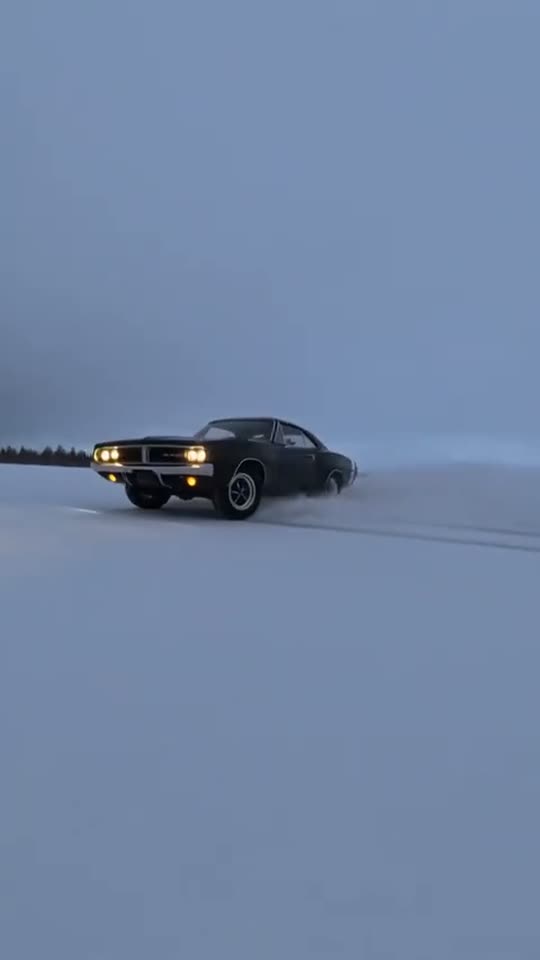
The example is a winter drift clip by @promt_from_iren, made by AI, with its own sound. Your video copies this clip shot for shot with your car in place of the black coupe, as the toy and as the full-size car.

Original reel by @promt_from_iren, 15 s

A winter drift clip by @promt_from_iren (TikTok, 21 November 2026): a gloved hand sets a toy black coupe on the snow, it drives off, and after a burst of snow the full-size car drifts a full circle. Made by AI: your car takes its place.

Use this reference
Step by step

How to make the Winter Drift AI video on MakeViral

Everything runs in the browser. No editing app, no prompt to write, no watermark.

  1. Add your photo

    Press "Create your own" and add your car, the whole car. Take it with the camera or pick it from your library.

  2. Press Generate

    The button shows the price. Seedance 2.5 puts your photos into the Winter Drift trend clip and copies it shot by shot for 15 seconds, with the reel's original song. You write no prompt.

  3. Download or share

    The video is ready in up to several minutes as a 9:16 MP4. Download it, share it from your phone, or find it later in My videos.

Which photo works best?

Add one photo of your car.

  • The whole car in view, from a corner, so the photo shows one end and one side, sharp and in daylight. The video shows your car from behind, from the side and from the front, as a toy and full size.
  • Nothing in front of it: no people, no other cars, no fence across the body.
  • Any car works: a sedan, a coupe, a hatchback, an SUV, a pickup or a van. Wheels, wraps and spoilers carry over to the toy and the real car, so keep them in the picture.
  • A photo at night or under colored lights can change the paint: a daylight photo keeps the color right.
  • Use your own car, or one whose owner said yes.

Where did the Winter Drift AI trend start?

The winter drift trend is an AI effect, not real footage. It showed up on TikTok on 20 November 2026 in promos of AI apps, and on 21 November it spread as a CapCut template named "Зимний дрифт" (Russian for "winter drift"). Every clip is one low chase shot on a frozen field at blue hour: a gloved hand lets go of a toy car, it drives off and breaks sideways, powder hits the lens, and the car comes out of it full size and drifts a full 360.

The most viewed posts are template tutorials by @rhetta.chandler in Russian, posted on 21 November: by 24 November they had 354,497 and 337,716 views on TikTok. Most posts are in Russian. On 24 November the full prompts went up on Pikabu, and an app began to run ads for the same look as the "Ice Drift Rush Effect".

It is the snowy branch of the toy car to real car trend, with one twist: the car does not just grow, it disappears behind snow and comes back full size mid-drift.

  1. The first winter drift clips show up on TikTok in AI app promos: a gloved hand sets a toy car on the snow, and it comes back full size.

  2. @rhetta.chandler posts CapCut "Winter drift" template tutorials in Russian; the top two reach 354,497 and 337,716 views by 24 November. TikTok

  3. @promt_from_iren posts a 15-second winter drift clip with a black classic coupe, the example on this page. TikTok

  4. A step-by-step instruction with the trend's full prompts (a toy replica, the real car, then a 15-second video) is posted on Pikabu. Pikabu

Copy and paste

The Winter Drift AI prompt

You do not need these: the one-tap flow runs them for you, together with the trend clip. [Image 1] and [Image 2] are your two photos, and [Video 1] is the trend clip the video copies.

1 photo: your car, the whole carSeedance 2.515 s · 720p · 9:16228 credits
Video prompt

Recreate the reference video [Video 1] shot for shot: a photorealistic automotive film, one continuous, low chase-camera shot, no cuts: a wide, level field of loose, dry powder snow, cold blue-hour daylight, a distant dark treeline and snowy mountains, the same camera moves and timing. The ONLY change: the black classic coupe of [Video 1], first the small toy and then the full-size car, is now the vehicle in [Image 1]. THE TOY (00:00-00:05.8) = a small physical 1:18-scale replica of that exact vehicle, not a generic toy, scaled down evenly: no oversized wheels, chunky proportions or cartoon styling. Its lights are OFF. THE REAL CAR (00:06.5-00:15) = the vehicle in [Image 1] at full size, from the rear, the side and the front: copy it exactly (body shape, proportions, paint color and finish, wheels, lights, grille, ride height, spoiler, wrap), whatever kind it is (car, SUV, pickup or van), so its owner knows it at once. Lights ON. Toy and real car are the same vehicle; only the size changes. PAINT: the hue of [Image 1] in cold blue-hour light, also if the photo was taken at night. Never black unless [Image 1] is black. Take ONLY the vehicle from [Image 1]. NEVER the black coupe of [Video 1]: no black paint, wide chrome grille, chrome bumpers or steel wheels unless [Image 1] shows them, never a mix. If [Image 1] shows a person or a pet and no vehicle, the coupe stays and that person or pet is seen at its wheel in the full-size part. THE MOVES, exactly as in [Video 1]: 00:00-00:01.8: TOUCHDOWN IS THE START. At snow level, a rear three-quarter view of the toy. A hand in an earth-brown winter glove lowers it; the instant its tyres touch the snow, the fingers release the roof and the little car drives forward. 00:01.8-00:04: LET THE TOY GET AHEAD. The camera follows slower than the toy: it becomes smaller against the untouched snow, leaving two pencil-thin tracks. 00:04-00:05.8: THE TOY BREAKS SIDEWAYS. It loses rear grip and slides across its tracks: a DRIFT. Its spinning rear tyres fling a fan of loose powder; the camera flies low into that fan. 00:05.8-00:06.5: THE SCALE CHANGE. Airborne snow fills the whole lens and hides the vehicle. At the first clear frame it is ALREADY the full-size real car, tail still sliding. No visible growth; the toy never comes back. 00:06.5-00:09.5: CLOSE THE GAP. A fast, low approach; the car slides sideways, throwing a plume higher than the roof. 00:09.5-00:12.5: ONE COMPLETE 360-DEGREE DRIFT on the open snow: rear three-quarter, side, front with both headlights on through the powder, other side, rear again. The camera does not orbit with it; the horizon stays level. 00:12.5-00:15: it straightens and accelerates away toward the mountains over its curved tracks. End on motion. Exactly one vehicle, and it always looks like [Image 1]. No badges, emblems or lettering on the vehicle; plain number plates with no readable text. No dialogue throughout the entire video. No background music. No text, no captions, no logos, no watermark.

3011 characters
How many credits does it cost?

You pay per video in credits, and the create page shows the exact price on the Generate button before you spend anything. The one-tap price covers the video, made in one step from your photos and the trend clip, charged once. One video is 228 credits, so the smallest one-time pack that covers it is $39.99 for 450 credits, with no subscription. The cheaper models are there if you run the prompts by hand in AI Video.

Video modelSettingsCredits
Seedance 2.5 (this template)15 s, 720p, copies the trend clip, one tap228

One-time packs and plans are on the pricing page. A failed video gives its credits back.

What happens in your winter drift AI video?

SecondsWhat happens
0 to 1.8At snow level, a hand in a brown winter glove sets a toy model of your car on the snow and lets go.
1.8 to 4The toy drives off across the frozen field, leaving two thin tracks.
4 to 5.8It loses grip and slides sideways, throwing a fan of powder; the camera flies into it.
5.8 to 6.5Snow fills the lens. When it clears, your car is full size.
6.5 to 9.5Your real car slides sideways right in front of the camera, throwing snow higher than its roof.
9.5 to 12.5It drifts one full circle: back, side, front with the headlights on, side, back.
12.5 to 15It straightens and drives away toward the snowy mountains.

This is a copy of the trend clip, not a new scene: top-quality AI video models, including Seedance 2.5, take the clip and put your car in it, the toy at the start and the real car after the snow, with the same field, the same blue light and the same chase camera. The video is vertical 9:16, about 15 seconds, at 720p, ready for Reels and TikTok, with the clip's own sound put back on after the run.

Press "Create your own", add your photo and press Generate. The exact price shows on the Generate button before you spend anything. A run can take 5 to 15 minutes, and the video waits in My videos when it is ready.

What do people call the winter drift trend?

Most people call it the winter drift trend, or just winter drift, and search for winter drift AI or a winter drift video. In Russian, where most of the posts come from, it is зимний дрифт. Google users also type snow drift AI, AI snow drift, a snow drift AI trend or a snow drift car, and some search for a Russian snow drift AI, since the first clips came with Russian captions. Others call it the ice drift AI trend, ice drift AI or the ice drift effect: one app sells it as the Ice Drift Rush Effect.

On TikTok most clips came from the winter drift CapCut template, so people look for a winter drift CapCut link too, and fans of any car drifting in snow video find it next to the real ones. And because the car starts as a toy, it also counts as a toy car to real car drift, or a toy car drift on snow.

How is it different from the other car drift templates?

  • Winter drift (this page) starts with your car as a toy in a gloved hand on a snowy field. It grows to full size behind a burst of snow and drifts a full circle.
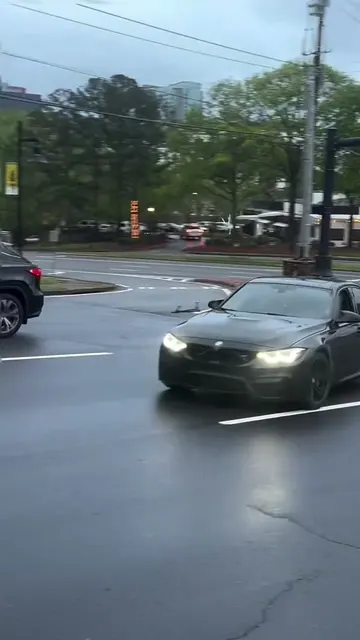
  • Car Drift AI Video is a real phone clip at a wet city intersection: your car slides sideways past the camera at the traffic lights, seen from the roadside.
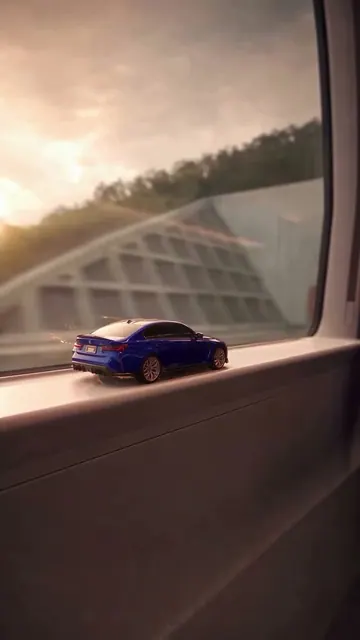
  • Toy Car to Real Car puts a toy of your car on a train window, and it drives off as the real car in a tunnel.

If you want snow, ice and a car drift on snow, this is the one. For a city street, pick Car Drift AI Video.

What goes wrong, and how do you fix it?

ProblemFix
The black coupe from the clip comes backUse a sharp daylight photo of the whole car from a corner, then run it again. A black car photo makes a mix more likely.
The toy does not look like your carA clear photo of the whole car helps. Run it again: every run is a new take.
The car grows instead of popping out of the snowRun it again. The swap should hide behind the burst of snow.
The paint looks offA night photo or colored light changes the color. Use a daylight photo.
An SUV or pickup changes shape in the spinA photo that shows one end and one side helps. Run it again.
A badge or a plate showsThe AI leaves them off, but sometimes one comes back. Run it again.
The run failsSome photos get refused. MakeViral then tries a backup model, and if the video still fails, the credits come back.
FAQ

Winter Drift AI trend questions

What is the winter drift AI trend?
An AI car video trend that started on TikTok on 20 to 21 November 2026: a gloved hand sets a toy car on a snowy, frozen field, the toy drives off and slides, a burst of snow hits the camera, and the car comes out of it full size and drifts a full 360. It spread through a CapCut template called "Зимний дрифт" (winter drift). The winter drift AI video puts your own car in that clip.
How do I make the winter drift AI video?
Press "Create your own", add one photo of your car and press Generate. The button shows the price first. You get a vertical clip of about 15 seconds with the trend clip's sound, with your car as the toy and as the real car. It can take 5 to 15 minutes, and you write no prompt.
Is it the same as the snow drift AI or ice drift AI trend?
Yes. Snow drift AI, AI snow drift, ice drift AI and the ice drift AI trend all mean the same clip: the toy car on the snow that comes back full size and drifts. One app calls it the Ice Drift Rush Effect, and Russian posts call it зимний дрифт. Some people look for a Russian snow drift AI, since most of the first clips are Russian.
Do I need the winter drift CapCut template?
No. Most TikTok clips came from the winter drift CapCut template, but you need no CapCut template and no editing app here. MakeViral runs in the browser on your phone or computer: add a photo and it makes the whole winter drift video. MakeViral is not linked with CapCut or with the creators named on this page.
What is the winter drift AI prompt?
The trend's own instruction, posted on Pikabu on 24 November 2026, has three prompts: a toy replica of your car, the real car, and a 15-second video of one chase shot (the toy touches down, drives off, breaks sideways, hides in snow, comes back full size, drifts a full 360 and drives away). MakeViral uses that video prompt, fitted to copy the trend clip with your car, so you write none of it.
Which cars work?
Any car: a sedan, a coupe, a hatchback, an SUV, a pickup or a van. The AI copies the shape, paint, wheels and lights from your photo for both the toy and the full-size car, and leaves badges and number plate text off. A light-colored car works as well as a dark one: the black coupe of the clip does not stay.
Which AI model makes the video?
Top-quality AI video models, including Seedance 2.5. The model takes the trend clip and your photo and swaps your car into it, keeping the snowy field, the glove, the snow burst and the camera moves. The clip's own sound goes back on after the run. If a model refuses a photo, MakeViral tries a backup model.
How long is the video, and what sound does it have?
About 15 seconds, vertical 9:16, at 720p. It has the sound of the trend clip it copies, a song with vocals. You can turn it off on the result screen.
Is the drift real?
No. The trend clips are made by AI, and so is your video: nobody drives your car. Never try a drift like this on a real road or on a real frozen lake: ice can break, and a car on ice can slide into people or traffic.
Does the winter drift AI video cost credits?
Yes. The Generate button shows the exact price before you spend anything, and if a video fails, the credits come back.

Make your own Winter Drift AI video

Add one photo and tap once. No prompt to write. 228 credits.

No watermark. A failed video gives its credits back. Secure checkout by Stripe.