Anime Face Trend: Your Own Anime Twin in the Star Eye Photo

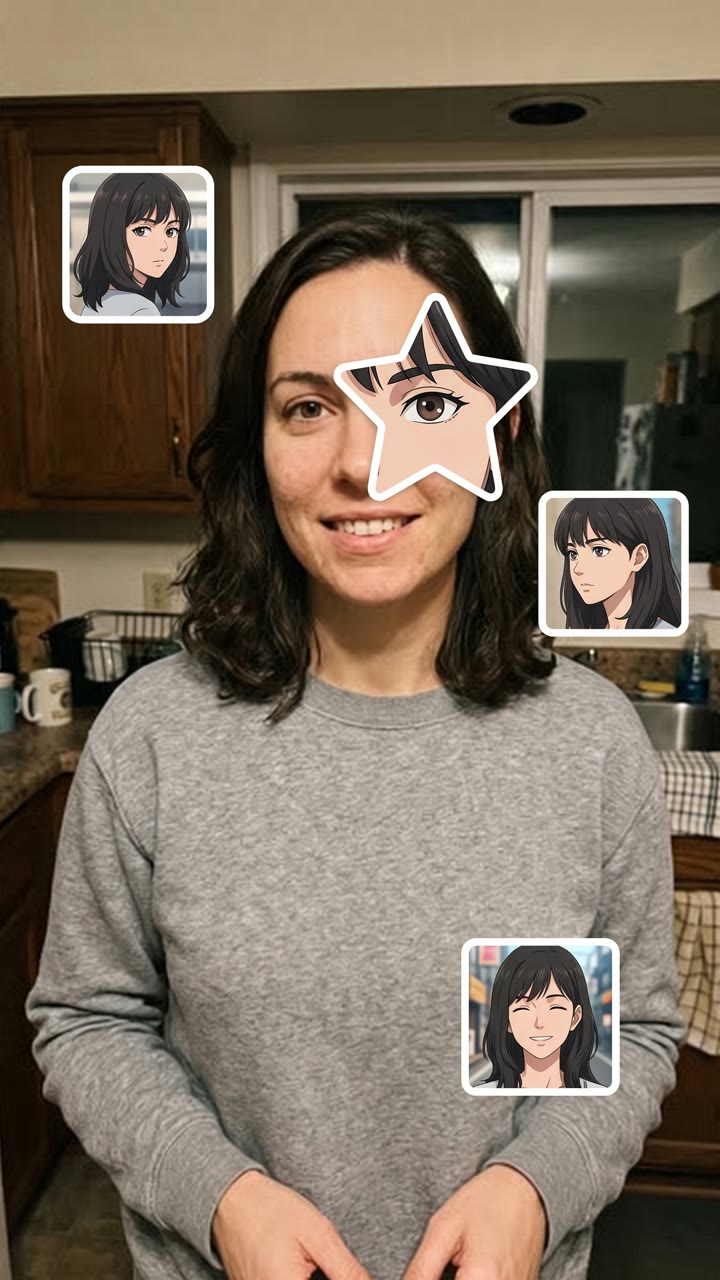
Add one selfie. AI draws an original anime version of you, cuts a star from its face, puts it right over your eye and adds three or four anime stickers of your twin around you.

Anime Face Trend example video, made with AI-made peopleAI-made
  • 1 photo you add
  • 2K photo you can turn into a video
  • 9:16 for TikTok, Reels, Shorts
  • No watermark

No prompt to write: Add your photo and tap once

Create your own

Ready in a few minutes · Photo · 3 credits

The anime face trend, also called the anime eye trend, is a TikTok selfie trend from October 2026: a star-shaped cut-out of an anime eye sits over your real eye, with small anime stickers around you. Here, AI draws your own original anime twin from one selfie and makes the whole picture.

Also called My anime look alike trend · Anime star eye photo · Anime eye sticker trend · Star eye anime trend

Example

What the Anime Face Trend photo looks like

Made from the prompt on this page. The people and pets are AI-made, not real persons. Your result will differ from run to run.

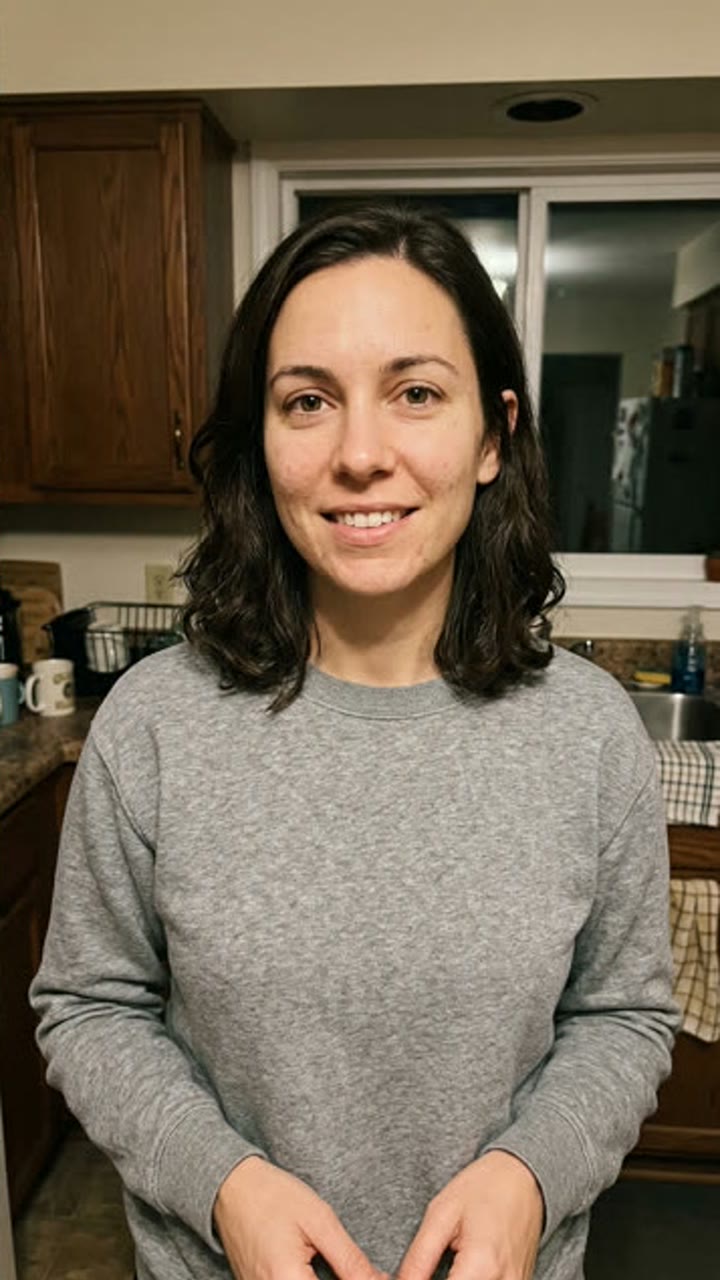
Input photo for Anime Face Trend example (AI-made person)
Input
Result, before and after

Star eye, one selfie: an AI-made woman gets her own anime twin, in a star over her eye and on three stickers around her.

Step by step

How to make the Anime Face Trend photo on MakeViral

Everything runs in the browser. No editing app, no prompt to write, no watermark.

  1. Add your photo

    Press "Create your own" and add your selfie, face close, one eye in view. Take it with the camera or pick it from your library.

  2. Press Generate

    The button shows the price. Nano Banana 2 puts your photo into the Anime Eye Trend scene and makes one 2K photo. You write no prompt.

  3. Download or share

    The photo is ready in a few minutes as a 9:16 2K image. Download it, share it from your phone, turn it into a video, or find it later in your Library.

Which photo works best?

Upload one selfie of yourself, the photo you want to post. The picture keeps it as it is and adds the anime parts on top.

  • Face close to the camera. Head and shoulders, or closer. The star goes over one eye, so that eye must be big and sharp in the photo.
  • Hide a bit of your face, like the trend. Pull a hood up, hold your hand or a sleeve over your mouth, or let your hair fall over one side. Keep at least one eye clear.
  • Moody light works best. Evening light, a window, a dark room with a lamp. Plain backgrounds give the stickers space.
  • Your hair and outfit decide your anime twin: it gets your hair color and style, your eye color and your clothes.
  • Use your own photo. Adults only: never a child, a celebrity or someone else's photo.

Where did the Anime Face Trend trend start?

The anime face trend is a photo edit. You take a moody selfie that hides part of your face, under a hood, behind your hand or your hair. Then you paste a star-shaped cut-out of an anime eye exactly over one of your own eyes, and three or four small anime screenshots around you: "the anime character I look like".

The sound is "original sound" by the TikTok user The One LSR, posted on 29 August 2026 under a bike video. In early October, posts from Vietnam used it for photos with anime faces pasted over friends' faces, and one passed 1.8 million views on 10 October. The star eye cut-out came from Kazakhstan: the first selfies of the format went up on 16 and 17 October, and on 17 October a post there passed 1.3 million views and 430,000 likes. More posts from Kazakhstan reached 850,000 to 900,000 views in the next two days. English how-to videos called it the anime star eye trend and "my anime look alike" from 19 October, and by 20 October the sound had about 39,000 videos, with 18,500 new ones a day.

  1. The TikTok user The One LSR posts the sound, "original sound", under a fixed-gear bike video. TikTok sound

  2. A photo from Vietnam with anime faces pasted over three friends' faces passes 1.8 million views on the sound, and more anime sticker photos follow. TikTok sound

  3. The star eye version, a hooded selfie with an anime eye in a star over the real eye and three anime stickers, passes 1.3 million views from Kazakhstan, the first post of the format with more than a million. TikTok sound

  4. English CapCut how-to videos start: "anime face trend photo tutorial", "anime star eye trend", "my anime look alike". The hashtag #animestareyetrend appears a day earlier. TikTok

  5. The sound has about 39,100 videos and gains about 18,500 a day. 12 of its 30 top posts are from the last three days, with 6.4 million views. TikTok sound

Copy and paste

The Anime Face Trend prompts

You do not need this: the one-tap flow runs it for you. The photo prompt puts your photo into the scene. Want to change it? Copy it and edit it in AI Photo.

Star eye

1 photo: your selfie, face close, one eye in viewNano Banana 2Photo · 2K · 9:163 credits
Photo prompt

Use the uploaded image as the base: it is the real selfie and it stays a real, unchanged photo. Keep the photo exactly as it is: the same person, face, skin, pose, camera angle, light, background, hood, hands and hair. Do not redraw, retouch, slim or stylize the real person: only add the stickers on top. First design this person's anime twin: an ORIGINAL anime character who looks like them, in a clean modern anime style (crisp ink lines, soft cel shading, large expressive eyes with bright highlights). The twin has the same hair color, hair length and hairstyle (with the same fringe), the same eye shape and eye color, the same eyebrows, skin tone and age, and the same clothes in the same colors as the person in the photo. It is an original design, not any existing anime, manga, cartoon or game character, and not copied from any series or studio. Then make the anime star eye edit on top of the photo: a large five-pointed STAR-shaped cut-out of the anime twin's face is pasted over ONE of the person's eyes (the one on the left of the picture when both show), at exactly the same place, size and angle, so the anime eye sits right where the real eye is and lines up with the real eyebrow, nose and cheek. The star shows a close-up of the twin's eye, eyebrow, a bit of its fringe and its cheek. The star has soft rounded points and a clean flat edge, like a cut paper sticker, with no border and no shadow. The other real eye stays visible and real. Three or four small sticker portraits of the same anime twin sit around the person, on the background and on the clothes, never on the real face: each one a different still of the twin like a frame from an anime episode (a look back over the shoulder, a side view, a calm stare at the camera, a small smile), with soft simple anime backgrounds (a classroom window, a pale sky, a blurred street). They have slightly different sizes and sit straight or a little tilted, like stickers in a phone photo collage. The stickers are squares with rounded corners. Exactly one real person, and every sticker shows only the anime twin of that person: no other characters, no famous anime, manga, cartoon or game character. Any logo or writing on the clothes becomes plain. Vertical 9:16; if the photo is wider, extend the background naturally. No text, no captions, no letters, no speech bubbles, no watermark, no app interface, no frame.

2387 characters

Heart eye

1 photo: your selfie, face close, one eye in viewNano Banana 2Photo · 2K · 9:163 credits
Photo prompt

Use the uploaded image as the base: it is the real selfie and it stays a real, unchanged photo. Keep the photo exactly as it is: the same person, face, skin, pose, camera angle, light, background, hood, hands and hair. Do not redraw, retouch, slim or stylize the real person: only add the stickers on top. First design this person's anime twin: an ORIGINAL anime character who looks like them, in a clean modern anime style (crisp ink lines, soft cel shading, large expressive eyes with bright highlights). The twin has the same hair color, hair length and hairstyle (with the same fringe), the same eye shape and eye color, the same eyebrows, skin tone and age, and the same clothes in the same colors as the person in the photo. It is an original design, not any existing anime, manga, cartoon or game character, and not copied from any series or studio. Then make the anime heart eye edit on top of the photo: a large HEART-shaped cut-out of the anime twin's face is pasted over ONE of the person's eyes (the one on the left of the picture when both show), at exactly the same place, size and angle, so the anime eye sits right where the real eye is and lines up with the real eyebrow, nose and cheek. The heart shows a close-up of the twin's eye, eyebrow, a bit of its fringe and its cheek, with a clean flat edge like a cut paper sticker, no border and no shadow. The other real eye stays visible and real. Three or four small sticker portraits of the same anime twin sit around the person, on the background and on the clothes, never on the real face: each one a different still of the twin like a frame from an anime episode (a look back over the shoulder, a side view, a calm stare at the camera, a small smile), with soft simple anime backgrounds (a classroom window, a pale sky, a blurred street). They have slightly different sizes and sit straight or a little tilted, like stickers in a phone photo collage. The stickers are a mix of shapes: one circle, one small heart and one or two squares with rounded corners. Exactly one real person, and every sticker shows only the anime twin of that person: no other characters, no famous anime, manga, cartoon or game character. Any logo or writing on the clothes becomes plain. Vertical 9:16; if the photo is wider, extend the background naturally. No text, no captions, no letters, no speech bubbles, no watermark, no app interface, no frame.

2399 characters

Manga

1 photo: your selfie, face close, one eye in viewNano Banana 2Photo · 2K · 9:163 credits
Photo prompt

Use the uploaded image as the base: it is the real selfie and it stays a real, unchanged photo. Keep the photo exactly as it is: the same person, face, skin, pose, camera angle, light, background, hood, hands and hair. Do not redraw, retouch, slim or stylize the real person: only add the stickers on top. Turn the whole picture into a soft black-and-white photo with a little film grain, like the trend's monochrome edits; the person, the light and the pose stay exactly the same. First design this person's anime twin: an ORIGINAL anime character who looks like them, drawn as a black-and-white manga character (bold black ink lines, screentone shading, large expressive eyes with white highlights). The twin has the same hair color, hair length and hairstyle (with the same fringe), the same eye shape and eye color, the same eyebrows, skin tone and age, and the same clothes in the same colors as the person in the photo. It is an original design, not any existing anime, manga, cartoon or game character, and not copied from any series or studio. Then make the manga star eye edit on top of the photo: a large five-pointed STAR-shaped cut-out of the manga twin's face is pasted over ONE of the person's eyes (the one on the left of the picture when both show), at exactly the same place, size and angle, so the manga eye sits right where the real eye is and lines up with the real eyebrow, nose and cheek. The star shows a close-up of the twin's eye, eyebrow, a bit of its fringe and its cheek, in black ink on white paper, with soft rounded points and a clean flat edge, no border and no shadow. The other real eye stays visible and real. Three or four small sticker portraits of the same anime twin sit around the person, on the background and on the clothes, never on the real face: each one a different still of the twin like a panel cut from a black-and-white manga page (a look back over the shoulder, a side view, a calm stare at the camera, a small smile), with simple inked backgrounds (screentone, speed lines, a window). They have slightly different sizes and sit straight or a little tilted, like stickers in a phone photo collage. The stickers are squares with rounded corners, all in black and white. Exactly one real person, and every sticker shows only the anime twin of that person: no other characters, no famous anime, manga, cartoon or game character. Any logo or writing on the clothes becomes plain. Vertical 9:16; if the photo is wider, extend the background naturally. No text, no captions, no letters, no speech bubbles, no watermark, no app interface, no frame.

2592 characters
How many credits does it cost?

You pay per photo in credits, and the create page shows the exact price on the Generate button before you spend anything. The one-tap price covers one 2K photo, charged once. One photo is 3 credits, so the smallest one-time pack that covers it is $9.99 for 100 credits, with no subscription. A smaller 1K photo costs less if you run the prompt by hand in AI Photo.

ModelSettingsCredits
Nano Banana 2 (this template)2K photo, 9:16, one tap3
Nano Banana 2 (by hand in AI Photo)1K photo, 9:16, same prompt2

One-time packs and plans are on the pricing page. A failed photo gives its credits back.

What does the anime eye trend template make?

One new picture, your anime face trend photo, in three looks:

VersionThe cut-out over your eyeThe stickers around you
Star eyeA big five-pointed star with your anime twin's eye, brow and fringe3 or 4 rounded square stills of your twin
Heart eyeA heart with your twin's eyeA mix of a circle, a small heart and rounded squares
MangaA black-and-white manga star eyeBlack-and-white manga panels of your twin, on a black-and-white photo

Your selfie stays a real photo: same face, same pose, same light. Only the anime parts are new. The AI first designs your own anime twin, an original character with your hair color and style, your eye shape and eye color, your skin tone and your outfit, then puts it in the star and on every sticker. It never uses an existing anime character, so the picture really shows the anime character you look like.

How MakeViral makes it: your photo goes to Nano Banana 2, Google's image model, and comes back as one 2K vertical picture. The create page shows the exact price on the Generate button before you spend anything, and every run is a new take.

How to post your anime star eye trend photo

  1. Make the picture here from your selfie. Run it again if you want a different anime twin or a different pose on the stickers.
  2. Post it as a TikTok photo post. One slide is enough: that is how the anime face trend tiktok posts look. Add the trend's sound: "original sound" by The One LSR. Tap the sound under any anime eye post and press Use this sound.
  3. Write a short caption. The creators keep it short: "my anime look alike", "who do I look like?" or just a few emojis. The picture does the talking.
  4. Want more slides? Make the Star eye and the Heart eye on the same selfie and post both, or one on a second selfie.

The how-tos you see on TikTok, the anime face trend tutorial and anime eye trend tutorial videos, show a CapCut template where you cut out the eye and paste screenshots by hand. Here you need no template and no screenshots: one selfie in, the finished photo out.

Where does the prompt come from?

The trend runs on a closed CapCut template, so nobody shared a prompt. We read the captions and the comments of the biggest post and the English how-to videos, and the how-tos only show the template buttons. So our prompt is written from what the posts show: a star-shaped cut-out (or a heart, or a circle) of an anime face exactly over one real eye, at the same angle, and 3 or 4 small anime stills around the person. The one change is on purpose: the creators paste screenshots of famous anime characters, and we draw an original anime version of you instead, so the picture is yours to post.

What goes wrong, and how do you fix it?

ProblemFix
The star does not sit on your eyeUse a closer selfie where one eye is big, sharp and open. Run it again.
The anime twin does not look like youIts hair, eye color and outfit come from your photo: use a photo with your hair and clothes in clear view. Every run draws a new twin.
Your real face looks retouchedThe prompt keeps the photo as it is. A very dark or blurry selfie can come back smoothed: use a sharper one.
The stickers cover your faceRun it again, or use a photo with some empty background around you.
A run fails, or the model refuses a photoThe credits come back. Try another photo.
FAQ

Anime Face Trend trend questions

What is the anime face trend?
It is a TikTok photo trend from October 2026, also called the anime eye trend and the anime star eye trend. You post a selfie with a star-shaped cut-out of an anime eye over your own eye and small anime stickers around you, to show the anime character you look like.
Where does the anime eye trend come from?
The sound is "original sound" by the TikTok user The One LSR from 29 August 2026. Anime sticker photos on it took off in Vietnam in early October, and the star eye selfie came from Kazakhstan: the first post of the format with more than a million views went up there on 17 October 2026. English how-tos followed from 19 October.
How do I make the anime face trend photo? Is there an anime face trend tutorial?
Press "Create your own", pick Star eye, Heart eye or Manga, add one selfie and press Generate. You get the finished picture. The anime face trend tutorial videos on TikTok show a CapCut template where you cut the star and paste screenshots by hand; here you need no tutorial, no template and no screenshots.
Is there an anime face trend app or anime look alike app?
This page is one. Most people make the anime face trend photo in a CapCut template. On MakeViral you upload a selfie and the AI makes the whole picture, the star eye and the stickers, with an anime twin drawn from your own photo. It works in the browser; you need no extra app.
Who is my anime look alike? Can AI find my anime look alike?
Here the AI does not pick a famous character. It draws an original one from your photo: your own anime look alike, with your hair, eye color and outfit. Ask "whos my anime look alike" here and the answer is a character drawn from you. It works as an anime look alike generator and an anime look alike ai in one, and the anime look alike photo is ready to post.
Can I use a real anime character, like in the trend posts?
Not here. The trend posts paste screenshots of famous anime characters, which belong to their studios. Our template draws an original anime twin of you instead, so the picture is yours and safe to post. If you want a famous character, you would have to edit that in yourself, at your own risk.
What is the anime eyes photo trend for a girl or a boy?
The same picture. For the anime eyes photo trend girl posts often use the heart and circle stickers, and the anime eyes photo trend boy posts the hooded star eye selfie, the star eye anime trend look. The anime face trend photo girl and anime face trend photo boy versions only differ in the selfie: your anime twin follows your photo.
Does my hair color matter? Black hair, brown hair, curly hair?
Yes, in a good way. Your anime twin gets your own hair color, length and style. The anime face trend black hair posts are the most common, but the anime face trend brown hair and anime face trend curly hair looks work the same: the AI draws your hair in anime style.
Can AI make an anime version of yourself without the trend layout?
This page makes the trend picture: the anime version of you sits inside the star and on the stickers, and your real selfie stays real. To make an anime version of yourself as a full portrait, or an anime version of me ai picture with no selfie in it, write your own prompt in the Nano Banana 2 image tool.
Is it an anime eye filter or an anime sticker selfie?
It is closer to an anime sticker selfie than a filter. An anime eye filter or an anime look alike filter, like the anime eyes filter tiktok effects, changes your real eyes live. This trend keeps your real face and puts an anime eye in a star on top, plus anime stickers for photos around you, like the anime star face trend on TikTok.
Who can use it?
Adults, with their own selfie. Never use a photo of a child, a celebrity or another person without their yes. The picture is AI-made: keep the platform's AI label on when you post.
Does it cost credits?
Yes, a few credits per picture, because it is one AI image. The create page shows the exact price on the Generate button before you spend anything, and if a run fails, the credits come back.
Is my photo private?
Yes. MakeViral does not post your photo or the result anywhere or show them to other users. The result goes to your private Library, and you can delete it there at any time.
More trends

Other AI video templates

Template

Nunca Ando Sola AI: You and the Holy Shadows

Add one photo of yourself. AI shows you from behind, kneeling on a sunlit path, with the shadows of Jesus, Saint Jude and the Virgin of Guadalupe beside you. Or walking hand in hand with the shadow of Jesus.

Read more
Template

You Look Lonely, I Can Fix That: The AI Hologram Video

A giant glowing hologram leans down out of a rainy neon sky to someone small on a bridge and says: "You look lonely. I can fix that." Put your faces in both roles, or make it a wallpaper.

Read more
Template

Cat in the Hat Trend: Make the AI Doorbell Cam Halloween Prank

A tall cat in a red and white striped top hat walks up your path on a grainy doorbell camera, waves and does a silly little dance. Or it stares up at your window, peeks out of your doorway, or stands right behind you in a selfie. It is all AI, made from one photo: a Halloween joke, not a sighting.

Read more
Template

South Park Filter: You as a Paper Cut-Out Cartoon

Add a photo of you, your friends or your pet. AI redraws it as a flat paper cut-out cartoon with a big round head and oval eyes, standing in the snow of a small mountain town. Your hair, beard, glasses and outfit come along.

Read more
Template

Crochet Filter: AI Turns Your Photo Into a Crochet Doll of You

Add one photo. AI turns you into a handmade amigurumi doll of yarn, with your hair, your clothes and your pose, in a crocheted copy of your own place. Make it alone or with your partner.

Read more
Template

Perdon Trend: The Perfect AI Photo of You, Then "Perdón"

Add one everyday photo of yourself or your pet. AI gives it back too perfect: the dream place, salon hair, studio light. Post it first, then your real photo with one word: perdón.

Read more

Make your own Anime Face Trend photo

Add one photo and tap once. No prompt to write. 3 credits.

No watermark. A failed video gives its credits back. Secure checkout by Stripe.