AI School Photo: Classic School Pictures From a Phone Photo

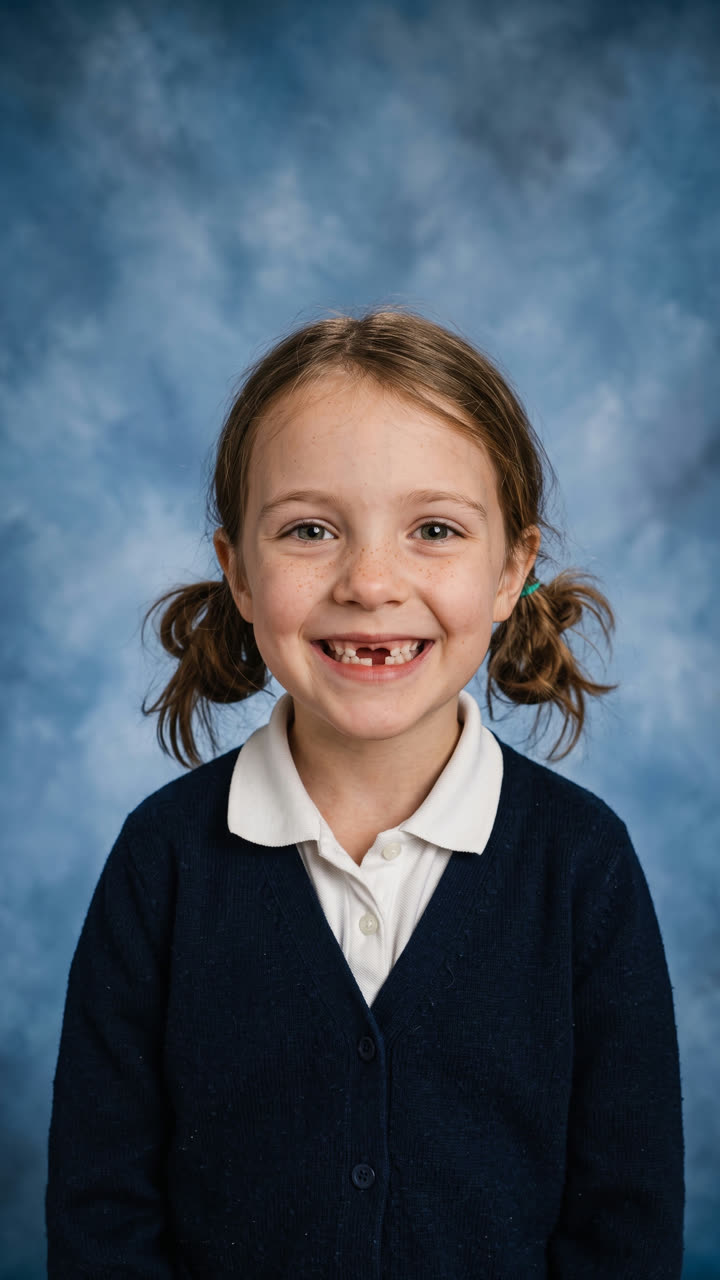
Take a photo of your child at home. MakeViral turns it into a classic picture day portrait: mottled blue backdrop, soft studio light, head and shoulders. The face stays exactly the same.

School Photo example video, made with AI-made peopleAI-made
  • 1 photo you add
  • 2K photo you can turn into a video
  • 9:16 for TikTok, Reels, Shorts
  • No watermark

No prompt to write: Add your photo and tap once

Create your own

Ready in 1 to 3 minutes · Photo · 3 credits

The AI school photo trend is parents turning a phone picture of their child, taken at home, into a classic school portrait: a mottled blue backdrop, soft studio light, head and shoulders. Here you add one photo, pick a backdrop and get the picture in one tap. Your child's face, smile and age stay exactly the same.

Example

What the School Photo photo looks like

Made from the prompt on this page. The people and pets are AI-made, not real persons. Your result will differ from run to run.

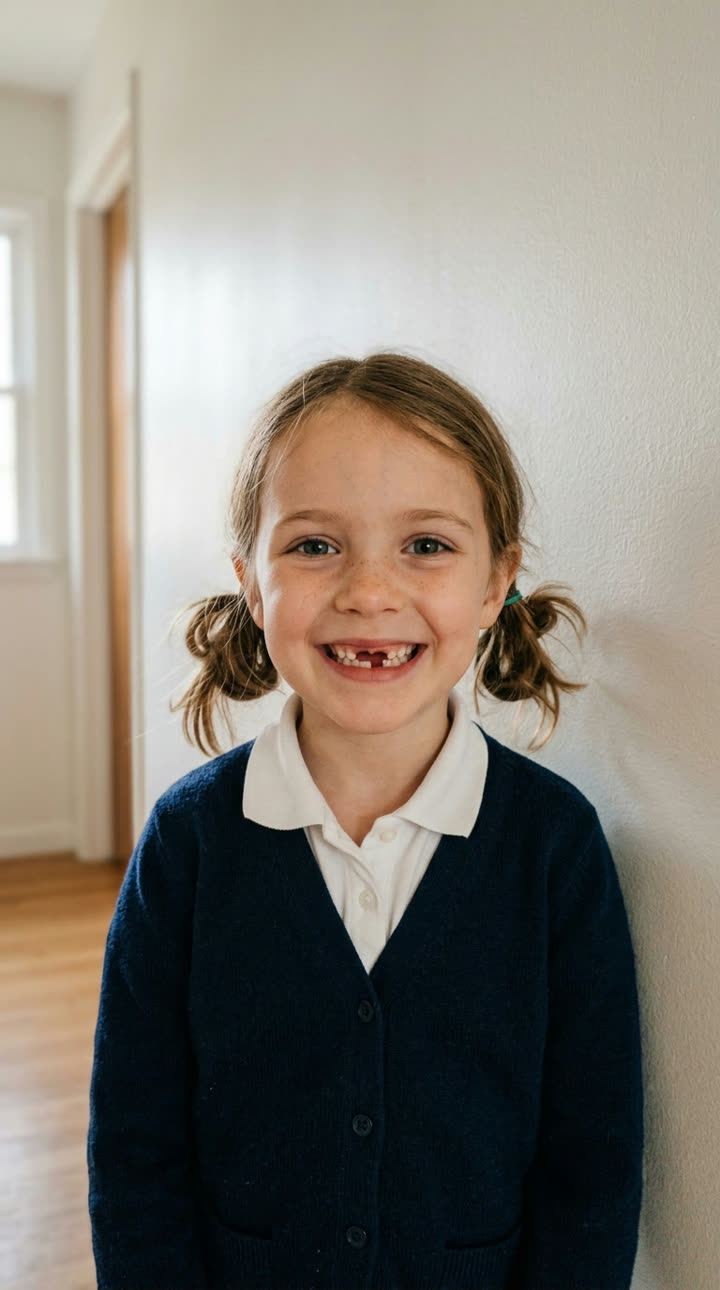
Input photo for School Photo example (AI-made person)
Input
Result, before and after

Classic school photo, one phone photo: an AI-made six-year-old against a hallway wall becomes a picture day portrait on mottled blue. The missing front tooth and the freckles stay.

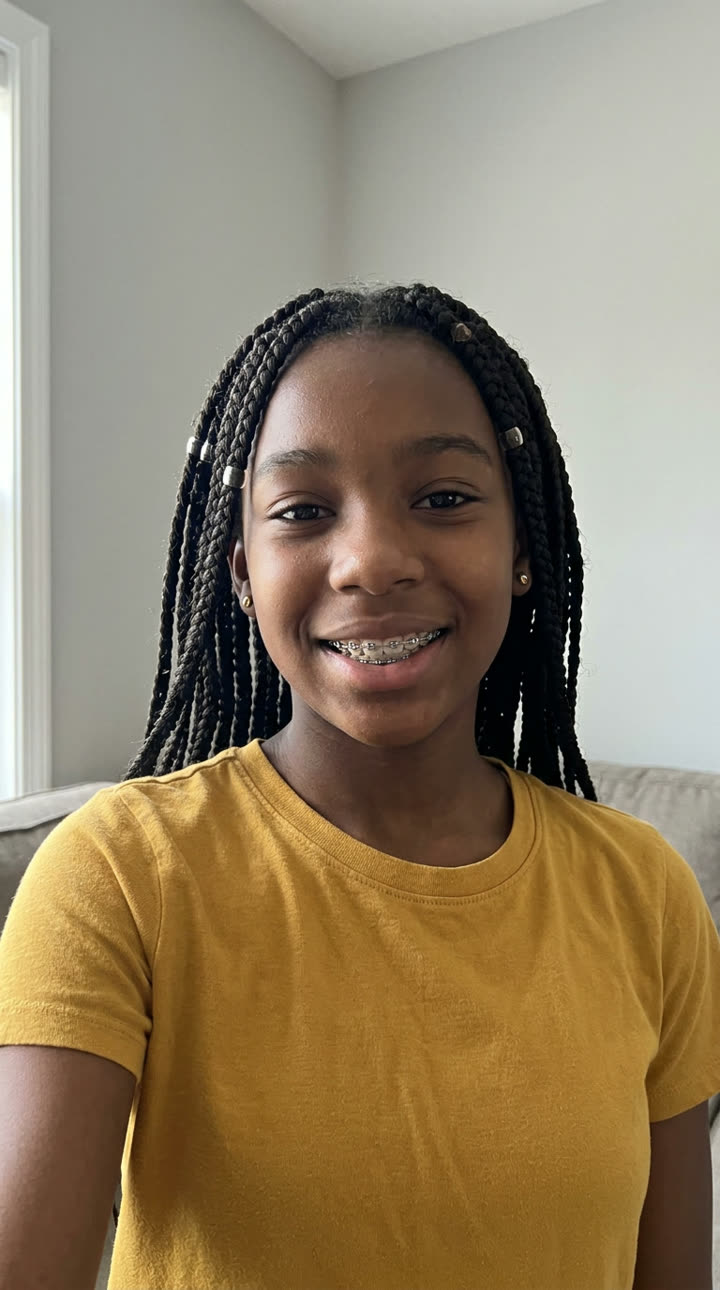
Input photo for School Photo example (AI-made person)
Input
Result, before and after

The 90s laser backdrop from "Make it yours": an AI-made thirteen-year-old keeps her braces, braids and smile in front of neon laser beams.

Step by step

How to make the School Photo photo on MakeViral

Everything runs in the browser. No editing app, no prompt to write, no watermark.

  1. Add your photo

    Press "Create your own" and add your child, chest up. Take it with the camera or pick it from your library.

  2. Press Generate

    The button shows the price. Nano Banana 2 puts your photo into the School photo scene and makes one 2K photo. You write no prompt.

  3. Download or share

    The photo is ready in 1 to 3 minutes as a 9:16 2K image. Download it, share it from your phone, turn it into a video, or find it later in your Library.

Which photo works best?

Use one sharp photo of your child from the chest up, looking into the camera. The prompt keeps the face, the smile, the head angle and the clothes from your photo, and changes only the backdrop, the light and the crop. So the photo you take is the school photo you get.

  • Dress them for picture day. The outfit stays as it is, so put on the shirt or sweater you want in the picture.
  • Stand them in front of a plain wall, a step away from it, near a window in daylight. The viral originals were shot this way, on a stool against a white wall. A busy kitchen works too, but a plain wall gives the cleanest edges around the hair.
  • Hold the phone at their eye level, about an arm's length away. From above, the head looks bigger and the chin smaller.
  • Turn off beauty mode and filters in the camera app. The prompt keeps the skin as it is, so a smoothed photo stays smoothed.
  • Get the smile you want in the photo. The AI does not change the expression, so a real laugh gives a real-laugh school photo.
  • One child per photo, no hat and no sunglasses. Glasses are fine and stay on.
  • Use your own phone photo, not a photographer's proof. A proof is the photographer's work, and the prompt keeps any watermark on it.
  • Only your own child, or a child whose parent asked you to make it.

Where did the School Photo trend start?

The trend took off on TikTok in late September 2026. On 24 September, mom of four Carlie Bond (@carlieb0nd) posted the school pictures she made at home: she sat her kids on a stool in front of a white wall, took the photos herself and asked ChatGPT to "keep them exactly the same but make it look like a school picture". The results came back on a cloudy blue backdrop. Her caption, "School pictures x3 kids?? In this economy?", had 914,600 plays by 8 October.

A second wave of posts used AI to remove the watermark from photographers' proofs, and that is what made the news. USA Today covered the trend on 28 September and Fast Company on 29 September; by 7 October it had reached The Guardian, Dexerto and PetaPixel, and school photographers in the US and the UK had pushed back against the watermark removal. The idea of an AI school portrait is older: the 90s AI yearbook photo reached No. 1 on the US App Store in October 2023.

  1. The 90s AI yearbook photo trend peaks: the Epik app's AI Yearbook reaches No. 1 on the US App Store. PetaPixel

  2. Carlie Bond posts her kids' school pictures made at home with ChatGPT on TikTok; the video has 914,600 plays and 75,100 likes by 8 October. TikTok

  3. USA Today reports that parents use ChatGPT to skip pricey school pictures, and lawyers warn that removing a photographer's watermark breaks copyright law. USA Today

  4. Fast Company covers the trend under the headline "'ChatGPT for the win': Parents are using AI to skip out on kids' school photos". Fast Company

  5. A UK school photographer asks parents to stop using AI to remove watermarks from school photos, and the story spreads to the UK press. Galway Beo

  6. The Guardian asks "Is this the end of the British school photo?" and quotes £20 for a single school photo. The Guardian

  7. PetaPixel reports how parents use AI to make their kids' school photos instead of paying photographers, and what photographers think of it. PetaPixel

Copy and paste

The School Photo prompt

You do not need this: the one-tap flow runs it for you. The photo prompt puts your photo into the scene. Want to change it? Copy it and edit it in AI Photo.

1 photo: your child, chest upNano Banana 2Photo · 2K · 9:163 credits
Photo prompt

Use the uploaded image as the base. This is a careful photo edit of a real child, not a new portrait. Keep the child's face exactly as it is in the photo: the same face shape, eyes, eye color, eyebrows, nose, lips, teeth (keep any gaps, missing teeth, crooked teeth or braces), freckles, moles, skin texture, skin tone, hairline, hairstyle, hair color, glasses and expression. Keep the exact face width, cheeks and jaw line: do not make the face rounder, fuller, slimmer or more symmetric. Keep the head angle and the exact shape of the smile, even if it is uneven or lopsided. Keep the child's real age: do not make the child look older or younger. No beauty filter: do not smooth the skin, do not slim or reshape the face, do not enlarge the eyes, do not whiten the teeth, no makeup. Keep the child's own clothes from the photo. Turn the photo into a classic school picture day portrait taken by a professional school photographer. Crop it head and shoulders, from the middle of the chest up, with the face centered in the upper half of the frame and a little space above the hair. Replace the background with a traditional mottled blue studio backdrop: a soft, cloudy, painted blue canvas texture, a little lighter behind the head and darker toward the edges, slightly out of focus. Light it like a school portrait studio: a large soft key light from the front left, gentle fill light, a soft hair light from behind, a small catchlight in each eye, even and flattering light with no harsh shadows. True, natural skin color. Sharp focus on the eyes, 85mm portrait lens look, clean professional print quality. Vertical 9:16. Exactly one child. If the uploaded photo already shows a watermark, a studio logo or the word proof, keep it exactly where it is and never remove or cover it. Do not add any text, logo, watermark, school name, frame or border.

1852 characters

How many credits does it cost?

You pay per photo in credits, and the create page shows the exact price on the Generate button before you spend anything. The one-tap price covers one 2K photo, charged once. One photo is 3 credits, so the smallest one-time pack that covers it is $9.99 for 100 credits, with no subscription. A smaller 1K photo costs less if you run the prompt by hand in AI Photo.

ModelSettingsCredits
Nano Banana 2 (this template)2K photo, 9:16, one tap3
Nano Banana 2 (by hand in AI Photo)1K photo, 9:16, same prompt2

One-time packs and plans are on the pricing page. A failed photo gives its credits back.

Which school picture backdrop should you pick?

Picture day has a small set of classic backdrops, and you can pick one under "Make it yours" before you press Generate. The face, the clothes and the light stay the same; only the background changes.

BackdropWhat it looks likeGood for
Mottled blue (default)The soft, cloudy, painted blue canvas of a classic school portrait, lighter behind the headThe look of the viral originals, and what most people picture when they hear "school photo"
Mottled greyThe same painted canvas in a neutral greyA calmer, modern print that goes with any outfit color
90s laserA dark background crossed by glowing neon pink, purple and blue laser beamsA retro yearbook joke, or a "then and now" pair with a parent's old school photo
Fall leavesSoft, blurred autumn trees in warm late-afternoon lightA fall look; some school studios sell seasonal fall backdrops on picture day too
Library shelvesA blurred school library with wooden shelves of colorful booksA softer, more personal portrait

The laser backdrop has its own story: it was common in US school portraits in the 1980s, and the internet brought it back as a meme in the late 2000s. Tip: match the backdrop to the outfit. A blue backdrop swallows a blue shirt, so pick grey or fall leaves for a blue outfit, and blue for red, yellow, green or white.

Does the AI change my child's face?

It must not, and that is the hardest part of this trend. Parents who tried general AI chat apps report it often: under Fast Company's story on 29 September 2026 one wrote that "it changes how the person looks no matter what I tell it", and on 6 October The Guardian warned that AI school photos make teeth whiter and hair shinier than real life. The usual problems are a child who looks a few years older, smooth plastic skin, perfect teeth where a front tooth is missing, or simply a different child with the same hair.

Our prompt is written as a careful photo edit, not a new portrait. It tells the model to keep the face shape, eyes, brows, nose, lips, teeth (gaps, missing teeth and braces included), freckles, moles, skin texture, hair, glasses, head angle and smile exactly as they are, to keep the child's real age, and to apply no beauty filter at all: no smoothing, no slimmer face, no bigger eyes, no whiter teeth, no makeup. Only the backdrop, the studio light and the crop change.

We tested it before we published it, on three AI-made children, and measured how alike the faces are with a face recognition model (ArcFace). Two different children score 0.08 to 0.32 on it; the same face scores close to 1.

Test child (AI-made)What we watchedWhat happened
6 years old, a missing front tooth, freckles, pigtails, plain hallway wallThe gap and the frecklesBoth stayed in every run. Face match 0.89 at 1K and 0.77 in the final 2K example, which is the same child with slightly different light.
9 years old, round glasses, an uneven closed-mouth smile, a cluttered kitchenGlasses, the smile, the backgroundThe kitchen was replaced and the glasses stayed. Our first prompt made his smile more even and his face a little fuller (0.82). The final prompt says to keep the face width and the exact smile "even if it is uneven": 0.84, with his own smile.
13 years old, metal braces, box braids, earringsBraces, braids, earringsAll kept. 0.72 with the first prompt, 0.89 with the final one.
The 9-year-old with the grey, fall leaves and library backdropsThe face when the backdrop changes0.74 to 0.84; the glasses and the smile stayed.
An AI-made proof with a PROOF watermarkDoes the watermark survive?Yes. The result kept the PROOF mark and the studio name.

If a result still looks off, run it again: each run is a little different. A sharp, well-lit photo taken at eye level helps most.

AI school photo or the school photographer?

School photos are not cheap, which is why the trend took off. In September 2026, USA Today listed real US packages at $43, $60 and $65, and the school photo company Capturely puts most families' spend at $25 to $60 per child for a print package. In the UK, The Guardian quoted £20 for a single photo in October 2026. With three or four children, that adds up fast.

Still, the two do different jobs:

  • The school photographer's picture is usually the one in the yearbook and on the student ID card, and each school sets those rules. An AI photo is school-style, not an official school photo, so ask your school before you send one in.
  • An AI school photo is a keepsake: for the family chat, the grandparents, a frame on the shelf, or a picture day your child missed. It also helps when the official photo went wrong (eyes closed, a bad hair day) and retake day is weeks away.
  • Proofs stay the photographer's work. Do not use AI, or any other tool, to remove the watermark from a proof you have not paid for: lawyers quoted by USA Today say it breaks copyright law. MakeViral does not offer it, and our prompt keeps any watermark that is already on a photo. Buy the print you love, or ask for a retake.

Many families do both: one small official package for school, and the extra looks, like the 90s laser backdrop, made at home.

Is it safe to upload my child's photo?

Kids' privacy was one of the main worries in the press coverage of this trend, so here is exactly what happens with your photo.

  • Nobody else sees it. MakeViral does not post your child's photo or the result anywhere and does not show them to other users. The school photo goes to your private Library.
  • You can delete it. Remove the result from your Library at any time. To erase the uploaded photo and the result from our storage for good, email [email protected].
  • Only your own child, or a child whose parent or guardian asked you to. Never a photo from someone else's account.
  • It is an AI picture. Think about who will see your child's face before you post it publicly; a family chat or a private account is a good home for it too.
  • The child on this page is AI-made. Our example started from an AI-made photo, not a real child.
FAQ

School Photo trend questions

What is the AI school photo trend?
Parents take a photo of their child at home, usually against a plain wall, and use AI to turn it into a classic school portrait with a studio backdrop. It went viral on TikTok in late September 2026, after a mom posted her kids' ChatGPT school pictures on 24 September, and USA Today, Fast Company, The Guardian and PetaPixel covered it by 7 October.
How do I make an AI school picture of my child?
Press "Create your own", add one photo of your child from the chest up, pick a backdrop if you want, and press Generate. MakeViral keeps the face, smile and clothes and turns the photo into a classic school portrait with a studio backdrop and soft light. The picture lands in your Library.
Will the AI change my child's face or make them look older?
The prompt tells the model to keep the face, teeth (including gaps and braces), freckles, glasses, smile and real age exactly as in your photo, and to use no beauty filter. We tested it on AI-made children of different ages before we published it. If a run still looks off, run it again; a sharp photo at eye level helps most.
Is an AI school photo a real school photo?
No. It is a school-style portrait made from your own photo. Schools usually use their photographer's pictures for the yearbook and the student ID card, so keep the AI photo for family, frames and sharing, and ask your school before you use it anywhere official.
Can AI remove the watermark from my school picture proofs?
Do not do that. A proof is the photographer's copyrighted photo, and lawyers quoted by USA Today in September 2026 say removing the watermark breaks copyright law. MakeViral does not offer it, and our prompt keeps any watermark already on a photo. Make a new picture from your own phone photo instead, or buy the print you love.
How much do school pictures cost?
It depends on the school and the studio. USA Today's September 2026 examples of US packages cost $43, $60 and $65, and the school photo company Capturely says most families spend $25 to $60 per child on a print package. In the UK, The Guardian quoted £20 for a single photo in October 2026.
When is picture retake day?
Retake day is a second photo session some weeks after picture day, for children who were absent, new to the school, or whose parents did not like the first photo. The date depends on the school; in the two US school notices we checked, retakes fell in November, in one case six weeks after picture day. Some schools ask you to bring back the first photo packet.
Which AI do parents use for school photos?
Most viral posts used ChatGPT; the first one asked it to "keep them exactly the same but make it look like a school picture". People also search for Gemini prompts for it. General chat apps often change the face, which parents complained about in the comments. On this page, MakeViral uses Nano Banana 2, Google's image model, with a prompt written and tested only for this job.
What is the AI school photo prompt?
It is on this page to copy. It keeps your child's face, smile, age and clothes exactly the same and changes only the backdrop, the studio light and the crop. You can paste it into AI Photo and edit it yourself, but the one-tap flow runs it for you.
What background do school pictures use?
The classic one is a mottled blue or blue-grey painted canvas, a little lighter behind the head. Studios also use mottled grey, seasonal fall backdrops, and in the 1980s the neon laser backdrop. All of them are under "Make it yours" on the create page.
Can I get the 90s laser background?
Yes. Pick "90s laser" under "Make it yours": a dark background with glowing neon pink, purple and blue laser beams, the retro yearbook look. Mottled grey, fall leaves and library shelves are there too.
Does it work for toddlers, preschool and kindergarten pictures?
It should: the prompt keeps the child's real age and small size. Our youngest test child was six, so with a toddler take a few photos and use the sharpest one with the face toward the camera. Little ones rarely hold still, and a blurry photo is the most common reason a face comes out wrong.
Can I make a sibling photo with two children?
Not in this template yet: it takes one child per photo, because the face rules work best with one face. Make one photo per child with the same backdrop, and they will match side by side.
Can I make it a short video?
Yes. Under your finished school photo, press "Make it a video": it opens AI Video with your photo as the first frame, and you choose the model and what happens, such as a smile that turns into a laugh. The video costs its own credits.
Can I print the AI school photo?
Yes. The photo is 1536 x 2752 pixels (2K, tall 9:16), which is enough for a sharp 4x6 or 5x7 print and for wallets at about 300 dpi; an 8x10 comes out softer. Crop it to the print shape first, because school prints are wider than a phone screen.
Is my child's photo private?
Yes. MakeViral does not post it or show it to other users, and the result goes to your private Library. You can delete the result there at any time, and [email protected] erases the uploaded photo and the result from our storage for good.
Does the AI school photo cost credits?
Yes. The create page shows the exact price on the Generate button before you spend anything. A photo costs far fewer credits than a video, and if a run fails, the credits come back.

Make your own School Photo photo

Add one photo and tap once. No prompt to write. 3 credits.

No watermark. A failed video gives its credits back. Secure checkout by Stripe.