Back

Flamingo Float AI Trend: Saved at the Edge of the Infinity Pool

You lounge on a giant pink flamingo float in a rooftop infinity pool high above the city, eyes on your phone, and drift right to the edge. "Hey bro, bro, bro!" A hand pulls you back. "Thank you." Add a photo and pick the city.

The original Flamingo Float reel by @youneszarouOriginal reel
  • 1 photo you add
  • 11 s clip with sound
  • 9:16 for TikTok, Reels, Shorts
  • No watermark

No prompt to write: Add your photo and tap once

Create your own

Ready in up to several minutes · 168 credits

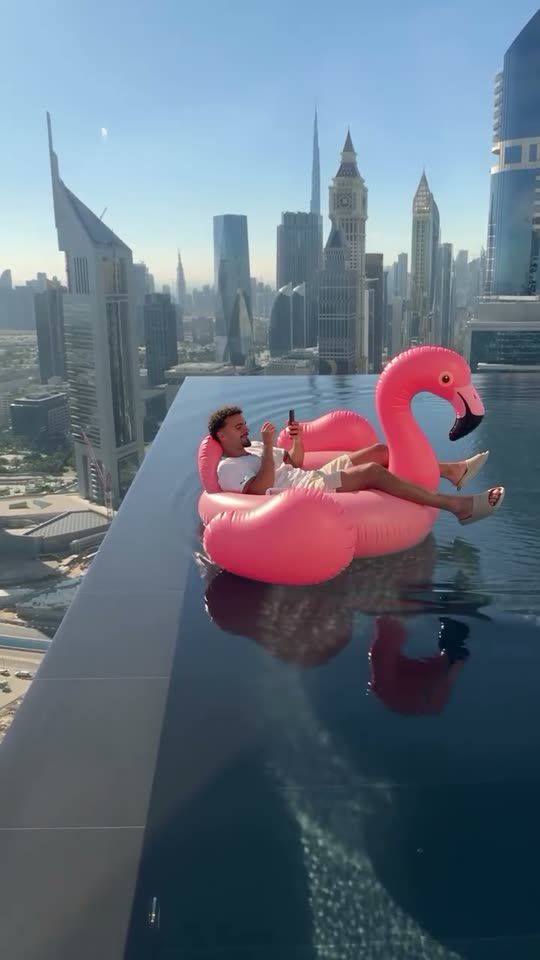
The flamingo float AI trend is an 11-second reel: a man on a giant pink flamingo float in a rooftop infinity pool above Dubai drifts to the edge while he looks at his phone. A friend off camera says "Hey bro, bro, bro" and pushes him back, and he says "thank you". Add one photo and you take his place.

Also called Hey bro flamingo trend · Thank you bro trend · Infinity pool flamingo trend · Flamingo floatie trend

Example

What the Flamingo Float video looks like

These are the creators' own reels, with their own sound. Your photo replaces the man on the float, so your video follows the same drift, push or tip with your face. No two runs come out the same.

Original reel by @youneszarou, 11 s

The original reel by @youneszarou: he drifts to the edge of a rooftop infinity pool above Dubai on a pink flamingo float, a hand pushes him back, "Hey bro, bro, bro... thank you". The Dubai city copies this reel.

Use this reference
Original reel by @cain.aii, 10 s

The earliest clip of the trend, an AI reel by @cain.aii: the flamingo float tips over the glass edge of a Singapore skyscraper pool and rocks back. The Singapore city copies this reel.

Step by step

How to make the Flamingo Float video on MakeViral

Everything runs in the browser. No editing app, no prompt to write, no watermark.

  1. Add your photo

    Press "Create your own" and add you, face clear and close. Take it with the camera or pick it from your library.

  2. Press Generate

    The button shows the price. Seedance 2.5 puts your photos into the Flamingo Float trend clip and copies it shot by shot for 11 seconds, with the reel's original song. You write no prompt.

  3. Download or share

    The video is ready in up to several minutes as a 9:16 MP4. Download it, share it from your phone, or find it later in My videos.

Which photo works best?

Upload one photo for You and Pet, two photos for Couple (one person per photo).

  • People: a close, sharp photo of the face, front-facing, in good light. The face on the float is small in the reel, so a clear face matters more than a full body.
  • No sunglasses, no hat that hides the hair, no heavy beauty filter.
  • Couple: photo 1 sits on the left of the float, photo 2 on the right.
  • Your clothes come from the photo; a coat or a hoodie becomes a T-shirt, with shorts or swimwear for the pool.
  • Pet: one animal, the whole body in view, in daylight.
  • Any background works: the pool, the float and the city come from the reel.
  • Use your own photo, a friend who said yes, or your own pet. Never a celebrity or a stranger.

Where did the Flamingo Float trend start?

The flamingo float trend has two reels behind it. On 29 October 2026, AI filmmaker Ilia Prudnikov (@cain.aii) posted an AI clip labelled "AI content": a bald man in sunglasses on a pink flamingo float slides over the glass edge of a skyscraper infinity pool above the Singapore bay, tips out over the drop and rocks back. His caption: "His flamingo almost took its first flight". It had 6,100 likes by 3 November.

On 2 November 2026, creator Younes Zarou (@youneszarou) posted the version that went viral: a Dubai rooftop infinity pool, the float drifting to the edge, a hand from behind the camera and "Hey bro, bro, bro... thank you". The Instagram reel had 2.2 million likes and 15,800 comments a day later, and the same clip on his TikTok had 4.6 million views. The top TikTok comment is simply "hey brooo" with 44,000 likes, and many viewers asked if it is AI or real.

That makes it one of the fastest infinity pool AI videos of the season, and the flamingo float AI version lets you post your own before the trend peaks.

  1. AI filmmaker @cain.aii posts the earliest clip found: a man on a flamingo float tips over the glass edge of a Singapore rooftop infinity pool and rocks back. 6,100 likes and 118 comments by 3 November. Instagram

  2. @youneszarou posts the Dubai flamingo float reel, "Thank you bro": a hand pushes him back from the edge. 2.2 million likes and 15,800 comments on Instagram by 3 November. Instagram

  3. The same clip on @youneszarou's TikTok reaches 4.6 million views and 297,000 likes by 3 November; the top comment, "hey brooo", has 44,000 likes. TikTok

Copy and paste

The Flamingo Float prompts

You do not need these: the one-tap flow runs them for you, together with the trend clip. [Image 1] and [Image 2] are your two photos, and [Video 1] is the trend clip the video copies.

You

1 photo: you, face clear and closeSeedance 2.511 s · 720p · 9:16168 credits
Video prompt

Recreate the reference video [Video 1] shot for shot: a rooftop infinity pool high above a city on a sunny day, a giant pink flamingo pool float on the dark water, the pool's edge where the water spills over above the drop, the same skyline of a desert city behind it, tall glass towers in the haze, exactly as in the video; the same handheld vertical camera, timing and moves, one continuous take with no cuts. The ONLY change: the man lounging on the flamingo float is now the person in [Image 1]. [Video 1] is for the moves, the float, the hand and the camera only. The person on the float = the person in [Image 1], in EVERY frame, also when the float is small in the wide shot: copy the exact face from [Image 1] (the face shape, eye color and eye shape, eyebrows, nose, mouth, skin tone, age, hair color, hair length and hairstyle, and any beard, moustache, glasses or freckles). The same real person in every frame, so their friends instantly recognize them. Never morph, never drift back to the original men's faces: NO short dark curly hair, no stubble beard, no bald head and no sunglasses unless [Image 1] shows them. The clothes come from [Image 1]; a coat, a jacket, a hoodie or a sweater becomes a plain T-shirt in its color, and the legs wear shorts or the swimwear from [Image 1]. Bare feet or flip-flops. The moves, second by second: 0-2.5 s: the person lounges back on the float with the legs over its side, holds a phone and looks at it, unaware of the edge, while the float drifts slowly toward the camera and the pool's edge. 2.5-5.5 s: a man's hand and forearm reach in from behind the camera, exactly as in the video, and push the float back to safety. The hand belongs to the person filming. 5.5-7 s: the person looks up from the phone at the camera and smiles, a relaxed thank-you. 7-11 s: the float drifts away across the pool toward the far edge and gets small, and the camera holds a wide shot of the pool and the skyline. Only replace the man on the float; the pool, the water, the float, the hand, the drift and the camera stay completely unchanged. Keep everything else the same. Anatomy rules: one head only, on the person's shoulders. Two arms, two legs, five fingers on each hand. Exactly one person on the float. The hand from behind the camera is the only other body part. No text, no captions, no logos, no watermark. No dialogue throughout the entire video. No background music.

2420 characters

Couple

2 photos: person 1 (left), face clear + person 2 (right), face clearSeedance 2.511 s · 720p · 9:16168 credits
Video prompt

Recreate the reference video [Video 1] shot for shot: a rooftop infinity pool high above a city on a sunny day, a giant pink flamingo pool float on the dark water, the pool's edge where the water spills over above the drop, the same skyline of a desert city behind it, tall glass towers in the haze, exactly as in the video; the same handheld vertical camera, timing and moves, one continuous take with no cuts. The ONLY change: the man lounging on the flamingo float is now two people, side by side on the same float: the person in [Image 1] on the LEFT and the person in [Image 2] on the RIGHT. [Video 1] is for the moves, the float, the hand and the camera only. The person on the LEFT of the float = the person in [Image 1], in EVERY frame: copy the exact face from [Image 1] (the face shape, eye color and eye shape, eyebrows, nose, mouth, skin tone, age, hair color, hair length and hairstyle, and any beard, moustache, glasses or freckles). The person on the RIGHT of the float = the person in [Image 2], in EVERY frame: copy the exact face from [Image 2] in the same way. Never blend their faces; each face stays the same in every frame, also in the wide shot, so their friends recognize them at once. Both change: no one from the video stays. NO short dark curly hair, no stubble beard, no bald head, no sunglasses unless a photo shows them. Each wears the clothes from their own photo (a coat or a hoodie becomes a plain T-shirt in its color), with shorts or swimwear. The moves, second by second: 0-2.5 s: the two lounge back side by side on the float, the one on the LEFT holds a phone and both look at it, unaware of the edge, while the float drifts slowly toward the camera and the pool's edge. 2.5-5.5 s: a man's hand and forearm reach in from behind the camera, exactly as in the video, and push the float back to safety. The hand belongs to the person filming. 5.5-7 s: both look up at the camera and smile, a relaxed thank-you. 7-11 s: the float drifts away across the pool toward the far edge and gets small, and the camera holds a wide shot of the pool and the skyline. Only replace the man on the float; the pool, the water, the float, the hand, the drift and the camera stay completely unchanged. Keep everything else the same. Anatomy rules: exactly two people on the float, one head on each pair of shoulders, two arms and two legs each, five fingers on each hand. The hand from behind the camera is the only other body part. No text, no captions, no logos, no watermark. No dialogue throughout the entire video. No background music.

2561 characters

Pet

1 photo: your pet, whole bodySeedance 2.511 s · 720p · 9:16168 credits
Video prompt

Recreate the reference video [Video 1] shot for shot: a rooftop infinity pool high above a city on a sunny day, a giant pink flamingo pool float on the dark water, the pool's edge where the water spills over above the drop, the same skyline of a desert city behind it, tall glass towers in the haze, exactly as in the video; the same handheld vertical camera, timing and moves, one continuous take with no cuts. The ONLY change: the man lounging on the flamingo float is now the pet in [Image 1], whole body. [Video 1] is for the moves, the float, the hand and the camera only. The pet on the float = the pet in [Image 1], whole body, in EVERY frame: the same species and breed, head shape, muzzle, eyes, eye color, ears, fur colors, fur length, markings and body shape as in [Image 1], with the natural body volume and proportions of that animal: never flattened, squashed, stretched or merged with the float, so its owner instantly recognizes it. The man from the video never appears on the float: no human body, no human face, no phone. If [Image 1] shows a dog, a cat or another animal, that animal takes the same place. The moves, second by second: 0-2.5 s: the pet lounges on the float in the sun, paws over its side, and looks around, unaware of the edge, while the float drifts slowly toward the camera and the pool's edge. 2.5-5.5 s: a man's hand and forearm reach in from behind the camera, exactly as in the video, and push the float back to safety. The hand belongs to the person filming. 5.5-7 s: the pet looks up at the camera with a happy, relaxed face. 7-11 s: the float drifts away across the pool toward the far edge and gets small, and the camera holds a wide shot of the pool and the skyline. Only replace the man on the float; the pool, the water, the float, the hand, the drift and the camera stay completely unchanged. Keep everything else the same. Real animal anatomy: one head, four legs ending in round furry paws, never human hands, one tail if the animal has one. Exactly one animal on the float, no person on it. The hand from behind the camera is the only human body part. No text, no captions, no logos, no watermark. No dialogue throughout the entire video. No background music.

2215 characters

How many credits does it cost?

You pay per video in credits, and the create page shows the exact price on the Generate button before you spend anything. The one-tap price covers the video, made in one step from your photos and the trend clip, charged once. One video is 168 credits, so the smallest one-time pack that covers it is $39.99 for 450 credits, with no subscription. The cheaper models are there if you run the prompts by hand in AI Video.

Video modelSettingsCredits
Seedance 2.5 (this template)11 s, 720p, copies the trend clip, one tap168

One-time packs and plans are on the pricing page. A failed video gives its credits back.

What happens in the flamingo float video, second by second?

The default city, Dubai, copies the viral 11-second reel, and your photo takes the place of the man on the float. The pool, the float, the hand and the camera come from the reel:

TimeYouPet
0 to 2.5 sYou lounge on the giant pink flamingo float with your phone, and it drifts toward the edge of the rooftop infinity pool.Your pet lounges on the float in the sun and drifts toward the edge.
2.5 to 5.5 s"Hey bro, bro, bro!" A hand from behind the camera reaches in and pushes the float back.The same hand saves your pet.
5.5 to 7 sYou look up at the camera and smile. "Thank you."Your pet looks up at the camera.
7 to 11 sThe float drifts away across the pool, high above the skyline.The same.

You get an 11-second vertical video at 720p with the reel's own sound put back after the run. Singapore is the other reel: 10 seconds, the float slides over the glass edge, tips out over the drop and rocks back, with no hand. The AI makes your flamingo infinity pool AI video with the best AI video models available, from your photo and the reel. A run takes 5 to 15 minutes, and the create page shows the exact price on the Generate button before you spend anything.

Which city and which version can you pick?

Every version has a City picker:

  • Dubai (default): the original reel by @youneszarou, the safest pick for a Dubai infinity pool flamingo AI video.
  • Singapore: the earliest reel of the trend by @cain.aii, over the bay. It is a different story: the float tips over the glass edge and rocks back, and nobody pulls it.
  • New York, Hong Kong, Shanghai, London, Kuala Lumpur and Bangkok: the Dubai reel with that city's skyline behind the pool. These six are new and not tested yet: a run can keep some Dubai towers in the back. If it does, run it again or pick Dubai.

The versions:

  • You: one photo, you on the float.
  • Couple: two photos, the two of you side by side on the same float. The reel has one person on the float, so the AI adds the second one; it is new and not tested yet.
  • Pet: your dog, cat or other pet on the float, saved by the same hand. A pet flamingo float with a "thank you" on the sound is the funny part.

What goes wrong, and how do you fix it?

ProblemFix
The face looks like the man in the reelHis face is small in the reel. Use a close, sharp, front-facing photo and run it again.
Some Dubai towers stay in another cityThe six new cities draw a new skyline over the Dubai reel, and a take can keep a tower. Run it again or pick Dubai.
The voice does not sound like youThe sound is the reel's own: an off-screen friend says "Hey bro, bro, bro" and the man on the float says "thank you". You can turn the sound off on the result screen.
Only one person on the float in CoupleThe reel shows one person. Use two sharp, close photos and run it again.
The pet looks squashed on the floatUse a photo with the whole pet in view.
The model refuses a photoSome photos get refused. The credits come back; try another photo.

How should you post your flamingo float video?

Your clip comes with the reel's own sound, so it is ready to post. The sound belongs to its owner, and MakeViral gives you no rights to it.

Hashtags: #flamingofloat, #infinitypool, #heybro and #aitrend. Keep the platform's AI label on: half the comments under the original ask "AI or real?".

Caption ideas: "Thank you bro", "Hey bro, bro, bro", "My flamingo almost took its first flight", or tag the friend you would want behind the camera.

FAQ

Flamingo Float trend questions

What is the flamingo float AI trend?
It is a short reel of a man on a giant pink flamingo float in a rooftop infinity pool high above a city. He drifts to the edge while he looks at his phone, a friend says "Hey bro, bro, bro" and pushes him back, and he says "thank you". @youneszarou's Dubai reel of 2 November 2026 made it viral; @cain.aii posted an AI Singapore version on 29 October.
How do I make the flamingo float AI video with my photo?
Press "Create your own", pick You, Couple or Pet, choose a city and add your photo. Press Generate; the button shows the price first. You get a vertical video with the reel's sound, and it waits in My videos when it is ready. You write no prompt.
Where does "hey bro bro bro" come from?
It is the sound of the original flamingo float reel: a friend behind the camera calls "Hey bro, bro, bro" as the float drifts to the edge, then pushes it back. "hey brooo" became the top comment under the TikTok clip, with 44,000 likes.
Is the thank you bro flamingo trend real or AI?
Many people search it as "man almost falls off infinity pool". @cain.aii's Singapore clip is labelled AI content. @youneszarou did not say how his Dubai clip was made, and thousands of comments ask "AI or real?". Your version is made by AI from your photo; nobody goes near a real edge.
Can I pick another city than Dubai?
Yes. Dubai is the default, Singapore copies its own reel, and New York, Hong Kong, Shanghai, London, Kuala Lumpur and Bangkok put that skyline behind the Dubai reel. Those six are new and untested, so a take can keep a Dubai tower; run it again if it does.
Can we do it as a couple?
Yes. Pick Couple and add two photos, one person each: photo 1 sits on the left of the float and photo 2 on the right. A couple flamingo float is new and untested, because the reel shows one person.
Can my dog or cat ride the flamingo float?
Yes. Pick Pet and add one sharp photo of your pet. It lounges on the float, drifts to the edge, and the hand pushes it back to safety. The pet flamingo float works in every city.
Can you make AI infinity pool videos with a fall?
It is not quite a falling off infinity pool AI video. This template keeps the joke of the reel: the man almost falls and gets saved, or in Singapore the flamingo float tips over the edge of the building and rocks back. No flamingo float falling off building edges here: nobody falls. The AI videos of rooftop pools collapsing, or of infinity pool falling off building clips, are a different, darker trend.
Which prompt does this template use?
No creator shared a prompt: @cain.aii sells his prompts, and the captions and comments have none. This template uses its own prompts on the original reels, with rules that keep your face from the photo in every frame, also in the wide shot.
Is there a flamingo floatie AI filter on TikTok or Instagram?
Not as a built-in filter on 3 November 2026. People make the flamingo floatie AI video with AI video tools from a photo, which is what this template does in one step.
How long is the video and what format is it?
11 seconds for Dubai and the six new cities, 10 seconds for Singapore, as a vertical MP4 at 720p with the reel's own sound. It plays on TikTok, Reels and Shorts, and there is no watermark.
Does the flamingo float trend cost credits?
Yes. Each video costs credits, and the create page shows the exact price on the Generate button before you spend anything. If a video fails, the credits come back.
Is it safe to try the flamingo float on a real rooftop pool?
No. Real rooftop infinity pools usually have a catch basin below the edge, but floats can still slide, and a guy almost falls off the infinity pool in the reel for a reason. The AI version gives you the drift, the save and the view from one photo.
More trends

Other AI video templates

Template

Bad Times AI Trend: Argue With the Camera From One Photo

Hands on the head, a hand on the hip, stop palms and a long stare at whoever is filming: the viral routine to Imael Angel's "Bad Times". Add one photo of you or your pet and get the clip with the song.

Read more
Template

Bby Wow Guy AI: Put Your Face in the Guy Dancing at a Quince Meme

Dance up to the camera at a quinceañera, bite the concha, chew with full cheeks while you stare into the lens, then dance away. Add one photo and become the bby wow guy, with the song.

Read more
Template

Stones to Castle AI Trend: They Threw Stones, You Built a Castle

A crowd of angry women throws stones toward you across a green mountain valley. You stay calm, pick the stones up, and they rise into a huge Gothic castle while you smile down from its window. One photo, 15 seconds, with the reel's own song.

Read more
Template

Car Roof Backflip AI Video: You Flip From One Car to the Next

You climb out of a black SUV on the highway, stand on its roof, do one slow backflip across the gap and land in a crouch on the red hatchback next to it. Add one photo. It is an AI effect, never a stunt to try.

Read more
Template

Drink Fly Bump: Your Sunglasses and Drink Fly Into the Lens

A low camera follows you down a sunny old-town street, a stranger bumps your shoulder, and in slow motion your sunglasses and your iced coffee fly into the lens. Add one photo, and you or your pet star in the original clip, with its song.

Read more
Template

AI Couple Prank: Drop Them Off the Cliff Plank

One of you stands on a plank over a sea cliff and yells, the other stares back cold, steps off the plank, and the yeller drops. Add two photos and put yourselves in the viral reel.

Read more

Make your own Flamingo Float video

Add one photo and tap once. No prompt to write. 168 credits.

No watermark. A failed video gives its credits back. Secure checkout by Stripe.