Headbop Trend AI: Your Family's Heads Bop in a Row

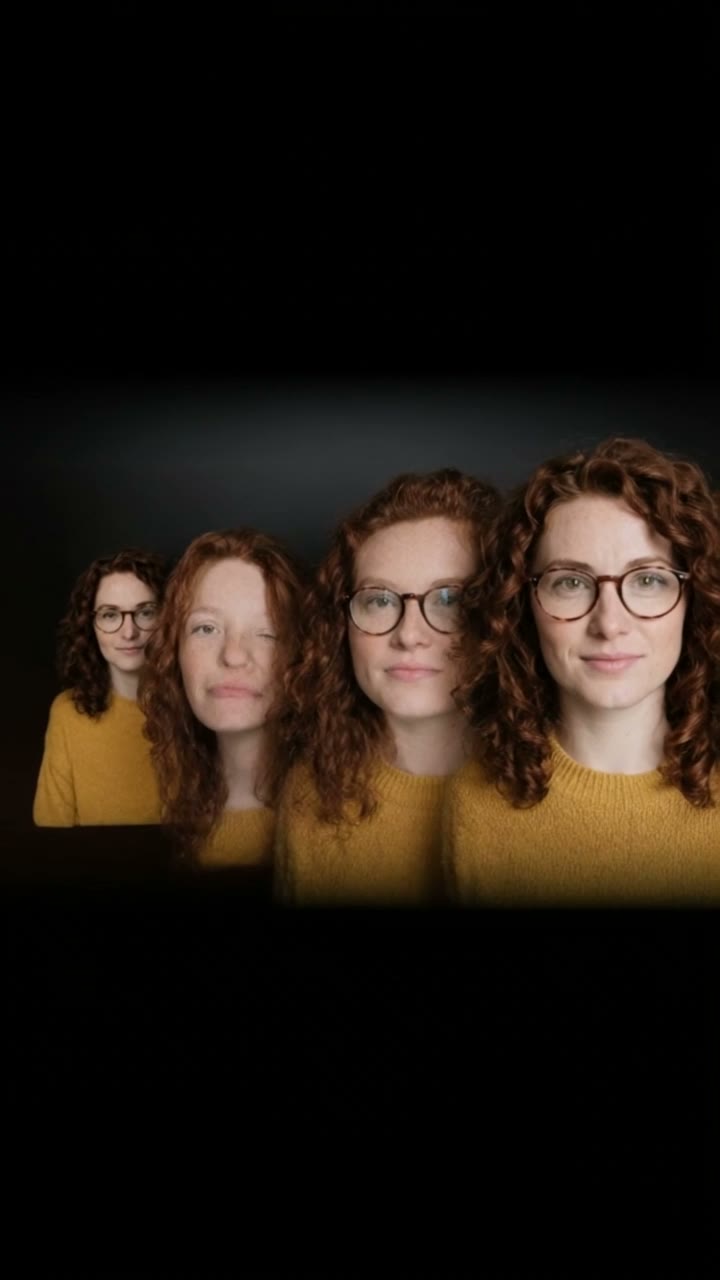
A row of heads on black, from small to big, bopping in turn to the beat. Add one photo and every head is you, three photos for your family or friends, or one photo of your pet. No cut-outs and no keyframes: the AI does the edit, with the trend's sound.

Headbop Trend example video, made with AI-made peopleAI-made
  • 1 photo you add
  • 11 s clip with sound
  • 9:16 for TikTok, Reels, Shorts
  • No watermark

No prompt to write: Add your photo and tap once

Create your own

Ready in a few minutes · 44 credits

The headbop trend is a TikTok edit where a row of cut-out heads on a black background bops to a phonk beat, from the smallest to the biggest. Here AI makes it from your photos: one photo and every head in the row is you, three photos for your family or friends, or one photo of your pet.

Example

What the Headbop Trend video looks like

The people and pets are AI-made, not real persons. The reel versions copy the original clip and come with its original song, which you can turn off; the other versions have original sound. Your result will differ from run to run.

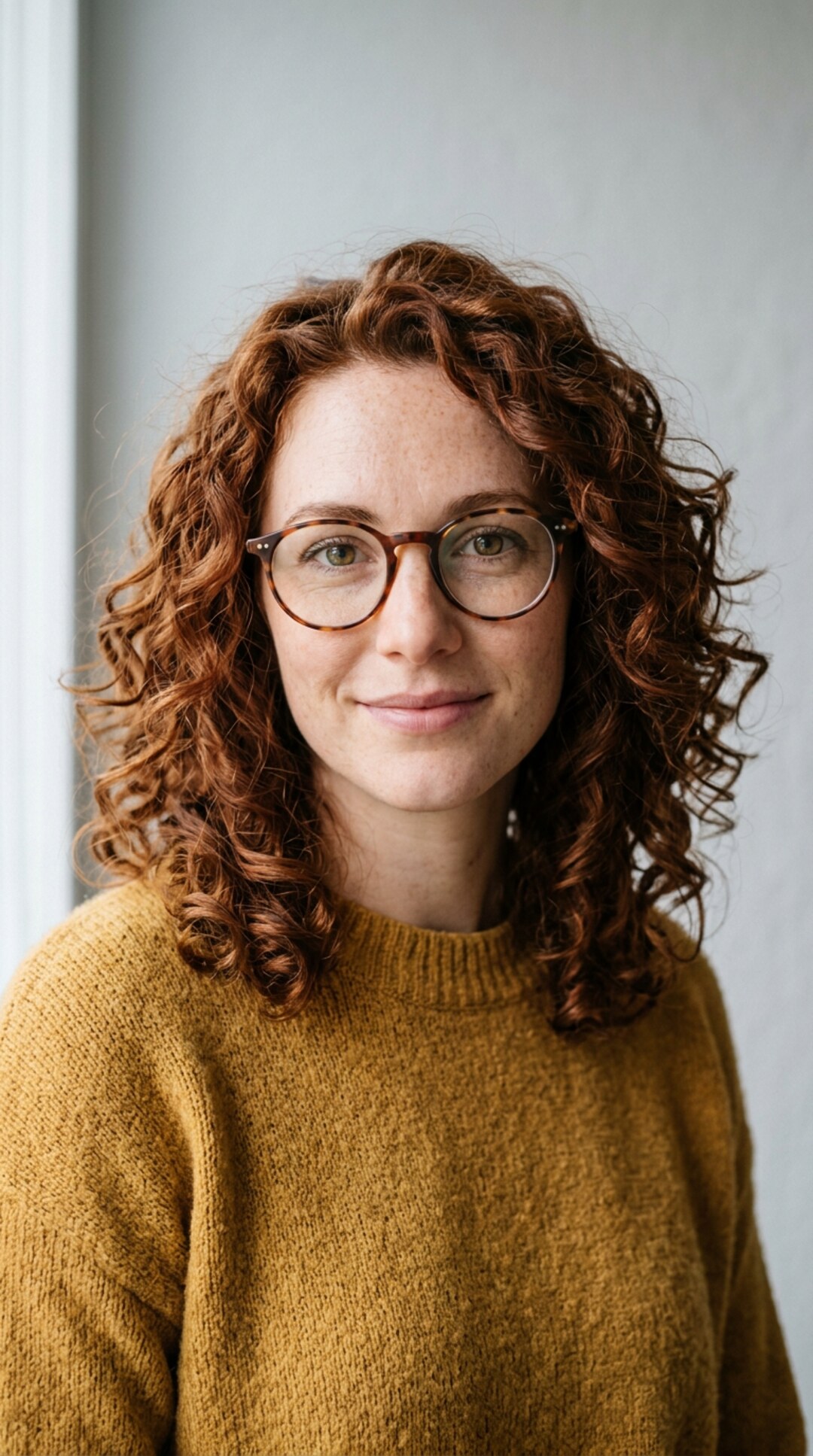
Input photo for Headbop Trend example (AI-made person)
Input
Result, 11 s, with sound

One photo of an AI-made woman (not a real person): every head in the row is her, bopping to the beat on black, with the trend's sound.

Original reel by @popo_hrtz, 11 s

The original reel by @popo_hrtz, the CapCut headbop template: four meme cats bop in a row on black, then the row comes back mirrored. Your heads take the cats' places. Shown: a vertical cut of the post.

Use this reference
Step by step

How to make the Headbop Trend video on MakeViral

Everything runs in the browser. No editing app, no prompt to write, no watermark.

  1. Add your photo

    Press "Create your own" and add your photo, face clear. Take it with the camera or pick it from your library.

  2. Press Generate

    The button shows the price. Kling 3.0 Omni puts your photos into the Headbop trend clip and copies it shot by shot for 11 seconds, with the reel's original song. You write no prompt.

  3. Download or share

    The video is ready in a few minutes as a 9:16 MP4. Download it, share it from your phone, or find it later in your Library.

Which photo works best?

Upload one photo of you for "Just you", three photos for "Family" (one face in each), or one photo of your pet for "Pet".

  • Head and shoulders, face to the camera. The clip shows heads only, so a close photo works better than a full-body one.
  • Sharp and well lit. No sunglasses. Hats and hoods change the head's outline in the row.
  • One face per photo. Crop out other people and pets.
  • Family order: photo 1 becomes the big head, photo 2 the middle one and photo 3 the small head at the end of the row.
  • Pets: a clear photo of the face, both ears in view.
  • Use photos of people who said yes.

Where did the Headbop Trend trend start?

The headbop is an edit, not an AI effect. Editors cut out heads, line them up on black and keyframe each one to bop on the beat in CapCut or Alight Motion. Anime editors have made them for years: the #headbopanimation tag has been on TikTok since May 2022.

The new wave started on 28 September 2026, when @.carvaa posted a "family" of fighter jets bopping in a row. The post had 1.9 million views and 300,900 likes by 13 October, and its sound was in about 3,500 videos, with about 290 new ones a day. A second sound followed on 5 October with a row of cartoon ponies (1.8 million views), and others posted rows of cars, vegetables and meme cats the same way.

On 10 October @popo_hrtz posted a CapCut template with four meme cats (589,500 views and 107,300 likes by 13 October), and how-to videos showed how to put your own cut-out photos in the row. A "family's headpop" how-to from 4 October had 516,200 views. You still had to cut out every head yourself. This template does the edit with AI, straight from normal photos.

  1. The #headbopanimation tag starts on TikTok; it holds 3,523 videos and 53.3 million views by 13 October 2026.

  2. @.carvaa posts a "family" of fighter jets that bop in a row, the first post on the trend's main sound; it has 1.9 million views and 300,900 likes by 13 October. TikTok

  3. A "family's headpop" how-to shows the edit with black-and-white portraits; it has 516,200 views by 13 October. TikTok

  4. @popo_hrtz posts the CapCut headbop template with four meme cats; it has 589,500 views and 107,300 likes by 13 October. TikTok

  5. The trend's main sound is in about 3,500 TikTok videos, with about 290 new ones a day, and the #headbop tag holds 76,500 videos and 615 million views.

Copy and paste

The Headbop Trend prompts

You do not need these: the one-tap flow runs them for you, together with the trend clip. [Image 1] and [Image 2] are your two photos, and [Video 1] is the trend clip the video copies.

Just you

1 photo: your photo, face clearKling 3.0 Omni11 s · 720p · 9:1644 credits
Video prompt

Replace each of the four cats in the video with the person in the first image: the small striped cat, the black-and-white cat, the grey cat with the big round eyes and the orange cat in the black hoodie all become the head and shoulders of this same person. Keep the original actions, facial expressions, poses, body movements, camera movement, background, lighting and timing. Only replace the cats and keep everything else unchanged. The video is a headbop: a row of cut-out heads on a black background, from small to big, that bop to the beat while the camera slides along the row. Timing, second by second, as in the original video: 0-3.2 s: four heads in a row, the smallest on the left and the biggest at the right edge of the frame, partly out of the frame. They bop in turn to the beat. 3.2-5.3 s: the camera moves closer to the three heads on the left. The biggest head is out of the frame. 5.3-5.7 s: a quick fade to black and back. 5.7-9.2 s: the same row, mirrored: the biggest head slides in at the left edge of the frame, then the others down to the smallest on the right. All four heads are the person again, no cat. They bop in turn to the beat. 9.2-11 s: the camera moves closer to the three heads on the right. The biggest head is out of the frame. Every head is the person from the first image, in every frame: the same face, eye color, eyebrows, nose, mouth, skin tone, age, hair color and hairstyle, and any glasses, beard or freckles as in the first image. Only the size changes from head to head, so their friends recognize them at once. Each head is a clean cut-out of the head, neck and shoulders, in the clothes from the first image. No cat in any frame, also after the fade to black: not the small striped cat, not the black-and-white cat, not the grey cat with the big round eyes, not the orange cat in the hoodie. No cat ears, no fur, no whiskers and no cat face anywhere. No hoodie, no badge, nothing in the mouth. One head in each place, no extra heads. The black background stays black above and below the row. No text, no logos, no watermark.

2078 characters

Family

3 photos: person 1: the big head + person 2: the middle head + person 3: the small headKling 3.0 Omni11 s · 720p · 9:1644 credits
Video prompt

Replace the cats in the video with the people in the first, second and third images, and remove the orange cat in the black hoodie. Keep the original actions, facial expressions, poses, body movements, camera movement, background, lighting and timing. Only replace and remove the cats and keep everything else unchanged. Who is who, in every frame: The big grey cat with the big round eyes = the person in the first image. The black-and-white cat = the person in the second image. The small striped cat = the person in the third image. The orange cat in the black hoodie never appears: where it is in the video, there is only the black background. The video is a headbop: a row of cut-out heads on a black background, from small to big, that bop to the beat while the camera slides along the row. Timing, second by second, as in the original video: 0-5.3 s: three heads in a row: the person from the third image (small, left), the person from the second image (middle), the person from the first image (big, right). They bop in turn to the beat, and the camera moves closer. 5.3-5.7 s: a quick fade to black and back. 5.7-11 s: the same row, mirrored: the person from the first image (big, left), the person from the second image (middle), the person from the third image (small, right). They bop in turn to the beat, and the camera moves closer. Each person keeps the face, eye color, eyebrows, nose, mouth, skin tone, age, hair color and hairstyle, and any glasses, beard or freckles from their own image in every frame, so their friends recognize them at once. Never blend their faces. Each head is a clean cut-out of the head, neck and shoulders, in the clothes from their own image. No cat ears, no fur, no whiskers and no cat face anywhere. No hoodie, no badge, nothing in the mouth. Exactly three heads, never a fourth. The black background stays black above and below the row. No text, no logos, no watermark.

1921 characters
Pet

1 photo: your pet, face clearKling 3.0 Omni11 s · 720p · 9:1644 credits
Video prompt

Replace each of the four cats in the video with the pet in the first image: the small striped cat, the black-and-white cat, the grey cat with the big round eyes and the orange cat in the black hoodie all become the head and shoulders of this same pet. Keep the original actions, facial expressions, poses, body movements, camera movement, background, lighting and timing. Only replace the cats and keep everything else unchanged. The video is a headbop: a row of cut-out heads on a black background, from small to big, that bop to the beat while the camera slides along the row. Timing, second by second, as in the original video: 0-3.2 s: four heads in a row, the smallest on the left and the biggest at the right edge of the frame, partly out of the frame. They bop in turn to the beat. 3.2-5.3 s: the camera moves closer to the three heads on the left. The biggest head is out of the frame. 5.3-5.7 s: a quick fade to black and back. 5.7-9.2 s: the same row, mirrored: the biggest head slides in at the left edge of the frame, then the others down to the smallest on the right. All four heads are the pet again, no cat from the video. They bop in turn to the beat. 9.2-11 s: the camera moves closer to the three heads on the right. The biggest head is out of the frame. Every head is the pet from the first image, in every frame: the same species and breed, face, eyes, ears, muzzle, fur colors, fur length and markings as in the first image, with the natural proportions of that animal: never flattened, squashed or stretched. Only the size changes from head to head. None of the cats from the video stays: not the small striped cat, not the black-and-white cat, not the grey cat with the big round eyes, not the orange cat. No hoodie, no badge, nothing in the mouth. One head in each place, no extra heads. The black background stays black above and below the row. No text, no logos, no watermark.

1905 characters

How many credits does it cost?

You pay per video in credits, and the create page shows the exact price on the Generate button before you spend anything. The one-tap price covers the video, made in one step from your photos and the trend clip, charged once. One video is 44 credits, so the smallest one-time pack that covers it is $9.99 for 100 credits, with no subscription. The cheaper models are there if you run the prompts by hand in AI Video.

Video modelSettingsCredits
Kling 3.0 Omni (this template)11 s, 720p, copies the trend clip, one tap44

One-time packs and plans are on the pricing page. A failed video gives its credits back.

What happens in the headbop video, second by second?

MakeViral edits the trend's own headbop reel and puts your heads in the row. The camera, the bops and the timing stay as in the reel:

TimeWhat you see
0 to 3 sThe row on black, from the small head to the big one. The heads bop in turn to the beat.
3 to 5 sThe camera moves in on the heads.
5 to 6 sA quick fade to black and back.
6 to 9 sThe row comes back mirrored, the big head first.
9 to 11 sThe camera moves in again until the end.

How it works: Kling 3.0 Omni edits the reel itself: it swaps the reel's cat heads for the heads from your photos and keeps everything else. The clip is 11 seconds at 720p, vertical 9:16, with the row in the middle of a black frame, the way headbops look on TikTok. The trend's sound goes back on after the run. The exact price shows on the Generate button before you spend anything. Every run is a new take, so results differ.

Just you, Family or Pet: which headbop should you make?

  • Just you (1 photo): every head in the row is you, from small to big. It is the quickest one to make, and the joke lands at once: a whole family of you.
  • Family (3 photos): three heads, one per photo, the way people post their family or their friend group. Photo 1 is the big head, photo 3 the small one, so put the one who should stand out first.
  • Pet (1 photo): every head is your cat or dog. The trend's best-known rows are meme cats, so a pet row fits right in.

All three use the same reel, the same sound and the same length. Want your own pet in the family row? Make the Family version and the Pet version, and post them as a pair.

What goes wrong, and how do you fix it?

ProblemFix
A cat ear or whiskers stay on a headThe reel's heads are cats. Run it again; a close photo with the hair in view helps.
The face looks like someone elseUse a sharp, front-facing photo in good light, with no sunglasses.
Two faces in the Family row look alikeUse photos with one clear face each, taken close up. Run it again.
A fourth head shows up in the Family rowThe reel has four heads, and this version takes one out. Run it again.
Your pet looks flat or stretchedUse a photo of the pet's face from the front, both ears in view.
The model refuses a photoSome photos get refused. The credits come back; try another photo.

Which caption and hashtags fit a headbop?

Caption ideas: "The family group chat", "Me, myself, I and also me", "Rate the lineup", "The cats were replaced". Or write your own.

Hashtags: #headbop is the big one, with 76,500 TikTok videos and 615 million views on 13 October 2026, and #headboptrend fits too. Keep the platform's AI label on.

The clip comes with the trend's sound, a fast phonk remix, so it is ready to post. You can turn the sound off on the result screen and pick a sound when you post instead. The song belongs to its owners, and MakeViral gives you no rights to it. Music rules differ from platform to platform, so check them before you use the clip in an ad or a paid post.

FAQ

Headbop Trend trend questions

What is the headbop trend?
It is a TikTok edit where a row of cut-out heads, from small to big, bops in turn on a black background to a fast phonk beat. The current wave started on 28 September 2026 with a row of fighter jets that had 1.9 million views by 13 October, and people now post their cars, pets, favorite characters and families the same way.
Who started the headbop trend?
Headbop animations of anime characters go back years: the #headbopanimation tag has been on TikTok since May 2022. This wave started on 28 September 2026 with @.carvaa's "family" of fighter jets, the first post on the trend's main sound. A CapCut template by @popo_hrtz with four meme cats followed on 10 October.
How do I make a headbop with my family?
Pick the Family version, press "Create your own" and add three photos, one face in each. Photo 1 becomes the big head, photo 3 the small head at the end. Press Generate; the button shows the price first. You get an 11-second clip with the trend's sound, and the video waits in your Library when it is ready.
Can I make a headbop of just me?
Yes. The Just you version needs one photo, and every head in the row becomes you, from small to big, like a family of four of you.
Can I put my cat or dog in the headbop?
Yes. The Pet version needs one clear photo of your pet's face, and every head in the row becomes your pet. The trend's best-known rows are meme cats, so a pet fits the look.
Do I need CapCut or cut-out photos?
No. In CapCut you cut out every head and keyframe each bop by hand, or you use a template with photos you cut out first. Here you upload normal photos, and Kling 3.0 Omni puts the heads into the trend's own headbop reel for you.
What prompt does the headbop template use?
The trend has no AI prompt: it is a keyframe edit, and none of its creators or how-to videos shared one. This template uses Kling's own recreate wording, which replaces the heads in the reel and keeps the moves, the camera, the background and the timing. You write no prompt yourself.
What song is in the headbop trend?
The trend's main sound is a fast phonk remix, and the clip comes with the same seconds of it as the reel, put back after the run. You can turn it off on the result screen. The song belongs to its owners, and MakeViral gives you no rights to it.
Will the faces look like us?
That is the aim. Each head keeps the face, hair and skin tone from its photo; only the size changes along the row. A sharp, front-facing photo in good light keeps a face closest.
Is the headbop video real?
No. The heads are made with AI from still photos and put into a reel of cat heads, and the people in it never filmed this. Keep the AI label on when you post it.
How long is the video and what format is it?
11 seconds, as an MP4 at 720p in vertical 9:16, with the row of heads in the middle of a black frame and the trend's sound. It fits TikTok, Reels and Shorts, and there is no watermark.

Make your own Headbop Trend video

Add one photo and tap once. No prompt to write. 44 credits.

No watermark. A failed video gives its credits back. Secure checkout by Stripe.