Back

Grinch Dog and Cat AI Filter: Your Pet as a Green Christmas Grump

Add one photo of your dog or cat. The AI keeps its breed, ears, eyes and pose, turns its fur bright green, gives it a sly grin and dresses it in a Santa hat and a red suit with white trim, right where it sits.

Grinch Pet example video, made with AI-made peopleAI-made
  • 1 photo you add
  • 2K photo you can turn into a video
  • 9:16 for TikTok, Reels, Shorts
  • No watermark

No prompt to write: Add your photo and tap once

Create your own

Ready in a few minutes · Photo · From 3 credits

The grinch dog trend, also called the grinch pet filter, is an ai grinch look for your pet: your dog or cat gets bright green fur, a sly grin, a red Santa hat and a little Santa suit, in the same room and pose. Add one pet photo and get the picture or a 5 second video. A grinch cat works too.

Also called Pet Grinch Christmas · Grinch my pet

Example

What the Grinch Pet photo looks like

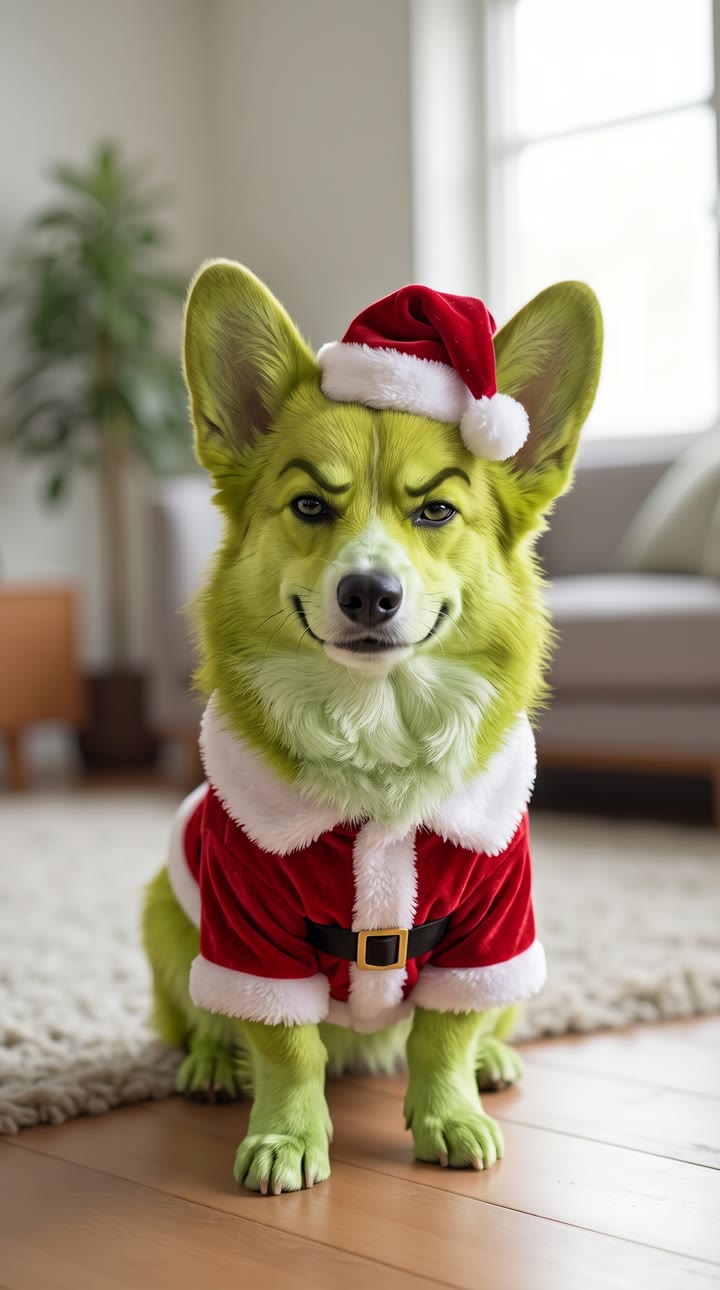
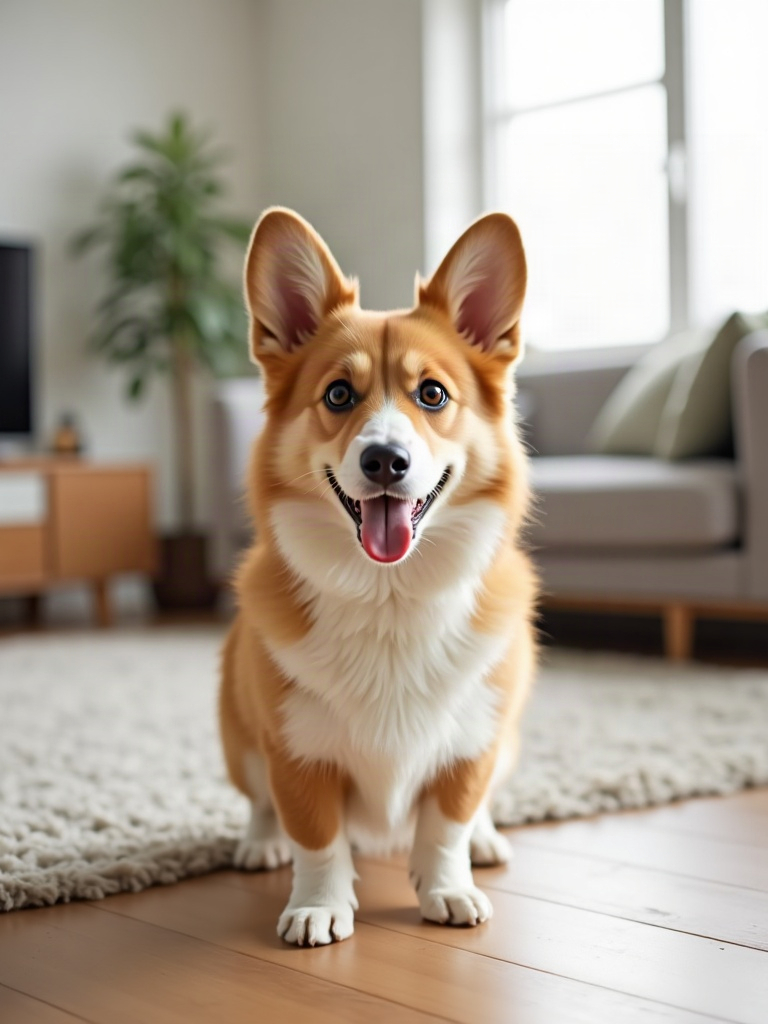
The first example is a MakeViral result from one photo of an AI-made corgi. The second clip is the trend's first big post, by @trickytrick70, with its own sound: made with an AI template app, not a MakeViral result. The animated title belongs to that template. Your result is a new photo (or a 5 second video) of your own pet in the same green, furry Santa look, with no title or logo on it. No two runs come out the same.

Input photo for Grinch Pet example (AI-made person)
Input
Result, before and after

Made with MakeViral from one photo of an AI-made corgi: the same room, the same pose and the same ears, now in green fur with a sly grin, a Santa hat and a red suit with a gold buckle.

Original reel by @trickytrick70, 9 s

The trend's first big post, by @trickytrick70 (8 November 2026, 42,100 views): a Yorkie on the couch turns green, gets a Santa hat and suit, and smirks at the camera.

Step by step

How to make the Grinch Pet photo on MakeViral

Everything runs in the browser. No editing app, no prompt to write, no watermark.

  1. Add your photo

    Press "Create your own" and add your pet, face and ears clear. Take it with the camera or pick it from your library.

  2. Press Generate

    The button shows the price. Nano Banana 2.1 puts your photo into the Grinch Pet scene and makes one 2K photo. You write no prompt.

  3. Download or share

    The photo is ready in a few minutes as a 9:16 2K image. Download it, share it from your phone, turn it into a video, or find it later in My videos.

Which photo works best?

Use one sharp photo of one pet, with its face, both eyes and its ears in view. The AI keeps the pose, the room and the light of your photo, so the photo you take is the scene you get.

  • Face to the camera, at its eye level. The viral posts are front shots of a dog or cat sitting or standing on a couch or the floor.
  • The whole pet in frame works best for the Santa suit: from the ears to the paws.
  • Daylight, no motion blur. Long or dark fur needs good light to show the face under the green.
  • Collars, harnesses and sweaters are replaced by the Santa suit.
  • One pet per photo. For two pets, make one each.
  • Human version: one adult, chest up, face clear. Adults and pets only, never a child's photo, and only people who said yes.

Where did the Grinch Pet trend start?

The trend started on TikTok in the first week of November 2026 with an AI template app's "Grinch pet" effect. Pet owners upload one photo, and the clip shows their real dog or cat for a moment before it turns green, gets the Santa hat and suit, and smirks at the camera. Almost every post uses the same sound, which went up on 3 November.

The first big post came on 8 November: @trickytrick70's Yorkie on a couch reached 42,100 views and 1,103 likes the same day. On that day template accounts posted grinch pet filter tutorials with captions like "turn your dog into the grinch", and owners added their own pets ("Mollie is ginchy", 12,600 views) with captions like "Grinch my pet" and "Pet Grinch Christmas". The idea is older: the #grinchpetfilter and #petgrinch tags go back to November 2023, and the grinch dog search peaked at 110,000 a month in the US in December 2025.

  1. The #grinchpetfilter hashtag starts on TikTok; #petgrinch follows on 11 November 2023. TikTok

  2. US Google searches for "grinch dog" reach 110,000 a month and "grinch cat" 18,100 (Google Ads data).

  3. The shared sound of the Grinch pet template goes up on TikTok; by 8 November about 4,700 videos use it.

  4. @trickytrick70 posts a Yorkie turned into a green Santa grump; it has 42,100 views and 1,103 likes the same day. TikTok

  5. Template accounts post step-by-step grinch pet filter tutorials, and the #petgrinchchristmas hashtag starts. TikTok

Copy and paste

The Grinch Pet prompts

You do not need this: the one-tap flow runs it for you. The photo prompt puts your photo into the scene. Want to change it? Copy it and edit it in AI Photo.

Pet photo

1 photo: your pet, face and ears clearNano Banana 2.1Photo · 2K · 9:163 credits
Photo prompt

Turn my pet photo into a green, furry Christmas grump character, bright green fur skin, mischievous smirk, expressive curved eyebrows, its own eyes with a sly, narrowed look, Santa Claus outfit with fluffy white trim, soft cinematic lighting, the cozy room from the photo as the background, high-detail face texture, holiday mood. Use the uploaded image as the base: it is the same real pet in the same place. Keep its species, breed, body shape, size, pose, head shape, ear shape, muzzle, nose and the camera angle exactly as in the photo, and keep the same room, furniture, floor and light. All of its fur, on the head, the ears, the chest, the legs and the paws, turns a bright yellow-green, soft and fluffy, with natural fur detail and its own fur length; its own pattern and markings still show as lighter and darker shades of green. The nose stays its own color. The face has a sly, mischievous closed-mouth grin that curls up at both corners, and the eyebrows lift into a cheeky curve over half-closed, scheming eyes in the pet's own eye color. It wears a red velvet Santa hat with a thick white fluffy band and a white pom-pom, tilted to one side between its ears, and a small red velvet Santa suit with fluffy white trim at the collar, the cuffs and the hem, closed by a black belt with a square gold buckle. Any collar, harness or clothes from the photo are replaced by the Santa suit. Photorealistic, like a real phone photo of a real animal in a costume: not a cartoon, not a 3D render, not a plush toy. Vertical 9:16: if the photo is wider, extend the room naturally. Exactly one animal and no people. No text, no title, no logo, no watermark, no frame. The only change is the green fur, the grin and the Santa outfit: the identity rules below apply to the pet's breed, head shape, ears, eye color, fur pattern and markings, and its fur colors become the shades of green described above.

1900 characters

Pet video

1 photo: your pet, face and ears clearKling 3.05 s · 1080p · 9:1629 credits
Step 1 · Photo prompt

Turn my pet photo into a green, furry Christmas grump character, bright green fur skin, mischievous smirk, expressive curved eyebrows, its own eyes with a sly, narrowed look, Santa Claus outfit with fluffy white trim, soft cinematic lighting, the cozy room from the photo as the background, high-detail face texture, holiday mood. Use the uploaded image as the base: it is the same real pet in the same place. Keep its species, breed, body shape, size, pose, head shape, ear shape, muzzle, nose and the camera angle exactly as in the photo, and keep the same room, furniture, floor and light. All of its fur, on the head, the ears, the chest, the legs and the paws, turns a bright yellow-green, soft and fluffy, with natural fur detail and its own fur length; its own pattern and markings still show as lighter and darker shades of green. The nose stays its own color. The face has a sly, mischievous closed-mouth grin that curls up at both corners, and the eyebrows lift into a cheeky curve over half-closed, scheming eyes in the pet's own eye color. It wears a red velvet Santa hat with a thick white fluffy band and a white pom-pom, tilted to one side between its ears, and a small red velvet Santa suit with fluffy white trim at the collar, the cuffs and the hem, closed by a black belt with a square gold buckle. Any collar, harness or clothes from the photo are replaced by the Santa suit. Photorealistic, like a real phone photo of a real animal in a costume: not a cartoon, not a 3D render, not a plush toy. Vertical 9:16: if the photo is wider, extend the room naturally. Exactly one animal and no people. No text, no title, no logo, no watermark, no frame. The only change is the green fur, the grin and the Santa outfit: the identity rules below apply to the pet's breed, head shape, ears, eye color, fur pattern and markings, and its fur colors become the shades of green described above.

1900 characters
Step 2 · Video prompt

A real, funny home video filmed on a phone in one continuous shot, at the pet's eye level. Keep the animal's face, eyes, green fur, Santa hat and red Santa suit exactly as in the image, in the same room and the same light. 0-1 s: the pet sits still and looks into the lens with its sly grin. 1-3 s: the grin slowly widens at both corners, the eyes narrow and the brows lift, as if it has a naughty Christmas plan. 3-5 s: it tilts its head to one side, the pom-pom of the hat swings, and it looks back into the lens, still grinning. It stays in the same spot: only the face, the head and the ears move. The camera stays almost still, with a slight handheld sway. Audio: a soft jingle of sleigh bells and one quiet, cheeky huff from the pet; no music, no voice. Exactly one animal with its own paws. No human hands, no extra limbs, no morphing, no cuts, no text, no logos.

870 characters

Human photo

1 photo: you, chest up, face clearNano Banana 2.1Photo · 2K · 9:163 credits
Photo prompt

Turn my selfie into a green, furry Christmas grump character, bright green fur skin, mischievous smirk, expressive curved eyebrows, their own eyes with a sly, narrowed look, Santa Claus outfit with fluffy white trim, soft cinematic lighting, the cozy place from the photo as the background, high-detail face texture, holiday mood. Use the uploaded image as the base: it is the same real person in the same place, like a great movie makeup and costume. Keep the face shape, jaw, eyes, eye color, nose, lips, teeth, age, the head angle, the pose, the framing and the light from the photo. The skin of the face, the ears, the neck and the hands is covered in short, soft, bright yellow-green fur, thin enough that every feature of the face shows exactly as in the photo. The hair keeps its own length and style, as fluffy fur in the same green. Glasses, a beard or a moustache stay, in green fur. The face has a sly, mischievous closed-mouth grin that curls up at both corners, and the eyebrows lift into a cheeky curve over half-closed, scheming eyes. They wear a red velvet Santa hat with a thick white fluffy band and a white pom-pom, tilted to one side, and a red velvet Santa jacket with fluffy white trim at the collar and the cuffs, closed by a black belt with a square gold buckle, in place of the clothes from the photo. Photorealistic, like a real phone photo of a real person in costume makeup: not a cartoon, not a 3D render, not a mask. If the photo shows only the face, show the person from the chest up. Vertical 9:16: if the photo is wider, extend the background naturally. Exactly one person, five fingers on each hand. No text, no title, no logo, no watermark, no frame. The only change is the green fur, the grin and the Santa outfit: the identity rules below apply to the face shape, the features, the eye color, the age and the hairstyle under the fur, and the skin tone becomes the green described above.

1923 characters

Human video

1 photo: you, chest up, face clearKling 3.05 s · 1080p · 9:1629 credits
Step 1 · Photo prompt

Turn my selfie into a green, furry Christmas grump character, bright green fur skin, mischievous smirk, expressive curved eyebrows, their own eyes with a sly, narrowed look, Santa Claus outfit with fluffy white trim, soft cinematic lighting, the cozy place from the photo as the background, high-detail face texture, holiday mood. Use the uploaded image as the base: it is the same real person in the same place, like a great movie makeup and costume. Keep the face shape, jaw, eyes, eye color, nose, lips, teeth, age, the head angle, the pose, the framing and the light from the photo. The skin of the face, the ears, the neck and the hands is covered in short, soft, bright yellow-green fur, thin enough that every feature of the face shows exactly as in the photo. The hair keeps its own length and style, as fluffy fur in the same green. Glasses, a beard or a moustache stay, in green fur. The face has a sly, mischievous closed-mouth grin that curls up at both corners, and the eyebrows lift into a cheeky curve over half-closed, scheming eyes. They wear a red velvet Santa hat with a thick white fluffy band and a white pom-pom, tilted to one side, and a red velvet Santa jacket with fluffy white trim at the collar and the cuffs, closed by a black belt with a square gold buckle, in place of the clothes from the photo. Photorealistic, like a real phone photo of a real person in costume makeup: not a cartoon, not a 3D render, not a mask. If the photo shows only the face, show the person from the chest up. Vertical 9:16: if the photo is wider, extend the background naturally. Exactly one person, five fingers on each hand. No text, no title, no logo, no watermark, no frame. The only change is the green fur, the grin and the Santa outfit: the identity rules below apply to the face shape, the features, the eye color, the age and the hairstyle under the fur, and the skin tone becomes the green described above.

1923 characters
Step 2 · Video prompt

A real, funny video filmed on a phone in one continuous shot, at eye level. Keep the person's face, eyes, green fur, hairstyle, Santa hat and red Santa jacket exactly as in the image, in the same place and the same light. 0-1 s: the person looks into the lens with a sly grin. 1-3 s: the grin slowly widens at both corners, the eyes narrow and one eyebrow lifts, as if they have a naughty Christmas plan. 3-5 s: they tilt the head to one side, the pom-pom of the hat swings, and they look back into the lens with a low, quiet chuckle. Only the face and the head move. The camera stays almost still, with a slight handheld sway. Audio: a soft jingle of sleigh bells and the low chuckle; no music, no words. The face stays the same person in every frame. Exactly one person. No extra hands, no morphing, no cuts, no text, no logos.

829 characters

How many credits does it cost?

You pay per photo in credits, and the create page shows the exact price on the Generate button before you spend anything. The one-tap price covers one 2K photo, charged once. One photo is 3 credits, so the smallest one-time pack that covers it is $9.99 for 100 credits, with no subscription. A smaller 1K photo costs less if you run the prompt by hand in AI Photo.

ModelSettingsCredits
Pet photo: Nano Banana 2.1 (this template)2K photo, 9:16, one tap3
Pet video: Kling 3.0 (this template)5 s, 1080p + 1 scene photo, one tap29
Human photo: Nano Banana 2.1 (this template)2K photo, 9:16, one tap3
Human video: Kling 3.0 (this template)5 s, 1080p + 1 scene photo, one tap29
Nano Banana 2.1 (by hand in AI Photo)1K photo, 9:16, same prompt2

One-time packs and plans are on the pricing page. A failed photo gives its credits back.

What each version gives you

Pick the version on the create page. Each one starts from one photo and makes the whole grinch transformation in one run, from your real pet to the green Santa grump.

VersionWhat you getGood for
Pet photo (default)One tall still: your dog or cat with bright green fur, a sly grin, a red Santa hat and a red suit with white trim and a black belt, in its own roomThe grinch dog or grinch cat picture people post, a Christmas card, a profile picture
Pet videoThe same look, then 5 seconds of motion: the grin widens, the brows lift and the head tilts, with soft sleigh bellsA short clip for TikTok or Reels
Human photoYou as the green, furry Christmas grump: your face shape and features under short green fur, the grin, the hat and the suitGrinch yourself next to your pet
Human videoYour look, then 5 seconds of the same sly grin and head tiltA matching clip for you and your pet

The video versions use top-quality AI video models, including Seedance 2.5 for Best. The create page shows the price of each version before you start.

How to post it like the trend

The viral posts show the real pet first and then the green version. Our result is the finished look, so do the reveal yourself:

  1. Put your original pet photo first in the TikTok or Reels editor, for about a second.
  2. Add the grinch pet filter photo or video right after it, with a quick zoom or flash cut.
  3. Add a Christmas sound from the app's library. The trend's own sound is not in our result: the photo has no sound, and the video has its own soft sleigh bells.
  4. Tag it with #grinchdog, #grinchcat or #grinchmas.

A pair works well too: make the Human photo of yourself and the Pet photo of your dog, and post them side by side.

Will it still look like my pet?

That is the whole joke, so the prompt keeps your pet's breed, head shape, ear shape, muzzle, nose, eye color, fur length, pattern and markings, and only changes the fur color, the expression and the outfit. A Yorkie stays a Yorkie with pointy ears, and a tabby keeps its stripes as darker green stripes.

What can go wrong, and the fix:

  • The grin is too human or too wide. Run it again: each run is a little different.
  • A dark pet looks flat. Black fur turns dark green with less detail. A brighter photo helps.
  • The suit hides the legs. That is how the trend looks. Use a photo with the whole pet in frame.
  • Two pets in the photo. The prompt makes one. Crop the photo to one pet first.
FAQ

Grinch Pet trend questions

What is the grinch pet filter?
It is a TikTok trend from November 2026: an AI filter turns a photo of your dog or cat into a green, furry Christmas grump with a sly grin, a Santa hat and a red Santa suit, in the same room. The first big grinch dog post, a Yorkie by @trickytrick70, reached 42,100 views on 8 November 2026.
How do I turn my dog into the Grinch?
Press "Create your own", add one sharp photo of your dog with its face and ears in view, keep "Pet photo" and press Generate. The grinch dog filter keeps its breed, ears, eyes and pose, makes the fur bright green and adds the grin, the Santa hat and the suit. The picture lands in My videos.
Does the grinch cat filter work on cats?
Yes. To turn your cat into the grinch, use the same Pet version with a cat photo. The grinch cat keeps its own face shape, ears, eye color and stripes or patches, now in shades of green. Rabbits and other pets work too, as long as the face is clear.
Can I grinch myself too?
Yes. Pick "Human photo" to grinch yourself: you get short green fur over your own face, the sly grin, the Santa hat and the suit, and your face shape, eyes and hairstyle stay yours. It is a grinch face filter made with AI, for adults only.
Is this the TikTok grinch filter from the CapCut template?
It is the same look, made a different way. The tiktok grinch filter posts use a grinch pet CapCut template that adds a title graphic and its own sound; the grinch pet tutorial videos show that app. MakeViral makes the picture or the video from your photo in the browser, with no title or logo on it.
What is the grinch AI photo prompt?
No creator of the trend shared one: the template is closed. Our prompt starts from the grinch AI prompts template sites use for this look ("bright green fur skin, mischievous smirk, expressive curved eyebrows, Santa Claus outfit with fluffy white trim") and adds what the viral pet posts show: the same room, the same pose and the pet's own markings. It runs for you in one tap.
Can I make a grinch AI video?
Yes. Pick "Pet video" or "Human video": the photo step makes the green look, then 5 seconds of video bring it to life, with the grin widening, the brows lifting and the head tilting, and soft sleigh bells. It works as a grinch video filter for TikTok or Reels.
Is there a grinch AI app?
You do not need one. MakeViral is a grinch AI generator that runs in your browser: a grinch AI photo generator for the still and a grinch AI video generator for the clip, with no app to install.
Is this the official Grinch?
No. MakeViral is not connected to the book, the films or their owners. The result is a green, furry Christmas costume look on your own pet, made for fun, and it carries no character name, title or logo.
Does the result have the trend's sound?
No. The trend's sound belongs to the template app. The photo versions have no sound, and the video versions have their own soft sleigh bells. Add any Christmas sound in TikTok or Instagram when you post.
Can I use a photo of my child?
No. This page makes the trend with adults and pets only. Use your dog, your cat, yourself or another adult who said yes.
Does it cost credits?
Yes. The create page shows the exact price on the Generate button before you spend anything. A photo costs far fewer credits than a video, and if a run fails, the credits come back.
More trends

Other AI video templates

Template

Bob Filter Prank: AI Cuts Your Long Hair Into a Bob

Add one photo with your hair down. AI makes a phone video of you cutting it into a blunt, chin-length bob with scissors, or a photo of you with the new bob to send. Nothing gets cut, so tell people it is AI when you share it.

Read more
Template

You Look Lonely, I Can Fix That: The AI Hologram Video

A giant glowing hologram leans down out of a rainy neon sky to someone small on a bridge and says: "You look lonely. I can fix that." Put your faces in both roles, or make it a wallpaper.

Read more
Template

AI School Photo: Classic School Pictures From a Phone Photo

Take a photo of your child at home. MakeViral turns it into a classic picture day portrait: mottled blue backdrop, soft studio light, head and shoulders. The face stays exactly the same.

Read more
Template

AI Dog Costume: Your Dog or Cat in Any Halloween Costume

Add one photo of your dog or cat and pick a costume: a pumpkin, a hot dog, a ghost or anything you type. Add your own photo for matching costumes, or make it a short video with sound.

Read more
Template

AI Christmas Photo: A Christmas Photoshoot From One Selfie

Add one selfie. MakeViral turns it into a studio Christmas photoshoot: a lit tree and a Santa hat, a snow throw in the golden winter sun, a red gown among the gifts, candy canes, a cozy sweater, or a couple by the tree. Your face stays the same.

Read more
Template

Santa Nice List AI Video: Santa Checks His List and Finds You

Santa unrolls his Naughty & Nice list in his workshop, smiles at the camera, and a swirl of gold sparkles opens on your own photo in a big gold frame while he says "You're on the nice list!" One photo in, a 10-second vertical clip with Santa's voice out.

Read more

Make your own Grinch Pet photo

Add one photo and tap once. No prompt to write. 3 credits.

No watermark. A failed video gives its credits back. Secure checkout by Stripe.