AI Crying Video: Make the Tears Effect From One Photo

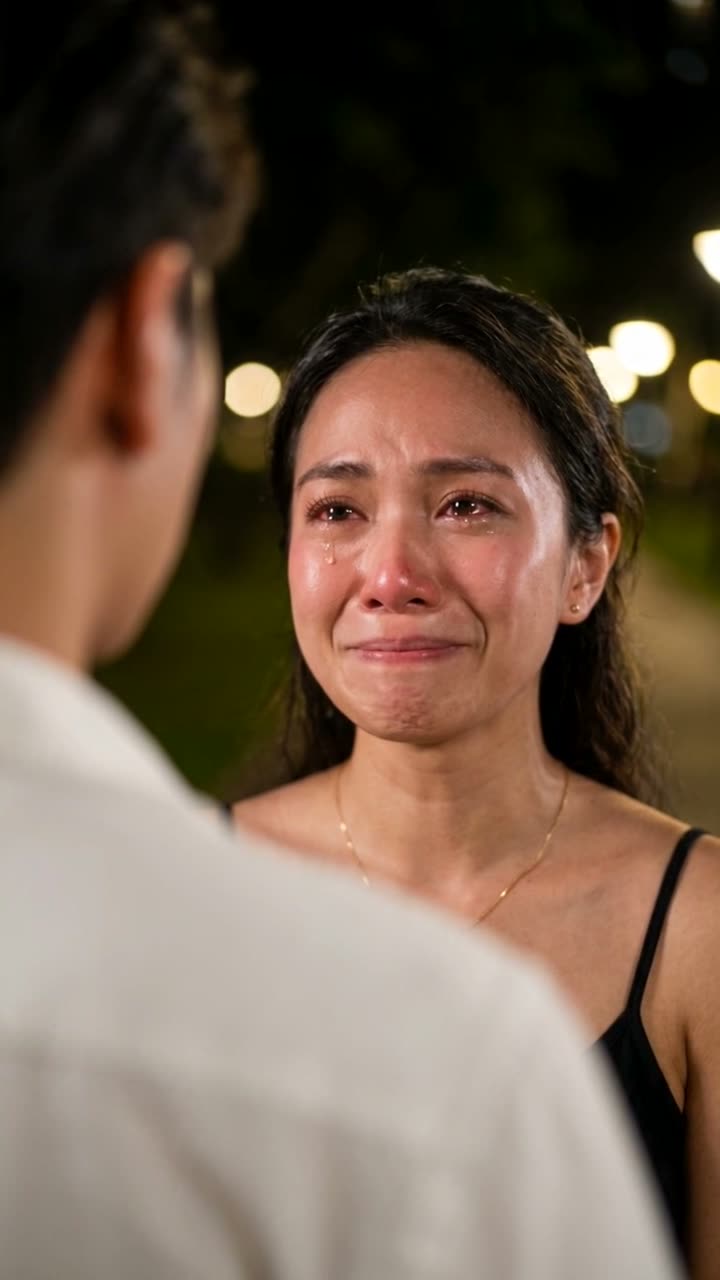
One photo of you becomes the night farewell scene from a drama: you smile through tears at someone, the smile breaks, and you walk away.

AI Crying example video, made with AI-made peopleAI-made
  • 1 photo you add
  • 10 s clip with sound
  • 9:16 for TikTok, Reels, Shorts
  • No watermark

No prompt to write: Add your photo and tap once

Create your own

Ready in a few minutes · 128 credits

The AI crying trend turns one photo into a 10-second drama scene. You stand at night facing a blurred person, try to smile through red, wet eyes, the smile breaks, the tears fall, and you turn and walk away, over a sad ballad. To make your own you need one clear photo of your face.

Example

What the AI Crying video looks like

Made from the prompts on this page. The people and pets are AI-made, not real persons, and the sound is original. Your result will differ from run to run.

Input photo for AI Crying example (AI-made person)
Input
Result, 10 s, with sound

The farewell scene on an AI-made person: she smiles through tears at night, the smile breaks, and she walks away.

Input photo for AI Crying example (AI-made person)
Input
Result, 10 s, with sound

The same prompts on an AI-made woman in a hijab: the hijab and the cardigan stay, the tears fall, and she turns away.

Step by step

How to make the AI Crying video on MakeViral

Everything runs in the browser. No editing app, no prompt to write, no watermark.

  1. Add your photo

    Press "Create your own" and add a clear face photo. Take it with the camera or pick it from your library.

  2. Press Generate

    The button shows the price. MakeViral builds the AI crying scene with your photos, then Seedance 2.5 animates it for 10 seconds with original sound. You write no prompt.

  3. Download or share

    The video is ready in a few minutes as a 9:16 MP4. Download it, share it from your phone, or find it later in your Library.

Which photo works best?

Use a sharp, front-facing photo of your face with both eyes open and visible. The effect lives in the eyes, so they need detail.

  • A head-and-shoulders selfie works best. The photo step rebuilds the night scene, the light and the person in front of you.
  • Start from a soft smile or a neutral look. The clip opens on a fragile smile.
  • Even light on the face. Heavy shadows or sunglasses hide the eyes and the tears.
  • Any background is fine: the photo step replaces it with the night park.
  • Use a photo of yourself or of an adult who agreed to it. Never a stranger, a celebrity or a child.

Where did the AI Crying trend start?

The trend runs on one CapCut template, Cinematic Emotional Farewell. A tutorial posted on 25 September already showed it at 17.6 million uses. Every popular clip has the same shot: an over-the-shoulder close-up at night, the back of a person in a white shirt blurred in front, warm bokeh lights behind, and a face that goes from a fragile smile to quiet tears. Most clips then cut to the person walking away.

It spread fastest in Indonesia and the Philippines. An Indonesian tutorial posted on 25 September, "Cara buat filter wajah sedih, AI nangis di CapCut", passed 6.8 million views and 174,000 likes. Tagalog tutorials that show the same effect in Dreamina AI followed in October, with 688,000 and 678,000 views.

We read the 10 top "AI crying" clips on TikTok frame by frame with Gemini on 4 October and rebuilt the shot, the acting and the cut from them. The prompts on this page come from that analysis.

  1. A "cry face" AI video goes up on TikTok and reaches about 960,000 views; crying-effect clips climb from this day. TikTok

  2. The first CapCut farewell clips with the over-the-shoulder night shot appear; one in a hijab reaches 295,000 views. TikTok

  3. An Indonesian tutorial for the template goes up and passes 6.8 million views; the template shows 17.6 million uses in it. TikTok

  4. Tagalog tutorials show the same effect in Dreamina AI and reach 688,000 views. TikTok

  5. All 10 top "AI crying" clips on TikTok show the same over-the-shoulder night shot in our frame-by-frame read.

Copy and paste

The AI Crying prompts

You do not need these: the one-tap flow runs them for you. A photo prompt puts your photo into the scene, then a video prompt animates it. Want to change them? Copy them and edit them in AI Photo and AI Video.

Farewell scene

1 photo: a clear face photoSeedance 2.510 s · 720p · 9:16128 credits
Step 1 · Photo prompt

Use the uploaded image as the base. Keep the person's face, facial features, skin tone, hair, makeup and outfit exactly the same. Turn the photo into a cinematic still from the farewell scene of a romantic drama. Tight over-the-shoulder close-up at night, framed from the chest up: the face fills the upper middle of the frame. In the left foreground, the back of another person's head and shoulder in a white shirt, heavily blurred into a soft shape. The person from the photo faces them and looks at them, just off camera to the left. Their face is in sharp focus: eyes red-rimmed, glossy and brimming with tears, flushed nose and cheeks, a small, fragile smile. Dark night background, a park or street with warm round bokeh lights, soft warm key light on the face, Korean drama film look, very shallow depth of field, 85mm lens at f/1.4. Photorealistic, vertical 9:16. No text, no logos.

890 characters
Step 2 · Video prompt

A cinematic farewell scene from a romantic drama. Keep the person's face, hair, makeup and outfit exactly as in the image. The other person stays in the foreground, out of focus, seen only from behind. Shot 1, over-the-shoulder close-up: the person looks at them with red, glossy eyes and tries to smile through the tears. The smile trembles and breaks. They blink slowly, tears roll down both cheeks, the lips and chin quiver, and they look down, crying quietly. Real, subtle acting, never exaggerated. Slight handheld drift. Shot 2, cut to a medium shot from the side: the person turns away and walks slowly off into the night, the warm bokeh lights blurring behind them. Audio: a soft, sad piano and string ballad and one quiet sniffle. No dialogue. No text, no logos.

771 characters

Rainy night scene

1 photo: your selfieSeedance 2.58 s · 720p · 9:16103 credits
Step 1 · Photo prompt

Use the uploaded image as the base. Keep the subject's face, facial features, skin tone, and hair exactly the same. Transform the photo into a cinematic still from an emotional drama: the subject stands alone on a city street at night in the rain, wet hair, soft neon bokeh behind, teal and orange color grade, eyes glossy with held-back tears. Medium close-up, shallow depth of field, film look. Vertical 9:16. No text, no logos.

430 characters
Step 2 · Video prompt

A slow, emotional movie moment. Keep the person's face, hair and outfit exactly as in the image. Rain falls in slow motion under the street lights. The person looks down, then up toward the sky, and a tear runs down their cheek. Their breath shows slightly in the cold air. The camera moves in very slowly. Audio: soft rain, distant traffic, and a gentle, sad string melody. No text, no logos.

393 characters

How many credits does it cost?

You pay per video in credits, and the create page shows the exact price on the Generate button before you spend anything. The one-tap price covers the scene photo and the video, charged once. One video is 128 credits, so the smallest one-time pack that covers it is $14.99 for 150 credits, with no subscription. The cheaper models are there if you run the prompts by hand in AI Video.

Video modelSettingsCredits
Seedance 2.5 (this template)10 s, 720p + 1 scene photo, one tap128
Seedance 2.0 Fast (by hand in AI Video)10 s, 720p + 1 photo68
Veo 3.1 Fast (by hand in AI Video)8 s, 720p + 1 photo14

One-time packs and plans are on the pricing page. A failed video gives its credits back.

What does the AI crying video look like, shot by shot?

We read the 10 top AI crying clips on TikTok frame by frame. They all follow the same plan:

TimeWhat you see
0 to 2 sOver-the-shoulder close-up at night. The back of a person in a white shirt is blurred in front. You look at them with red, wet eyes.
2 to 4 sYou try to smile through the tears. The smile trembles and breaks.
4 to 6 sYou blink, tears roll down both cheeks, the chin quivers, you look down.
6 to 10 sA cut: you turn away and walk off into the night, warm bokeh lights behind you.

A sad ballad plays under the whole clip. The "Farewell scene" prompt on this page asks for all four beats in one 10-second run.

Why do people post AI crying videos?

Mostly for the drama, and often as a joke. The clip is ten seconds of a movie-level goodbye on a face everyone knows, so it works as a reaction: "me when the group chat leaves me on read", "me after one sad song", "when my favourite cafe closes". The mismatch between a small everyday caption and a K-drama farewell is the punchline. One Turkish caption in the trend sums it up: "I wish I cried this beautifully in real life".

It also works played straight. Creators pair the scene with a line about a breakup, a move or missing home, and viewers answer in the comments. The format asks for nothing but your face, which is why it crossed languages so fast.

Farewell scene or rainy night scene: which one should you make?

Farewell sceneRainy night scene
StepsTwo: a photo prompt builds the night scene, then a video prompt animates itTwo, the same way
Length10 seconds8 seconds
ShotOver the shoulder of a blurred person, then a cut to you walking awayYou alone on a wet neon street
MoodThe trend as people know it: a goodbye in a dramaLonely, cinematic, no one else in frame
Best forJoining the trend, reaction memesStory posts, slideshows, longer captions

Start with the farewell scene if you want the trend in its classic form. Pick the rainy night scene when you want a solo shot with no second person.

What goes wrong with the AI crying face, and how do you fix it?

ProblemFix
The face changes into someone elseUse a sharper, larger photo of the face. Keep "exactly the same" in the prompt.
The crying looks cartoonish or loudKeep "real, subtle acting, never exaggerated" in the prompt. A second run often comes back calmer.
The person in front is too sharpKeep "heavily blurred into a soft shape" in the photo prompt, or run the photo step again.
Makeup, a hijab or glasses shiftName them in the prompt: "keep the pink hijab and the round glasses".
The video model refuses the photoSome models refuse some real faces. The credits come back; try Veo 3.1 Fast.

Is it okay to make someone cry with AI?

Keep it light and kind. The AI crying effect is a dramatic scene, and the best posts are obviously playful. Make it with your own face or with an adult who said yes and knows where it will be posted.

Do not use it to fake someone's distress: no clips that pretend a real person broke down, no "proof" in an argument, no messages meant to guilt or scare someone. That can hurt people and break platform rules. When the clip could be taken as real, say it is AI in the caption. Many posting apps also offer an AI-generated label.

FAQ

AI Crying trend questions

What is the AI crying trend?
It is a short-video trend from September 2026. One photo becomes a night farewell scene from a drama: you face a blurred person, smile through tears, the smile breaks, and you walk away, over a sad ballad. It runs on the CapCut template "Cinematic Emotional Farewell" and spread fastest in Indonesia and the Philippines.
How do I make an AI crying video from my photo?
Press "Make this video" on this page. Upload one clear photo of your face, check the price on the button and press Generate. The photo step builds the night scene with you in it, then the video step animates 10 seconds of the farewell. The clip lands in your Library as a 9:16 MP4 with sound.
What is the AI crying prompt?
There are two: a photo prompt that turns your selfie into an over-the-shoulder night close-up with red, glossy eyes and a fragile smile, and a video prompt that plays the smile breaking into tears and then cuts to you walking away. Both are on this page to copy, and the one-tap button runs them for you.
Is there an AI crying filter I can use?
Filters in camera apps usually paint tears onto a live face. This template works differently: it builds a whole movie scene from your photo and animates it, so the expression changes over time and the tears move. You get a file to post anywhere, with no watermark, instead of a filter tied to one app.
Can I add a trending sad song to my AI crying video?
Yes, in the posting app. The MakeViral file carries original sound, a sad piano and string ballad, so it has no copyrighted music. On TikTok, Instagram or YouTube you can add a trending sound from their licensed library and turn the original audio down.
Can I make an AI crying video of someone else?
Only of an adult who agreed to it and knows how you will use it. Never use the effect to fake a real person's distress, to deceive anyone or to make fun of someone who did not agree. Never use photos of children. Keep it playful.

Make your own AI Crying video

Add one photo and tap once. No prompt to write. 128 credits.

No watermark. A failed video gives its credits back. Secure checkout by Stripe.