Back

Tweenslop AI: Turn One Photo Into a Tweenslop Animation

Your photo becomes a flat cut-out that zooms, squashes, spins and flies with a rainbow trail on every beat of a Brazilian funk track, with white, pink, purple and green flashes. You, your pet or any object.

The original Tweenslop reel by @ekpppOriginal reel
  • 1 photo you add
  • 15 s clip with sound
  • 9:16 for TikTok, Reels, Shorts
  • No watermark

No prompt to write: Add your photo and tap once

Create your own

Ready in up to several minutes · 228 credits

Tweenslop (also written tween slop or tweensloop) is the TikTok animation trend where one still picture is cut out like a sticker and thrown around on every beat of a Brazilian funk track: it bounces, squashes, spins, zooms and flashes in color. Add one photo of yourself, your pet or any object, and your picture gets the tweenslop treatment.

Also called Tween slop · Tweensloop · Tweening slop · CheezeDibbles style · Tweenslop funk · Tweenslop edit

Example

What the Tweenslop video looks like

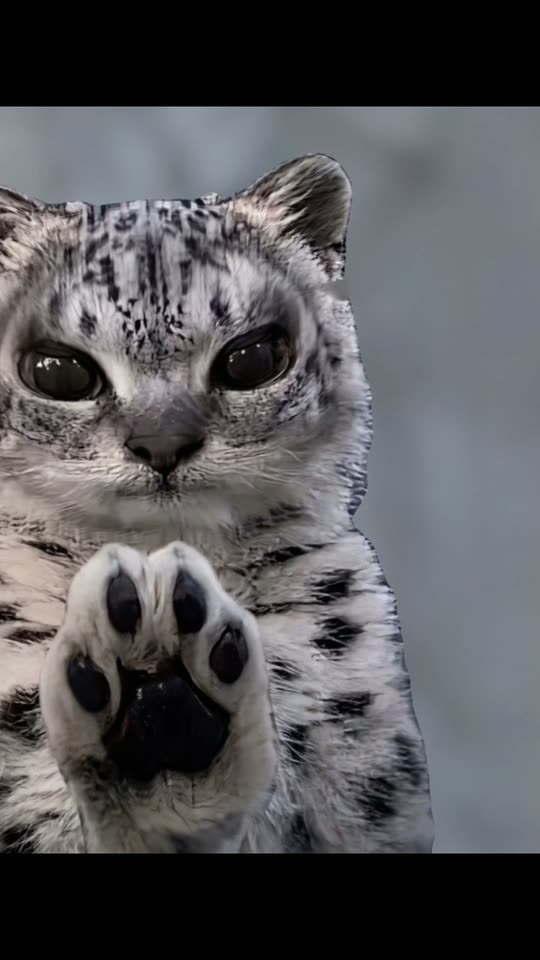
The example is the trend reel by @ekppp, made by hand in an animation app, not by MakeViral. Your video copies its zooms, flashes and beats with your own photo in the leopard's place.

Original reel by @ekppp, 15 s

The original tweenslop reel by @ekppp: a snow leopard photo, cut out like a sticker, zooms, bounces and spins, then flies in rows with rainbow trails while the colors flash on every beat. Your photo takes the leopard's place. Shown in a vertical frame.

Use this reference
Step by step

How to make the Tweenslop video on MakeViral

Everything runs in the browser. No editing app, no prompt to write, no watermark.

  1. Add your photo

    Press "Create your own" and add your photo, face clear. Take it with the camera or pick it from your library.

  2. Press Generate

    The button shows the price. Seedance 2.5 puts your photos into the Tweenslop trend clip and copies it shot by shot for 15 seconds, with the reel's original song. You write no prompt.

  3. Download or share

    The video is ready in up to several minutes as a 9:16 MP4. Download it, share it from your phone, or find it later in My videos.

Which photo works best?

Upload one photo: of yourself for Human, of your pet for Pet, or of anything else for Object.

  • Human: chest up, face to the camera, sharp and in good light. The cut-out keeps your face, hair and clothes from the photo, with both hands raised at the front like the leopard's paws.
  • Pet: one animal, the whole head in view, eyes open, in daylight. The fur colors, ears and markings come from your photo.
  • Object: one clear thing (a snack, a toy, a shoe, a drawing of your OC) on a plain background, filling most of the photo.
  • One subject per photo. The edit throws the picture around fast, so a clean outline keeps it readable when it spins and zooms.
  • Use your own photo, your own pet, or a friend who said yes. Never a stranger, a celebrity or a child.

Where did the Tweenslop trend start?

The word joins tweening, the animation shortcut where software fills in the frames between two key poses, and slop, internet slang for cheap, mass-made content. Animators first used it as a put-down for lazy motion: one flat picture that slides, stretches and wobbles instead of being drawn frame by frame. In 2026 it turned into a style people make on purpose, mostly in Alight Motion and CapCut.

The look most edits copy comes from the animator CheezeDibbles (@wombadal): on 11 August 2026 a cut-out edit of snack cans and a cartoon character bouncing to funk passed 20 million views. "CheezeDibbles style" remakes followed, like @brian.boy1's on 26 September (2.3 million views), and in late October the "my tweening style vs tweenslop" format took over: @yashi.dark's comparison has 4.6 million views. By 14 November 2026 the #tweenslop hashtag held about 28,000 videos and 379 million views, and US Google searches for the word were rising.

  1. The #tweenslop hashtag is created on TikTok, when animators still use the word as a joke about quick, lazy animation. TikTok

  2. CheezeDibbles (@wombadal) posts a cut-out edit of snack cans bouncing to funk. It has 20.7 million views and 3 million likes by 13 November, and its look becomes the "CheezeDibbles style". TikTok

  3. @brian.boy1 starts remaking the CheezeDibbles style in Alight Motion with a photo of himself; the post reaches 2.3 million views. TikTok

  4. @yashi.dark posts "My tweening style vs Tweenslop", a gentle animation next to a wild one. It has 4.6 million views by 13 November, and the comparison format spreads. TikTok

  5. @ekppp posts a snow leopard tweenslop edit with flying rainbow-trail copies, the clip this template copies. It has 1.4 million views and 298,400 likes by 13 November. TikTok

  6. #tweenslop holds 27,998 TikTok videos and 378.9 million views. On US Google Trends, "tweenslop" rose from 10 on 31 October to 25 on 14 November. TikTok

Copy and paste

The Tweenslop prompts

You do not need these: the one-tap flow runs them for you, together with the trend clip. [Image 1] and [Image 2] are your two photos, and [Video 1] is the trend clip the video copies.

Human

1 photo: your photo, face clearSeedance 2.515 s · 720p · 9:16228 credits
Video prompt

Recreate the reference video [Video 1] shot for shot: a tweenslop edit, one cut-out photo thrown around on every beat of a funk track, with the same framing, timing and moves. The ONLY change: the snow leopard is now the person in [Image 1], in every shot and in every copy. The cut-out = a flat photo cut-out of the person in [Image 1] from the chest up, with a thin clean edge: the exact face from [Image 1] (face shape, eye color and eye shape, eyebrows, nose, mouth, skin tone, age, hair color, hair length and hairstyle, and any beard, moustache, glasses or freckles exactly as in the photo) and the clothes from [Image 1]. Both hands are raised flat at the front, palms to the camera, where the paws are in [Video 1]. In the side-on rainbow shots it is the same person lying flat, seen from the side, like a flying sticker. The same person in every frame and in every copy, so their friends recognize them at once. Never drift back to the snow leopard: no spotted grey fur, no leopard ears, no whiskers, no paw pads, no animal body. Matching [Video 1] second by second: 0-1.5 s: a small framed photo of the person in the middle of a black screen jumps bigger on each beat. 1.5-3.3 s: a white flash, then a big flat cut-out of the person, both hands raised at the front, bounces and squashes to the beat on a plain grey background. 3.3-5.0 s: a white flash; the same cut-out in front of a green hill and a blue sky, then it tilts, spins and flies away as a flat picture. 5.0-8.4 s: a white flash, then a dark blue background with small white pixel stars: a flat side-on cut-out of the person slides across with a pixel-style rainbow trail behind it, and more copies of the person, each with its own rainbow trail, pop in above and below. 8.4-11.8 s: big close-ups of the cut-out of the person again, the colors flash on each beat: grey-green, purple, white, peach and pink stripes, a pink sky; at 11 s it tilts and flies away over a purple sky and a green hill. 11.8-15 s: a white flash, then the rows of the person with rainbow trails slide across while the background color changes on each beat: teal, green, olive, brown, pink, purple. Keep everything else exactly as in [Video 1]: the cheap 2D tween animation, every zoom, bounce, squash, spin and cut on the same beats, the white flashes, the color backgrounds, the pixel stars, the rainbow trails, and the black bands above and below the picture. Anatomy rules: one head per cut-out, five fingers per hand. A face never appears on the hands or the clothes. No animal in any frame. No text, no captions, no logos, no watermark.

2591 characters
Pet

1 photo: your pet, whole head clearSeedance 2.515 s · 720p · 9:16228 credits
Video prompt

Recreate the reference video [Video 1] shot for shot: a tweenslop edit, one cut-out photo thrown around on every beat of a funk track, with the same framing, timing and moves. The ONLY change: the big cat in the video is now the pet in [Image 1], in every shot and in every copy. The cut-out = a flat photo cut-out of the pet in [Image 1], with a thin clean edge: the same species and breed, face, eyes, ears, muzzle, fur colors, fur length and markings as in [Image 1], with the natural body volume and proportions of that animal, never merged with anything. Its front paws are raised at the front, where the paws are in [Video 1]. The squash and stretch of the animation may bend the flat picture, but the pet itself keeps its own shape. Whether [Image 1] shows a dog, a cat or another animal, it stays that animal. The same pet in every frame and in every copy, so its owner instantly recognizes it. Never drift back to the big cat of the video: not its spotted grey coat, not its round ears, not its pale eyes, unless [Image 1] shows them. Matching [Video 1] second by second: 0-1.5 s: a small framed photo of the pet in the middle of a black screen jumps bigger on each beat. 1.5-3.3 s: a white flash, then a big flat cut-out of the pet, front paws raised at the front, bounces and squashes to the beat on a plain grey background. 3.3-5.0 s: a white flash; the same cut-out in front of a green hill and a blue sky, then it tilts, spins and flies away as a flat picture. 5.0-8.4 s: a white flash, then a dark blue background with small white pixel stars: a flat side-on cut-out of the pet slides across with a pixel-style rainbow trail behind it, and more copies of the pet, each with its own rainbow trail, pop in above and below. 8.4-11.8 s: big close-ups of the cut-out of the pet again, the colors flash on each beat: grey-green, purple, white, peach and pink stripes, a pink sky; at 11 s it tilts and flies away over a purple sky and a green hill. 11.8-15 s: a white flash, then the rows of the pet with rainbow trails slide across while the background color changes on each beat: teal, green, olive, brown, pink, purple. Keep everything else exactly as in [Video 1]: the cheap 2D tween animation, every zoom, bounce, squash, spin and cut on the same beats, the white flashes, the color backgrounds, the pixel stars, the rainbow trails, and the black bands above and below the picture. Anatomy rules: one head per cut-out, animal paws, never human hands. No person in any frame. No text, no captions, no logos, no watermark.

2537 characters

Object

1 photo: any object, toy, drawing or characterSeedance 2.515 s · 720p · 9:16228 credits
Video prompt

Recreate the reference video [Video 1] shot for shot: a tweenslop edit, one cut-out photo thrown around on every beat of a funk track, with the same framing, timing and moves. The ONLY change: the snow leopard is now the subject of [Image 1], in every shot and in every copy. The cut-out = a flat photo cut-out of the subject of [Image 1] with a thin clean edge, whatever it is: an object, a snack, a toy, a drawing, a cartoon or game character, a person or a pet. Its whole shape, colors, materials, printed details and style stay exactly as in [Image 1]: it is never turned into an animal, never given a face, arms or paws it does not have. A person keeps the exact face, hair and clothes from [Image 1]; a pet keeps its own face, fur and markings. The same subject in every frame and in every copy. Never drift back to the snow leopard: no spotted fur, no leopard ears, no paws unless [Image 1] shows them. Matching [Video 1] second by second: 0-1.5 s: a small framed photo of the subject in the middle of a black screen jumps bigger on each beat. 1.5-3.3 s: a white flash, then a big flat cut-out of the subject, held up big at the front, bounces and squashes to the beat on a plain grey background. 3.3-5.0 s: a white flash; the same cut-out in front of a green hill and a blue sky, then it tilts, spins and flies away as a flat picture. 5.0-8.4 s: a white flash, then a dark blue background with small white pixel stars: a flat side-on cut-out of the subject slides across with a pixel-style rainbow trail behind it, and more copies of the subject, each with its own rainbow trail, pop in above and below. 8.4-11.8 s: big close-ups of the cut-out of the subject again, the colors flash on each beat: grey-green, purple, white, peach and pink stripes, a pink sky; at 11 s it tilts and flies away over a purple sky and a green hill. 11.8-15 s: a white flash, then the rows of the subject with rainbow trails slide across while the background color changes on each beat: teal, green, olive, brown, pink, purple. Keep everything else exactly as in [Video 1]: the cheap 2D tween animation, every zoom, bounce, squash, spin and cut on the same beats, the white flashes, the color backgrounds, the pixel stars, the rainbow trails, and the black bands above and below the picture. One subject per cut-out, no extra heads or limbs, no snow leopard in any frame. No text, no captions, no logos, no watermark.

2408 characters

How many credits does it cost?

You pay per video in credits, and the create page shows the exact price on the Generate button before you spend anything. The one-tap price covers the video, made in one step from your photos and the trend clip, charged once. One video is 228 credits, so the smallest one-time pack that covers it is $39.99 for 450 credits, with no subscription. The cheaper models are there if you run the prompts by hand in AI Video.

Video modelSettingsCredits
Seedance 2.5 (this template)15 s, 720p, copies the trend clip, one tap228

One-time packs and plans are on the pricing page. A failed video gives its credits back.

What happens in the tweenslop video, second by second?

Every version copies @ekppp's tweenslop reel beat for beat, and your photo takes the snow leopard's place in every shot and in every flying copy:

TimeWhat happens
0 to 1.5 sA small framed photo of you on black jumps bigger on each beat.
1.5 to 5 sA white flash, then a big cut-out of you bounces and squashes on grey, then in front of a green hill, tilts, spins and flies away.
5 to 8.4 sOn dark blue with pixel stars, a side-on cut-out of you slides across with a rainbow trail, and more copies pop in above and below.
8.4 to 11.8 sBig close-ups again while the colors flash: green, purple, white, peach and pink.
11.8 to 15 sRows of you with rainbow trails slide across while the background changes color on every beat.

How it works: the best AI video models available edit the trend's own reel: they swap the leopard for the subject of your photo and keep the cut-out animation, the flashes and the timing. You get a vertical 15-second video at 720p with the reel's own funk sound put back on, so it is ready to post. A run takes 5 to 15 minutes, and the exact price shows on the Generate button before you spend anything. Every run is a new take, so results differ.

Human, Pet or Object: which version of the tweenslop trend should you make?

  • Human turns your photo into the cut-out: your face, hair and clothes bounce, spin and fly in rows with rainbow trails. Selfies work, and so does a friend who said yes.
  • Pet is the tweenslop cat or tweenslop dog: your pet keeps its own face, fur and markings and flies paws first. Pets are the closest to the original reel.
  • Object takes anything: a snack can like the CheezeDibbles style, a fidget toy, a plush, a shoe or a drawing of your OC. It keeps its own shape and colors and is never turned into an animal.

If you upload a pet photo on Human, the run moves it to Pet by itself. Want more cut-out edits? Try the headbop trend, where a row of cut-out heads bops to a phonk beat, or the clapping cat.

Tweening vs tweenslop: what is the difference?

Normal tweening animation is subtle: a character sways, blinks and shifts its weight, and the in-between frames only make it smooth. Tweenslop is the same tool turned all the way up: the whole picture tilts, stretches to twice its height, snaps back and bounces on every kick drum, with color flashes and copies flying in. Nothing is redrawn; it is one picture pushed around as hard as possible.

That contrast became its own tweenslop meme. In "my tweening style vs tweenslop" posts a creator shows a gentle animation first, then the same picture going wild when the funk drops. People act it out in real life too, with a pop tube, a fidget ball, their dog or themselves on a chair.

What goes wrong, and how do you fix it?

ProblemFix
The snow leopard stays in one of the small flying copiesThe prompt bans it, but the copies are tiny. Run it again.
Your pet gets spots or round leopard ears (Pet)The reel's animal is a spotted snow leopard. Use a sharp photo where your pet's face and fur are clear, then run it again.
The face looks a little off in the fast spinsThe picture moves very fast on purpose. A front-facing, well-lit photo keeps the face closest.
Your object gets a face or paws (Object)The prompt keeps its own shape. Use a photo with only the object on a plain background and run it again.
The model refuses a photoSome photos get refused. The credits come back; try another photo.

Which sound, caption and hashtags should you post it with?

There is no single tweenslop song. The tweenslop audio is Brazilian funk, the bass-heavy, phonk-like style with chopped vocals, and most creators make or remix their own track and name it after the picture, like "meowing funk" or "Tu tu tu tu tu funk". Your video comes with the funk of the reel it copies, the same 15 seconds, and you can turn it off on the result screen. The sound belongs to its owner, and MakeViral gives you no rights to it.

Hashtags: #tweenslop (27,998 TikTok videos and 378.9 million views on 14 November 2026), #tweensloop (107 videos) and #cheezedibbles (702 videos, 39.8 million views). Keep the platform's AI label on.

Flashing lights: tweenslop strobes colors fast. Many creators add a flashing-lights warning to the caption; do the same.

FAQ

Tweenslop trend questions

What does tweenslop mean?
Tweenslop meaning, in short: tweening (letting software fill in the frames between two key poses) plus slop (cheap, low-effort content). It names over-the-top cut-out animation where one still picture bounces, squashes, spins, zooms and flashes on every beat of a Brazilian funk track. Animators first used it as a put-down, then started making it on purpose as a joke.
What is tweenslop on TikTok?
The tweenslop TikTok trend is a wave of edits made in Alight Motion or CapCut: a photo, a snack, a cartoon or a pet cut out and thrown around to funk. The #tweenslop hashtag had 27,998 videos and 378.9 million views on 14 November 2026. Big posts include CheezeDibbles' snack-can edit (20.7 million views) and @yashi.dark's "My tweening style vs Tweenslop" (4.6 million).
What is the CheezeDibbles style?
CheezeDibbles is the TikTok animator @wombadal. Their cut-out edit of snack cans and a cartoon character bouncing to funk, posted on 11 August 2026, passed 20 million views, and many tweenslop edits copy that look and credit it as the CheezeDibbles style.
Can I make a tweenslop with AI instead of Alight Motion?
Yes. A tweenslop alight motion edit means setting every keyframe by hand. Here you pick Human, Pet or Object, add one photo and press Generate: the tweenslop ai template copies the zooms, spins, flashes and rainbow trails of a real tweenslop reel with your picture in it. You write no prompt, and it works like a tweenslop generator for any photo.
What is the tweenslop song?
There is no single tweenslop song. The tweenslop funk is Brazilian funk or phonk, and creators usually make their own track and title it after their picture ("meowing funk", "Tu tu tu tu tu funk"). Your video keeps the funk of the reel it copies, so you do not need to find the beat yourself.
Can my cat or dog be a tweenslop?
Yes. Pick Pet and add one sharp photo of your pet with the whole head in view. Your tweenslop cat or tweenslop dog keeps its own face, fur and markings and flies across the screen with a rainbow trail. Dogs, cats and other pets work.
Can I make a tweenslop of an object or my OC?
Yes. Pick Object: a snack, a toy, a shoe or a drawing of your OC works. One clear subject on a plain background gives the cleanest cut-out, and it keeps its own shape and colors.
Is it tweenslop or tweensloop?
Both spellings are on TikTok: tweenslop is the common one, and tweensloop and tween slop are other ways people write it. Some posts also say tweening slop. They all mean the same trend.
How long is the tweenslop video and what format is it?
15 seconds as a vertical MP4 at 720p, with the reel's own funk sound. It plays on TikTok, Reels and Shorts, and there is no watermark.
Is there a tweenslop GIF?
A tweenslop GIF is usually a short loop of a tweenslop edit without sound. MakeViral makes a full tweenslop animation with your own photo as an MP4 file with sound, not a GIF.
Does the tweenslop video cost credits?
Yes. Each video costs credits, and the create page shows the exact price on the Generate button before you spend anything. If a video fails, the credits come back.
Who made the tweenslop edit in the example?
@ekppp, a TikTok animator, posted it on 1 November 2026: a snow leopard photo turned into a tweenslop edit, with 1.4 million views by 13 November. It was made by hand, not by MakeViral. The page shows it in a vertical frame, with credit and a link to the post.
More trends

Other AI video templates

Make your own Tweenslop video

Add one photo and tap once. No prompt to write. 228 credits.

No watermark. A failed video gives its credits back. Secure checkout by Stripe.