Storm AI Trend: Stand Still While the Crowd Bows

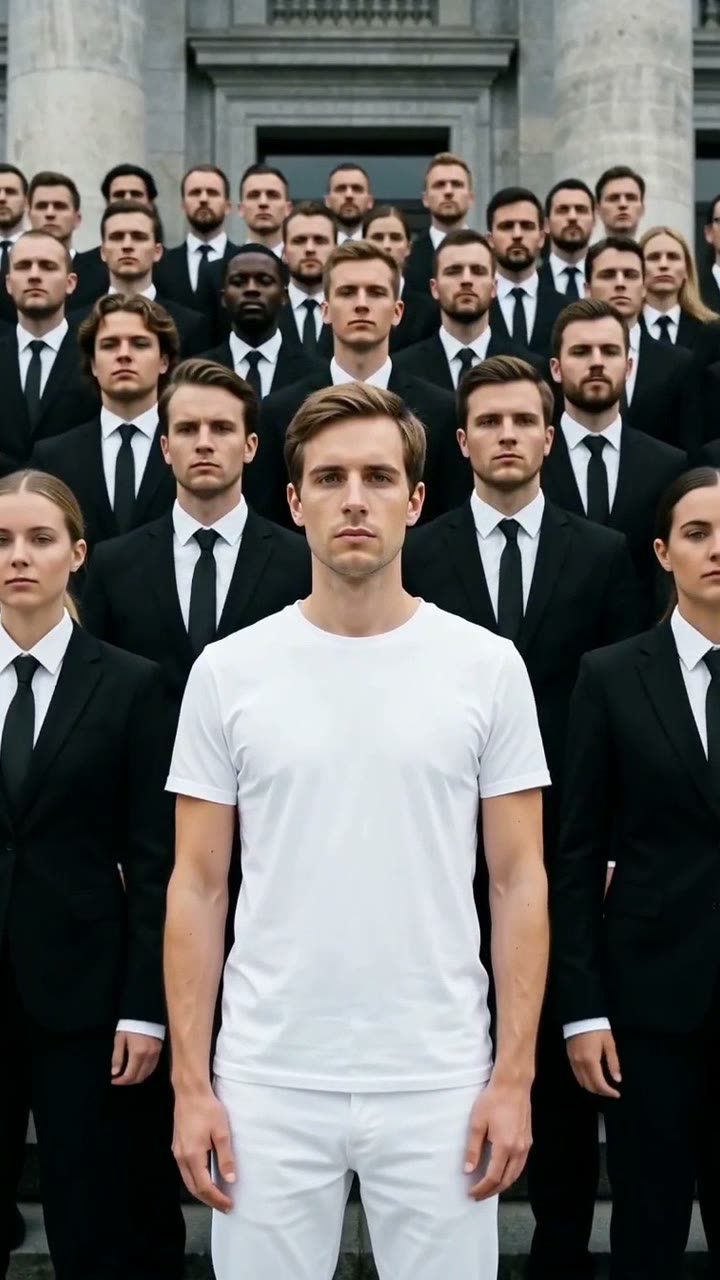
You stand calm in the center, dressed in white. Around you, dozens of people in black suits snap, twist and bow on a heavy beat. One photo in, a 10-second clip with sound out.

Storm example video, made with AI-made peopleAI-made
  • 1 photo you add
  • 10 s clip with sound
  • 9:16 for TikTok, Reels, Shorts
  • No watermark

No prompt to write: Add your photo and tap once

Create your own

Ready in a few minutes · 128 credits

The Storm AI trend is a short clip where one person in white stands perfectly still in the middle of a crowd in black suits. On a heavy beat the whole crowd clutches their ties, snaps their heads and folds into a deep bow, while the lead never moves. You need one clear photo of yourself.

Example

What the Storm video looks like

Made from the prompts on this page. The people and pets are AI-made, not real persons, and the sound is original. Your result will differ from run to run.

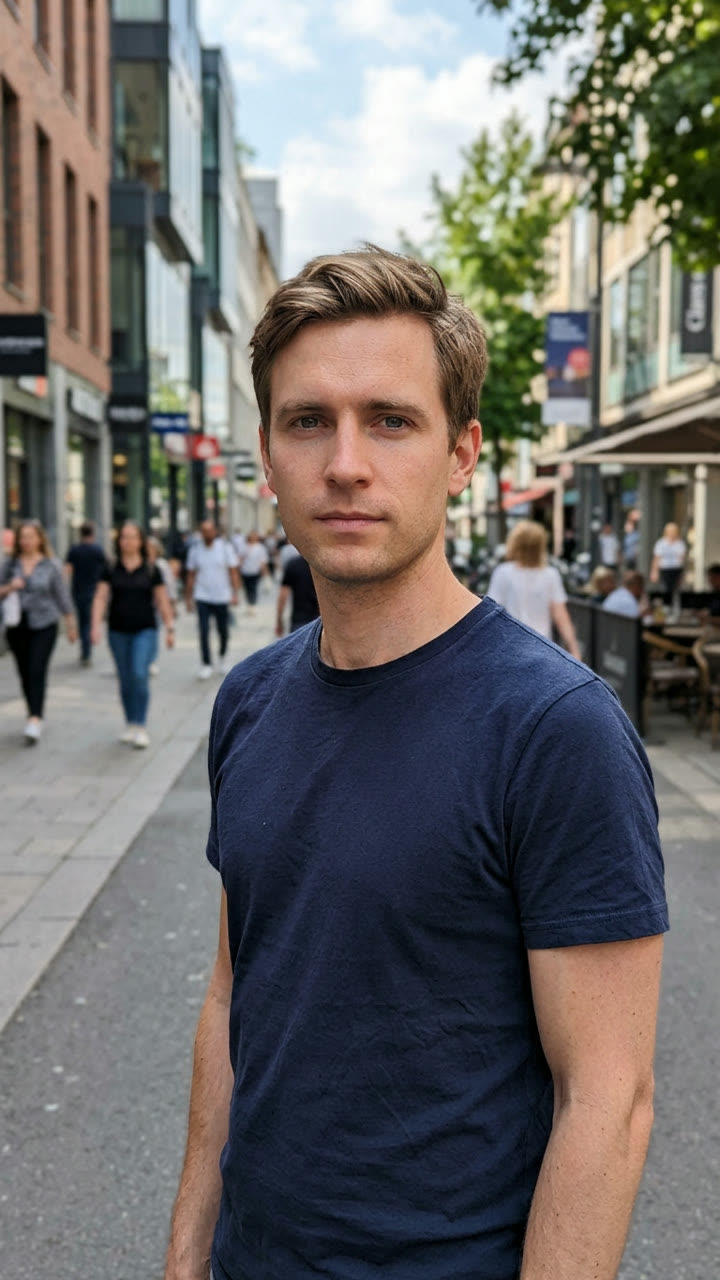
Input photo for Storm example (AI-made person)
Input
Result, 10 s, with sound

An AI-made man in white holds still while the crowd in black suits bows around him, over an original beat.

Step by step

How to make the Storm video on MakeViral

Everything runs in the browser. No editing app, no prompt to write, no watermark.

  1. Add your photo

    Press "Create your own" and add your photo. Take it with the camera or pick it from your library.

  2. Press Generate

    The button shows the price. MakeViral builds the Storm crowd scene with your photos, then Seedance 2.5 animates it for 10 seconds with original sound. You write no prompt.

  3. Download or share

    The video is ready in a few minutes as a 9:16 MP4. Download it, share it from your phone, or find it later in your Library.

Which photo works best?

Use a sharp, front-facing photo with your face and upper body in view. The photo prompt dresses you in white and puts you on stone steps, so your clothes and background do not matter much. Your face does.

  • Look straight into the camera with a neutral or calm face. The whole joke is that you do not react, so a big smile works against it.
  • Good light on the face, no sunglasses, no hat that hides the eyes.
  • One person in the photo. A group shot confuses which face should lead the crowd.
  • Skip photos with a cigarette, a drink or a logo in view. The prompt bans them, and a clean start gives a cleaner result.
  • Use a photo of yourself or of an adult who agreed. Never a celebrity or a stranger.

Where did the Storm trend start?

The look comes from a music video. GENER8ION, the duo of the French DJ Surkin and the director Romain Gavras, released "STORM" with the Swedish rapper Yung Lean on 24 April 2026. It is set in a British boys' boarding school. The second part, "STORM II", ends with the students in dark uniforms dancing on the school steps in a tight formation choreographed by Damien Jalet.

The AI version arrived in September 2026. In a sample of TikTok posts we reviewed, the first AI copy is dated 10 September, and by the end of the month there were 88 of them. A Thai tutorial from 14 September passed 1.6 million views. One AI tool blog dates the real takeoff to 15 September and says the format reached Korean, Japanese, Thai, Indonesian and Ukrainian feeds within 4 days.

The viral prompt that people shared on Reddit has the lead smoking a cigarette. Ours removes it, and it asks for an original beat instead of the song.

  1. GENER8ION releases the "STORM" music video with Yung Lean, directed by Romain Gavras, with a crowd dance on school steps in its second part, "STORM II". The FADER

  2. The first AI crowd-formation copy appears in our sample of TikTok posts. The sample holds 88 of them by late September.

  3. A Thai TikTok tutorial for the AI version reaches 1.6 million views and 39,100 likes.

  4. A Reddit post tests the "STORM" trend with Seedance 2.5 and shares the full prompt, which includes a cigarette. r/ImagineAiArt

  5. "The Ukrainian take on the viral STORM II trend" gets 927 upvotes on r/ukraine. r/ukraine

  6. A French version passes 584,100 views on TikTok, as the format keeps spreading across languages.

Copy and paste

The Storm prompts

You do not need these: the one-tap flow runs them for you. A photo prompt puts your photo into the scene, then a video prompt animates it. Want to change them? Copy them and edit them in AI Photo and AI Video.

1 photo: your photoSeedance 2.510 s · 720p · 9:16128 credits
Step 1 · Photo prompt

Use the uploaded image as the base. Keep the subject's face, facial features, skin tone, and expression exactly the same. Dress the subject in a clean all-white outfit and place them standing still in the exact center of wide grey stone steps in front of a large building. Around and behind them stand forty to sixty people in identical black suits, arranged in tight rows like a wall, all facing the camera. The subject is the only person in white. Overcast daylight, slight film grain, cinematic music-video look. Vertical 9:16. No cigarettes, no text, no logos.

564 characters
Step 2 · Video prompt

Cinematic music-video shot in one continuous take. Keep the lead's face and white outfit exactly as in the image. The lead stands perfectly still and calm in the center and looks straight into the camera for the whole clip. The camera slowly pushes in. On a heavy beat, the whole crowd in black suits explodes into one sharp synchronized move: they clutch their ties, twist, and snap their heads to the side, then fold into a deep, fast bow and snap back up. They repeat the bow once more and freeze. Only the crowd moves, the lead never moves. Audio: an original dark, heavy electronic beat with deep drums. No cigarettes, no text, no logos.

642 characters

How many credits does it cost?

You pay per video in credits, and the create page shows the exact price on the Generate button before you spend anything. The one-tap price covers the scene photo and the video, charged once. One video is 128 credits, so the smallest one-time pack that covers it is $14.99 for 150 credits, with no subscription. The cheaper models are there if you run the prompts by hand in AI Video.

Video modelSettingsCredits
Seedance 2.5 (this template)10 s, 720p + 1 scene photo, one tap128
Seedance 2.0 Fast (by hand in AI Video)10 s, 720p + 1 photo68
Veo 3.1 Fast (by hand in AI Video)8 s, 720p + 1 photo14

One-time packs and plans are on the pricing page. A failed video gives its credits back.

It is pure contrast. Everyone in the frame moves at once, hard and fast, and the one person in the center does nothing. That stillness reads as power, and it lets anyone play the lead: a student, a boss, a grandmother, a baby. One of the early viral copies on 13 September was a baby version that passed 315,300 views.

It also rewards a second watch. The bow lands on the beat, the lead stays calm, and the viewer loops it to see the crowd drop again.

The search data shows how people look for it. On 29 September 2026, "storm trend" had about 50 US searches a month in Google Ads data, and Google Trends for the past 30 days showed "yung lean storm" searched far more often than "storm trend". Most people know it by the artist and the song, not by a trend name.

Why doesn't my Storm video copy the music video move for move?

Because it is not a motion copy. Most viral versions use a video-reference swap: an app takes a clip of the original dance, then swaps the lead's face for yours. That keeps the exact choreography, and it also reuses a copyrighted video and song.

MakeViral works from one image. AI Photo builds a new first frame of you in white on the steps, and AI Video animates that frame from the prompt. The crowd does its own synced clutch, head snap and bow, written in plain words, so the moves are close in spirit but not the same steps. You cannot upload a dance clip to copy. In return, your file has no frames from the music video and no song, so you can post it without borrowing someone else's work.

What goes wrong with the Storm prompt, and how do you fix it?

ProblemFix
The lead moves or dances with the crowdKeep "the lead never moves" in the video prompt. Remove any word that gives the lead an action.
The crowd moves out of syncCrowd motion is the hardest part for any model. Run it again; one sharp move per beat works better than a long routine.
Faces in the crowd melt during the bowNormal at the edges of the frame. Generate the still again with fewer people, for example forty instead of sixty.
The lead is not in the exact centerFix it in the still before you animate. Everything the video model does starts from that frame.
Your face changes during the push-inUse a sharper source photo, or try Veo 3.1 Fast. A failed video returns its credits.
More than one person wears whiteGenerate the still again. The prompt says the lead is the only person in white, and a second run usually gets it.

Can you add the real Storm song when you post?

Not inside the MakeViral file. The video prompt asks for an original dark electronic beat so the download carries no copyrighted audio. If you want the trending sound, pick it from the licensed music library inside TikTok, Instagram or YouTube when you post. The bow in your clip will not land on the song's beat by default, so line up the start in the posting app, or keep the original beat and name the trend in the caption.

Caption ideas that fit the format: "me walking into Monday", "the only calm person in the group chat", or "when you finally understand the assignment". Tag the friends who would be the crowd.

FAQ

Storm trend questions

What is the Storm AI trend?
It is a viral AI video format from September 2026. One person in white stands still in the center of a crowd in black suits, and on a heavy beat the crowd clutches their ties, snaps their heads and bows. It copies the look of the dance in GENER8ION's "STORM II" music video with Yung Lean.
What is the Yung Lean Storm trend?
It is the same trend. People search for it by the artist because the dance comes from "STORM", a 2026 music video by GENER8ION featuring Yung Lean. The AI version puts your face on the calm lead in the middle of the crowd. Our prompts use no frames and no audio from the video.
How do I make the Storm AI video with my own photo?
Upload one clear, front-facing photo to AI Photo with the Storm photo prompt. You get a still of you in white on the steps, surrounded by the crowd. Then press the film button on the still: AI Video opens with the video prompt filled in and animates the bow for 10 seconds with sound.
Can I make a crowd bow AI video with a different outfit or setting?
Yes. The prompts are plain English, so you can edit them. Change "all-white outfit" to a color you like, or swap the stone steps for a school hall, a stadium tunnel or an office lobby. Keep the lead as the only person in a different color, and keep "the lead never moves", or the contrast is lost.
Why did the original Storm prompt have a cigarette?
The prompt that spread on Reddit copies the opening of the music video, where the lead smokes. We removed it. Smoking on screen can run into platform rules on some apps, and it adds nothing the joke needs. The contrast between the calm lead and the bowing crowd carries the clip on its own.
How long is the Storm video and what format is it?
The default is 10 seconds, vertical 9:16, 720p, with an original beat, as an MP4 with no watermark that you can post straight to TikTok, Reels or Shorts. You can change the length and resolution in AI Video before you generate; the price on the button updates.
Can I put a celebrity in the center of the crowd?
Do not. A fake video of a real person can break platform rules and that person's rights, and some video models refuse well-known faces. Use your own photo or a photo of an adult who agreed to it.

Make your own Storm video

Add one photo and tap once. No prompt to write. 128 credits.

No watermark. A failed video gives its credits back. Secure checkout by Stripe.