Thank You Baby Meme: Turn One Baby Photo Into the Thank You Babeh Dance

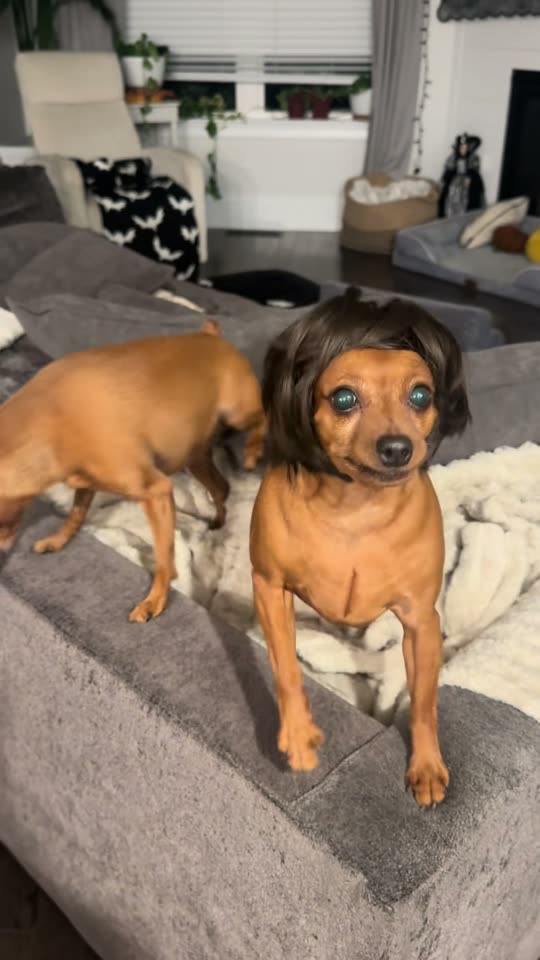
"Thank you baby, thank you babeh": the chant from a TikTok LIVE, now a dance. Add one photo of your baby and get a 15-second clip where your baby bounces, shrugs and ends with a heart, with the trend's sound. Or put your pet in the famous wig.

The original Thank You Baby AI reel by @packofpinschersOriginal reel
  • 1 photo you add
  • 10 to 15 s clip with sound
  • 9:16 for TikTok, Reels, Shorts
  • No watermark

No prompt to write: Add your photo and tap once

Create your own

Ready in a few minutes · From 60 credits

The thank you baby meme is the sing-song "thank you baby, thank you babeh" from a TikTok LIVE by the 50/50 Twins, and its AI version makes a baby dance to it. One photo of your own baby becomes a 15-second dance clip with the trend's sound. A Pet version puts your pet in the viral wig.

Also called Thank you baby, thank you babeh · Thank you babeh trend · Thank you baby 50/50 Twins

Example

What the Thank You Baby AI video looks like

This is the original reel. Your photos replace its characters, so your video follows the same shots with your faces. No two runs come out the same.

Original reel by @packofpinschers, 10 s

The pet version by @packofpinschers: a small dog in a dark bob wig shakes its head to the chant on the sofa, then stares into the camera. Pet copies this reel.

Use this reference
Step by step

How to make the Thank You Baby AI video on MakeViral

Everything runs in the browser. No editing app, no prompt to write, no watermark.

  1. Add your photo

    Press "Create your own" and add your baby. Take it with the camera or pick it from your library.

  2. Press Generate

    The button shows the price. Kling 3.0 Motion Control takes the moves of the Thank You Baby clip and plays them with the one in your photo, in your photo's own scene, for about 15 seconds, with the reel's original sound. You write no prompt.

  3. Download or share

    The video is ready in a few minutes as a 9:16 MP4. Download it, share it from your phone, or find it later in your Library.

Which photo works best?

You need one photo: of your own baby for Baby, of your pet for Pet.

  • Baby: upright works best. The dance is done standing, so a photo of your baby standing or sitting up straight gives the most natural moves. A baby lying down can get odd legs.
  • Head to toes in view if you can, with the face turned to the camera, in good light. The Baby clip keeps your photo's own room and frame, so a vertical photo in a tidy spot looks best.
  • One baby, nobody else. Crop out a parent's hands, a sibling or a pet.
  • Pet: a sharp photo with the face and the whole body in view. Any pet works; the wig goes on in the video.
  • Only your own child, or a child whose parent or guardian asked you to. Never a stranger's photo.

Where did the Thank You Baby AI trend start?

The thank you baby trend started on a TikTok LIVE. On 23 September 2026 the 50/50 Twins, a duo who perform in rapper costumes with grills, gold chains and long nails, bounced on camera and thanked their viewers for gifts with a sing-song "thank you baby, thank you babeh". The stream is gone, but screen recordings spread. The one posted by @drebabygums on 24 September had 5.1 million views by 20 October, and its sound carries most of the memes. The twins' own "POV: You joined our live" of 30 September reached 38.4 million views, and on 12 October they released the full song, "Thank You Babeh".

The dance came next. On 6 October the producer @prodpoodee put the chant on a bouncy beat, with people dancing a loose two-step to it; one dance to that remix, posted on 7 October, passed 948,000 views. From 14 October, CapCut AI baby templates set to the remix made babies dance, and US tutorials for the thank you baby AI trend took off. On 20 October a dog in a dark bob wig reached 214,900 views.

  1. The 50/50 Twins go live on TikTok and thank their viewers with a sing-song "thank you baby, thank you babeh". The stream is later removed, but screen recordings spread. Know Your Meme

  2. A screen recording of the LIVE by @drebabygums goes viral: 5.1 million views and 653,100 likes by 20 October. Its sound is the one most thank you baby memes use. Know Your Meme

  3. The twins post "POV: You joined our live" on their own account; it reaches 38.4 million views and 5.8 million likes by 20 October. TikTok

  4. The producer @prodpoodee puts the chant on a bouncy beat with dancers. This remix is the sound of the AI baby templates. TikTok

  5. US tutorials for a CapCut AI baby template on the remix start; the most viewed one has 222,800 views and 2,705 shares by 20 October.

  6. A small dog in a dark bob wig shakes its head to the chant on a sofa: 214,900 views and 55,100 likes on its first day. TikTok

Copy and paste

The Thank You Baby AI prompts

You do not need these: the one-tap flow runs them for you, together with the trend clip. [Image 1] and [Image 2] are your two photos, and [Video 1] is the trend clip the video copies.

Baby

1 photo: your babyKling 3.0 Motion Control15 s · 720p · 9:1660 credits
Video prompt

One continuous single take, steady camera, vertical video. Recreate the reference video exactly, but the dancer is the baby from the reference image instead of the man: the same baby with the same face, hair, skin tone and clothes, standing upright in the place from the reference image. The baby reproduces the man's full dance frame by frame with the same timing, on the beat: the loose, bouncy two-step with bent knees and a little kick, the steps toward the camera and back, the shrug with both palms up, the arms swinging wide, a hand to the forehead, both hands behind the head, the point to the side, one arm thrown up high, and at the very end both hands making a heart in front of the chest. Above all his big, happy facial acting: a wide grin, raised brows and cheeky looks into the camera. Very expressive, joyful baby face. The baby keeps real baby anatomy: a small chubby body, a big round head, short arms and legs and small baby hands, never an adult body, no jewelry, even when it throws an arm up or steps toward the lens. No cuts, no text, no captions or labels on screen. No olive-green T-shirt, no camouflage trousers, no belt, no tan boots, no glasses, no wristwatch, no tattoos and no uniform of any kind unless the reference image shows them. Exactly one baby, no extra people.

1300 characters

Pet

1 photo: your petSeedance 2.510 s · 720p · 9:16152 credits
Video prompt

Recreate the reference video [Video 1] shot for shot: the same living room with the grey sofa and the cream fluffy blanket, the same evening lamp light, the same handheld phone camera, framing, timing and head moves. The ONLY change: the small dog in the dark brown bob wig is now the pet in [Image 1], and the pet wears that same dark brown bob wig on its head in every frame. The pet = the pet in [Image 1], in EVERY frame: the same species and breed, head shape, face, eyes, ears, muzzle, fur colors, fur length and markings as in [Image 1], with the natural body volume and proportions of that animal: never flattened, squashed, stretched or merged with anything, so its owner instantly recognizes it. Whether [Image 1] shows a dog, a cat or another animal, it stays that animal. Never drift back to the dog in the wig of the original video: not the coat, the ears or the face of the dog in the video unless [Image 1] shows them. The other small dog, the one with no wig on the sofa behind it, stays exactly as in the video and never takes the look of [Image 1]. The pet in the wig grooves to the chant like a little rapper. Matching the reference second by second: 1. 0-2 s: on the edge of the sofa it shakes its head hard from side to side, so the wig flips and swings. 2. 2-5 s: it turns on the blanket, tosses the wig with another head shake and sniffs the sofa. 3. 5-8 s: it steps to the front edge of the sofa, faces the camera and bobs its head under the wig. 4. 8-10 s: it stares into the lens with the wig on, sticks its tongue out, then shakes its head again. Anatomy rules: one head only, one muzzle, natural teeth and tongue, four legs with real paws. The wig sits on top of the head like a real wig and never merges with the fur. No text, no logos, no watermark, no people.

1794 characters

How many credits does it cost?

You pay per video in credits, and the create page shows the exact price on the Generate button before you spend anything. The one-tap price covers the video, made in one step from your photos and the trend clip, charged once. Each version has its own price: Baby 60 credits, Pet 152 credits. The cheaper models are there if you run the prompts by hand in AI Video.

Video modelSettingsCredits
Baby: Kling 3.0 Motion Control (this template)15 s, 720p, copies the moves of the trend clip, one tap60
Pet: Seedance 2.5 (this template)10 s, 720p, copies the trend clip, one tap152

One-time packs and plans are on the pricing page. A failed video gives its credits back.

What happens in the thank you baby dance, beat by beat?

The Baby version plays the dance with the baby from your photo, in your photo's own room. The camera stays steady and the clip is one continuous take:

TimeWhat your baby does
0 to 2 sA loose, bouncy two-step on the beat, with a little kick.
2 to 4 sSteps up to the camera with a big grin, then back with a shrug, both palms up.
4 to 9 sArms swing wide, a hand to the forehead, hands behind the head, a point to the side.
9 to 13 sBounces with both hands up by the head, then throws one arm up high.
13 to 15 sBoth hands make a heart in front of the chest.

The Pet version (10 seconds) copies the viral dog-in-a-wig clip: your pet stands on a grey sofa in a dark bob wig, shakes its head so the wig flips, turns on the blanket, then faces the camera and stares into the lens. A second little dog with no wig stays in the clip, as in the original.

How it works: the Baby version takes only the moves of an adult's dance to the remix, never the dancer's face or clothes, and plays them with your baby using top-quality AI video models. The Pet version puts your pet into the dog-in-a-wig clip itself, with the best AI video models available, including Seedance 2.5. Both clips get the trend's sound back after the run. The exact price shows on the Generate button before you spend anything. Every run is a new take, so results differ.

Who are the 50/50 Twins, and what is the thank you baby song 2026?

The 50/50 Twins (on TikTok as @fiftyfifty082, also written 5050 twins) are a creator duo who go live in over-the-top rapper costumes. The thank you baby 50/50 clip is a bit from one of those 50 50 twins TikTok LIVE streams: they bounce side by side, one arm on the other's shoulder, and thank each viewer for a gift in a sing-song voice. Know Your Meme added the meme in October 2026.

There are three sounds. The thank you baby TikTok song most memes use is the LIVE itself, from the @drebabygums repost (more than 240,000 videos by 20 October). The twins then released the full song "Thank You Babeh" on 12 October; their post about it had 9.6 million views by 20 October, so that is the Thank You Babeh song people mean by "thank you baby song 2026". The AI baby templates use @prodpoodee's beat remix of the chant.

The thank you baby 50 50 twins lyrics people look up are mostly the hook, "thank you baby, thank you babeh", said again and again on the beat; the thank you baby lyrics on TikTok are rarely more than that. This page does not print the song, and the thank you baby voice in your clip is the trend's sound: it belongs to its owners, and MakeViral gives you no rights to it.

Is it safe to make an AI video of my baby?

It can be, if you keep to a few rules.

  • Only your own child, or a child whose parent or guardian asked you to. Never a photo taken from someone else's account.
  • The result is AI-made. Your baby never did these moves. Keep the AI label on when you post, so nobody takes it for real footage.
  • Your video goes to your Library, not to a public feed. MakeViral does not post it anywhere, and you can delete it at any time.
  • Think before you post a baby's face publicly. A family chat, a close-friends story or a private account are good homes for it too.
  • The moves are playful. A bounce, a shrug, a big grin and a heart at the end: nothing in the dance is rude.

What goes wrong, and how do you fix it?

ProblemFix
The baby looks older, or gets long legs and an adult bodyUse a full-body photo where the baby is clear and upright. The prompt keeps baby proportions; run it again.
An olive T-shirt, camouflage trousers or glasses show upThe dancer in the trend clip wears them. The prompt bans them unless your photo has them; run it again.
The hands blur or get extra fingersCommon in fast arm moves. A second run comes out different.
The clip ends a little before 15 secondsThe Baby video sometimes stops a moment early; the sound fades out with it.
The pet loses the wig, or the clip's dog comes backRun it again with a sharp photo where your pet's face and coat are clear.
The second dog on the sofa changes tooThe prompt keeps it as it is, but it can happen; run it again.
The model refuses the photoSome photos get refused. The credits come back; try another photo.

Which caption and hashtags fit the thank you baby trend?

Caption ideas: "Thank you baby, thank you babeh", "When the baby joins the LIVE", "POV: you sent a gift", "Thank you for the follow, babeh". Or write your own.

Hashtags (20 October 2026): #thankyoubaby has 31,116 TikTok videos and 271.7 million views, #5050twins 4,273 videos and 188 million views, #thankyoubabytrend 847 videos. For the AI baby trend on TikTok, #aibaby (292,557 videos, 12.9 billion views) and #aibabydance (75,387 videos) are the big ones. Keep the platform's AI label on. The same clip works on Instagram Reels and YouTube Shorts.

Want another baby dance? The AI baby dance page has the sassy dance and the Toc Toc dance from the same one photo. For a dog without a wig, try the AI dancing pet video.

FAQ

Thank You Baby AI trend questions

What is the thank you baby meme?
It is a TikTok meme built on a chant from a 50/50 Twins LIVE in September 2026: the duo bounce on camera and thank their viewers with a sing-song "thank you baby, thank you babeh". Screen recordings went viral, people copied it in rapper costumes, and by mid-October it turned into a dance trend, with AI babies and pets. Some people spell it the thank you babe meme.
What is the thank you baby AI trend?
It is the AI version of the meme: one photo of a baby becomes a short clip of the baby dancing to the chant. CapCut AI baby templates on @prodpoodee's remix started it, and US tutorials began on 14 October 2026. Here the ai baby thank you clip comes from one photo of your own baby, with no app and no template to find.
How do I make the thank you baby AI video?
Press "Create your own" on this page, pick Baby or Pet, and add one clear photo: your baby upright with the whole body in view, or your pet. Press Generate; the button shows the price first. That is how to make the thank you baby AI video with no editing: the thank you baby AI baby dance comes out as a vertical clip with the trend's sound, and it waits in your Library.
Do I need the thank you baby CapCut template?
No. The thank you baby CapCut template is a closed AI template and shows no prompt. This page makes the same kind of thank you baby AI template clip in your browser: add one photo and press Generate.
Can I make the thank you baby trend with my dog or cat?
Yes. The Pet version copies the thank you baby meme dog clip, the small dog in a dark bob wig from 20 October 2026. Your dog, cat or other pet takes its place in the wig, so a thank you baby AI dog or a thank you baby AI cat both work. Many people search it as the thank you babeh dog.
Where does the background of the video come from?
For Baby, from your photo: the video keeps the room, the garden or the nursery of your photo and only takes the moves of the dance. For Pet, from the original clip: your pet appears on the same grey sofa in the same living room.
Does the video come with the thank you baby sound?
Yes. Baby gets the same seconds of the remix the AI baby templates use, and Pet gets the thank you baby song TikTok memes use, put back on after the run. You can turn the sound off on the result screen. The sound belongs to its owners, and MakeViral gives you no rights to it.
What is the original thank you baby video?
The thank you baby original is a TikTok LIVE of the 50/50 Twins from 23 September 2026. The LIVE itself is gone; the most viewed thank you baby video of it is the @drebabygums screen recording (5.1 million views by 20 October). This page does not show the twins: our clips are made from your own photo.
Is this the same as the AI baby dance?
It is the same idea with a new dance. The AI baby dance thank you baby version is the bouncy two-step on the thank you remix, which ends with a heart. Our [AI baby dance](/templates/ai-baby-dance) page has two other baby dances, the sassy dance and the Toc Toc dance. All of them need one photo of your baby.
Is the baby dancing real or AI?
It is AI. The baby in the clip comes from one still photo, and your baby never did these moves. Keep the AI label on when you post it, so nobody takes it for real footage.
Is it safe to upload my baby's photo?
Upload only a photo of your own child, or of a child whose parent or guardian asked you to. MakeViral does not post your video anywhere: it goes to your Library, and you can delete it at any time. Think about who will see your baby's face before you post it publicly.
How long is the video, and what format is it?
Baby is about 15 seconds, sometimes a moment shorter, and Pet is 10 seconds, as an MP4 at 720p with the trend's sound. Baby keeps the frame of your photo, so a vertical photo gives a vertical 9:16 clip for TikTok, Reels or Shorts; Pet is always vertical. There is no watermark.
More trends

Other AI video templates

Template

Bad Times AI Trend: Argue With the Camera From One Photo

Hands on the head, a hand on the hip, stop palms and a long stare at whoever is filming: the viral routine to Imael Angel's "Bad Times". Add one photo of you or your pet and get the clip with the song.

Read more
Template

Bby Wow Guy AI: Put Your Face in the Guy Dancing at a Quince Meme

Dance up to the camera at a quinceañera, bite the concha, chew with full cheeks while you stare into the lens, then dance away. Add one photo and become the bby wow guy, with the song.

Read more
Template

Tecktonik Dance AI: Your Turn on the String-Light Stage

Arms out wide, hands to the head, both arms up, then a flurry of sharp arm moves on a small stage under string lights: the 2000s electro dance that Cheba Man brought back in 2026. Add one photo of you or your pet and get the dance with the song.

Read more
Template

Plug Walk Filter: Take the Dollar, Then Do the Plug Walk

At a red light at sunset, a hand passes you a dollar out of the car window. You grab it, grin, back onto the gravel and break into the plug walk on the beat. Add one photo of yourself, or of your pet.

Read more
Template

AI Baby Dance: Turn One Baby Photo Into the Viral Dance

Wait until your baby starts dancing: hands on the head, a hand on the hip, "talk to the hand" and stop palms, all on the beat. One photo of your baby in, a 10-second clip with the trend's sound out.

Read more
Template

AI Dog Dancing Video: Make Your Pet Dance

Your dog or cat stands up on its hind legs at home and does a happy, bouncy dance. One pet photo in, a 10-second clip with an original beat out.

Read more

Make your own Thank You Baby AI video

Add one photo and tap once. No prompt to write. 60 credits.

No watermark. A failed video gives its credits back. Secure checkout by Stripe.