Escalator Outfit Change AI: A New Look With Every Ride

The camera looks straight down at a long moving escalator. You sit back on the steps and ride through the frame, and every time the escalator brings you back, you wear a new outfit. Keep the reel's four looks or write your own. One photo in, a vertical clip with the reel's sound out.

The original Escalator Outfits reel by @abimbola_fitsOriginal reel
  • 1 photo you add
  • 13 s clip with sound
  • 9:16 for TikTok, Reels, Shorts
  • No watermark

No prompt to write: Add your photo and tap once

Create your own

Ready in a few minutes · 168 credits

The escalator outfit change is the fashion clip filmed from straight above a long escalator: you lounge on the moving steps, ride down through the frame, and come back in a new outfit each time. Real creators film it in a mall with a phone held over the rail. Here you need one photo with your face clear.

Also called Escalator fit check · Escalator outfit transition · AI escalator video · Outfits of the week escalator edition

Example

What the Escalator Outfits video looks like

This is the original reel. Your photos replace its characters, so your video follows the same shots with your faces. No two runs come out the same.

Original reel by @abimbola_fits, 13 s

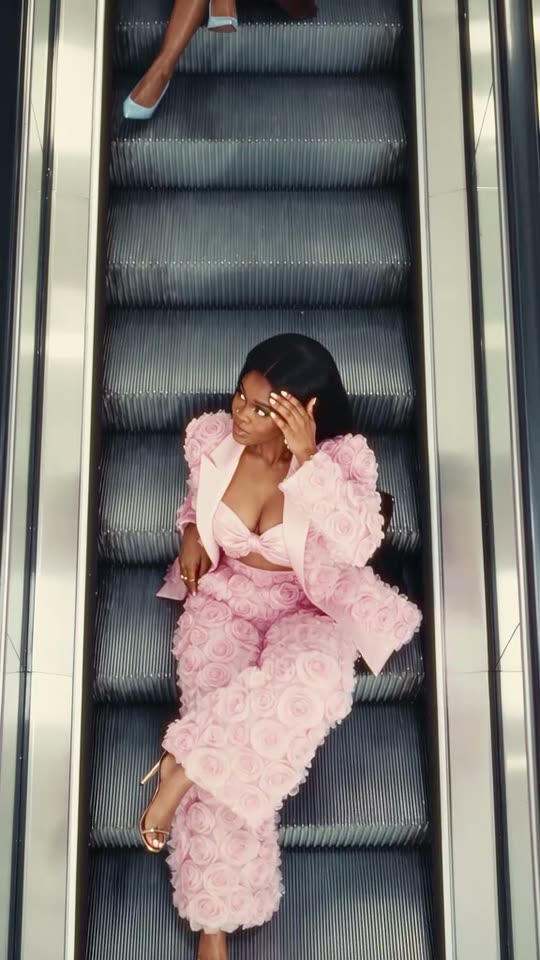
The original AI reel by @abimbola_fits, which this template copies: the escalator carries her through a pink rose suit, a burgundy dress, a color-block sweater and a denim dress with red boots.

Use this reference
Step by step

How to make the Escalator Outfits video on MakeViral

Everything runs in the browser. No editing app, no prompt to write, no watermark.

  1. Add your photo

    Press "Create your own" and add you, face clear. Take it with the camera or pick it from your library.

  2. Press Generate

    The button shows the price. Genjutsu Motion puts your photos into the Escalator outfits trend clip and copies it shot by shot for 13 seconds, with the reel's original song. You write no prompt.

  3. Download or share

    The video is ready in a few minutes as a 9:16 MP4. Download it, share it from your phone, or find it later in your Library.

Which photo works best?

Use one sharp photo with your face clear and big enough to see well, from the waist up or closer. The video looks down from high above, so your face is small in the frame. A clear, front-facing face keeps you looking like you in every outfit.

  • The four outfits come from the reel or from your own words, never from your photo. MakeViral first makes a close portrait from your photo, so only your face and hair go into the video.
  • Face visible: no sunglasses, no hat, no heavy filter.
  • Daylight or a bright room. Any background works; the video sets the scene.
  • One person per photo.
  • Use your own photo, or one of an adult who said yes. Never a celebrity or a stranger.

Where did the Escalator Outfits trend start?

No single creator owns the escalator outfit change. Fashion creators were already posting top-down escalator outfits on TikTok in 2025: on 26 June 2025 @lara_bsmnn posted "Outfits of the week escalator edition", which had 227,300 plays by 16 October 2026, and on 11 October 2025 @misstchillo sat on an escalator in a new outfit on every cut, captioned "pov: you took an escalator video every time you dressed cute".

In 2026 the format went AI. On 3 June 2026 the AI fashion tool WeShop AI published a how-to for "the viral AI escalator video", saying "You have probably seen this video style all over Instagram lately". On 12 October 2026 @abimbola_fits posted an AI version with five looks, made with Higgsfield. It is still small: on 16 October 2026 the TikTok tag #escalatoroutfits had 18 videos and 326,000 views, and #escalatorfitcheck had 40 videos.

  1. @lara_bsmnn posts "Outfits of the week escalator edition", filmed from above; it has 227,300 plays on 16 October 2026. TikTok

  2. @misstchillo sits on an escalator in a new outfit on every cut: "pov: you took an escalator video every time you dressed cute". TikTok

  3. WeShop AI publishes a guide to "the viral AI escalator video": an overhead escalator scene with outfit changes cut to the beat. WeShop AI

  4. @abimbola_fits posts an AI escalator video with five looks, made with Higgsfield. MakeViral's version copies it. TikTok

  5. @kaylala6774 posts "Escalator outfits for fall", four looks on the same escalator, shot from above. TikTok

Copy and paste

The Escalator Outfits prompt

You do not need these: the one-tap flow runs them for you, together with the trend clip. [Image 1] and [Image 2] are your two photos, and [Video 1] is the trend clip the video copies.

1 photo: you, face clearGenjutsu Motion13 s · 480p · 9:16168 credits
Video prompt

Replace the young woman with long straight black hair who sits and lounges on the moving escalator steps with the person from image 1: keep that face, hair and skin tone exactly, in every outfit, also when two looks are on screen at once. Take only the face, hair and skin tone from image 1, never the clothes: in every shot the person wears the outfit of the video. Keep every outfit, every new look that rides in from the top of the frame, the escalator, the steel side panels, the light, the motion and the camera of the video.

530 characters

How many credits does it cost?

You pay per video in credits, and the create page shows the exact price on the Generate button before you spend anything. The one-tap price covers the video, made in one step from your photos and the trend clip, charged once. One video is 168 credits, so the smallest one-time pack that covers it is $39.99 for 450 credits, with no subscription. The cheaper models are there if you run the prompts by hand in AI Video.

Video modelSettingsCredits
Genjutsu Motion (this template)13 s, 480p, copies the trend clip, one tap168

One-time packs and plans are on the pricing page. A failed video gives its credits back.

How does the escalator outfit change work?

The escalator is the edit. In the real clips a phone looks straight down over the rail at a long escalator, and the creator sits or lounges on the moving steps in a different outfit for each take. In the AI version that MakeViral copies, the escalator carries the person down through the frame, and as one look leaves at the bottom, the next look already rides in at the top. It looks like an escalator fashion editorial, an outfit inspiration post and a small magic trick at once.

Our template copies the AI escalator reel by @abimbola_fits from 12 October 2026, cut to 13 seconds and four looks. First Nano Banana 2 makes a close portrait from your photo, so only your face and hair go into the reel. Then Higgsfield Genjutsu puts you in place of the woman in the reel, shot by shot, so every look rides in exactly where it does in the original. Your face, hair and skin tone come from your photo. The outfits, the escalator and the camera come from the reel.

With Your outfits you write your own look for any of the four rides. MakeViral first changes those looks in the reel itself (FLUX.3 Edit Video), so the new outfits still arrive with the escalator, and then puts you in. It is an escalator photoshoot without the escalator, the camera or the four changes of clothes.

Which looks are in the video, and can you write your own?

The reel's four looks, in order:

  1. A pink rose-textured blazer and matching wide trousers over a pink bralette, with gold sandals.
  2. A burgundy corset midi dress and jacket over a pale blue shirt and tie, with a pale blue bag and pale blue heels.
  3. A green and rust-orange knit sweater, a long frayed denim skirt and black lace-up boots.
  4. A denim corset dress over a white shirt with a red tie, a red belt and red knee boots.

The model redraws the clothes on your body, so small details can change from run to run. The cut and the colors of each look stay close to the reel.

Your outfits: on the create page, open Your outfits and write any look you want, for example "All-white suit" for outfit 1 or "Black evening gown" for outfit 2. Name the clothes, the colors, the shoes and the bag. Every look you leave empty stays as in the reel, so you can change one look or all four, and plan your own escalator outfit ideas before you buy them. A written look costs a few credits more, because MakeViral first changes the outfits in the reel itself. Logos, brand names and copies of famous characters are left out.

The reel's looks are women's looks. A man can write four looks of his own, but the body and the pose stay the reel's, so the result fits women's styling best.

Which sound should you post it with?

There is no one song for the escalator outfit trend. @lara_bsmnn's escalator fit check used a mashup sound, and most other clips, the AI reel we copy included, use an "original sound". Creators pick whatever is trending that week.

Your video comes with the original sound of the reel it copies, so it is ready to post. You can turn the sound off on the result screen. The sound belongs to its owners, and MakeViral gives you no rights to it.

To use a trending sound, add it in TikTok, Instagram or YouTube when you post, from their licensed library, and lower the original sound. Hashtags: #escalatoroutfits is the tag of the trend, and #outfitchange and #outfittransition reach a much wider fashion audience.

What can go wrong, and how do you fix it?

This version is new, and we have not run it with test photos yet. It uses the same setup as our ceiling fan template, which kept the person the same in all four looks in our tests. These are the problems to look out for:

What goes wrongWhyWhat to do
The face looks less like youThe face is small in a top-down shotUse a sharp, front-facing photo with the face big and in good light, then run it again.
Sunglasses appear in one lookThe woman in the reel wears them in the sweater lookWrite your own outfit 3, or run it again.
An outfit detail differs from the reelThe model redraws the clothes on your bodyThat is normal. The cut and the colors stay close to the reel.
A soft patch on the black bag in look 3We blurred a brand logo in the reelNothing to fix, or write your own outfit 3.
The clip looks soft on a big screenGenjutsu makes 480p videoIt is made for a phone screen, where 480p looks fine.
A written outfit looks a little different from your wordsThe model draws the look in the reel's pose and lightName fewer things, for example a color and one piece of clothing, and run it again.
FAQ

Escalator Outfits trend questions

What is the escalator outfit change?
It is a fashion clip filmed from straight above a long escalator. The person sits or lounges on the moving steps, and every time the escalator brings them through the frame, they wear a new outfit. Creators post it as an escalator fit check or as "outfits of the week, escalator edition".
How do I make an AI escalator video from one photo?
Press "Create your own" on this page, add one photo with your face clear and press Generate. MakeViral puts you into a viral AI escalator reel, so you ride through four looks. You write no prompt, and the clip lands in your Library as a vertical MP4. To pick your own looks, open Your outfits first.
Is the escalator outfit change AI or real?
Both exist. Fashion creators film it for real in malls, with a phone held over the rail and one take per outfit. Since mid-2026 AI tools make it from photos, and the reel this template copies, by @abimbola_fits, was made with AI. Your escalator outfit change AI video needs no escalator and no filming.
How do you film the escalator outfit trend for real?
Stand at the top of a long, quiet escalator and hold the phone over the rail, pointing straight down, or ask a friend to film. Ride down in the same pose for every take, change outfits between takes, then cut the takes together on the beat. Ask the mall first, keep the phone strap on your wrist, and never block other riders.
Can I choose the outfits?
Yes. Open Your outfits on the create page and write your own look for any of the four rides, for example "Red dress with red high heels". A look you leave empty stays as in the reel. MakeViral changes those looks in the reel first, so each new outfit still arrives with the escalator.
What escalator outfit ideas work best?
Looks that contrast hard in color and shape: a bright suit, a dark dress, a cozy knit, a denim look. The escalator outfit transition reads best when each look is clearly different from the last, the same reason the escalator runway and escalator fashion show clips use bold colors.
What is the best escalator pose for the video?
You do not pose: the reel sets the pose. The woman in the reel sits back on the steps, crosses her legs, leans on one hand and touches her hair, the poses fashion creators use in their escalator photoshoot and escalator photo ideas posts. Genjutsu copies those moves onto you.
Is this the same as the escalator trend?
No. The posts called the "escalator trend" on TikTok are a different clip, filmed on famous long escalators in places like Taipei, Macau and Singapore. The escalator video trend on this page is the escalator outfit change: one person, a camera from above, and a new outfit on every ride.
How long is the video?
13 seconds, vertical 9:16 at 480p, with the reel's original sound. It takes a few minutes, and you can leave the page while it runs: the finished clip waits in your Library.
Does the escalator outfit video cost credits?
Yes. Each video costs credits, and the create page shows the exact price on the Generate button before you spend anything. Your own outfits cost a few credits more, because the reel is changed first. If a video fails, the credits come back.
Can I post my escalator video on TikTok or Instagram?
Yes. The MP4 has no watermark, so you can post it to TikTok, Reels or Shorts as it is. The reel's sound belongs to its owners: check the platform's music rules before you use the clip in an ad. Keep the platform's AI label on, and tag it #escalatoroutfits or #outfitchange.

Make your own Escalator Outfits video

Add one photo and tap once. No prompt to write. 168 credits.

No watermark. A failed video gives its credits back. Secure checkout by Stripe.