Back

AI Snow Globe: You as a 3D Cartoon Figure Inside a Christmas Globe

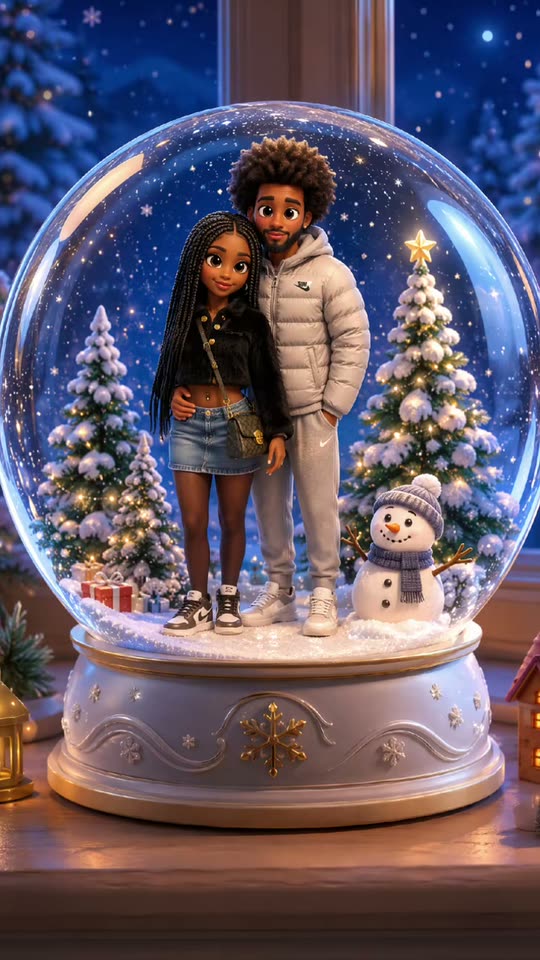
One photo becomes a cute 3D cartoon version of you, standing in the snow inside a glass Christmas globe with a little tree, a snowman and warm lights. Your face, hair and clothes stay yours.

The original AI Snow Globe reel by @aitrenddropOriginal reel
  • 1 photo you add
  • 2K photo you can turn into a video
  • 9:16 for TikTok, Reels, Shorts
  • No watermark

No prompt to write: Add your photo and tap once

Create your own

Ready in a few minutes · Photo · From 3 credits

The AI snow globe trend, also called the Pixar snow globe filter, turns one photo into a cute 3D cartoon figure of you inside a Christmas snow globe, with falling snow and warm lights. It spread on TikTok in November 2026. Add one photo (two for a couple, or your pet) and get your AI Christmas snow globe in one tap.

Also called Pixar snowglobe filter · CapCut snow globe filter · Christmas snow globe filter

Example

What the AI Snow Globe photo looks like

This is the trend's own clip, a CapCut filter result posted by @aitrenddrop: a couple's mirror selfie turns into two 3D cartoon figures in a snow globe, with the clip's own sound. Your result is one new still picture made from your own photo in the same idea, not a copy of this clip; the video version moves the globe for 5 seconds. No two runs come out the same.

Original reel by @aitrenddrop, 9 s

The trend clip by @aitrenddrop: a couple's mirror selfie turns into two 3D cartoon figures standing in the snow inside a Christmas globe, with a tree, a snowman and warm lights.

Step by step

How to make the AI Snow Globe photo on MakeViral

Everything runs in the browser. No editing app, no prompt to write, no watermark.

  1. Add your photo

    Press "Create your own" and add you, whole body or waist up, face clear. Take it with the camera or pick it from your library.

  2. Press Generate

    The button shows the price. Nano Banana 2.1 puts your photo into the AI Snow Globe scene and makes one 2K photo. You write no prompt.

  3. Download or share

    The photo is ready in a few minutes as a 9:16 2K image. Download it, share it from your phone, turn it into a video, or find it later in My videos.

Which photo works best?

Use one sharp photo, whole body or waist up, with your face clear and turned to the camera. The AI keeps your face, hair, glasses and the clothes from the photo, so wear the outfit you want your figure to wear.

  • Light from the front. Daylight from a window or a bright room. A dark or backlit face gives a vague cartoon face.
  • Close is better than far. The figure stands inside a globe, so its face is small in the picture. Your face should be big and sharp in the photo you upload, not a tiny face in a wide shot.
  • One person per photo. For the Couple or friends version, add one photo per person: photo 1 stands on the left, photo 2 on the right. A group photo with many faces is what this kind of filter does worst.
  • For your pet, a photo of the whole animal, sharp, at its eye level, with the face and the markings in view.
  • No sunglasses and no hat that hides the hair, unless you want them on the figure.

Where did the AI Snow Globe trend start?

Putting yourself in a snow globe with AI is not new. On 9 April 2025, the X user @balconychy shared a short prompt that turns the people in a photo into "a cute chibi-style 3D design" inside a snow globe on a tabletop by a window, and the prompt went into the popular lists of Gemini and ChatGPT image prompts with examples from both. In late 2025 the idea became one-tap effects: a creator called it the "CapCut Snow Globe Ai Filter Trend" on 15 November 2025, and a TikTok effect named "New Christmas globe" reached 69,500 views by 1 December 2025.

The 2026 wave is the Pixar snow globe filter. On 14 November 2026, the CapCut template account @aitrenddrop posted a couple's mirror selfie that turns into two 3D cartoon figures standing in a snowy globe, with the caption "Trying the pixar snowglobe trend". Its sound was used in 71 videos by 17 November, every one of its top clips from the last three days, and #pixarsnowglobe had 147,000 views. The top posts came from accounts in the US and the UK. The trend is early: no clip of it had one million views yet.

  1. @balconychy shares the "3D Q-version Couple Snow Globe" prompt on X: the people in a photo become cute 3D figures inside a snow globe by a window. X

  2. A TikTok post titled "CapCut Snow Globe Ai Filter Trend" shows a selfie turned into a figure in a snow globe. TikTok

  3. A TikTok effect called "New Christmas globe" (#aisnowglobe) puts a photo inside a snow globe; the post reaches 69,500 views. TikTok

  4. @aitrenddrop posts the Pixar snow globe filter on a couple's mirror selfie; the clip's sound starts the 2026 wave. TikTok

  5. The trend sound is in 71 videos, all of its top clips from the last three days, and #pixarsnowglobe has 147,000 views. TikTok

Copy and paste

The AI Snow Globe prompts

You do not need this: the one-tap flow runs it for you. The photo prompt puts your photo into the scene. Want to change it? Copy it and edit it in AI Photo.

Solo

1 photo: you, whole body or waist up, face clearNano Banana 2.1Photo · 2K · 9:163 credits
Photo prompt

Transform the person in the attached image into a snow globe scene. Overall environment: The snow globe is placed on a tabletop by the window, with a blurred, warm-toned background. Sunlight passes through the globe, casting golden sparkles that gently illuminate the surrounding darkness. Inside the globe: The character is in a cute 3D animated cartoon design, like a modern animated feature film, smiling at the camera with eyes full of joy. The character wears their own clothes and colors from the photo and keeps their own face, hair and glasses, so their friends recognize them at once. It is an original cartoon character of this person, not an existing cartoon or film character. The whole figure stands from head to feet on soft white snow in the middle of the globe and fills most of the globe's height, with a small decorated Christmas tree with warm lights, a little snowman and a few tiny glowing houses around it. Snowflakes drift inside the glass. The clear glass globe sits on a white carved base with small warm lights, and the whole globe and its base are in view, filling most of the picture. Vertical 9:16. No text, no letters, no logo, no watermark, no sticker, no frame and no border.

1207 characters

Couple or friends

2 photos: you (left), face clear + your partner, friend or pet (right)Nano Banana 2.1Photo · 2K · 9:163 credits
Photo prompt

Transform the two people in the attached images into a snow globe scene. The person in image 1 stands on the LEFT, the person in image 2 stands on the RIGHT. Overall environment: The snow globe is placed on a tabletop by the window, with a blurred, warm-toned background. Sunlight passes through the globe, casting golden sparkles that gently illuminate the surrounding darkness. Inside the globe: The characters are in a cute 3D animated cartoon design, like a modern animated feature film, standing close together, their faces turned three-quarters to the camera, with eyes full of love. Each character wears their own clothes and colors from their own photo and keeps their own face, hair, skin tone and glasses. Never blend the two faces and never swap them. They are original cartoon characters of these people, not existing cartoon or film characters. If an image shows an animal, that place is that same animal as a cute 3D cartoon figure with its own face, fur colors and markings, not a person. Both figures stand from head to feet on soft white snow in the middle of the globe and fill most of the globe's height, with a small decorated Christmas tree with warm lights, a little snowman and a few tiny glowing houses around them. Snowflakes drift inside the glass. The clear glass globe sits on a white carved base with small warm lights, and the whole globe and its base are in view, filling most of the picture. Vertical 9:16. No text, no letters, no logo, no watermark, no sticker, no frame and no border.

1518 characters

Pet

1 photo: your pet, whole bodyNano Banana 2.1Photo · 2K · 9:163 credits
Photo prompt

Transform the pet in the attached image into a snow globe scene. Overall environment: The snow globe is placed on a tabletop by the window, with a blurred, warm-toned background. Sunlight passes through the globe, casting golden sparkles that gently illuminate the surrounding darkness. Inside the globe: The pet is in a cute 3D animated cartoon design, like a modern animated feature film, looking at the camera with big bright eyes. It is the same species and breed, with the same face, eyes, ears, muzzle, fur colors, fur length and markings as in the photo, and the natural body volume and proportions of that animal: never flattened, squashed or stretched. The whole pet sits on soft white snow in the middle of the globe and fills most of the globe's height, with a small decorated Christmas tree with warm lights, a little snowman and a few tiny glowing houses around it. Snowflakes drift inside the glass. The clear glass globe sits on a white carved base with small warm lights, and the whole globe and its base are in view, filling most of the picture. Vertical 9:16. Exactly the animals in the photo, no people. No text, no letters, no logo, no watermark, no sticker, no frame and no border.

1202 characters

Snow globe video

1 photo: you, whole body or waist up, face clearKling 3.05 s · 1080p · 9:1629 credits
Step 1 · Photo prompt

Transform the person in the attached image into a snow globe scene. Overall environment: The snow globe is placed on a tabletop by the window, with a blurred, warm-toned background. Sunlight passes through the globe, casting golden sparkles that gently illuminate the surrounding darkness. Inside the globe: The character is in a cute 3D animated cartoon design, like a modern animated feature film, smiling at the camera with eyes full of joy. The character wears their own clothes and colors from the photo and keeps their own face, hair and glasses, so their friends recognize them at once. It is an original cartoon character of this person, not an existing cartoon or film character. The whole figure stands from head to feet on soft white snow in the middle of the globe and fills most of the globe's height, with a small decorated Christmas tree with warm lights, a little snowman and a few tiny glowing houses around it. Snowflakes drift inside the glass. The clear glass globe sits on a white carved base with small warm lights, and the whole globe and its base are in view, filling most of the picture. Vertical 9:16. No text, no letters, no logo, no watermark, no sticker, no frame and no border.

1207 characters
Step 2 · Video prompt

The snow globe in the image comes to life in the same cute 3D animated cartoon style. Keep the character, the face, the hair, the clothes, the globe, the base and the room exactly as in the image. The snowflakes inside the globe begin to swirl, creating a beautiful, miniature blizzard. The character waves at the camera with a smile, while the small Christmas tree glows with warm golden lights. If the character is an animal, it tilts its head and moves its ears instead of waving. The camera slowly pulls back from the globe, showing the whole globe on its base by the window. One continuous shot, no cuts. The glass stays closed and clear, and the character stays inside the globe at the same size, with the same face from the first frame to the last. No text, no letters, no logo, no watermark.

799 characters

How many credits does it cost?

You pay per photo in credits, and the create page shows the exact price on the Generate button before you spend anything. The one-tap price covers one 2K photo, charged once. One photo is 3 credits, so the smallest one-time pack that covers it is $9.99 for 100 credits, with no subscription. A smaller 1K photo costs less if you run the prompt by hand in AI Photo.

ModelSettingsCredits
Solo: Nano Banana 2.1 (this template)2K photo, 9:16, one tap3
Couple or friends: Nano Banana 2.1 (this template)2K photo, 9:16, one tap3
Pet: Nano Banana 2.1 (this template)2K photo, 9:16, one tap3
Snow globe video: Kling 3.0 (this template)5 s, 1080p + 1 scene photo, one tap29
Nano Banana 2.1 (by hand in AI Photo)1K photo, 9:16, same prompt2

One-time packs and plans are on the pricing page. A failed photo gives its credits back.

Which snow globe version should you pick?

VersionPhotosWhat you get
Solo (default)1 photo of youOne 3D cartoon figure of you in the snow inside the globe, smiling at the camera
Couple or friends2 photos: left, then rightTwo figures side by side in one globe, close together, like the viral couple clip
Pet1 photo of your dog, cat or other petYour pet as a cute 3D cartoon figure in the globe, with its own face, fur and markings
Snow globe video1 photo of youYour snow globe picture first, then a 5 second video: the snow swirls, your figure waves and the camera pulls back from the globe, with the trend's sound

The three photo versions give one AI snow globe photo, a tall still picture (9:16), ready for a story, a Christmas card or a profile picture. The video version is the closest to the TikTok filter clip, which shows the globe moving.

The prompt behind the AI snow globe

The CapCut snow globe template is closed: it shows no prompt. The most shared snow globe AI prompt is the one @balconychy posted on X in April 2025, and it works in Gemini and ChatGPT: "Transform the person in the attached image into a snow globe scene. Overall environment: The snow globe is placed on a tabletop by the window, with a blurred, warm-toned background. Sunlight passes through the globe, casting golden sparkles that gently illuminate the surrounding darkness. Inside the globe: The characters are in a cute chibi-style 3D design, gazing at each other with eyes full of love."

Our versions keep those words and their order and change only what the trend and the face need: a 3D animated film look in place of chibi (the Pixar-style look of the 2026 filter), faces turned toward the camera so they stay recognizable, the tree, the snowman and the white base of the filter clip, and rules that keep your own face. You can copy the prompt from the create page and paste it into AI Photo, or let the one-tap flow run it for you. Gemini AI snow globe pictures and ChatGPT snow globe prompt results can look quite different from run to run; ours adds the face rules that general chat apps leave out.

What can go wrong, and how to fix it

  • The face looks like someone else. The figure is small inside the globe, so the AI has fewer pixels for your face. Upload a closer, sharper photo and run it again.
  • Too realistic, or too cartoon. The style changes a little from run to run. If it looks like a real photo of you in a glass ball, run it again; each run is a new picture.
  • Two people blended. In the couple version, use two separate photos, one person each. One photo with both of you often merges the faces.
  • Text on the base. Some snow globe filters print "Merry Christmas" on the base. Our prompt asks for no text, so the picture stays clean for your own caption.
  • The pet changed breed. Use a sharp photo with the whole body and the face in view; a dark or blurry pet photo is the usual cause.
FAQ

AI Snow Globe trend questions

What is the AI snow globe trend?
It turns one photo into a cute 3D cartoon figure of you inside a Christmas snow globe, with falling snow, a small tree and warm lights. The 2026 wave is the Pixar snow globe filter, a CapCut template that spread on TikTok from 14 November 2026. Earlier versions were a 2025 Gemini and ChatGPT prompt and a 2025 TikTok effect.
How do I get the Pixar snow globe filter?
On MakeViral, press "Create your own", add one photo with your face clear, and press Generate. On TikTok the filter is a CapCut template that promoters link from their profiles. Our page is not CapCut: it is an AI snow globe filter with its own prompt and rules that keep your face.
Is there a snow globe filter on TikTok?
Yes, it spreads as a snow globe TikTok trend: creators use a CapCut snow globe template and post the result with its sound. In 2025 there was also a TikTok effect called "New Christmas globe". The snow globe filter works on a photo, not live in the camera, so it is a snow globe photo filter: there is no snow globe camera filter or snow globe selfie filter to film with.
Can I put my pet in a snow globe?
Yes. Pick the Pet version and add one photo of your dog, cat or other pet. Your pet becomes a cute 3D cartoon figure in the globe with its own face, fur colors and markings. It is the pet snow globe many people make as a Christmas card.
Can I make a couple snow globe?
Yes. Pick Couple or friends and add two photos, one person each: photo 1 stands on the left, photo 2 on the right. The viral 2026 clip was a couple, so this is the closest copy of it. A photo of your pet works in either slot too.
What is the snow globe AI prompt?
The most shared one is by @balconychy (X, April 2025): "Transform the person in the attached image into a snow globe scene", with the globe on a tabletop by a window and the people in a cute chibi-style 3D design. Our versions keep its words and add a 3D animated film look, the tree and snowman of the filter, and face rules. The full prompt is on the create page.
Can I make an AI snow globe video?
Yes. Pick Snow globe video: your snow globe picture is made first, then a 5 second video where the snow swirls, your figure waves and the camera pulls back from the globe. It plays the trend's own sound, which you can turn off on the result screen. It costs more than the picture; the create page shows the price.
Is this an AI snow globe generator or an app?
It is an online AI snow globe generator that runs in your browser, so there is no snow globe photo app or snow globe picture app to install. Your picture lands in My videos, where you can download it.
Is it the Pixar snow globe from the short film?
No. People also search "pixar snow globe" for an old animated short about a snowman in a snow globe. This trend only borrows the 3D animated look. Our pictures show you, not any film character, and never use a studio's characters, logos or titles.
Will the figure look like me?
That is the goal: the prompt keeps your face shape, eye color, hair, skin tone, glasses and clothes, and the figure only changes into a 3D cartoon style. The face is small inside the globe, so a close, sharp photo matters most. If a run looks off, run it again.
Does the AI snow globe cost credits?
Yes. A snow globe picture costs a few credits and the video version costs more; the create page shows the exact price on the Generate button before you spend anything. If a run fails, the credits come back.
More trends

Other AI video templates

Make your own AI Snow Globe photo

Add one photo and tap once. No prompt to write. 3 credits.

No watermark. A failed video gives its credits back. Secure checkout by Stripe.