Kids Drawing to Life AI: Your Child's Drawing as a Real Video
Add a photo of a drawing. AI turns the lion, monster, car or family dog on the paper into a real, living one in a real place, with the same wobbly shape and colors, and makes an 8-second video of it moving, with the drawing as a small inset at the top.
The kids drawing to life trend turns a child's drawing into a real, living version of itself: a crayon lion with stick legs becomes a fluffy real lion on the savanna that still has stick legs, and a scribbled bus drives down a real road. You need one photo of the drawing, nothing else.
Also called kids drawings come to life · drawings to life · children's drawings brought to life by AI · AI realistic transformation · if kids drawings were real · different kinds of lion
Example
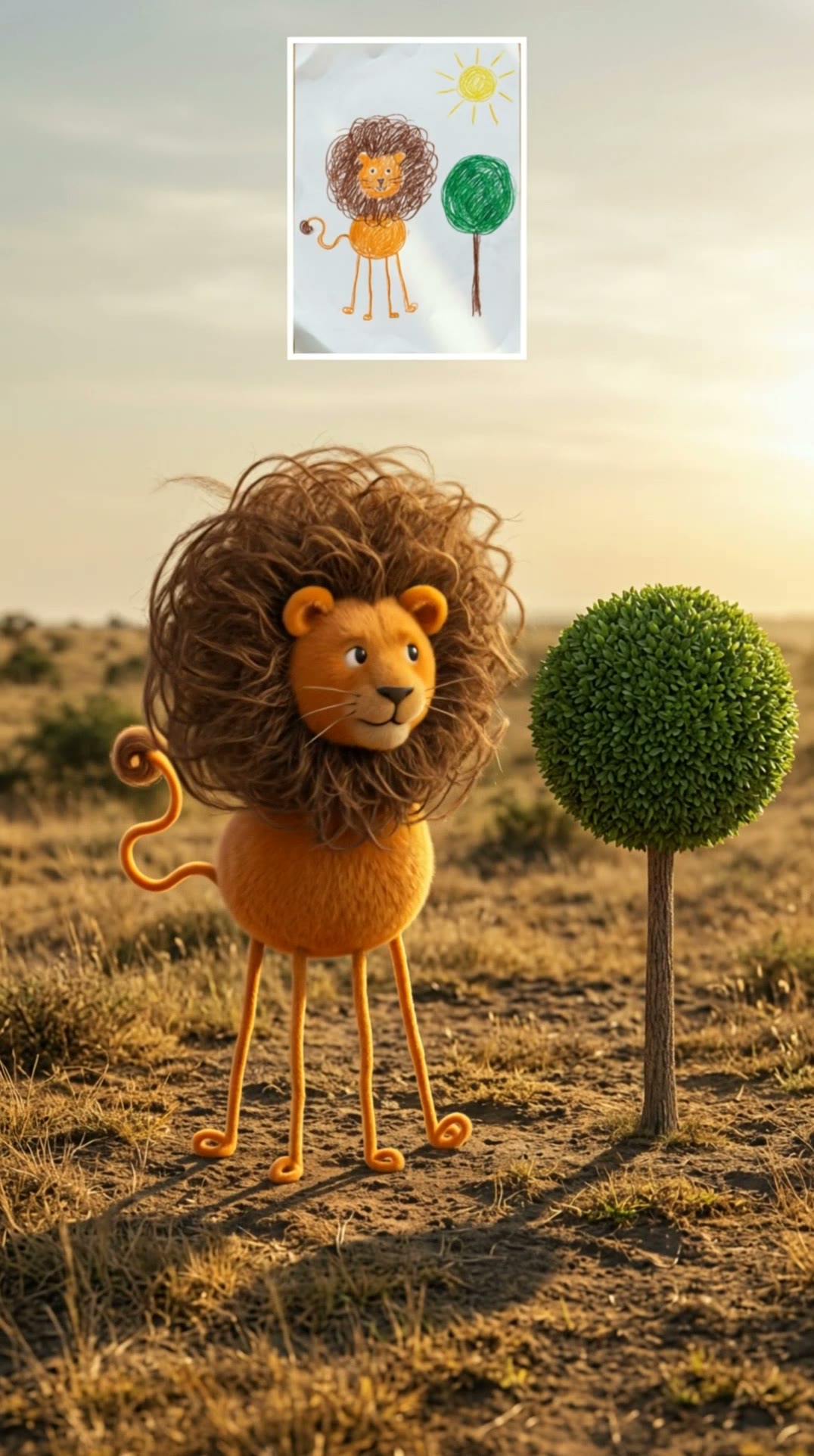
What the Drawing to Life AI video looks like
Made from the prompts on this page. The people and pets are AI-made, not real persons, and the sound is original. Your result will differ from run to run.
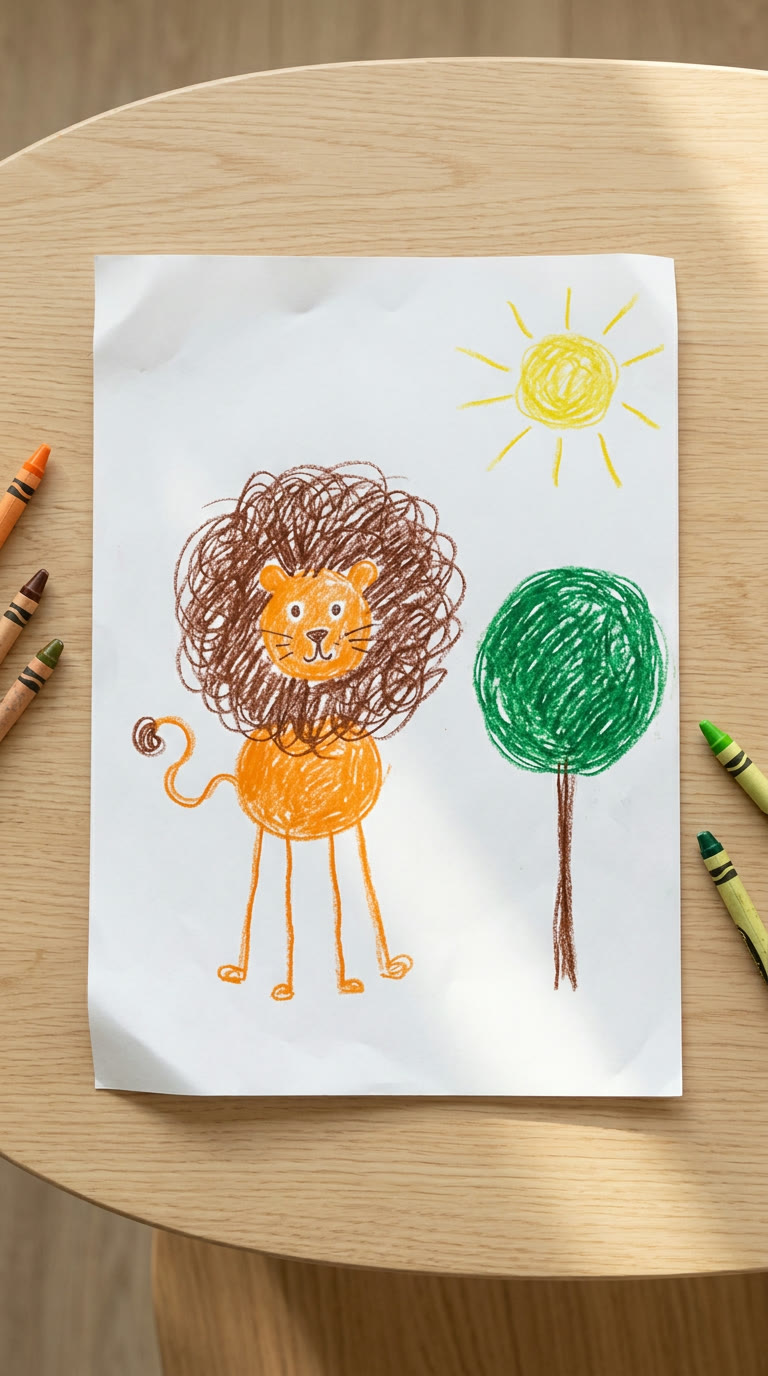
InputResult, 8 s, with sound
A crayon drawing of a lion with a huge mane and stick legs comes to life in the savanna: it looks around, walks to the camera and roars.
Step by step
How to make the Drawing to Life AI video on MakeViral
Everything runs in the browser. No editing app, no prompt to write, no watermark.
Add your photo
Press "Create your own" and add your drawing: one animal or monster, the whole paper. Take it with the camera or pick it from your library.
Press Generate
The button shows the price. MakeViral builds the Drawing to Life scene with your photos, then Kling 3.0 animates it for 8 seconds with original sound. You write no prompt.
Download or share
The video is ready in a few minutes as a 9:16 MP4. Download it, share it from your phone, or find it later in My videos.
Which photo works best?
Upload one photo of the drawing.
Flat and straight. Lay the paper on a table and shoot from straight above in daylight, so the whole drawing fills the photo with no shadow of your phone on it.
One main subject. One lion, one car or one dog works best. A busy page with many things gives the AI too many choices.
Pick the right version. Animals, monsters, dinosaurs and dragons go to Creature, cars, buses, planes and boats to Vehicle, and a drawing of your own dog or cat to Pet.
Bold colors help. Crayon, marker and paint carry over as the real colors. A pencil outline works too; it comes out in natural colors.
No people in the photo. Keep hands and faces out of the shot. A person on the drawing becomes a plush toy figure, never a real human.
Where did the Drawing to Life AI trend start?
The idea of showing kids what their drawings would look like if they were real is older than this wave. On TikTok, "If Kid's Drawings Were Real" clips of odd, real-looking animals seen through binoculars were posted in February 2025 (899,600 views for @official_jaythekid) and again on 14 February 2026, when @funny_car_598's version reached 11.4 million views. In July 2025 a TikTok mom, @the_loud_house_of_6, shared the prompt she used to turn her children's animal drawings into photorealistic pictures.
The wave of autumn 2026 started in India. @penguin8_, a tutor in Jammu, posted reels of children holding up their drawings, and the AI editor @happylily86 turned them into real animals, credited as "Original drawings & videos by @penguin8_, AI Realistic Transformation by HappyLily". Her reel of 22 October drew more than 815,000 likes, and the lion reel of 30 October ("Different kinds of lion") passed 2.1 million likes by 3 November: a dozen kids' lions, each one a fluffy real lion with the drawing's long legs, round body or tall mane. Car and bus versions followed from accounts like @drawingsto_life.
@official_jaythekid posts "If Kid's Drawings Were Real" on TikTok: kids' drawings as real-looking animals, 899,600 views by 3 November 2026. TikTok
@the_loud_house_of_6 shares her prompt for turning her children's animal drawings into photorealistic pictures that keep "all imperfections exactly as they are". TikTok
@funny_car_598's "If Kid's Drawings Were Real" becomes the first clip of the style past one million views that we found: 11.4 million views and 1.3 million likes. TikTok
@happylily86 posts students' drawings from @_penguin8__ (Jammu, India) turned into real animals: 815,861 likes by 3 November. Instagram
@happylily86's "Different kinds of lion" reel turns a class of lion drawings into real lions: 2,161,018 likes and 10,336 comments by 3 November. Instagram
The same lions on TikTok pass 2.1 million views in three days, and the #kidsdrawing tag gains new videos faster every day. TikTok
Copy and paste
The Drawing to Life AI prompts
You do not need these: the one-tap flow runs them for you. A photo prompt puts your photo into the scene, then a video prompt animates it. Want to change them? Copy them and edit them in AI Photo and AI Video.
Creature
1 photo: your drawing: one animal or monster, the whole paperKling 3.08 s · 1080p · 9:1646 credits
Step 1 · Photo prompt
Take this drawing created by my child (the uploaded image) and turn it into a photorealistic image or realistic 3D render. It is supposed to be an animal or a creature (a lion, an elephant, a dinosaur, a dragon, a monster, a bird, a fish or a bug). Keep the original shape, proportions, line lengths, and all imperfections exactly as they are in the drawing, including any uneven lines or strange markings. Do not correct, smooth out or change any details of its design. Make it look like this thing exists in the real world, with realistic textures (fur, feathers etc) and natural lighting. You can add realistic shadows and an environment or background that fits the feel of the drawing, but don't change anything about the form or the details of what they created. No pencil, crayon textures or hand drawn styles: this must look like a photo or CGI render, but staying true to their imagination. Keep the same number of legs, wheels, eyes, ears, horns, wings and tails, the same colors in the same places, and the same face and expression. Never correct the drawing into a normal one: if the drawing has a huge round mane on four thin stick legs, the real one has exactly that. The place: a real place that fits it, a lion or an elephant on a sunny savanna, a dinosaur or a monster in a green valley, a bird on a branch, a fish in clear water. Warm golden-hour sunlight, a real shadow on the ground, real eyes with catchlights, shot on a full-frame camera at the creature's eye level. The whole creature in frame, from the top of its head to its feet, in the lower two thirds of the picture, facing the camera or three-quarters to it. At the top center of the frame, a small rectangular inset shows the uploaded drawing itself, exactly as in the uploaded image, about one quarter of the frame width, with a thin white border. If the drawing also shows a person, that person becomes a soft plush toy figure of the same shape and colors with stitched button eyes, never a real human. Vertical 9:16. No people, no human faces, no hands, no children anywhere in the picture. No text other than what is on the drawing in the inset, no captions, no logos, no watermark.
2166 characters
Step 2 · Video prompt
The real creature from the drawing comes alive in its real place, one continuous shot on film. It keeps exactly the shape, proportions, colors and face of the image in every frame: never more normal, never taller or thinner, no extra legs, no new parts. It blinks, looks around with curiosity, then takes a few steps toward the camera on its own legs in the way its body allows (a bird flaps, a fish swims), its fur or feathers move in the breeze, and it ends with a small happy roar or call. The camera slowly pushes in at its eye level. Warm sunlight, grass and leaves move gently in the wind. Audio: the natural sounds of the place and the creature's own small roar or call, no music. The small drawing inset at the top center stays exactly the same and in the same place for the whole clip. No people, no human faces, no hands, no text, no logos, no watermark.
1 photo: your drawing: one car, bus, plane or boat, the whole paperKling 3.08 s · 1080p · 9:1646 credits
Step 1 · Photo prompt
Take this drawing created by my child (the uploaded image) and turn it into a photorealistic image or realistic 3D render. It is supposed to be a vehicle (a car, a bus, a truck, a train, a tractor, a plane, a boat or a rocket). Keep the original shape, proportions, line lengths, and all imperfections exactly as they are in the drawing, including any uneven lines or strange markings. Do not correct, smooth out or change any details of its design. Make it look like this thing exists in the real world, with realistic textures (glossy paint, metal, glass, rubber tires etc) and natural lighting. You can add realistic shadows and an environment or background that fits the feel of the drawing, but don't change anything about the form or the details of what they created. No pencil, crayon textures or hand drawn styles: this must look like a photo or CGI render, but staying true to their imagination. Keep the same number of legs, wheels, eyes, ears, horns, wings and tails, the same colors in the same places, and the same face and expression. Never correct the drawing into a normal one: if the drawing has a huge round mane on four thin stick legs, the real one has exactly that. The place: a real place that fits it, a car, bus, truck or tractor on an open road at sunset, a train on rails, a plane in the sky above the clouds, a boat on blue water, a rocket on a launch pad. It is full size, with its paint in the drawn colors, and its windows are dark and tinted, so nobody shows inside. Warm golden-hour light, a real shadow on the ground, shot on a full-frame camera low at wheel height. The whole vehicle in frame, in the lower two thirds of the picture, front three-quarters to the camera. No brand names, badges, emblems, logos or number plates on the vehicle. At the top center of the frame, a small rectangular inset shows the uploaded drawing itself, exactly as in the uploaded image, about one quarter of the frame width, with a thin white border. If the drawing also shows a person, that person becomes a soft plush toy figure of the same shape and colors with stitched button eyes, never a real human. Vertical 9:16. No people, no human faces, no hands, no children anywhere in the picture. No text other than what is on the drawing in the inset, no captions, no logos, no watermark.
2304 characters
Step 2 · Video prompt
The real vehicle from the drawing comes alive, one continuous shot on film. It keeps exactly the shape, proportions and colors of the image in every frame: never a normal car, no extra wheels, no new parts, no badges. Its lights come on and it moves the way it should: a car, bus, truck or tractor drives along the road toward the camera at a calm speed with its wheels turning, a train rolls along the rails, a plane flies through the sky, a boat sails over small waves, a rocket lifts off with a cloud of smoke. The camera tracks with it low and smoothly, the background moves by, warm sunset light. The windows stay dark: nobody shows inside. Audio: the vehicle's own engine, wheels, wind or water sounds, no music. The small drawing inset at the top center stays exactly the same and in the same place for the whole clip. No people, no human faces, no hands, no text, no logos, no watermark.
1 photo: your drawing of your dog, cat or other pet, the whole paperKling 3.08 s · 1080p · 9:1646 credits
Step 1 · Photo prompt
Take this drawing created by my child (the uploaded image) and turn it into a photorealistic image or realistic 3D render. It is supposed to be our family pet (a dog, a cat, a rabbit, a hamster, a bird or another pet). Keep the original shape, proportions, line lengths, and all imperfections exactly as they are in the drawing, including any uneven lines or strange markings. Do not correct, smooth out or change any details of its design. Make it look like this thing exists in the real world, with realistic textures (fur, feathers etc) and natural lighting. You can add realistic shadows and an environment or background that fits the feel of the drawing, but don't change anything about the form or the details of what they created. No pencil, crayon textures or hand drawn styles: this must look like a photo or CGI render, but staying true to their imagination. Keep the same number of legs, wheels, eyes, ears, horns, wings and tails, the same colors in the same places, and the same face and expression. Never correct the drawing into a normal one: if the drawing has a huge round mane on four thin stick legs, the real one has exactly that. The place: a real cozy home, a sunny living room with a rug and a sofa, or a green backyard garden, with a small ball on the floor next to the pet. Soft natural daylight, a real shadow on the floor, a real wet nose and real shiny eyes with catchlights, shot on a full-frame camera low at the pet's eye level. The whole pet in frame, from the ears to the paws, in the lower two thirds of the picture, facing the camera or three-quarters to it. At the top center of the frame, a small rectangular inset shows the uploaded drawing itself, exactly as in the uploaded image, about one quarter of the frame width, with a thin white border. If the drawing also shows a person, that person becomes a soft plush toy figure of the same shape and colors with stitched button eyes, never a real human. Vertical 9:16. No people, no human faces, no hands, no children anywhere in the picture. No text other than what is on the drawing in the inset, no captions, no logos, no watermark.
2122 characters
Step 2 · Video prompt
The real pet from the drawing comes alive at home, one continuous shot on film. It keeps exactly the shape, proportions, colors, markings and face of the image in every frame: never a normal-shaped pet, no extra legs, no new parts. It tilts its head, wags its tail or twitches its whiskers, then playfully pounces on the small ball, rolls it with its paws and bounces happily toward the camera. The camera stays low at its eye level and follows it gently. Soft daylight. Audio: the pet's own happy sounds (a bark, a meow or a squeak), paws on the floor, the ball rolling, no music. The small drawing inset at the top center stays exactly the same and in the same place for the whole clip. No people, no human faces, no hands, no text, no logos, no watermark.
You pay per video in credits, and the create page shows the exact price on the Generate button before you spend anything. The one-tap price covers the scene photo and the video, charged once. One video is 46 credits, so the smallest one-time pack that covers it is $9.99 for 100 credits, with no subscription. The cheaper models are there if you run the prompts by hand in AI Video.
Video model
Settings
Credits
Kling 3.0 (this template)
8 s, 1080p + 1 scene photo, one tap
46
Seedance 2.0 Fast (by hand in AI Video)
8 s, 720p + 1 photo
55
Veo 3.1 Fast (by hand in AI Video)
8 s, 720p + 1 photo
14
One-time packs and plans are on the pricing page. A failed video gives its credits back.
What does the drawing to life AI keep, and what does it change?
The joke of the trend is that the real version keeps every mistake of the drawing. A lion with a giant round mane and four thin legs does not turn into a normal lion: it turns into a real, fluffy lion with a giant round mane and four thin legs.
Stays from the drawing
Becomes real
The outline and the shape of each part
Fur, feathers, scales, skin or glossy paint with fine detail
Long legs, a round body, a big head, a short tail
Real eyes with light in them and a real shadow on the ground
The number of legs, wheels, eyes, horns and wings
A real place that fits: a savanna, a road at sunset, the sky, the sea, a living room
The colors where the child put them
Warm golden-hour light, like a real camera shot
The face and the expression
Movement and its own sounds in the video
Your drawing also stays in the picture as a small inset at the top, so everyone sees the before and the after in one clip.
How MakeViral makes it: the drawing photo first becomes one real-life picture, with a prompt that starts with the words a parent shared for this look ("keep the original shape, proportions, line lengths, and all imperfections"), and then one of the best AI video models available brings that picture to life for 8 seconds, with natural sounds. The create page shows the exact price on the Generate button, and every run comes out a little different.
Creature, Vehicle or Pet: which version should you pick?
All three take one photo of one drawing.
Creature is the trend as it went viral, kids drawings to real animals: a lion, an elephant, a dinosaur, a dragon, a monster, a bird or a fish becomes a real creature in a place that fits it. It looks around, walks toward the camera on its own odd legs and gives a small roar.
Vehicle is for cars, buses, trucks, trains, tractors, planes, boats and rockets. The drawing becomes a full-size real vehicle in the drawn colors, and it drives, flies or sails at sunset.
Pet is for a drawing of the family dog, cat, rabbit or hamster. It becomes a real-looking pet with the drawing's shape and markings, at home or in the garden, and it plays with a ball.
There is no version that turns a drawn person into a real human. If a drawing shows a person next to the animal or the car, that person becomes a plush toy figure.
How do you post a drawing to life video like the trend?
The viral posts use two formats.
Drawing, then the real one: first a shot of the drawing on the table, then the AI video. The video already has your drawing as an inset at the top, so it works on its own too.
A series: "Different kinds of lion", one drawing after another, each one followed by its real version. Make one video per drawing and put them in a row.
Credit the artist. The big posts name the child artist's family account and the AI part separately. Keep the platform's AI label on, so nobody thinks the creature is real.
Hashtags: posts of kids drawings turned real use #kidsdrawing (38,100 TikTok videos on 3 November 2026, with new videos coming in faster every day), #kidsimagination (6,900, for the kids imagination side of the joke) and #drawingstolife (35 videos and 12.2 million views).
What goes wrong, and how do you fix it?
What goes wrong
What our prompt does, and what you can do
It comes out as a normal animal or car
The prompt keeps the drawing's shape and bans a "corrected" one. Run it again, or pick Best
The wrong kind of animal
Very loose drawings can read as another animal. Upload a sharper photo, or a drawing with one clear subject
The inset moves or changes in the video
The prompt keeps it still. Run it again, or pick Best
A person shows up
The prompt leaves people out, and a drawn person becomes a plush toy
A logo or a number plate
The prompt bans badges, logos and plates on vehicles
The colors look washed out
Pale pencil gives pale colors. Crayon or marker drawings come out brighter
If a run fails, the credits come back.
FAQ
Drawing to Life AI trend questions
What is the kids drawing to life trend?+
It is a video trend where a kids drawing becomes real: AI turns it into a realistic, living version of itself that keeps the drawing's funny shape: a lion with stick legs becomes a real lion with stick legs. It went viral on Instagram at the end of October 2026, with real lions made from a group of children's lion drawings.
How do I bring kids drawing to life with AI?+
Bring your child's drawing to life in three steps. Press "Create your own", pick Creature, Vehicle or Pet, upload one photo of the drawing and press Generate. MakeViral makes the real-life version and an 8-second video of it moving, and puts it in My videos. You write no prompt.
Is it kids drawing to life or kids drawing to real life?+
Both names mean the same trend, and people also search for kids drawing to real life AI and kids drawing come to life AI. Whatever you call it, the result here is a drawing to real life AI video: the drawing becomes a real creature, vehicle or pet that moves.
Does it work with a pencil sketch?+
Yes. A pencil sketch works like a colored drawing: the sketch to life AI gives it natural colors where the paper has none, so a grey outline of a cat becomes a cat with a real coat. Anything drawn by hand works, from a toddler's scribble to a careful sketch, so grown-ups who want to bring their own drawing to life with AI can use it too.
Can it turn a drawing into a realistic photo instead of a video?+
Every run makes the real-life picture first, and the video starts from it. The result you get is the video, with the drawing as a small inset at the top.
Will it keep the drawing's shape, or make it look normal?+
The prompt is written to keep the shape: the same outline, the same number of legs or wheels, the same long or short parts and the same colors. That is the whole joke of the trend. Sometimes a run comes out a little more normal: run it again or pick Best.
What can the drawing show?+
Animals, monsters, dinosaurs, dragons, birds and fish (Creature), cars, buses, trucks, trains, planes, boats and rockets (Vehicle), and the family dog, cat or other pet (Pet). One main subject per drawing works best.
Can it turn a drawing of a person into a real person?+
No. MakeViral never turns a drawing of a person into a realistic human or child. A drawn person next to the animal or the car becomes a plush toy figure, and the photo you upload should show only the drawing, with no hands or faces.
What prompt did the trend use?+
The big accounts never shared theirs. The one drawing to real life AI prompt we found word for word is a TikTok mom's (@the_loud_house_of_6, July 2025): "turn them into photorealistic images or realistic 3D render ... Keep the original shape, proportions, line lengths, and all imperfections exactly as they are". Our picture prompt starts with her words, then adds the place, the inset and the rules that keep people out. You do not need to type any of it.
Is there a kids drawing to life app?+
MakeViral works in the browser on a phone or a computer, so it works like a drawing to real life generator with no app to install: one photo of the drawing in, a video out. It also covers the kids drawing to video AI idea: the AI can animate a kids drawing as a real creature, not as a cartoon.
How long is the video, and does it have sound?+
8 seconds, vertical (9:16), with its own natural sounds: the creature's roar or call, the engine, or the pet's bark or meow, and no music. Add the trend's sound when you post it.
Is my child's drawing private?+
Yes. MakeViral does not post your photo or the video anywhere or show them to other users. The video goes to your private My videos page, and you can delete it there at any time.
Does it cost credits?+
Yes. The create page shows the exact price on the Generate button before you spend anything. Best costs more than Standard. If a run fails, the credits come back.