Back

Alors On Danse AI: Put You and a Friend in the Studio Sketch

One of you taps the beat on a mini keyboard next to a laptop. The other claps, points at the screen, laughs and leans into the lens. Two people or two pets, in a viral AI reel of the sketch, with its sound.

The original Alors On Danse reel by @kennyslowbirdOriginal reel
  • 2 photos you add
  • 11 to 15 s clip with sound
  • 16:9 like the original clip
  • No watermark

No prompt to write: Add your photos and tap once

Create your own

Ready in up to several minutes · From 168 credits

The Alors On Danse AI trend recasts a 2010 comedy sketch in a white studio: one person taps a mini keyboard next to a laptop while the other claps, points at the screen and leans into the camera. You need two photos: the DJ at the keyboard first, then the MC who claps. Pets work too.

Also called Alors On Danse meme · Alors On Danse sketch · Alors On Danse making of · Jamel Debbouze Stromae sketch · Keyboard Duo Dance

Example

What the Alors On Danse video looks like

This is the original reel. Your photos replace its characters, so your video follows the same shots with your faces. No two runs come out the same.

Original reel by @kennyslowbird, 15 s

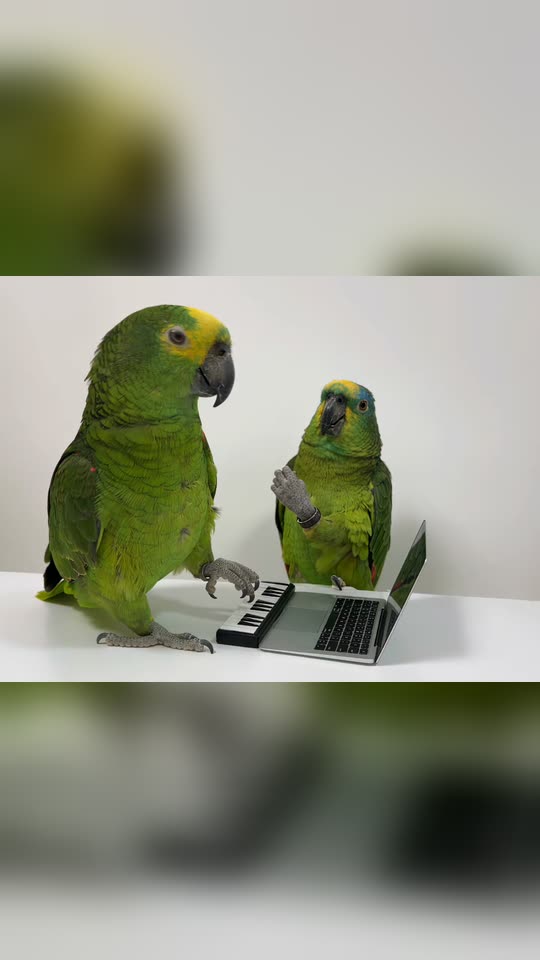
The original reel by @kennyslowbird: two AI-made parrots. One taps the mini keyboard next to the laptop, the other waves to the beat, points at the screen and leans into the lens.

Use this reference
Original reel by @martaegianluca, 15 s

The original reel by @martaegianluca: the comedy duo put their own faces into the sketch with AI. She taps the mini keyboard; he points, laughs and leans into the lens, then both jog toward the camera.

Use this reference
Step by step

How to make the Alors On Danse video on MakeViral

Everything runs in the browser. No editing app, no prompt to write, no watermark.

  1. Add the two photos

    Press "Create your own" and add dj at the keyboard, then mc who claps. Add them in this order, because the order decides who is who in the scene. Take them with the camera or pick them from your library.

  2. Press Generate

    The button shows the price. Seedance 2.5 puts your photos into the Alors On Danse trend clip and copies it shot by shot for 11 seconds, with the reel's original song. You write no prompt.

  3. Download or share

    The video is ready in up to several minutes as a 16:9 MP4. Download it, share it from your phone, or find it later in My videos.

Which photo works best?

You need two photos, the DJ first. Photo 1 is the DJ who stands at the table and taps the mini keyboard. Photo 2 is the MC who claps, points at the screen and laughs.

  • One person or pet per photo, with the face clear and in good light.
  • Waist up or full body works best. In Pet, the second pet's face fills the frame at the end, so a sharp photo matters most there.
  • No sunglasses, no caps that hide the face and no beauty filters.
  • Any background works: the reel sets the white studio.
  • For Pet, pick a photo where the whole animal is visible and in focus.
  • Use photos of yourself, of adults who agreed, or of your own pets. Never a celebrity or a stranger.

Where did the Alors On Danse trend start?

The scene comes from Made in Jamel, a 2010 comedy DVD by Jamel Debbouze. In a scripted sketch, Jamel pretends to teach Stromae his hit "Alors on danse" at a laptop and a mini keyboard in a white studio. A TikTok upload of the sketch from 1 June 2026 had 10.1 million views by 10 October, and the song was back on TikTok: a street-dance clip to it from 28 September passed 4.9 million views.

The AI version started in late September 2026, when an AI clip put two well-known tech CEOs in the two roles. People then recast the sketch with footballers, film and cartoon characters, pets and themselves, often captioned "MC X x DJ Y", and many tagged Higgsfield. On 3 October @kennyslowbird posted two AI parrots in the roles; by 10 October it had 805,700 views and 64,600 likes. On 5 October the Italian comedy duo Marta e Gianluca posted an AI version with their own faces.

The two versions on this page copy those two reels.

  1. Jamel Debbouze's comedy DVD Made in Jamel includes a scripted sketch in which he pretends to teach Stromae "Alors on danse" at a laptop and a mini keyboard. top5apps

  2. A TikTok upload of the sketch goes viral again. It has 10.1 million views and 793,100 likes by 10 October. TikTok

  3. An AI clip puts two well-known tech CEOs in the two roles of the sketch, and AI recasts of the scene start to spread. top5apps

  4. @kennyslowbird posts two AI parrots in the sketch: "My parrots rewrote ALORS ON DANSE!". It has 805,700 views and 64,600 likes by 10 October. TikTok

  5. The Italian comedy duo Marta e Gianluca post an AI version with their own faces in the two roles. It has 101,800 views by 10 October. The tag #alorsondanseai starts the same day. TikTok

  6. US Google searches for "alors on danse" reach their high for the past 30 days, and "alors on danse ai" is the fastest-rising related search, per Google Trends data we pulled that day.

Copy and paste

The Alors On Danse prompts

You do not need these: the one-tap flow runs them for you, together with the trend clip. [Image 1] and [Image 2] are your two photos, and [Video 1] is the trend clip the video copies.

Human

2 photos: dj at the keyboard + mc who clapsSeedance 2.511 s · 720p · 16:9168 credits
Video prompt

Recreate the reference video [Video 1] shot for shot: the same white studio, the same table with the laptop and the mini keyboard, the same light, the same camera angles, cuts, timing and moves. The ONLY change: the woman with curly blonde hair in the white t-shirt who taps the mini keyboard is now the person in [Image 1], and the man with red glasses, a grey beard, a dark red shirt and a navy vest who claps and points is now the person in [Image 2]. The one at the keyboard = the person in [Image 1], in EVERY shot: copy the exact face from [Image 1] - face shape, eye color and eye shape, eyebrows, nose, mouth, skin tone, age, hair color, hair length and hairstyle, and any beard, moustache, glasses or freckles exactly as in the photo. They wear the clothes and shoes from [Image 1]. The one who claps = the person in [Image 2], in EVERY shot: copy the exact face from [Image 2] - face shape, eye color and eye shape, eyebrows, nose, mouth, skin tone, age, hair color, hair length and hairstyle, and any beard, moustache, glasses or freckles exactly as in the photo. They wear the clothes and shoes from [Image 2]. NO red glasses: no glasses of any kind on this person unless [Image 2] shows glasses, and no grey beard unless [Image 2] shows one. The same real people in every frame, from the first shot to the last, so their friends instantly recognize them. Never morph, never drift back to the original people's faces, never add or remove facial hair. Both people change: neither person from the video stays anywhere, also in the dance after the cut, in the wide shots, far away and when only the back of a head shows. The dancers in shot 2 are the same two, never the curly-haired woman or the grey-bearded man. Where a photo hides the legs or feet: plain trousers and shoes that fit their own outfit and age, never the light pink trousers, red pointed flats, navy vest, dark trousers or black shoes from [Video 1]. If [Image 1] shows a child, that child taps the keys and dances at a child's height, with small, playful moves. If [Image 2] shows a child, that child points beside the table, then dances and jogs at a child's height, with small, playful moves, never an adult body. Do not mix the two faces: [Image 1] is only the one at the keyboard, [Image 2] is only the one who claps. If an image shows an animal, that one is that animal with its own face, fur and markings, in the same place and doing the same moves, not a person. Shots, matching the reference: 1. 0-6 s, medium shot at the table: the person from [Image 1] taps the mini keyboard and nods to the beat, while the person from [Image 2] beside them taps the wrist, points at the laptop screen and laughs. 2. 6-11 s, hard cut, no table: the same two laugh and dance in the white studio, then face the camera and jog with high steps while the camera pulls back to full body, side by side, [Image 1] on the left, [Image 2] on the right. Anatomy rules: one head per person, on that person's own shoulders. A face never appears on knees, legs, hands or clothes. Exactly two of them in every frame, no one else. No text, no logos.

3110 characters

Pet

2 photos: pet at the keyboard + pet who leans inSeedance 2.515 s · 720p · 16:9228 credits
Video prompt

Recreate the reference video [Video 1] shot for shot: the same white table, the same laptop and mini keyboard, the same white wall and light, the same camera angles, cuts, timing and moves. The ONLY change: the big green parrot at the mini keyboard is now the pet in [Image 1], and the smaller parrot behind the laptop is now the pet in [Image 2]. Both parrots change: no parrot from the video stays anywhere, also in the lean-in close-up at the end. The pet at the keyboard = the pet in [Image 1], in EVERY shot: the same species and breed, face, eyes, ears, muzzle, fur colors, fur length and markings as in [Image 1], with the natural body volume and proportions of that animal: never flattened, squashed, stretched or merged with anything. It taps the mini keyboard next to the laptop. The pet behind the laptop = the pet in [Image 2], in EVERY shot: the same species and breed, face, eyes, ears, muzzle, fur colors, fur length and markings as in [Image 2], with the natural body volume and proportions of that animal: never flattened, squashed, stretched or merged with anything. It waves to the beat, points at the screen and leans close into the camera at the end. No green feathers and no beak unless the photo shows a bird. Each pet looks exactly like its own photo in every frame, from the first shot to the last. Do not mix the two pets: [Image 1] is only the pet at the keyboard, [Image 2] is only the pet behind the laptop. Anatomy rules: one head per pet, on its own body. Exactly two animals. No people, no text, no logos.

1541 characters

How many credits does it cost?

You pay per video in credits, and the create page shows the exact price on the Generate button before you spend anything. The one-tap price covers the video, made in one step from your photos and the trend clip, charged once. Each version has its own price: Human 168 credits, Pet 228 credits. The cheaper models are there if you run the prompts by hand in AI Video.

Video modelSettingsCredits
Human: Seedance 2.5 (this template)11 s, 720p, copies the trend clip, one tap168
Pet: Seedance 2.5 (this template)15 s, 720p, copies the trend clip, one tap228

One-time packs and plans are on the pricing page. A failed video gives its credits back.

What happens in the Alors On Danse AI video, shot by shot?

Each version is a viral AI reel of the sketch, and your two photos replace its two characters. The table, the laptop, the mini keyboard, the white studio and the camera come from the reel. Your clip follows this plan:

BeatHumanPet
The beatThe DJ taps the mini keyboard and nods. The MC stands behind the laptop, claps, gestures to the beat and points at the screen (about 6 s).The pet at the keyboard taps the keys. The other pet stands behind the laptop, waves a paw to the beat and points (about 12 s).
The lean-inNo lean-in: Human goes from the beat straight to the jog.The second pet leans close into the lens, and the clip ends on its face (about 3 s).
The endingBoth jog side by side toward the camera while it pulls far back into the empty white studio (about 5 s).No jog: the parrot reel ends on the lean-in.

Human or Pet? Human copies the reel by Marta e Gianluca, with the jog at the end. Pet copies the parrot reel by @kennyslowbird, which went the most viral. Press "Create your own" and choose one, or press the button under its reel on this page. Your two photos stay in place when you switch.

Which model, and what does it cost?

HumanPet
ModelSeedance 2.5 puts the two of you into the reelSeedance 2.5 puts your pets into the reel
Length11 s15 s
FrameThe reel's own almost square frame, 720pThe reel's own 4:3 frame, 720p
SoundThe reel's original sound, which you can turn offThe same

The exact price of each version shows on the Generate button before you spend anything.

Both versions use Seedance 2.5 because it copies the reel itself shot by shot and, in our tests, kept the faces and the pets from the photos in every shot, also in big close-ups. A cheaper reference model kept the reel's own people in the Human reel, so we took it off.
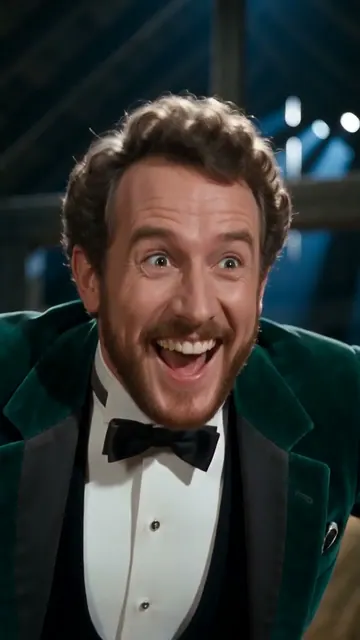
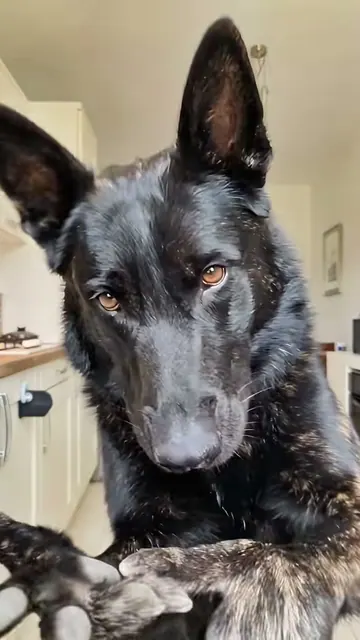
Who should be the DJ, and who the MC?

The joke is the contrast: one calm player who builds the beat, and one loud partner who hypes it up and steals the shot. These casts fit:

  • You and your best friend. The classic. Give the MC part to the louder one, because the MC gets the big reactions.
  • You and your partner. A couple version, like the Marta e Gianluca reel.
  • Two coworkers or teammates. Post it with "MC Name x DJ Name", the caption style of the trend.
  • Your two pets. A cat at the keyboard and a dog as the MC, or the other way round. Use Pet.

Caption ideas: "MC Sam x DJ Alex", "How we made the song", "The making of our hit", "My cat produced this". The rising Google searches for "alors on danse making of" in October 2026 show the joke people look for: the fake behind-the-scenes of a hit.

What goes wrong, and how do you fix it?

ProblemFix
The DJ and the MC swap rolesPhoto 1 is always the DJ at the keyboard, photo 2 the MC who leans in. Run it again with the photos in the other order.
A face looks less like the photoUse a sharper, front-facing photo with the face in good light, then run it again.
Red glasses or a grey beard show up (Human)The man in the reel has both. The prompt bans them; run it again if they come back.
A pet gets green feathers or a beak (Pet)The reel stars parrots. Use a sharper photo with the whole pet in view, then run it again.
The clip is not verticalBoth versions keep the reel's own frame: almost square for Human, 4:3 for Pet. TikTok and Reels show it with bars, or you can crop it when you post.
The video model refuses a photoSome models refuse some real faces. The credits come back; try another photo.

Every run is a new take, so results differ from run to run.

Which sound, caption and hashtags should you post it with?

Your clip comes with the original sound of the reel it copies, so it is ready to post as it is. You can turn the sound off on the result screen and add one when you post instead: "Alors on danse" by Stromae is in the TikTok sound library.

The song belongs to its owners, and MakeViral gives you no rights to it. Music rules differ from platform to platform, so check them before you use the clip in an ad or a paid post.

Hashtags: #alorsondanse has more than 40,000 TikTok videos, and #alorsondanseai, which started on 5 October 2026, had 133 by 10 October. The parrot reel adds #musicproducer. Keep the platform's AI label on.

Want another duo trend? Put you and a friend in the orange booth of the AI Hotel Lobby trend, or make your two pets scream and dance in the Smalltown Boy AI dance.

FAQ

Alors On Danse trend questions

What is the Alors On Danse AI trend?
It is a viral AI video format from late September and October 2026. AI puts two new people or pets into a 2010 comedy sketch in a white studio: one taps a mini keyboard next to a laptop, the other claps, points at the screen and leans into the camera. People caption it "MC X x DJ Y" with the names of the two.
Where does the Alors On Danse studio clip come from?
It is a scripted sketch from Made in Jamel, a 2010 comedy DVD by Jamel Debbouze. Jamel pretends to teach Stromae his song "Alors on danse". It looks like a real making-of, but it was written as a joke. A TikTok upload of the sketch had 10.1 million views by 10 October 2026.
How do I make the Alors On Danse AI video with my own photos?
Press "Create your own" and choose Human or Pet. Add photo 1, the DJ at the keyboard, then photo 2, the MC who claps and leans in, and press Generate. The button shows the price first. You get a clip with the reel's sound (11 seconds for Human, 15 for Pet), and the video waits in My videos when it is ready. You write no prompt.
Which photo is the DJ and which is the MC?
Photo 1 is always the DJ, who stands at the table and taps the mini keyboard. Photo 2 is always the MC, who claps, points at the screen and laughs. Give the MC part to the one with the biggest reactions.
Can I make it with my cat or dog?
Yes. Pick Pet. It copies the viral parrot reel by @kennyslowbird and puts your two pets in place of the parrots, shot by shot, with Seedance 2.5. A cat and a dog, two cats or two dogs all work. Use photos where the whole animal is visible and in focus.
Does the video have the Alors On Danse song?
Your clip comes with the original sound of the reel it copies, and you can turn it off on the result screen. To use the official "Alors on danse" sound instead, add it from the TikTok sound library when you post. The song belongs to its owners, and MakeViral gives you no rights to it.
Which AI model makes the video?
Both versions use Seedance 2.5. It takes the reel itself and puts your two photos in place of its two characters, so the moves, the cuts and the camera stay exactly as in the reel. We chose it because, in our tests, it kept the faces from the photos in every shot, also in big close-ups.
How long is the video and what format is it?
Human makes 11 seconds at 720p in the reel's almost square frame. Pet makes 15 seconds at 720p in the reel's 4:3 frame. Both are MP4 files with the reel's original sound.
Can I put celebrities in it?
Do not. Many viral copies used famous faces, but a fake video of a real person can break platform rules and the person's rights, and some video models refuse well-known faces. Use yourself, adults who agreed, or your own pets.
More trends

Other AI video templates

Make your own Alors On Danse video

Add two photos and tap once. No prompt to write. 168 credits.

No watermark. A failed video gives its credits back. Secure checkout by Stripe.