Back

Gender Swap Filter: Meet Your Opposite Gender Self

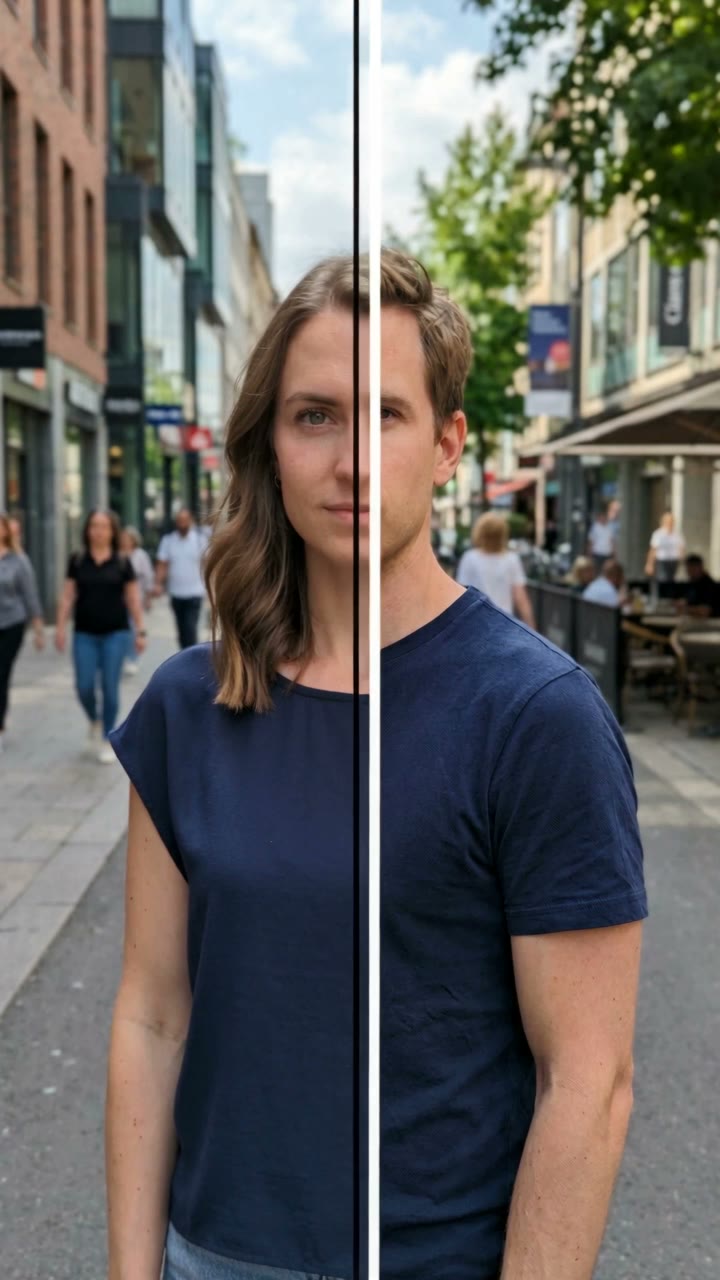
Your selfie holds for a moment, a line sweeps across it, and the other-gender you looks back with a small smile. Same eyes, same skin, same background. Would you date them?

Gender Swap Filter example video, made with AI-made peopleAI-made
  • 1 photo you add
  • 10 s clip with sound
  • 9:16 for TikTok, Reels, Shorts
  • No watermark

No prompt to write: Add your photo and tap once

Create your own

Ready in a few minutes · From 3 credits

The gender swap filter turns your photo into your opposite gender version: if you are a woman you see your male version, if you are a man you see your female version. On TikTok it runs as "Would you date your opposite self?". Upload one selfie and MakeViral makes the reveal video or the swapped photo.

Also called Would you date yourself · Opposite self filter · Genderswap filter · Gender flip filter · Other-gender me

Example

What the Gender Swap Filter video looks like

Made from the prompts on this page. The people and pets are AI-made, not real persons, and the sound is original. Your result will differ from run to run.

Input photo for Gender Swap Filter example (AI-made person)
Input
Result, 10 s, with sound

Our Swap video on an AI-made man: a line wipes his photo into his female version on the same street, then she touches her hair and smiles.

Step by step

How to make the Gender Swap Filter video on MakeViral

Everything runs in the browser. No editing app, no prompt to write, no watermark.

  1. Add your photo

    Press "Create your own" and add your selfie (18+), face clear, chest up. Take it with the camera or pick it from your library.

  2. Press Generate

    The button shows the price. Seedance 2.5 films the Gender Swap Filter scene straight from your photo, with no in-between picture, for 10 seconds with original sound. You write no prompt.

  3. Download or share

    The video is ready in a few minutes as a 9:16 MP4. Download it, share it from your phone, or find it later in My videos.

Which photo works best?

Use one clear selfie of yourself: your face toward the camera, in good light, from the chest up.

  • Your eyes, skin tone, freckles and glasses carry over. The hair keeps its color: a woman's version gets a short cut, a man's version gets longer hair.
  • A simple background works best, because it stays the same before and after the swap.
  • No sunglasses, no hand over the face, no beauty filter.
  • Swap video takes one person. Swap photo also works with a photo of you two: each of you gets swapped.
  • Adults only (18+), and only people who agreed to it. Logos and printed words on clothes are best avoided.

Where did the Gender Swap Filter trend start?

Gender swap lenses are not new: a camera lens that showed people as the other gender went viral in 2019, and face-editing apps kept the joke alive for years. The gender swap ai version is newer. In January 2026, phone-editor AI templates began to take one selfie and wipe it into the opposite gender version of the same person, under the question "Would you date your opposite self?". The first post of it we found past a million views came on 18 January 2026 (6.1 million), and by 30 January people were posting their own results with answers like "I 100% would" (6.5 million views).

The biggest post we found is from May 2026, at 7.5 million views. The trend came back in late September and October 2026: on 18 October a couple's opposite gender filter clip reached 678,000 views in the US, and on 19 October a template post reached 549,000 in the UK. The hashtag #genderswapfilter had about 12,700 videos and 135.9 million views on 25 October.

  1. A gender swap filter post made with a face-editing app passes 6 million views. TikTok

  2. An AI template post with the question "Would you date your opposite self?" reaches 6.1 million views, the first of the AI version we found past a million. TikTok

  3. People post their own results with their answers: one "I 100% would" clip reaches 6.5 million views. TikTok

  4. A user's own gender swap AI filter result reaches 7.5 million views, the biggest post we found. TikTok

  5. A couple's opposite gender filter clip reaches 678,000 views in the US, as a new wave starts. TikTok

  6. A "Gender swap AI filter trend" template post reaches 549,000 views in the UK; #genderswapfilter has about 12,700 videos on 25 October. TikTok

Copy and paste

The Gender Swap Filter prompts

You do not need this: the one-tap flow runs it for you. [Image 1] is your photo: the video model takes it as a reference and films the scene straight from it, with no photo step first.

Swap video

1 photo: your selfie (18+), face clear, chest upSeedance 2.510 s · 720p · 9:16126 credits
Video prompt

A viral "gender swap filter" selfie video made from [Image 1], vertical 9:16. Use [Image 1] as the opening look and the only identity reference for this clip. Preserve the same person's identity, facial features, skin tone, age, and overall vibe while performing a natural opposite-gender transformation based on the subject's current gender. Keep the camera fixed, with stable composition and background throughout. In the first part, show the original subject. In the middle part, use a smooth continuous wipe transition so that the hairstyle, facial contours, build, and clothing change naturally in sync. The outfit should also transform to clearly match the target gender, with appropriate cut, fit, silhouette, and styling while remaining consistent with the original scene. In the final part, complete the gender transformation and hold the result steadily, with the subject performing a subtle finishing action such as touching their hair or adjusting their hairstyle. The overall style should be realistic, natural, and clean. Do not use static split screens, complex visual effects, multiple people, text, or watermarks. Copy the exact face from [Image 1] (the face shape, eye color and eye shape, nose, lips, smile, skin tone, ethnicity, age, freckles, moles and glasses) before and after the change. Same place, light, pose and framing as in [Image 1]. For gender transformation, apply minimal and controlled adjustments instead of reconstruction: adjust hairstyle, subtle facial softness or sharpness, eyebrow thickness, and styling cues rather than altering core facial geometry; if transforming female to male, slightly increase jawline definition, reduce facial softness, slightly thicken eyebrows, simplify makeup to none, and use a short or mid-short natural hairstyle while strictly preserving original hair color, hair density, and hairline; if transforming male to female, slightly soften facial contours, refine skin texture, lightly adjust eyebrows, and apply minimal natural makeup while keeping facial structure intact. A man gets longer hair in his own hair color and no beard; a woman may get light stubble. The skin tone, ethnicity, eye color and age never change. The clothes keep their colors and fabric and become an everyday cut for the new gender, as casual as in the photo, modest and fully covered. 0-2 s: the person exactly as in [Image 1], one blink. 2-6 s: a clean, straight vertical line sweeps slowly from the left edge to the right edge: behind it the person is already the opposite-gender version, ahead of it still the original, so for a moment the face is half and half. 6-10 s: the new version touches their hair, then gives the camera a small, confident smile and raises one eyebrow. Audio: a soft whoosh, then a light pop beat. No singing, no speech. Exactly one grown adult in every frame. Friendly and natural, a playful what-if: an everyday look, never a costume, a stage look or a mocking look; nothing sexy or revealing. One head, five fingers. No text, no captions, no stickers, no logos, no watermark.

3060 characters
Swap photo

1 photo: your selfie (18+): you, or you two, faces clearNano Banana 2.1Photo · 2K · 9:163 credits
Photo prompt

Use the uploaded image as the base. Based on the photo uploaded by the user, generate the same photo with the person as a gender-transformed version (opposite gender), while strictly retaining the same core identity and recognizability; do NOT change age group, facial proportions, face shape, eye distance, nose shape, lip shape, bone structure, skin tone tendency, or key expression features; ensure the result clearly looks like the same person rather than a different individual; for gender transformation, apply minimal and controlled adjustments instead of reconstruction: adjust hairstyle, subtle facial softness or sharpness, eyebrow thickness, and styling cues rather than altering core facial geometry; if transforming female to male, slightly increase jawline definition, reduce facial softness, slightly thicken eyebrows, simplify makeup to none, and use a short or mid-short natural hairstyle while strictly preserving original hair color, hair density, and hairline; if transforming male to female, slightly soften facial contours, refine skin texture, lightly adjust eyebrows, and apply minimal natural makeup while keeping facial structure intact. A man becomes a woman with longer hair in his own hair color and no beard or moustache; a woman becomes a man, light stubble is fine. If the photo shows two or more people, each one becomes their own opposite-gender version, each in their own place; never blend their faces. Keep the pose, the expression, the background, the light and the framing exactly as in the photo, like a real phone photo. The clothes keep their colors and fabric and become an everyday cut for the new gender, as casual as in the photo, modest and fully covered. Vertical 9:16: if the photo is wider, extend the background naturally. Grown adults only, nobody added. Friendly and natural, a playful what-if: never a costume, a stage look or a mocking look; nothing sexy or revealing. No text, no logos, no watermark, no border. The only change is the gender: the identity rules below apply to the face shape, eyes and eye color, nose, lips, skin tone, ethnicity, age, freckles, moles and glasses, while the hairstyle, the facial hair, the makeup and the softer or stronger features that this prompt asks for change.

2255 characters

How many credits does it cost?

You pay per video in credits, and the create page shows the exact price on the Generate button before you spend anything. The one-tap price covers the scene photo and the video, charged once. Each version has its own price: Swap video 126 credits, Swap photo 3 credits. The cheaper models are there if you run the prompts by hand in AI Video.

Video modelSettingsCredits
Swap video: Seedance 2.5 (this template)10 s, 720p, straight from your photos, one tap126
Swap photo: Nano Banana 2.1 (this template)2K photo, 9:16, one tap3

One-time packs and plans are on the pricing page. A failed video gives its credits back.

What the gender swap filter makes

Swap video copies the look of the trend: your selfie holds for two seconds, then a straight line sweeps across the picture from left to right. Behind the line you are already your opposite gender version, ahead of it you are still you, so for a moment your face is half and half. Then the new you touches their hair and gives the camera a small smile. 10 seconds, vertical, with a light beat. It is made straight from your photo, with no in-between picture, so the face stays yours.

Swap photo makes only the picture, an AI gender swap of the same photo: the same background and pose, with you as the other gender, at high resolution. It is the cheapest version on the page and works with a couple photo too.

The change is small on purpose, the way the trend's best results look: the hairstyle, a slightly stronger or softer jaw and brows, stubble or light makeup, and your clothes in the same colors with a new cut. Your eyes, nose, lips, skin tone and age stay. This gender swap ai video generator uses top-quality AI image and video models, including Seedance 2.5. The price of each version shows on the create page before you start.

Gender swap ai filter, opposite gender filter, male version of me: one trend, many names

People search this as the gender swap ai filter, the opposite gender filter, the other gender filter or the reverse gender filter, and on TikTok it is the gender swap filter tiktok trend or simply "would you date your opposite self". If you search for the male version of me or the female version of me, the male version of me ai, the female version of me ai, a male version of me filter or a female version of me filter, it is the same idea. Some people want a moving gender swap video, a gender transformation video or a gender swap video generator, others only a gender swap photo: this page makes both. The questions people ask under the posts, like "would you date a female version of yourself" or "would you date your male self", are the whole point of the trend.

Tips for posting your opposite self

  • Use the trend's question as your caption: "Would you date your opposite self?" Then answer it honestly. "I 100% would" and "No, I would not" are both classics.
  • The video has no text, so add your own caption on top.
  • Make it with a friend or your partner and compare: whose other-gender version looks more like them?
  • Post the Swap photo next to your real photo as a two-picture carousel.
  • Keep it kind. It is a playful what-if, not a statement about anyone.
What goes wrongFix
The face looks like someone elseUse a sharp selfie, face to the camera, in good light. Every run is a new take.
The change is too smallRun it again, or use a photo with your hair visible.
The skin or age changedThat is not the trend's look: run it again. The prompt keeps your skin tone and age.
A run failsThe credits come back. Try another photo.
FAQ

Gender Swap Filter trend questions

What is the gender swap filter?
It is a filter that shows you as your opposite gender: a woman sees her male version, a man sees his female version, with the same eyes, skin and background. The AI version that went viral in 2026 wipes from your real selfie to the swapped one under the question "Would you date your opposite self?".
How do I use the gender swap filter online?
Pick Swap video or Swap photo, upload one clear selfie and start. MakeViral makes a 10-second reveal video or a high-resolution swapped photo in your browser: an opposite gender filter online, with no app to download.
Is this the gender swap filter from TikTok?
The look is the same: your selfie, a line that wipes across it and your opposite self left behind. On TikTok it comes from a phone-editor template. Here you get a finished clip without the template's text, ready to post with your own caption.
Is there a gender swap filter app?
You do not need a gender swap app. MakeViral works in the browser on your phone or computer: one photo in, a gender swap video or photo out.
Is this the Snapchat gender swap filter?
No. The gender swap filter snapchat users remember is a live camera lens from 2019. This is an AI filter: it makes a finished photo or video of your opposite self from one selfie, which you can post anywhere.
Do I need a gender swap ai prompt?
No. The prompt is built in: it keeps your face, eyes, skin tone and age and changes only the hairstyle, the facial hair or makeup, the softness of the features and the cut of your clothes. You only add the photo.
Would you date your opposite self?
That is the question of the trend. Make your Swap video, add the question as your caption and answer it in the comments. Most people answer with "I 100% would" or a firm no.
Can I use a photo of a child or a celebrity?
No. Use a selfie of yourself or of adults (18+) who agreed to it. We do not swap children, celebrities or strangers.
More trends

Other AI video templates

Template

Stones to Castle AI Trend: They Threw Stones, You Built a Castle

A crowd of angry women throws stones toward you across a green mountain valley. You stay calm, pick the stones up, and they rise into a huge Gothic castle while you smile down from its window. One photo, 15 seconds, with the reel's own song.

Read more
Template

Bby Wow Guy AI: Put Your Face in the Guy Dancing at a Quince Meme

Dance up to the camera at a quinceañera, bite the concha, chew with full cheeks while you stare into the lens, then dance away. Add one photo and become the bby wow guy, with the song.

Read more
Template

Tecktonik Dance AI: Your Turn on the String-Light Stage

Arms out wide, hands to the head, both arms up, then a flurry of sharp arm moves on a small stage under string lights: the 2000s electro dance that Cheba Man brought back in 2026. Add one photo of you or your pet and get the dance with the song.

Read more
Template

AI Caricature: Turn Your Photo Into a Funny 3D Caricature That Comes Alive

A big head on a small body, your own clothes and glasses, a few extra wrinkles and a grumpy frown that turns into a smug grin. You alone, the two of you, or your pet. One photo, 10 seconds, with sound.

Read more
Template

Symmetry Filter AI: Your Face Mirrored From the Left and the Right

Add one straight-on selfie. AI builds your left-side twin and your right-side twin, each one a mirror copy of one half of your face, and flips between them on the beat, or puts all three faces in one photo.

Read more
Template

AI Makeup Filter: Watch Your Full Glam Happen on Video

Add one photo with a bare face. AI makes the 10-second glow-up: a makeup artist's hands do your base, eyes, liner, lashes and lips, then you open your eyes and smile in full glam.

Read more

Make your own Gender Swap Filter video

Add one photo and tap once. No prompt to write. 126 credits.

No watermark. A failed video gives its credits back. Secure checkout by Stripe.