Back

365 Elevator Trend: You Two in the Sampagne AI Elevator Edit

One of you waits in a steel elevator, the other walks in, turns around and stands beside you, a glance, a pose, and both stare into the camera to the song "365". Add two photos and get your own duo edit.

The original 365 Elevator reel by @neoausdermatrix33Original reel
  • 2 photos you add
  • 14 s clip with sound
  • 16:9 like the original clip
  • No watermark

No prompt to write: Add your photos and tap once

Create your own

Ready in up to several minutes · 213 credits

The 365 elevator trend (also called the 365 Sampagne elevator AI trend) is an AI duo edit from Germany: one person stands in a steel elevator, a second walks in, turns and stands beside them, set to the song "365" by Sampagne. Add a photo of you and one of a friend, and you two take their places.

Also called 365 Sampagne elevator AI trend · Elevator 365 Sampagne AI video trend · Sampagne elevator edit · Unexpected duo edit · 365 by Sampagne AI trend

Example

What the 365 Elevator video looks like

These are the trend's own AI edits of famous duos, not MakeViral results. Your video copies the same elevator scene, with your two photos in place of the two people. No two runs come out the same.

Original reel by @neoausdermatrix33, 14 s

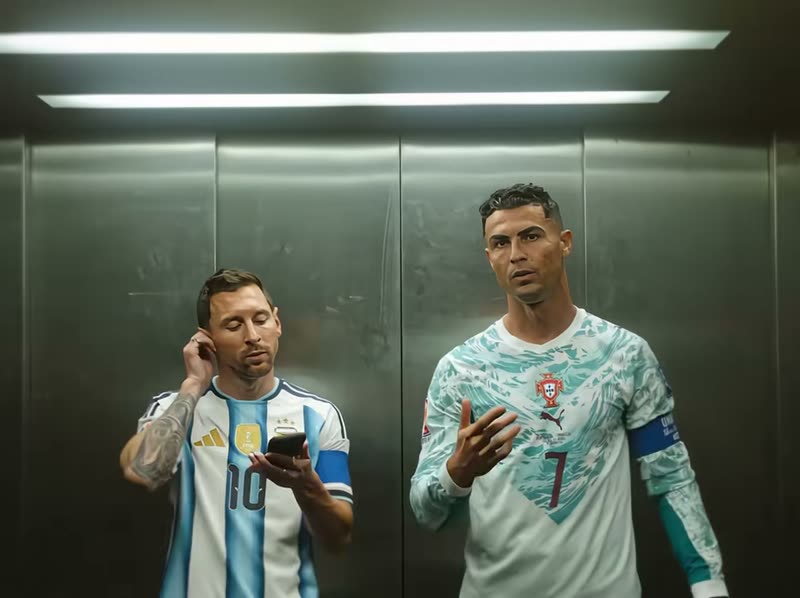
The 365 elevator edit by @neoausdermatrix33 (20 November 2026, 590,800 views): AI versions of Cristiano Ronaldo and Lionel Messi. Ronaldo waits, Messi walks in, turns, checks his phone, and both stare into the camera to "365". Duo puts you and a friend in their places.

Use this reference
Original reel by @neoausdermatrix33, 14 s

The 365 edit with AI Shirin David and Loredana by @neoausdermatrix33 (20 November 2026, 581,300 views): the same elevator, walk-in, hair touch and deadpan stare.

Use this reference
Step by step

How to make the 365 Elevator video on MakeViral

Everything runs in the browser. No editing app, no prompt to write, no watermark.

  1. Add the two photos

    Press "Create your own" and add you, face clear, then who walks in, face clear. Add them in this order, because the order decides who is who in the scene. Take them with the camera or pick them from your library.

  2. Press Generate

    The button shows the price. Seedance 2.5 puts your photos into the 365 Elevator trend clip and copies it shot by shot for 14 seconds, with the reel's original song. You write no prompt.

  3. Download or share

    The video is ready in up to several minutes as a 16:9 MP4. Download it, share it from your phone, or find it later in My videos.

Which photo works best?

Upload two photos, one person in each.

  • Photo 1 is you, the one who already waits in the elevator. Photo 2 is the one who walks in: a friend, your partner, a sibling or a coworker.
  • Waist up or knees up, face to the camera, sharp and in good light. The video shows you both from the knees up, so the clothes in your photos are the clothes in the video.
  • No sunglasses and no beauty filter. Hats and glasses only if you want them in the video.
  • The more unexpected the pair, the better the edit: a very tall and a very short friend, a formal and a sporty look, or you and your dog in photo 2.
  • Then vs. now: put a recent photo of you as photo 1 and an older photo of you as an adult as photo 2, and your past self walks in.
  • Use photos of people who said yes. Never a stranger.

Where did the 365 Elevator trend start?

The 365 elevator trend started in Germany in November 2026. The song is "365" by the German artist Sampagne (@sampagnebaby): her first TikTok snippet on 22 October 2026 made the sound, and the full song came out on 12 November.

On 19 November the German fan account @neoausdermatrix33 posted the first elevator edit: two famous faces, made with AI, meet in a brushed steel elevator under two strip lights, with the camera locked straight on. One stands still, the other walks in with the back to the camera, turns, glances over and poses, and both end on a deadpan stare. No text, no dialogue, only the song. That first clip has 440,000 views. On 20 November the account posted Cristiano Ronaldo and Lionel Messi (590,800 views), Shirin David and Loredana (581,300) and, at 18:10 UTC, a clip of two German TikTok dancers that became the first 365 edit past 1 million views.

By 22 November the account had posted more than 50 elevator duos, each caption asking "wen wollt ihr als nächstes sehen?" (who do you want to see next?), and a "Bibi then vs. now" edit, where a YouTuber meets her younger self, passed 600,000 views. Since 21 November US tutorial accounts show a CapCut template for the elevator 365 Sampagne AI video, under names like 365 elevator edit, 365 edit, 365 Sampagne edit and 365 CapCut template.

  1. Sampagne posts the first snippet of "365" on TikTok, and the sound "365" is created. The full song comes out on 12 November. TikTok

  2. @neoausdermatrix33 posts the first elevator duo edit to "365" at 20:29 UTC. It has 440,000 views by 22 November. TikTok

  3. The account posts AI Ronaldo and Messi in the elevator ("wer ist denn jetzt der goat?", 590,800 views), then a clip of two German TikTok dancers that becomes the first 365 elevator edit past 1 million views. TikTok

  4. US accounts post the first CapCut template tutorials for the "elevator 365 Sampagne AI video trend", and the "Bibi then vs. now" edit passes 600,000 views. TikTok

  5. @neoausdermatrix33 has posted more than 50 elevator duos in under three days. #365edit holds 220 TikTok videos and 11.1 million views, and the new #365elevatortrend tag appears. TikTok

Copy and paste

The 365 Elevator prompt

You do not need these: the one-tap flow runs them for you, together with the trend clip. [Image 1] and [Image 2] are your two photos, and [Video 1] is the trend clip the video copies.

2 photos: you, face clear + who walks in, face clearSeedance 2.514 s · 720p · 16:9213 credits
Video prompt

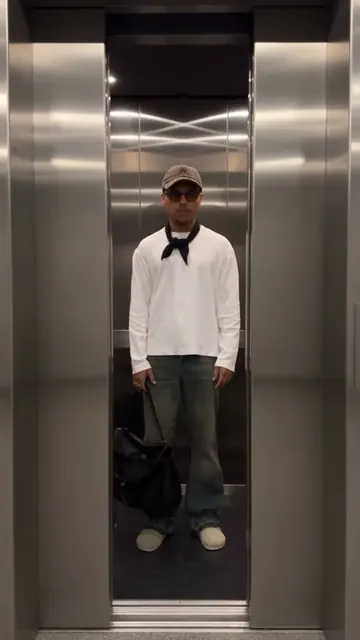
Recreate the reference video [Video 1] shot for shot: the same steel elevator with two white strip lights, the same locked front camera, one continuous take, the same timing and moves. The ONLY change: [Image 1] replaces the man who waits in the elevator from the start and ends on the right, and [Image 2] replaces the woman who walks in and ends on the left. Each photo can show a person, a pet, a toy, a cartoon or game character, a figure or an object: whoever or whatever it shows takes that place with its WHOLE body, not only the head. Do not copy the two people from [Video 1]: nothing of them stays in any frame, not their faces, hair, cap, tank top, pink neck scarf or jewelry. The one who waits = [Image 1], from head to feet in EVERY frame. If [Image 1] shows a person: copy the exact face - face shape, eye color and eye shape, eyebrows, nose, mouth, skin tone, age, hair color, hair length and hairstyle, and any beard, moustache, glasses or freckles exactly as in the photo - and the clothes from [Image 1]. NO cap, NO printed tank top and NO beard unless [Image 1] shows them. If it shows anything else: that exact subject, with its own shape, proportions, colors, surface, material and art style; its own whole body (head, torso, arms, paws, legs, feet or a base) replaces ALL of the man's body, with no human arms, hands, skin or clothes unless [Image 1] shows them; a pet keeps its natural body volume, never flattened. The one who walks in = [Image 2], from head to feet in EVERY frame, copied from [Image 2] in the same way: a person with the exact face from [Image 2] and the clothes from [Image 2], with NO pink neck scarf, NO black crop top and NO ponytail unless [Image 2] shows them; anything else with its own whole body and no human arms, hands or clothes unless [Image 2] shows them. While the back is turned to the camera, the back of the head, the hair or fur and the clothes are already those of [Image 2]. When a photo shows only a head or an upper body, add the rest so it matches. The same two in every frame, so their friends instantly recognize them. Never morph, never drift back to the original two, never mix them. Timing, one continuous take, matching the reference: 0-1 s: [Image 1] stands alone in the elevator, right of center, facing the camera, calm, and fixes the top. 1-2.5 s: [Image 2] walks in from right in front of the camera, the back to the camera, and steps to the left side. 2.5-4 s: [Image 2] turns around to face the camera, looks around and touches the hair by the ear. 4-14 s: both stand side by side, [Image 2] left, [Image 1] right, from the knees up, cool and unbothered. They glance at each other, [Image 1] touches the face and makes a small hand move, [Image 2] poses with the arms down, and both end staring straight into the camera with a calm, unimpressed face. No dialogue, nobody sings or talks. Anatomy rules: one head each, on its own body. A face never appears on hands or clothes. Exactly two in the elevator, no third person. No text, no logos, no watermark.

3040 characters
How many credits does it cost?

You pay per video in credits, and the create page shows the exact price on the Generate button before you spend anything. The one-tap price covers the video, made in one step from your photos and the trend clip, charged once. One video is 213 credits, so the smallest one-time pack that covers it is $39.99 for 450 credits, with no subscription. The cheaper models are there if you run the prompts by hand in AI Video.

Video modelSettingsCredits
Seedance 2.5 (this template)14 s, 720p, copies the trend clip, one tap213

One-time packs and plans are on the pricing page. A failed video gives its credits back.

What happens in the 365 elevator edit, second by second?

Duo copies the scene of the trend: the same steel elevator with two bright strip lights, the same locked camera, one continuous take with no cuts. Your photos take the two places:

TimePhoto 1 (you)Photo 2 (who walks in)
0 to 1 sYou stand alone in the elevator, calm, and fix your top.Not in the frame yet.
1 to 2.5 sYou wait and look ahead.Walks in from right in front of the camera, back to the camera.
2.5 to 4 sYou stay cool.Turns around, looks around and touches the hair.
4 to 14 sYou glance over, touch your face and make a small hand move, then stare into the camera.Stands beside you, poses, glances back, then stares into the camera.

How it works: the best AI video models available, including Seedance 2.5, edit a reference clip of the trend and replace both people with the two people (or pets, or characters) in your photos. You get 14 seconds at 720p in the clip's wide 4:3 frame, with the song "365" put back on after the run. A run takes 5 to 15 minutes, and the exact price shows on the Generate button before you spend anything.

Who should you put in the elevator?

The 365 edit works because the pair is unexpected: the original account put rivals, exes and odd couples side by side and asked the comments who should come next. That is why people call it the unexpected duo elevator trend, or a celebrity elevator edit when the two are famous. Ideas that work with your own photos:

  • You and your best friend, with captions like "the duo nobody expected" or "me and her after one coffee".
  • You and your partner, the couple version of the ai elevator trend.
  • Then vs. now: your younger self walks in next to you, like the "Bibi then vs. now" edit. Use an old photo of you as an adult.
  • You and your pet: a dog, a cat or any pet takes photo 2 and walks in with its own body and fur.

Want more two-person edits? Meet your younger self in 2016 Me Meets 2026 Me, change outfits in the elevator outfit change, or rap together in the hotel lobby trend.

What goes wrong, and how do you fix it?

ProblemFix
A face looks a bit offUse sharp, front-facing photos where the face fills more of the frame, and run it again. Every run is a new take.
You two swapped placesPhoto 1 is always the one who waits, photo 2 the one who walks in. Check the order and run it again.
A cap, a printed tank top or a neck scarf shows upThose come from the reference clip, and the prompt bans them unless your photo shows them. Run it again.
The clothes are not what you wantedThe video keeps the clothes from each photo. Pick photos in the outfits you want to wear.
The model refuses a photoSome photos get refused. The credits come back; try another photo.

Which sound, caption and hashtags should you post it with?

Your clip comes with the song "365" by Sampagne, the same 14 seconds as in the trend, so it is ready to post. You can turn it off on the result screen. The song belongs to its owner, and MakeViral gives you no rights to it, so for an ad or a paid post check the platform's music rules first.

Caption ideas: "the duo nobody expected", "wen wollt ihr als nächstes sehen?" like the original edits, or "who should be next?".

Hashtags: #365edit (220 TikTok videos and 11.1 million views on 22 November 2026), #sampagne (3,247 videos), #365elevatortrend and #elevatoredit. Keep the platform's AI label on.

FAQ

365 Elevator trend questions

What is the 365 elevator trend?
It is an AI duo edit set to "365" by the German artist Sampagne. Two people meet in a steel elevator under strip lights: one stands still, the other walks in with the back to the camera, turns, glances over and poses, and both end on a deadpan stare. It started on 19 November 2026 with the German fan account @neoausdermatrix33, which paired famous faces like Ronaldo and Messi.
What song is used in the 365 elevator edit?
"365" by Sampagne (@sampagnebaby on TikTok). She posted the first snippet on 22 October 2026, and the full song came out on 12 November 2026. Your video from this page comes with the same 14 seconds of the song.
Who started the 365 Sampagne elevator trend?
The German TikTok account @neoausdermatrix33. Its first elevator edit went up on 19 November 2026, Ronaldo and Messi followed on 20 November, and a clip of two German TikTok dancers was the first to pass 1 million views on 20 November. Most of the big posts come from Germany.
How do I make the 365 elevator AI trend with my photos?
Press "Create your own" and add two photos: photo 1 is you, who waits in the elevator, and photo 2 is the one who walks in. Press Generate; the button shows the price first. You get a 14-second clip with the song, and it waits in My videos when it is ready. You write no prompt.
Is there a 365 CapCut template?
Yes, tutorial accounts show a 365 CapCut template where you add two photos. This page needs no CapCut: add your two photos here and get the 365 elevator edit with the song, in the original 4:3 frame.
Which prompt does this template use?
No creator of the trend shared a prompt, and the CapCut template shows none. This template uses its own prompt, written from the trend clip second by second: the elevator, the walk-in, the turn, the glances and the final stare, with rules that keep each face from its photo.
Can I do the 365 edit with my pet?
Yes. Put your pet in photo 2 (or photo 1). It walks into the elevator with its own body, face and fur and stands beside you. Use a sharp photo of one animal with the head and body in view.
How long is the 365 elevator video and what format is it?
14 seconds as an MP4 at 720p, in the wide 4:3 frame of the original edits, with the song. It plays on TikTok, Reels and Shorts, and there is no watermark.
Is the 365 elevator edit real?
No. The original clips are AI edits: the famous people in them never stood in that elevator. Your video is AI too, made from two still photos. Keep the AI label on when you post it.
Is it the same as the AI celebrity elevator trend?
No. The ai celebrity elevator trend of 2025 is a still photo of you next to a star in a lift. The 365 elevator trend is a video: two people, one walks in, and the song "365" plays. This page makes the video.
Does the 365 elevator video cost credits?
Yes. Each video costs credits, and the create page shows the exact price on the Generate button before you spend anything. If a video fails, the credits come back.
What does "365 Tage" mean in the song?
"365 Tage" is German for "365 days": every day of the year. People also search the trend as 365 tage edit, and some spell the artist as 365 Champagne for the elevator edit; the right name is Sampagne.
Is there a 365 elevator edit tutorial?
This page is the tutorial: add two photos, press Generate, and post the result with the song. Tutorial accounts on TikTok show the CapCut way, which needs the app and a template link.
What is the elevator duo edit with the 365 edit audio?
It is this trend: the 365 edit audio is the song "365" by Sampagne, and the elevator duo edit puts two people side by side in the steel elevator. Sampagne 365 AI clips all use the same scene.
More trends

Other AI video templates

Make your own 365 Elevator video

Add two photos and tap once. No prompt to write. 213 credits.

No watermark. A failed video gives its credits back. Secure checkout by Stripe.