Back

Hole in Shirt Effect: A Mini You Waves From Inside Your Shirt

Add one photo of yourself. AI cuts a round hole in the front of your shirt, puts a small copy of you inside it and circles it with a glowing blue ring. Get an 8-second video where the mini you waves, or one picture.

The original Hole in Shirt reel by @mercicv1000000Original reel
  • 1 photo you add
  • 8 s clip with sound
  • 9:16 for TikTok, Reels, Shorts
  • No watermark

No prompt to write: Add your photo and tap once

Create your own

Ready in a few minutes · From 3 credits

The hole in shirt effect is a TikTok photo effect from October 2026: a round hole in the front of your shirt shows a small copy of you inside, with a glowing blue ring around it. Here, one photo of you, waist up, is enough. AI makes the picture, and in the video the mini you waves.

Also called Hole in shirt photo effect · Mini me in my shirt · Mini me hole in shirt

Example

What the Hole in Shirt video looks like

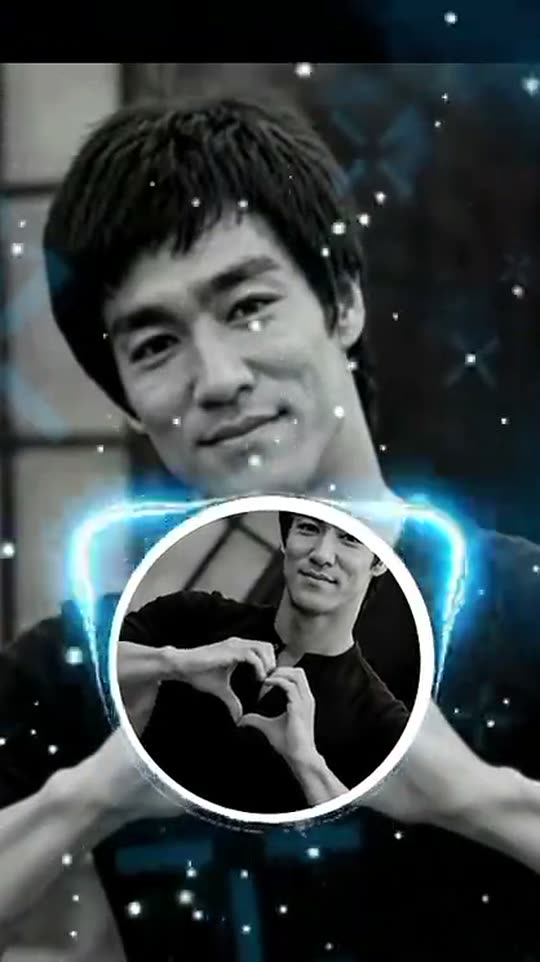
This is the original reel that started the trend. Your video is a new clip made from your photo in the same style, not a copy of these shots. No two runs come out the same.

Original reel by @mercicv1000000, 10 s

A TikTok post of the CapCut template by @mercicv1000000 (19 Oct 2026), on a black-and-white portrait: a round window with a white rim in the chest, the same photo spinning inside it, a blue neon ring and sparkles. Cropped; our template makes an AI version from your photo, with a mini you that waves.

Step by step

How to make the Hole in Shirt video on MakeViral

Everything runs in the browser. No editing app, no prompt to write, no watermark.

  1. Add your photo

    Press "Create your own" and add you, waist up, your top in view. Take it with the camera or pick it from your library.

  2. Press Generate

    The button shows the price. MakeViral builds the Hole in Shirt scene with your photos, then Kling 3.0 animates it for 8 seconds with original sound. You write no prompt.

  3. Download or share

    The video is ready in a few minutes as a 9:16 MP4. Download it, share it from your phone, or find it later in My videos.

Which photo works best?

Upload one photo of yourself, the photo you want to post. The effect keeps it as it is and adds the hole, the mini you and the ring.

  • Waist up, facing the camera. The hole goes in the middle of your chest, so your top must be in clear view, not covered by your arms, a bag or long hair.
  • A plain top works best. A T-shirt, a tank top, a hoodie or a shirt in one color. Big prints and logos get in the way of the window.
  • Face clear and sharp, good light. The mini you inside the hole copies your face, hair and clothes from the same photo.
  • One person in the photo. A group photo puts the hole on the wrong person.
  • Use your own photo. Adults only: never a child, a celebrity or someone else's photo.

Where did the Hole in Shirt trend start?

The hole in shirt effect started as a CapCut template, not an AI tool. The template, made by the CapCut user BABLO, takes one photo twice: it keeps your photo as it is, cuts a round window with a white rim into the chest of your shirt, puts the same photo inside the window, smaller, and lets it spin slowly. A tilted light-blue neon ring circles the window and small sparkles fall. Its sample clip, a smiling man in a white sleeveless top, went up on TikTok from Burkina Faso in mid-October 2026.

On 18 October 2026 the TikTok account @yr5sdowfg6 posted a CapCut how-to for it, with captions in English, French and Amharic. It reached about 363,000 views and 66,000 likes, and on screen the template had about 35,700 uses. From 19 October, hundreds of users, most of them in Burkina Faso, posted their own photo with the hole in their shirt on the how-to's sound. By 21 October that sound had about 1,000 videos and gained about 600 a day.

  1. The CapCut template by BABLO goes around in Burkina Faso: one photo, a round window in the shirt with the same photo inside, a blue neon ring and sparkles.

  2. The TikTok account @yr5sdowfg6 posts a CapCut how-to for the effect. It reaches about 363,000 views and 66,000 likes. TikTok

  3. More than a hundred users, most of them in Burkina Faso, post their own hole in shirt photos on the how-to's sound in one day. TikTok sound

  4. A user post from Burkina Faso with the effect passes 50,000 views and 12,000 likes, the biggest on the sound after the how-to. TikTok sound

  5. The sound has about 1,000 videos and gains about 600 a day; 28 of its top 29 posts are from the last three days. TikTok sound

Copy and paste

The Hole in Shirt prompts

You do not need these: the one-tap flow runs them for you. A photo prompt puts your photo into the scene, then a video prompt animates it. Want to change them? Copy them and edit them in AI Photo and AI Video.

Video

1 photo: you, waist up, your top in viewKling 3.08 s · 1080p · 9:1646 credits
Step 1 · Photo prompt

Use the uploaded image as the base: it is the person's own photo and it stays a real, unchanged photo. Keep the same person, face, hair, skin, pose, hands, clothes, camera angle, light and background exactly as they are. Do not retouch, slim or restyle the person. Then add the hole in shirt effect: a perfectly round hole is cut in the front of the person's top, in the middle of the chest, about one third as wide as the body, with a thin, softly frayed white rim of fabric curling back around its edge, as if the shirt itself was cut open. The hole does not show skin or a body: it is a window into a smaller copy of the same photo. Inside the hole is a mini version of the same person, the same adult with the same face, hair, clothes and pose, seen from the head to the waist, standing in a small copy of the same place and light and smiling out of the hole at the camera. The mini version's own top is whole, with no hole. Around the hole, a thin glowing light-blue neon ring circles it at a slight tilt, like the ring of a planet, with a soft blue glow on the fabric, and a few small white sparkles float in the air in front of the picture. Exactly one person and one mini copy of that same person: no other people, no third copy. The mini copy is the same adult, never a child. No skin, no chest and no underwear show in the hole: only the mini copy and its background. Any logo or writing on the clothes becomes plain. Realistic photo, vertical 9:16; if the photo is wider, extend the background naturally. No text, no captions, no letters, no emoji, no stickers, no watermark, no app interface, no frame.

1614 characters
Step 2 · Video prompt

One continuous shot with no cuts, like a real phone video, the camera almost still. Keep the person's face, hair, clothes and the place exactly as in the image, and keep the round hole in the front of the shirt with the mini copy of the same person inside it, the same size and in the same place. 0-2 s: the thin light-blue neon ring around the hole lights up brighter and starts to circle the hole, tilted like the ring of a planet; small white sparkles drift slowly down through the frame. 2-5 s: inside the hole, the mini copy of the person comes alive: it smiles, looks up at the camera and waves one hand, then gives a happy peace sign. The big person smiles and moves only a little, with natural breathing and a small nod. 5-8 s: the round picture inside the hole slowly turns once around its center, with the mini copy in it, like a spinning window, and comes back upright; the mini copy waves again as the ring keeps circling and the sparkles keep falling. Audio: a soft, dreamy original tune and a light chime when the ring lights up. No speech. Exactly one person and one mini copy of that same adult, never a child. The hole shows only the mini copy and its background, never skin or a body. No extra people, no extra limbs, no morphing. No text, no subtitles, no logos, no watermark.

1295 characters

Photo

1 photo: you, waist up, your top in viewNano Banana 2.1Photo · 2K · 9:163 credits
Photo prompt

Use the uploaded image as the base: it is the person's own photo and it stays a real, unchanged photo. Keep the same person, face, hair, skin, pose, hands, clothes, camera angle, light and background exactly as they are. Do not retouch, slim or restyle the person. Then add the hole in shirt effect: a perfectly round hole is cut in the front of the person's top, in the middle of the chest, about one third as wide as the body, with a thin, softly frayed white rim of fabric curling back around its edge, as if the shirt itself was cut open. The hole does not show skin or a body: it is a window into a smaller copy of the same photo. Inside the hole is a mini version of the same person, the same adult with the same face, hair, clothes and pose, seen from the head to the waist, standing in a small copy of the same place and light and smiling out of the hole at the camera. The mini version's own top is whole, with no hole. Around the hole, a thin glowing light-blue neon ring circles it at a slight tilt, like the ring of a planet, with a soft blue glow on the fabric, and a few small white sparkles float in the air in front of the picture. Exactly one person and one mini copy of that same person: no other people, no third copy. The mini copy is the same adult, never a child. No skin, no chest and no underwear show in the hole: only the mini copy and its background. Any logo or writing on the clothes becomes plain. Realistic photo, vertical 9:16; if the photo is wider, extend the background naturally. No text, no captions, no letters, no emoji, no stickers, no watermark, no app interface, no frame.

1614 characters

How many credits does it cost?

You pay per video in credits, and the create page shows the exact price on the Generate button before you spend anything. The one-tap price covers the scene photo and the video, charged once. Each version has its own price: Video 46 credits, Photo 3 credits. The cheaper models are there if you run the prompts by hand in AI Video.

Video modelSettingsCredits
Video: Kling 3.0 (this template)8 s, 1080p + 1 scene photo, one tap46
Photo: Nano Banana 2.1 (this template)2K photo, 9:16, one tap3
Seedance 2.0 Fast (by hand in AI Video)8 s, 720p + 1 photo55
Veo 3.1 Fast (by hand in AI Video)8 s, 720p + 1 photo14

One-time packs and plans are on the pricing page. A failed video gives its credits back.

What does the hole in shirt effect make?

Your own photo, with a round hole in the front of your shirt. The hole does not show skin: it is a window, and inside it a mini you, the same face, hair, clothes and pose, smiles out at the camera. A thin, glowing light-blue ring circles the hole like the ring of a planet, and small white sparkles float in front.

VersionWhat you getLength
Video, StandardThe picture first, then the video: the blue ring lights up and circles the hole, the mini you waves and gives a peace sign, and the window spins once, with a soft, dreamy tune8 seconds
Video, BestThe same video from the same picture, made with a stronger model that keeps the mini you sharper while it moves8 seconds
PhotoOne 2K picture with the hole, the mini you, the ring and the sparkles, for a photo postA picture

How MakeViral makes it: a top AI image model edits your photo into the hole in shirt picture, and the best AI video models available bring it to life. The create page shows the exact price on the Generate button before you spend anything, and every run is a new take.

The hole in shirt CapCut template, and our AI version

The hole in shirt capcut template on TikTok is an edit template. It does no AI work: it puts your photo in its two slots, the big picture and the small one in the window, and spins the small one. So there is no prompt to copy, and the mini you never moves. We read the template frames, the how-to and its comments, and wrote our own prompt from what the template shows: the round window in the middle of the chest, the white rim of fabric, the same photo smaller inside, the tilted blue neon ring and the sparkles.

The one change is on purpose, and it is what makes this the hole in shirt ai version: the mini you is alive. In the video it looks up, waves and gives a peace sign before the window spins. If you want the template's still look, pick Photo.

A photo in photo effect: the Droste effect, in your shirt

A picture that shows itself inside itself has a name: the Droste effect, after an old Dutch cocoa tin with a picture of itself on the label. The hole in shirt trend is a fun, one-step version of it: the photo in photo effect sits in your shirt, so the mini you is you inside your own shirt. People who search for a droste effect generator or a droste effect maker usually want a picture within a picture like this, and the Video version is a short droste effect video. One small difference: in our effect the mini you's own shirt stays whole, so the picture shows one mini you, not an endless tunnel. That keeps the face clear, and it makes a clean droste effect photo or droste effect meme for your friends.

What goes wrong, and how do you fix it?

ProblemFix
The hole is not on your chestUse a waist-up photo where your top is in clear view and not covered by your arms.
The mini you does not look like youIt copies your face from the same photo: use a sharper photo with your face big and in good light. Every run is a new take.
The mini you blurs when it waves or spins (Standard)Run it again, or pick Best.
The hole shows something oddThe prompt keeps the hole as a window with the mini you only. Run it again, or try a plainer top.
A run fails, or the model refuses a photoThe credits come back. Try another photo.
FAQ

Hole in Shirt trend questions

What is the hole in shirt trend?
It is a TikTok photo effect from October 2026, also called the hole in shirt filter and "you inside your own shirt". A round hole in the front of your shirt shows a small copy of you inside, with a glowing blue ring around it and sparkles. People made it with a CapCut template, and here AI makes it from one photo.
Where does the hole in shirt effect come from?
From a CapCut template by the user BABLO that went around in Burkina Faso in October 2026. A CapCut how-to by @yr5sdowfg6 on 18 October 2026 reached about 363,000 views, and from 19 October hundreds of users, most of them in Burkina Faso, posted their own photos on its sound. No post of the effect has reached a million views yet.
How do I make the hole in shirt effect?
Press "Create your own", pick Video or Photo, add one photo of yourself, waist up, and press Generate. You get the picture with the hole and the mini you, and with Video, an 8-second clip where the mini you waves. You need no CapCut template and no editing.
Is it a filter? Is there a hole in shirt filter app?
It works like a filter, but it is not a live camera filter: you upload a photo and get a finished picture or video. This page is the app: it runs in the browser. On TikTok the hole in shirt effect tiktok posts are made with a CapCut photo template, and the how-to videos show how to open it.
Is it the same as the ripped shirt prank?
No. The ripped shirt prank is an older CapCut filter from August 2026 that puts tears and holes in a friend's shirt as a joke. The hole in shirt effect has one clean, round hole, like a window, with a mini you inside it. If you search for a hole in t shirt effect with a mini me, you are in the right place.
Can I get just a picture, like the CapCut template?
Yes. Pick **Photo**: you get one 2K picture with the hole, the mini you, the blue ring and the sparkles, ready for a photo post. It is the cheapest version. Pick **Video** when you want the mini you to wave.
Is this a mini me AI or a mini me effect?
Both. The mini me effect here is the small copy of you inside your own shirt. It is a mini me ai picture made from your photo: the mini you has your face, hair and clothes. If you search for "mini me inside my shirt", this is that effect.
Does the hole show my body?
No. The hole is a window into a small copy of your photo. It never shows skin, a chest or underwear: the prompt bans it, and the rim of fabric frames the mini you only.
Does the video have the trend's sound?
The video comes with its own soft, dreamy tune. The TikTok posts use the how-to's sound, "original sound" by Puff. To use it, tap the sound under any hole in shirt post on TikTok and press Use this sound when you post your clip.
Who can use it?
Adults, with their own photo. Never use a photo of a child, a celebrity or another person without their yes. The picture and the video are AI-made: keep the platform's AI label on when you post.
Does it cost credits?
Yes. The Photo version costs a few credits; the Video versions cost more, because they make a picture and then a video. The create page shows the exact price on the Generate button before you spend anything, and if a run fails, the credits come back.
Is my photo private?
Yes. MakeViral does not post your photo or the result anywhere or show them to other users. The result goes to your private My videos page, and you can delete it there at any time.
More trends

Other AI video templates

Template

Bby Wow Guy AI: Put Your Face in the Guy Dancing at a Quince Meme

Dance up to the camera at a quinceañera, bite the concha, chew with full cheeks while you stare into the lens, then dance away. Add one photo and become the bby wow guy, with the song.

Read more
Template

Bad Times AI Trend: Argue With the Camera From One Photo

Hands on the head, a hand on the hip, stop palms and a long stare at whoever is filming: the viral routine to Imael Angel's "Bad Times". Add one photo of you or your pet and get the clip with the song.

Read more
Template

Tecktonik Dance AI: Your Turn on the String-Light Stage

Arms out wide, hands to the head, both arms up, then a flurry of sharp arm moves on a small stage under string lights: the 2000s electro dance that Cheba Man brought back in 2026. Add one photo of you or your pet and get the dance with the song.

Read more
Template

Earth Zoom Out AI: From a Selfie to Space in One Shot

It starts as a wide 0.5x selfie of you waving. Then the camera rises, and keeps rising: over the city, through the clouds, out to the whole blue Earth.

Read more
Template

Headbop Trend AI: Your Family's Heads Bop in a Row

A row of heads on black, from small to big, bopping in turn to the beat. Add one photo and every head is you, three photos for your family or friends, or one photo of your pet. No cut-outs and no keyframes: the AI does the edit, with the trend's sound.

Read more
Template

2016 vs 2026: Your 2016 Self Walks In and Meets You

Your 2016 self walks in, looks you up and down and asks why you look so exhausted. Write your own lines, pick the place and the ending. An old photo and a new one in, a 10-second clip with voices out. It works with your pet too.

Read more

Make your own Hole in Shirt video

Add one photo and tap once. No prompt to write. 46 credits.

No watermark. A failed video gives its credits back. Secure checkout by Stripe.