Elevator Outfit Change AI: The Doors Close, a New Outfit Steps Out

You stand inside a steel elevator, filmed straight on. The doors slide shut, open again, and you are wearing a new outfit. Pick the women's looks (four evening gowns) or the men's looks (three outfits and a walk out), keep the reel's looks or write your own. One photo in, a vertical clip with the reel's sound out.

The original Elevator Outfits reel by @fabianparksOriginal reel
  • 1 photo you add
  • 13 s clip with sound
  • 9:16 for TikTok, Reels, Shorts
  • No watermark

No prompt to write: Add your photo and tap once

Create your own

Ready in a few minutes · 168 credits

The elevator outfit change is the fit check where the elevator does the edit: you stand in the car, the doors close, and when they open again you wear something new. Creators call it an elevator fit check or an elevator outfit check, and they film one take per outfit. Here you need one photo with your face clear.

Also called Elevator glow-up · Elevator outfit rotation · One elevator, four outfits · Elevator door outfit transition

Example

What the Elevator Outfits video looks like

This is the original reel. Your photos replace its characters, so your video follows the same shots with your faces. No two runs come out the same.

Original reel by @fabianparks, 13 s

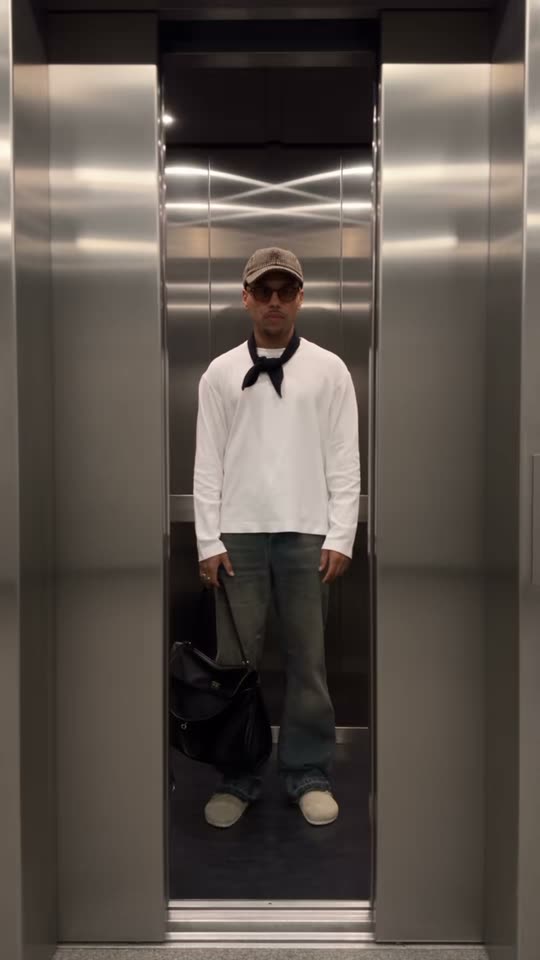
The original AI reel by @fabianparks, which the Men's looks version copies: a trench coat with a tie, a white tee with a neck bandana, then a plum sweater as he walks out of the elevator.

Use this reference
Original reel by @karolvidaldiaz, 13 s

The original reel by @karolvidaldiaz, which the Women's looks version copies: a bronze sequin gown, a blue patterned gown, a black lace gown with a fur jacket and a silver sequin gown, one per door close.

Use this reference
Step by step

How to make the Elevator Outfits video on MakeViral

Everything runs in the browser. No editing app, no prompt to write, no watermark.

  1. Add your photo

    Press "Create your own" and add you, face clear. Take it with the camera or pick it from your library.

  2. Press Generate

    The button shows the price. Genjutsu Motion puts your photos into the Elevator outfits trend clip and copies it shot by shot for 13 seconds, with the reel's original song. You write no prompt.

  3. Download or share

    The video is ready in a few minutes as a 9:16 MP4. Download it, share it from your phone, or find it later in your Library.

Which photo works best?

Use one sharp photo with your face clear and big enough to see well, from the waist up or closer. The video shows you full length inside the elevator, so your face is small in the frame. A clear, front-facing face keeps you looking like you in every outfit.

  • The outfits come from the reel or from your own words, never from your photo. MakeViral first makes a close portrait from your photo, so only your face and hair go into the video.
  • Face visible: no sunglasses, no hat, no heavy filter.
  • Daylight or a bright room. Any background works; the video sets the elevator.
  • One person per photo.
  • Use your own photo, or one of an adult who said yes. Never a celebrity or a stranger.

Where did the Elevator Outfits trend start?

The elevator fit check is older than the AI trend. On 18 December 2023 the fashion house Karl Lagerfeld posted an "elevator fitcheck" on TikTok: a model steps out of a wood-paneled hotel elevator in a new look each time the doors open. It had 369,800 plays by 17 October 2026, and other creators later put their own elevator fits on its original sound. On 25 September 2024 @bossymarie asked "does this transition have a potential?" over her own elevator outfit transition (144,300 plays), and on 12 August 2025 @karolvidaldiaz posted "4 pisos, 4 vestidos" (4 floors, 4 dresses): four evening gowns, one per floor, on the same sound.

In 2026 fashion brands made it an ad format, and two brand elevator reels passed 11 million plays each. Then it went AI. On 8 September 2026 @morgan.pierce.pm posted an AI-labeled "the elevator outfit change that broke my brain", by 11 October template makers were posting CapCut "Elevator Outfit Transition" templates, and on 12 October 2026 @fabianparks posted "AI elevator, real outfits": three looks, the doors closing between them, and a walk out to the camera. A day later the Korean creator @reels_drgn shared the full Seedance 2.5 prompt for the same shot. On 17 October 2026 #elevatorfitcheck had 1,161 TikTok videos and 3.9 million views.

  1. Karl Lagerfeld posts an "elevator fitcheck": a new look each time the hotel elevator doors open. 369,800 plays on 17 October 2026. TikTok

  2. @bossymarie posts her elevator outfit transition, one outfit per floor: "does this transition have a potential?" It has 144,300 plays. TikTok

  3. @karolvidaldiaz posts "Elevator Fitcheck: 4 pisos, 4 vestidos", four gowns in one steel elevator. MakeViral's Women's looks version copies it. TikTok

  4. @fabianparks posts "AI elevator, real outfits": three looks, the doors close between them, then he walks out. MakeViral's Men's looks version copies it. TikTok

  5. @reels_drgn posts a Higgsfield tutorial for the AI elevator fashion video and shares the full Seedance 2.5 prompt: three outfits, two door cycles, a walk out. TikTok

Copy and paste

The Elevator Outfits prompts

You do not need these: the one-tap flow runs them for you, together with the trend clip. [Image 1] and [Image 2] are your two photos, and [Video 1] is the trend clip the video copies.

Women's looks

1 photo: you, face clearGenjutsu Motion13 s · 480p · 9:16168 credits
Video prompt

Replace the young woman with long straight brown hair who stands and poses inside the steel elevator with the person from image 1: keep that face, hair and skin tone exactly, in every outfit, also in the first second when she turns from the back. Take only the face, hair and skin tone from image 1, never the clothes: in every shot the person wears the gown of the video. Keep every gown, every outfit change hidden by the closing elevator doors, the steel doors, the mirrored steel walls, the ceiling lights, the light, the motion and the camera of the video.

561 characters

Men's looks

1 photo: you, face clearGenjutsu Motion13 s · 480p · 9:16168 credits
Video prompt

Replace the young man with short dark hair, a dark cap and tinted glasses who stands inside the steel elevator with the person from image 1: keep that face, hair and skin tone exactly, in every outfit, also when he walks out toward the camera at the end. Take only the face, hair and skin tone from image 1, never the clothes: in every shot the person wears the outfit of the video. Glasses only if image 1 shows glasses. Keep every outfit, every outfit change hidden by the closing elevator doors, the black bag, the steel doors and walls, the curved light strips, the light, the motion and the camera of the video.

616 characters

How many credits does it cost?

You pay per video in credits, and the create page shows the exact price on the Generate button before you spend anything. The one-tap price covers the video, made in one step from your photos and the trend clip, charged once. One video is 168 credits, so the smallest one-time pack that covers it is $39.99 for 450 credits, with no subscription. The cheaper models are there if you run the prompts by hand in AI Video.

Video modelSettingsCredits
Genjutsu Motion (this template)13 s, 480p, copies the trend clip, one tap168

One-time packs and plans are on the pricing page. A failed video gives its credits back.

How does the elevator outfit change work?

The elevator doors are the edit. The camera stands still outside the elevator and films you full length inside it. The doors slide shut, and for a moment you are gone behind the steel. That is where the cut hides: when the doors open again, you stand in the same spot in a new outfit. It is the elevator outfit transition that fashion creators film floor by floor, one take per look, and that brands now use as an elevator fashion show.

MakeViral has two versions. Women's looks copies @karolvidaldiaz's elevator fit check from 12 August 2025: 13 seconds, four evening gowns, three door closes. Men's looks copies @fabianparks's AI elevator reel from 12 October 2026: 13 seconds, three outfits, two door closes, and at the end you walk out of the elevator toward the camera. First Nano Banana 2 makes a close portrait from your photo, so only your face and hair go into the reel. Then Higgsfield Genjutsu puts you in place of the person in the reel, shot by shot, so every door closes and every outfit changes exactly where it does in the original. Your face, hair and skin tone come from your photo. The outfits, the elevator and the camera come from the reel.

With Your outfits you write your own look for any of the outfits. MakeViral first changes those looks in the reel itself (FLUX.3 Edit Video), so the new outfits still appear behind the doors, and then puts you in. It is an elevator fashion editorial without the building, the camera or the changes of clothes.

Which looks are in the video, and can you write your own?

Women's looks, in order:

  1. A bronze sequin slip gown with thin straps.
  2. A blue strapless gown with a geometric diamond pattern and a silver clutch.
  3. A black lace-pattern gown over a nude lining, with a black faux-fur jacket.
  4. A silver-grey sequin gown with a scoop neck.

Men's looks, in order:

  1. A black double-breasted trench coat over a white shirt and a burgundy tie, with faded jeans and a dark cap.
  2. A white long-sleeve tee with a black bandana tied at the neck, faded jeans and a houndstooth flat cap.
  3. A plum crew-neck sweater with light grey pleated trousers, worn for the walk out.

The model redraws the clothes on your body, so small details can change from run to run. The cut and the colors of each look stay close to the reel.

Your outfits: on the create page, open Your outfits and write any look you want, for example "Red satin evening gown" or "Black leather jacket and jeans". Name the clothes, the colors, the shoes and the bag. Every look you leave empty stays as in the reel, so you can change one look or all of them and try your elevator outfit ideas before you wear them. A written look costs a few credits more, because MakeViral first changes the outfits in the reel itself. Logos, brand names and copies of famous characters are left out.

The body and the pose stay the reel's, so pick the version whose looks are closest to what you want to wear, then write your own on top.

Which sound should you post it with?

There is no one song for the elevator trend. The women's reel we copy uses the original sound of Karl Lagerfeld's 2023 elevator fit check, which other creators reuse too. The AI reel we copy for the men's looks has its own original sound, and other creators pick whatever is trending that week.

Your video comes with the original sound of the reel it copies, so it is ready to post. You can turn the sound off on the result screen. The sound belongs to its owners, and MakeViral gives you no rights to it.

To use a trending sound, add it in TikTok, Instagram or YouTube when you post, from their licensed library, and lower the original sound. Hashtags: #elevatorfitcheck is the tag of the trend (1,161 videos on 17 October 2026), and #elevatoroutfitcheck and #elevatortransition reach the same crowd.

What can go wrong, and how do you fix it?

These versions are new, and we have not run them with test photos yet. They use the same setup as our ceiling fan template, which kept the person the same in every look in our tests. These are the problems to look out for:

What goes wrongWhyWhat to do
The face looks less like youThe face is small in a full-length shotUse a sharp, front-facing photo with the face big and in good light, then run it again.
Tinted glasses appear in the men's looksThe man in the reel wears them in every lookRun it again, or use the women's looks with outfits of your own.
The last gown is shortIn the women's reel the fourth look shows for about a secondThat is the reel's timing. Write your strongest look as outfit 2 or 3.
An outfit detail differs from the reelThe model redraws the clothes on your bodyThat is normal. The cut and the colors stay close to the reel.
The clip looks soft on a big screenGenjutsu makes 480p videoIt is made for a phone screen, where 480p looks fine.
A written outfit looks a little different from your wordsThe model draws the look in the reel's pose and lightName fewer things, for example a color and one piece of clothing, and run it again.
FAQ

Elevator Outfits trend questions

What is the elevator outfit change?
It is a fashion clip filmed from outside an elevator: you stand inside, the doors close, and each time they open you wear a new outfit. Creators post it as an elevator fit check, an elevator outfit check or simply elevator fits, and in the UK as a lift fit check or lift outfit check. The tags #elevatorfitcheck and #elevatoroutfitcheck hold most of the posts.
How do I make the elevator outfit change with AI?
Press "Create your own" on this page, pick Women's looks or Men's looks, add one photo with your face clear and press Generate. MakeViral puts you into a real elevator outfit reel, so every door close brings a new look. You write no prompt, and the AI elevator video lands in your Library as a vertical MP4. To pick your own looks, open Your outfits first.
Is this the AI elevator trend with the photo prompt?
Not quite. The AI elevator trend people search for in Google with "elevator trend AI" or an elevator trend prompt is often a still photo: a top-down shot of you in a steel elevator, made with an image prompt. This page makes the video trend: the doors close and open, and your outfit changes each time.
How do you film an elevator transition for real?
Put the phone on a stand outside the elevator, pointing straight in, and stand in the middle of the car. Let the doors close, change outfits, and film again in the same spot for every look. Then cut the takes together where the doors are shut. Editors like CapCut have elevator door transition templates for the cut, which is why an elevator trend CapCut template is a common search. A real elevator transition video takes a quiet elevator and many rides, so ask the building first.
Can I choose the outfits?
Yes. Open Your outfits on the create page and write your own look for any of the outfits, for example "Emerald green slip dress". A look you leave empty stays as in the reel. MakeViral changes those looks in the reel first, so each new outfit still appears when the doors open.
What elevator outfit ideas work best?
Looks that contrast hard in color and shape: a sequin gown, a bright patterned dress, a dark coat, a light knit. Elevator looks read best when each outfit is clearly different from the last, the same reason the elevator lookbook and elevator fashion posts on TikTok use bold colors and long silhouettes.
Is there a version for men?
Yes. Men's looks copies @fabianparks's AI elevator reel: a trench coat with a tie, a white tee with a neck bandana, and a plum sweater for the walk out toward the camera. Women's looks copies four evening gowns. Either version takes any photo, and Your outfits lets you write your own looks in both.
How long is the video?
13 seconds, vertical 9:16 at 480p, with the reel's original sound. It takes a few minutes, and you can leave the page while it runs: the finished clip waits in your Library.
Does the elevator outfit video cost credits?
Yes. Each video costs credits, and the create page shows the exact price on the Generate button before you spend anything. Your own outfits cost a few credits more, because the reel is changed first. If a video fails, the credits come back.
Can I post my elevator transition reel on TikTok or Instagram?
Yes. The MP4 has no watermark, so you can post it to TikTok, Reels or Shorts as it is. The reel's sound belongs to its owners: check the platform's music rules before you use the clip in an ad. Keep the platform's AI label on, and tag it #elevatorfitcheck or #elevatortransition, the tags of the elevator trend on TikTok.
More trends

Other AI video templates

Template

Bad Times AI Trend: Argue With the Camera From One Photo

Hands on the head, a hand on the hip, stop palms and a long stare at whoever is filming: the viral routine to Imael Angel's "Bad Times". Add one photo of you or your pet and get the clip with the song.

Read more
Template

A2O LITE NEON Dance: Do the Duo Intro From Your Photos

The sway, the spin kick, the high-and-low pose and the squat: the viral NEON intro from A2O LITE's debut song. Add two photos for a duo, one for a solo, or two of your pets.

Read more
Template

Tecktonik Dance AI: Your Turn on the String-Light Stage

Arms out wide, hands to the head, both arms up, then a flurry of sharp arm moves on a small stage under string lights: the 2000s electro dance that Cheba Man brought back in 2026. Add one photo of you or your pet and get the dance with the song.

Read more
Template

AI Ceiling Fan Trend: Change Your Outfit on Every Blade Pass

The camera looks straight down through a slow ceiling fan at you on the floor. Each blade wipes across the lens, and you come back in a new outfit. Pick a pack of four looks or write your own outfits. One photo in, a vertical clip with the reel's sound out.

Read more
Template

Escalator Outfit Change AI: A New Look With Every Ride

The camera looks straight down at a long moving escalator. You sit back on the steps and ride through the frame, and every time the escalator brings you back, you wear a new outfit. Keep the reel's four looks or write your own. One photo in, a vertical clip with the reel's sound out.

Read more
Template

Subway Outfit Change AI: Every Train Brings a New Outfit

You stand on a New York-style subway platform and scroll your phone. A train rushes past between you and the camera, and when it clears, you wear a new outfit. Three trains, four looks. Keep the reel's looks or write your own. One photo in, a vertical clip with the reel's sound out.

Read more

Make your own Elevator Outfits video

Add one photo and tap once. No prompt to write. 168 credits.

No watermark. A failed video gives its credits back. Secure checkout by Stripe.