MP3 to video converter

MP3 to Video Converter: Turn Your MP3 Into an MP4 With AI Clips

Drop in an MP3 and get back an MP4 you can post anywhere. Instead of one still picture, AI makes moving clips that change on the beat of your audio.

An AI music video of the hip hop song "Night Shift City" in the Neon city look, made with MakeViral
Made with MakeViral: an AI-made hip hop song, Full song, Neon city look, no photo. Tap for sound.
Made with MakeViral

Music videos made with MakeViral

We made these from 30-second songs made with AI, in Full song mode on Fast quality, with no edits after. Every person in them is AI-made. Tap a video for sound.

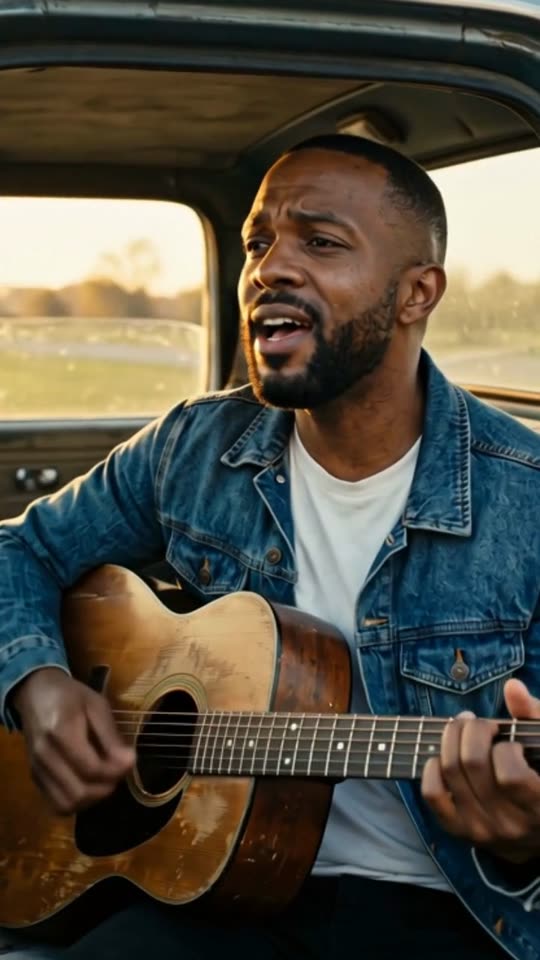
An AI music video of the country song "Dust Road Home" in the Cinematic look, made with MakeViral
Country, Cinematic, with a photo"Dust Road Home", 30 s, 11 shots cut on the beat
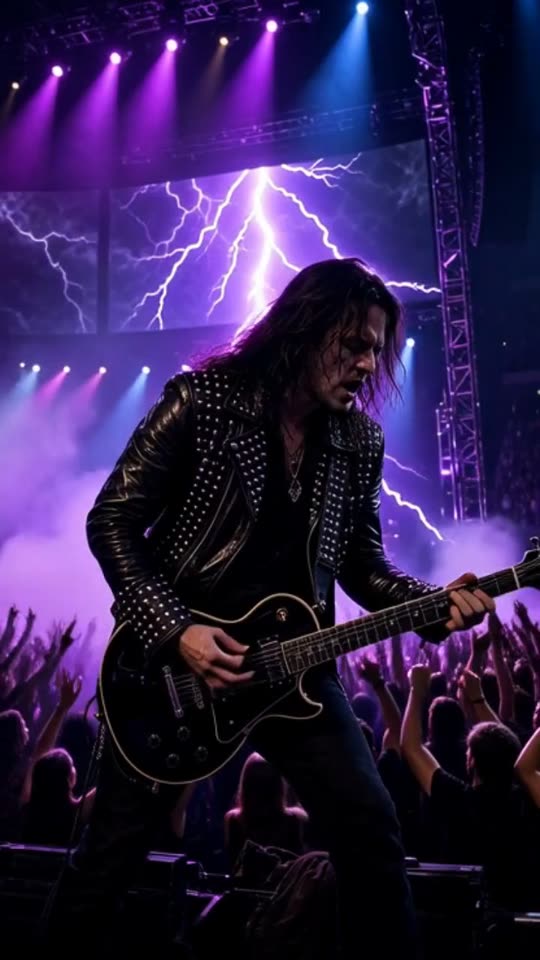
An AI music video of the rock song "Engine Heart" in the Concert stage look, made with MakeViral
Rock, Concert stage, no photo"Engine Heart", 30 s, 9 shots cut on the beat
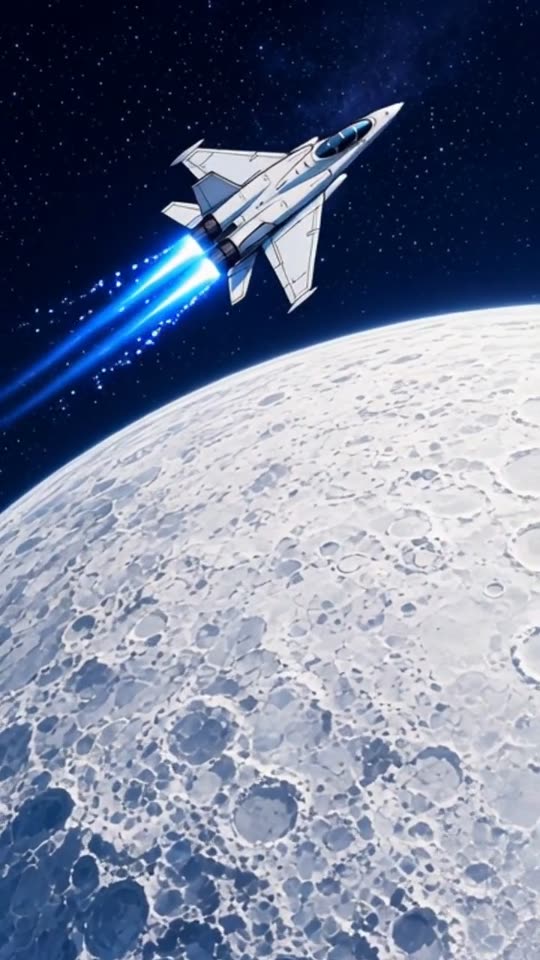
An AI music video of the EDM song "Starlight Run" in the Anime look, made with MakeViral
EDM, Anime, no photo"Starlight Run", 30 s, 8 shots cut on the beat
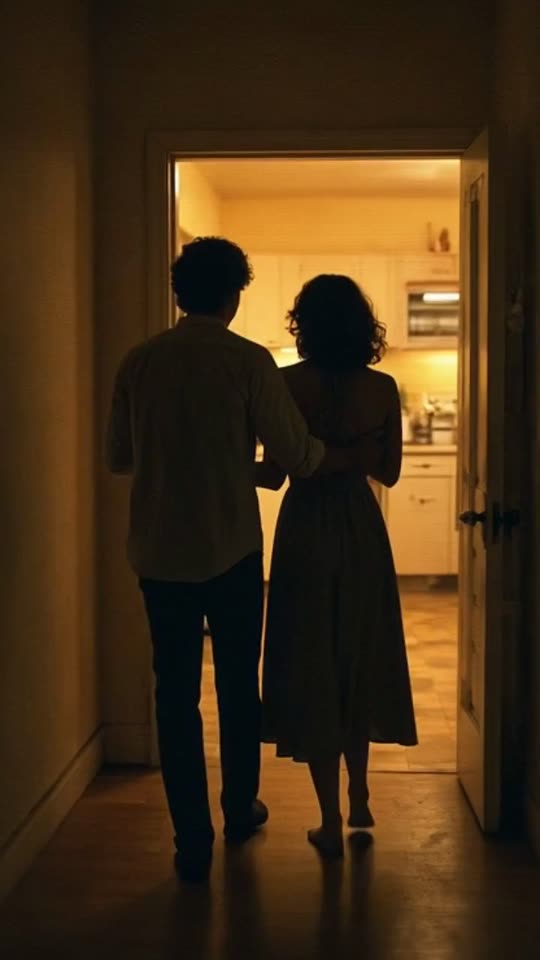
An AI music video of the lo-fi R&B song "Midnight Kitchen" in the Retro VHS look, made with MakeViral
Lo-fi R&B, Retro VHS, no photo"Midnight Kitchen", 30 s, 11 shots cut on the beat
200 billionViews a day on YouTube ShortsYouTube, 2026
189 millionPeople TikTok reaches in the EU every monthTikTok, 2026
2.60%Average engagement on TikTok, against 0.45% on Reels and 0.30% on ShortsSocialinsider, 2026
4,200+Videos rendered on MakeViral so farCounted on this site, hourly
Sources

Every figure was read on the page it links to on 2026-09-18. The MakeViral counts come from this site and update every hour.

MP3 to video means turning an audio file into a video file you can post, because Reels, TikTok and YouTube take video, not audio. Most converters put one still picture over the sound. MakeViral makes moving AI clips instead, cut on the beat of your MP3, and gives you an MP4 to download.

Also called MP3 to video converter · MP3 to MP4 converter · Audio file to video

Why convert an MP3 to video?

Because the places where people listen now are video apps. Reels, TikTok, Shorts and YouTube all upload video files. An MP3 has sound and nothing to look at, so before you can post it, it needs a picture track.

People convert MP3 to video to:

  • post a new track or a demo where their audience already scrolls,
  • share a beat, a jingle or a sound with a client who asked for "a video",
  • turn a voice memo or a podcast part into something that plays in a feed,
  • put a song on YouTube, which needs a video file for every upload.

The picture you add decides whether people stay. A frozen cover image tells the viewer there is nothing to watch. Clips that move with the music give the eye a reason to keep watching while the ear decides.

Still picture converter or AI clips?

There are two ways to convert MP3 to video, and they give very different results.

A still picture converterMakeViral
What you seeOne image for the whole trackA new AI clip every 2 to 5 seconds
TimingNothing movesEvery cut lands on a beat of your MP3
LookYour cover art or a plain colorCinematic, Anime, Lo-fi, 3D cartoon, Neon city, Dreamy, Synthwave, Pixel art, Claymation, Storybook, Dark fantasy, Nature, Concert stage or Retro VHS
A person on screenOnly if they are in the pictureAdd one photo and that person is in every shot
LengthThe whole fileThe part you pick (15, 30 or 60 seconds), or the full song up to 6 minutes
OutputA video fileA 720p MP4

If you need your full 4-minute track as one long video with the cover art, a still converter is the right tool. If you need a short video that people watch to the end, the AI clips are.

What goes in and what comes out?

In

  • One audio file: MP3, M4A, WAV or AAC. MP3 is the usual one, but the others work the same way.
  • Up to 25 MB and 10 minutes long.
  • Or a direct link to the audio file, for example a link that ends in .mp3. Links to video sites and streaming services do not work.

Out

  • One MP4 video file, 720p. So it is MP3 to MP4, with moving pictures.
  • 9:16 Vertical (TikTok, Reels and Shorts) or 16:9 Wide (YouTube), your choice. The price is the same.
  • 15, 30 or 60 seconds long: the part of the MP3 you picked.
  • Your audio as the sound, at full volume, with a short fade at the very end.
  • No text or logos are asked for in the clips, so you can add your own caption on the platform.

When the file is too big

A 10-minute MP3 at 320 kbps is about 24 MB, so it fits. A WAV is much larger: about 10.6 MB a minute at CD quality, so a WAV longer than about 2 minutes 20 seconds passes the 25 MB limit. Export it as an MP3 or AAC first, or cut it to the part you want.

How to convert an MP3 to video, step by step

  1. Open the page and drop the MP3. Or tap to pick it from your phone or computer. The file name and the length show at once.
  2. Look at the waveform. The whole MP3 is drawn as a wave, and a window sits on the loudest part after the intro. In most songs that is the chorus.
  3. Set the length. 15 seconds is the default. Switch to 30 or 60 for a longer video.
  4. Move the window if you want. Drag it to any part, then press play to hear exactly what will be in the video.
  5. Pick the look and the shape. One style, and 9:16 or 16:9. Add one photo if you want a person in every shot.
  6. Create. Price shown before you create, from 35 credits for 15 seconds. Tap the button, and the AI listens, plans the shots, makes the clips and cuts them on the beat.
  7. Download the MP4. Post it, or take it into your own editor for titles.

Nothing to install. It runs in the browser on a phone or a computer.

Tips for a better video from your MP3

  • Pick a part with a clear beat. The cuts follow the beat. A drum pattern gives the AI sharp places to cut. A part with no clear beat gets even cuts, every 2 to 4 seconds.
  • Start on a strong sound. The first second of the video is the first second of your window. A drum hit or the first word of a line works better than a fade in.
  • Use the vocals. The AI reads the lyrics in your part and uses them for the shots. A part with words gives it more to work with than a long intro.
  • Match the shape to the place. 9:16 for Reels, TikTok and Shorts. 16:9 for a music video for YouTube or a website.
  • A chill or study track? The Lo-fi look gives a cozy room, rain on the window and a slow camera.
  • Your own look. None of the looks fits? Pick "Your own style" and describe it in up to 200 characters. It is saved for your next MP3.
  • Make two. The same 15 seconds in two styles is a cheap test of which look your audience likes.
Why it works

What the mp3 to video converter: turn your mp3 into an mp4 with ai clips does for you

Moving clips, not a still

A new AI clip every 2 to 5 seconds, so the video has something to watch.

Synced to your audio

The beat comes from your MP3, and every cut lands on it.

An MP4 that posts anywhere

A 720p MP4 in 9:16 or 16:9, ready for Reels, TikTok, Shorts or YouTube.

More than MP3

MP3, M4A, WAV or AAC, up to 25 MB, or a direct link to the audio file.

No trimming software

Pick the part on a waveform in the browser and hear it before you create.

Your audio is the sound

The part you picked plays at full volume under the clips, with a short fade at the end.

How it works

3 steps from idea to finished file

No editor, no timeline, no export settings to get wrong.

  1. Drop the MP3

    Or an M4A, WAV or AAC file, up to 25 MB. A direct audio link works too.

  2. Choose the part

    Drag the 15, 30 or 60 seconds window on the waveform and press play to hear it.

  3. Download the MP4

    Price shown before you create, from 35 credits for 15 seconds. The AI makes the clips, cuts them on the beat and gives you one MP4.

Who it is for

Works in these niches

  • Musicians posting a new track
  • Beat sellers
  • Podcasters
  • Jingle and sound makers
  • Music teachers
  • Choirs and bands
  • YouTube uploads
  • Reels and TikTok
FAQ

Questions people ask

Is the result an MP4 file?
Yes. You download one 720p MP4 with your audio as its sound. It plays on any phone or computer and uploads to Reels, TikTok, Shorts and YouTube.
Can I convert the whole MP3 to video?
Yes, when the MP3 is 6 minutes or shorter: pick Full song. For a longer track, pick a part (15, 30 or 60 seconds) and make a video for each part you want to post.
Can I put my cover art over the MP3 instead?
Not on this page. It makes moving clips, not a still. You can add one photo of a person, and that person appears in every shot.
Does it work with M4A, WAV and AAC?
Yes. MP3, M4A, WAV and AAC all work, up to 25 MB and 10 minutes. A long WAV can pass the size limit, so export it as an MP3 first.
Can I convert an MP3 from a link?
Yes, if the link points straight to the audio file, for example a link that ends in .mp3. Links to video sites and streaming services do not work.
Do I need to install a converter?
No. It runs in your browser, on a phone or a computer. The waveform and the beat are worked out in the browser, and the video is made on our servers.
Is this MP3 to video converter free?
No. A new account starts with 0 credits, and the smallest top-up is a $9.99 one-time pack of 100 credits. Price shown before you create, from 35 credits for 15 seconds, so you know the cost before you pay.

Your MP3, as a video you can post

Drop an MP3 of up to 25 MB, pick the part, and download an MP4. Price shown before you create, from 35 credits for 15 seconds.

No watermark. A failed video gives its credits back. Secure checkout by Stripe.