Back

If I Was ChatGPT Trend: Your Observe, Just Observe Mood Board

Add one photo. The AI looks at it, picks the city, season, flower, painting, animal and element that fit you, and puts them around your photo in one mood board with short labels.

The original If I Was ChatGPT reel by @mimi_iv19Original reel
  • 1 photo you add
  • 2K photo you can turn into a video
  • 9:16 for TikTok, Reels, Shorts
  • No watermark

No prompt to write: Add your photo and tap once

Create your own

Ready in a few minutes · Photo · 3 credits

The if i was chatgpt trend started on TikTok in November 2026: you give ChatGPT one photo, type "Observe, just observe." and "Only dry answers.", then ask "If I was a city", "a season", "a flower" and more, and post the one-word answers with matching pictures around your photo. Here, one photo gives you the whole board in one image.

Also called Observe just observe · Observe ChatGPT trend · If I was a city trend · Only dry answers trend

Example

What the If I Was ChatGPT photo looks like

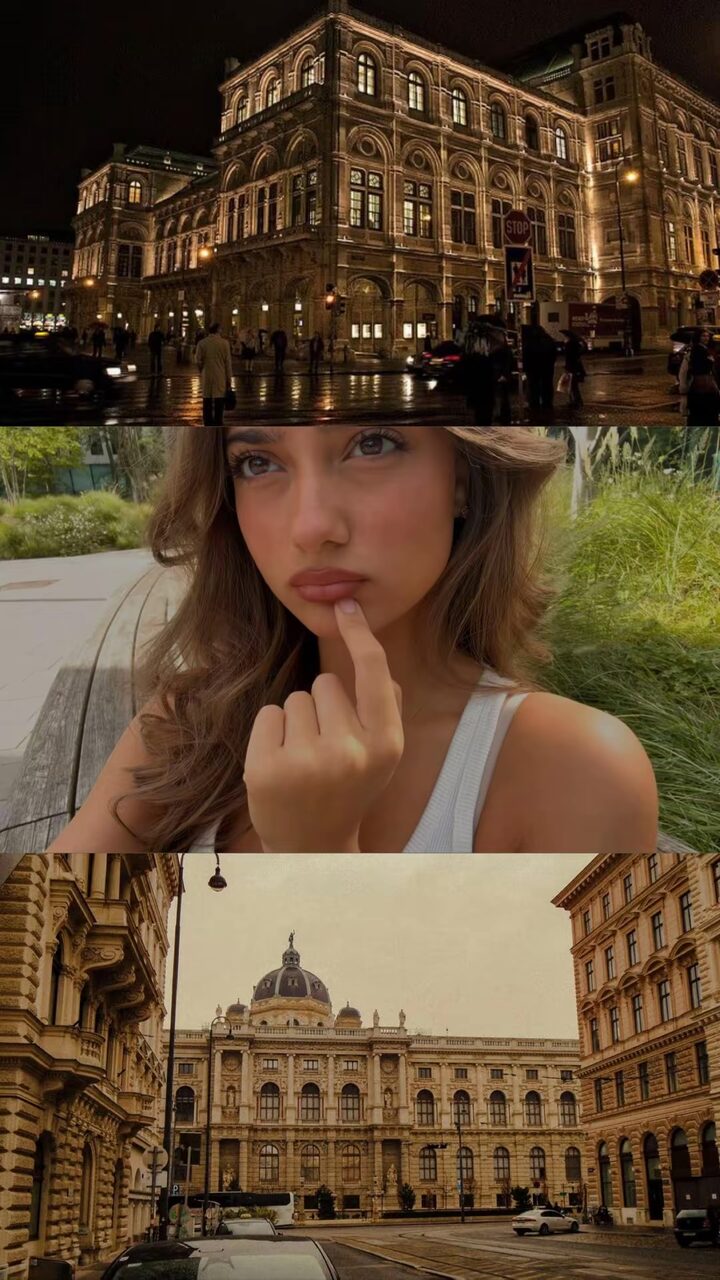
This is the trend's first big post: a creator's own TikTok photo slideshow, shown here as a video with the post's own sound. The chat lines are her real ChatGPT questions and answers, and each answer gets two matching pictures around her photo. Your result is one new still photo: your own photo in the middle of a mood board with six answer pictures and short labels, not a copy of this slideshow. No two runs come out the same.

Original reel by @mimi_iv19, 20 s

The first big post of the trend by @mimi_iv19 (7 November 2026, 199,350 plays): "Observe, just observe", "Only dry answers", "1 word", then each ChatGPT answer (Vienna, Peony, Autumn, Water Lilies, Deer and more) with two matching pictures around her photo.

Step by step

How to make the If I Was ChatGPT photo on MakeViral

Everything runs in the browser. No editing app, no prompt to write, no watermark.

  1. Add your photo

    Press "Create your own" and add you, face clear. Take it with the camera or pick it from your library.

  2. Press Generate

    The button shows the price. Nano Banana 2.1 puts your photo into the If I was ChatGPT scene and makes one 2K photo. You write no prompt.

  3. Download or share

    The photo is ready in a few minutes as a 9:16 2K image. Download it, share it from your phone, turn it into a video, or find it later in My videos.

Which photo works best?

Use one clear photo of you from the chest up or the waist up, with your face easy to see. The AI reads everything in it to pick the answers: your face and expression, your hair, your clothes, the colors and the place.

  • Pick a photo with a mood. A golden-hour selfie, a rainy window or a night out gives clearer answers than a plain passport-style shot.
  • Keep it sharp and well lit. Your photo sits in the middle of the board, so a blurry photo stays blurry.
  • Just you. One person per photo; the answers are about that one person.
  • Vertical or square works. The photo is cropped to fit a large frame in the middle, with your face kept in view.
  • For the pet version, use one photo of your pet with its head and body in view.

Where did the If I Was ChatGPT trend start?

The observe just observe chatgpt trend is a TikTok photo slideshow. The earliest post we found is by @pov_monika on 6 November 2026, the first one under #observejustobserve: her photo, the chat lines "Observe, just observe" and "Only dry answers.", then answers such as Prague, White anemone, Late autumn and A red fox, each shown as a three-picture slide with a matching picture above and below her photo.

The first big post came hours later, on 7 November, from @mimi_iv19, a student in Vienna, under #observechatgpt. She added "1 word" to the chat and asked for her city, core, mineral, flower, element, season, sport, painting, job and animal. ChatGPT said Vienna, Peony, Autumn, Water Lilies by Claude Monet and Deer, among others. The post had 199,350 plays and 1,037 shares by 12 November.

On 8 November the tutorials began. The biggest, by @bao268096, had 388,900 views by 12 November and shows the prompt on screen, then a CapCut template for the slideshow. Its caption made "if i was chatgpt trend" the name people search for: #ifiwaschatgpttrend had 109 videos and 846,401 views by 12 November, #observechatgpt 175 videos and 448,569 views.

  1. @pov_monika posts the first #observejustobserve slideshow: "Observe, just observe", "Only dry answers." and eight "If I was" answers with matching pictures. TikTok

  2. @mimi_iv19 posts her version under the new tag #observechatgpt; it has 199,350 plays, 3,210 likes and 1,037 shares by 12 November. TikTok

  3. A tutorial by @bao268096 shows the chat prompt and a CapCut slideshow template; it has 388,900 views by 12 November. TikTok

  4. The tag #ifiwaschatgpttrend starts; by 12 November it has 109 videos and 846,401 views. TikTok

  5. #observechatgpt reaches 175 videos and 448,569 views, and #observejustobserve 68 videos and 89,996 views. TikTok

Copy and paste

The If I Was ChatGPT prompts

You do not need this: the one-tap flow runs it for you. The photo prompt puts your photo into the scene. Want to change it? Copy it and edit it in AI Photo.

Human

1 photo: you, face clearNano Banana 2.1Photo · 2K · 9:163 credits
Photo prompt

Use the uploaded image as the base. Observe, just observe. Only dry answers. Look closely at the person in the uploaded photo: the face, the expression, the hair, the clothes, the colors, the place and the mood of the photo. Then answer these questions for this person in one word, or two at most, the way the trend's chat answers do: If I was a city. If I was a season. If I was a flower. If I was a painting (a famous classic painting from before 1900). If I was an animal. If I was an element. Choose every answer from what the photo shows, so it fits this person's look and mood, never a random or generic choice. Make ONE vertical 9:16 mood board image that shows the answers, in the look of the "if I was" slideshows. A plain near-black background, like a phone chat screen in dark mode. At the very top, one small rounded chat bubble in deep navy blue on the right side, with the words "Observe, just observe." in clean white sans-serif text. In the middle of the image, the uploaded photo itself, as it is: the same framing, pose, background, light and colors, only cropped to fit a large rounded rectangle about 75 percent of the image width and about 45 percent of its height, with the face fully in view. Above the photo, a row of three square picture tiles; below the photo, another row of three square picture tiles, all with rounded corners and thin black gaps. Each tile is one real, photorealistic picture of the answer, never a drawing of the person: the city as a real street or skyline view of that city with its known landmarks, the season as a landscape in that season, the flower as a close-up of that flower, the painting as the whole real painting, flat and straight on, the animal as a real photo of that animal in nature, the element as a real photo of it (water, fire, air or earth). Top row, left to right: city, season, flower. Bottom row, left to right: painting, animal, element. Under each tile, a short label in small white sans-serif text: the question word, a colon and the answer, for example "City: Vienna." or "Season: Autumn.", and for the painting the title and the painter's last name. Spell every label correctly. The colors of the six pictures match the colors and the mood of the photo, so the board looks calm and put together. No other people in any tile, no faces in the tiles, no text or watermark inside the pictures, no logos, no app icons, no buttons, no frames other than the rounded corners. Exactly one person in the whole image, and only in the middle photo. Keep the person in the middle photo exactly as in the uploaded image.

2583 characters

Pet

1 photo: your pet, head and body in viewNano Banana 2.1Photo · 2K · 9:163 credits
Photo prompt

Use the uploaded image as the base. Observe, just observe. Only dry answers. Look closely at the pet in the uploaded photo: its species, its face and expression, its fur colors and markings, its pose, the place and the mood of the photo. Then answer these questions for this pet in one word, or two at most, the way the trend's chat answers do: If my pet was a city. If my pet was a season. If my pet was a flower. If my pet was a painting (a famous classic painting from before 1900). If my pet was an animal (a wild animal, not its own species). If my pet was an element. Choose every answer from what the photo shows, so it fits this pet's look and mood, never a random or generic choice. Make ONE vertical 9:16 mood board image that shows the answers, in the look of the "if I was" slideshows. A plain near-black background, like a phone chat screen in dark mode. At the very top, one small rounded chat bubble in deep navy blue on the right side, with the words "Observe, just observe." in clean white sans-serif text. In the middle of the image, the uploaded photo itself, as it is: the same framing, pose, background, light and colors, only cropped to fit a large rounded rectangle about 75 percent of the image width and about 45 percent of its height, with the face fully in view. Above the photo, a row of three square picture tiles; below the photo, another row of three square picture tiles, all with rounded corners and thin black gaps. Each tile is one real, photorealistic picture of the answer, never a drawing of the person: the city as a real street or skyline view of that city with its known landmarks, the season as a landscape in that season, the flower as a close-up of that flower, the painting as the whole real painting, flat and straight on, the animal as a real photo of that animal in nature, the element as a real photo of it (water, fire, air or earth). Top row, left to right: city, season, flower. Bottom row, left to right: painting, animal, element. Under each tile, a short label in small white sans-serif text: the question word, a colon and the answer, for example "City: Vienna." or "Season: Autumn.", and for the painting the title and the painter's last name. Spell every label correctly. The colors of the six pictures match the colors and the mood of the photo, so the board looks calm and put together. No other people in any tile, no faces in the tiles, no text or watermark inside the pictures, no logos, no app icons, no buttons, no frames other than the rounded corners. Exactly one pet in the whole image, and only in the middle photo: the same species, breed look, face, eyes, ears, fur colors, fur length and markings as in the uploaded image, with its natural body proportions. No people anywhere.

2749 characters
How many credits does it cost?

You pay per photo in credits, and the create page shows the exact price on the Generate button before you spend anything. The one-tap price covers one 2K photo, charged once. One photo is 3 credits, so the smallest one-time pack that covers it is $9.99 for 100 credits, with no subscription. A smaller 1K photo costs less if you run the prompt by hand in AI Photo.

ModelSettingsCredits
Nano Banana 2.1 (this template)2K photo, 9:16, one tap3
Nano Banana 2.1 (by hand in AI Photo)1K photo, 9:16, same prompt2

One-time packs and plans are on the pricing page. A failed photo gives its credits back.

The original prompt and the If I Was trend categories

The if i was chatgpt trend prompt is not one long text. It is three short chat lines, and they show on screen in almost every post and tutorial:

  1. Send your photo and type "Observe, just observe." ChatGPT replies with something like "Observed." or "I'm observing."
  2. Type "Only dry answers." That is the only dry answers chatgpt line: it keeps every reply to a word or two. The first big post added "1 word".
  3. Ask one category at a time: "If I was a city", then "If I was a season", "a flower", "a painting", "an animal" and so on.

These are the if i was trend categories we saw in the first posts, the same list people look for as observe just observe chatgpt categories:

CategoryAnswers in the first posts and the top tutorial
CityPrague, Vienna, Copenhagen
SeasonLate autumn, Autumn
FlowerWhite anemone, Peony, Sunflower
PaintingThe Kiss by Gustav Klimt, Water Lilies by Claude Monet, Girl with a Pearl Earring by Johannes Vermeer
AnimalA red fox, Deer, Golden retriever
ElementOxygen, Water
MoreStatue, monument, mineral, core, sport, job, food, perfume, hobby, force of nature, a cartoon character

On MakeViral the template asks the six classic ones for you (city, season, flower, painting, animal, element) and shows them in one picture. For the others, use the chat lines above in ChatGPT yourself.

One mood board instead of a slideshow: what you get here

On TikTok the observe just observe chatgpt trend takes two apps: ChatGPT for the answers, then a collage or a CapCut slideshow for the pictures. Here one photo makes one finished image:

  • Your photo in the middle, as you took it, in a large rounded frame.
  • Six answer pictures around it: a real view of your city, a landscape in your season, your flower, your painting, your animal and your element, with colors that match your photo.
  • A short label under each one, like "City: Vienna.", and the "Observe, just observe." chat bubble at the top, in the trend's dark chat look.

Honest limits: the answers come from a top AI image model that reads your photo, not from your own ChatGPT chat, so they can differ from what ChatGPT would say to you. Each run picks again, so run it twice if you want other answers. The image is a still photo with no sound; on TikTok, add the trend's sound, "original sound" by veckk.lyrics, when you post it.

Pet version: if my dog was a city

The trend works for pets too. Pick Pet, add one photo of your dog, cat or any pet, and the AI answers for it: if my dog was a city, a season, a flower, a painting, a wild animal and an element. Your pet stays in the middle photo exactly as it is, and the board gets the same six pictures and labels. A pet with a strong look (a fluffy white cat, a black dog with a red collar) gives the most fitting answers.

FAQ

If I Was ChatGPT trend questions

What is the If I Was ChatGPT trend?
A TikTok trend from November 2026, also called Observe just observe. You send ChatGPT one photo of you, type "Observe, just observe." and "Only dry answers.", then ask "If I was a city", "a season", "a flower" and more. You post the short answers with matching pictures around your photo. The first post we found is from 6 November 2026.
What is the observe just observe ChatGPT trend prompt?
Three chat lines, in this order: "Observe, just observe." (with your photo), then "Only dry answers.", then "If I was a city" and the other categories one by one. Some people add "1 word" after the second line for one-word answers. On MakeViral you do not type any of it: add a photo and the template asks the questions for you.
What categories do people use for the If I Was trend?
The classic ones are city, season, flower, painting and animal, often with element. Other posts add statue, monument, mineral, core, sport, job, food, perfume, hobby and force of nature. The template here makes a board with city, season, flower, painting, animal and element.
If I was a city, what city would I be?
That is the first question of the trend. The answer comes from your photo: the mood, the colors, the style. In the first posts, @pov_monika got Prague, @mimi_iv19 got Vienna and the photo in the biggest tutorial got Copenhagen. Add your photo here and the city tile shows your answer with a real view of that city. It is not a test or a what city would I be quiz, just a fun read of one photo.
Is it the ChatGPT describe me trend?
It is a close cousin. The chatgpt trend describe me posts ask ChatGPT for a long description of you. This one asks for dry, one-word answers in categories, and posts them as pictures. If you search for a chatgpt describe me trend prompt with pictures, this template gives you the picture part in one step.
How do I do the If I Was ChatGPT trend tutorial way, with CapCut?
The if i was chatgpt trend tutorial videos on TikTok show it: ask ChatGPT the questions, save one or two pictures for each answer, then put them around your photo with an if i was chatgpt capcut template or a collage app, one slide per answer, on the trend's sound. If you want it all in one image without the collecting, use this template.
Does the AI change my face?
It should not. Your photo goes in the middle of the board as it is, and the prompt ends with our face lock, which tells the model to keep the same face, hair, skin and age with no beauty filter. If the face in a result looks off, run it again; a sharp photo with your face in clear light helps most.
Can I do it with my dog or cat?
Yes. Pick the Pet version and add one photo of your pet. The board answers "if my pet was a city", a season, a flower, a painting, a wild animal and an element, with your pet in the middle.
Can I choose the answers or the categories?
Not in this template: the six categories are fixed and the AI picks the answers from your photo, which is the fun of the trend. Run it again for another set of answers. For your own categories, type the chat lines into ChatGPT yourself.
Is this trend on TikTok only?
It started as a chatgpt trend TikTok slideshow under #observejustobserve and #observechatgpt, and spread under #ifiwaschatgpttrend. The finished board works anywhere: an Instagram story, a profile post or a group chat. It is also a nice chatgpt trend about me post for people who do not want to write a caption.
Does it have the trend's song?
No. The result is a still photo, so it has no sound. The trend's posts use "original sound" by veckk.lyrics on TikTok: add it there when you post your board, or press "Make it a video" under your result for a short clip.
Does it cost credits?
Yes. The create page shows the exact price on the Generate button before you spend anything. A photo costs far fewer credits than a video, and if a run fails, the credits come back.
More trends

Other AI video templates

Make your own If I Was ChatGPT photo

Add one photo and tap once. No prompt to write. 3 credits.

No watermark. A failed video gives its credits back. Secure checkout by Stripe.