Car Jump AI Video: A Truck Flies Over You, You Stay Calm

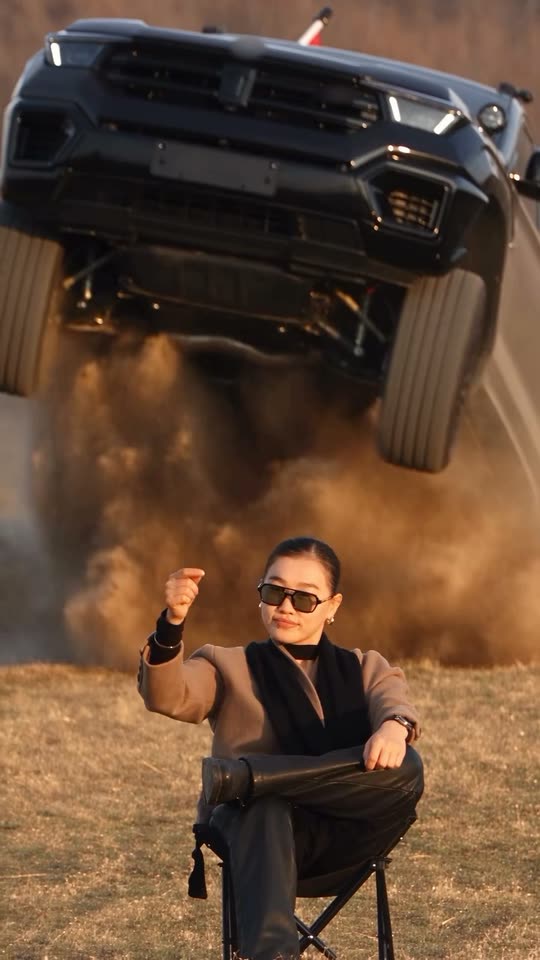
You sit in a folding camp chair with your legs crossed, raise one fist, and a black pickup flies over the field behind you and lands at your back. You never turn around. Add a selfie, or a selfie and a photo of your own car.

The original Car Jump AI reel by @ya_danilova01Original reel
  • 1 photo you add
  • 10 s clip with sound
  • 9:16 for TikTok, Reels, Shorts
  • No watermark

No prompt to write: Add your photo and tap once

Create your own

Ready in up to several minutes · 152 credits

The car jump AI video is the "unbothered" trend: you sit calm in a folding camp chair in a golden field, raise one fist, and a black pickup flies over the field behind you in slow motion and lands at your back. You need one clear photo of yourself, plus a photo of your car for your own ride.

Example

What the Car Jump AI video looks like

This is the original reel. Your photos replace its characters, so your video follows the same shots with your faces. No two runs come out the same.

Original reel by @ya_danilova01, 10 s

The original reel by @ya_danilova01, the AI clip that started the trend: she put her own face into it. A black pickup flies over the field behind her and lands at her back while she stays calm. Your photo takes her place. Shown: the last 10 seconds, with the car badges blurred.

Use this reference
Step by step

How to make the Car Jump AI video on MakeViral

Everything runs in the browser. No editing app, no prompt to write, no watermark.

  1. Add your photo

    Press "Create your own" and add your photo. Take it with the camera or pick it from your library.

  2. Press Generate

    The button shows the price. Seedance 2.5 puts your photos into the Car Jump trend clip and copies it shot by shot for 10 seconds, with the reel's original song. You write no prompt.

  3. Download or share

    The video is ready in up to several minutes as a 9:16 MP4. Download it, share it from your phone, or find it later in your Library.

Which photo works best?

Upload one photo of you for Any car, or two photos for Your car (you first, then your car).

  • Waist up or full body, face to the camera. You sit in the chair for the whole clip and keep the clothes from your photo, so wear what you want to be seen in.
  • Sharp and well lit, no sunglasses. The creator wears sunglasses; the AI adds glasses only when your photo has them.
  • One person per photo, so the AI picks the right face.
  • The car photo: the whole vehicle in view, from the front or a front corner, in daylight. The reel shows the truck's front for most of the jump. Badges and number plates come out blurred or blank.
  • Use your own photo, or one of a friend who said yes. Never a celebrity or a stranger.

Where did the Car Jump AI trend start?

The trend started on 26 September 2026 with an Instagram reel by @ya_danilova01, who calls herself an AI creator. She sits in a folding camp chair in a golden field at sunset, legs crossed, and raises a fist. A black pickup bursts over the ridge behind her, hangs in the air in slow motion in a cloud of dust, lands at her back and rolls past. She never turns her head. Her caption: "In parallel worlds…". By 14 October the reel had 95,100 likes, 1,446 comments and 3.6 million views.

Copies came fast. On 28 September TikTok creator @stevenwommack posted a how-to that credits her and recreates the clip with Higgsfield's Genjutsu motion transfer (98,500 views by 14 October). In India, YouTube how-tos for the "Instagram viral car jumping video" started on 27 September, and from 29 September several of them shared the same short prompt for Google Flow: copy the camera, the framing and the moves from the video, and keep the face and the clothes from the photo. Another one added a second photo to swap in your own car. By mid-October AI video apps sold it as a ready-made "Unbothered" template.

  1. @ya_danilova01 posts the original AI reel on Instagram; it has 95,100 likes, 1,446 comments and 3.6 million views by 14 October. Instagram

  2. @stevenwommack posts a TikTok how-to that credits her and recreates the clip with Higgsfield's Genjutsu; it has 98,500 views by 14 October. TikTok

  3. The most viewed YouTube how-to (Hindi, 32,800 views by 14 October) shares the trend's prompt for Google Flow; the same prompt shows up word for word in other how-tos from 29 September. YouTube

  4. A how-to adds a second photo and a prompt that swaps the truck for your own car; it has 10,600 views by 14 October. YouTube

  5. Worldwide YouTube searches for "car jump ai video" stay at their highest from 30 September, when they first show up, to 2 October, then fall (Google Trends).

Copy and paste

The Car Jump AI prompts

You do not need these: the one-tap flow runs them for you, together with the trend clip. [Image 1] and [Image 2] are your two photos, and [Video 1] is the trend clip the video copies.

Any car

1 photo: your photoSeedance 2.510 s · 720p · 9:16152 credits
Video prompt

Track the exact camera movement, framing, facial expressions, and body movements from the reference video [Video 1]. Keep the face, hairstyle, body, clothing, and overall appearance exactly the same as in the reference image [Image 1], with no changes or distortion. Use the video's background and environment. Output in 9:16 vertical format. Recreate the reference video [Video 1] shot for shot: the dry golden field at sunset with the rusty autumn bushes behind, the black folding camp chair, the black pickup truck that bursts over the low ridge behind the chair, flies in slow motion over the space just behind it in a huge cloud of dust, lands at the back of the chair and rolls past, the same long-lens handheld camera, the same framing, quick cuts and timing. The ONLY change: the woman in the camp chair is now the person in [Image 1]. The black pickup stays as in [Video 1], with no badges. The one in the camp chair = the person in [Image 1], in EVERY shot: copy the exact face from [Image 1] - face shape, eye color and eye shape, eyebrows, nose, mouth, skin tone, age, hair color, hair length and hairstyle, and any beard, moustache, glasses or freckles exactly as in the photo. They wear the clothes from [Image 1]; if [Image 1] shows only the head or the upper body, invent the rest so it matches naturally. The same real person in every frame, from the first second to the last, so their friends instantly recognize them, also in the close shots at the end when the truck passes behind the chair. Never morph, never drift back to the original woman's face, never add or remove facial hair. NO sunglasses: no glasses of any kind unless [Image 1] shows glasses. No slicked-back bun, no black scarf, no taupe wool coat, no black leather trousers and no earrings unless [Image 1] shows them. If [Image 1] shows an animal, the one in the chair is that animal, sitting upright in the camp chair, with its own face, fur and markings and the natural body volume and proportions of that animal: never flattened, squashed, stretched or merged with anything. The moves, matching the reference second by second: 0-1.3 s: sits calm in the camp chair, legs crossed, one forearm resting on the knee, and glances around. 1.3-3.3 s: raises one hand to shoulder height in a loose fist, as if snapping the fingers, and holds it while the black pickup bursts over the low ridge behind (from 1.8 s) in a cloud of dust. 3.3-6.8 s: the black pickup hangs in the air in slow motion just behind the chair, front to the camera, wheels hanging, in a huge cloud of dust. The person lowers the hand, rests both forearms on the crossed knee and stays perfectly still and calm, with a small, cool look, never turning around. 6.8-8.8 s: quick cuts: the black pickup lands right behind the chair and rolls toward the camera. 8.8-10 s: the black pickup passes close behind the chair; the person stays seated and looks into the camera, unbothered. Anatomy rules: one head only, on the person's own shoulders. Two arms and two hands. The vehicle never touches the person or the chair. No badges, emblems or lettering on the vehicle, no readable number plate, no flag on the vehicle, no text, no logos, no watermark, no extra people.

3215 characters

Your car

2 photos: your photo + your car, whole vehicle in viewSeedance 2.510 s · 720p · 9:16152 credits
Video prompt

Use the reference video [Video 1] as-is. Replace the person with the person from [Image 1]. Replace the vehicle with the vehicle from [Image 2] (same model, color, design). Track the exact camera movement, framing, facial expressions, and body movements from the reference video [Video 1]. Keep the face, hairstyle, body, clothing, and overall appearance exactly the same as in the reference image [Image 1], with no changes or distortion. Use the video's background and environment. Output in 9:16 vertical format. Recreate the reference video [Video 1] shot for shot: the dry golden field at sunset with the rusty autumn bushes behind, the black folding camp chair, the black pickup truck that bursts over the low ridge behind the chair, flies in slow motion over the space just behind it in a huge cloud of dust, lands at the back of the chair and rolls past, the same long-lens handheld camera, the same framing, quick cuts and timing. The ONLY changes: the woman in the camp chair is now the person in [Image 1], and the black pickup is now the vehicle from [Image 2]. The one in the camp chair = the person in [Image 1], in EVERY shot: copy the exact face from [Image 1] - face shape, eye color and eye shape, eyebrows, nose, mouth, skin tone, age, hair color, hair length and hairstyle, and any beard, moustache, glasses or freckles exactly as in the photo. They wear the clothes from [Image 1]; if [Image 1] shows only the head or the upper body, invent the rest so it matches naturally. The same real person in every frame, from the first second to the last, so their friends instantly recognize them, also in the close shots at the end when the truck passes behind the chair. Never morph, never drift back to the original woman's face, never add or remove facial hair. NO sunglasses: no glasses of any kind unless [Image 1] shows glasses. No slicked-back bun, no black scarf, no taupe wool coat, no black leather trousers and no earrings unless [Image 1] shows them. If [Image 1] shows an animal, the one in the chair is that animal, sitting upright in the camp chair, with its own face, fur and markings and the natural body volume and proportions of that animal: never flattened, squashed, stretched or merged with anything. The vehicle = the vehicle in [Image 2], in EVERY shot where the truck shows in [Video 1]: the same body shape, size, paint color, grille, headlights, wheels and roof as in [Image 2], whatever kind of vehicle it is. It takes the same path at the same moments as the truck in [Video 1]: over the ridge, through the air behind the chair in slow motion, the landing and the pass. Never the black pickup from [Video 1]. Nobody rides on it or stands next to it; if [Image 2] shows people, leave them out. No badges, emblems or lettering on it and no readable number plate, even if [Image 2] shows them. The moves, matching the reference second by second: 0-1.3 s: sits calm in the camp chair, legs crossed, one forearm resting on the knee, and glances around. 1.3-3.3 s: raises one hand to shoulder height in a loose fist, as if snapping the fingers, and holds it while the vehicle from [Image 2] bursts over the low ridge behind (from 1.8 s) in a cloud of dust. 3.3-6.8 s: the vehicle from [Image 2] hangs in the air in slow motion just behind the chair, front to the camera, wheels hanging, in a huge cloud of dust. The person lowers the hand, rests both forearms on the crossed knee and stays perfectly still and calm, with a small, cool look, never turning around. 6.8-8.8 s: quick cuts: the vehicle from [Image 2] lands right behind the chair and rolls toward the camera. 8.8-10 s: the vehicle from [Image 2] passes close behind the chair; the person stays seated and looks into the camera, unbothered. Anatomy rules: one head only, on the person's own shoulders. Two arms and two hands. The vehicle never touches the person or the chair. No badges, emblems or lettering on the vehicle, no readable number plate, no flag on the vehicle, no text, no logos, no watermark, no extra people.

4028 characters
How many credits does it cost?

You pay per video in credits, and the create page shows the exact price on the Generate button before you spend anything. The one-tap price covers the video, made in one step from your photos and the trend clip, charged once. One video is 152 credits, so the smallest one-time pack that covers it is $39.99 for 450 credits, with no subscription. The cheaper models are there if you run the prompts by hand in AI Video.

Video modelSettingsCredits
Seedance 2.5 (this template)10 s, 720p, copies the trend clip, one tap152

One-time packs and plans are on the pricing page. A failed video gives its credits back.

What happens in the car jump AI video, second by second?

MakeViral puts you into @ya_danilova01's original AI reel itself. The field, the chair, the jump, the cuts and the camera stay as in the reel:

TimeWhat you see
0 to 1.3 sYou sit in the folding camp chair in a golden field at sunset, legs crossed, and glance around.
1.3 to 3.3 sYou raise one hand in a loose fist, like a snap, and the black pickup bursts over the ridge behind you.
3.3 to 6.8 sThe truck hangs in the air right behind you in slow motion, front to the camera, in a huge cloud of dust. You rest your arms on your knee and stay calm.
6.8 to 8.8 sQuick cuts: it lands at your back and rolls toward the camera.
8.8 to 10 sIt passes close behind your chair. You look into the camera, unbothered.

How it works: Seedance 2.5 edits the reel itself and swaps the person in the chair for the one in your photo, and in Your car the truck for your car. You get 10 seconds at 720p, vertical, with the reel's own sound put back after the run. You can turn the sound off on the result screen. A run takes 5 to 15 minutes, and the exact price shows on the Generate button before you spend anything. Every run is a new take, so results differ.

Any car or your car: which one should you make?

  • Any car (1 photo): you sit in the chair, and the reel's black pickup flies over you, with its badges blurred. This is the original trend.
  • Your car (2 photos): photo 1 is you, photo 2 is your car. Your car takes the pickup's place: it bursts over the ridge, flies over the field behind you and lands at your back. A how-to on YouTube made this version popular a few days after the original.

Both use the same reel, the same sound and the same model, and both cost the same. Your car works with any vehicle in the photo; badges, lettering and number plates come out blurred or blank on purpose.

What goes wrong, and how do you fix it?

ProblemFix
The face looks like someone elseUse a sharp, front-facing photo in good light, without sunglasses. Run it again.
The creator's sunglasses, black scarf or slicked-back bun come backThe prompt bans them unless your photo has them. Run it again.
Your car looks different in some shotsUse a photo of the whole vehicle from the front or a front corner, in daylight.
The car's badge is blurred or missingThat is on purpose: we blurred the badges in the reel, and the prompt asks for no badges, lettering or plates.
The truck clips the chairIt is a new take every time: run it again.
The model refuses a photoSome photos get refused. The credits come back; try another photo.

Which caption, sound and hashtags fit the car jump trend?

Caption ideas: "Unbothered.", "In parallel worlds…" (the creator's own caption), "Waiting for my ride", "Monday can't touch me". Or write your own.

Hashtags: the trend lives on Instagram Reels; on TikTok, #carjumpai started on 2 October 2026 and is still small. Add #carjump and #aivideo, and keep the platform's AI label on.

Sound: the clip comes with the reel's own sound, the same seconds as the clip, so it is ready to post. You can turn it off on the result screen and pick a sound when you post instead.

Safety: it is an AI effect. Never try it with a real car.

FAQ

Car Jump AI trend questions

What is the car jump AI video trend?
It is a viral AI video where you sit calm in a folding camp chair in a golden field and raise a fist, and a black pickup flies over the field behind you in slow motion and lands at your back while you never turn around. It started on Instagram on 26 September 2026, and YouTube and TikTok how-tos spread it from 27 September.
Who started the car jump AI trend?
Instagram creator @ya_danilova01, an AI creator, with a reel posted on 26 September 2026 that shows her own face. It had 95,100 likes, 1,446 comments and 3.6 million views by 14 October.
What prompt does the car jump AI video use?
The creator shared no prompt. The how-tos shared one for Google Flow from 29 September: copy the exact camera movement, framing, facial expressions and body movements from the video, and keep the face, hairstyle, body and clothing from the photo. Another how-to added a line that swaps the truck for the car in a second photo. This template uses those prompts, in that order, plus rules that keep your face from the eye color to the hairstyle. You write no prompt yourself.
How do I make the car jump AI video with my photo?
Pick Any car or Your car, press "Create your own" and add your photo, plus a photo of your car for Your car. Press Generate; the button shows the price first. You get a 10-second vertical clip with the reel's sound, and it waits in your Library when it is ready.
Can I put my own car in it?
Yes. Your car takes a second photo, your vehicle, and puts it in place of the black pickup: it flies over the field behind you and lands at your back. Use a photo of the whole vehicle in daylight, from the front or a front corner.
Will my car's logo show in the video?
No. We blurred the badges in the reel, and the prompt asks for no badges, lettering or readable number plates, also on your own car.
Can I use a photo of my pet?
You can try. When the photo shows an animal, the prompt sits that animal upright in the camp chair. The reel was made for a person, so results with pets vary more.
Is this the Higgsfield or CapCut car jump template?
No. Those are separate apps with their own clips and effects. Here AI puts you into the original AI reel that started the trend, with your own face and clothes, and you need no other app.
How long is the video and what format is it?
10 seconds as a vertical 9:16 MP4 at 720p, with the reel's own sound. It plays on TikTok, Reels and Shorts, and there is no watermark.
Is the video real?
No. You are put into an AI clip from a still photo, and no car jumped over anyone. Keep the AI label on when you post it, and never try this with a real car.
Can I put a celebrity in it?
No. Use your own photo, or a friend who said yes. Never a celebrity or a stranger.

Make your own Car Jump AI video

Add one photo and tap once. No prompt to write. 152 credits.

No watermark. A failed video gives its credits back. Secure checkout by Stripe.