Back

POV Outfit Transition AI: Six Items, Six Matching Looks

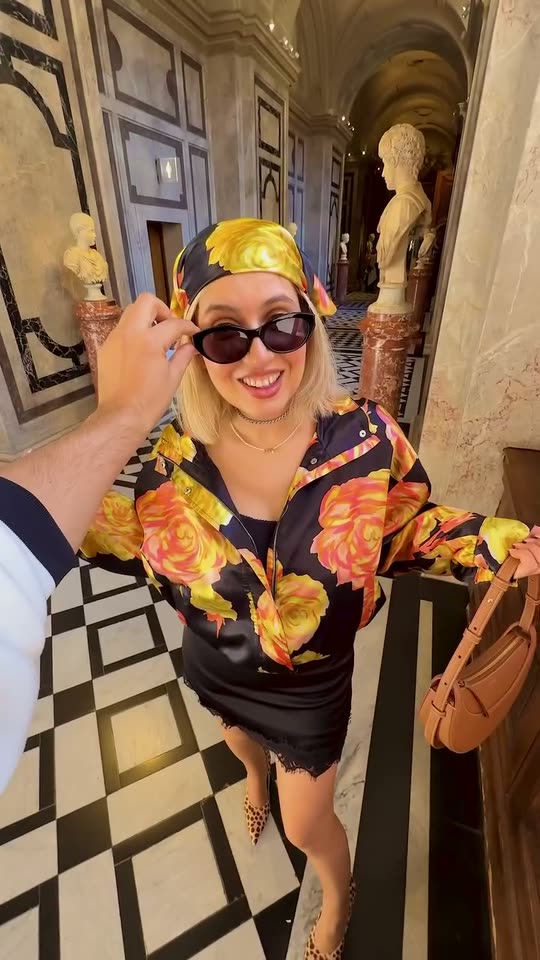
A hand holds out a ring, sunglasses, a silk scarf, a phone, an iced matcha and a red fan. After each one, a jump cut puts you in front of the camera in a look that matches it. One photo in, a vertical clip with the trend's "Annyeonghaseyo" sound out.

The original POV Outfit Transition reel by @irinahpOriginal reel
  • 1 photo you add
  • 9 s clip with sound
  • 9:16 for TikTok, Reels, Shorts
  • No watermark

No prompt to write: Add your photo and tap once

Create your own

Ready in up to several minutes · From 137 credits

The POV outfit transition is the fashion reel filmed from your friend's eyes: a hand holds an item out to the camera in an empty spot, a jump cut, and you stand there in an outfit that matches it, again and again across the city. Here you need one photo with your face clear, or a photo of your pet.

Also called Annyeonghaseyo trend · POV outfit check · Hand outfit transition · Jump outfit transition

Example

What the POV Outfit Transition video looks like

The clip above is the trend's original reel, real footage by the fashion creator @irinahp with its own sound, so you can see what the trend looks like. It is not a MakeViral result. Your video is this reel with your face and hair, or your pet, in her place: the same six spots, items and jump cuts, 9 seconds, vertical, with the Annyeonghaseyo sound.

Original reel by @irinahp, 9 s

The original reel by @irinahp in Vienna: a hand holds out a ring, sunglasses, a silk scarf, a phone, an iced matcha and a red fan, and after each jump cut she stands there in a look that matches it. You and Pet copy this reel.

Use this reference
Step by step

How to make the POV Outfit Transition video on MakeViral

Everything runs in the browser. No editing app, no prompt to write, no watermark.

  1. Add your photo

    Press "Create your own" and add you, face clear. Take it with the camera or pick it from your library.

  2. Press Generate

    The button shows the price. Seedance 2.5 puts your photos into the POV Outfit Transition trend clip and copies it shot by shot for 9 seconds, with the reel's original song. You write no prompt.

  3. Download or share

    The video is ready in up to several minutes as a 9:16 MP4. Download it, share it from your phone, or find it later in My videos.

Which photo works best?

Upload one photo: of yourself for You, of your pet for Pet.

  • You: a sharp photo with your face turned to the camera, from the waist up or closer, in good light. MakeViral first makes a close portrait from it, so only your face and hair go into the video. The six outfits come from the reel, or from your own words with Your outfits, never from your photo.
  • No sunglasses, no hat and no heavy filter. The woman in the reel wears dark sunglasses, and the video shows your eyes instead, so a clear face matters.
  • Pet: one animal, the whole body in view, eyes open, in daylight. The fur colors, ears and markings come from your photo.
  • One person or one pet per photo. Use your own photo, a friend who said yes, or your own pet. Never a celebrity or a stranger.

Where did the POV Outfit Transition trend start?

Outfit transitions are one of the oldest fashion formats: an outfit transition TikTok or Reel cuts from one look to the next on the beat. On 12 November 2026 the TikTok tag #outfittransition had 137,731 videos and 2.28 billion views, and #povoutfit had 45.5 million views. This POV version adds a twist: the camera person's hand offers an item first, and the look that follows is built around it.

The reel this template copies was posted on Instagram on 1 October 2026 by the fashion creator @irinahp, captioned "Annyeonghaseyo from Vienna ;)". She credits the idea to a reel by @ll.lu1s. In six rounds through Vienna's old town, a hand holds out a ring, sunglasses, a silk scarf, a phone, an iced matcha and a red fan, and each time she appears in a matching outfit. It had 15,913 likes on 12 November 2026.

The sound is "Annyeonghaseyo" by Yuki Chiba and Lil Moshpit, the Korean greeting sung over a beat. It reached TikTok in January 2026 and became a dance trend in Japan first: @magichour0120's clip from 4 March 2026 had 3.2 million views. By October 2026 travel and fashion creators used the annyeonghaseyo song for Seoul outfit check clips too.

  1. The sound "Annyeonghaseyo" by Yuki Chiba and Lil Moshpit is added to TikTok.

  2. @magichour0120 posts an Annyeonghaseyo dance; it has 3.2 million views and 387,800 likes on 12 November 2026. TikTok

  3. @irinahp posts the POV outfit transition in Vienna with the Annyeonghaseyo sound, crediting @ll.lu1s for the idea. MakeViral's template copies it. Instagram

  4. @chamterrr posts a Korea travel clip on the same sound; it has 914,200 views on 12 November 2026. TikTok

  5. @jelllyyyy_ posts a "seoul outfit check" on the sound, tagged #annyeonghaseyo and #transition; 109,600 views on 12 November 2026. TikTok

Copy and paste

The POV Outfit Transition prompts

You do not need these: the one-tap flow runs them for you, together with the trend clip. [Image 1] and [Image 2] are your two photos, and [Video 1] is the trend clip the video copies.

You

1 photo: you, face clearSeedance 2.59 s · 720p · 9:16139 credits
Video prompt

Recreate the reference video [Video 1] shot for shot: a handheld POV fashion reel in six rounds, the same places, light, framing, timing, jump cuts and moves. In each round the camera person's hand holds out an item, then a hard jump cut shows the person there in a matching outfit. The ONLY change is the face and the hair of the platinum-blonde young woman: they are now the face and the hair of the person in [Image 1], in every look. The person = the person in [Image 1], in EVERY shot and in EVERY look: copy the exact face from [Image 1] (the face shape, eye color and eye shape, eyebrows, nose, mouth, skin tone, age, hair color, hair length and hairstyle, and any beard, moustache, glasses or freckles), so their friends recognize them at once. [Image 1] is only a head-and-shoulders portrait: take ONLY the face, the hair and the skin tone from it, never its plain black t-shirt and never its grey background. The same real person in every look, from the first frame to the last, also right after each jump cut and when the face is small or turned away. Never morph, never drift back to the original woman's face or hair. Every outfit stays exactly as in [Video 1]: the same clothes, shoes, bags and accessories, the same fit, in the same order, and each outfit change at the same moment as in [Video 1]. NO black t-shirt from [Image 1] in any look. NO platinum-blonde hair unless [Image 1] shows it, also under the headscarves and the beret. One exception to the outfits: NO sunglasses on the face unless [Image 1] shows glasses; the eyes stay clear in every look. LOOK 1 to LOOK 6 = the person in the six outfits of [Video 1], in order. Shot 1 [0-0.65s]: an empty shopping street; the hand holds out a ring with a dark stone. Shot 2 [0.65-1.5s]: hard jump cut, LOOK 1 stands in that spot and holds out a hand; the ring goes on a finger. Shot 3 [1.5-2.25s]: hard cut, an empty marble hall; the hand holds out dark sunglasses. Shot 4 [2.25-3.2s]: hard jump cut, LOOK 2 steps in close and smiles. Shot 5 [3.2-3.8s]: hard cut, an empty leopard-print lounge; the hand holds out a pale blue silk scarf. Shot 6 [3.8-4.55s]: hard jump cut, LOOK 3 takes the corner of the scarf. Shot 7 [4.55-5.2s]: hard cut, an empty stone arcade; the hand holds out a phone. Shot 8 [5.2-6.15s]: hard jump cut, LOOK 4 strikes a playful pose. Shot 9 [6.15-6.8s]: hard cut, a sunny square; the hand holds out an iced matcha with a straw. Shot 10 [6.8-7.55s]: hard jump cut, LOOK 5 sips from the straw. Shot 11 [7.55-8.2s]: hard cut, a palace plaza; the hand holds out a red fan. Shot 12 [8.2-9s]: hard jump cut, LOOK 6 poses with the fan, to the end. The camera person's hand comes in from the edge of the frame as in [Video 1]: it never belongs to the one in front of the camera and never gets a face. Never mix pieces of two looks. Plain hard jump cuts on the beat: no glow, no dissolve, no flash. Real phone footage, natural light. No dialogue throughout the entire video. No background music. Anatomy rules: one person in front of the camera, plus the camera person's one hand and forearm. One head, two arms, two legs, five fingers on each hand. No text, no captions, no readable signs, no logos, no watermark.

3205 characters
Pet

1 photo: your pet, whole bodySeedance 2.59 s · 720p · 9:16137 credits
Video prompt

Recreate the reference video [Video 1] shot for shot: a handheld POV fashion reel in six rounds, the same places, light, framing, timing, jump cuts and items. In each round the camera person's hand holds an item out in an empty spot, then a hard jump cut shows the pet standing there, close to the camera. The ONLY change: the young woman who appears in front of the camera is now the pet in [Image 1], in every look. The pet = the pet in [Image 1], in EVERY shot: the same species and breed, face, eyes, ears, muzzle, fur colors, fur length and markings as in [Image 1], with the natural body volume and proportions of that animal: never flattened, squashed, stretched or merged with anything. It stands upright on its hind legs in the woman's place, big in the frame like a little fashion model. It stays that animal: never a person, never a human face, never human hands. The same pet in every look, so its owner recognizes it at once. No woman, no blonde hair, no sunglasses on the face. LOOK 1 to LOOK 6 = the pet in a small pet-sized version of each outfit of [Video 1], in order: a rust and gold patterned dress, a yellow headscarf and a floral shirt, a black and white spotted top, a red floral jacket, a leopard beret and a cream trench, a black headscarf and a short red coat. Shot 1 [0-0.65s]: an empty shopping street; the hand holds out a ring with a dark stone. Shot 2 [0.65-1.5s]: hard jump cut, LOOK 1 stands in that spot and lifts a front paw; the ring goes on it. Shot 3 [1.5-2.25s]: hard cut, an empty marble hall; the hand holds out dark sunglasses. Shot 4 [2.25-3.2s]: hard jump cut, LOOK 2 steps in close and sniffs the sunglasses. Shot 5 [3.2-3.8s]: hard cut, an empty leopard-print lounge; the hand holds out a pale blue silk scarf. Shot 6 [3.8-4.55s]: hard jump cut, LOOK 3 takes the corner of the scarf in its mouth. Shot 7 [4.55-5.2s]: hard cut, an empty stone arcade; the hand holds out a phone. Shot 8 [5.2-6.15s]: hard jump cut, LOOK 4 strikes a playful pose, a front paw on the phone. Shot 9 [6.15-6.8s]: hard cut, a sunny square; the hand holds out an iced matcha with a straw. Shot 10 [6.8-7.55s]: hard jump cut, LOOK 5 sniffs the straw. Shot 11 [7.55-8.2s]: hard cut, a palace plaza; the hand holds out a red fan. Shot 12 [8.2-9s]: hard jump cut, LOOK 6 poses with the fan, to the end. The camera person's hand comes in from the edge of the frame as in [Video 1]: it never belongs to the one in front of the camera and never gets a face. Never mix pieces of two looks. Plain hard jump cuts on the beat: no glow, no dissolve, no flash. Real phone footage, natural light. No dialogue throughout the entire video. No background music. Anatomy rules: one animal in front of the camera, plus the camera person's one hand and forearm. One head, one muzzle, four legs with animal paws. No person in front of the camera. No text, no captions, no readable signs, no logos, no watermark.

2916 characters

How many credits does it cost?

You pay per video in credits, and the create page shows the exact price on the Generate button before you spend anything. The one-tap price covers the video, made in one step from your photos and the trend clip, charged once. Each version has its own price: You 139 credits, Pet 137 credits. The cheaper models are there if you run the prompts by hand in AI Video.

Video modelSettingsCredits
You: Seedance 2.5 (this template)9 s, 720p, copies the trend clip, one tap139
Pet: Seedance 2.5 (this template)9 s, 720p, copies the trend clip, one tap137

One-time packs and plans are on the pricing page. A failed video gives its credits back.

How does the POV outfit transition work?

The hand is the edit. The camera is your friend's phone at chest height, so the viewer sees what your friend sees. In each round the friend's hand holds an item out to the lens in an empty spot. Then a hard jump cut: you stand right there, close to the camera, in a look built around that item, and you reach for it, pose or take a sip. Six rounds in 9 seconds, one per beat of the song.

TimeThe hand holds outThe look that follows
0-1.5 sA ring with a dark stone, on a shopping streetA rust and gold patterned mini dress with green knee boots
1.5-3.2 sDark sunglasses, in a marble hallA yellow silk headscarf and a black and orange floral shirt
3.2-4.5 sA pale blue silk scarf, in a leopard-print loungeA black and white spotted high-neck blouse
4.5-6.1 sA phone, under a stone arcadeA red floral jacket with a denim mini skirt
6.1-7.5 sAn iced matcha, on a sunny squareA leopard beret, a cream trench jacket and a suede skirt
7.5-9 sA small red fan, in front of a palaceA black headscarf and a short red coat

The template copies the reel shot for shot with the best AI video models available. You puts your face and hair on the woman in every round. Pet puts your pet in her place, in a small version of each look.

Can you pick your own looks?

Yes, in the You version. On the create page, open Your outfits and write any of the six looks in your own words, for example "All-black suit" for look 1 or "White summer dress" for look 5. Name the clothes, the colors and the shoes. Every look you leave empty stays as in the reel, so you can change one look or all six. MakeViral first changes those looks in the reel itself, so each new outfit still arrives on its jump cut, then puts you in. A written look costs a few credits more.

The items in the hand stay the reel's: the ring, the sunglasses, the scarf, the phone, the matcha and the fan. For the full effect, write a look that goes with the item, like a red coat for the red fan.

The reel's looks are women's looks. A man's photo keeps his own gender, and the model shapes the looks to him, but the poses stay the reel's.

Which song is the POV outfit transition trend?

The sound of this outfit transition reel is "Annyeonghaseyo" by Yuki Chiba and Lil Moshpit. "Annyeonghaseyo" is the Korean for "hello", and the song repeats it over a short, bouncy beat, which is why creators use it for Seoul trip clips and outfit checks. On TikTok the annyeonghaseyo trend started as a dance and moved to fashion clips in autumn 2026.

Your video comes with the reel's own sound, the annyeonghaseyo trending song, for its whole length, so it is ready to post. You can turn the sound off on the result screen. The song belongs to its owners, and MakeViral gives you no rights to it. To post on Annyeonghaseyo TikTok clips or Reels, you can also add the song from the platform's own music library.

What can go wrong, and how do you fix it?

This template is new, and we have not run it with test photos yet. It uses the same setup as our other outfit change templates: a close portrait of you first, then the reel copy. Look out for these:

What goes wrongWhyWhat to do
Sunglasses come back in a lookThe woman in the reel wears them in all sixRun it again; the version asks for your eyes to show.
The hand in the frame looks oddHands are hard for AI, and the friend's hand is in every roundRun it again for a new take.
An outfit detail differs from the reelThe model redraws the clothes on your bodyThat is normal; the colors and the cut stay close.
A face looks less like you in a short roundEach look is on screen for less than a secondUse a sharp, front-facing photo in good light.
A pet looks odd standing upThe pet takes a standing woman's placeRun it again; a full-body pet photo helps.
FAQ

POV Outfit Transition trend questions

What is the POV outfit transition?
It is a fashion reel filmed from a friend's point of view. A hand holds out an item, like a ring or a drink, in an empty spot, then a jump cut shows you standing there in an outfit that matches it. Creators repeat it four to six times in different places, often to the Annyeonghaseyo song.
How do I make the POV outfit transition with AI?
Press "Create your own" on this page, add one photo with your face clear and press Generate. MakeViral puts you into the viral reel, so you appear in six matching looks after six items. You write no prompt, and the clip lands in My videos as a vertical MP4.
What is the annyeonghaseyo trend?
It is the set of TikTok and Instagram clips that use the song "Annyeonghaseyo" by Yuki Chiba and Lil Moshpit: first a dance with a wave, then Seoul trip clips, outfit checks and this POV outfit transition. The reel this template copies is captioned "Annyeonghaseyo from Vienna".
What is the annyeonghaseyo song?
"Annyeonghaseyo" by the Japanese rapper Yuki Chiba with Lil Moshpit, added to TikTok in January 2026. The title is the Korean word for "hello". It is the sound of this outfit transition trend, and your video comes with it.
Is this a POV outfit check?
Close. A POV outfit check shows one look from the viewer's eyes. The POV outfit transition goes further: every item the hand holds out brings a new look, six in 9 seconds, so it works as an outfit check for a whole week.
Is there an outfit transition CapCut template?
Many outfit transition CapCut templates cut your own clips together, so you still have to film every look. This AI version needs no filming: one photo, and the reel, the items, the places and the jump outfit transition timing all come from the original.
Is there an outfit transition app?
MakeViral works in the browser on any phone. Open this page, add your photo and generate: the outfit transition video is ready in a few minutes, with no app to install and no editing.
Can I do it with my pet?
Yes. Pick Pet and upload one photo of your dog, cat or other pet. Your pet takes the woman's place in all six rounds, in a small version of each look, while the hand offers the ring, the sunglasses, the scarf, the phone, the matcha and the fan.
Can I choose the outfits?
Yes, in the You version: open Your outfits on the create page and write your own look for any of the six rounds. A look you leave empty stays as in the reel. The items in the hand stay the same, so a look that matches the item works best.
How long is the video?
9 seconds, vertical 9:16 at 720p, with the Annyeonghaseyo sound. It takes 5 to 15 minutes, and you can leave the page while it runs: the finished clip waits in My videos.
Does the POV outfit transition cost credits?
Yes. Each video costs credits, and the create page shows the exact price on the Generate button before you spend anything. Your own outfits cost a few credits more. If a video fails, the credits come back.
Can I post my outfit change transition on TikTok or Instagram?
Yes. The MP4 has no watermark, so you can post it to TikTok, Reels or Shorts as it is. The song belongs to its owners: check the platform's music rules before you use the clip in an ad. Keep the platform's AI label on, and tag it #outfittransition or #povoutfit.
More trends

Other AI video templates

Make your own POV Outfit Transition video

Add one photo and tap once. No prompt to write. 139 credits.

No watermark. A failed video gives its credits back. Secure checkout by Stripe.