Heaven Hug AI: Run Through the Clouds Into Their Arms

Add a photo of you and one of someone you miss. You run across a sea of golden clouds, find them waiting in the light, and hold each other once more, in a 10-second video with soft music.

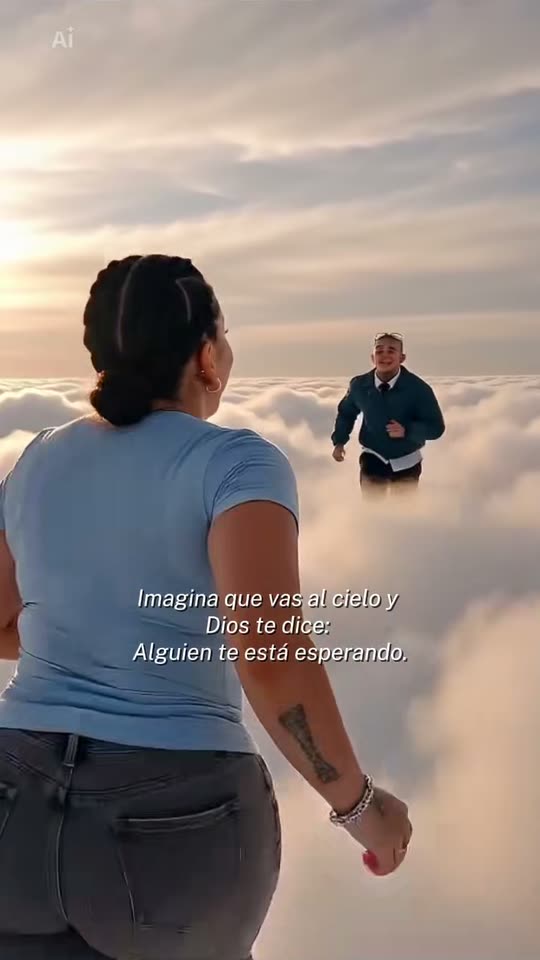
The original Heaven Hug reel by @leslysevilla09Original reel
  • 2 photos you add
  • 10 s clip with sound
  • 9:16 for TikTok, Reels, Shorts
  • No watermark

No prompt to write: Add your photos and tap once

Create your own

Ready in a few minutes · 126 credits

The heaven hug, or abrazo en el cielo, is a Día de Muertos trend from Mexico: an AI video where you run across the clouds and hug a loved one who has passed away. It is a gentle way to remember them. You need two photos: one of you and one of the person you miss.

Example

What the Heaven Hug video looks like

This is the original reel that started the trend. Your video is a new clip made from your photo in the same style, not a copy of these shots. No two runs come out the same.

Original reel by @leslysevilla09, 15 s

One of the first posts of the trend, by @leslysevilla09 on 13 October 2026, made with the CapCut template: she runs across the clouds into the arms of someone she misses. The CapCut logo is blurred.

Step by step

How to make the Heaven Hug video on MakeViral

Everything runs in the browser. No editing app, no prompt to write, no watermark.

  1. Add the two photos

    Press "Create your own" and add you, then your loved one. Add them in this order, because the order decides who is who in the scene. Take them with the camera or pick them from your library.

  2. Press Generate

    The button shows the price. Seedance 2.5 films the Heaven hug scene straight from your photos, with no in-between picture, for 10 seconds with original sound. You write no prompt.

  3. Download or share

    The video is ready in a few minutes as a 9:16 MP4. Download it, share it from your phone, or find it later in your Library.

Which photo works best?

Use two photos: one of you, and one of the person you miss.

  • Clear, sharp faces that look at the camera, in good light. A photo from the waist up works best.
  • Your loved one at the age you want to remember. The video keeps the age in the photo.
  • Old prints are fine. Lay the print flat and photograph it with no glare. A black-and-white photo comes out in natural color.
  • Two people in photo 2, like your grandparents, wait together, and you hug them both.
  • Only you in photo 1. Crop a group photo first.
  • A pet in photo 2 runs to you, and you kneel to hold it.

Where did the Heaven Hug trend start?

The heaven hug is a CapCut template that spread in Mexico from 13 October 2026, about three weeks before Día de Muertos on 1 and 2 November. It opens with the line "Imagina que vas al cielo y Dios te dice: alguien te está esperando" ("Imagine you go to heaven and God tells you: someone is waiting for you"). You run across a sea of clouds at golden hour, stop, and see a loved one waiting in the light. Then you run into their arms.

People post it for the ones they miss: a mother, a grandmother, a brother, a partner. One of the first posts, by @leslysevilla09, passed 93,000 views in less than a day. The template's sound was in 564 TikTok videos early on 14 October and in 1,052 ten hours later, with the top posts from Mexico.

Reunions in heaven are not new as templates on TikTok: a Father's Day version was posted in June 2026. This one took off in the weeks before Día de Muertos, the days when families in Mexico remember their dead.

  1. A Father's Day template shows a reunion with a late father in heaven on TikTok, tagged #reencuentroenelcielo. TikTok

  2. The heaven hug template appears on TikTok in Mexico, with the line "Imagina que vas al cielo y Dios te dice: alguien te está esperando". TikTok

  3. @leslysevilla09 posts her heaven hug. It has 93,400 views and 2,976 likes by 14 October. TikTok

  4. The template's sound is in 564 TikTok videos at 06:45 UTC and in 1,052 at 16:18 UTC, ten hours later. TikTok

Copy and paste

The Heaven Hug prompt

You do not need this: the one-tap flow runs it for you. [Image 1] and [Image 2] are your photos, in the order you add them: the video model takes them as a reference and films the scene straight from them, with no photo step first.

2 photos: you + your loved oneSeedance 2.510 s · 720p · 9:16126 credits
Video prompt

A tender, emotional reunion above the clouds, filmed like a real film: a soft white sea of clouds stretches to the horizon under a pale golden-hour sky, with warm sunbeams breaking through the clouds. Photorealistic, natural skin and natural colors, gentle film grain, warm golden light, not CGI, not a cartoon, not a painting. Medium shots and close-ups keep both faces large, sharp and well lit. The one who arrives is the person in [Image 1], in every frame: copy the exact face from [Image 1] (the face shape, eye color and eye shape, eyebrows, nose, mouth, skin tone, age, hair color, hair length and hairstyle, and any beard, moustache, glasses or freckles), with the clothes from [Image 1]. The one who waits is the person in [Image 2], in every frame: copy the exact face from [Image 2] (the face shape, eye color and eye shape, eyebrows, nose, mouth, skin tone, age, hair color, hair length and hairstyle, and any beard, moustache, glasses or freckles), at the age shown in [Image 2], with the clothes from [Image 2]. They look healthy, calm and at peace. If [Image 2] is an old or black-and-white photo, they appear in natural full color with the same face. If [Image 2] shows two people, both wait side by side, each with their own face from [Image 2], and the one who arrives hugs them both together. If [Image 2] shows a child, keep the same child at the same age and size, with the face from [Image 2] (the face shape, eye color and eye shape, eyebrows, nose, mouth, cheeks, skin tone, hair color, hair length and hairstyle), never an older child or an adult. If [Image 2] shows an animal, the one who waits is that animal on four legs, with its own face, fur, markings and size, never a person. Never blend their faces, never swap their clothes. Each face stays the same from the first frame to the last, so the family recognizes them at once. The shots: 1. 0-3 s: a medium shot from the side: the one who arrives runs lightly across the soft clouds, looking around in wonder, hair moving in the breeze, then slows down. 2. 3-6 s: a medium close-up, the face turned three-quarters to the camera: they stop, breathless, look ahead, and their eyes fill with tears as they recognize someone, with a trembling smile. 3. 6-10 s: over their shoulder, a few steps away in a beam of warm golden light, the one who waits stands with open arms and a warm smile. The one who arrives runs into their arms and they hug tightly, swaying gently; with a child or an animal, the one who arrives kneels down to hold them. The camera moves in to a medium close-up as they lean back a little and touch foreheads, eyes closed, with quiet happy tears, both faces in three-quarter view to the camera. Audio: an original slow, tender piano melody with soft strings, a soft breeze, light quick footsteps, then a quiet sob and a soft laugh in the hug. No dialogue, no lyrics. Only the one who arrives and the one who waits, nobody else. No wings, no halos, no angels, no gates, no religious symbols. No text, no subtitles, no logos, no watermark.

3039 characters
How many credits does it cost?

You pay per video in credits, and the create page shows the exact price on the Generate button before you spend anything. The one-tap price covers the scene photo and the video, charged once. One video is 126 credits, so the smallest one-time pack that covers it is $14.99 for 150 credits, with no subscription. The cheaper models are there if you run the prompts by hand in AI Video.

Video modelSettingsCredits
Seedance 2.5 (this template)10 s, 720p, straight from your photos, one tap126

One-time packs and plans are on the pricing page. A failed video gives its credits back.

What happens in your video

Your clip follows the template's story in 10 seconds:

SecondsWhat happens
0 to 3You run lightly across a sea of soft clouds in warm golden light, looking around in wonder.
3 to 6You stop, look ahead, and your eyes fill with tears as you recognize someone.
6 to 10Your loved one waits in a beam of light with open arms. You run to them, hold each other tight and touch foreheads.

Seedance 2.5 makes the video straight from your two photos, with no in-between picture, so both faces stay close to the photos. The clip is vertical 9:16 at 720p, with soft original piano music. The exact price shows on the Generate button before you spend anything, and the video waits in your Library when it is ready.

How to share it, gently

These videos are about love and loss. A few things help:

  • Talk to your family first if the person was theirs too. Some find the video comforting, and others need more time.
  • Write a line to them. The trend's own line is "Imagina que vas al cielo y Dios te dice: alguien te está esperando" ("Imagine you go to heaven and God tells you: someone is waiting for you"). Others write "Lo que daría por un abrazo tuyo" ("What I would give for a hug from you") or "Algún día nos volveremos a ver" ("One day we will see each other again").
  • Keep the AI label on. The video is an AI creation, not a memory.

Hashtags (TikTok, 14 October 2026): #diademuertos is the big one. The trend's own tags, #abrazoenelcielo and #reencuentroenelcielo, are small and new, with 129 and 139 videos. Sound: your video has soft original music. On TikTok you can pick the trend's sound ("sonido original") when you post.

What goes wrong, and how do you fix it?

ProblemFix
A face does not look like the photoUse a sharp photo that looks at the camera, in good light. For an old print, photograph it flat with no glare. Then run it again.
Your loved one looks younger or older than you hopedThe video keeps the age in the photo. Pick a photo from the time you want to remember.
The two faces look alike or mixUse only one person in photo 1, and run it again.
Wings, halos or text show upRun it again. The prompt asks for none of them.
The run failsSome photos get refused. The credits come back; try another photo.

Every run is a new take, so results differ.

FAQ

Heaven Hug trend questions

What is the heaven hug trend?
It is a Día de Muertos trend from Mexico, also called abrazo en el cielo. People turn a photo of themselves and a photo of a loved one who has passed away into a short video: they run across the clouds, find that person waiting in the light, and hug. It started as a CapCut template on 13 October 2026.
How do I make the heaven hug video?
Press "Create your own", add a photo of you as photo 1 and a photo of your loved one as photo 2, and press Generate. The button shows the price first. You get a 10-second vertical video, and it waits in your Library when it is ready.
What does "Imagina que vas al cielo y Dios te dice: alguien te está esperando" mean?
It means "Imagine you go to heaven and God tells you: someone is waiting for you." It is the line of the original template, and many people use it as their caption.
Can I use an old or black-and-white photo?
Yes. Photograph the print flat, with no glare, so the face is sharp. Your loved one comes out in natural color, at the age they are in the photo.
Can photo 2 show two people, a child or a pet?
Yes. Two people in one photo, like your grandparents, wait together, and you hug them both. A child stays at their age in the photo, and you kneel to hold them. A pet runs to you, and you kneel to hold it. For a video of a pet on its own, see [Day of the Dead pet](/templates/ai-day-of-the-dead-pet).
Is it okay to make a video of someone who has passed away?
It is a personal choice. Talk to your family first, use a photo they are comfortable with, and keep the video private if you are unsure. The video is an AI creation, not a memory. For a hug with someone in your life today, use the [AI hug video](/templates/ai-hug-video).
Which prompt does this template use?
The CapCut template is closed, and no creator of the trend shared a prompt. Our prompt follows the template's story shot by shot and is written for Seedance 2.5, which makes the video straight from your two photos. You do not need to write anything.
How long is the video, and does it have sound?
It is 10 seconds, vertical 9:16, at 720p, with soft original piano music and no talking. The template's song is not included. On TikTok you can add the trend's sound when you post.
Does the heaven hug video cost credits?
Yes. The create page shows the exact price on the Generate button before you spend anything. If a video fails, the credits come back.
Are my photos private?
Yes. MakeViral does not post your photos or the result anywhere or show them to other users. The video goes to your private Library, and you can delete it there at any time.

Make your own Heaven Hug video

Add two photos and tap once. No prompt to write. 126 credits.

No watermark. A failed video gives its credits back. Secure checkout by Stripe.