AI Halloween Costume Try-On: See Yourself in a Costume Before You Buy

Add one full-body photo, type or pick a costume, and see yourself in it at a Halloween party. Two photos make a matching couple costume, and a short video shows the costume change.

Halloween Costume example video, made with AI-made peopleAI-made
  • 1 photo you add
  • 2K photo you can turn into a video
  • 9:16 for TikTok, Reels, Shorts
  • No watermark

No prompt to write: Add your photo and tap once

Create your own

Ready in 1 to 3 minutes · Photo · 3 credits

An AI Halloween costume try-on shows you in a costume before you buy or make it. Add one full-body photo, type or pick a costume such as a witch, vampire or zombie bride, and get a 2K photo of yourself at a Halloween party. Two photos make a matching couple costume. You need one clear, full-body photo.

Example

What the Halloween Costume photo looks like

Made from the prompt on this page. The people and pets are AI-made, not real persons. Your result will differ from run to run.

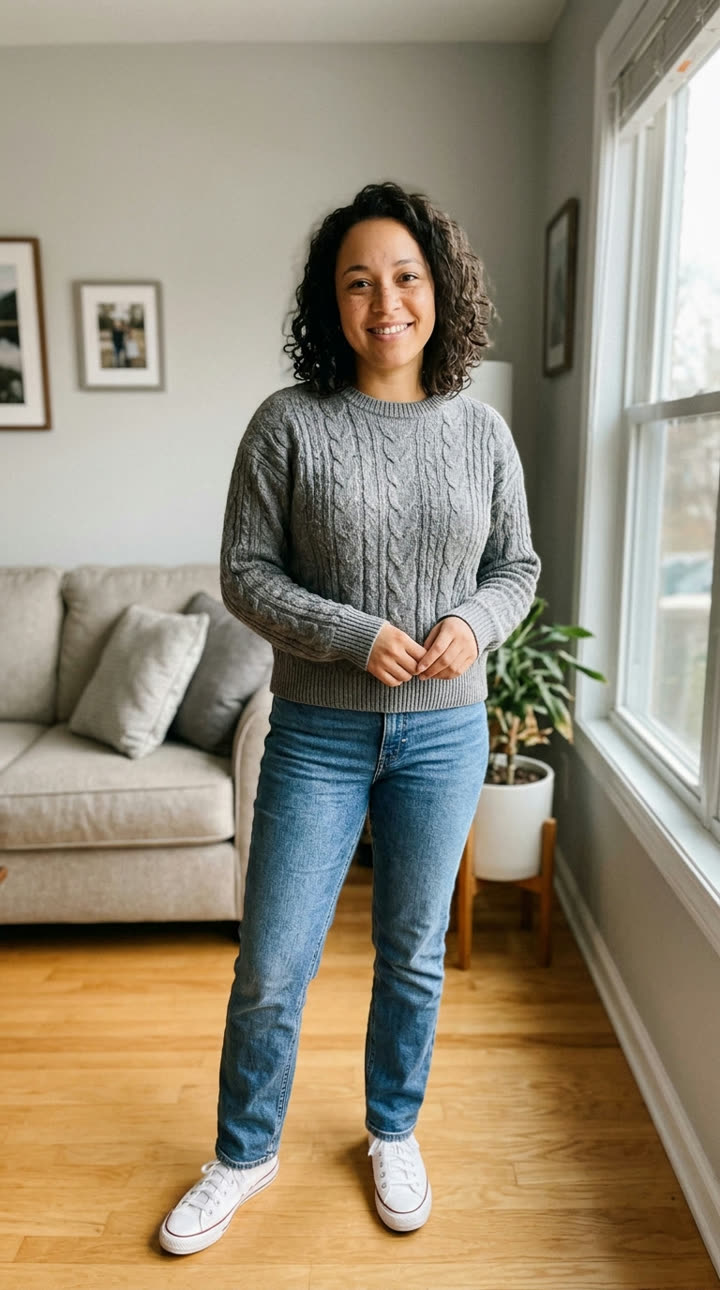
Input photo for Halloween Costume example (AI-made person)
Input
Result, before and after

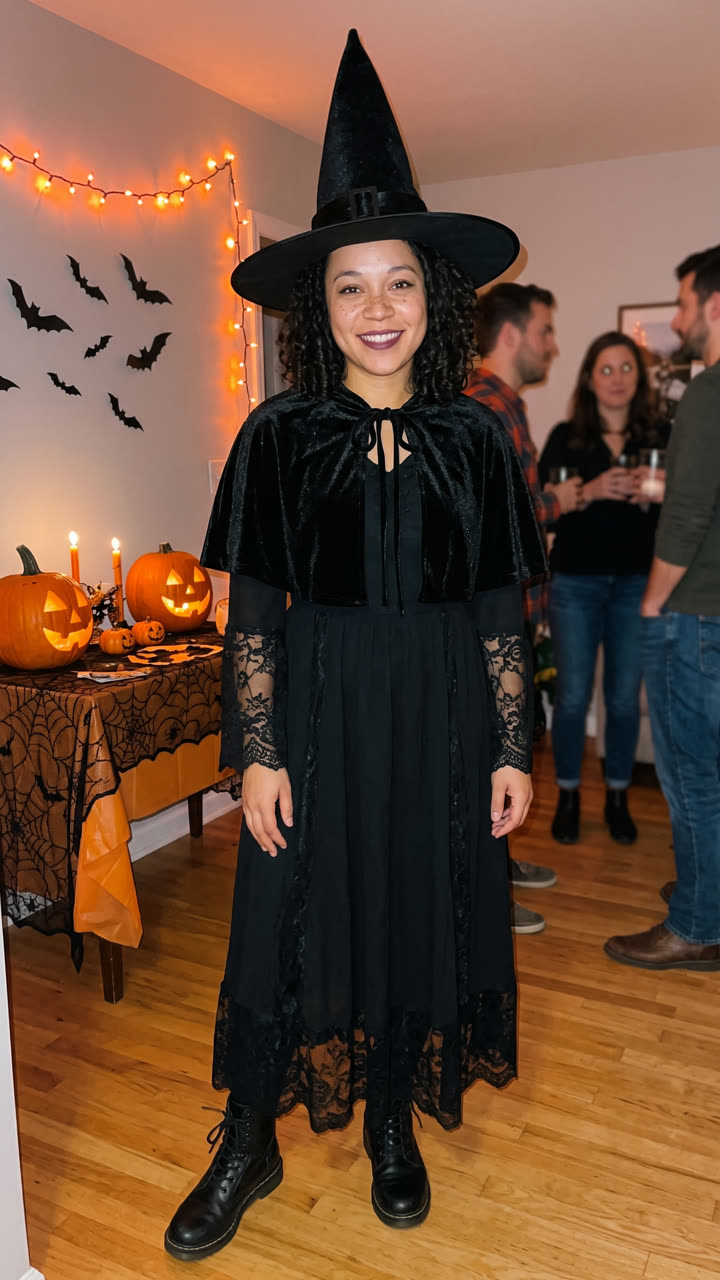
Your costume, one photo: an AI-made woman in jeans and a sweater, then the 2K photo of her as a witch at a Halloween party. The face and body stay hers.

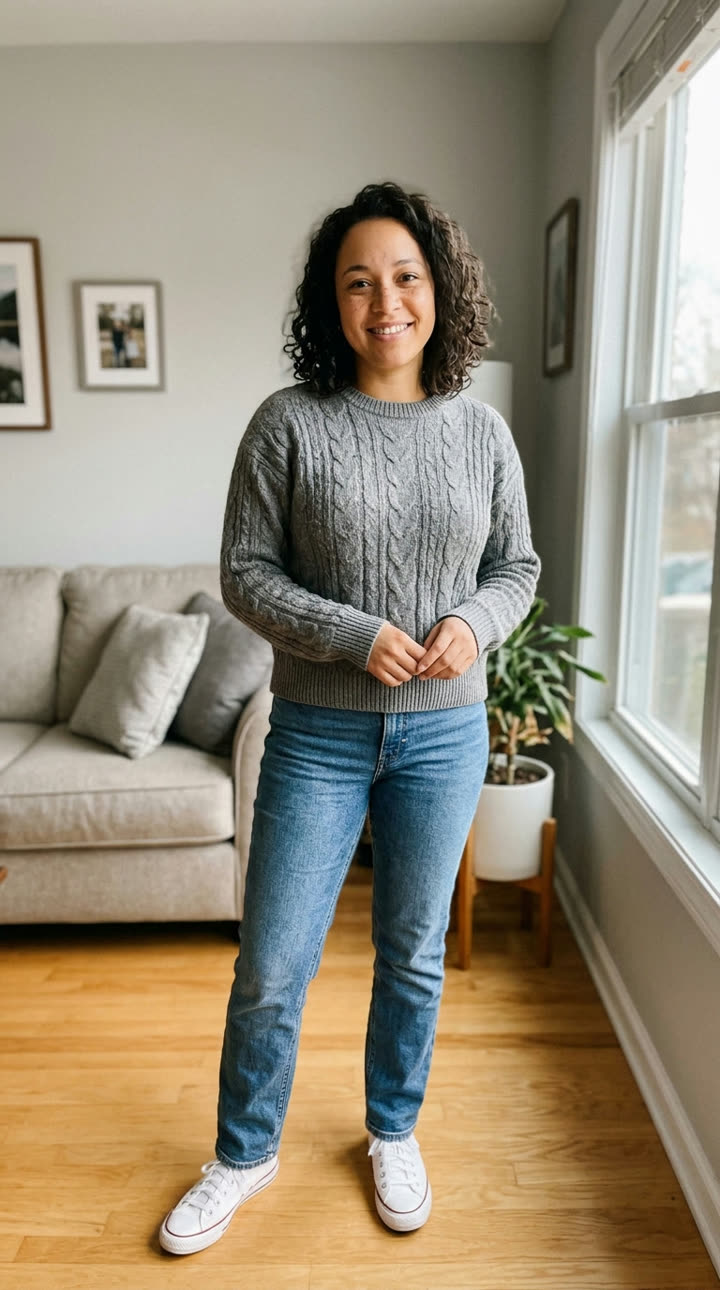
Input photo for Halloween Costume example (AI-made person)
Input
Result, before and after

Costume reveal video, one photo: the same AI-made woman spins at the party and her everyday clothes turn into the witch costume, with sound.

Step by step

How to make the Halloween Costume photo on MakeViral

Everything runs in the browser. No editing app, no prompt to write, no watermark.

  1. Add your photo

    Press "Create your own" and add your photo, whole body. Take it with the camera or pick it from your library.

  2. Press Generate

    The button shows the price. Nano Banana 2 puts your photo into the Halloween costume scene and makes one 2K photo. You write no prompt.

  3. Download or share

    The photo is ready in 1 to 3 minutes as a 9:16 2K image. Download it, share it from your phone, turn it into a video, or find it later in your Library.

Which photo works best?

Use one sharp, full-body photo, head to shoes, so the model sees your height, build and stance. A costume is mostly the body, so a face-only selfie leaves it guessing.

  • Stand straight and face the camera, in good daylight. Any room works: the prompt moves you to a Halloween party.
  • Fitted, plain clothes show your shape. A big coat hides it.
  • Wear your hair the way you plan to on the night.
  • For Couple costume, add two photos, one person each. The first photo stands on the left and gets the first part of a pair, such as the angel in "Angel and devil".
  • Use your own photo, or the photo of an adult who agreed. Never a celebrity. This template is made for adults.

Where did the Halloween Costume trend start?

Trying on a Halloween costume with AI is not one viral clip. It is a habit that grows every October. In the US, Google searches for "ai halloween costume" went from 1,900 in October 2024 to 2,900 in October 2025, and in the first week of October 2026 Google Trends shows "ai costume" near the level of the same week in 2025, and more than twice the 2024 level.

The National Retail Federation (NRF) measures it too. In its 2025 survey, 6% of people planned to use AI tools such as ChatGPT, Copilot or Gemini to find a costume. Its 2026 survey, published on 22 September 2026, asked a broader question: 47% said they use AI platforms and tools for their Halloween shopping, most often to brainstorm ideas (34%) and to research products (32%). Costumes are big money: $2 billion for adults this year, and the witch (4.8 million people) and the vampire (4.2 million) lead the adult list.

On video, the "costume transition", everyday clothes to full costume in one cut, was one of the Halloween social media trends of 2025.

  1. The NRF reports that 6% of people plan to use AI tools such as ChatGPT, Copilot or Gemini for costume ideas; online search (37%) is still the top source. NRF

  2. Perfect Corp. says Halloween looks in its YouCam apps drove more than 176,000 digital try-ons in one week. Perfect Corp. via Nasdaq

  3. marketing4ecommerce lists the costume transition video, from everyday clothes to a full costume in one cut, among the 8 Halloween social media trends of 2025. marketing4ecommerce

  4. The NRF's 2026 survey finds that 47% of shoppers use AI platforms and tools for Halloween shopping; the witch and the vampire are the top adult costumes. NRF

  5. US Google Trends for "ai costume" reads 31 for the week of 4 October 2026 (week not over), against 34 in the same week of 2025 and 14 in 2024. Google Trends

Copy and paste

The Halloween Costume prompts

You do not need this: the one-tap flow runs it for you. The photo prompt puts your photo into the scene. Want to change it? Copy it and edit it in AI Photo.

Your costume

1 photo: your photo, whole bodyNano Banana 2Photo · 2K · 9:163 credits
Photo prompt

Use the uploaded image as the base. Keep the person's face, facial features, skin tone, hair color, hairstyle, age, height and body shape exactly the same as in the photo, so they see how the costume really looks on them. Do not slim, reshape or beautify the face or the body. Dress the person in a complete, high-quality Halloween costume made for an adult: a classic witch costume with a tall black pointed hat with a wide brim, a long black witch robe with lace sleeves, a short black cape and black boots, plus light, matching makeup that keeps the face fully recognizable. The costume fits the person well, like a good store-bought costume. The person stands full body, head to shoes, at a cozy Halloween house party at night and smiles at the camera in a relaxed pose: orange string lights, carved jack-o'-lanterns on a table, paper bats on the wall and a few friends blurred in the background. A real phone photo taken by a friend with the flash on, natural skin texture, slight grain. The face and the whole costume are sharp and in focus. Vertical 9:16. Exactly one person in focus. No camera app interface, no icons, no frames or overlays. No text, no logos, no brand marks.

1184 characters

Couple costume

2 photos: first person (left) + second person (right)Nano Banana 2Photo · 2K · 9:163 credits
Photo prompt

Use the two uploaded images as the base. The person in the first image stands on the LEFT. The person in the second image stands on the RIGHT. Keep each person's face, facial features, skin tone, hair, age, height and body shape exactly the same as in their own photo. Do not blend the two people, do not swap their faces, and do not slim or beautify anyone. Dress the two in a matching Halloween couple costume made for adults: an elegant vampire couple. Both wear dark Victorian-style outfits in black and deep red that suit each person, high-collared black capes with a blood-red lining, small fangs and pale vampire makeup with dark lips that keeps each face fully recognizable. The costumes fit well, like good store-bought costumes. The two stand side by side, full body, head to shoes, close together with an arm around each other, smiling at the camera at a cozy Halloween house party at night: orange string lights, carved jack-o'-lanterns on a table, paper bats on the wall and a few friends blurred in the background. A real phone photo taken by a friend with the flash on, natural skin texture, slight grain. Both faces and both costumes are sharp and in focus. Vertical 9:16. Exactly two people in focus. No camera app interface, no icons, no frames or overlays. No text, no logos, no brand marks.

1310 characters

Costume reveal video

1 photo: your photo, whole bodySeedance 2.0 Mini6 s · 720p · 9:1617 credits
Step 1 · Photo prompt

Use the uploaded image as the base. Keep the person's face, facial features, skin tone, hair, age, body shape and their own everyday clothes and shoes exactly the same as in the photo. Place the person full body, head to shoes, in the middle of a cozy Halloween house party at night, standing and facing the camera with a playful, excited smile: orange string lights, carved jack-o'-lanterns on a table, paper bats on the wall and a few friends blurred in the background. Leave some space around the person. A real phone photo with a soft flash, natural skin texture, slight grain. Vertical 9:16. Exactly one person in focus, still in their everyday clothes, no costume yet. No camera app interface, no icons, no frames or overlays. No text, no logos.

751 characters
Step 2 · Video prompt

One continuous handheld phone shot at a Halloween house party at night, with no cuts. Keep the person's face, hair and body exactly as in the image for the whole clip. The person grins at the camera, snaps their fingers and does one quick full spin on the spot. During the spin, a swirl of orange sparks and soft smoke wraps around them and their everyday clothes change into a complete witch costume: a tall black pointed hat, a long black witch robe with lace sleeves, a short cape and black boots. They stop facing the camera in the full costume, strike a proud pose and laugh. Only the clothes change, the face stays the same. The friends in the blurred background cheer. Audio: party chatter, a magical whoosh and sparkle on the spin, friends cheering, and an original playful spooky tune. No text, no logos.

813 characters

How many credits does it cost?

You pay per photo in credits, and the create page shows the exact price on the Generate button before you spend anything. The one-tap price covers one 2K photo, charged once. One photo is 3 credits, so the smallest one-time pack that covers it is $9.99 for 100 credits, with no subscription. A smaller 1K photo costs less if you run the prompt by hand in AI Photo.

ModelSettingsCredits
Nano Banana 2 (this template)2K photo, 9:16, one tap3
Nano Banana 2 (by hand in AI Photo)1K photo, 9:16, same prompt2

One-time packs and plans are on the pricing page. A failed photo gives its credits back.

What should I be for Halloween? Try three costumes before you buy one

"What should I be for Halloween" had about 33,100 US Google searches in October 2025. An AI try-on answers it with your own body instead of a model on a packet: make the same photo in three costumes and keep the one you like.

Press "Create your own", then type a costume in Make it yours or tap a quick pick. Leave it empty for the classic witch, the most popular adult costume in the NRF's 2026 survey. Each run is one 2K photo.

Quick pickNotes
Witch (the default)A tall pointed hat, a long black witch robe with lace sleeves, a short cape and boots. Our first example.
VampireA high-collared black cape with a red lining and a Victorian outfit. We tested it on an AI-made man.
Skeleton, Zombie bride, Angel, Devil, Pirate, MummyThe prompt asks for the classic adult version of each, with matching makeup and props.

You can also type your own idea, such as "80s aerobics instructor" or "bat". The prompt makes a generic costume of the idea, with no logos and no copy of a famous character's exact design, so a film or comic hero comes out as a look-alike costume, not the real one.

The photo shows how a costume looks on you, not how it fits. For the size, read the store's size chart.

Couple costume ideas you can try on together

Couple costumes are the biggest costume search there is: "couples halloween costumes" had about 823,000 US Google searches in October 2025. The Couple costume version takes two photos and dresses both people in one matching idea, side by side at the party.

Leave it empty for an elegant vampire couple, or pick a pair: "Angel and devil", "Witch and black cat", "Skeleton pair", "Zombie bride and groom" or "Pirate captain and first mate". In a pair, the person in the first photo wears the first part. Swap the photos to swap the parts.

In our tests both faces stayed the same, and the people did not blend into each other. The model keeps each body as it is, so a couple with a big height difference keeps it. It makes two people per photo; for a group costume, make each pair on its own.

The costume reveal video: the transition trend without the editing

The "costume transition" is the Halloween video where someone stands in everyday clothes, spins or snaps, and lands in the full costume. On TikTok it takes two shots and a careful cut. The Costume reveal video version makes it from one photo:

  1. Nano Banana 2 puts you, in your own clothes, at a Halloween party.
  2. Seedance 2.0 Mini animates 6 seconds at 720p: you grin, snap your fingers and spin, orange sparks swirl, and you stop in the costume, laughing, while friends cheer. The clip has sound: the prompt asks for party noise, a whoosh on the spin, cheering and an original spooky tune, with no known song.

Type a costume in Make it yours to change the witch into anything else. We made 3 reveal clips from 2 AI-made people with these prompts and all 3 changed only the clothes, not the face. Seedance 2.0 Mini is the default (Standard). The Best option uses Seedance 2.5 for more detail at a higher price; we did not test it on this prompt.

What goes wrong with an AI costume try-on, and how do you fix it?

We tested these prompts on AI-made adults before we published them. These are the real problems we hit:

What goes wrongWhat the prompt does about itIf you still see it
A phone camera icon shows on the photoBans "camera app interface, icons, frames or overlays"It came from "a real phone photo" in an early prompt. Run it again.
A man gets a witch dressThe default witch wears a robe, not a dressType "warlock" or "wizard" in Make it yours.
The makeup hides your faceAsks for light makeup that keeps the face "fully recognizable"Pick a costume with less face paint, or type "no face paint" with it.
You look slimmer or tallerSays "do not slim, reshape or beautify"Use a straight, full-body photo. A wide-angle or close photo distorts the body.
Half your body is made upThe model must invent what it cannot seeUse a photo from head to shoes.
A famous character looks offMakes a generic costume with no logos on purposeThat is the rule, not a bug.
The video morphs the faceSays "only the clothes change, the face stays the same"It did not happen in our 3 tests. Run it again, or pick Best.
FAQ

Halloween Costume trend questions

What is an AI Halloween costume try-on?
It is a photo of you in a Halloween costume, made by AI from your own picture. You add one full-body photo and type or pick a costume, and the AI dresses you in it at a Halloween party while it keeps your face, skin tone, hair and body. People use it to choose a costume before they buy or make one.
How do I try on a Halloween costume with AI?
Press "Create your own", add one full-body photo, then type a costume in Make it yours or tap a quick pick such as Witch, Vampire or Zombie bride. Press Generate. Nano Banana 2 makes a 2K photo of you in the costume, usually in one to three minutes, and it lands in your Library.
Can I type any costume I want?
Yes, up to 60 characters, such as "pirate captain", "bat" or "80s aerobics instructor". The prompt always makes a generic costume of your idea with no logos and no copy of a famous character's exact design. So a film or comic hero comes out as a look-alike costume, not the real one.
What are the most popular Halloween costumes in 2026?
In the NRF's 2026 survey, published on 22 September 2026, the top adult costumes are the witch (4.8 million people), the vampire (4.2 million), Batman (2 million), Spider-Man (1.5 million) and the ghost (1.4 million). The witch and the vampire are quick picks on this page; for characters, the prompt makes a generic costume.
Does the AI show if the costume will fit me?
It shows how the style looks on your body, not the real fit. The prompt keeps your height and body shape and does not slim you, but it cannot know a store's sizes or fabric. For the size, read the store's size chart.
Can we try on a couple costume?
Yes. Pick the "Couple costume" version and add two photos, one person each. Leave the costume empty for a vampire couple, or pick a pair such as "Angel and devil" or "Zombie bride and groom". The person in the first photo stands on the left and wears the first part of the pair.
Can I make a group or family costume?
Not in one photo. This template makes one person or two people per photo, because faces stay truest with fewer people. For a group, make each person or pair in the same costume idea. This template is made for adults.
Can I make a costume transition video?
Yes. Pick "Costume reveal video" and add one full-body photo. You get a 6-second vertical video with sound: you spin at a Halloween party and your everyday clothes turn into the costume. Type a costume in Make it yours to change the witch into something else.
Which AI models does it use?
The photo versions use Nano Banana 2 at 2K. The reveal video uses Nano Banana 2 for the first frame, then Seedance 2.0 Mini at 720p for 6 seconds, the default (Standard) option. The Best option uses Seedance 2.5 instead. We picked Mini after it made 5 good clips in 5 runs on this page and the pet costume page; Veo 3.1 Lite failed 4 of 5 runs with a server error on our test day.
Does it cost credits?
Yes. A photo costs a few credits and the reveal video costs more; the create page shows the exact price on the Generate button before you spend anything. If a run fails, the credits come back.
Why does my costume photo not look like me?
The model rebuilds you from one photo. A dark, blurry, cropped or close-up photo leaves it guessing, and heavy costume makeup can hide your face. Use a sharp full-body photo in daylight, pick a costume with lighter makeup, and run it again: each run is different.
Is there an AI costume generator app I need to install?
No. MakeViral runs in the browser on a phone or a computer. The 2K photo lands in your Library, ready to download and post.
Can I post the photo or video on Instagram or TikTok?
Yes. There is no watermark, and the video has original sound, so it is clean to post. Keep the platform's AI label on, and use your own photos or those of adults who agreed.
Can I see my pet in a costume too?
Yes, on its own page: the [AI pet Halloween costume](/templates/ai-pet-halloween-costume) template dresses your dog or cat as a pumpkin, a hot dog, a ghost or anything you type, and can put you both in matching costumes.

Make your own Halloween Costume photo

Add one photo and tap once. No prompt to write. 3 credits.

No watermark. A failed video gives its credits back. Secure checkout by Stripe.