Keep On Steppin AI Dance: Do the Viral Steps From One Photo

Strut to the front, footwork on the beat, a lean and a turn, the way the leader of the line does it in the original clip. Add one full-body photo of you and get a short clip of you dancing it, with the song.

Keep On Steppin example video, made with AI-made peopleAI-made
  • 1 photo you add
  • 7 s clip with sound
  • 9:16 for TikTok, Reels, Shorts
  • No watermark

No prompt to write: Add your photo and tap once

Create your own

Ready in a few minutes · 29 credits

The Keep On Steppin AI dance turns one photo of you into a short clip of you doing the steps from Cale Brown's viral "Keep On Steppin" video. You get the leader's solo: a strut to the front, footwork on the beat, a lean and a turn. You need one full-body photo, and the clip comes with the song.

Example

What the Keep On Steppin video looks like

The people and pets are AI-made, not real persons. The reel versions copy the original clip and come with its original song, which you can turn off; the other versions have original sound. Your result will differ from run to run.

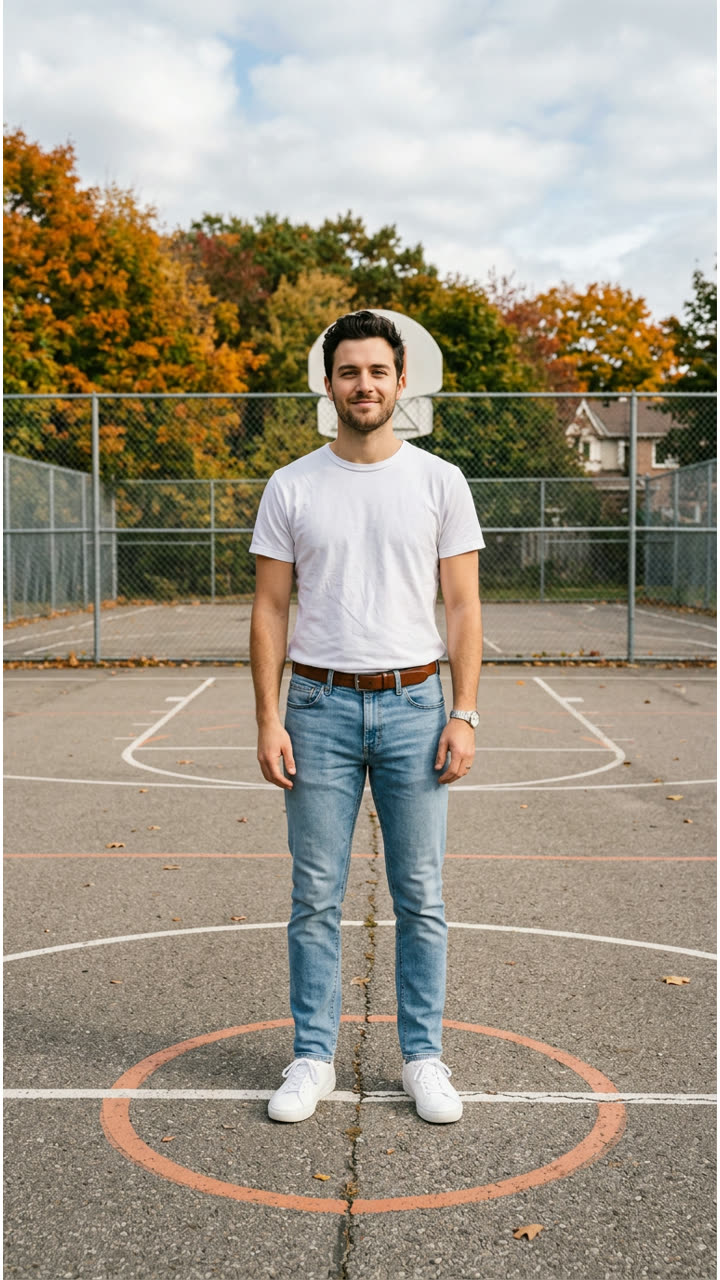
Input photo for Keep On Steppin example (AI-made person)
Input
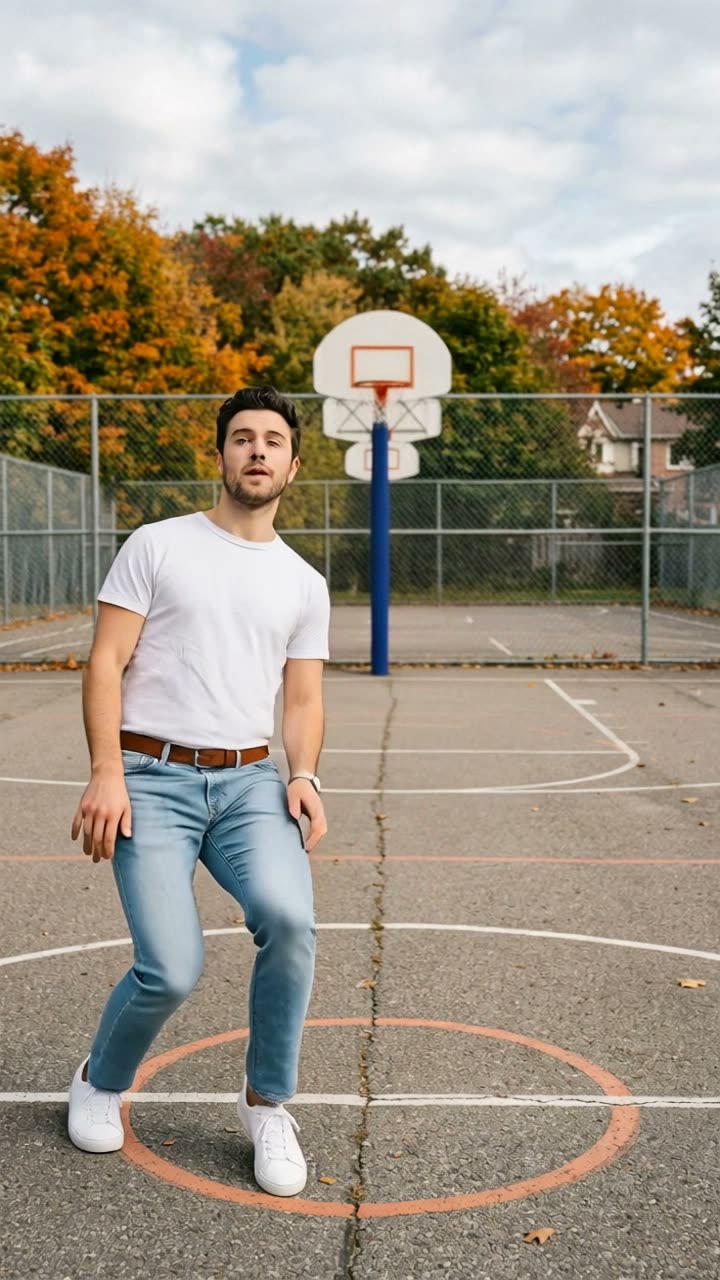
Result, 6 s, with sound

One photo of an AI-made man (not a real person) on an outdoor court: he struts forward, does the footwork, leans and turns away, the leader's solo from the Keep On Steppin clip, with the song.

Step by step

How to make the Keep On Steppin video on MakeViral

Everything runs in the browser. No editing app, no prompt to write, no watermark.

  1. Add your photo

    Press "Create your own" and add you, full body. Take it with the camera or pick it from your library.

  2. Press Generate

    The button shows the price. Kling 3.0 Motion Control takes the moves of the Keep On Steppin clip and plays them with the one in your photo, in your photo's own scene, for about 7 seconds, with the reel's original sound. You write no prompt.

  3. Download or share

    The video is ready in a few minutes as a 9:16 MP4. Download it, share it from your phone, or find it later in your Library.

Which photo works best?

Upload one full-body photo of you, standing. You do the steps in your photo's own place.

  • Head to toes in view. The dance is all footwork, so the feet must be in the photo. A waist-up photo gives stiff or made-up legs.
  • Standing, facing the camera, arms relaxed, with some floor around you.
  • One person, nobody else. Crop out friends, pets and people in the background.
  • Good light, no blur. Sunglasses and a hood over the face make the face drift.
  • A vertical photo gives a vertical clip. An outdoor court, a car park or a street looks closest to the original, and baggy jeans with a hoodie give the same look.
  • Use a photo of yourself, or of someone who said yes.

Where did the Keep On Steppin trend start?

The dance comes from Cale Brown, a dance creator with 10.7 million TikTok followers. On 31 October 2025 he posted a clip with four friends on an outdoor court next to an orchard, all in baggy jeans and black hoodies: the five step toward a high camera in a line, a camera on the ground catches their stomps and kicks, and each one takes a short solo. The sound was the southern soul track "Keep On Steppin". The post had 4.7 million views and 355,800 likes by 13 October 2026.

A year later the clip became an AI template. From 8 October 2026, UK CapCut template accounts posted versions that swap new people into the five-man line, most of them famous TV casts. The most viewed one, from 9 October, had 2.8 million views and 278,700 likes by 13 October. How-to videos followed the next day, the top one at 575,700 views, and from 10 October others showed the same swap in the Kling AI app.

The viral versions put new faces into the whole five-man line. This template does the solo: one photo, you alone, doing the leader's steps.

  1. Cale Brown posts the five-man "Keep On Steppin" dance on TikTok; it has 4.7 million views and 355,800 likes by 13 October 2026. TikTok

  2. One of the first AI versions of the line goes up from a UK CapCut template account; it has 648,100 views by 13 October.

  3. The most viewed AI version we found goes up; it has 2.8 million views and 278,700 likes by 13 October. The first how-to videos for the template go up the same day.

  4. How-to videos show the same swap in the Kling AI app, with a ready-made prompt that replaces each person in the line with one photo.

  5. The #keeponsteppin tag holds 5,073 videos and 84 million views, and new how-to posts for the AI dance still go up the same day.

Copy and paste

The Keep On Steppin prompt

You do not need these: the one-tap flow runs them for you, together with the trend clip. [Image 1] and [Image 2] are your two photos, and [Video 1] is the trend clip the video copies.

1 photo: you, full bodyKling 3.0 Motion Control7 s · 720p · 9:1629 credits
Video prompt

Replace the character in the video with the person from the uploaded image. Keep actions, poses, facial expressions, camera movement and rhythm. Preserve the person's original facial features, maintain character consistency, no distortion, no glitches, no artifacts. The person dances in the place from the uploaded image, in the clothes from the uploaded image, not the clothes or the hood of the dancer in the video. Exactly one person, no other people. One continuous shot, no cuts, no text, no captions, no logos.

517 characters

How many credits does it cost?

You pay per video in credits, and the create page shows the exact price on the Generate button before you spend anything. The one-tap price covers the video, made in one step from your photos and the trend clip, charged once. One video is 29 credits, so the smallest one-time pack that covers it is $9.99 for 100 credits, with no subscription. The cheaper models are there if you run the prompts by hand in AI Video.

Video modelSettingsCredits
Kling 3.0 Motion Control (this template)7 s, 720p, copies the moves of the trend clip, one tap29

One-time packs and plans are on the pricing page. A failed video gives its credits back.

What happens in the Keep On Steppin AI dance, beat by beat?

MakeViral takes the moves of the leader's solo from the original clip and plays them with you, in your photo's own place. The camera stays where your photo was taken, and the clip is one continuous shot:

TimeWhat you do
0 to 1 sYou strut to the front with bent knees and a bounce.
1 to 3 sFootwork on the beat: small shuffles and crossing steps, shoulders rocking.
3 to 5 sA step back, then forward again with a big step and a lean.
5 to 6 sYou turn around and walk off with your back to the camera.

How it works: Kling 3.0 Motion Control copies the body moves of the trend clip, not the dancer in it. You keep your own face, hair and clothes. The clip is about 6 seconds at 720p in the frame of your photo, and the song goes back on after the run. The exact price shows on the Generate button before you spend anything. Every run is a new take, so results differ.

Can I do the five-person line with my friends?

Not in this template yet. The viral versions swap new faces into all five dancers, and the AI copies of that line we found all use famous faces, so we do not copy them.

This template is the solo: one photo, you alone, doing the leader's steps. You can still make the line yourself: make the solo for each friend, from the same kind of photo, and put the clips side by side in your editor.

For a group dance with friends' photos, try the gas station dance or the TV show halay.

What goes wrong, and how do you fix it?

ProblemFix
The legs look stiff or the feet slideUse a photo where you stand with your whole body in view, feet on the ground. Run it again.
A black hoodie or baggy dark jeans show upThe dancer in the trend clip wears them. The prompt keeps your own clothes; run it again.
The hands blurCommon in fast moves. A second run comes out different.
The background moves or warpsThe clip keeps your photo's place. A simple, tidy background with some open floor works best.
The clip ends a moment earlyMotion Control sometimes stops a little before the end; the song fades out with it.
The model refuses the photoSome photos get refused. The credits come back; try another photo.

Which caption and hashtags fit a Keep On Steppin AI dance?

Caption ideas: "I'mma keep on steppin", "Leader of the line", "Practising for the group chat", "Tag the four who'd stand behind me". Or write your own.

Hashtags: #keeponsteppin is the big one, with 5,073 TikTok videos and 84 million views on 13 October 2026. Keep the platform's AI label on.

The clip comes with the song, so it is ready to post. You can turn the sound off on the result screen and pick a sound when you post instead. The song belongs to its owners, and MakeViral gives you no rights to it. Music rules differ from platform to platform, so check them before you use the clip in an ad or a paid post.

FAQ

Keep On Steppin trend questions

What is the Keep On Steppin AI dance trend?
It is a TikTok trend that turns photos into AI copies of Cale Brown's "Keep On Steppin" clip, where five friends in baggy jeans and black hoodies step toward the camera in a line and stomp on the beat. AI template versions went up from 8 October 2026, and the most viewed one we found had 2.8 million views by 13 October.
Who made the original Keep On Steppin dance?
Cale Brown, a dance creator with 10.7 million TikTok followers, posted it on 31 October 2025 with four friends. The post had 4.7 million views and 355,800 likes by 13 October 2026. The AI versions copy that clip.
How do I make the Keep On Steppin AI dance?
Press "Create your own" on this page and add one full-body photo of yourself, standing. Press Generate; the button shows the price first. You get a clip of about 6 seconds with the song. You write no prompt, and the video waits in your Library when it is ready.
Can I put my friends in the line?
Not yet. This template makes the solo with one photo: you alone, doing the leader's steps. You can make one clip per friend and put them side by side in an editor.
Where does the background of the video come from?
From your photo. Kling 3.0 Motion Control keeps the place of your photo and only takes the moves of the trend clip. So an outdoor court, a car park or a street with some open floor looks closest to the original.
What song is in the Keep On Steppin AI dance?
The trend's own sound: the same seconds of the southern soul track "Keep On Steppin" that play in the original clip, put back on after the run. You can turn it off on the result screen. The song belongs to its owners, and MakeViral gives you no rights to it.
What prompt does the Keep On Steppin AI dance use?
The viral CapCut template is closed and shows no prompt. The Kling AI version of the trend uses a ready-made prompt that replaces each person in the line with one photo and keeps the moves, camera and rhythm. This template uses the same prompt, changed from five people to one and set to keep your own face and clothes. You write no prompt yourself.
Is it the same as the CapCut template?
It is the same dance, made a different way. The CapCut template swaps people into the original five-man line. Here, Kling 3.0 Motion Control plays the leader's moves with you, in your own photo's place, so you need no CapCut account and no template link.
Will my face and clothes stay the same?
Yes, that is the aim. The clip keeps your face, hair, skin tone and clothes from the photo and takes only the moves. A sharp, front-facing photo in good light keeps the face closest.
Is the dancing real?
No. The dance is made with AI from one still photo, and you never did these moves. Keep the AI label on when you post it.
How long is the video and what format is it?
About 6 seconds, sometimes a moment shorter, as an MP4 at 720p with the song. The clip keeps the frame of your photo, so a vertical photo gives a vertical 9:16 clip for TikTok, Reels or Shorts. There is no watermark.

Make your own Keep On Steppin video

Add one photo and tap once. No prompt to write. 29 credits.

No watermark. A failed video gives its credits back. Secure checkout by Stripe.