Back

Lego AI Trend: Turn Your Photo Into a Toy Brick Minifigure

Add one photo. MakeViral rebuilds it in plastic toy bricks: you become a minifigure in the same pose, with your hair, your glasses and your outfit colors, in your own room made of bricks.

Photo to Lego example video, made with AI-made peopleAI-made
  • 1 photo you add
  • 2K photo you can turn into a video
  • 9:16 for TikTok, Reels, Shorts
  • No watermark

No prompt to write: Add your photo and tap once

Create your own

Ready in a few minutes · Photo · 3 credits

The Lego AI trend, also called "I turned into Lego", is a real photo that flashes into the same scene rebuilt in toy bricks, each person a minifigure in the same pose and outfit colors. It started on Russian-speaking TikTok in mid-November 2026 on the chorus "Превратился в лего". Add one photo to get your toy brick version.

Also called Lego trend · I turned into Lego · Photo to Lego minifigure · Превратился в лего · AI Lego transformation · Lego minifigure filter

Example

What the Photo to Lego photo looks like

Made from the prompt on this page. The people and pets are AI-made, not real persons. Your result will differ from run to run.

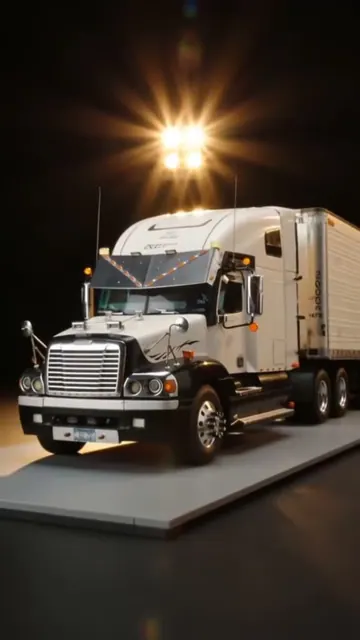
Input photo for Photo to Lego example (AI-made person)
Input
Result, before and after

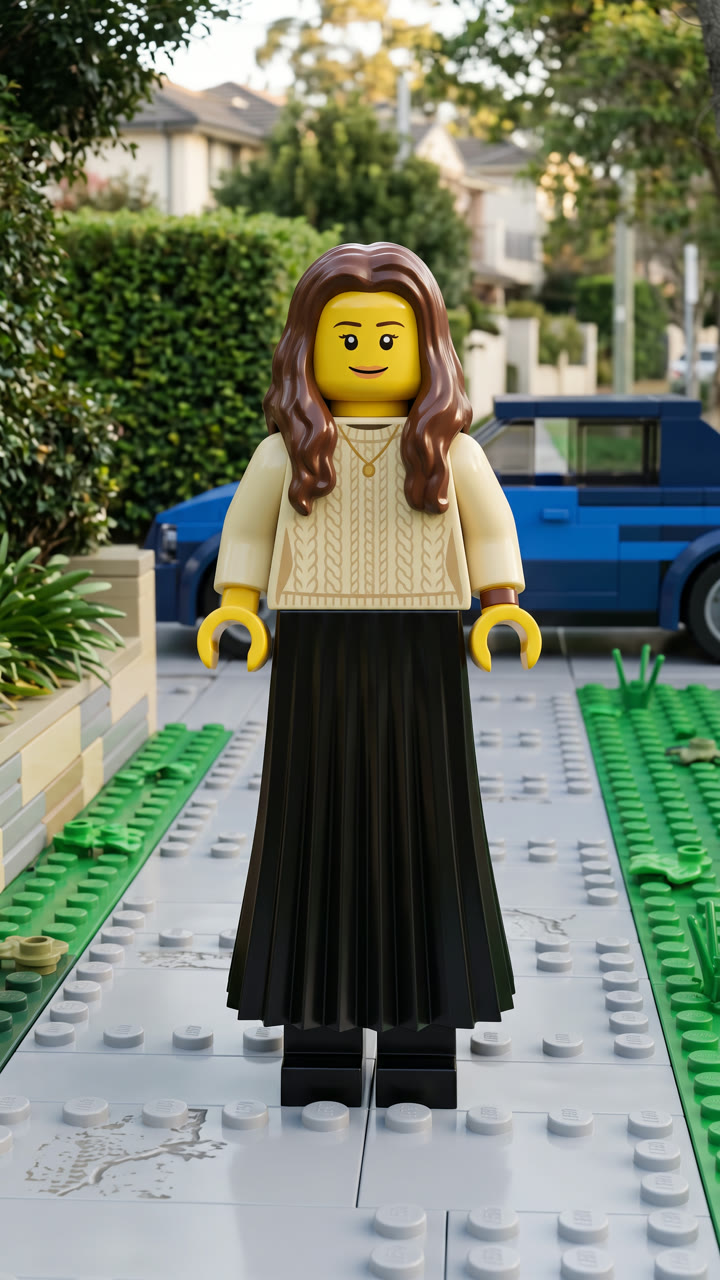
Made with this template from one AI-made photo: a woman on a garden path becomes a toy brick minifigure on a brick street, with her long brown hair, her cream cable sweater and her pleated black skirt.

Step by step

How to make the Photo to Lego photo on MakeViral

Everything runs in the browser. No editing app, no prompt to write, no watermark.

  1. Add your photo

    Press "Create your own" and add you, full body or waist up. Take it with the camera or pick it from your library.

  2. Press Generate

    The button shows the price. Nano Banana 2.1 puts your photo into the Toy brick minifigure scene and makes one 2K photo. You write no prompt.

  3. Download or share

    The photo is ready in a few minutes as a 9:16 2K image. Download it, share it from your phone, turn it into a video, or find it later in My videos.

Which photo works best?

Use one photo you like as it is: the pose, the framing and the place stay, and everything turns into toy bricks. A full-body or waist-up photo works best, because a minifigure is all about the body shape, the outfit and the hair.

  • Show the outfit. Your clothes come back as printed toy clothes in the same colors, so bold colors and patterns (polka dots, stripes, a bright jacket) read well.
  • Keep the hair and the glasses in view. A minifigure has a simple printed face, so your hair, glasses, beard, hat and accessories are what make it look like you.
  • A clear place helps. A room, a street, a club or a park all work; the AI rebuilds the walls, the floor and the furniture in bricks.
  • Mirror selfies work, the phone becomes a small toy phone in the minifigure's hand.
  • Friends and pets are welcome. Everyone in the photo becomes a minifigure, and a cat or a dog becomes a brick-built animal.
  • Good light, a sharp photo. A blurry or dark photo gives muddy brick shapes.

Where did the Photo to Lego trend start?

The sound came first. On 7 November 2026, @s0unds_wave posted a sped-up cut of a Russian song with the words "Превратился в лего. Я лего, пятнадцать тыщ деталей" ("I turned into Lego. I'm Lego, fifteen thousand pieces"); it had 741,180 plays by 23 November. Posts tag the song «ЛЕГО» to the artist kirkiimad. On 15 November, @kinderis74 put up the short cut of the chorus that the trend uses, and by 23 November that sound was on about 94,900 TikTok videos.

The photo to Lego AI trend took off on 19 November. A CapCut template that cuts from your photo to its Lego version on the word "лего" spread through template accounts (one post had 321,360 plays by 23 November, another 406,000 on 20 November), and @miss_innovation showed how she made her own Lego picture with an AI image model and a one-line prompt. English captions such as "Photo-to-Lego trend" and "Turn your photo into a Lego trend" appeared on US accounts from 20 November. By 23 November #леготренд (лего тренд, "Lego trend") had 6.7 million views and #превратилсявлего ("turned into Lego") 2.0 million, and selfie videos that switch between a person and their minifigure passed a million plays.

  1. @s0unds_wave posts a sped-up cut of the Russian song with the line "Превратился в лего" ("I turned into Lego"); 741,180 plays by 23 November. TikTok

  2. @kinderis74 posts the short chorus cut that the trend uses as its sound; about 94,900 videos use it by 23 November. TikTok

  3. @miss_innovation posts a tutorial: an AI image model and the prompt "turn the photo as if it were made of LEGO" (in Russian); 66,500 plays by 23 November. TikTok

  4. A CapCut template post that cuts from real photos to their Lego versions goes up; 321,360 plays by 23 November. TikTok

  5. The most viewed template post so far reaches 406,000 plays and 55,200 likes, and English "Photo-to-Lego trend" captions start on US accounts. TikTok

Copy and paste

The Photo to Lego prompt

You do not need this: the one-tap flow runs it for you. The photo prompt puts your photo into the scene. Want to change it? Copy it and edit it in AI Photo.

1 photo: you, full body or waist upNano Banana 2.1Photo · 2K · 9:163 credits
Photo prompt

Use the uploaded image as the base. Turn the photo as if it were made of plastic toy building bricks: the same photo, the same moment, rebuilt as a real toy brick scene. Keep the exact framing, camera angle, crop, light and colors of the photo. Every person becomes a classic plastic toy minifigure in exactly the same place and pose: a short cylindrical toy head with a simple printed toy face (two black dot eyes, simple printed eyebrows and the person's own expression, so a smile stays a smile), classic yellow toy skin on the head and the hands, C-shaped toy hands, a blocky toy torso, toy arms and toy legs. Each minifigure keeps what makes the person recognizable: their own hairstyle, hair length and hair color as a molded plastic toy hairpiece, and their glasses, beard or moustache, hat, earrings, headband and bag as small toy parts; their own outfit printed and molded on the toy body in exactly the same colors and patterns (stripes, dots and checks stay; brand logos on clothes become plain color). If the photo shows an animal, it becomes a toy animal built from bricks, the same species, in the same colors, markings and pose. A phone, a cup or anything else in a hand becomes a small toy accessory in the same hand. The place itself, the walls, floor, furniture, doors, sky, trees and street, is rebuilt from toy bricks, plates and tiles with plain round studs, in the same layout and colors as the photo. Glossy molded plastic with soft reflections, a real macro photo of a toy set with a shallow depth of field: photorealistic toy photography, not a drawing, not a cartoon. Vertical 9:16. The same number of people and animals as in the photo, no one added and no one left out. No human face and no human skin: every person is a toy. Plain studs with no lettering, no brand logo, no text, no watermark.

1822 characters
How many credits does it cost?

You pay per photo in credits, and the create page shows the exact price on the Generate button before you spend anything. The one-tap price covers one 2K photo, charged once. One photo is 3 credits, so the smallest one-time pack that covers it is $9.99 for 100 credits, with no subscription. A smaller 1K photo costs less if you run the prompt by hand in AI Photo.

ModelSettingsCredits
Nano Banana 2.1 (this template)2K photo, 9:16, one tap3
Nano Banana 2.1 (by hand in AI Photo)1K photo, 9:16, same prompt2

One-time packs and plans are on the pricing page. A failed photo gives its credits back.

What the Lego trend picture looks like

The result is one tall photo of the same moment, rebuilt as a toy brick scene. It follows the look of the trend's most shared posts:

In your photoIn the toy brick version
YouA minifigure in the same pose, with your hairstyle and hair color, your glasses or beard, and your outfit printed on the toy body in the same colors
Your faceA simple printed toy face with your expression (a smile stays a smile), and the classic yellow toy skin
FriendsEach one is their own minifigure, in their own place and pose
A petA brick-built animal in the same colors and pose
The room or the streetWalls, floor, furniture and sky built from toy bricks and plates, with plain studs
Your phone, a bag, a cupSmall toy accessories in the minifigure's hands

The toy bricks are generic: no logo, no lettering on the studs, and no brand name anywhere in the picture.

How to post it like the trend

The trend post is two pictures and one sound: your real photo first, then a flash, then the toy brick version on the word "лего". To make it:

  1. Make your Lego picture here and save it from My videos.
  2. In your video editor, put your real photo first (about 1.5 seconds) and the toy brick picture second, with a white flash or a light streak between them.
  3. Add the trend's sound from TikTok (search "превратился в лего") and put the cut on the word "лего".
  4. Repeat it with two or three photos for a longer post, like the template posts.

Prefer a moving clip? Under your finished picture, press "Make it a video": it opens AI Video with the toy brick picture as the first frame, and you choose what happens. The video costs its own credits.

Is this a CapCut Lego template?

No. The CapCut Lego template is a closed app template that does the cut and the sound for you, and it needs its own AI picture. MakeViral makes the picture itself, from one photo, in your browser: no app to install. Many creators in the trend did the same: the first tutorial with a prompt used an AI image model and the one-line photo to Lego prompt "turn the photo as if it were made of LEGO". Our prompt starts from those words and adds the details that make the result look like the trend (same pose, same outfit colors, the room in bricks). You can read it on the create page.

FAQ

Photo to Lego trend questions

What is the Lego AI trend?
It is a TikTok trend where a real photo flashes into the same scene rebuilt in plastic toy bricks, with each person as a minifigure in the same pose and outfit colors. It started on Russian-speaking TikTok in mid-November 2026 on the chorus "Превратился в лего" ("I turned into Lego") and spread to US accounts from 20 November.
What song is the Lego trend?
The sound is the chorus of a Russian song called «ЛЕГО» ("Lego"), which posts tag to the artist kirkiimad. The words are "Превратился в лего" ("I turned into Lego"), also written in Latin letters as prevratilsya v lego. The short cut that the trend uses was posted on 15 November 2026 by @kinderis74.
How do I turn myself into Lego with AI?
To turn yourself into Lego, press "Create your own", add one photo of yourself (full body or waist up works best) and press Generate. MakeViral rebuilds the photo in toy bricks and turns you into a minifigure in the same pose and outfit colors. The picture lands in My videos.
Can AI turn me into Lego from one photo?
Yes. Want to turn yourself into a Lego minifigure? This template makes a Lego minifigure of yourself in your own pose and clothes, inside your own scene rebuilt in bricks, so people who search for Lego yourself AI or "turn me into Lego" get the same result. If you only want the figure, use a photo against a plain wall.
Will the minifigure look like me?
It looks like you the way a toy does: your hairstyle and hair color, glasses, beard, hat, outfit colors and pose stay, and the face is a simple printed toy face with your expression. That is the look of the trend. A sharp photo with your hair and outfit in view gives the closest match.
Is there a Lego AI filter or app for this?
There is no official Lego AI filter. The trend runs on a CapCut template and on AI image tools, and people search for it as Lego trend AI, a Lego filter, a Lego minifigure filter, an AI Lego man filter or a Lego yourself app. MakeViral works in your browser like a Lego yourself generator: one photo in, the toy brick picture out.
What is the photo to Lego prompt?
The first tutorial with a prompt used one line: "turn the photo as if it were made of LEGO". Our photo to Lego prompt starts from it and adds the details that keep the trend's look: the same pose, framing and outfit colors, every person a minifigure, pets as brick animals, the place in bricks, and no logos or text.
Can I add friends or a pet?
Yes. Everyone in the photo becomes their own minifigure, in their own place, and a cat or a dog becomes a brick-built animal in the same colors. Keep faces and outfits in view for each person.
Is MakeViral linked to the LEGO Group?
No. "Lego trend" is the name people gave this trend, after the toy bricks it looks like. MakeViral has no link to the LEGO Group, and our pictures use generic toy bricks and toy figures with no brand logo or lettering.
Can I make it a video with the sound?
The template makes the picture. Post your real photo and the toy brick picture back to back with the trend's sound, cut on the word "лего" (see "How to post it like the trend"). For motion, press "Make it a video" under your picture: the video costs its own credits.
How much does it cost?
The create page shows the exact price on the Generate button before you spend anything. A photo costs far fewer credits than a video, and if a run fails, the credits come back.

Make your own Photo to Lego photo

Add one photo and tap once. No prompt to write. 3 credits.

No watermark. A failed video gives its credits back. Secure checkout by Stripe.