Back

PS2 Filter: Turn Any Idea into a PS2 Game Video

Type an idea and get it as an early-2000s game cutscene, in the GTA San Andreas style look of 2004: low-poly people, blurry textures, hard shadows. Add your photo and you are the main character in every shot.

The original PS2 Filter reel by @byhato_Original reel
  • Photo optional type an idea, star in it if you like
  • 10 or 15 s video with the trend's song
  • 9:16 for TikTok, Reels, Shorts
  • No watermark

Add your photo on the next page to star in it, or skip it.

Ready in 2 to 5 minutes · From 57 credits

The PS2 filter turns an idea into PS2 graphics: low-poly people, blurry textures, flat lighting and fog at the end of the street, like an early-2000s game. In 2026 the PS2 style AI video took over TikTok. Type an idea, add your photo if you want to star in it, and get a PS2 video.

Also called AI PS2 filter · PS2 AI trend · How <city> must feel like

Example

What the PS2 Filter video looks like

Both clips are the trend's own AI reels by @byhato_, shown with credit and their sound. Your result is a new vertical video made from your idea, with you in it if you add a photo.

Original reel by @byhato_, 20 s

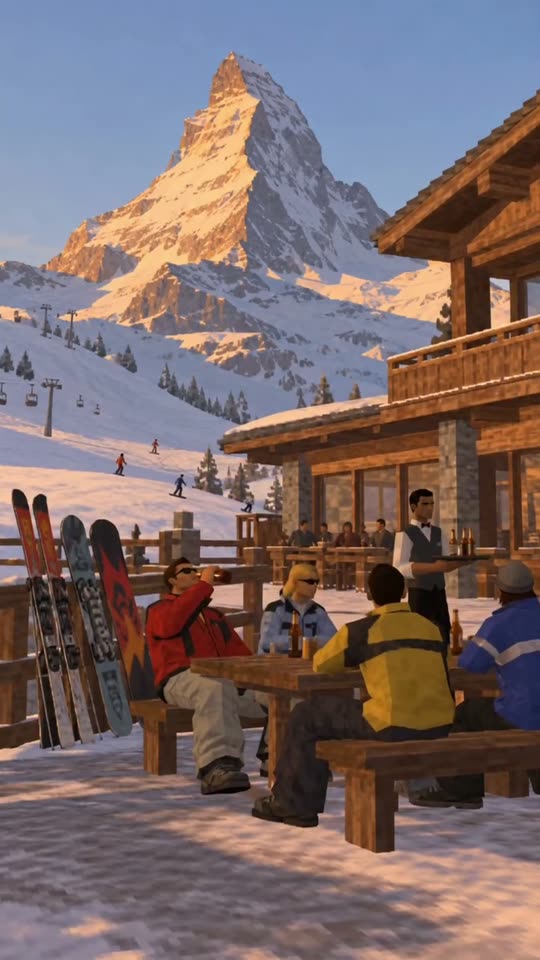
The original reel by @byhato_ (21 October 2026, 78,100 likes): "what switzerland must feel like...". Paragliding over a lake, a ski hut, a yacht, a fondue chalet, all in PS2 graphics, with the reel's own sound. AI-made characters. Type "how <your city> must feel like" to make this kind of montage, with you in it if you add a photo.

Original reel by @byhato_, 11 s

The Bangkok reel by @byhato_ (15 November 2026): a skytrain street, a tuk-tuk at night, a market, a river boat, a rooftop party and the city lights, in early-2000s game graphics, with the reel's own sound. AI-made characters.

Step by step

How to make the PS2 Filter video on MakeViral

Everything runs in the browser. No editing app, no prompt to write, no watermark.

  1. Type your idea

    A place, a job or a scene from your life, like "how Switzerland must feel like" or "my gym on a Monday". Tap an example if you are stuck.

  2. Add your photo, or skip it

    With a photo you (or your pet) are the main character in every shot. Without one, the idea decides who is in it.

  3. Pick the length and the sound

    10 or 15 seconds, the trend's song or game sounds, a title line on or off, 720p or 480p. The button shows the price.

  4. Download or share

    The video is ready in about 2 to 5 minutes as a 9:16 MP4. Download it, or find it later in My videos.

Which photo works best?

The photo is optional. Without one, your idea decides who is in the video. With one, you (or your pet) are the main character in every shot.

  • One sharp photo, knees or waist up, face to the camera, in daylight. A clear face keeps you recognizable under the low-poly style.
  • Face clear and big enough. No sunglasses, no hat brim over the eyes, no hand on the face. Glasses are fine and stay on.
  • Wear something with a clear color or shape. A red jacket, a striped shirt or a cap reads well in blurry game textures; a plain grey top can turn into a grey blob.
  • One person per photo. The video has one main character.
  • Pets work too: one photo of the whole animal, face to the camera.
  • Ideas: famous places work best, because the AI builds the views it knows. "How Tokyo must feel like" beats a small street name.

Where did the PS2 Filter trend start?

The PS2 aesthetic has two waves. The first was a photo filter. On 20 November 2023 a Redditor shared a Midjourney prompt called "PlayStation 2 aesthetics" on r/midjourney, and in March 2024 people ran it on their own selfies: TikTok user @hurtabdu1's slideshow of himself in PS2 graphics passed 1 million plays in two days (Know Your Meme, 20 March 2024), and the ps2 filter tiktok wave followed.

The second wave is video. From September 2026, AI clips made to look like a 2004 game cutscene spread on TikTok, with stiff low-poly characters saying odd lines; YouTube tutorials on how to make PS2 AI videos credit Luca Maxim and Children of Khan for the look. On 21 October 2026 the DJ HATO (@byhato_) posted "what switzerland must feel like...", a travel montage in PS2 graphics made with Higgsfield, and it passed 78,000 likes. Hong Kong, Vienna, Paris, New York and Bangkok followed, copycats picked up the "how must feel like" line, and from 12 November Higgsfield paid creators to post #ps2 city clips.

  1. A Redditor shares the Midjourney prompt "PlayStation 2 aesthetics" on r/midjourney; the post gets nearly 1,000 upvotes. Know Your Meme

  2. TikTok user @hurtabdu1 posts a slideshow of himself as a PS2 character; it passes 1 million plays and 117,000 likes in two days and starts the AI PS2 filter trend. Know Your Meme

  3. A YouTube tutorial explains how the viral PS2-style AI videos linked to Luca Maxim and Children of Khan are made; more tutorials follow within weeks. YouTube

  4. A PS2 AI video by @3dmoggerr with "Tutorial in bio" reaches 1.87 million views on TikTok (count on 16 November). TikTok

  5. HATO (@byhato_) posts "what switzerland must feel like...", a PS2-graphics travel reel made with Higgsfield; it has 78,100 likes by 16 November. Instagram

  6. @byhato_ posts "what bangkok must feel like...", after Hong Kong, Vienna, Paris and New York; paid #ps2 city posts run on TikTok since 12 November. Instagram

Copy and paste

The PS2 Filter prompts

You do not need these: the one-tap flow runs them for you. A photo prompt puts your photo into the scene, then a video prompt animates it. Want to change them? Copy them and edit them in AI Photo and AI Video.

PS2 photo

1 photo: you, knees or waist up, face clearNano Banana 2.1Photo · 2K · 9:163 credits
Photo prompt

Use the uploaded image as the base. Early-2000s console in-engine 3D cutscene portrait of the person in the uploaded image, 2001 to 2004 sixth-generation console graphics, classic early-2000s game engine style. The entire scene converted into period-accurate 3D game level assets. Coarse 3D polygonal character mesh, blocky hair cards, compressed low-resolution diffuse bitmap textures wrapped over geometric facial bones, Gouraud vertex shading with simple baked lighting, authentic 480i NTSC CRT television scanlines, slight pixel dithering, aliased edges. The scene: a sunny street in an early-2000s open-world city game, with palm trees, low-rise stucco shops, blocky parked cars, hard-edged shadows, flat colors and a hazy draw-distance fog at the end of the street. A few low-poly passers-by far behind. Vertical 9:16 in-game frame: the person from the knees up, big and sharp in the front, the face turned to the camera or three-quarters to it, in a relaxed, confident game-character idle pose. The person keeps their own face shape, eye color, eyebrows, nose, mouth, skin tone, age, hair color, hairstyle, and any beard, moustache or glasses, so their friends recognize them at once, but as a low-poly game face with a simple painted-on texture, never a real photo. They wear the same clothes as in the photo, as low-poly game clothing with blurry textures. Exactly one main character. No text, no letters, no captions, no logos, no game title, no HUD, no minimap, no health bar, no watermark, no frame or border. No photorealism, no modern CGI.

1553 characters

PS2 video

1 photo: you, knees or waist up, face clearSeedance 2.510 s · 720p · 9:16128 credits
Step 1 · Photo prompt

Use the uploaded image as the base. Early-2000s console in-engine 3D cutscene portrait of the person in the uploaded image, 2001 to 2004 sixth-generation console graphics, classic early-2000s game engine style. The entire scene converted into period-accurate 3D game level assets. Coarse 3D polygonal character mesh, blocky hair cards, compressed low-resolution diffuse bitmap textures wrapped over geometric facial bones, Gouraud vertex shading with simple baked lighting, authentic 480i NTSC CRT television scanlines, slight pixel dithering, aliased edges. The scene: a sunny street in an early-2000s open-world city game, with palm trees, low-rise stucco shops, blocky parked cars, hard-edged shadows, flat colors and a hazy draw-distance fog at the end of the street. A few low-poly passers-by far behind. Vertical 9:16 in-game frame: the person from the knees up, big and sharp in the front, the face turned to the camera or three-quarters to it, in a relaxed, confident game-character idle pose. The person keeps their own face shape, eye color, eyebrows, nose, mouth, skin tone, age, hair color, hairstyle, and any beard, moustache or glasses, so their friends recognize them at once, but as a low-poly game face with a simple painted-on texture, never a real photo. They wear the same clothes as in the photo, as low-poly game clothing with blurry textures. Exactly one main character. No text, no letters, no captions, no logos, no game title, no HUD, no minimap, no health bar, no watermark, no frame or border. No photorealism, no modern CGI.

1553 characters
Step 2 · Video prompt

A 10-second continuous early-2000s console 3D video game sequence, starting from the exact scene in the image. Character action: The character looks around the sunny street and gives the camera a small, confident nod, then walks along the sidewalk with the slightly stiff walk and swinging arms of an early-2000s game character, followed by stopping beside a parked car and settling into a relaxed idle pose, shifting weight from foot to foot. Make each movement clear, connected, and physically natural. Scene development: As the character moves, the third-person camera follows behind and to the side at shoulder height, and the street extends ahead with palm trees, low-rise shops and blocky cars. Include low-poly cars rolling slowly past, a few low-poly pedestrians walking far behind and palm leaves swaying in the wind to create a cohesive game world. Keep the character's identity, facial features, angular low-poly geometry, chunky hair, clothing, and proportions consistent throughout the animation. Extend the surroundings into a cohesive early-2000s console game environment, with low-resolution textures, angular geometry, simple lighting, and basic shadows. Use continuous, natural movement with no abrupt transitions or scene cuts. Maintain authentic early-2000s console game graphics throughout. No photorealism, no modern CGI, no character morphing. Sound: the hum of the city, distant traffic, footsteps and a soft, laid-back early-2000s game music loop. No dialogue throughout the entire video. No text, no letters, no logos, no HUD, no minimap, no game title, no watermark.

1593 characters

City dream

1 photo: you or your pet, face clearSeedance 2.510 s · 720p · 9:16126 credits
Video prompt

A 10-second montage of how Switzerland must feel like, told as story-driven cutscenes from an early-2000s console 3D game, with the one in [Image 1] as the main character. THE MAIN CHARACTER = the one in [Image 1], in every shot where the character appears: copy the exact face from [Image 1] (the face shape, eye color and eye shape, eyebrows, nose, mouth, skin tone, age, hair color, hair length and hairstyle, and any beard, moustache, glasses or freckles), as a low-poly game character with a simple painted-on face texture, so their friends recognize them at once. The same face from the first shot to the last. They wear the clothes from [Image 1] as low-poly game clothing, with a warm jacket in snow. If [Image 1] shows an animal, the main character is that animal as a low-poly game animal with its own face, fur colors and markings, walking on four legs, not a person. Every shot shows a famous, recognizable view, landmark, food, vehicle or pastime of Switzerland, in calm, sunny luxury-travel moods. Hard cuts between the shots, like a travel reel: Shot 1 [0-2 s]: a wide aerial shot of the most famous view of Switzerland, the camera gliding forward; the main character small in the front of the frame, arriving, looking out at the view. Shot 2 [2-4 s]: hard cut, a sunny cafe or restaurant terrace with a famous landmark of Switzerland behind; the main character, from the waist up, enjoys a local dish or drink with a few low-poly locals, then smiles at the camera. Shot 3 [4-6 s]: hard cut, the main character rides through Switzerland in a shiny open car, on a boat or on the local transport Switzerland is known for, the wind in the hair, the city sliding past. Shot 4 [6-8 s]: hard cut, the main character does the pastime Switzerland is known for, the camera following from behind and to the side, low-poly locals and cars moving around. Shot 5 [8-10 s]: hard cut, golden hour or night: the main character sits on a rooftop or a balcony above the lights of Switzerland, turns three-quarters to the camera and gives a calm smile. Style: early-2000s console game graphics, low-poly 3D, blurry low-res textures, hard-edged shadows, flat vertex lighting, a hazy draw-distance fog, low-poly locals and blocky cars, slightly aliased edges, the look of a 2004 in-game cutscene. Vertical 9:16. No dialogue throughout the entire video. No background music. No text, no letters, no captions, no logos, no HUD, no minimap, no game title, no watermark. No photorealism, no modern CGI, no character morphing, no extra copies of the main character.

2554 characters
Pet photo

1 photo: your pet, whole body, face clearNano Banana 2.1Photo · 2K · 9:163 credits
Photo prompt

Use the uploaded image as the base. Early-2000s console in-engine 3D cutscene portrait of the pet in the uploaded image, 2001 to 2004 sixth-generation console graphics, classic early-2000s game engine style. The entire scene converted into period-accurate 3D game level assets. Coarse 3D polygonal animal mesh, blocky fur cards, compressed low-resolution diffuse bitmap textures wrapped over geometric facial bones, Gouraud vertex shading with simple baked lighting, authentic 480i NTSC CRT television scanlines, slight pixel dithering, aliased edges. The scene: a sunny sidewalk in an early-2000s open-world city game, with palm trees, low-rise stucco shops, a blocky parked car, hard-edged shadows, flat colors and a hazy draw-distance fog at the end of the street. Vertical 9:16 in-game frame: the whole pet big and sharp in the front, its face to the camera, as a real animal on four legs. It keeps its own species, breed look, face, eyes, ears, muzzle, fur colors, markings and body shape exactly as in the photo, so its owner recognizes it at once, but as a low-poly game animal with a simple painted-on fur texture, never a real photo. Exactly one animal and no people in the front. No text, no letters, no captions, no logos, no game title, no HUD, no minimap, no health bar, no watermark, no frame or border. No photorealism, no modern CGI.

1349 characters

Pet video

1 photo: your pet, whole body, face clearSeedance 2.510 s · 720p · 9:16128 credits
Step 1 · Photo prompt

Use the uploaded image as the base. Early-2000s console in-engine 3D cutscene portrait of the pet in the uploaded image, 2001 to 2004 sixth-generation console graphics, classic early-2000s game engine style. The entire scene converted into period-accurate 3D game level assets. Coarse 3D polygonal animal mesh, blocky fur cards, compressed low-resolution diffuse bitmap textures wrapped over geometric facial bones, Gouraud vertex shading with simple baked lighting, authentic 480i NTSC CRT television scanlines, slight pixel dithering, aliased edges. The scene: a sunny sidewalk in an early-2000s open-world city game, with palm trees, low-rise stucco shops, a blocky parked car, hard-edged shadows, flat colors and a hazy draw-distance fog at the end of the street. Vertical 9:16 in-game frame: the whole pet big and sharp in the front, its face to the camera, as a real animal on four legs. It keeps its own species, breed look, face, eyes, ears, muzzle, fur colors, markings and body shape exactly as in the photo, so its owner recognizes it at once, but as a low-poly game animal with a simple painted-on fur texture, never a real photo. Exactly one animal and no people in the front. No text, no letters, no captions, no logos, no game title, no HUD, no minimap, no health bar, no watermark, no frame or border. No photorealism, no modern CGI.

1349 characters
Step 2 · Video prompt

A 10-second continuous early-2000s console 3D video game sequence, starting from the exact scene in the image. Character action: The pet looks around the sunny street and tilts its head at the camera, then trots along the sidewalk with the slightly stiff, bouncy gait of an early-2000s game animal, followed by stopping beside a parked car, sitting down and wagging its tail. Make each movement clear, connected, and physically natural, with four legs on the ground like a real animal. Scene development: As the pet moves, the third-person camera follows behind and to the side at a low height, and the street extends ahead with palm trees, low-rise shops and blocky cars. Include low-poly cars rolling slowly past, a few low-poly pedestrians walking far behind and palm leaves swaying in the wind to create a cohesive game world. Keep the pet's identity, face, fur colors, markings, angular low-poly geometry and proportions consistent throughout the animation. Extend the surroundings into a cohesive early-2000s console game environment, with low-resolution textures, angular geometry, simple lighting, and basic shadows. Use continuous, natural movement with no abrupt transitions or scene cuts. Maintain authentic early-2000s console game graphics throughout. No photorealism, no modern CGI, no character morphing. Sound: the hum of the city, distant traffic, footsteps and a soft, laid-back early-2000s game music loop. No dialogue throughout the entire video. No text, no letters, no logos, no HUD, no minimap, no game title, no watermark.

1546 characters

How many credits does it cost?

The video is charged once before it starts, at the AI Video price of its length and quality, the same with or without a photo. A video that fails gives its credits back. PS2 filter video (10 s, 480p) is 57 credits, PS2 filter video (15 s, 480p) is 84 credits, PS2 filter video (10 s, 720p) is 126 credits, PS2 filter video (15 s, 720p) is 189 credits.

The photo versions, with your own face, have their own price: PS2 photo 3 credits, PS2 video 128 credits, City dream 126 credits, Pet photo 3 credits, Pet video 128 credits.

Video modelSettingsCredits
PS2 filter video (10 s, 480p)Seedance 2.5, 9:16, with or without your photo57
PS2 filter video (15 s, 480p)Seedance 2.5, 9:16, with or without your photo84
PS2 filter video (10 s, 720p)Seedance 2.5, 9:16, with or without your photo126
PS2 filter video (15 s, 720p)Seedance 2.5, 9:16, with or without your photo189
PS2 photo: Nano Banana 2.1 (this template)2K photo, 9:16, one tap3
PS2 video: Seedance 2.5 (this template)10 s, 720p + 1 scene photo, one tap128
City dream: Seedance 2.5 (this template)10 s, 720p, straight from your photos, one tap126
Pet photo: Nano Banana 2.1 (this template)2K photo, 9:16, one tap3
Pet video: Seedance 2.5 (this template)10 s, 720p + 1 scene photo, one tap128
Nano Banana 2.1 (by hand in AI Photo)1K photo, 9:16, same prompt2

One-time packs and plans are on the pricing page. A failed video gives its credits back.

What you can make with the PS2 filter

One box, one optional photo, one button. Some ideas that work:

  • "how Switzerland must feel like": the travel montage of the trend, in PS2 graphics.
  • "a day as a Tokyo taxi driver": a job or a life as a game story.
  • "my gym on a Monday": your own everyday scene as a 2004 cutscene.
ChoiceWhat it does
Your photo (optional)You or your pet are the main character in every shot. Without it, the idea decides who is in it.
Length10 or 15 seconds, vertical 9:16.
SoundThe characters' voices and game sounds with the trend's song under them, or game sounds and game music only.
Title lineYour idea as a small line at the top of the first shot, like the trend's "how must feel like...".
Quality720p or 480p. 480p costs fewer credits.

The video is made with a top-quality AI video model. The page shows the price on the button before you tap.

Why do PS2 graphics look like that?

PS2 era graphics come from hardware limits. The console sold from 2000 had 4 MB of video memory, so games used few polygons and small textures. That gives the look people now want from a PS2 graphics filter:

  • Low-poly models: faces and bodies made of visible flat planes, hair as a few blocky strips.
  • Blurry, smeared textures: small images stretched over big surfaces, so close-ups look soft and slightly pixelated.
  • Flat, baked light and hard shadows: no soft light bounce, simple dark shadows under people and cars.
  • Fog at the end of the street: a trick to hide how short the view distance was.
  • 480i on a CRT TV: low resolution, slight scanlines and jagged edges.

The 2004 GTA San Andreas style is the one most people picture: a sunny city, palm trees, blocky cars, stiff walking animations. That is the scene this template builds. It is a fan-style look only: no game logos, menus, minimap or HUD go into the picture, and MakeViral is not linked to any game maker or console brand.

PS2 filter prompt: what we use and why

No creator of the 2026 PS2 videos shared a prompt: the tutorials sell it in courses, PDFs or app presets. The first PS2 filter prompt from 2023 was mostly console and game names plus a Midjourney style code, which does not work in today's image models. So this template starts from the only published two-step PS2 prompt set we found, a guide from 10 November 2026: one prompt for the PS2 character picture, one for the PS2 video.

Its PS2 graphics prompt asks for an in-engine cutscene portrait in sixth-generation console graphics: coarse polygonal meshes, blocky hair cards, compressed low-resolution textures, simple baked lighting, 480i scanlines, pixel dithering and aliased edges. We changed the console and engine names to plain words, because AI models often block brand names, and we added the sunny game street, the 9:16 frame and a ban on text, logos and HUD. The video maker puts your idea into the same look: story-driven cutscenes, hard cuts about every 2 seconds, low-poly people and blocky cars. The prompts are on this page to read. If you write your own PS2 filter prompt or ps2 ai prompt in ChatGPT or Gemini, keep those words, and say "no photorealism": the most common failure is a result that turns into a real photo.

What can go wrong, and how to fix it

  • It looks too real. The model sometimes drifts back to a photo look, mostly in the video. Run it again; a photo with plain daylight helps.
  • It does not look like me. A strong low-poly style always simplifies a face. Use a sharp, close photo face to the camera. Each run is a little different, so try twice before you change the photo.
  • A wrong landmark. The AI draws the places it knows. For a small town, type the region or the country instead.
  • The title line has a typo. The AI writes it itself. Short ideas spell best, or turn the title line off.
  • Text or signs. We ban text, logos and HUD, but a shop sign can still show a few letters. Run it again if it bothers you.
FAQ

PS2 Filter trend questions

What is the PS2 filter?
It is an AI effect that turns your photo into PS2 graphics (people also search for it as PS2 filter AI): you become a low-poly character in an early-2000s game, with blurry textures, flat lighting and hard shadows. It started as an AI PS2 filter for selfies in March 2024 and came back in 2026 as the PS2 style AI video trend.
How do I do the PS2 filter with my photo?
Type your idea, press "Create your own", add one photo of yourself from the knees or the waist up and tap Make. You get a 9:16 video with you as an early-2000s game character in every shot, in My videos. Want a still PS2 filter photo only? The PS2 photo version in the prompts section makes one picture.
How do I make the viral PS2 style AI videos?
Type an idea, like "how Bangkok must feel like" or "a day as a Tokyo taxi driver", add your photo if you want to star in it, and tap once. That is how to make PS2 AI videos here without a long prompt or an editor: the PS2 look, the cuts and the song are built in.
Can I use the PS2 filter on a video, not just a photo?
Not on this page yet. You type an idea and can add a photo, and the AI makes a new PS2 video from them. A PS2 filter for video that restyles your own clip is not part of this page.
How do I make my city look like GTA San Andreas?
Type "how <your city> must feel like" in the box. You get a reel of its famous views, food and streets in the GTA San Andreas style look of early-2000s games, with you as the main character if you add a photo. The AI draws the places it knows, so well-known cities work best.
What is the "how <city> must feel like" trend?
It is a series by the DJ HATO (@byhato_) on Instagram: short reels of a place in PS2 graphics, captioned "what switzerland must feel like..." or "how hong kong must feel like...". The Switzerland reel from 21 October 2026 passed 78,000 likes, and others copied the line for their own cities.
How do I turn myself into a PS2 character?
Add a clear, sharp photo of yourself next to your idea. This ps2 character filter keeps your face shape, skin tone, hairstyle, glasses and clothes, and rebuilds them as a low-poly game model, so your friends still know it is you. Make PS2 style characters of your friends too, one photo each.
What prompt gives PS2 graphics?
Words for the hardware look work best: early-2000s console in-engine cutscene, coarse polygonal mesh, blocky hair, low-resolution blurry textures, simple baked lighting, hard shadows, 480i CRT scanlines, aliased edges, and "no photorealism". Our full PS2 filter prompt is on this page. Brand names often get blocked, so we use plain words.
Is there a PS2 filter app?
You do not need one: this PS2 filter generator runs online in your browser on MakeViral. Type an idea, add a photo if you like, and the video lands in My videos.
What is the PS2 filter trend on TikTok?
In March 2024 the ps2 filter tiktok trend was selfies turned into PS2 characters. In autumn 2026 it became PS2 AI videos: game-cutscene clips of people and cities, tagged #ps2 and #ps2nostalgia, half PS2 nostalgia and half the PS2 AI trend. Many PS2 filter tutorial videos on TikTok and YouTube now sell the prompt; here the prompt is built in.
Is this the same as the Higgsfield PS2 videos?
It makes the same kind of clip. @byhato_ says his city reels are made with Higgsfield. MakeViral is a separate site: type the place or the idea, add your photo if you want to be in it, and get the reel.
Is this a GTA San Andreas filter?
It is a GTA San Andreas style photo and video look: the sunny streets, palm trees, blocky cars and low-poly people of 2004 open-world games. Some people call the GTA San Andreas AI video look a ps2 filter gta sa. It is fan-style art: no game logos or HUD, and it is not linked to the game's maker.
Can I use the PS2 filter on my pet?
Yes. Add a photo of your pet and type an idea, like "my dog's day in Paris". Your pet is the main character as a low-poly game animal. The Pet photo and Pet video versions in the prompts section work too.
Why do PS2 graphics look like that?
The console of 2000 had very little video memory, so games used few polygons, small blurry textures, simple lighting and fog to hide the short view distance. The low poly filter look and the ps2 graphics meme both come from those limits.
Is this a PS2 AI generator for any video game filter look?
This page is one look, the early-2000s sixth-generation console look, for any idea you type. For other game looks, see the GTA 6 loading screen and street-racing templates linked below.
Does the PS2 filter cost credits?
Yes. The price depends on the length and the quality, and the page shows it on the button before you spend anything. If a run fails, the credits come back.
More trends

Other AI video templates

Make your own PS2 Filter video

Type an idea, add your photo if you like, and tap once. From 57 credits.

No watermark. A failed video gives its credits back. Secure checkout by Stripe.