Back

Jatayu AI Video: A Giant Eagle Rises Behind You

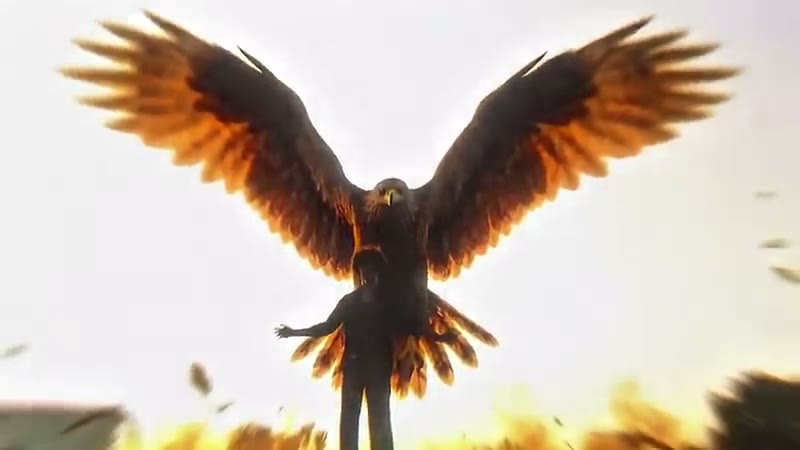
The Jatayu edit from Instagram Reels: you stand under an open sky, spread your arms, and a giant golden-brown eagle rises up behind you with its wings wide while a flock of birds circles. Add one photo and get the clip with the trend's own sound.

The original Jatayu AI Video reel by @asholic03Original reel
  • 1 photo you add
  • 7 s clip with sound
  • 16:9 like the original clip
  • No watermark

No prompt to write: Add your photo and tap once

Create your own

Ready in up to several minutes · 107 credits

The Jatayu AI video, also called the Jatayu edit, is an Indian Reels trend from November 2026: a person opens their arms and a giant golden-brown eagle, a tribute to Jatayu of the Ramayana, rises behind them with its wings spread. Add one clear photo, and you take the person's place.

Also called Jatayu edit · Jatayu Ji AI video · Ramayana Jatayu edit · Giant eagle AI video · Jatayu entry edit

Example

What the Jatayu AI Video video looks like

This is the original reel. Your photos replace its characters, so your video follows the same shots with your faces. No two runs come out the same.

Original reel by @asholic03, 11 s

The reel that started the Jatayu edit, by Ashtra Creation (@imashh4 on Instagram), 12 November 2026: he walks into a golden sky, opens his arms, and a giant eagle rises behind him. It has his own sound.

The trend's template clip, 7 s

The trend's template clip: a man on a sunny rooftop opens his arms, and the giant eagle rises up behind him while a flock of birds circles. Your video copies this clip with your photo.

Use this reference
Step by step

How to make the Jatayu AI Video video on MakeViral

Everything runs in the browser. No editing app, no prompt to write, no watermark.

  1. Add your photo

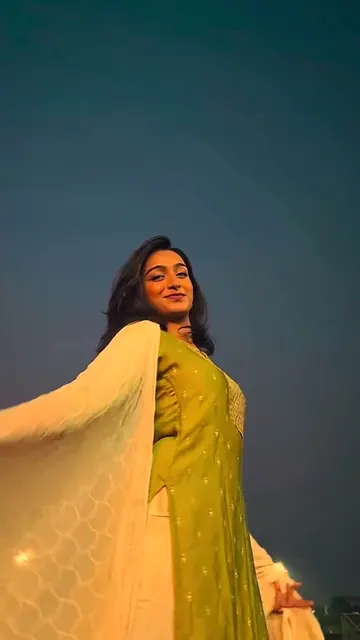
    Press "Create your own" and add you, face clear, waist up or full body. Take it with the camera or pick it from your library.

  2. Press Generate

    The button shows the price. Seedance 2.5 puts your photos into the Jatayu AI Video trend clip and copies it shot by shot for 7 seconds, with the reel's original song. You write no prompt.

  3. Download or share

    The video is ready in up to several minutes as a 16:9 MP4. Download it, share it from your phone, or find it later in My videos.

Which photo works best?

Upload one photo of yourself.

  • Waist up or full body, facing the camera, sharp and in daylight. In the clip you stand in the middle of a wide shot, so your face is small: a clear, front-facing photo keeps it yours.
  • No sunglasses, no cap that hides the face, no beauty filter.
  • Your clothes come from your photo. A plain shirt or a kurta looks great under the open sky.
  • Any background works: the rooftop, the tree, the sky, the eagle and the birds come from the clip.
  • Use your own photo or a friend who said yes. Never a celebrity or a stranger.
  • A pet or a figure works too: it takes the person's place, with its own body.

Where did the Jatayu AI Video trend start?

The Jatayu edit started in India in November 2026, a week after the film Ramayana: Part 1 opened in cinemas on 5 November. Its scene of Jatayu, the noble giant bird who fights to save Sita, filled Reels and Shorts with fan edits.

On 12 November the creator Ashtra Creation (@asholic03 on YouTube, @imashh4 on Instagram) posted his own version, "I Recreated the Ramayana Jatayu Scene Using Only My Phone": he walks into a golden sky, opens his arms, and a huge eagle rises behind him. The title card says "Bro Thinks He Can Beat 4000cr Movie Scene Solo". Viewers came over from Instagram, and the making-of video passed 76,000 views on YouTube.

From 13 November, Hindi Jatayu AI video editing tutorials showed how to make the Jatayu edit video (a Jatayu video edit) from a photo instead of a film shoot: one shared reference clip of a man on a sunny rooftop, one photo and one prompt. More than 20 tutorials, most of them titled "Jatayu AI video kaise banaye", went up in three days. By 19 November the #jatayu tag on TikTok held 7,431 videos and 110.7 million views, and it grew by about 51 videos a day.

  1. The film Ramayana: Part 1 opens in cinemas in India; its Jatayu fight scene sets off a wave of Jatayu fan edits. The Hollywood Reporter India

  2. Ashtra Creation posts "I Recreated the Ramayana Jatayu Scene Using Only My Phone": he opens his arms and a giant eagle rises behind him. The Short has 11,473 views and the making-of video 76,187 views by 19 November. YouTube

  3. Photo tutorials spread: a shared rooftop reference clip, one photo and one shared prompt. The most viewed one has 48,413 views by 19 November. YouTube

  4. The #jatayu tag on TikTok holds 7,431 videos and 110.7 million views and adds about 51 videos a day, up from 33 the day before. TikTok

Copy and paste

The Jatayu AI Video prompt

You do not need these: the one-tap flow runs them for you, together with the trend clip. [Image 1] and [Image 2] are your two photos, and [Video 1] is the trend clip the video copies.

1 photo: you, face clear, waist up or full bodySeedance 2.57 s · 720p · 16:9107 credits
Video prompt

Recreate the reference video [Video 1] shot for shot. Use [Video 1] as the strict reference for all actions, gestures, timing, camera movements, framing, editing, the giant eagle, the flying birds and all visual effects. The ONLY change: the man on the rooftop with short dark hair in a loose white long-sleeved shirt and dark trousers is now the subject of [Image 1]. Replace the man in [Video 1] with [Image 1]. THE PERSON = the subject of [Image 1] (a person, a pet, a figure or anything else), in EVERY frame, in the same place and at the same size as the man. A person: preserve the complete character design from [Image 1]: copy the exact face from [Image 1] (the face shape, eye color and eye shape, eyebrows, nose, mouth, skin tone, age, hair color, hair length and hairstyle, and any beard, moustache, glasses or freckles), the skin tone, body proportions, clothing and distinctive details. NO white long-sleeved shirt and no short dark hair unless [Image 1] shows them. The face is clearly visible and exactly [Image 1] in every frame, from the first frame to the last: never the original man's face, never blended or morphed, never drift back to it. An animal keeps the species, breed, face, ears, fur colors and markings of [Image 1] with its natural body proportions, never flattened or stretched; it stands tall facing the camera and lifts its head to the sky, with no human arms or clothes. Anything else keeps its own whole body, shape, colors and style, with no human body parts it does not have. One continuous low-angle shot, no cuts: 0.0-1.0 s: THE PERSON steps in, leaning forward, by the dark green tree. 1.0-2.3 s: THE PERSON stands up straight and faces the camera. 2.3-3.0 s: THE PERSON opens both arms wide and looks up at the sky. 3.0-4.0 s: the giant reddish-brown eagle rises up from behind THE PERSON with its wings spreading wide. 4.0-6.8 s: the eagle hovers right above and behind THE PERSON with slow powerful wingbeats while the flock of small birds flies around; THE PERSON holds the arms wide. Keep the giant reddish-brown eagle exactly as in [Video 1]: the same huge size, the same golden-brown glowing feathers, the same moment it rises up behind THE PERSON with wings spread wide, the same slow powerful wingbeats and the same flock of small birds flying around. Keep the original blue sky, the dark green tree, the white rooftop walls, the warm sunlight, the low camera angle, the same length and the wide frame. Change only the man's appearance. Normal anatomy, one head per body. No dialogue throughout the entire video. No background music. No text anywhere: do not copy or create any words, letters, titles or captions from [Video 1]. The sky stays clean. NEGATIVES: any text, letters, words, titles, captions, subtitles, original man's face, identity swap, face morphing, appearance drift, altered actions, smaller eagle, missing eagle, extra characters, distorted faces, extra limbs, distorted wings, flickering, new scenes, logos, watermarks.

2992 characters
How many credits does it cost?

You pay per video in credits, and the create page shows the exact price on the Generate button before you spend anything. The one-tap price covers the video, made in one step from your photos and the trend clip, charged once. One video is 107 credits, so the smallest one-time pack that covers it is $13.99 for 150 credits, with no subscription. The cheaper models are there if you run the prompts by hand in AI Video.

Video modelSettingsCredits
Seedance 2.5 (this template)7 s, 720p, copies the trend clip, one tap107

One-time packs and plans are on the pricing page. A failed video gives its credits back.

What happens in the Jatayu AI video, second by second?

Your video copies the template clip shot for shot. It is one continuous low-angle shot under a bright blue sky, with a dark green tree on the left and white rooftop walls on the right:

TimeWhat happens
0 to 1 sYou step in, leaning forward, by the tree.
1 to 2.3 sYou stand up straight and face the camera.
2.3 to 3 sYou open both arms wide and look up.
3 to 4 sA giant golden-brown eagle rises up from behind you, wings spreading wide.
4 to 7 sIt hovers right above and behind you with slow, powerful wingbeats while a flock of small birds circles. You hold your arms wide.

How it works: the best AI video models available, including Seedance 2.5, edit the clip itself: they put the person in your photo where the man stands and keep the eagle, the birds, the sky and the camera. You get about 7 seconds, wide 16:9 at 720p, with the trend's own epic instrumental sound put back on after the run. A run takes 5 to 15 minutes, and the exact price shows on the Generate button before you spend anything. Every Jatayu AI edit is a new take, so results differ.

Jatayu edit prompt: which one does this template use?

The Jatayu edit video prompt that spread with the tutorials (also shared as the Jatayu AI video editing prompt and the Jatayu trending video prompt on prompt blogs) tells a video tool to use the reference clip for every move, the camera, the giant eagle and the flying birds, to replace the man with the person in the photo, and to keep the eagle's huge size, its golden-brown feathers, the moment it rises behind him and the flock of birds. It bans text, a smaller or missing eagle, extra people and a changed face.

This template uses that Jatayu AI video prompt in the same order, with three changes: it never names a character, it describes the rooftop scene of the clip itself, and it adds rules that keep your face (or your pet's fur) the same from the first frame to the last. You write no prompt: one photo is enough.

The tutorials do it by hand with Google Flow (the Jatayu edit Google Flow method), then add the sound in CapCut or Edits: a Jatayu edit in CapCut is the music and slow-motion step, not the eagle. Here the eagle and the sound come in one run.

What goes wrong, and how do you fix it?

ProblemFix
The face does not look like youYou stand in a wide shot, so the face is small. Use a sharp, front-facing photo in daylight and run it again.
You get a white long-sleeved shirtThat is the man's shirt in the clip. The prompt asks for your own clothes; a photo that shows your clothes clearly helps.
The eagle is smaller or comes in lateThe prompt keeps it huge and on time. Run it again for a new take.
A pet gets human armsThe prompt asks for its own body. A photo of the whole animal helps.
The model refuses a photoSome photos get refused. The credits come back; try another photo.

How should you post your Jatayu viral video?

Your Jatayu AI reel comes with the trend's sound and is ready for Reels, Shorts or a WhatsApp status. You can turn the sound off on the result screen. The sound belongs to its owner, and MakeViral gives you no rights to it.

Hashtags: #jatayu (7,431 TikTok videos and 110.7 million views on 19 November 2026), #jatayuedit and #jatayuai. Keep the platform's AI label on.

Keep it respectful. Jatayu is a revered figure of the Ramayana, a noble bird who gave his life to protect Sita. The trend is a tribute, not a joke: post it with a line of pride, like "Courage has wings" or "A tribute to Jatayu", and make it only with your own face or a friend who said yes.

FAQ

Jatayu AI Video trend questions

What is the Jatayu AI video trend?
It is a Reels trend from India, November 2026: a person stands under an open sky, opens their arms, and a giant golden-brown eagle rises behind them with its wings spread, as a tribute to Jatayu, the noble bird of the Ramayana. People also call it the Jatayu edit or the Jatayu Ji AI video.
Who started the Jatayu edit?
The earliest version we found is by the Indian creator Ashtra Creation (@imashh4 on Instagram, @asholic03 on YouTube), posted on 12 November 2026, a week after the film Ramayana: Part 1 opened. He filmed himself opening his arms against a golden sky and added a giant eagle behind him. Tutorials for the photo version followed from 13 November.
Jatayu AI video kaise banaye? How do I make the Jatayu wala video with my photo?
Press "Create your own" and add one clear photo of yourself, waist up or full body, facing the camera. Press Generate; the button shows the price first. You get a 7-second wide clip with the trend's sound, and it waits in My videos when it is ready. You write no prompt.
What is the Jatayu AI video prompt?
The prompt the tutorials share uses a reference clip for all the moves, the camera, the giant eagle and the flying birds, replaces the man with the person in your photo, and keeps the eagle's huge size, its golden-brown feathers, the moment it rises and the flock of birds, with no text. This template runs the same prompt for you, with extra rules that keep your face the same.
Is this the Jatayu from the Ramayana film?
No. The trend is a fan tribute. The eagle in your video comes from the trend's template clip, not from the film, and no film footage, character or actor is used.
Is there a CapCut template for the Jatayu edit?
Not for the eagle itself. The tutorials make the eagle with an AI video tool from a reference clip and a photo, then use CapCut or Edits only for the sound and slow motion. This template does both in one step.
Can I do Jatayu AI photo editing or make Jatayu AI images instead of a video?
The trend is a video: the eagle rising behind you is the moment people share. This page makes the video, not still images. If you want a still for your profile, pause the finished video at the end, when the wings are fully spread.
Can my pet or a figure be in the Jatayu video?
Yes. The prompt takes any subject: a pet or a figure takes the person's place with its own body, and the eagle rises behind it. A person is the classic version.
What sound is on the Jatayu viral video?
The trend's own epic instrumental sound, the one the tutorials share with the reference clip. It goes back on your video after the run, and you can turn it off on the result screen.
How long is the video and what format is it?
About 7 seconds, an MP4 at 720p, wide 16:9 like the trend's clip, with the sound and no watermark.
Does the Jatayu AI video cost credits?
Yes. Each video costs credits, and the create page shows the exact price on the Generate button before you spend anything. If a video fails, the credits come back.
Is the video real?
No. You are put into the clip by AI from one photo, and the eagle is made by AI. Keep the AI label on when you post it.
More trends

Other AI video templates

Make your own Jatayu AI Video video

Add one photo and tap once. No prompt to write. 107 credits.

No watermark. A failed video gives its credits back. Secure checkout by Stripe.