Back

Hanuman Ji AI Video: Kneel in Prayer, Receive His Blessing

The devotional Hanuman Ji AI video from Instagram Reels: you walk a quiet garden path at night, kneel and pray, and after a golden flash Hanuman Ji stands beside you with his hand on your head in blessing. Add one photo and get the reel with its Hanuman Chalisa sound.

The original Hanuman Ji AI Video reel by @susobhan__chatterjeeOriginal reel
  • 1 photo you add
  • 15 s clip with sound
  • 16:9 like the original clip
  • No watermark

No prompt to write: Add your photo and tap once

Create your own

Ready in up to several minutes · 228 credits

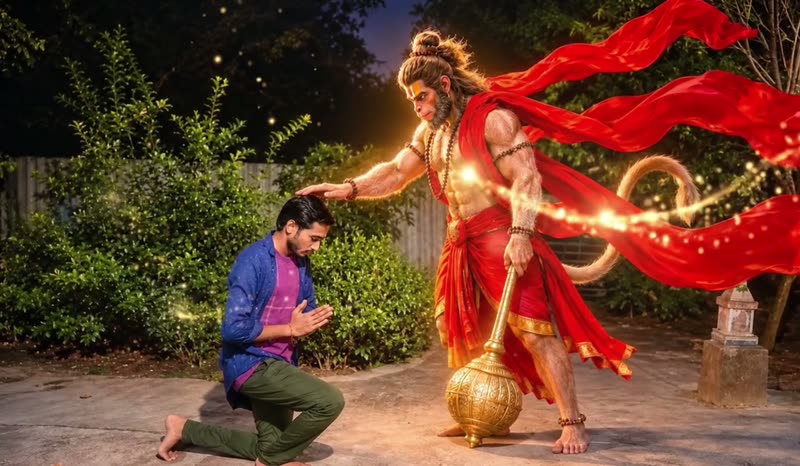
The Hanuman Ji AI video, also called the Hanuman Ji blessing AI video, is a devotional Reels trend from India, November 2026: a person kneels in prayer in a garden at night, and after a golden flash Hanuman Ji appears beside them and blesses them, to the Hanuman Chalisa. Add one clear photo to take the devotee's place.

Also called Hanuman Ji blessing AI video · Hanuman blessing AI video · Bajrang Bali AI video · Hanuman Ji ke sath AI video · POV: You took blessings from Hanuman · Hanuman Ji transformation video

Example

What the Hanuman Ji AI Video video looks like

This is the real trend reel by its creator, with its own sound. Your video copies it shot for shot with you in his place: the prayer, the golden flash and Hanuman Ji's blessing stay as they are.

Original reel by @susobhan__chatterjee, 17 s

The reel that started the trend, by Susobhan Chatterjee (@susobhan__chatterjee), 5 November 2026, 440,099 plays: he kneels in prayer in a garden at night, and after a golden flash Hanuman Ji blesses him. With its Hanuman Chalisa sound.

Use this reference
Step by step

How to make the Hanuman Ji AI Video video on MakeViral

Everything runs in the browser. No editing app, no prompt to write, no watermark.

  1. Add your photo

    Press "Create your own" and add you, face clear, waist up or full body. Take it with the camera or pick it from your library.

  2. Press Generate

    The button shows the price. Seedance 2.5 puts your photos into the Hanuman Ji AI Video trend clip and copies it shot by shot for 15 seconds, with the reel's original song. You write no prompt.

  3. Download or share

    The video is ready in up to several minutes as a 16:9 MP4. Download it, share it from your phone, or find it later in My videos.

Which photo works best?

Upload one photo of yourself.

  • Waist up or full body, facing the camera, sharp and in good light. In the first shot you walk and kneel in a wide night scene, so your face is small: a clear, front-facing photo keeps it yours.
  • No sunglasses, no cap that hides the face, no beauty filter.
  • Your clothes come from your photo. A kurta, a plain shirt or a saree looks right in a devotional scene.
  • Any background works: the garden, the night and Hanuman Ji come from the reel.
  • Men and women both work: the video keeps your own look.
  • Use your own photo, or a family member or friend who said yes. Never a celebrity or a stranger.

Where did the Hanuman Ji AI Video trend start?

Hanuman Ji, also called Bajrang Bali, is one of the most loved deities in Hinduism: the devoted servant of Lord Ram and a symbol of strength and protection. Lord Hanuman AI video reels filled Instagram and YouTube Shorts through 2026, and before Hanuman Jayanti in April creators shared "POV: You took blessings from Hanuman" edits, with Hanuman Ji giving blessings to the person in the photo.

The video version started on 5 November 2026. The creator Susobhan Chatterjee (@susobhan__chatterjee) filmed himself walking along a garden path at night, kneeling and praying. After one golden flash, an AI-made Hanuman Ji stands beside him with his right hand on his head. The reel plays the Instagram sound "Hanuman Chalisa" by Shankar Mahadevan and Ajay Gogavale. By 19 November it had 440,099 plays and 48,570 likes, and the comments asked how he made it.

On 16 November a Google Flow prompt was posted, and from 17 November Instagram tutorials showed how to make the Hanuman Ji ka AI video from one photo. Searches followed in English and Hindi: "Hanuman Ji AI video kaise banaye", "Hanuman Ji ke sath AI video" and "Bajrang Bali AI video" (also spelled Bajrangbali AI video).

  1. Before Hanuman Jayanti, an Instagram reel shares the "POV: You took blessings from Hanuman" idea: a realistic AI photo and video of you with Bajrang Bali. Instagram

  2. Susobhan Chatterjee posts the reel: he kneels in prayer in a garden at night and Hanuman Ji appears to bless him. It has 440,099 plays and 48,570 likes by 19 November. Instagram

  3. A Google Flow prompt for the Hanuman Ji AI video is posted, describing the same garden, the prayer and the blessing. YeTechnical

  4. Instagram tutorials show how to make the trend from one photo, with Susobhan Chatterjee's reel as the clip to copy. Instagram

  5. On TikTok, the #hanumanji tag holds 249,753 videos and 1.18 billion views, and #bajrangbali 218,902 videos and 1.12 billion views. TikTok

Copy and paste

The Hanuman Ji AI Video prompt

You do not need these: the one-tap flow runs them for you, together with the trend clip. [Image 1] and [Image 2] are your two photos, and [Video 1] is the trend clip the video copies.

1 photo: you, face clear, waist up or full bodySeedance 2.515 s · 720p · 16:9228 credits
Video prompt

Recreate the reference video [Video 1] shot for shot: the same camera angles, cut, timing and moves. The ONLY change: the kneeling man (the man who walks, kneels and prays) is now the person in [Image 1]. THE PERSON = the person in [Image 1], in EVERY frame, in the same place, pose and size as the man. [Image 1] is the ONLY identity reference for THE PERSON: copy the exact face from [Image 1] (the face shape, eye color and eye shape, eyebrows, nose, mouth, skin tone, age, hair color, hair length and hairstyle, and any beard, moustache, glasses or freckles), the skin tone, facial hair (or none), gender, age and body shape. Clothes exactly as in [Image 1] in every frame: NO blue open shirt, no magenta T-shirt, no olive-green trousers and no beard unless [Image 1] shows them. The face stays identical when looking down, in profile and with eyes closed. No beautification, no jewellery added. The same real person in every frame: never the original man's face, never blended or morphed, never drift back to it. Shot 1 [0-5.5 s]: the fixed wide shot from the side at chest height, a quiet house garden at night, cool dim light with bluish shadows, THE PERSON full body on the left: 0.0-1.0 s: THE PERSON walks slowly along the grey concrete path from left to right, looking down, sad and tired. 1.0-3.0 s: THE PERSON stops and goes down on one knee on the path, facing right. 3.0-5.5 s: THE PERSON joins both palms in prayer in front of the chest, head bowed, eyes closed, lips moving silently. 5.5-5.7 s: one quick flash of warm golden light, the only transition. Shot 2 [5.7-15 s]: the slightly closer fixed framing. The giant divine figure is ALREADY standing on the right in the final pose: RIGHT palm resting on THE PERSON's head, LEFT hand gripping the golden mace, the red cloth flying. THE PERSON stays kneeling with joined palms, head slightly bowed, a peaceful emotional face; the figure looks down with a calm smile. Golden sparkles drift; warm golden light falls on THE PERSON, the path and the bushes. Keep the giant divine figure exactly as in [Video 1]: photorealistic, NOT cartoon, NOT a statue, about 1.5 times taller than a standing adult, warm golden-orange skin, a calm kind face with a monkey-like muzzle, long dark hair in a high top-knot, gold necklaces and armbands, a red-and-saffron dhoti, the very long bright red cloth flying out behind in big waves, the long tail curling behind, the huge golden mace in the LEFT hand with its round head on the ground, a soft golden glow. Calm, protective and blessing, never aggressive. It never walks, slides or fades into the frame. Keep the garden, the path, the bushes, the gate, the stone lantern, the night sky, the camera, the timing, the same length and the wide frame. Change only the man's appearance. Normal anatomy, one head per body. No dialogue throughout the entire video. No background music. No text, no captions, no logos, no watermarks. No extra people. No violence, no fire, no weapon swung.

2984 characters
How many credits does it cost?

You pay per video in credits, and the create page shows the exact price on the Generate button before you spend anything. The one-tap price covers the video, made in one step from your photos and the trend clip, charged once. One video is 228 credits, so the smallest one-time pack that covers it is $39.99 for 450 credits, with no subscription. The cheaper models are there if you run the prompts by hand in AI Video.

Video modelSettingsCredits
Seedance 2.5 (this template)15 s, 720p, copies the trend clip, one tap228

One-time packs and plans are on the pricing page. A failed video gives its credits back.

What happens in the Hanuman Ji AI video, second by second?

Your video copies the trend reel shot for shot. It is wide, like the original:

TimeWhat happens
0 to 1 sYou walk slowly along a garden path at night, looking down.
1 to 3 sYou stop and go down on one knee.
3 to 5.5 sYou join your palms in prayer, head bowed, eyes closed.
5.5 sOne golden flash.
5.7 to 15 sHanuman Ji stands beside you, tall and calm, his right hand on your head in blessing and his golden mace in his left hand, his red cloth flying while golden sparkles drift. You stay kneeling in prayer.

How it works: top-quality AI video models, including Seedance 2.5, edit the reel itself: they put the person in your photo where the devotee kneels and keep Hanuman Ji, the garden, the golden light and the camera as they are. You get 15 seconds, wide at 720p, with the reel's Hanuman Chalisa sound put back on after the run. A run takes 5 to 15 minutes, and the exact price shows on the Generate button before you spend anything. Every run is a new take, so results differ.

Hanuman Ji AI video prompt: which one does this template use?

The Hanuman Ji AI video prompt that spread with the trend was written for Google Flow (the Hanuman Ji AI video Google Flow method): your photo is the only face reference, you walk, kneel and pray in a night garden, one golden flash, and then Hanuman Ji is already standing beside you, his right palm on your head and his left hand on the golden mace, calm, protective and blessing, never aggressive. It bans text, extra people, violence and any change to your face.

This template uses that Hanuman ji blessing prompt in the same order, with three changes: it copies the trend reel itself instead of building the scene from text, so the garden, the timing and Hanuman Ji look like the original; it adds rules that keep your face the same in every frame; and it puts the reel's own sound back on. You write no prompt and need no Hanuman Ji AI video generator account: one photo is enough.

The tutorials then do Hanuman AI video editing in CapCut or Edits to add the Hanuman Chalisa. Here the sound comes on in the same run.

What goes wrong, and how do you fix it?

ProblemFix
The face does not look like youIn the first shot you are small and seen from the side. Use a sharp, front-facing photo in good light and run it again.
You get a blue shirt or a beardThat is the creator's look in the reel. The prompt asks for your own clothes and face; a photo that shows your clothes clearly helps.
Hanuman Ji looks different from the reelThe prompt keeps his look from the reel: golden-orange skin, the mace in his left hand, the red cloth. Run it again for a new take.
The model refuses a photoSome photos get refused. The credits come back; try another photo.

How should you share your Hanuman Ji viral AI video?

Your Hanuman Ji AI video status is ready for Reels, Shorts or WhatsApp, with the Hanuman Chalisa sound. You can turn the sound off on the result screen. The recording belongs to its owners, and MakeViral gives you no rights to it.

Keep it devotional. Hanuman Ji is a deity whom millions of people pray to. The trend is an act of faith and gratitude, not a meme: post it with a line of devotion, like "Jai Bajrang Bali" or "Jai Shree Ram". Many devotees share it on a Tuesday or a Saturday, the days of Hanuman Ji. Make it only with your own face or a family member who said yes. Do not add jokes, comic sounds or edits that make fun of the scene.

Hashtags: #hanumanji (249,753 TikTok videos and 1.18 billion views on 19 November 2026), #bajrangbali and #jaishreeram. Keep the platform's AI label on.

FAQ

Hanuman Ji AI Video trend questions

What is the Hanuman Ji AI video trend?
It is a devotional Reels trend from India, November 2026: a person walks along a garden path at night, kneels and prays, and after a golden flash Hanuman Ji appears beside them and blesses them with his hand on their head, to the Hanuman Chalisa. People also call it the Hanuman blessing AI video or the Bajrang Bali AI video.
Who started the Hanuman Ji blessing AI video?
The earliest big post we found is by the creator Susobhan Chatterjee (@susobhan__chatterjee on Instagram), posted on 5 November 2026. He filmed his own prayer in a garden and added Hanuman Ji's blessing with AI. It passed 440,000 plays, and tutorials for the one-photo version followed from 16 November.
Hanuman Ji AI video kaise banaye? How do I make the Hanuman Ji ke sath AI video with my photo?
Press "Create your own" and add one clear photo of yourself, waist up or full body, facing the camera. Press Generate; the button shows the price first. You get a 15-second wide video with the Hanuman Chalisa sound, and it waits in My videos when it is ready. You write no prompt. (Hanuman Ji ki AI video kaise banaen, Hanuman Ji ke sath AI video kaise banaen: the steps are the same.)
What is the Hanuman AI video prompt?
The Hanuman AI video prompt the tutorials share makes your photo the only face reference, sets a quiet garden at night, has you walk, kneel and pray, adds one golden flash, and then shows Hanuman Ji already standing beside you, right hand on your head and left hand on his golden mace, calm and blessing. This template runs the same idea on the trend reel itself, with extra rules that keep your face the same.
Is it respectful to make a Hanuman AI blessing video?
The trend is made by devotees as an act of faith: Hanuman Ji, calm and kind, blesses a person who prays to him. The template keeps that tone. He is never shown angry, violent or as a joke. Please share it in the same spirit, with your own photo.
Can I make a Hanuman Ji AI photo instead of a video?
The trend is a video: the golden flash and the blessing are the moment people share. This page makes the video. For a Hanuman Ji AI photo, pause the finished video during the blessing and take a screenshot.
Can a girl or a woman make this video?
Yes. The video keeps the person from your photo, a man or a woman, with their own face, hair and clothes. A saree or a kurta looks lovely in the prayer scene.
What song is on the Hanuman Chalisa AI video?
The trend reel plays the Instagram sound "Hanuman Chalisa" by Shankar Mahadevan and Ajay Gogavale. The same cut goes back on your video after the run, and you can turn it off on the result screen.
How long is the video and what format is it?
15 seconds, an MP4 at 720p, wide like the trend reel, with the sound and no watermark. The first 5.5 seconds are your prayer; the blessing fills the rest.
Can I put my pet or a group in the video?
No. This is a devotional scene of one person in prayer, so the template takes one person. Use one photo of one person.
Does the Hanuman Ji AI video cost credits?
Yes. Each video costs credits, and the create page shows the exact price on the Generate button before you spend anything. If a video fails, the credits come back.
Is the video real?
No. You are put into the reel by AI from one photo, and Hanuman Ji in the reel is made by AI. Keep the AI label on when you post it.
More trends

Other AI video templates

Make your own Hanuman Ji AI Video video

Add one photo and tap once. No prompt to write. 228 credits.

No watermark. A failed video gives its credits back. Secure checkout by Stripe.