Back

AI Car Edit: Your Car in a Cinematic Night Edit, From One Photo

Add one photo of your car. It becomes the star of a 15-second cinematic car edit at night: fast speed ramps across an empty parking lot, low passes along the side, a spin around the car and close-ups of the wheels and the hood, cut to music.

The original AI Car Edit reel by @pascal.zero7Original reel
  • 1 photo you add
  • 15 s clip with sound
  • 9:16 for TikTok, Reels, Shorts
  • No watermark

No prompt to write: Add your photo and tap once

Create your own

Ready in up to several minutes · 228 credits

An AI car edit is a cinematic car edit made from photos instead of a film shoot: speed ramps, low camera passes and wheel close-ups, cut to a beat. MakeViral copies a viral night car edit shot for shot and puts your own car in it. You need one photo of your car.

Also called 1 photo, 1 edit · Real vs AI car edit

Example

What the AI Car Edit video looks like

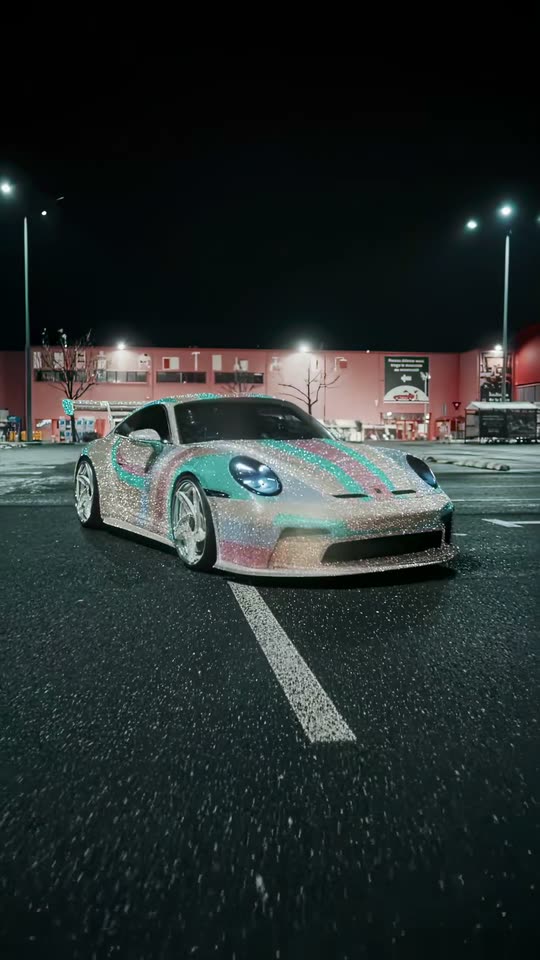
This is the real car edit the template copies, filmed by a videographer, not a MakeViral result. In your video, your car takes the crystal car's place in every shot.

Original reel by @pascal.zero7, 15 s

The night car edit this template copies: footage of the crystal-covered sports car by @pascal.zero7 (filmed in Bucharest, posted 14 January 2026, 1.1 million views on TikTok), in a 15-second re-edit. Your car takes its place.

Use this reference
Step by step

How to make the AI Car Edit video on MakeViral

Everything runs in the browser. No editing app, no prompt to write, no watermark.

  1. Add your photo

    Press "Create your own" and add your car, the whole car from a front corner. Take it with the camera or pick it from your library.

  2. Press Generate

    The button shows the price. Seedance 2.5 puts your photos into the AI Car Edit trend clip and copies it shot by shot for 15 seconds, with the reel's original song. You write no prompt.

  3. Download or share

    The video is ready in up to several minutes as a 9:16 MP4. Download it, share it from your phone, or find it later in My videos.

Which photo works best?

Add one photo of your car.

  • The whole car in view, from a front corner, sharp and in good light. The edit shows the front, the side, the wheels and the back, so a front three-quarter photo gives the AI the most to copy.
  • Nothing in front of it: no people, no other cars, no fence across the body.
  • Any car works: a sedan, a hatchback, an SUV, a pickup or a sports car. A motorbike does not fit this edit.
  • A clean daylight photo is fine: the video puts the car into the night scene with its own lights.
  • Use a photo of your own car, or one of a friend who said yes.

Where did the AI Car Edit trend start?

Car edits are one of the biggest formats on TikTok: the #caredit tag holds about 2.1 million videos with 36.5 billion views (4 November 2026). Filmers shoot a car with a gimbal, then cut it to music with speed ramps and close-ups. One of the most shared cars of the season was a sports car fully covered in crystals, first shown at the Essen Motor Show at the end of November 2025. On 14 January 2026 the German videographer @pascal.zero7 posted his night edit of it, filmed in Bucharest: 1.1 million views and 111,100 likes on TikTok. Other editors re-cut his footage to new songs.

AI changed who can make one. On 11 January 2026 @360.mediaedits showed "1 photo -> 1 edit": a full car edit made from a single photo of his car, and his AI car edit of 4 March 2026 reached 27.1 million views and 3.7 million likes. His later "Real vs AI" car edits ask viewers to pick between the filmed car and the AI one. Since then people search for an AI car edit prompt, an AI car edit maker or an AI car editor to do the same with their own car.

  1. A sports car fully covered in crystals is the talk of the Essen Motor Show; car spotters post it on TikTok. TikTok

  2. @360.mediaedits posts "1 photo -> 1 edit": a whole car edit made with AI from one photo of his car. TikTok

  3. @pascal.zero7 posts his night edit of the crystal car, filmed in Bucharest; it reaches 1.1 million views and 111,100 likes. TikTok

  4. An AI car edit by @360.mediaedits, made from photos of one car, reaches 27.1 million views and 3.7 million likes. TikTok

  5. @lucars_e46 re-cuts @pascal.zero7's crystal car footage to a new song, one of many re-edits of the clip. TikTok

Copy and paste

The AI Car Edit prompt

You do not need these: the one-tap flow runs them for you, together with the trend clip. [Image 1] and [Image 2] are your two photos, and [Video 1] is the trend clip the video copies.

1 photo: your car, the whole car from a front cornerSeedance 2.515 s · 720p · 9:16228 credits
Video prompt

Recreate the reference video [Video 1] shot for shot: a cinematic night car edit in an empty parking lot under tall street lights, filmed with a low gimbal camera and a wide lens, with the same speed ramps, whip moves, close-ups, cuts, motion blur and timing. The ONLY change: the sports car in [Video 1] is now the car in [Image 1]. The parking lot, the street lights, the night sky, the building in the back, the cuts and the camera moves stay exactly as in [Video 1]. The car = the car in [Image 1], in EVERY shot, also in the close-ups of the wheels, the hood and the back: the same body shape, proportions, paint color and finish, wheels, rims, windows, lights and any spoiler as in [Image 1], whatever kind of car it is (a sedan, a hatchback, an SUV, a pickup or a sports car), so its owner knows it at once. Never the car from [Video 1]: NO sparkle or crystal wrap, NO turquoise and pink stripes, NO star-shaped silver rims and NO big rear wing unless [Image 1] shows them. Take only the car from [Image 1], not its background, its people or its light: it stands in the night parking lot with its own headlights and tail lights on. No badges, emblems or lettering on the car, and no readable number plate. The shots, matching the reference second by second: 0-1 s: the car stands far away in the parking lot, front three-quarter view; the camera rushes toward it low over the asphalt. 1-2.3 s: a speed ramp into the front: the headlights, a tight close-up of the hood paint, then the whole front again. 2.3-3.2 s: the camera pulls back to a low front view of the whole car. 3.2-4.2 s: a fast whip to a low close-up of a rear corner and the glowing tail lights. 4.2-5.5 s: a wide-lens pass close along the side: the front wheel, then the side profile. 5.5-7.5 s: the camera spins fast around the car (front, low front, from above, the back) with motion blur. 7.5-8.4 s: the back of the car from low, the tail lights glowing. 8.4-9.9 s: extreme close-ups of the turning front wheel and rim, then the side. 9.9-12.1 s: hard cut, a slow close-up glide low along the hood paint. 12.1-13.8 s: hard cut, a low rear view with the tail lights; the camera pushes in. 13.8-14.8 s: a wide front three-quarter view of the whole car standing in the lit parking lot. Exactly one car; no people, no hands, no other cars close by. No dialogue throughout the entire video. No background music. No badges, emblems, brand names or lettering on the car, no readable number plate, no text, no captions, no logos, no watermark.

2514 characters
How many credits does it cost?

You pay per video in credits, and the create page shows the exact price on the Generate button before you spend anything. The one-tap price covers the video, made in one step from your photos and the trend clip, charged once. One video is 228 credits, so the smallest one-time pack that covers it is $39.99 for 450 credits, with no subscription. The cheaper models are there if you run the prompts by hand in AI Video.

Video modelSettingsCredits
Seedance 2.5 (this template)15 s, 720p, copies the trend clip, one tap228

One-time packs and plans are on the pricing page. A failed video gives its credits back.

What happens in your AI car edit?

SecondsWhat happens
0 to 1Your car stands in an empty parking lot at night; the camera rushes toward it low over the asphalt.
1 to 3A speed ramp into the headlights and a close-up of the hood, then back to the whole front.
3 to 5.5A whip to the tail lights, then a low pass along the side past the front wheel.
5.5 to 8.4A fast spin around the car with motion blur, ending on the back.
8.4 to 12Close-ups of the turning wheel and rim, then a slow glide over the hood.
12 to 15A low shot of the back, then the whole car standing in the lit parking lot.

This is a copy of a real cinematic car edit, not a new scene: the cuts, the speed ramps and the music stay in sync, and only the car changes. It is a ready-made AI car edit video, so you write no prompt and use no car edit template in an editing app.

What do people call an AI car edit?

Most people search ai car edit or car edit ai, and when they want the clip, an ai car edit video or a car edit ai video. Creators who share their steps get asked for the ai car edit prompt (or the car edit ai prompt), and tools that do it for you are called an ai car editor, an ai car edit maker or an ai car edit generator. The style itself is simply a car edit (plural car edits), a cinematic car edit or, for this one, a night car edit; filmers also call it a car showcase edit or a speed ramp car edit, and the posts are car reels.

The AI side has its own words: trending car edit AI clips, an ai car editing video, an ai car video edit, ai car replacement (your car in place of the one in a famous edit), and the car edit trend of 1 photo car edit clips that started on TikTok in January 2026.

What goes wrong, and how do you fix it?

ProblemFix
The crystal car from the reel stays, or its stripes showUse a sharp photo of the whole car in good light, then run it again. A front-corner photo helps most.
The car changes shape in the fast spinRun it again: every run is a new take. A photo with the whole car in view keeps the shape best.
A big rear wing appears that your car does not haveRun it again; the AI is told to keep your car's own shape.
A badge or a number plate showsThe AI leaves them off, but one can come back in a close-up. Run it again.
The run failsSome photos get refused. MakeViral then tries a backup model, and if the video still fails, the credits come back.
FAQ

AI Car Edit trend questions

What is an AI car edit?
A cinematic car edit made with AI from photos of a car instead of a film shoot: speed ramps, low camera passes, wheel close-ups and a spin around the car, cut to music. Creators like @360.mediaedits made it popular on TikTok in 2026 with edits made from one photo. MakeViral copies a viral night car edit and puts your car in it.
How do I make an AI car edit of my own car?
Press "Create your own", add one photo of your car and press Generate. The button shows the price first. You get a vertical 15-second video with the edit's music, with your car in every shot. It can take 5 to 15 minutes, and you write no prompt.
What is the AI car edit prompt?
The creators who made the trend did not share one: they send their prompts by direct message, and the night edit we copy was filmed for real, not prompted. So when people ask for a trending car edit AI prompt or an AI car edit tutorial, the honest answer is that the prompt stays private. We wrote our own car edit AI prompt that follows the reel second by second (the parking lot, each speed ramp, the spin and the close-ups) and tells the model to keep your car's own shape, paint and wheels. MakeViral runs it for you: you never type it.
Is there an AI car editor app?
You need no AI car editing app and no car edit template. MakeViral runs in the browser on your phone or computer: add a photo and it makes the whole AI car edit video, ready to post as a car reel on TikTok or Instagram. It works like an AI car edit maker that already knows the shots. MakeViral is not linked with @pascal.zero7 or @360.mediaedits.
Which cars work?
Any car: a sedan, a hatchback, an SUV, a pickup or a sports car. The AI copies its body shape, paint, wheels and lights from your photo and leaves badges and number plates off. A motorbike does not fit this edit.
Which AI model makes the video?
Top-quality AI video models, including Seedance 2.5. The model takes the original night edit and your car photo and swaps your car into every shot, keeping the parking lot, the lights, the cuts and the camera moves. The edit's own music goes back on after the run. If a model refuses a photo, MakeViral tries a backup model.
Can I or my pet be in the car edit?
Not in this version: the edit shows only the car, with no driver and no people in view, which is what makes it a car showcase. Add one photo of your car only.
How long is the video, and does it have sound?
15 seconds, vertical 9:16, at 720p. It has the original edit's music, which you can turn off on the result screen and swap for your own song when you post.
Does the AI car edit cost credits?
Yes. The Generate button shows the exact price before you spend anything, and if a video fails, the credits come back.

Make your own AI Car Edit video

Add one photo and tap once. No prompt to write. 228 credits.

No watermark. A failed video gives its credits back. Secure checkout by Stripe.