Back

Charlie Brown Christmas Trend: Turn Your Photo Into the Snoopy Christmas Cartoon

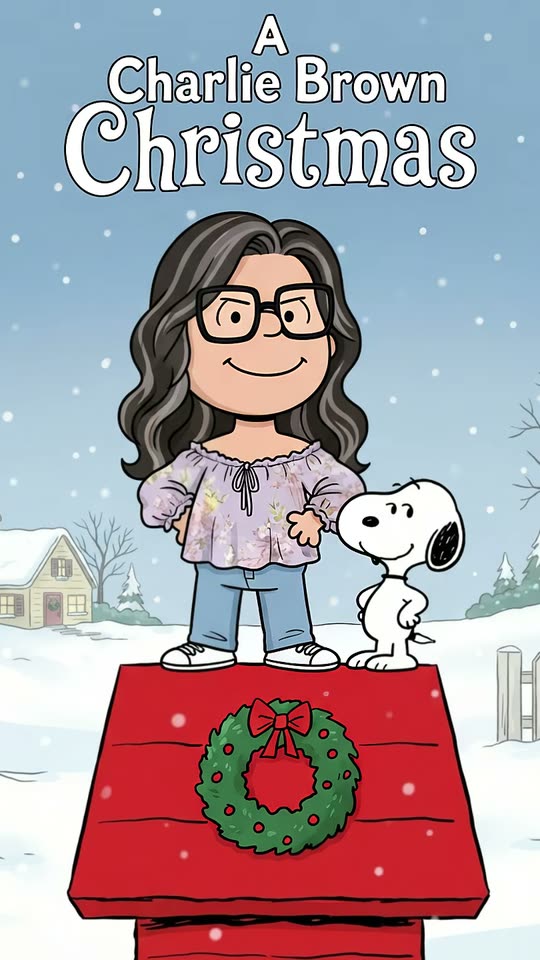
Add one photo. MakeViral draws you as a flat 1960s comic-strip cartoon, standing on a red doghouse with a wreath, next to a little white beagle, in the snow. Your hair, glasses and outfit stay.

The original Charlie Brown Christmas reel by @nanceesjourneyOriginal reel
  • 1 photo you add
  • 2K photo you can turn into a video
  • 9:16 for TikTok, Reels, Shorts
  • No watermark

No prompt to write: Add your photo and tap once

Create your own

Ready in a few minutes · Photo · From 3 credits

The Charlie Brown Christmas trend is a Snoopy AI photo: one selfie becomes a flat, hand-drawn cartoon of you in the look of the 1965 holiday special, standing on a red doghouse next to a white beagle in the snow, under a big holiday title. Add one photo here. Pets, groups and a short video work too.

Also called Snoopy Christmas photo · Peanuts Christmas edit · Snoopy cartoon trend · Charlie Brown Christmas photo

Example

What the Charlie Brown Christmas photo looks like

This is the creator's own result from the CapCut template, with its sound, not a MakeViral run: it shows the special's title and the comic's dog. Your MakeViral picture has the same look with a "A Merry Christmas" title and a look-alike white beagle.

Original reel by @nanceesjourney, 8 s

The first post of the Charlie Brown Christmas trend that took off, by @nanceesjourney (26 Oct 2026, 60,500 views): her CapCut result, with snow falling over her cartoon on the red doghouse.

Step by step

How to make the Charlie Brown Christmas photo on MakeViral

Everything runs in the browser. No editing app, no prompt to write, no watermark.

  1. Add your photo

    Press "Create your own" and add you, full body or waist up. Take it with the camera or pick it from your library.

  2. Press Generate

    The button shows the price. Nano Banana 2.1 puts your photo into the Christmas Comic scene and makes one 2K photo. You write no prompt.

  3. Download or share

    The photo is ready in a few minutes as a 9:16 2K image. Download it, share it from your phone, turn it into a video, or find it later in My videos.

Which photo works best?

Use one sharp photo of you, full body or from the waist up, in good light. The cartoon keeps what makes you you: your hairstyle and hair color, glasses, beard, earrings and the outfit with its colors. The face itself becomes a simple cartoon face, as in the trend.

  • Wear what you want in the cartoon. A Christmas sweater or a red scarf stays, drawn as flat shapes.
  • Glasses are good: they stay on, as bold cartoon frames.
  • Keep your pose if you like it. A mirror selfie keeps the phone in your hand, as in the first post. A waist-up photo gets plain trousers and shoes.
  • One person per photo for the Human version. For two to four people, use the Friends and family version with one group photo.
  • Pets: one clear photo of the whole animal, face to the camera.

Where did the Charlie Brown Christmas trend start?

The trend is a CapCut AI photo template. Its first post is by @jason_l_smith on 23 October 2026: a mirror selfie that turns into a cartoon of him on the red doghouse, captioned "I know Christmas is still some time away". His post stayed small (205 views by 30 October), but the template spread on US TikTok within days. On 26 October @nanceesjourney posted hers with "Sixty days till Christmas!", the first post of the trend that took off (60,500 views and 1,018 likes by 30 October). On 28 October @lisahoesman reached 81,300 views.

Then the tutorials came. A Charlie Brown Christmas tutorial by @sm5bhbjno8 on 29 October, captioned "charlie brown christmas trend, snoopy christmas filter", had 139,400 views and 2,302 shares a day later. Six of the 13 posts on the template's sound that we saw came on 29 October. The look copies the 1965 TV special A Charlie Brown Christmas, whose doghouse-decorating scene is where the red doghouse with lights and a wreath comes from. As a Christmas trend, the Snoopy Christmas trend should keep growing until December: last year, Google searches for "snoopy filter" peaked in November.

  1. The TV special A Charlie Brown Christmas airs for the first time in the US; its flat, hand-drawn look is the style the trend copies. Wikipedia

  2. @jason_l_smith posts the first result of the CapCut template, a mirror selfie turned into a cartoon on the red doghouse, with the template's sound. TikTok

  3. @nanceesjourney posts "Sixty days till Christmas!", the first post of the trend to take off: 60,500 views and 1,018 likes by 30 October. TikTok

  4. @lisahoesman posts her cartoon ("Been a Peanuts Gang fan since I was a kid!"): 81,300 views by 30 October. TikTok

  5. A tutorial by @sm5bhbjno8 explains how to do the Snoopy Christmas filter: 139,400 views and 2,302 shares by 30 October. TikTok

Copy and paste

The Charlie Brown Christmas prompts

You do not need this: the one-tap flow runs it for you. The photo prompt puts your photo into the scene. Want to change it? Copy it and edit it in AI Photo.

Human

1 photo: you, full body or waist upNano Banana 2.1Photo · 2K · 9:163 credits
Photo prompt

Use the uploaded image as the base. Transform the person in the uploaded image into a cute cartoon character in a classic 1960s newspaper comic-strip style, with clean black outlines, soft pastel colors, simple comic-style facial features, and a cozy nostalgic newspaper-strip mood: a flat 2D cartoon like a hand-drawn animated holiday TV special from the 1960s: even black ink lines, flat solid colors with no shading, no gradients and no 3D, soft cartoon lines and a cozy retro Christmas mood. Keep the face highly recognizable, natural, and friendly. The character has a big round head, a simple cartoon face with two small black dot eyes, short-line eyebrows, a small nose, a small curved smile and small ears, a short body with short arms and legs, small rounded hands and simple shoes. It keeps everything that makes the person recognizable: the exact hairstyle, hair length and hair color, any beard or moustache, glasses (as simple bold frames), earrings and freckles, any hat, the skin tone, gender and age, and the clothes with their colors and prints, all as flat cartoon shapes. A waist-up photo gets plain trousers and simple shoes. Keep the photo's hand gesture when it fits a standing pose: a phone held up for a mirror selfie stays in the hand. No winter hat, scarf or gloves unless the photo shows them. The character stands on top of a red wooden doghouse seen straight from the front, its red sloped roof with dark plank lines and a little snow on the edges filling the bottom third of the picture, a green wreath with a red bow on the front of the roof, full body from the top of the head to the shoes, facing the camera, a little left of the middle. On the roof right next to the character, on the right, at the height of their hips, stands a small white cartoon beagle with long black ears, a round black nose and small black dot eyes, standing upright on its hind legs with a happy, proud face. Behind, in the same flat style: a snowy suburban yard, bare winter trees, a white picket fence, a small house with a snowy roof, a pale blue sky and soft falling snowflakes. At the top, in the sky: a hand-lettered holiday title in white rounded serif letters with a thin dark outline, on three centered lines: a small "A", then "Merry", then a larger "Christmas". It is the only text: spell it exactly, with no other words, signs, logos or watermark. Vertical 9:16. Exactly one person and one beagle: an original cartoon of this person, not an existing cartoon character. No zigzag stripe on any shirt and no single curl of hair on the forehead unless the photo shows one. No frame, no border, no caption. The face is always the simple flat comic-strip cartoon face described above, never a photo face: the identity rules below apply to the cartoon's hair, facial hair, glasses, skin tone, gender, age and clothes.

2832 characters

Friends and family

1 photo: your group photo, 2 to 4 peopleNano Banana 2.1Photo · 2K · 9:163 credits
Photo prompt

Use the uploaded image as the base. Transform every person in the uploaded image into a cute cartoon character in a classic 1960s newspaper comic-strip style, with clean black outlines, soft pastel colors, simple comic-style facial features, and a cozy nostalgic newspaper-strip mood: a flat 2D cartoon like a hand-drawn animated holiday TV special from the 1960s: even black ink lines, flat solid colors with no shading, no gradients and no 3D, soft cartoon lines and a cozy retro Christmas mood. Keep each face highly recognizable, natural, and friendly. Draw exactly as many characters as there are people in the photo, in the same order from left to right, each about as tall as in the photo. Each character has a big round head, a simple cartoon face with two small black dot eyes, short-line eyebrows, a small nose, a small curved smile and small ears, a short body with short arms and legs, small rounded hands and simple shoes. Each one keeps everything that makes that one person recognizable: the exact hairstyle, hair length and hair color, any beard or moustache, glasses (as simple bold frames), earrings and freckles, any hat, the skin tone, gender and age, and the clothes with their colors and prints, all as flat cartoon shapes. Never blend two people, never swap hair, glasses or clothes between them, and never add or drop a person. If the photo also shows a pet, it becomes a flat cartoon animal with its own fur colors and markings, standing with them. If the photo shows only their upper bodies, add plain trousers and simple shoes that go with each outfit. Add no winter hats, scarves or gloves unless the photo shows them. They stand side by side on the snowy ground, full bodies from the tops of the heads to the shoes, facing the camera. On the right of the group stands a red wooden doghouse seen straight from the front, its red sloped roof with dark plank lines and a little snow on the edges, a green wreath with a red bow on the front of the roof, and on top of its roof, at the height of their heads, stands a small white cartoon beagle with long black ears, a round black nose and small black dot eyes, standing upright on its hind legs with a happy, proud face. Behind, in the same flat style: a snowy suburban yard, bare winter trees, a white picket fence, a small house with a snowy roof, a pale blue sky and soft falling snowflakes. At the top, in the sky: a hand-lettered holiday title in white rounded serif letters with a thin dark outline, on three centered lines: a small "A", then "Merry", then a larger "Christmas". It is the only text: spell it exactly, with no other words, signs, logos or watermark. Vertical 9:16. Original cartoons of these people, not existing cartoon characters. No zigzag stripe on any shirt and no single curl of hair on the forehead unless the photo shows one. No frame, no border, no caption. Every face is the simple flat comic-strip cartoon face described above, never a photo face: the identity rules below apply to each cartoon's hair, facial hair, glasses, skin tone, gender, age and clothes.

3068 characters
Pet

1 photo: your pet, whole bodyNano Banana 2.1Photo · 2K · 9:163 credits
Photo prompt

Use the uploaded image as the base. Transform the pet in the uploaded image into a cute cartoon animal in a classic 1960s newspaper comic-strip style, with clean black outlines, soft pastel colors, simple comic-style features, and a cozy nostalgic newspaper-strip mood: a flat 2D cartoon like a hand-drawn animated holiday TV special from the 1960s: even black ink lines, flat solid colors with no shading, no gradients and no 3D, soft cartoon lines and a cozy retro Christmas mood. Keep the pet highly recognizable, natural, and friendly. The pet is drawn as simple flat cartoon shapes: small black dot eyes, a simple nose, a small happy mouth, its own ear shape, its own body shape and tail. It keeps everything that makes this pet recognizable: the same species, the fur colors, fur pattern, markings and spots, the ear shape, the tail, and any collar, tag, bandana or sweater from the photo. If the pet is a white or light dog, it keeps its own colors, ears and face so that it is clearly a different dog from the beagle. The pet stands or sits on top of a red wooden doghouse seen straight from the front, its red sloped roof with dark plank lines and a little snow on the edges filling the bottom third of the picture, a green wreath with a red bow on the front of the roof, its whole body in view, facing the camera, a little left of the middle. On the roof right next to the pet, on the right, stands a small white cartoon beagle with long black ears, a round black nose and small black dot eyes, standing upright on its hind legs with a happy, proud face. Behind, in the same flat style: a snowy suburban yard, bare winter trees, a white picket fence, a small house with a snowy roof, a pale blue sky and soft falling snowflakes. At the top, in the sky: a hand-lettered holiday title in white rounded serif letters with a thin dark outline, on three centered lines: a small "A", then "Merry", then a larger "Christmas". It is the only text: spell it exactly, with no other words, signs, logos or watermark. Vertical 9:16. Exactly one pet and one beagle, no people: an original cartoon of this pet, not an existing cartoon character. No frame, no border, no caption.

2174 characters

Photo + video

1 photo: you, full body or waist upKling 3.010 s · 1080p · 9:1656 credits
Step 1 · Photo prompt

Use the uploaded image as the base. Transform the person in the uploaded image into a cute cartoon character in a classic 1960s newspaper comic-strip style, with clean black outlines, soft pastel colors, simple comic-style facial features, and a cozy nostalgic newspaper-strip mood: a flat 2D cartoon like a hand-drawn animated holiday TV special from the 1960s: even black ink lines, flat solid colors with no shading, no gradients and no 3D, soft cartoon lines and a cozy retro Christmas mood. Keep the face highly recognizable, natural, and friendly. The character has a big round head, a simple cartoon face with two small black dot eyes, short-line eyebrows, a small nose, a small curved smile and small ears, a short body with short arms and legs, small rounded hands and simple shoes. It keeps everything that makes the person recognizable: the exact hairstyle, hair length and hair color, any beard or moustache, glasses (as simple bold frames), earrings and freckles, any hat, the skin tone, gender and age, and the clothes with their colors and prints, all as flat cartoon shapes. A waist-up photo gets plain trousers and simple shoes. Keep the photo's hand gesture when it fits a standing pose: a phone held up for a mirror selfie stays in the hand. No winter hat, scarf or gloves unless the photo shows them. The character stands on top of a red wooden doghouse seen straight from the front, its red sloped roof with dark plank lines and a little snow on the edges filling the bottom third of the picture, a green wreath with a red bow on the front of the roof, full body from the top of the head to the shoes, facing the camera, a little left of the middle. On the roof right next to the character, on the right, at the height of their hips, stands a small white cartoon beagle with long black ears, a round black nose and small black dot eyes, standing upright on its hind legs with a happy, proud face. Behind, in the same flat style: a snowy suburban yard, bare winter trees, a white picket fence, a small house with a snowy roof, a pale blue sky and soft falling snowflakes. At the top, in the sky: a hand-lettered holiday title in white rounded serif letters with a thin dark outline, on three centered lines: a small "A", then "Merry", then a larger "Christmas". It is the only text: spell it exactly, with no other words, signs, logos or watermark. Vertical 9:16. Exactly one person and one beagle: an original cartoon of this person, not an existing cartoon character. No zigzag stripe on any shirt and no single curl of hair on the forehead unless the photo shows one. No frame, no border, no caption. The face is always the simple flat comic-strip cartoon face described above, never a photo face: the identity rules below apply to the cartoon's hair, facial hair, glasses, skin tone, gender, age and clothes.

2832 characters
Step 2 · Video prompt

A gentle, cozy holiday cartoon scene in exactly the same flat 2D comic-strip style as the image, like a hand-drawn animated holiday TV special from the 1960s: clean black outlines, flat solid colors, simple limited cartoon animation. Keep every drawing exactly as in the image: the character's face, hair, glasses and clothes, the small white beagle, the red doghouse with the wreath, the snowy yard and the title at the top. Nothing turns 3D or realistic, and the title letters stay sharp, still and spelled exactly as in the image. Soft white snowflakes drift down the whole time. The character smiles, gives a small happy wave to the camera with one hand, then sways gently from side to side as if listening to music. Next to them, the little white beagle hops happily on its hind legs, front paws up and long ears flapping, does a happy little dance on the roof, then looks up at the character and smiles. The camera stays still, with a very slow push in. Audio: a soft, gentle, original jazz piano holiday tune, light and cozy, and the hush of falling snow. No speech, no singing. No new characters, no new text, no logos, no watermark.

1141 characters

Pet photo + video

1 photo: your pet, whole bodyKling 3.010 s · 1080p · 9:1656 credits
Step 1 · Photo prompt

Use the uploaded image as the base. Transform the pet in the uploaded image into a cute cartoon animal in a classic 1960s newspaper comic-strip style, with clean black outlines, soft pastel colors, simple comic-style features, and a cozy nostalgic newspaper-strip mood: a flat 2D cartoon like a hand-drawn animated holiday TV special from the 1960s: even black ink lines, flat solid colors with no shading, no gradients and no 3D, soft cartoon lines and a cozy retro Christmas mood. Keep the pet highly recognizable, natural, and friendly. The pet is drawn as simple flat cartoon shapes: small black dot eyes, a simple nose, a small happy mouth, its own ear shape, its own body shape and tail. It keeps everything that makes this pet recognizable: the same species, the fur colors, fur pattern, markings and spots, the ear shape, the tail, and any collar, tag, bandana or sweater from the photo. If the pet is a white or light dog, it keeps its own colors, ears and face so that it is clearly a different dog from the beagle. The pet stands or sits on top of a red wooden doghouse seen straight from the front, its red sloped roof with dark plank lines and a little snow on the edges filling the bottom third of the picture, a green wreath with a red bow on the front of the roof, its whole body in view, facing the camera, a little left of the middle. On the roof right next to the pet, on the right, stands a small white cartoon beagle with long black ears, a round black nose and small black dot eyes, standing upright on its hind legs with a happy, proud face. Behind, in the same flat style: a snowy suburban yard, bare winter trees, a white picket fence, a small house with a snowy roof, a pale blue sky and soft falling snowflakes. At the top, in the sky: a hand-lettered holiday title in white rounded serif letters with a thin dark outline, on three centered lines: a small "A", then "Merry", then a larger "Christmas". It is the only text: spell it exactly, with no other words, signs, logos or watermark. Vertical 9:16. Exactly one pet and one beagle, no people: an original cartoon of this pet, not an existing cartoon character. No frame, no border, no caption.

2174 characters
Step 2 · Video prompt

A gentle, cozy holiday cartoon scene in exactly the same flat 2D comic-strip style as the image, like a hand-drawn animated holiday TV special from the 1960s: clean black outlines, flat solid colors, simple limited cartoon animation. Keep every drawing exactly as in the image: the pet's face, fur colors, markings and ears, the small white beagle, the red doghouse with the wreath, the snowy yard and the title at the top. Nothing turns 3D or realistic, and the title letters stay sharp, still and spelled exactly as in the image. Soft white snowflakes drift down the whole time. The pet looks at the camera, tilts its head, wags its tail and catches a snowflake on its nose. Next to it, the little white beagle hops happily on its hind legs, front paws up and long ears flapping, and does a happy little dance on the roof, then pats the pet gently on the head. The camera stays still, with a very slow push in. Audio: a soft, gentle, original jazz piano holiday tune, light and cozy, and the hush of falling snow. No speech, no singing. No people, no new characters, no new text, no logos, no watermark.

1105 characters

How many credits does it cost?

You pay per photo in credits, and the create page shows the exact price on the Generate button before you spend anything. The one-tap price covers one 2K photo, charged once. One photo is 3 credits, so the smallest one-time pack that covers it is $9.99 for 100 credits, with no subscription. A smaller 1K photo costs less if you run the prompt by hand in AI Photo.

ModelSettingsCredits
Human: Nano Banana 2.1 (this template)2K photo, 9:16, one tap3
Friends and family: Nano Banana 2.1 (this template)2K photo, 9:16, one tap3
Pet: Nano Banana 2.1 (this template)2K photo, 9:16, one tap3
Photo + video: Kling 3.0 (this template)10 s, 1080p + 1 scene photo, one tap56
Pet photo + video: Kling 3.0 (this template)10 s, 1080p + 1 scene photo, one tap56
Nano Banana 2.1 (by hand in AI Photo)1K photo, 9:16, same prompt2

One-time packs and plans are on the pricing page. A failed photo gives its credits back.

What each version makes

Every version draws the same scene: a flat 2D comic-strip cartoon in the soft winter colors of a 1960s holiday special, a red wooden doghouse with a green wreath, a little white cartoon beagle, a snowy yard with bare trees and a picket fence, falling snow, and a "A Merry Christmas" title at the top.

VersionPhotosWhat you get
Human (default)1 photo of youYou as the cartoon, standing on the doghouse roof next to the beagle. A 2K picture, tall 9:16.
Friends and family1 group photo, 2 to 4 peopleEveryone as cartoons, side by side in the snow next to the doghouse, the beagle on its roof. A pet in the photo comes along.
Pet1 photo of your petYour cat or dog as a flat cartoon animal on the doghouse roof next to the beagle.
Photo + video1 photo of youThe cartoon picture first, then a 10 second clip: snow falls, you wave, and the beagle does its happy little dance on the roof, with soft holiday piano.
Pet photo + video1 photo of your petThe same 10 second clip with your pet.

The photo versions take about a minute. A video takes a few minutes more. The create page shows the price of each version before you press Generate.

How it differs from the CapCut template

The trend started as a CapCut template, so many people search for the Snoopy Christmas CapCut template, and some find that it is "not available in my region" (a comment under the most viewed tutorial). MakeViral runs in the browser, with no app and no template to find, and it takes pets and group photos.

Three honest differences:

  • The title. The CapCut template writes the name of the 1965 special at the top. Our picture says "A Merry Christmas" in the same hand-lettered holiday style, because that title belongs to the special's owners.
  • The dog. Our beagle is a look-alike: a small white cartoon beagle with long black ears, not the comic's own drawing. MakeViral is not connected to the comic or its owners.
  • The sound. The template's music stays with the template. The Photo + video version has its own soft holiday piano from the AI video model, and the photo versions are pictures, so you can add any sound in TikTok or Instagram.

What can go wrong, and how to fix it

  • The cartoon does not look like you. The face is a simple cartoon face by design, so your likeness comes from the hair, glasses, beard and clothes. A photo where those show clearly, in daylight, works best. Run it again if a detail is missing: each run is a little different.
  • Glasses or a beard went missing. It happens more with a far photo. Use a photo where your face fills more of the frame.
  • Odd letters in the title. AI pictures sometimes misspell a word. Run it again, or crop the title off.
  • A group photo lost a person. Use a photo where every face is clear and nobody is cut off at the edge, with four people at most.
  • Your dog looks like the beagle. A white dog with dark ears can look close to it. The prompt keeps your dog's own colors and ears, but if it still looks off, use a photo where its face and markings show clearly.

Post it like the trend

The posts that took off counted down to the holidays ("Sixty days till Christmas!") or said how much they love the comic. Post your Charlie Brown Christmas edit with a short countdown line, or make it your profile picture for December. The Photo + video version gives you a moving post with snow, and the 2K picture is big enough for a printed Christmas card. The hashtags of the trend are #charliebrownchristmas (21,404 videos on 30 October 2026) and #snoopychristmas (21,232 videos), plus #snoopy and #peanutschristmas.

FAQ

Charlie Brown Christmas trend questions

What is the Charlie Brown Christmas trend?
It is a Snoopy AI photo trend on TikTok: one photo becomes a flat, hand-drawn cartoon of you in the look of the 1965 special A Charlie Brown Christmas, standing on a red doghouse next to the white beagle in the snow, under a big title. It started with a CapCut template on 23 October 2026 and spread on US TikTok in late October. Some call it the Peanuts Christmas AI photo or the Peanuts Christmas aesthetic edit.
How do I do the Snoopy Christmas filter?
Press "Create your own", add one photo of you, and press Generate. MakeViral draws the cartoon scene from your photo in about a minute. Every Snoopy AI photo tutorial on TikTok uses a CapCut template; here you need no app and no template.
Is there a Snoopy AI prompt for ChatGPT or Gemini?
The trend's creators shared no prompt, because the CapCut template hides it. Generic Snoopy AI prompt lists exist, but they make a plain cartoon avatar, not this snowy doghouse scene. Our prompt is written for the trend's scene and is on this page to copy; with a general chat app, the face and the text often come out different.
Is the Charlie Brown Christmas filter the same as a Snoopy AI filter or a Peanuts filter?
Close, but not the same. A Snoopy AI filter or a Peanuts filter (also searched as a Peanuts cartoon filter, Peanuts character filter or Peanuts photo filter) usually turns a photo into a plain cartoon avatar. The Charlie Brown Christmas filter puts that cartoon of you into the holiday scene: the red doghouse, the wreath, the white beagle, the snow and the title.
Can I do the Charlie Brown Christmas AI photo with my dog or cat?
Yes. Pick the Pet version and add one photo of your pet: it becomes a flat cartoon animal on the red doghouse next to the white beagle, with its own fur colors, markings and ears. The Pet photo + video version makes a 10 second clip of it.
Can I make it with my family or friends?
Yes. Pick Friends and family and add one group photo with two to four people. Everyone becomes a cartoon, side by side in the snow next to the doghouse. A pet in the same photo comes along.
Does it make a video?
The default version makes a picture, like the trend. The Photo + video version makes the picture first and then a 10 second clip: snow falls, you wave at the camera and the beagle does a happy dance on the roof.
Does the video have the trend's song?
No. The template's music stays with the template. The video version has its own soft holiday piano from the AI video model, and you can add any sound when you post it.
Why does my picture say "A Merry Christmas" and not the special's title?
The title of the 1965 special belongs to its owners, so MakeViral writes "A Merry Christmas" in the same hand-lettered holiday style. Everything else follows the trend: the cartoon, the doghouse, the beagle and the snow.
Is this the Charlie Brown Christmas dance trend?
No. That is a different TikTok trend from the same week. In late October 2026, a football team's celebration on the field copied the dance of the kids from the special, and fans posted clips of it to the special's piano tune. This page is the cartoon photo trend.
Is this an official Peanuts or Snoopy app?
No. MakeViral is not connected to the comic, the special or their owners. The trend's name is how people search for it; the picture is a look-alike tribute in a classic comic-strip style.
Is there a Snoopy filter online without CapCut?
Yes, this one. It runs in the browser on a phone or a computer, so there is nothing to install, and the Snoopy filter online works for people, groups and pets.
Can I print it as a Christmas card?
Yes. The picture is 2K, tall 9:16, which prints sharply as a 4x6 or 5x7 card. Crop it to the card shape first, because a card is wider than a phone screen.
Is my photo private?
Yes. MakeViral does not post your photo or the result anywhere or show them to other users. The result goes to your private My videos page, where you can delete it at any time.
Does the Charlie Brown Christmas trend cost credits?
Yes. The create page shows the exact price on the Generate button before you spend anything. A picture costs far fewer credits than a video, and if a run fails, the credits come back.
Can I make Snoopy AI art, images or pictures other than this scene?
This template makes the trend's Christmas scene only. For other Snoopy AI images, a Charlie Brown AI image of another character or Charlie Brown AI generated pictures of your own idea, our AI Photo page takes your own prompt. The comic's characters belong to their owners.
More trends

Other AI video templates

Template

Gender Swap Filter: Meet Your Opposite Gender Self

Your selfie holds for a moment, a line sweeps across it, and the other-gender you looks back with a small smile. Same eyes, same skin, same background. Would you date them?

Read more
Template

Button Eye Doll AI: The Coraline Filter Trend From One Photo

Button eyes reveal: you sweep a hand across the lens and come back as a porcelain doll with black button eyes. Doll photo: four stop-motion film frames of a button-eyed puppet doll of you. One selfie either way.

Read more
Template

AI Elf Dance: You and Your Friends as Dancing Christmas Elves

Your photo turns into a real elf: red and green suit, pointy ears, a hat with a bell. Then you dance by a lit Christmas tree, with your own face. Solo, a group of up to four, or your pet. 10 seconds, with sound.

Read more
Template

Atatürk ile Fotoğraf: Your Photo Next to the Portrait, for 29 Ekim and 10 Kasım

You stand full body, in formal clothes, next to a large framed black-and-white portrait of Atatürk in a bright marble hall, with sunlight on the floor. One photo of you. A photo for 29 Ekim, a calm one for 10 Kasım, or a short clip in which only you move.

Read more
Template

South Park Filter: You as a Paper Cut-Out Cartoon

Add a photo of you, your friends or your pet. AI redraws it as a flat paper cut-out cartoon with a big round head and oval eyes, standing in the snow of a small mountain town. Your hair, beard, glasses and outfit come along.

Read more
Template

90s Christmas AI: The Don't You Dare Snowball Romance

You two in a 1990s Christmas romantic comedy: you bump into each other on a snowy square at night, a snowball flies, "Don't you dare!", a chase through the lights and a truce under the big tree. Two photos, or one with an AI-made partner.

Read more

Make your own Charlie Brown Christmas photo

Add one photo and tap once. No prompt to write. 3 credits.

No watermark. A failed video gives its credits back. Secure checkout by Stripe.