AI Arrest Trend: Make the “Getting Arrested Again” Video With One Photo

Two officers walk you out of the house at night, hands cuffed behind your back, red and blue lights on your face, and you give the camera a small, smug smile. One photo in, an 8-second AI clip with night street sound out. A joke, made with your own photo.

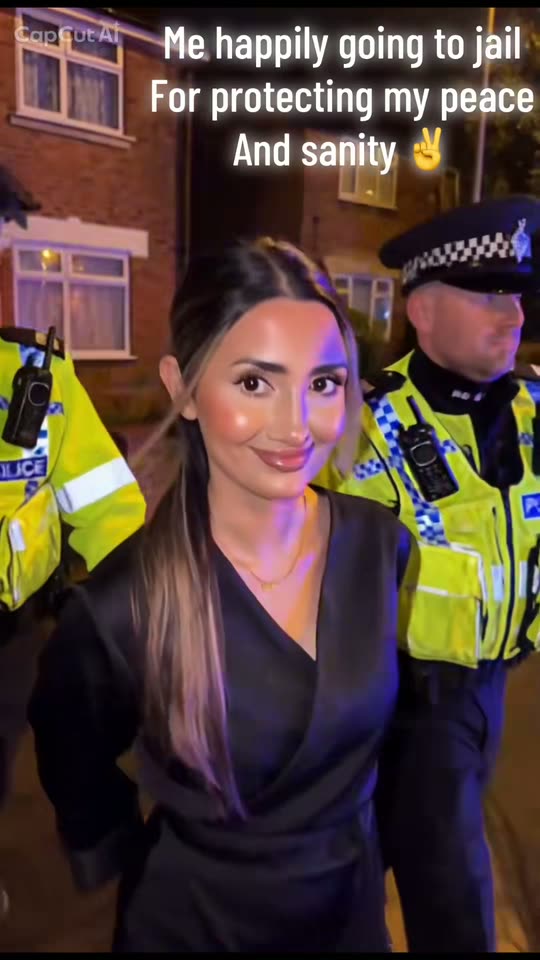
The original AI Arrest Trend reel by @hj_muaOriginal reel
  • 1 photo you add
  • 8 s clip with sound
  • 9:16 for TikTok, Reels, Shorts
  • No watermark

No prompt to write: Add your photo and tap once

Create your own

Ready in a few minutes · 46 credits

The AI arrest trend turns one photo into a shaky phone video of a fake arrest: two officers walk you out at night, hands cuffed behind your back, red and blue lights flashing, and you give the camera a small, smug smile. Its caption is "Not bro, getting arrested again". You need one photo of yourself, or of a pet.

Example

What the AI Arrest Trend video looks like

This is the original reel that started the trend. Your video is a new clip made from your photo in the same style, not a copy of these shots. No two runs come out the same.

Original reel by @hj_mua, 8 s

The original reel by @hj_mua, made from her own photo with the CapCut AI template: two officers walk her out of a house at night, she smiles at the camera and they lead her to the car. AI-made, with its own sound.

Step by step

How to make the AI Arrest Trend video on MakeViral

Everything runs in the browser. No editing app, no prompt to write, no watermark.

  1. Add your photo

    Press "Create your own" and add your own photo. Take it with the camera or pick it from your library.

  2. Press Generate

    The button shows the price. MakeViral builds the AI arrest scene with your photos, then Kling 3.0 animates it for 8 seconds with original sound. You write no prompt.

  3. Download or share

    The video is ready in a few minutes as a 9:16 MP4. Download it, share it from your phone, or find it later in your Library.

Which photo works best?

Use your own photo, or a photo of a friend who said yes. The clip looks like a real arrest, so never make one of someone who did not agree, and never of a child.

  • One person, face clear and turned to the camera, waist-up or full body.
  • Your clothes stay: the template keeps your outfit, so pick the one you want to be "arrested" in. A smart outfit makes the joke land.
  • Even light, in focus, no sunglasses.
  • The night street, the officers and the lights come from the template, so any background works.
  • Pet version: one pet with the whole body in view, a sharp photo in daylight. It takes a dog, a cat or any other pet.

Where did the AI Arrest Trend trend start?

The AI arrest trend is a joke edit. You upload one ordinary photo, and an AI template turns it into a clip that looks like a bystander filmed you on a phone: two officers walk you out of a house at night, your hands cuffed behind your back, and instead of looking scared you smirk at the camera.

AI arrest clips were already on TikTok in 2025: the #aiarresttrend tag was first used in June 2025, and GoEnhance describes the new wave as following an earlier "taken by police" AI filter trend. The 2026 wave came through CapCut. On 10 September a CapCut tutorial showed a clip captioned "not bro gettin arrested again", and the #notbrogettingarrestedagain tag started the same day. A US tutorial from 27 September reached 961,500 views, and a tutorial from 30 September showed the CapCut AI template "Cinematic Staged Arrest Scene" at 2.5 million uses. CapCut's sister app Dreamina added two arrest templates on 28 and 30 September, and a pet version followed on 1 October.

By 12 October both tags had about 8,300 to 8,400 videos and 70 million views each. Posts on the template sound peaked from 4 to 7 October.

  1. The #aiarresttrend tag is first used on TikTok. By 12 October 2026 it has 8,261 videos and 71.2 million views. TikTok

  2. A CapCut tutorial shows a clip captioned "not bro gettin arrested again", and the #notbrogettingarrestedagain tag starts the same day. The tutorial has 220,500 views by 12 October; the tag has 8,413 videos and 69.8 million views. TikTok

  3. @llvbjmiga881 posts "Learn how to make the viral 'Not bro, getting arrested again' AI arrest edit!". It has 961,500 views and 20,300 likes by 12 October. TikTok

  4. Dreamina, CapCut's AI image and video app, adds an "arrest-trend" template to its Trends Studio. A second one, "arrest-filter", follows on 30 September. Dreamina

  5. A tutorial shows the CapCut AI template "Cinematic Staged Arrest Scene" at 2.5 million uses, remade in CapCut's AI agent with the Seedance 1.5 Pro model. It has 951,100 views by 12 October. TikTok

  6. @hj_mua, a Birmingham hair and makeup artist, posts her own version: "Me happily going to jail / For protecting my peace / And sanity". It has 55,100 views by 12 October. TikTok

Copy and paste

The AI Arrest Trend prompts

You do not need these: the one-tap flow runs them for you. A photo prompt puts your photo into the scene, then a video prompt animates it. Want to change them? Copy them and edit them in AI Photo and AI Video.

Human

1 photo: your own photoKling 3.08 s · 1080p · 9:1646 credits
Step 1 · Photo prompt

Use the uploaded image as the base. Keep the person's face, facial features, skin tone, hair, body shape and original clothing exactly the same as in the photo. A photorealistic vertical 9:16 still from a handheld smartphone video of a fictional night-time movie arrest scene on an urban night street of brick houses. The person has just been walked out of the front door of a house onto the pavement, hands cuffed behind the back, escorted by two uniformed officers, one on each side, each holding one of the person's arms just above the elbow. The officers wear plain dark navy uniforms with no badges, no patches and no writing. The person looks straight into the camera with a restrained, knowing smile. Behind them a plain white patrol car at the curb flashes red and blue roof lights that tint the faces and the house walls. Shot by a bystander a few steps in front of them at chest height, framing the three from the knees up, with slight phone-camera grain and a soft background. Exactly three people: the person in the middle and the two officers. No badges, no shoulder patches, no department names, no readable text on the uniforms or the car, no captions, no logos, no watermark.

1191 characters
Step 2 · Video prompt

Turn the image into a photorealistic vertical 9:16 handheld smartphone video of a fictional night-time movie arrest scene. The same person keeps their identity and original clothing and is escorted by two uniformed officers with hands cuffed behind the back; they briefly look at the camera with a restrained smile, then walk on. Use for viral behind-the-scenes style clips on an urban night street. Not for identity, outfit or gender changes, subtitles, watermarks or extra main characters. Keep the face, hair and clothing exactly as in the image, from the front and from the back. Audio: footsteps on the pavement, distant sirens and faint police radio chatter on a quiet night street; no music, no dialogue. No film crew or film cameras in frame. No badges, no shoulder patches, no department names, no readable text on the uniforms or the car, no captions, no logos.

871 characters

Pet

1 photo: your pet, whole bodyKling 3.08 s · 1080p · 9:1646 credits
Step 1 · Photo prompt

Use the uploaded image as the base. Keep the animal's species, breed, face, eye color, fur color, fur length and markings exactly the same as in the photo. A photorealistic vertical 9:16 still from a handheld smartphone video of a fictional night-time movie arrest scene on an urban night street of brick houses. The pet has just been walked out of the front door of a house onto the pavement. It stands upright on its hind legs like a person, about as tall as a child, and wears a plain grey hoodie and grey joggers with no print. Its front paws are cuffed behind its back with small silver handcuffs, and two uniformed officers, one on each side, each hold one of its arms. The officers wear plain dark navy uniforms with no badges, no patches and no writing. The pet looks straight into the camera with a calm, smug face. Behind them a plain white patrol car at the curb flashes red and blue roof lights that tint the fur and the house walls. Shot by a bystander a few steps in front of them at chest height, framing all three from the knees up, with slight phone-camera grain. Exactly one animal and two officers. No other animals, no badges, no shoulder patches, no department names, no readable text on the uniforms, the clothes or the car, no captions, no logos, no watermark.

1283 characters
Step 2 · Video prompt

Turn the image into a photorealistic vertical 9:16 handheld smartphone video of a fictional night-time movie arrest scene. The same pet keeps its face, fur, markings and clothing and walks upright on its hind legs, escorted by two uniformed officers with its front paws cuffed behind its back; it briefly looks at the camera with a calm, smug face, then walks on. A funny viral clip on an urban night street. No changes to the animal's species, face or fur, no subtitles, no watermarks, no extra animals. Keep the animal's face, fur and clothes exactly as in the image in every frame, from the front and from the back. Audio: footsteps on the pavement, distant sirens and faint police radio chatter on a quiet night street; no music, no dialogue, no barking. No film crew or film cameras in frame. No badges, no shoulder patches, no department names, no readable text on the uniforms or the car, no captions, no logos.

918 characters

How many credits does it cost?

You pay per video in credits, and the create page shows the exact price on the Generate button before you spend anything. The one-tap price covers the scene photo and the video, charged once. One video is 46 credits, so the smallest one-time pack that covers it is $9.99 for 100 credits, with no subscription. The cheaper models are there if you run the prompts by hand in AI Video.

Video modelSettingsCredits
Kling 3.0 (this template)8 s, 1080p + 1 scene photo, one tap46
Seedance 2.0 Fast (by hand in AI Video)8 s, 720p + 1 photo55
Veo 3.1 Fast (by hand in AI Video)8 s, 720p + 1 photo14

One-time packs and plans are on the pricing page. A failed video gives its credits back.

What happens in the AI arrest video, second by second?

Your clip follows the beats of the viral versions, filmed like a shaky phone video by someone on the street:

TimeWhat you see
0-2 sYou come out of a house at night between two officers, your hands cuffed behind your back. Red and blue lights from a patrol car flash across your face.
2-5 sYou turn to the camera and give it a small, knowing smile, as if this happens every week.
5-8 sYou look away and walk on with the officers.

The sound is the street at night: footsteps, distant sirens and police radio chatter, with no music. The Pet version does the same with your dog or cat, standing upright in a grey hoodie with its paws cuffed behind its back, like the pet arrest template that came out on 1 October.

Why does it work? The setup looks like trouble, and the smile says the opposite. The best posts add a caption that explains the "crime", like "Me happily going to jail / For protecting my peace / And sanity".

How does MakeViral make it, and what does it cost?

The template works in two steps, so your face and your clothes stay yours:

  1. The still. Nano Banana 2 takes your photo and puts you on a street at night, just outside a front door, between two officers in plain dark uniforms, with a patrol car flashing behind you. Your face, hair and outfit stay as in your photo.
  2. The video. A video model animates the still for 8 seconds: the walk, the look at the camera, the smile and the night street sound.
Standard (default)Best
Video modelKling 3.0Seedance 2.5
Length8 s8 s
FrameVertical 9:16, 1080pVertical 9:16, 720p
SoundFootsteps, sirens, radio chatterThe same
PriceLowerHigher

The exact price shows on the Generate button before you spend anything. You write no prompt. The video step uses the scene description that the creator of Dreamina's "arrest-trend" template published on 28 September 2026, word for word, plus rules that keep badges, patches, department names and writing off the uniforms and the car. CapCut's own template does not show its prompt. Best runs on Seedance, the model family picked in a 951,100-view tutorial of the trend.

What goes wrong, and how do you fix it?

ProblemFix
Your face looks less like youUse a sharper photo with your face turned to the camera, then run it again or pick Best.
Your outfit changes when you turn awayAI video often redraws clothes from the back. A viewer spotted it on the original reel too: "her dress from the front turns into trousers from the back". Run it again or pick Best.
The clip cuts to a second shotKling sometimes adds a cut. Best keeps one take more often.
Letters or a badge show up on a uniform or the carThe prompts ban them, but AI can still draw garbled letters. Run it again, and do not post a take that looks like a real police force.
Your pet's legs look wrong (Pet)A pet that walks upright is hard for AI video. Run it again, or pick Best.
The video model refuses the photoSome photos get refused. The credits come back; try another photo.

Every run is a new take, so results differ. If one take is not smug enough, run it again.

How should you post it: captions, hashtags and the AI label

Say it is AI. The clip is made to look like phone footage, and people ask: one of the comments under the original reel is "Are these AI?". Turn on TikTok's AI-generated label, write "AI" in your caption, and never send the clip to someone as real news. On 5 September 2026 the South African Police Service warned that AI photos of people being arrested can falsely suggest that someone was arrested or involved in a crime, and that using police uniforms, badges and insignia without permission is an offence there. Rules differ by country, so keep it an obvious joke about yourself.

Captions that worked on the viral posts: "Me happily going to jail / For protecting my peace / And sanity" (@hj_mua), "Protected my peace abit too much" (@cathleennn._), "Gettin arrested again" (@capcutaiengine) or "Ok if I got arrested, what do you think it would be for? Drop it below" (@lexie_b__).

Hashtags: #aiarresttrend (8,261 TikTok videos and 71.2 million views on 12 October 2026), #notbrogettingarrestedagain (8,413 videos and 69.8 million views) and #arresttrend. Your clip comes with its own night street sound; if you want the trend sound, add it in the app when you post.

Want another walk-out moment? Arrive like a star with the AI airport star arrival, or stand still while a crowd moves around you in the storm AI trend.

FAQ

AI Arrest Trend trend questions

What is the AI arrest trend?
It is a joke video trend from September 2026. You upload one photo, and AI turns it into a shaky phone clip of you being walked out of a house at night by two officers, hands cuffed behind your back, while you smile at the camera. Its caption is "Not bro, getting arrested again". On this page you can make it with your own photo or your pet's.
What does "Not bro, getting arrested again" mean?
It is the caption line of the 2026 wave. The joke is that you act like an arrest is routine: no panic, just a smug smile at the camera. The CapCut tutorials use it ("Learn how to make the viral 'Not bro, getting arrested again' AI arrest edit"), and the #notbrogettingarrestedagain tag started on 10 September 2026.
Is the AI arrest video real?
No. Everything in it is AI-made: the officers, the street, the patrol car and the walk. Only your face, hair and clothes come from your photo. Because it looks like phone footage, keep the AI label on when you post it and never pass it off as real.
How do I do the AI arrest trend?
Press "Create your own", add one clear photo of yourself and press Generate. MakeViral first makes a still of you between two officers on a street at night, then animates it: the walk, the smile at the camera and the night street sound. You get an 8-second vertical clip in a few minutes, and you write no prompt.
Is there a CapCut template for the AI arrest trend?
Yes. Most TikTok tutorials point to a CapCut AI template; one tutorial on 30 September 2026 showed "Cinematic Staged Arrest Scene" at 2.5 million uses. Dreamina added its own "arrest-trend" and "arrest-filter" templates on 28 and 30 September. On MakeViral you make it in the browser and pick Standard or Best.
Which prompt does this template use?
CapCut's template does not show its prompt. Our video step uses the scene description that the creator of Dreamina's "arrest-trend" template published on 28 September 2026, word for word, plus rules that keep badges, department names and writing off the uniforms. The still that puts you in the scene is our own prompt, written from the same description.
Can I make my dog or cat get arrested?
Yes. Pick the Pet version and add one full-body photo of your pet. It stands upright in a grey hoodie between two officers, paws cuffed behind its back, gives the camera a smug look and walks on, like the pet arrest template from 1 October 2026. Its face and fur stay as in your photo.
Can I use a friend's photo to prank them?
Only if they say yes, and only as an obvious joke. The clip looks like real phone footage, so an arrest video of someone who did not agree can embarrass them or be taken as true. Never make one of a child, never send it as news, and keep the AI label on.
How long is the AI arrest video, and does it have sound?
8 seconds, vertical 9:16, as an MP4 file: 1080p with Standard, 720p with Best. It has its own sound: footsteps, distant sirens and police radio chatter, with no music. You can add the trend sound in TikTok when you post.
Does the AI arrest video cost credits?
Yes. Each video costs credits, and the create page shows the exact price on the Generate button before you spend anything. Standard (Kling 3.0) costs less than Best (Seedance 2.5). If a video fails, the credits come back.

Make your own AI Arrest Trend video

Add one photo and tap once. No prompt to write. 46 credits.

No watermark. A failed video gives its credits back. Secure checkout by Stripe.