Babydoll Dance AI: Do the Viral Jamie Miller Dance From One Photo

Bouncy chugs toward the camera, circling arms, steps out to the side, ball changes and an arm thrown up high, all on the beat. Add a photo of you or your pet and get your own Babydoll dance video with the song.

The original Babydoll Dance reel by @sebby.phinOriginal reel
  • 1 photo you add
  • 15 s clip with sound
  • 9:16 for TikTok, Reels, Shorts
  • No watermark

No prompt to write: Add your photo and tap once

Create your own

Ready in a few minutes · 60 credits

The Babydoll dance is the bouncy two-step that took over TikTok in autumn 2026 to Jamie Miller's song "Babydoll": chugs forward, arm circles, steps out and big arm moves, done with a grin. This Babydoll dance AI template makes the person or pet in your photo do it. You need one photo, or two for two pets.

Also called Babydoll trend · Babydoll two step · Babydoll challenge · Babydoll dance challenge · Baby doll challenge

Example

What the Babydoll Dance video looks like

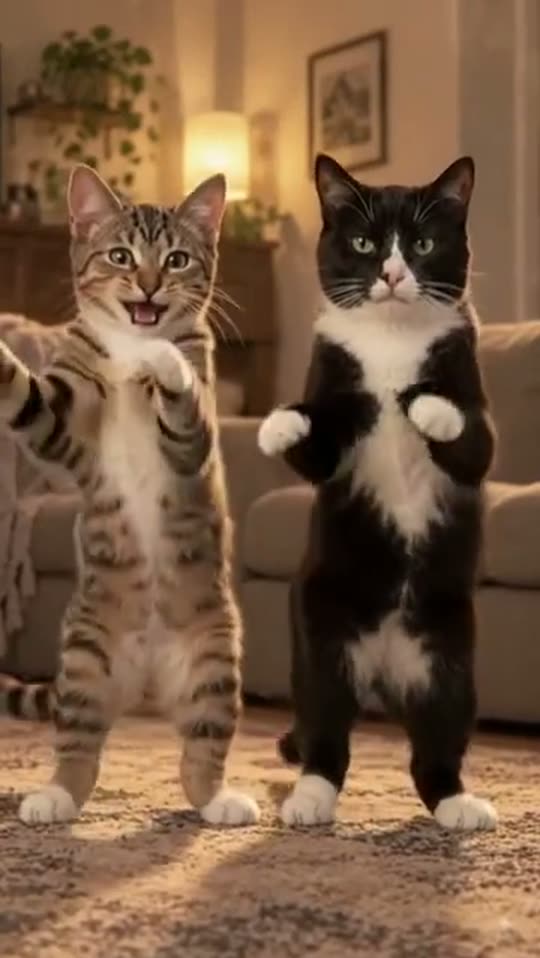
This is the original reel. Your photos replace its characters, so your video follows the same shots with your faces. No two runs come out the same.

Original reel by @sebby.phin, 9 s

The original reel by @sebby.phin: an AI version of the creator's own two cats, a tabby and a tuxedo cat, doing the Babydoll dance upright in a cozy living room. Pet and Two pets copy this reel.

Use this reference
Step by step

How to make the Babydoll Dance video on MakeViral

Everything runs in the browser. No editing app, no prompt to write, no watermark.

  1. Add your photo

    Press "Create your own" and add you, head to toes. Take it with the camera or pick it from your library.

  2. Press Generate

    The button shows the price. Kling 3.0 Motion Control takes the moves of the Babydoll dance clip and plays them with the one in your photo, in your photo's own scene, for about 15 seconds, with the reel's original sound. You write no prompt.

  3. Download or share

    The video is ready in a few minutes as a 9:16 MP4. Download it, share it from your phone, or find it later in your Library.

Which photo works best?

You need one photo for Human and Pet, and two for Two pets.

  • Human: you alone, standing, head to toes in view. The dance is all bounces and steps, so a full-body photo gives the best legs and feet. You dance in your photo's own place, in the clothes you wear in it.
  • Pet: a sharp photo with the whole animal in view, from ears to paws. Fur colors and markings come from the photo.
  • Two pets: photo 1 is the pet on the left, photo 2 the pet on the right. One pet per photo.
  • Good light, no sunglasses and no hat over the face.
  • Use your own photo, a photo of an adult who said yes, or your own pets. Never a celebrity or a stranger.

Where did the Babydoll Dance trend start?

Singer Jamie Miller put out "Babydoll" in August 2026. On 16 August he posted a clip of himself and two friends in black suits and sunglasses doing a bouncy two-step in the street, captioned "Had to hit the babydoll two step". It had 6.5 million views by 15 October. Dance teacher Xito Rico, who says he helped Jamie Miller make the "baby doll challenge", posted a tutorial on 24 August, and tutorials credit the two of them for the Babydoll choreography.

In September the Babydoll dance craze spread through tutorials, couples, grandparents and pets. A beginner tutorial by @beginnerdancetutorials passed 2.4 million views, and a couple married for 53 years (@twojays2) reached 3.9 million. In an interview posted on 9 October, Miller said he never set out to make the dance a trend. By 15 October the song's main TikTok sound was in 58,600 videos, and US Google searches for "babydoll dance" had jumped from 390 in August to 2,900 in September.

AI versions are only starting. On 14 October @sebby.phin posted an AI version of the creator's own two cats doing the routine, the reel the Pet versions here copy.

  1. Jamie Miller posts the first Babydoll clip, three people in black suits and sunglasses doing the two-step in the street, captioned "Had to hit the babydoll two step"; it has 6.5 million views by 15 October. TikTok

  2. Dance teacher Xito Rico, who says he helped Jamie Miller make the "baby doll challenge", posts a 60-second tutorial of the routine (47,300 views by 15 October). TikTok

  3. A beginner Babydoll dance tutorial by @beginnerdancetutorials goes up and passes 2.4 million views by 15 October. TikTok

  4. A new version of "Babydoll" with actor Antonio Cipriano comes out after he joined the dance trend online. uDiscover Music

  5. Jamie Miller posts that "Babydoll is officially top 3 in the UK"; by 15 October the song's main TikTok sound is in 58,600 videos. TikTok

  6. @sebby.phin posts an AI version of the creator's own two cats doing the Babydoll dance in a living room, the reel the Pet versions copy. TikTok

Copy and paste

The Babydoll Dance prompts

You do not need these: the one-tap flow runs them for you, together with the trend clip. [Image 1] and [Image 2] are your two photos, and [Video 1] is the trend clip the video copies.

Human

1 photo: you, head to toesKling 3.0 Motion Control15 s · 720p · 9:1660 credits
Video prompt

Replace the character in the video with the person from the uploaded image. Keep actions, poses, facial expressions, camera movement and rhythm. Preserve the person's original facial features, maintain character consistency, no distortion, no glitches, no artifacts. The person dances in the place from the uploaded image, in the clothes and shoes from the uploaded image, not the white sleeveless top or the blue-and-white striped flared jeans of the dancer in the video, and keeps their own hair from the uploaded image. Follow the dancer's moves and timing exactly: the bouncy chugs toward the camera with the arms circling low, the steps out to the side, the hand flick by the face, the ball changes, the step touches and the arm thrown up high. Keep the whole body in view from head to shoes, with natural balance and stable ground contact. Exactly one person, no other people. One continuous shot, no cuts, no text, no captions, no logos.

944 characters

Pet

1 photo: your pet, whole bodyH3 Max Recast9 s · 720p · 9:16108 credits
Video prompt

Image 1 replaces the grey-brown tabby cat on the left who dances upright on its hind legs, in every shot, also when it turns its back to the camera. Keep the pet's face, ears, fur colors, fur length and markings from image 1, on the whole body, the head, the legs and the tail, with no tabby stripes and no green eyes unless image 1 shows them. The pet keeps the natural body volume and proportions of its own animal: never flattened, squashed, stretched or merged with anything. If image 1 shows a dog or another animal, that animal takes the same place, standing upright on its hind legs and doing the same paw moves, with its own ears and muzzle. The black-and-white tuxedo cat on the right stays exactly as in the video, with its own face, in every shot. Keep the cozy living room, the beige sofa, the warm lamps, the plants, the patterned rug, the warm light, the dance moves, the motion and the camera exactly as in the video.

932 characters

Two pets

2 photos: pet 1, on the left + pet 2, on the rightH3 Max Recast9 s · 720p · 9:16108 credits
Video prompt

Image 1 replaces the grey-brown tabby cat on the left who dances upright on its hind legs, in every shot, also when it turns its back to the camera. Image 2 replaces the black-and-white tuxedo cat on the right who dances upright beside it, in every shot. Keep the face, ears, fur colors and markings of each pet from its own image, on the whole body, the head, the legs and the tail, not the tabby stripes or the black-and-white coat of the cats in the video. Each pet keeps the natural body volume and proportions of its own animal: never flattened, squashed, stretched or merged with anything. Each pet keeps its own face from the first frame to the last; never swap the two faces. If an image shows a dog or another animal, that animal takes the same place, standing upright on its hind legs and doing the same paw moves. Keep the cozy living room, the beige sofa, the warm lamps, the plants, the patterned rug, the warm light, the dance moves, the motion and the camera exactly as in the video.

998 characters

How many credits does it cost?

You pay per video in credits, and the create page shows the exact price on the Generate button before you spend anything. The one-tap price covers the video, made in one step from your photos and the trend clip, charged once. One video is 60 credits, so the smallest one-time pack that covers it is $9.99 for 100 credits, with no subscription. The cheaper models are there if you run the prompts by hand in AI Video.

Video modelSettingsCredits
Kling 3.0 Motion Control (this template)15 s, 720p, copies the moves of the trend clip, one tap60

One-time packs and plans are on the pricing page. A failed video gives its credits back.

What are the Babydoll dance moves, second by second?

The Human version takes the moves of a full-speed take of the routine and plays them with the person from your photo. The camera stays still and the clip is one continuous shot of about 15 seconds:

TimeWhat you do
0 to 3 sBouncy chugs toward the camera, the arms circling low at your sides.
3 to 6 sSteps out to the side into a wide stance, the arms opening.
6 to 9 sA hand comes up by your face with a flick, then both arms go wide.
9 to 11 sQuick ball-change steps, the arms swinging.
11 to 15 sStep touches with a hand by the face, then one arm thrown up high and a point to the side.

Keep the smile on: the Babydoll dance is meant to look easy and happy. Pet and Two pets copy the AI cat reel instead, with small paw moves, bounces and a turn.

Want to learn Babydoll dance steps yourself? Search for a Jamie Miller Babydoll dance tutorial: Xito Rico's own Babydoll dance how-to counts the routine in eights (chugs, a step to the side, a ball change, a "90s groove", a "superstar" jump and a "rockstar" arm move). The AI version needs no practice.

The exact price of each version shows on the Generate button before you spend anything. Human costs the least. Every run is a new take, so results differ.

Human, Pet or Two pets: which Babydoll dance should you make?

Press "Create your own" and pick a version, or press the button under the cat reel on this page for Pet.

HumanPetTwo pets
Photos1, you1, your pet2, your pets
How it worksKling 3.0 Motion Control takes only the moves of a full-speed Babydoll take and plays them with youH3 Recast puts your pet into the AI cat reel above, in place of the tabby on the left; the tuxedo cat stays as its dance partnerH3 Recast puts your two pets into the AI cat reel, in place of both cats
Where you danceYour photo's own placeThe reel's cozy living roomThe reel's cozy living room
LooksYour face, hair and clothes from your photoFur and markings from your photoEach pet's fur and markings from its own photo
LengthAbout 15 s9 s9 s
SoundThe song, put back on after the run; you can turn it offThe sameThe same

The Pet versions make a Babydoll dance video of a dog, a cat or another pet, standing upright on its hind legs like the cats in the reel. With a dog, use a photo where its whole body shows.

A baby? The Babydoll dance is not the AI baby dance. For a baby, use the AI baby dance template: it keeps your baby's own small body.

What goes wrong, and how do you fix it?

ProblemFix
A white top or blue striped flared jeans show up (Human)The dancer in the clip wears them. The prompt bans them unless your photo has them; run it again.
The feet slide or the legs look stiff (Human)Use a full-body photo where you stand. With a waist-up photo, the model has to make up your legs.
Your pet comes out with tabby stripes or green eyes (Pet)The cat in the reel is a green-eyed tabby. Use a sharp photo where the fur is clear, then run it again.
Your pet looks flat or squashedUse a photo where the whole animal shows from the side or the front, then run it again.
The two pets swap places or faces (Two pets)Photo 1 is always the left pet, photo 2 the right one. Use one pet per photo, then run it again.
A paw or a hand blurs in a quick moveThis is common in fast steps. A second run comes out different.
The model refuses a photoSome photos get refused. The credits come back; try another photo.

Which song, caption and hashtags fit the Babydoll dance?

Your clip comes with the sound of the clip it copies: Jamie Miller's "Babydoll", the song the whole Babydoll TikTok trend dances to, put back on after the run, so your Babydoll dance video is ready to post. You can turn it off on the result screen and pick the sound when you post instead. The song belongs to its owners, and MakeViral gives you no rights to it. Music rules differ from platform to platform, so check them before you use the clip in an ad or a paid post.

Caption ideas: "Had to hit the babydoll two step", "POV: this song is stuck in your head", "My dog has more rhythm than me", "Babydoll dancing in the kitchen at midnight". Or write your own.

Hashtags: the Babydoll dance TikTok posts use #babydoll (1.36 million videos, but it is an old, general tag), #jamiemiller (48,195 videos and 1.65 billion views), #babydolldance (812 videos), #babydollchallenge (381) and #babydolltrend (213), counted on 15 October 2026. Keep the platform's AI label on.

Want another dance from one photo? Try the Toc Toc dance, or put your dog in the Single Ladies dog dance.

FAQ

Babydoll Dance trend questions

What is the Babydoll dance?
It is the Babydoll dance trend of autumn 2026: a bouncy two-step to Jamie Miller's song "Babydoll", with chugs toward the camera, arm circles, steps out to the side, ball changes and an arm thrown up high, done with a big smile.
Who made the Babydoll Jamie Miller dance?
Jamie Miller posted the first clip on 16 August 2026, with two friends in black suits and sunglasses, captioned "Had to hit the babydoll two step". Dance teacher Xito Rico says he helped make it, and tutorials credit both. In captions his name is sometimes spelled Jaime Miller, and the song Babydoll or Baby doll.
Which Babydoll song dance is this?
This page is the dance to "Babydoll" by Jamie Miller (2026). It is not the older "Babydoll" by Dominic Fike, not Ari Abdul's "Babydoll", not the Bollywood song "Baby Doll" and not the Filipino "Baby Dolls" dance. If a post tags @Jamie Miller or uses his "Babydoll" sound, it is this dance.
How do I make the Babydoll dance AI video with my photo?
Press "Create your own", pick Human, Pet or Two pets, and add your photo, or two photos for Two pets. Press Generate; the button shows the price first. You get a Babydoll dance AI video of about 15 seconds (Human) or 9 seconds (Pet and Two pets) with the song. You write no prompt, and the video waits in your Library when it is ready.
Can my dog or cat do the Babydoll dance?
Yes, with Pet. Add one sharp photo of your pet, whole body in view. H3 Recast puts it into the viral AI cat reel on this page in place of the tabby, next to the tuxedo cat: it stands on its hind legs, bounces and moves its paws to the beat, with its own fur and markings. With Two pets, both cats become your pets.
Can I learn Babydoll dance moves instead of using AI?
Sure. A Babydoll dance tutorial teaches the routine in a few minutes: Xito Rico's tutorial counts it in eights, and @beginnerdancetutorials has a slow version with 2.4 million views. The AI template is for when you want the clip now, for a pet, or for a friend who will never dance on camera.
What prompt does the Babydoll dance AI use?
No creator shared a Babydoll dance prompt, and the template sites that have this trend show none. The Human version uses Kling's own motion prompt (copy the moves of the clip onto the person in the photo) plus our lines for your place and clothes. The Pet versions use our own pet-swap prompt, in the shape that worked on other cat reels. You write no prompt yourself.
Where does the background of the video come from?
For Human, from your photo: Kling 3.0 Motion Control keeps your room, street or garden and only takes the moves of the dance clip. Pet and Two pets copy the AI cat reel, so your pets dance in its cozy living room.
What sound does my video have?
Jamie Miller's "Babydoll", the sound of the clip it copies, put back on after the run. You can turn it off on the result screen. The song belongs to its owners, and MakeViral gives you no rights to it.
When did the Babydoll trend start?
On 16 August 2026, with Jamie Miller's first clip. It grew on TikTok through September and October 2026, and US Google searches for "babydoll dance" went from 390 in August to 2,900 in September.
Is this the Babydoll AI trend, or the AI baby dance?
It is the Babydoll AI trend: the Jamie Miller dance done with AI. People also search for it as baby doll dance AI, which mixes it up with the AI baby dance, where a baby photo dances. This Babydoll AI template is for adults and pets; for a baby, use the [AI baby dance](/templates/ai-baby-dance).
How long is the video and what format is it?
Human makes about 15 seconds in the frame of your photo, so a vertical photo gives a vertical 9:16 clip. Pet and Two pets make 9 seconds, vertical 9:16. All are MP4 files at 720p with the song and no watermark, ready for TikTok, Reels or Shorts.
Is the dance in the video real?
No. The dance is made with AI from still photos, and you or your pets never did these moves. Use only your own photo, a photo of an adult who agreed, or your own pets, and keep the AI label on when you post.

Make your own Babydoll Dance video

Add one photo and tap once. No prompt to write. 60 credits.

No watermark. A failed video gives its credits back. Secure checkout by Stripe.