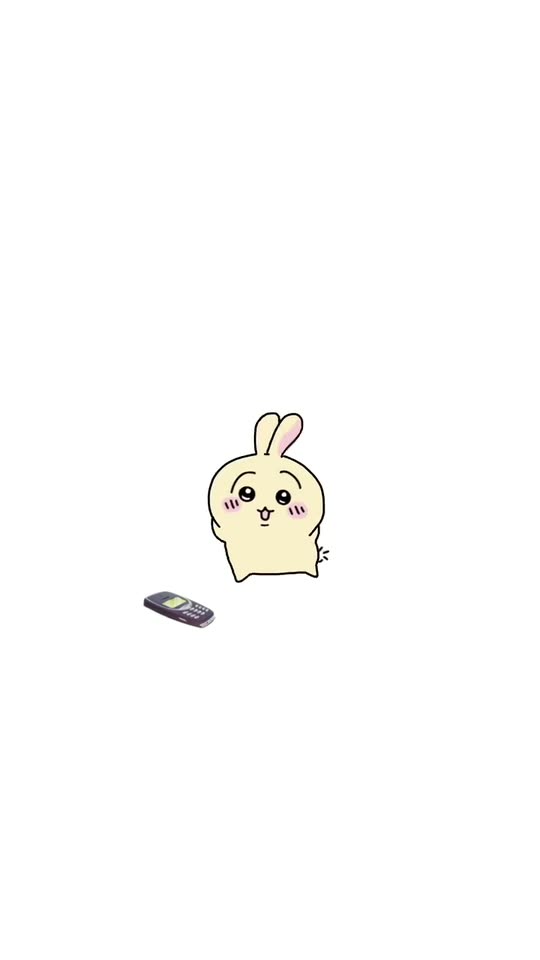
Chiikawa Dancing Nokia: Turn Yourself Into a Tiny Chibi That Dances to the Ringtone
Your photo becomes a tiny, round chibi creature with your hair, your colors and your outfit. An old phone rings on the floor, and instead of picking it up, the little you turns around and wiggles to the ringtone. One photo in, a 10-second vertical clip with a ringtone sound out.
The Chiikawa dancing Nokia trend comes from a November 2026 doodle animation: Usagi, the bunny from Chiikawa, ignores an old phone that rings on the floor and wiggles its bottom to the ringtone instead. Here a tiny round chibi version of you, or of your pet, does the dance. You need one clear photo.
Also called Usagi dancing to the Nokia ringtone · Nokia ringtone dance · Chiikawa phone dance
Example
What the Chiikawa Nokia Dance video looks like
This is the trend's original clip, a hand-drawn animation by @qutechan, not a MakeViral result. Your clip shows a chibi creature made from your own photo, in the same simple cartoon look.
Original reel by @qutechan, 10 s
The first viral clip by @qutechan (2 November 2026, 1.6 million views): Usagi wiggles next to a ringing old phone, with the original ringtone. A hand-drawn fan animation, shown in full with white space added above and below.
Step by step
How to make the Chiikawa Nokia Dance video on MakeViral
Everything runs in the browser. No editing app, no prompt to write, no watermark.
Add your photo
Press "Create your own" and add you, face clear. Take it with the camera or pick it from your library.
Press Generate
The button shows the price. MakeViral builds the Chiikawa Nokia Dance scene with your photos, then Kling 3.0 animates it for 10 seconds with original sound. You write no prompt.
Download or share
The video is ready in a few minutes as a 9:16 MP4. Download it, share it from your phone, or find it later in My videos.
Which photo works best?
Use one sharp photo of yourself, or of your pet, where the face and the hair are easy to see.
Daylight, in focus, the face turned to the camera. The chibi keeps your hair color, hairstyle, skin tone, eye color and glasses, so those should be clear.
Wear the clothes you want: the little creature gets a tiny version of your outfit in the same colors. Plain colors read best at this size.
For a pet, show the whole animal with its ears and markings: the chibi keeps its fur colors, markings and ear shape.
One person or one animal per photo. With two, the model may merge them.
Use a photo of yourself, or of an adult who said yes.
Where did the Chiikawa Nokia Dance trend start?
The first clip comes from the animation artist @qutechan, who posts from the US. On 2 November 2026 the artist posted a short hand-drawn loop with only "??" as the caption: Usagi from Chiikawa stands on a white page next to an old candybar phone that buzzes on the floor, sways side to side, turns around and shakes its bottom to the beeping ringtone. By 8 November it had 1.6 million views, 459,200 likes and 235,800 shares.
Fans asked for their favorite characters in the comments ("NOW DO KURIMANJU", "please make momonga"), and the artist drew one a day: Momonga on 2 November (727,000 views), Rakko and Kurimanju on 3 November, then Shisa, Kani and Chiikabu. Other artists drew their own characters doing the same dance: @mashpotatosart's "Nokia dance" of 3 November passed 1 million views.
From 5 November, CapCut tutorial accounts in the US started to post "How to make the viral chiikawa dancing nokia AI trend", with a "Nokia + chiikawa" edit template on the Rakko clip's sound. The original is drawn by hand, not made with AI. This page makes the AI version that the tutorials promise: the dancer is you.
@qutechan posts Usagi dancing next to a ringing old phone. By 8 November the clip has 1.6 million views and 459,200 likes. TikTok
The second clip, with Momonga, follows the same evening. It reaches 727,000 views by 8 November. TikTok
The Rakko clip (492,900 views by 8 November) starts the sound that 154 TikTok videos use by 8 November, and @mashpotatosart posts a "Nokia dance" with their own character that passes 1 million views. TikTok
A CapCut tutorial, "How to make the viral chiikawa dancing nokia AI trend", gets 146,500 views and 29,000 likes, and dozens of copies follow on the same sound. TikTok
The #chiikawadance hashtag has 104 videos and 2.2 million views, and new tutorials on the trend's sound go up every day. TikTok
Copy and paste
The Chiikawa Nokia Dance prompts
You do not need these: the one-tap flow runs them for you. A photo prompt puts your photo into the scene, then a video prompt animates it. Want to change them? Copy them and edit them in AI Photo and AI Video.
You
1 photo: you, face clearKling 3.010 s · 1080p · 9:1656 credits
Step 1 · Photo prompt
Use the uploaded image as the base. Turn the person in the photo into a tiny, round, cute chibi plush creature: the head and the body are one soft round bean shape, about as wide as it is tall, with small black dot eyes with a white shine, little pink blush ovals on the cheeks, a tiny happy mouth, two short stubby arms, two tiny feet and a small round tail, drawn as a simple flat 2D hand-drawn cartoon, like a cute doodle sticker animation: thin dark brown outlines, flat soft pastel colors, no shading, no texture, never 3D and never a photo. It is a cute creature version of this person that their friends recognize at once: it keeps the person's hair color and hairstyle as a soft little hair shape on top of the round head (or their bald head, cap or hat), their skin tone as the face and body color, their eye color, and any glasses, beard, moustache, freckles or earrings, all drawn in the same simple style. It wears a tiny, simple version of the clothes from the photo in the same colors, with no print, letters or logo. No rabbit ears, no bear ears, no cat ears and no animal ears of any kind. It stands in the middle of a plain, pure white empty background, like a blank page: no room, no floor line, no other objects, only a tiny soft shadow under its feet. The creature fills about a third of the frame height in the middle, its whole body in view, with white space all around, like the trend clips. Next to it lies an old small dark grey candybar mobile phone with a small green screen and a rubber number keypad, lying flat on the white floor to the lower left of the creature, with a few tiny curved vibration lines around it because it is ringing; the phone has no brand name, no letters and no logo. The creature faces the camera with a shy, happy little smile and blushing cheeks, both stubby arms a little raised, eyes open. Vertical 9:16. Exactly one character: an original cartoon creature of this person, not an existing cartoon, anime, manga or mascot character. No text, no letters, no logos, no watermark, no frame. The face is always the cute flat cartoon face described above, never a photo face: the identity rules below apply to the creature's hair color, hairstyle, skin tone, eye color, glasses, facial hair and age.
2250 characters
Step 2 · Video prompt
One continuous shot with no cuts and a locked-off camera, in the same simple flat 2D hand-drawn cartoon style as the image: thin dark outlines, flat soft colors, a plain pure white background. Keep the creature's look, colors, hair or fur, clothes and the old phone on the floor exactly as in the image. The creature stays in the middle of the white frame, its whole body in view.
The old phone on the floor rings the whole time: it buzzes and wobbles a little in place, with tiny curved vibration lines around it. The creature never picks it up: it dances to the ringtone instead, a bouncy, silly little wiggle dance on the beat.
0-2.5 s: it faces the camera with a happy, blushing face and sways its round body left and right on the beat with small hops, the stubby arms swinging, the little tail wiggling.
2.5-5 s: it hops around to show its back and wiggles its round bottom left and right on the beat, the tail shaking, with tiny motion lines beside it.
5-7.5 s: it hops back around to face the camera and sways side to side, very pleased with itself, cheeks blushing.
7.5-10 s: it turns its back again, wiggles its bottom on the beat, then looks back over its shoulder at the camera with a cute smile.
Smooth, bouncy, simple cartoon animation. The creature's face stays the same in every frame; its back shows only hair or fur, never a second face.
Audio: only the loud, beeping, old-phone monophonic ringtone, a fast and catchy classical melody in a minor key, over a soft vibration buzz. No voice, no talking, no words, no other music, no drums.
Exactly one character and one phone. It never turns 3D or into a real photo, never grows extra arms or legs and never changes its colors. No camera move, no zoom, no cuts. No text, no subtitles, no letters, no logos, no brand name on the phone, no watermark.
1 photo: your pet, whole bodyKling 3.010 s · 1080p · 9:1656 credits
Step 1 · Photo prompt
Use the uploaded image as the base. Turn the pet in the photo into a tiny, round, cute chibi plush creature: the head and the body are one soft round bean shape, about as wide as it is tall, with small black dot eyes with a white shine, little pink blush ovals on the cheeks, a tiny happy mouth, two short stubby arms, two tiny feet and a small round tail, drawn as a simple flat 2D hand-drawn cartoon, like a cute doodle sticker animation: thin dark brown outlines, flat soft pastel colors, no shading, no texture, never 3D and never a photo. It is a cute creature version of this pet that its owner recognizes at once: it keeps the same species look, the ear shape, the muzzle, the eye color, the fur colors, the fur pattern and the markings of the pet in the photo, drawn in the same simple style on the round body; never swapped for another animal or breed, and no ears the pet does not have. It stands in the middle of a plain, pure white empty background, like a blank page: no room, no floor line, no other objects, only a tiny soft shadow under its feet. The creature fills about a third of the frame height in the middle, its whole body in view, with white space all around, like the trend clips. Next to it lies an old small dark grey candybar mobile phone with a small green screen and a rubber number keypad, lying flat on the white floor to the lower left of the creature, with a few tiny curved vibration lines around it because it is ringing; the phone has no brand name, no letters and no logo. The creature stands upright on its two tiny feet and faces the camera with a happy little face and blushing cheeks, eyes open, its own paws, never human hands. Vertical 9:16. Exactly one animal creature and no people: an original cartoon of this pet, not an existing cartoon, anime, manga or mascot character. No text, no letters, no logos, no watermark, no frame. The pet is always the cute flat cartoon described above, never a photo: the identity rules below apply to its species look, ear shape, eye color, fur colors and markings.
2046 characters
Step 2 · Video prompt
One continuous shot with no cuts and a locked-off camera, in the same simple flat 2D hand-drawn cartoon style as the image: thin dark outlines, flat soft colors, a plain pure white background. Keep the creature's look, colors, hair or fur, clothes and the old phone on the floor exactly as in the image. The creature stays in the middle of the white frame, its whole body in view.
The old phone on the floor rings the whole time: it buzzes and wobbles a little in place, with tiny curved vibration lines around it. The creature never picks it up: it dances to the ringtone instead, a bouncy, silly little wiggle dance on the beat.
0-2.5 s: it faces the camera with a happy, blushing face and sways its round body left and right on the beat with small hops, the stubby arms swinging, the little tail wiggling.
2.5-5 s: it hops around to show its back and wiggles its round bottom left and right on the beat, the tail shaking, with tiny motion lines beside it.
5-7.5 s: it hops back around to face the camera and sways side to side, very pleased with itself, cheeks blushing.
7.5-10 s: it turns its back again, wiggles its bottom on the beat, then looks back over its shoulder at the camera with a cute smile.
Smooth, bouncy, simple cartoon animation. The creature's face stays the same in every frame; its back shows only hair or fur, never a second face.
Audio: only the loud, beeping, old-phone monophonic ringtone, a fast and catchy classical melody in a minor key, over a soft vibration buzz. No voice, no talking, no words, no other music, no drums.
Exactly one character and one phone. It never turns 3D or into a real photo, never grows extra arms or legs and never changes its colors. No camera move, no zoom, no cuts. No text, no subtitles, no letters, no logos, no brand name on the phone, no watermark.
You pay per video in credits, and the create page shows the exact price on the Generate button before you spend anything. The one-tap price covers the scene photo and the video, charged once. One video is 56 credits, so the smallest one-time pack that covers it is $9.99 for 100 credits, with no subscription. The cheaper models are there if you run the prompts by hand in AI Video.
Video model
Settings
Credits
Kling 3.0 (this template)
10 s, 1080p + 1 scene photo, one tap
56
Seedance 2.0 Fast (by hand in AI Video)
10 s, 720p + 1 photo
68
Veo 3.1 Fast (by hand in AI Video)
8 s, 720p + 1 photo
14
One-time packs and plans are on the pricing page. A failed video gives its credits back.
What happens in the Chiikawa dancing Nokia video, second by second?
Your clip follows the beats of the original loop, on a plain white page with one old phone on the floor:
Time
What the little you does
0-2.5 s
It faces you with blushing cheeks and sways left and right on the beat, while the phone buzzes on the floor.
2.5-5 s
It hops around and wiggles its round bottom to the ringtone.
5-7.5 s
It hops back to face you and sways, very pleased with itself.
7.5-10 s
It turns away again, wiggles, and looks back at you over its shoulder.
It never picks up the phone. That is the whole joke: the phone rings, and the tiny creature treats the ringtone as its song.
The ringtone. In the original clip, the phone plays a beeping old-phone ringtone of the opening of Mozart's Symphony No. 40 (a top comment points it out, and the notes match). Your clip makes its own beeping old-phone ringtone and a soft buzz; it is a ringtone in the same spirit, not the exact original sound. If you want the trend's sound, add it in TikTok when you post.
How does MakeViral make it, and what does it cost?
The template works in two steps, and you write no prompt:
The picture. An AI image model turns your photo into a tiny, round chibi creature in a flat, hand-drawn cartoon style, with your hair, skin tone, glasses and outfit colors, next to an old phone on a white page.
The video. A video model animates that picture for 10 seconds: the sway, the turn, the wiggle and the ringtone sound.
Standard (default)
Best
Video model
Top-quality AI video models
The best AI video models available, including Seedance 2.5
Length
10 s
10 s
Frame
Vertical 9:16, 1080p
Vertical 9:16, 720p
Sound
An old-phone ringtone and a buzz
The same
Price
Lower
Higher
The exact price shows on the Generate button before you spend anything, and the video waits in My videos when it is ready.
You turns your own photo into the chibi. Pet does the same with a photo of your cat, dog or other pet: it becomes a round little creature with its own fur colors and ears.
Is it the official Chiikawa character? No. The trend's clips star Chiikawa's characters, drawn by fans. This template makes an original chibi creature of you, not a copy of any show's character, so you can post it as your own take on the trend.
What goes wrong, and how do you fix it?
Problem
Fix
The chibi does not look like you
Use a sharper photo in daylight with your hair in view. Hair color, hairstyle and glasses carry the likeness at this size.
It gets bunny or bear ears
Run it again. The prompt asks for no animal ears on a person, but the cute style can pull them in.
It stops dancing, or picks up the phone
Run it again or pick Best.
The cartoon turns into a 3D or photo look
Pick Best, which holds the flat style steadier.
The phone shows letters or a logo
Run it again. The prompt asks for a plain phone with no brand name.
The ringtone sounds different from the original
Your clip makes its own ringtone. Add the trend sound in the app when you post if you want the original.
Every run is a new take, so results differ.
Which caption, sound and hashtags should you post it with?
The original runs as a collection: fans comment "I have 4 now" and ask for their favorite character next. Make one for each friend, or your whole family and your pets, and post them as a set.
Captions that fit: "me when my alarm goes off", "when the group chat calls", "pick up the phone" (a top comment on the original), or "the ringtone is my song now".
Sound: your clip has its own ringtone sound. For the trend sound, pick the "original sound" from @qutechan's Rakko clip in TikTok; it is the one the CapCut template uses, with 154 videos on 8 November 2026.
Hashtags: the Chiikawa dance tag #chiikawadance (104 videos and 2.2 million views on 8 November 2026), #nokiadance (348 videos and 5.5 million views, all time) and #chiikawa. Keep the platform's AI label on, and tag @qutechan if you want to credit the original.
It is a TikTok trend from November 2026. In a short doodle animation, a Chiikawa character stands next to an old candybar phone that rings on the floor, and instead of answering it, the character sways and wiggles its bottom to the ringtone. The first clip, with Usagi, came from @qutechan on 2 November 2026 and had 1.6 million views by 8 November.
Is the Chiikawa dancing Nokia AI trend made with AI?+
The original is not: @qutechan draws each clip by hand. The "chiikawa dancing nokia AI" name comes from CapCut tutorial accounts that share a "Nokia + chiikawa" edit template. This page is the AI version: it turns your photo into a tiny chibi creature and makes it do the dance.
What is the Usagi Nokia ringtone song?+
It is the opening of Mozart's Symphony No. 40, played as a beeping, old-phone ringtone. A top comment on the first clip names it, and the notes of the clip match it. The phone in the drawing looks like a classic Nokia candybar phone, which is where the Nokia name comes from.
How do I make the Chiikawa dancing Nokia video with my own face?+
Press "Create your own", add one clear photo of yourself and press Generate. MakeViral first draws a round chibi creature with your hair, skin tone, glasses and outfit colors next to an old phone, then animates the dance with a ringtone sound. You get a 10-second vertical clip in a few minutes and write no prompt.
Can I make my cat or dog do the Chiikawa Nokia dance?+
Yes. Pick Pet and add one photo of your pet. It becomes a tiny round chibi creature with its own fur colors, markings and ears, and it wiggles next to the ringing phone like the characters in the trend.
Is there a Chiikawa dancing Nokia template on CapCut?+
Yes, a "Nokia + chiikawa" edit template spread through CapCut tutorials from 5 November 2026. It puts the characters' dance clips into your edit; it does not put you into the dance. This page makes a new clip where a chibi version of you or your pet is the dancer.
Is there a prompt for the Chiikawa dancing Nokia filter?+
No creator shared one: the original is hand-drawn and the CapCut template has no prompt. MakeViral wrote its own prompt for the look and the moves, so you only add a photo.
How long is the video, and does it have sound?+
10 seconds, vertical 9:16, as an MP4 file: 1080p with Standard, 720p with Best. It has its own sound: a beeping old-phone ringtone and a soft buzz. It is not the exact ringtone of the original clip; add the trend sound in TikTok if you want it.
Can I get a Chiikawa dancing GIF or green screen clip of Usagi dancing?+
This page does not give out the characters' clips. It makes a new clip of a chibi you or your pet, on a plain white background, so it is easy to cut out and drop into your own edit. For a GIF, convert the MP4 in any GIF tool.
Can I use the clip as a Chiikawa ringtone or alarm video?+
Many fans asked for that under the original. Your clip is an MP4 with its own ringtone sound, so you can set it as a video alarm or a ringtone video in apps that take one.
Does the video cost credits?+
Yes. Each video costs credits, and the create page shows the exact price on the Generate button before you spend anything. Standard costs less than Best. If a video fails, the credits come back.
Why are all the Chiikawa characters dancing to a phone on TikTok?+
Because fans asked @qutechan for their favorites after the Usagi clip, and the artist drew Momonga, Rakko, Kurimanju, Shisa, Kani and Chiikabu doing the same dance. Other artists did the same with their own characters, and the Chiikawa dancing meme turned into a format, the "Nokia dance meme": a cute character, a ringing phone, a wiggle.