Back

Seal Filter: Turn Your Dog or Cat Into a Chubby Seal

Your pet sits in its photo for two seconds, then a line sweeps across the frame and it turns into a round, fat seal with its own face and fur. One pet photo in, an 8-second vertical clip out.

The original Seal Filter reel by @zeustlabrottieOriginal reel
  • 1 photo you add
  • 8 s clip with sound
  • 9:16 for TikTok, Reels, Shorts
  • No watermark

No prompt to write: Add your photo and tap once

Create your own

Ready in a few minutes · 44 credits

The seal filter is a TikTok pet trend: your dog or cat sits still for a moment, a line sweeps across the screen, and the same pet sits in the same spot as a round, chubby seal with its own face, fur and collar. This pet seal filter needs one clear photo of your pet. There is a Human version too.

Also called Trying the seal filter · Pet into seal AI · Seal trend · Seal version

Example

What the Seal Filter video looks like

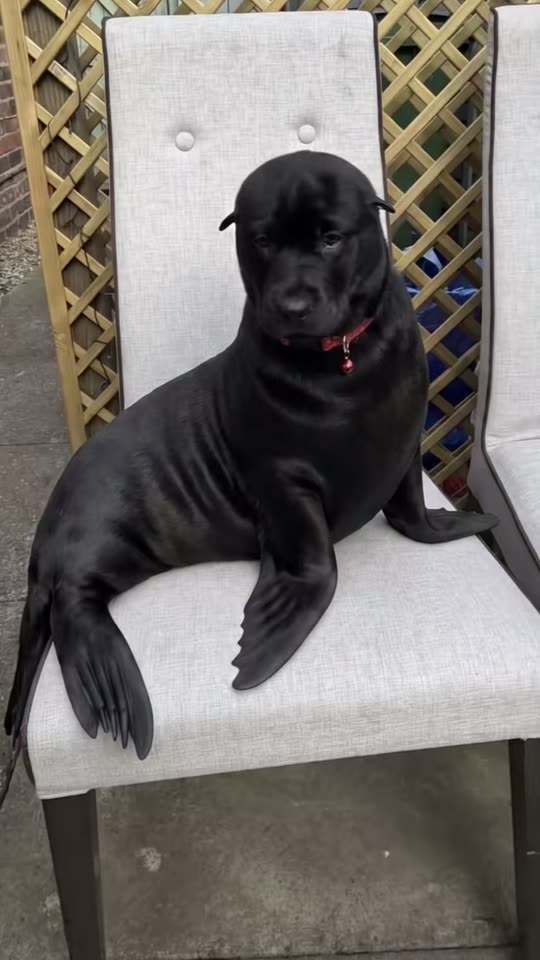
The example is the trend's own clip: a real dog, turned into a seal by the AI template the creator used. Your clip is made from your own pet's photo.

Original reel by @zeustlabrottie, 10 s

The first big seal filter clip, by @zeustlabrottie (11 Jun 2026, 262,400 views): a black puppy sits on a garden chair, a line sweeps across, and it is a sleek black seal with its own face and red collar. Cropped below its caption, with its own sound.

Step by step

How to make the Seal Filter video on MakeViral

Everything runs in the browser. No editing app, no prompt to write, no watermark.

  1. Add your photo

    Press "Create your own" and add you, waist up, sitting, face clear. Take it with the camera or pick it from your library.

  2. Press Generate

    The button shows the price. Kling 3.0 animates your photo for 8 seconds with original sound. You write no prompt.

  3. Download or share

    The video is ready in a few minutes as a 9:16 MP4. Download it, share it from your phone, or find it later in My videos.

Which photo works best?

Use one sharp photo of your pet with the whole body in view, head to tail. The seal body grows out of your pet's real body, so the model needs to see where it sits or lies.

  • A pet that sits or lies still works best: on a sofa, a bed, a chair or the floor. Lying down looks most like a seal.
  • Daylight, in focus, eyes open. The face stays your pet's own, so a sharp face matters most.
  • Leave a little space around the pet: the round seal body is wider than a dog or a cat.
  • One animal per photo. With two, the model may merge them.
  • Dogs and cats both work, and so do rabbits and other furry pets.
  • For the Human version, use a photo of yourself from the waist up, sitting, with your face clear.

Where did the Seal Filter trend start?

The seal filter trend comes from a CapCut AI template with the burned-in line "Trying the seal filter". It started on 3 June 2026, when the template account CAPCUTDAILYUK made the sound that most clips use. On 11 June @zeustlabrottie posted a black puppy on a garden chair turning into a sleek black seal, and it reached 262,400 views. On 6 July @staciepeters3 posted an American bulldog, and that clip reached 1.8 million views. By 30 October the sound had 3,720 videos. The cat seal filter clips came soon after: "born to be a seal" by @meowmemeowmemeowmemeow reached 869,500 views (15 July).

The template keeps the pet's own head and fur and gives it a fat seal body with flippers, so a lab, a dachshund or a tabby still looks like itself. Comments fill up with "I don't need the filter", because many pets already look a little like seals.

A second wave started in October with a newer version of the template, on a sound made on 1 September by @d.0.gz. @sablespins (18 October, 399,500 views), @danmorenooo (22 October, 393,300 views) and @tay.kolee (28 October, 242,900 views) brought the dog seal filter back to US feeds, and new clips came every day in the last two weeks of October.

  1. The template account CAPCUTDAILYUK makes the TikTok sound that the first seal filter clips use. It has 3,720 videos on 30 October. TikTok

  2. @zeustlabrottie posts a black puppy turning into a seal on a garden chair. It is the first seal filter clip with big views: 262,400 views and 11,200 likes by 30 October. TikTok

  3. @staciepeters3 posts an American bulldog as a seal with the caption "oh my boy!". It is the biggest clip of the trend: 1.8 million views and 84,400 likes by 30 October. TikTok

  4. The hashtag #sealfiltertrend is made, and how-to clips for the seal filter on CapCut spread. TikTok

  5. @d.0.gz posts "I can't see a difference can you?" with a new version of the template and its own sound. That sound has 1,794 videos by 30 October. TikTok

  6. @sablespins posts "Trying the seal filter" with a black lab and gets 399,500 views. @danmorenooo follows on 22 October with cats (393,300 views) and @tay.kolee on 28 October with a tortoiseshell cat (242,900 views). TikTok

Copy and paste

The Seal Filter prompts

You do not need this: the one-tap flow runs it for you. The video prompt animates your own photo directly. Want to change it? Copy it and edit it in AI Video.

Human

1 photo: you, waist up, sitting, face clearKling 3.08 s · 1080p · 9:1644 credits
Video prompt

Use the photo as the first frame and keep everything in it exactly as photographed: the same person, the same room, furniture, floor and light, and the same camera angle. A real vertical 9:16 phone video from a phone that does not move, one continuous take, no zoom and no cuts. 0-2 s: the person stays as in the photo, in the same spot and pose, with small natural moves only: they breathe, blink once and give a small smile. 2-4 s: a thin, soft vertical line sweeps slowly across the whole frame from the left edge to the right edge, like a wipe. Behind the line the person has changed: their body below the neck is now a round, chubby, fat seal body, smooth and plump, with no arms and no legs, two front flippers resting on the surface and the back flippers of a seal where the legs were. Ahead of the line the person is still as in the photo. The room never changes. 4-8 s: the person is now a chubby seal that keeps their own human head: the same face, eyes, eye color, eyebrows, nose, mouth, skin tone, age, hair color, hair length and hairstyle, and any beard, glasses or earrings exactly as in the photo, so their friends recognize them at once. The seal body is short, sleek grey seal skin with soft darker spots, like a real harbor seal, and no clothes. They rest in the same spot on the same seat or floor, blink slowly at the camera, wiggle the round body once and clap the two front flippers together once, with a proud, funny little smile. Photorealistic, like a real video filmed at home, not a cartoon, not CGI. Exactly one person with one head. No human arms, hands or legs on the seal body, no animals, no other people, no water. No text, no captions, no logos, no watermark. Audio: a light, playful plucked tune, a soft whoosh while the line passes, and one small happy seal bark near the end. No voice, no talking.

1835 characters
Pet

1 photo: your pet, whole bodyKling 3.08 s · 1080p · 9:1644 credits
Video prompt

Use the photo as the first frame and keep everything in it exactly as photographed: the same animal, the same room, furniture, floor and light, and the same camera angle. A real vertical 9:16 phone video from a phone that does not move, one continuous take, no zoom and no cuts. 0-2 s: the pet stays as in the photo, in the same spot and pose, with small natural moves only: it breathes, blinks once and tilts its head a little. 2-4 s: a thin, soft vertical line sweeps slowly across the whole frame from the left edge to the right edge, like a wipe. Behind the line the pet has changed: its body below the head is now a round, chubby, fat seal body, smooth and plump, with no legs and no paws, two front flippers resting on the surface and the back flippers of a seal where the tail and hind legs were. Ahead of the line the pet is still as in the photo. The room never changes. 4-8 s: the pet is now a chubby seal that keeps its own head: the same face, eyes, eye color, nose, muzzle, ear shape, fur colors, fur length and markings as in the photo, and its collar if it wears one. The ears stay, a little smaller and closer to the head. The seal body has the same fur colors and pattern as the pet, short and sleek like a real seal. It rests in the same spot on the same surface, blinks slowly at the camera, wiggles its round body once and taps one front flipper, calm and cute. Photorealistic, like a real pet filmed at home, not a cartoon, not CGI. Exactly one animal with one head. No paws or legs on the seal body, no extra animals, no people, no hands, no water. No text, no captions, no logos, no watermark. Audio: a light, playful plucked tune, a soft whoosh while the line passes, and one small happy seal bark near the end. No voice, no talking.

1757 characters

How many credits does it cost?

You pay per video in credits, and the create page shows the exact price on the Generate button before you spend anything. The one-tap price covers the scene photo and the video, charged once. One video is 44 credits, so the smallest one-time pack that covers it is $9.99 for 100 credits, with no subscription. The cheaper models are there if you run the prompts by hand in AI Video.

Video modelSettingsCredits
Kling 3.0 (this template)8 s, 1080p, one tap44
Seedance 2.0 Fast (by hand in AI Video)8 s, 720p53
Veo 3.1 Fast (by hand in AI Video)8 s, 720p12

One-time packs and plans are on the pricing page. A failed video gives its credits back.

What happens in your seal filter video, second by second?

Your clip follows the beats of the template clips, from a phone that does not move:

TimeWhat happens
0-2 sYour photo comes to life: your pet sits as in the photo, breathes and blinks.
2-4 sA thin line sweeps across the frame from left to right. Behind it, your pet's body is a round, fat seal body with flippers.
4-8 sYour pet sits there as a chubby seal with its own face, fur colors and markings, blinks at you and taps one flipper.

The clip is 8 seconds long, vertical 9:16, as an MP4 file. It comes with a light, playful sound and a soft whoosh, not the TikTok trend sound (see below).

Why does it work? The face stays the pet you know, and only the body changes. A lab, a pug or a dachshund already has a seal-like face, so the seal version looks strangely right, and the comments turn into "I don't need the filter".

How does MakeViral make it, and what does it cost?

Your photo is the first frame of the video, like in the CapCut seal filter. A video model brings it to life and makes the sweep and the seal body in one take, so your real room stays as it is.

Standard (default)Best
Video modelOne of the best AI video models availableA stronger model, including Seedance 2.5
Length8 s8 s
FrameVertical 9:16, 1080pVertical 9:16, 720p
SoundA light, playful sound, no voiceThe same
PriceLowerHigher

The exact price shows on the Generate button before you spend anything, and the video waits in My videos when it is ready. You write no prompt.

Pet turns your dog, cat or other pet into a seal. Human does the same with a photo of you: your own head and hair on a chubby seal body, in your own room. If you add a pet photo to the Human version, the run makes the Pet version for you.

What goes wrong, and how do you fix it?

ProblemFix
The pet changes slowly instead of with a sweeping lineVideo models sometimes melt the body into the seal instead of wiping it. The result is still a seal; run it again if you want the line.
The face looks less like your petUse a sharper photo in daylight, with the face turned to the camera, or pick Best.
The seal still has paws or legsRun it again. A photo where the pet sits or lies low helps.
The seal has a different color from your petRun it again, or pick Best. A photo with clear colors and good light helps most.
The room changes, or the clip cutsThe prompt asks for one still shot in your own room. Run it again.
The video model refuses the photoSome photos get refused. The credits come back; try another photo.

Every run is a new take, so results differ.

Which sound, caption and hashtags should you post it with?

The trend has two TikTok sounds, both called "original sound": the summer one by CAPCUTDAILYUK and the October one by D.O.G. Your clip has its own light sound, so add one of those in the TikTok app when you post if you want the trend sound. On Instagram, pick a short playful track.

Captions that did well: "Trying the seal filter", "oh my boy!", "born to be a seal", "filter did cashew dirty", or "I don't need the filter" for a pet that already looks like a seal.

Hashtags: #sealfilter (820 TikTok videos and 3 million views on 30 October 2026), #sealdog (1,267 videos and 158.9 million views) and #sealtrend. Keep the platform's AI label on.

Want your pet in more trends? Make it give a creepy slow clap with the clapping cat AI video, or give it a human body with the cat human AI video.

FAQ

Seal Filter trend questions

What is the seal filter TikTok trend?
It is an AI pet trend from June 2026. A clip shows your dog or cat as it is, then a line sweeps across the screen and the same pet sits in the same spot as a round, fat seal with its own face and fur. People post it with the line "Trying the seal filter". It came back in October 2026 with a new US wave.
Is the seal filter real or AI?
AI. The pets are real, but the seal bodies are made by an AI template from one photo of the pet. It is not a live camera effect: the template makes a short video after you add the photo.
How do you do the seal filter on your dog?
Press "Create your own", add one full-body photo of your dog and press Generate. You get an 8-second clip: your dog sits as in the photo, a line sweeps across, and it turns into a chubby seal with its own face and fur. You write no prompt. It is a seal filter for dogs that needs no app.
Does the seal filter work for cats?
Yes. The seal filter for cats is one of the biggest parts of the trend: "born to be a seal" by @meowmemeowmemeowmemeow reached 869,500 views. The prompt keeps your cat's face, ears, fur colors and markings, so a tabby or a tuxedo cat becomes a tabby or a tuxedo seal. It works for rabbits and other furry pets too.
Is the seal filter on CapCut?
Yes, the seal filter capcut template is where the trend started: a one-photo AI template made by a template account in June 2026, and a newer version in September. On MakeViral you get the same seal filter template effect on the web, with a Standard and a Best quality to choose from.
Is there a seal filter on Instagram?
Not as a camera effect. The seal filter clips on Instagram are the same AI videos people make on TikTok and CapCut. Make yours here and post it on Instagram or TikTok, or use it as a cat seal filter meme.
Is there a turn dog into seal filter app?
You need no app. This dog to seal filter runs on the web: add one photo of your dog, and the AI makes the sweep and the seal body for you. The CapCut template works in the CapCut app, and this page gives the same effect with your own photo.
Can I turn myself into a seal?
Yes. Pick Human and add one photo of yourself, waist up and sitting. A line sweeps across and you become a chubby seal with your own face and hair. Use a photo of an adult who agreed to it.
How long is the seal filter video, and does it have sound?
8 seconds, vertical 9:16, as an MP4 file: 1080p with Standard, 720p with Best. It has a light, playful sound and a soft whoosh. The TikTok trend sound is not on it: add it in the TikTok app when you post.
Why does my pet look a little different as a seal?
The model rebuilds your pet from one photo, so a dark, blurry or cropped photo leaves it guessing. A sharp, full-body photo in daylight helps most, and Best keeps the face a little closer. Every run is different, so a second run can come out closer.
Does the seal filter cost credits?
Yes. Each video costs credits, and the create page shows the exact price on the Generate button before you spend anything. Standard costs less than Best. If a video fails, the credits come back.
Can I turn my dog into a seal photo instead of a video?
This template makes a video, because the sweep from your pet to the seal is the joke. To turn my dog into a seal as a still, pause the clip on the last second: your dog is a seal there, and the dog seal trend posts often end on that frame.
What are the dog seal meme and the cat seal trend?
Both are names for the same trend: a dog seal meme shows a dog that looks like a seal, and the seal filter turns it into one. The cat seal trend is the cat side of it, with cat to seal filter clips and a cat into seal filter edit on TikTok and Instagram.
More trends

Other AI video templates

Template

Stones to Castle AI Trend: They Threw Stones, You Built a Castle

A crowd of angry women throws stones toward you across a green mountain valley. You stay calm, pick the stones up, and they rise into a huge Gothic castle while you smile down from its window. One photo, 15 seconds, with the reel's own song.

Read more
Template

Bby Wow Guy AI: Put Your Face in the Guy Dancing at a Quince Meme

Dance up to the camera at a quinceañera, bite the concha, chew with full cheeks while you stare into the lens, then dance away. Add one photo and become the bby wow guy, with the song.

Read more
Template

Bad Times AI Trend: Argue With the Camera From One Photo

Hands on the head, a hand on the hip, stop palms and a long stare at whoever is filming: the viral routine to Imael Angel's "Bad Times". Add one photo of you or your pet and get the clip with the song.

Read more
Template

Squishy Face AI Trend: Turn Your Face Into a Squishy Toy From One Photo

Your face becomes a glossy silicone squishy lying on a wooden table. Two hands squeeze your cheeks, knead you like soft dough, then let go, and your face slowly bounces back. One photo in, an 8-second clip with squish sounds out.

Read more
Template

Cat Human AI Video: Your Pet's Real Head on a Greedy Party Guest

Your cat or dog gets a human body in a polo shirt at a sunny party, grabs plate after plate of cake off the waitress's tray, laughs with its mouth wide open and licks the plate clean. One pet photo in, a 10-second clip with the reel's sound out.

Read more
Template

Clapping Cat: Make Your Pet Grin and Clap Like the Black Cat

Your cat or dog sits up, grows two small human hands, flashes a wide human grin and gives you a slow, loud clap, like the black cat clapping meme. One pet photo in, a 6-second clip with clap sounds out.

Read more

Make your own Seal Filter video

Add one photo and tap once. No prompt to write. 44 credits.

No watermark. A failed video gives its credits back. Secure checkout by Stripe.