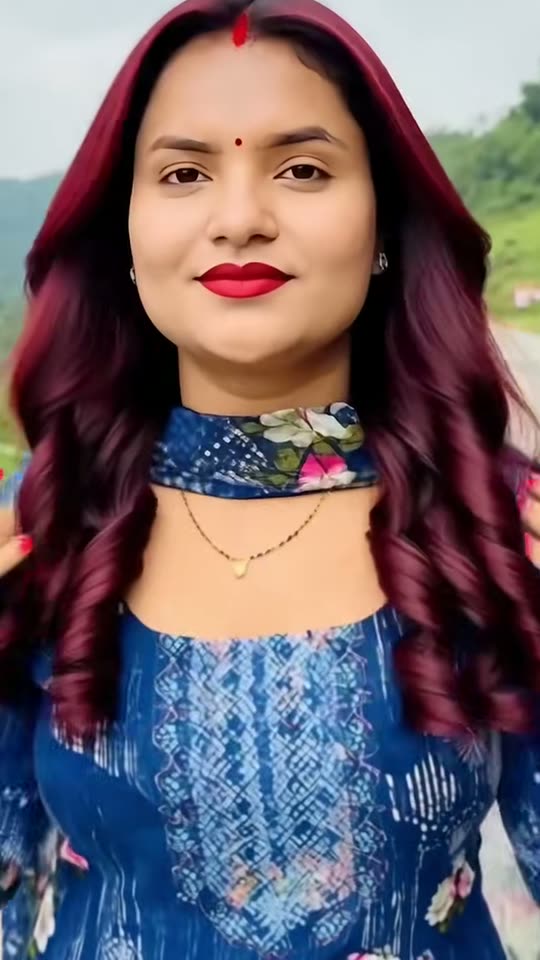
What is the hair dye filter?+
It is a TikTok trend from October 2026: an AI template turns one photo into a short video of you painting burgundy dye onto your hair from a bowl, then showing off long, sleek, glossy burgundy hair, a flat iron and big curls. People post it as if it were a real dye job, often with the joke "haters go think say na AI".
Where does the AI hair dye filter come from?+
From a CapCut AI template. The first clip that took off came from Nepal on 11 October 2026, during the Dashain festival. The big wave came from Nigeria and West Africa from 14 October, when @harmie_273's clip passed 2 million views, and English how-to videos followed on 16 October.
How do I do the hair dye filter?+
Press "Create your own", pick Dye video or Burgundy photo, add one photo with your face and hair in view, and press Generate. MakeViral makes the AI video or the picture and puts it in your Library. You need no CapCut template, no app and no prompt.
Is this the CapCut hair dye filter?+
No. MakeViral has no link to CapCut. The CapCut hair dye template, like every hair color change template in CapCut, is closed. Our Dye video is made by Seedance 2.5 from your photo, with a prompt written from the beats of the trend's clips, and the Burgundy photo by Nano Banana 2.
Is there a hair dye filter prompt?+
No creator or how-to we checked shares one: the CapCut template is closed. So the Dye video prompt is ours, written from the trend's clips second by second. The Burgundy photo starts from a common AI hair color prompt (keep the face, the expression, the skin, the clothes and the background, and change only the hair color), set to burgundy.
Is the hair dye filter real? Does my hair get dyed?+
Nothing gets dyed. The video is AI, made from a still photo: the bowl, the brush, the color and the curls are all generated. Say it is AI when you share it.
What would I look like with burgundy hair? Is there a hair color filter for that?+
Pick Burgundy photo. It works like an AI hair color changer and a virtual hair color try on: it changes only the hair color in your photo and keeps your face, your hairstyle and your clothes. Think of it as a hair color changing filter for burgundy, online, one look per run.
Can I try other colors, like red or cherry red?+
This page makes burgundy, the trend's color: a deep wine red, close to maroon. If you wonder what you would look like with red hair in another shade, a cherry red hair filter or a bright red hair filter is a different look: use the AI photo tool and write your own color. A cherry red hair dye trend went around TikTok in September 2026 with another CapCut template.
Is there a hair dye filter app, or can I use it online?+
You can try it online here, in the browser, with no app: add one photo and the AI makes the dye video or the burgundy photo. The hair dye filter and the hair color filter here are not a Snapchat lens or an Instagram effect, but you can post the result on Instagram, TikTok or Snapchat.
Is the hair dye filter on TikTok?+
Yes. The trend lives on TikTok, where people post their AI hair dye clips, burgundy hair and all, with the template's sound and the hashtags #hairdyefilter and #hairdyetrend. Some call it a hair color filter or a red hair filter. Make your video here and post it on TikTok with a trending sound.
Can I use it as a hair dye prank?+
Yes, as a light joke. Send the video or the photo to your mom or a friend as if you dyed your hair burgundy, enjoy the reaction, then tell them quickly that it is AI. A fake hair dye prank, a red hair dye prank or any hair color prank is only fun when everyone laughs at the end.
Is there an AI hair dye simulator to try a color first?+
Burgundy photo is that: an AI hair dye try on, simulator and generator in one, a hair dye changer for burgundy. It changes only the hair color in your photo, so you see the look before you change anything for real. The Dye video makes an AI hair color change video of the whole dye job.
Does it work with braids, short hair or on men?+
Yes. The Dye video paints the dye on the hair in your photo, braids and short hair included, then gives you long, sleek burgundy hair, so it is a full AI hair transformation: a hair color transformation and a new length, more than a filter. The Burgundy photo keeps your own hairstyle and length. Anyone can use it: the template keeps the face and the gender from the photo.
Does the video have sound?+
Yes. The Dye video comes with its own sound: soft brush strokes, the hiss of the flat iron and a light, upbeat beat, with no lyrics. To post it like the trend, add a trending sound from the trend's posts in TikTok.
Can I use a photo of my friend?+
Only if your friend said yes. Never use a photo of a child, a celebrity or a stranger, and say it is AI when you post the result.
Does the hair dye filter cost credits?+
Yes. The Burgundy photo costs a few credits, and the Dye video costs more, because it is a video. The create page shows the exact price on the Generate button before you spend anything, and if a run fails, the credits come back.
Is my photo private?+
Yes. MakeViral does not post your photo or the result anywhere or show them to other users. The result goes to your private Library, and you can delete it there at any time.