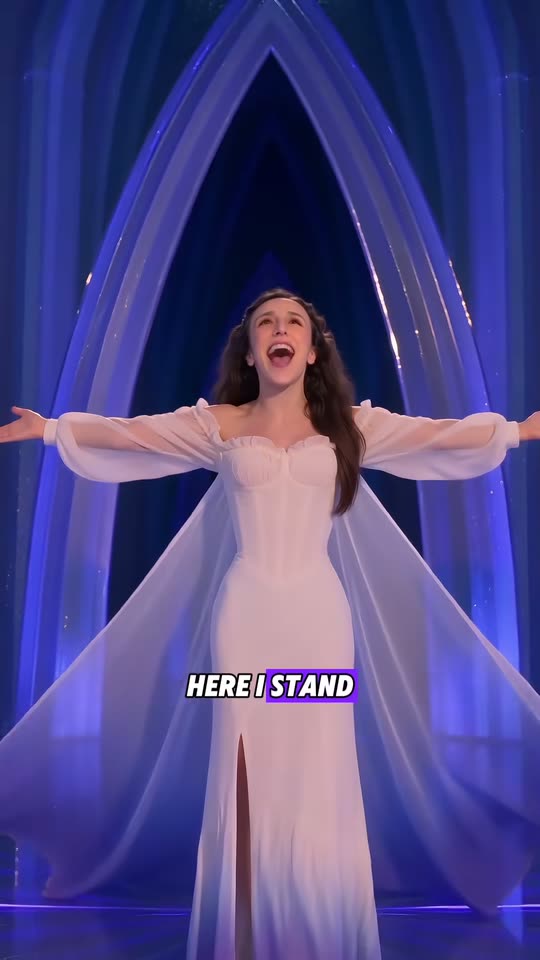
Elsa AI Trend: Let It Go in the Ice Palace, Starring Your Kid

Your child, you or your pet sings in a glowing ice hall: the arms fly up, a sheer cape sweeps out, the gown frosts over and the song plays on. One photo in, a 14-second clip with the reel's own song out.

The original Elsa AI Trend reel by @mer1pao.usOriginal reel
  • 1 photo you add
  • 14 s clip with sound
  • 9:16 for TikTok, Reels, Shorts
  • No watermark

No prompt to write: Add your photo and tap once

Create your own

Ready in a few minutes · 45 credits

The Elsa AI trend puts your child, or you, into the ice queen's big song from Frozen: singing "Let It Go" in a glowing ice palace while a sheer cape and a frosted gown appear. Here your photo takes the singer's place in a real viral AI reel of the trend. You need one clear photo.

Example

What the Elsa AI Trend video looks like

This is the original reel. Your photos replace its characters, so your video follows the same shots with your faces. No two runs come out the same.

Original reel by @mer1pao.us, 14 s

The original reel by @mer1pao.us: Paola, the mom of the family, put her own face in with AI. She sings in a glowing ice hall, throws her arms up, a sheer cape sweeps out, the hem frosts purple, and she ends in the ice archway. Your photo takes her place, with the reel's song.

Use this reference
Original reel by @user268785799501, 14 s

The original reel by @user268785799501: an AI-made tabby cat sings on an ice balcony under the northern lights, poses in a glowing ice hall and spins in swirls of magic. Your pet takes its place, with the reel's song.

Use this reference
Step by step

How to make the Elsa AI Trend video on MakeViral

Everything runs in the browser. No editing app, no prompt to write, no watermark.

  1. Add your photo

    Press "Create your own" and add your kid or you. Take it with the camera or pick it from your library.

  2. Press Generate

    The button shows the price. Seedance 2.0 Mini puts your photos into the Elsa AI trend clip and copies it shot by shot for 14 seconds, with the reel's original song. You write no prompt.

  3. Download or share

    The video is ready in a few minutes as a 9:16 MP4. Download it, share it from your phone, or find it later in your Library.

Which photo works best?

Use one sharp photo of the singer: your child, yourself, or your pet for Pet.

  • Face to the camera, eyes open, in daylight. No sunglasses, no hat, no face filter. The clip opens on a waist-up shot, so the face matters most.
  • Waist up or full body works best. The gown and the cape come from the reel, so any clothes are fine.
  • Only one person or pet in the photo. With two, the model may mix them.
  • Hair counts: long hair flows in the wind of the reel, short hair stays short.
  • For a child, use a photo of your own child, never someone else's.
  • For Pet, pick a sharp photo with the whole animal in view and its face clear.

Where did the Elsa AI Trend trend start?

The scene is "Let It Go", the song the ice queen Elsa sings as she builds her ice palace in Disney's Frozen (2013). In 2026, AI video turned it into a family trend.

On 5 August 2026 the TikTok account @mer1pao.us (MPRA.Family, "Real family, unreal worlds") posted their two daughters in the film's scenes, made with AI: "Recreating the ENTIRE iconic Frozen movie scene with your daughters using AI". It had 191,200 views by 12 October. Their 25 August clip of the younger girl's ice-gown transformation passed 265,000 views, and fans noticed that the AI voice changes the words of the chorus. Then the rest of the family took a turn: Mom Paola in a white ice gown on 22 September, then Dad in warrior armor and an aunt in a pink gown.

In late September, AI video apps started to sell the format as a one-photo "Frozen trend with your kid" template, with Facebook and Instagram ads from 28 September, and AI pet creators made their cats sing in ice palaces. The Human version on this page copies Paola's reel; the Pet version copies an AI cat reel.

  1. Disney's Frozen comes out. Its song "Let It Go", sung by the ice queen Elsa as she builds her ice palace, becomes the film's best-known scene. Wikipedia

  2. @mer1pao.us posts their daughters recreating Frozen scenes with AI. It has 191,200 views and 1,565 likes by 12 October. TikTok

  3. The same family posts the younger daughter's AI ice-gown transformation: "Your toddler hits the ultimate high note". It has 265,500 views and 2,872 likes by 12 October. TikTok

  4. Mom Paola takes her turn: "The kids had their turn, now Mom is unleashing full Elsa energy". This is the reel the Human version copies (12,900 views and 164 likes by 12 October). TikTok

  5. @user268785799501 posts an AI tabby cat that sings and spins in an ice palace under the northern lights, tagged #letitgo #aicat. It has 19,400 views and 1,214 likes by 12 October. TikTok

  6. An AI video app starts Facebook and Instagram ads for a "Frozen trend with your kid" template: a child's photo becomes the ice queen of the song scene.

Copy and paste

The Elsa AI Trend prompts

You do not need these: the one-tap flow runs them for you, together with the trend clip. [Image 1] and [Image 2] are your two photos, and [Video 1] is the trend clip the video copies.

Human

1 photo: your kid or youSeedance 2.0 Mini14 s · 720p · 9:1645 credits
Video prompt

[Video 1] is a motion guide only. Copy its camera moves, timing and actions, the tall glowing blue ice pillars, the shiny dark-blue ice floor with reflections, the shot from high above, the low shot behind the trailing cape, the tall pointed ice archway and the cold blue light. Do NOT copy the woman in [Video 1]: not her face, long dark curly hair, skin tone, age or body. Replace her completely. The singer is the one in [Image 1]. Keep the face, hair, skin tone and age from [Image 1] in every shot, also in the wide shots and the shot from high above, with no long dark curly hair unless [Image 1] shows it. If [Image 1] shows a child, the singer is that same child at the same age, with a child's height and body, in a child-size gown. The singer becomes an elegant ice queen wearing a breathtaking icy gown made of shimmering frost and crystal textures, with long sheer sleeves and a long sheer cape. Long flowing hair moves gracefully in the cold wind while blue-white magical energy glows around the body. The singer sings with joy, throws both arms up so the sheer sleeves stream out, spins on the ice floor while the cape sweeps out behind and frost spreads up from the hem, walks toward the camera singing, and ends with both arms wide open under the ice archway. Photorealistic, like a scene from a big musical film. One singer only. No crown, no tiara, no text, no subtitles, no captions, no logos, no extra people.

1429 characters

Pet

1 photo: your petH3 Max Recast14 s · 720p · 9:16168 credits
Video prompt

The pet from image 1 replaces the tabby cat who sings and dances on the ice balcony and in the ice hall, in every shot, also in the close-ups. Keep the pet's face, fur colors, markings, eyes and ears exactly as in image 1, with no tabby stripes and no silver chain collar with a heart pendant unless image 1 shows them. If image 1 shows a dog or another animal, that animal takes the same place and does the same moves: it sits up, raises its front paws, stands on its hind legs and spins. Keep the ice balcony with its ice railing, the northern lights and the starry night sky, the glowing ice hall, the white houses, the sparkles and the swirls of magic, the motion, the mouth movement and the camera exactly as in the video.

727 characters

How many credits does it cost?

You pay per video in credits, and the create page shows the exact price on the Generate button before you spend anything. The one-tap price covers the video, made in one step from your photos and the trend clip, charged once. One video is 45 credits, so the smallest one-time pack that covers it is $9.99 for 100 credits, with no subscription. The cheaper models are there if you run the prompts by hand in AI Video.

Video modelSettingsCredits
Seedance 2.0 Mini (this template)14 s, 720p, copies the trend clip, one tap45

One-time packs and plans are on the pricing page. A failed video gives its credits back.

What happens in the Elsa AI video, second by second?

Each version is a viral AI reel of the trend, cut to its best 14 seconds, with your photo in place of its singer. The ice palace, the moves and the camera come from the reel.

Human (the @mer1pao.us reel):

TimeWhat happens
0-3 sWaist-up in a hall of glowing blue ice pillars, singing "let it go", then both arms fly up and the sheer sleeves stream out.
3-7 sWide shot: arms open, a long sheer cape sweeps out and the hem of the white gown frosts purple as the singer spins on the ice floor.
7-9.5 sThe camera looks straight down from high above, then low behind the cape as it trails across the ice.
9.5-12 sThe singer walks toward the camera, still singing, gown and cape flowing.
12-14 sArms wide open under a tall pointed ice archway: "Here I stand."

Pet (the AI cat reel):

TimeWhat happens
0-3.5 sYour pet sits up on an ice balcony under the northern lights and sings, front paws raised in a burst of sparkles.
3.5-7.5 sIn a glowing ice hall it turns to the camera and crosses its paws, close up.
7.5-14 sBack on the balcony it opens its paws, stands on its hind legs and spins in swirls of magic, then steps toward the camera.

The sound. Your clip comes with the reel's own singing, cut to the same 14 seconds. On the Human reel the words also show as karaoke captions. The song in the reel is a fan's take, not the film's recording: it even sings "let the perfect girl be gone".

Human or Pet, and which model makes it?

Press "Create your own" and pick Human for a child or an adult, or Pet for a cat or a dog. You write no prompt: one photo is all it takes.

Human, StandardHuman, BestPet
ModelSeedance 2.0 Mini makes a new clip that follows the reel's moves and cameraMiniMax H3 Max Recast puts the singer into the reel itselfMiniMax H3 Max Recast puts your pet into the reel itself
Length14 s14 s14 s
FrameVertical 9:16, 720pVertical 9:16, 768pVertical, 768p
SoundThe reel's song, put back on after the runThe sameThe same
Photos111

The exact price of each option shows on the Generate button before you spend anything. Standard costs much less than Best. The video waits in your Library when it is ready.

Why does Pet have one option only? The cat reel has big close-ups of the cat's face, and the cheaper model tends to keep the reel's own animal in close-ups like these. Recast swapped the pet in close-ups in our tests on other reels.

Why a fan reel and not the film? The film's scene belongs to Disney. This template copies an AI reel that a fan made and posted herself, and no prompt names the film, the song or the character. MakeViral is not connected to Disney.

Making it with your child: what to know

The trend is mostly parents turning their kids into the ice queen, and that works here: add a clear photo of your own child to Human.

  • The reel's singer is an adult. Both models take the face, the hair and the age from your photo, and the prompts ask for a child-size singer when the photo shows a child. Standard builds the singer new from your photo. Best follows the reel's moves and body very closely, so a child can come out looking older or taller. If that happens, try Standard.
  • Boys work too. The gown and the cape come from the reel, whoever sings.
  • Use your own child's photo only, never a photo of someone else's child.
  • Before you post, think about who will see it. A private account or a family chat is a safe start. Keep the platform's AI label on.

Hashtags: on 12 October 2026, #frozenletitgo had 1,308 TikTok videos and 5.7 million views, #minielsa 210 videos and 1.5 million views, and #elsaai 254 videos and 11.7 million views. The big #letitgo tag had 740,619 videos. Captions in the style of the trend: "Mini Elsa hits the high note", "My little ice queen", "The cold never bothered her anyway".

Want another kids' template? Make your child a brave little knight in the baby knight video, or try a costume on with the AI Halloween costume.

What goes wrong, and how do you fix it?

ProblemFix
The face looks less like the photoUse a sharper photo in daylight, face to the camera, eyes open. Then run it again.
The singer keeps the long dark curly hair of the reelUse a photo where the hair is clear. Run it again, or pick Best.
A child looks older or tallerThat can happen with Best, which follows the adult singer of the reel. Pick Standard.
Lyric captions show on the clipBest can keep the reel's karaoke captions. Standard usually leaves them out.
Your pet gets tabby stripes or a heart collar (Pet)Those come from the cat in the reel. Use a sharper photo with the whole pet in view, then run it again.
The model refuses your photoSome photos get refused. The credits come back; try another photo.

Every run is a new take, so results differ a little from run to run.

FAQ

Elsa AI Trend trend questions

What is the Elsa AI trend?
It is a 2026 AI video trend on TikTok and Instagram. Parents use AI to turn their child into the ice queen of Frozen's "Let It Go" scene: singing in an ice palace while a frosted gown and a long cape appear. Adults and pets do it too. On this page your photo takes the singer's place in a viral AI reel of the trend.
Where did the Frozen AI trend start?
The first big posts came from @mer1pao.us, a family account that makes AI short dramas with its own real family. On 5 August 2026 they posted their daughters in the film's scenes (191,200 views by 12 October), and on 25 August the younger girl's ice-gown transformation (265,500 views). From late September, AI video apps sold the format as a one-photo "Frozen trend with your kid" template.
How do I make the Elsa AI video of my kid?
Press "Create your own", pick Human, add one clear photo of your child and press Generate. The button shows the price first. You get a 14-second vertical clip with the reel's song, and it waits in your Library when it is ready. You write no prompt.
Can I make it of myself, or of a boy?
Yes. The reel on this page stars an adult, the mom of the family that started the trend. Anyone can be the singer: the model takes the face, the hair and the age from your photo. The white gown and the sheer cape come from the reel, whoever sings.
Can I make it with my cat or dog?
Yes. Pick Pet. It copies a viral AI cat reel and puts your pet in place of the tabby cat: it sings on an ice balcony under the northern lights and spins in swirls of magic. Use a sharp photo with the whole animal in view.
Does the video have the Let It Go song?
It has the reel's own singing, which goes back on after the run, and you can turn it off on the result screen. It is a fan's take on the song, not the film's recording. To use the official sound instead, add it from the TikTok sound library when you post. The song belongs to its owners, and MakeViral gives you no rights to it.
Is this an official Disney or Frozen template?
No. MakeViral is not connected to Disney. The template copies an AI reel that a fan made and posted, never the film itself, and the prompts do not name the film, the song or the character.
How long is the video, and what format is it?
14 seconds, vertical, as an MP4 file with sound. Standard makes 720p with Seedance 2.0 Mini. Best and Pet make 768p with MiniMax H3 Max Recast.
Does the Elsa AI video cost credits?
Yes. Each video costs credits, and the create page shows the exact price on the Generate button before you spend anything. Standard costs much less than Best. If a video fails, the credits come back.

Make your own Elsa AI Trend video

Add one photo and tap once. No prompt to write. 45 credits.

No watermark. A failed video gives its credits back. Secure checkout by Stripe.