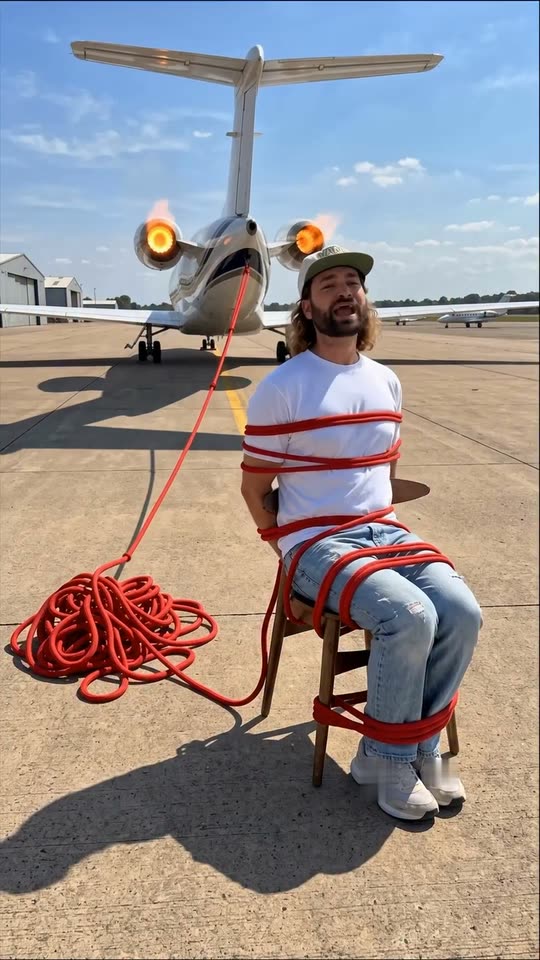
What is the AI danger video trend?+
The ai danger trend is a hook format from Instagram: a short clip of you in an ordinary moment, restyled with an AI edit so that danger sits right behind you, a jet, a train or a giant wave, while you stay calm and keep talking. It started with @rourke's "How to make viral hooks with AI" reel on 29 July 2026.
How do I make an AI danger hook with my photo?+
Press "Create your own", pick a danger, add one clear photo of yourself and press Generate; the button shows the price first. You get a 7-second vertical clip with sound, and it waits in My videos when it is ready.
Which prompt does this template use?+
The creator's own. His guide has an image prompt for each scene, like "Keep this shot the same, with the same man, and the same chair, with the same composition, but change the location to be an airport runway", and a video prompt that keeps the camera still. We use his words, with "the person" in place of "the man", and add rules against logos and crashes. You do not need to write an ai danger prompt yourself.
Is this an AI hook video generator?+
Yes, for one kind of hook. Most ai hook video tools write hook lines; this page makes the clip itself, a viral hooks AI video from your photo. Use it as an ai intro hook at the start of a post, then cut to your real video. It works as an ai video hook creator for Reels, TikTok and Shorts.
Can I make the AI train behind me clip?+
Yes. Pick Train tracks: you sit between the rails and a train comes down the same track behind you. Pick Car on the tracks to sit in a car while the train comes from the side.
Is there an AI tsunami video version?+
Yes. Pick Tsunami: you relax on a sun lounger at the beach while people run from a giant wave that lifts boats behind you. The clip ends before the wave reaches the beach.
Can I make an AI jet engine video like the original?+
Yes. Jet engine is the creator's first clip: you sit tied to your chair with a red rope that runs to a jet on a runway, and the jet's engines flame and pull the rope tight.
Can I get just an AI danger photo?+
Every run makes the picture first and then the video, and you get the video. If you only want an ai danger photo or an ai danger image, pause the clip on its first frame and take a screenshot: it is the edited picture of your shot.
Is it an AI danger filter?+
Not a camera filter. It is an AI edit of a photo you upload, so it works with any photo you already have, on a phone or a computer. People also call it the danger right behind you edit or an ai dangerous edit.
Does anyone get hurt in the video?+
No. The clip ends a moment before the danger reaches you, and nothing crashes. The ai danger meme is about staying calm, not about an accident.
Is the video real?+
No. It is an AI video made from a still photo. Keep the AI label on when you post it, and never sit on real train tracks, runways or anywhere else that is dangerous.
Are my photos private?+
Yes. MakeViral does not post your photo or the result anywhere or show them to other users. The video goes to your private My videos page, and you can delete it there at any time.