Welcome to My Page Trend: Your AI Digital Scrapbook Intro
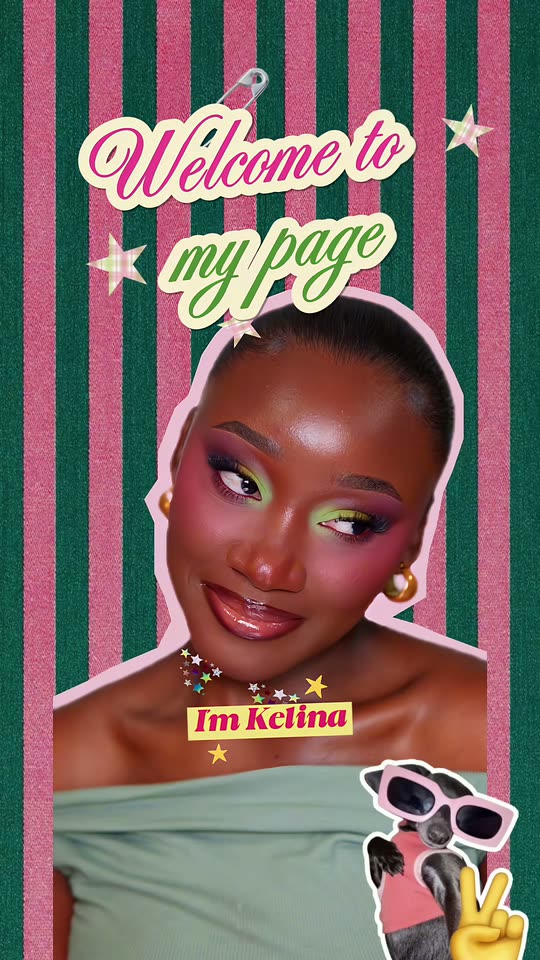
Add one photo and type your first name. MakeViral turns you into a sticker cutout on a pink and green striped scrapbook card with "Welcome to my page", stars, a safety pin and an "I'm + your name" tag, then makes it move, with the trend's own sound.
The welcome to my page trend is a TikTok intro: a cutout of you with a pink sticker border pops onto a pink and green striped scrapbook card while "Welcome to my page", stars, a safety pin and an "I'm + your name" tag appear, over a short original sound by @paula.toledo391. It took off in mid November 2026. Here you add one photo and your name.
Also called Welcome to My Page AI Digital Scrapbook · Scrapbook intro reel · Digital Scrapbook Profile · Bienvenue sur ma page
Example
What the Welcome to My Page video looks like
This is the trend's original post by @joywithkelina, made with the CapCut template from her own short video, with the trend sound. The words and the name tag are part of the effect. Your result is a new 6 second video made from your own photo in the same style, with your own name on the tag. No two runs come out the same.
Original reel by @joywithkelina, 6 s
The first big welcome to my page post, by @joywithkelina (15 November 2026, 2.8 million plays): her cutout jumps onto the pink and green striped card, "Welcome to my page" and the stars pop in, and the tag types "Im Kelina".
Step by step
How to make the Welcome to My Page video on MakeViral
Everything runs in the browser. No editing app, no prompt to write, no watermark.
Add your photo
Press "Create your own" and add you, chest or waist up, face clear. Take it with the camera or pick it from your library.
Press Generate
The button shows the price. MakeViral builds the Welcome to my page scene with your photos, then Kling 3.0 animates it for 6 seconds, with the trend's original song. You write no prompt.
Download or share
The video is ready in a few minutes as a 9:16 MP4. Download it, share it from your phone, or find it later in My videos.
Which photo works best?
Use one photo of you alone, from the chest or the waist up, with your face clear and turned to the camera or a little to the side. The card shows you large, like the viral posts, so a close, sharp photo keeps your face, hair and makeup the most.
Type your first name. It goes on the yellow tag as "I'm + your name". One or two short words fit best. Leave it empty and the tag says "Hi, it's me".
Show your look. The viral posts are about the face: bold eye makeup, a hairstyle, earrings, a nice top. What your photo shows is what the cutout shows.
Good light helps. Daylight from a window, no strong shadow on the face. The background does not matter: the template cuts you out.
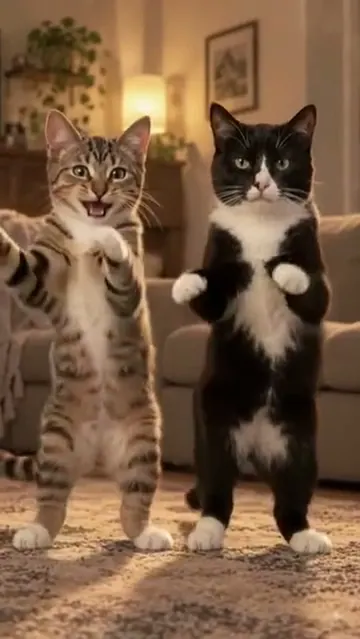
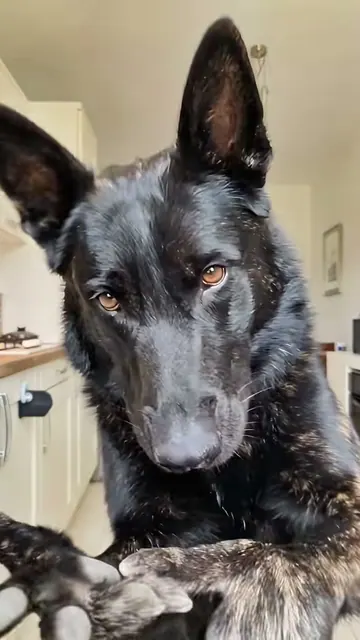
Pets and friends work too. A photo of your dog or cat becomes the cutout, and a photo of two people puts both of you on the card.
Use your own photo, or one of an adult friend who said yes.
Where did the Welcome to My Page trend start?
The welcome to my page TikTok trend started as a CapCut template in November 2026. The first post that went big was by @joywithkelina on 15 November 2026: "How stinking cute is this 🥰😍 hiiiiiiii", 5.6 seconds, 2.8 million plays and 226,100 likes by 23 November. The top comment, with 1,627 likes, was "Need a tutorial asap", and another asked "How do you make your image jump in?"
The copies came fast, most of the big ones from Nigeria, Côte d'Ivoire, DR Congo, South Africa and the US, and the sound had about 360,000 uses by 23 November:@adornwithardor (897,200 plays, 16 November), @_mercy.xxx (761,100, 17 November) and @chancelvieyenga6 (604,100, 17 November). Tutorial accounts posted the "welcome to my page capcut template" from 14 November, and from 18 November French-speaking creators shared a Hypic AI effect called "Bienvenue sur ma page / Welcome to My Page / Digital Scrapbook Profile" that makes the card from a single photo.
The trend tracker Virlo listed it as "Welcome to My Page AI Digital Scrapbook": 135 creators in seven days and 22.1 million views over the 240 videos it scanned (read 23 November 2026). The #welcometomypage tag had 20,210 TikTok videos on 23 November, and the pulse of new posts was slowing.
@paula.toledo391 posts the short original sound that the welcome to my page template later uses.
The first "welcome to my page template capcut" tutorial posts appear on TikTok (34,100 views on the biggest by 23 November). TikTok
@joywithkelina posts her welcome to my page intro: 2.8 million plays and 226,100 likes by 23 November, the most viewed post of the trend. TikTok
@_mercy.xxx (761,100 plays) and @chancelvieyenga6 (604,100 plays) post their versions with the same sound. TikTok
Creators share the Hypic AI effect "Welcome to My Page / Digital Scrapbook Profile", which makes the card from one photo. TikTok
#welcometomypage has 20,210 TikTok videos and 46.5 million views; Virlo counts 135 creators in seven days. Virlo
Copy and paste
The Welcome to My Page prompts
You do not need these: the one-tap flow runs them for you. A photo prompt puts your photo into the scene, then a video prompt animates it. Want to change them? Copy them and edit them in AI Photo and AI Video.
1 photo: you, chest or waist up, face clearKling 3.06 s · 1080p · 9:1635 credits
Step 1 · Photo prompt
Transform the single photo into a personal presentation card, a digital scrapbook profile: a cutout portrait with a pink outline, a pink and green striped background, retro typography "Welcome to my page", shiny stars, a decorative pin, cute stickers and a small label "Hi, it's me", for a fully personalized profile. A real digital scrapbook, Y2K profile, profile intro card and personal page aesthetic. Layout, vertical 9:16: wide vertical stripes of dusty pink and deep emerald green with a soft paper texture fill the whole background, edge to edge. At the top, "Welcome to" in a bold, slanted retro pink script with a thick cream outline, and right under it "my page" in a light lime green retro script with a cream outline, a little tilted, like two paper stickers. A small silver safety pin is pinned above the lettering, and a few small cream four-point sparkle stars sit around the words. Below the words, the subject of the photo is cut out like a paper sticker with a thick light pink border that follows its outline, large and centered, from the top of the head to the chest or the waist, filling the lower two thirds of the card. The cutout is the photo itself: the same face, expression, hair, makeup, jewelry, clothes and pose, with the face turned to the camera or three-quarters to it as in the photo. If the photo shows a pet, an animal, a toy or any other subject, that subject with its own whole look is the cutout, with no human body parts. If the photo shows two or more people, all of them are in the one cutout together, each with their own face. Over the chest of the cutout, a small butter yellow paper label with dark red retro letters reads exactly "Hi, it's me", with two tiny gold stars at its corners. In the bottom right corner, one cute photo sticker with a white border: a small black puppy in a pink shirt wearing oversized pink sunglasses, next to a yellow peace-sign hand. Flat 2D paper collage, crisp edges, bright even light. The only words in the picture are "Welcome to", "my page" and "Hi, it's me", each spelled exactly and shown once. No other text, no logo, no watermark, no app name, no frame.
2139 characters
Step 2 · Video prompt
The digital scrapbook card in the image comes to life as a short, cute profile intro. Keep the striped background, the lettering "Welcome to my page", the safety pin, the stars, the yellow name label, the puppy sticker and the pink cutout border exactly as in the image: flat, sharp, in the same place and spelled the same, from the first frame to the last. Inside the cutout, the subject comes alive like a short selfie video: a small happy bounce, a playful head tilt, a smile and a cute look into the camera, a little shoulder move, like saying hi to new followers. If the subject is an animal, it tilts its head, blinks and moves its ears instead. The small sparkle stars twinkle, the lettering gives one soft bounce, and the name label and the puppy sticker wiggle gently like paper stickers. The camera stays still. One continuous shot, no cuts. The same face and the same look from the first frame to the last. No new text, no letters changing, no logo, no watermark. No speech, no music.
You pay per video in credits, and the create page shows the exact price on the Generate button before you spend anything. The one-tap price covers the scene photo and the video, charged once. One video is 35 credits, so the smallest one-time pack that covers it is $9.99 for 100 credits, with no subscription. The cheaper models are there if you run the prompts by hand in AI Video.
Video model
Settings
Credits
Kling 3.0 (this template)
6 s, 1080p + 1 scene photo, one tap
35
Seedance 2.0 Fast (by hand in AI Video)
6 s, 720p + 1 photo
42
Veo 3.1 Fast (by hand in AI Video)
8 s, 720p + 1 photo
14
One-time packs and plans are on the pricing page. A failed video gives its credits back.
What you get
Part
What it looks like
The card
Wide vertical stripes of dusty pink and deep green with a paper texture, filling the whole vertical 9:16 frame
The words
"Welcome to" in pink retro script and "my page" in light green script, both with a cream outline, a safety pin and sparkle stars
You
A cutout of your photo with a thick pink sticker border, large in the middle of the card
Your tag
A small yellow label with "I'm + your name" and two tiny gold stars
The sticker
A small black puppy in big pink sunglasses with a peace-sign hand, in the corner
The video
6 seconds: you move in the cutout (a bounce, a head tilt, a smile), the stars twinkle and the stickers wiggle
The sound
The trend's own short original sound, as it is
You see the card first and the video after it, within a few minutes.
The prompt behind it
The CapCut template is closed, so it shows no prompt. The Hypic AI effect of the same trend describes its card like this (in French, then in English): "a cutout portrait with a pink outline, a pink and green striped background, retro typography 'Welcome to my page', shiny stars, a decorative pin, cute stickers and a small 'I am + your first name' label".
Our card prompt keeps those words in that order. We added the layout of the viral post (the words at the top, you in the middle, the tag at your chest, the sticker in the corner), the exact spelling of the three pieces of text, your name in the tag, and a line that lets a pet or two people take the cutout. It runs on a top-quality AI image model with face rules that keep your own face, and the best AI video models available make it move.
What goes wrong, and how to fix it
A letter in the words or the name is off. AI image models still misspell now and then, most often with long or rare names. Use a short first name, or run it again: each run is a little different.
The face looks a little off. Use a closer, sharper photo with more light. A small face in a far photo is the most common cause.
The video does not "jump in" like CapCut. In the CapCut template the cutout and the words fly in. Here the card is made first, so the video starts with everything in place and then moves. If you want the pop-in, post the card photo first and the video after it.
You want other words. The words stay "Welcome to my page" so the trend reads right. Only the name tag changes.
Tips for posting your welcome to my page intro
Pin it. The trend is a profile intro: creators pin it to the top of their page so new visitors meet them first.
Use the trend sound. Your video already has it. On TikTok, add the original sound of @paula.toledo391 so people find you under it.
Write a hello. The viral captions are short and warm: "hiiii", "Nice meeting y'all again", "Hi I'm new".
Tags. #welcometomypage, #digitalscrapbook and #capcut are the ones the trend uses.
FAQ
Welcome to My Page trend questions
What is the welcome to my page trend?+
It is a short TikTok intro from November 2026: a cutout of you with a pink sticker border sits on a pink and green striped scrapbook card, while "Welcome to my page", stars, a safety pin and an "I'm + your name" tag pop in, over an original sound by @paula.toledo391. The first big post was by @joywithkelina on 15 November 2026 (2.8 million plays).
How do I make the welcome to my page AI intro?+
Press "Create your own", add one photo of yourself from the chest or the waist up, type your first name and press Generate. MakeViral makes the scrapbook card with your name on the tag, then a 6 second video of it with the trend sound. The card and the video land in My videos.
Is this the welcome to my page CapCut template?+
No, it is our own AI version of the same look, so you do not need the welcome to my page capcut template or a video of yourself. The CapCut template cuts you out of your own clip. Here one photo is enough, and the AI makes the card and the motion.
Is there a welcome to my page tutorial?+
You do not need one here: add a photo, type your name and press Generate. The tutorials on TikTok show the CapCut template and the Hypic effect, which need you to pick the template, add your clip and type the name in the app.
Can I put my own name on the tag?+
Yes. Type your first name in the name box on the create page and the tag reads "I'm + your name". One or two short words work best. Empty, it says "Hi, it's me".
Can I change the words "Welcome to my page"?+
Not on this template: the words are the trend, so they stay. Only the name tag changes. For other words, copy the prompt from this page into AI Photo and change them there.
Does it have the trend sound?+
Yes. Your video plays the trend's own short original sound by @paula.toledo391, as it is. You can turn it off on the result screen.
Can I make it with my dog or cat, or with a friend?+
Yes. A photo of your pet makes your pet the cutout on the card, and a photo of two people puts both of you in it. Type the pet's name or both names for the tag.
Is this a TikTok intro template?+
Yes. It works like a TikTok intro template and a scrapbook intro template in one: the card, the words, the stickers and your name tag are made for you from one photo. The scrapbook intro CapCut versions need your own clip and the CapCut app; here you only add a photo.
What is a digital scrapbook intro?+
A digital scrapbook intro is a short video or picture that looks like a page of a paper scrapbook (stripes, stickers, a pin, a name label) and introduces you to new followers. The welcome to my page trend is the biggest scrapbook intro of November 2026; Virlo calls it the Welcome to My Page AI Digital Scrapbook trend.
What does "bienvenue sur ma page" mean?+
It is French for "welcome to my page". French-speaking creators, many of them in Côte d'Ivoire, share the trend under that name and use the Hypic effect "Welcome to My Page / Digital Scrapbook Profile". People also search for it as "welcome 2 my page".
How long is the video?+
6 seconds, vertical 9:16, about the length of the 5.6 second trend posts. You also get the scrapbook card as a still picture.
Does it cost credits?+
Yes. The create page shows the exact price on the Generate button before you spend anything. If a run fails, the credits come back.