Back

Monkey Eating Apple AI: A Macaque Steals Your Apple

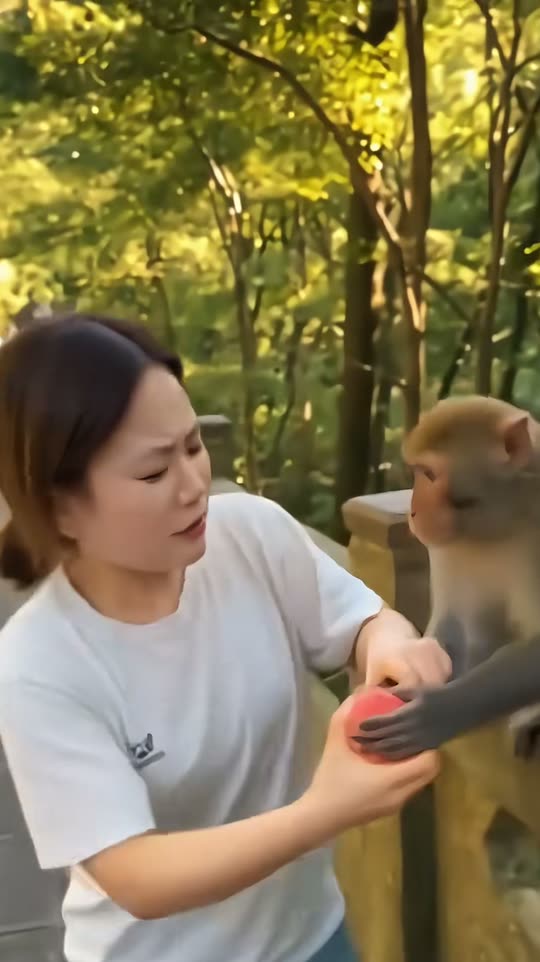
You bite into a red apple on a forest path, a wild macaque on the stone railing grabs it, a tug of war follows, and the camera pushes in on your shocked face. Add one photo for you or your pet, or two for a duo.

The original Monkey Eating Apple reel by @user7453115952617Original reel
  • 1 photo you add
  • 9 to 10 s clip with sound
  • 9:16 for TikTok, Reels, Shorts
  • No watermark

No prompt to write: Add your photo and tap once

Create your own

Ready in up to several minutes · From 126 credits

The monkey eating apple AI trend is a short video where a wild macaque on a stone railing grabs the red apple you are eating, wins a quick tug of war and leaves you frozen in shock. It started as a CapCut AI template on 1 November 2026. Add one clear photo of yourself or your pet, or two photos for a duo.

Also called Monkey Eating Apple AI effect · Monkey snatches apple AI

Example

What the Monkey Eating Apple video looks like

This is the original reel. Your photos replace its characters, so your video follows the same shots with your faces. No two runs come out the same.

Original reel by @user7453115952617, 9 s

The first monkey eating apple AI video, by @user7453115952617 (1 November 2026, 154.5 thousand views): a macaque on a stone railing fights a woman for her red apple, snatches it, and the camera pushes in on her shocked face. Shown: the AI clip without the tutorial part. You puts your face in her place.

Use this reference
Step by step

How to make the Monkey Eating Apple video on MakeViral

Everything runs in the browser. No editing app, no prompt to write, no watermark.

  1. Add your photo

    Press "Create your own" and add your photo, face clear. Take it with the camera or pick it from your library.

  2. Press Generate

    The button shows the price. Seedance 2.5 puts your photos into the Monkey Eating Apple trend clip and copies it shot by shot for 9 seconds, with the reel's original song. You write no prompt.

  3. Download or share

    The video is ready in up to several minutes as a 9:16 MP4. Download it, share it from your phone, or find it later in My videos.

Which photo works best?

Upload one photo for You or Pet, and two photos for Duo: photo 1 is the one with the apple (on the left), photo 2 is the friend (on the right).

  • You and Duo: waist up or full body, face to the camera, sharp and in good light. The video takes your clothes from the photo, so casual clothes fit a forest walk best.
  • No sunglasses, no hat that hides the face and no beauty filter.
  • Pet: one animal, whole body in view, eyes open, in daylight. Its fur colors, ears and markings come from your photo.
  • Any background works: the forest path, the stone railing, the macaque and the apple come from the template.
  • Use your own photo, a friend who said yes, or your own pet. Never a celebrity or a stranger.

Where did the Monkey Eating Apple trend start?

The trend began on TikTok on 1 November 2026 with a CapCut AI template called "monkey eating apple": you upload one photo, and the template puts you on a sunny forest path next to a wild macaque that wants your apple.

One Australian promoter account, @user7453115952617, posted it first. Its first post, at 12:45 UTC on 1 November, shows a woman with a short bob who bites an apple, fights the macaque for it and ends with a wide-eyed close-up. It had 154.5 thousand views and 5,263 likes the next day. A second post an hour later passed 820 thousand views in less than a day, and by 2 November the account had posted the template at least five times.

The joke is an old one: real monkeys at parks and temples are known for grabbing snacks, phones and sunglasses from tourists, and clips of monkeys stealing food from people have been a staple of funny animal videos for years. The AI version puts your own face in the tourist's place. On 2 November the #monkeyeatingapple hashtag held 22 videos and 336.2 thousand views: the trend is still very early.

  1. @user7453115952617 posts the first monkey eating apple AI video at 12:45 UTC: a woman, a macaque and a red apple on a forest path. It has 154.5 thousand views and 5,263 likes on 2 November. TikTok

  2. The same account posts the template again at 13:57 UTC; that post reaches 823.9 thousand views and 10.5 thousand shares by 2 November.

  3. A post at 22:29 UTC names the effect "monkey eating apple" in its caption for the first time. It shows a man with glasses and has 164.5 thousand views on 2 November. TikTok

  4. The #monkeyeatingapple hashtag holds 22 TikTok videos and 336.2 thousand views. TikTok

Copy and paste

The Monkey Eating Apple prompts

You do not need these: the one-tap flow runs them for you, together with the trend clip. [Image 1] and [Image 2] are your two photos, and [Video 1] is the trend clip the video copies.

You

1 photo: your photo, face clearSeedance 2.59 s · 720p · 9:16137 credits
Video prompt

Recreate the reference video [Video 1] shot for shot: one continuous handheld phone take on a paved path through a sunny green forest, beside a low stone railing where a wild macaque sits, a few tourists small in the far background, the same camera, framing, timing, push-in and moves. The ONLY change: the woman in the white T-shirt who eats the red apple is now the person in [Image 1]. Everything else stays the same. The person = the person in [Image 1], in EVERY frame: copy the exact face from [Image 1]: face shape, eye color and eye shape, eyebrows, nose, mouth, skin tone, age, hair color, hair length and hairstyle, and any beard, moustache, glasses or freckles exactly as in the photo. They wear the clothes from [Image 1]; if [Image 1] shows only the head or the upper body, invent the rest so it matches naturally. The same real person in every frame, from the first second to the last, so their friends instantly recognize them, also with the back turned and in the final close-up. Never morph, never drift back to the original woman's face. NO short brown bob with bangs and NO white T-shirt unless [Image 1] shows them. If [Image 1] shows an animal, the person is that animal in the same place, with its own face, fur and markings and the natural body volume and proportions of that animal: never flattened, squashed, stretched or merged with anything. The macaque stays exactly as in [Video 1] in every frame: a real wild macaque with brown-grey fur and a pink face, its own size, its own quick moves. It is never a person, never a toy and never merges with anyone. There is one red apple, the same apple from the first frame to the last. The performance, matching [Video 1] second by second: 00:00-00:01: the person stands by the stone railing and bites into the red apple held in both hands; the macaque sits on the railing just behind their shoulder. 00:01-00:03: the macaque leans in and grabs the apple with both hands; the person pulls it back, surprised, eyebrows up. 00:03-00:06: a tug of war: the person turns their back to the macaque and holds the apple close, the macaque reaches over their shoulder and hangs on their arm; the person screams and laughs at the same time. 00:06-00:07.6: the person faces the camera and holds the bitten apple in both hands, stunned and out of breath; the macaque watches from the railing. 00:07.6-00:08.2: the macaque's arm shoots in and snatches the apple out of the person's hands; the person turns toward it. 00:08.2-00:09.1: the camera pushes in to a close-up of the person's face: eyes wide, mouth open, frozen in shock. Real live-action phone footage, natural late-afternoon light, clear facial features. No dialogue throughout the entire video. No background music. Anatomy rules: one head only, on the person's shoulders. Two arms and two hands, five fingers on each hand. Exactly one person and one macaque in the foreground. No text, no captions, no stickers, no logos, no watermark, no extra animals, no extra limbs, no morphing, no facial distortion.

3030 characters

Duo

2 photos: you, with the apple (left) + your friend (right)Seedance 2.510 s · 720p · 9:16126 credits
Video prompt

Real handheld phone footage, filmed like a tourist video: a paved path through a sunny green forest with tall trees, a low stone railing along the path, warm late-afternoon light, a few tourists small in the far background. Photorealistic, natural skin and natural colors, not CGI, not a cartoon. The camera stays close: medium shots and a close-up keep both faces large, sharp and well lit. The one on the LEFT is the person in [Image 1], in every frame: copy the exact face from [Image 1] (the face shape, eye color and eye shape, eyebrows, nose, mouth, skin tone, age, hair color, hair length and hairstyle, and any beard, moustache, glasses or freckles), with the clothes from [Image 1]. The one on the RIGHT is the person in [Image 2], in every frame: copy the exact face from [Image 2] (the face shape, eye color and eye shape, eyebrows, nose, mouth, skin tone, age, hair color, hair length and hairstyle, and any beard, moustache, glasses or freckles), with the clothes from [Image 2]. If an image shows an animal, that one is that animal standing at the railing, with its own face, fur and markings and the natural body volume of that animal, not a person. Never blend their faces, never swap their clothes. Each face stays the same from the first frame to the last, so their friends recognize them at once. A real wild macaque with brown-grey fur and a pink face sits on the stone railing right behind them, at the natural size of a macaque. There is one red apple. The shots: 1. 0-3 s: a medium shot: both stand side by side with their backs to the railing; the one on the left bites into a red apple held in both hands, the one on the right smiles at the camera. The macaque creeps closer along the railing behind them. 2. 3-6 s: the macaque leans in and grabs the apple with both hands. The one on the left pulls it back, the one on the right grabs their friend's arm; a short tug of war, both scream and laugh. 3. 6-8 s: the macaque snatches the apple, sits back on the railing and takes a big crunchy bite, looking at them. 4. 8-10 s: the camera pushes in to a close-up of both faces side by side: eyes wide, mouths open, frozen in shock, then they turn to look at each other. Audio: forest birds, the macaque's short chatter, the crunch of the apple, a surprised scream and laughter. No dialogue, no background music. Exactly the two from the photos and one macaque in the foreground. No text, no captions, no logos, no watermark, no extra animals, no extra limbs.

2484 characters
Pet

1 photo: your pet, whole bodySeedance 2.59 s · 720p · 9:16137 credits
Video prompt

Recreate the reference video [Video 1] shot for shot: one continuous handheld phone take on a paved path through a sunny green forest, beside a low stone railing where a wild macaque sits, a few tourists small in the far background, the same camera, framing, timing, push-in and moves. The ONLY change: the woman in the white T-shirt who eats the red apple is completely replaced by the pet from [Image 1], the WHOLE body, not just the head. Everything else stays the same. The pet = the pet in [Image 1], in EVERY frame: the same species and breed, face, eyes, ears, muzzle, fur colors, fur length and markings as in [Image 1], with the natural body volume and proportions of that animal: never flattened, squashed, stretched or merged with anything. Whether [Image 1] shows a dog, a cat or another animal, it stays that animal, standing up on its hind legs at the stone railing in the woman's place, front paws on the top of the railing. It stays an animal: no human body, no human hands, no clothes, no white T-shirt. The same pet in every frame, so its owner instantly recognizes it. Never drift back to the woman. The macaque stays exactly as in [Video 1] in every frame: a real wild macaque with brown-grey fur and a pink face, its own size, its own quick moves. It is never a person, never a toy and never merges with anyone. There is one red apple, the same apple from the first frame to the last. The performance, matching [Video 1] second by second: 00:00-00:01: the pet stands at the stone railing and nibbles the red apple, which it holds in its mouth; the macaque sits on the railing right beside it. 00:01-00:03: the macaque leans in and grabs the apple with both hands; the pet holds on with its teeth and pulls its head back, eyes wide. 00:03-00:06: a tug of war: the pet turns its head away with the apple, the macaque reaches over the pet's back and tugs; the pet's ears go back. 00:06-00:07.6: the pet faces the camera, the bitten apple between its front paws on the railing, stunned. 00:07.6-00:08.2: the macaque's arm shoots in and snatches the apple away; the pet turns its head toward it. 00:08.2-00:09.1: the camera pushes in to a close-up of the pet's face: eyes wide, ears up, mouth a little open, frozen in shock. Real live-action phone footage, natural late-afternoon light. No dialogue throughout the entire video. No background music. Anatomy rules: the pet has one head, one muzzle and four legs, animal paws, never human hands. Exactly one pet and one macaque in the foreground, no people in the foreground. No text, no captions, no stickers, no logos, no watermark, no extra animals, no morphing.

2635 characters

How many credits does it cost?

You pay per video in credits, and the create page shows the exact price on the Generate button before you spend anything. The one-tap price covers the video, made in one step from your photos and the trend clip, charged once. Each version has its own price: You 137 credits, Duo 126 credits, Pet 137 credits. The cheaper models are there if you run the prompts by hand in AI Video.

Video modelSettingsCredits
You: Seedance 2.5 (this template)9 s, 720p, copies the trend clip, one tap137
Duo: Seedance 2.5 (this template)10 s, 720p, straight from your photos, one tap126
Pet: Seedance 2.5 (this template)9 s, 720p, copies the trend clip, one tap137

One-time packs and plans are on the pricing page. A failed video gives its credits back.

What happens in the monkey eating apple video, second by second?

You and Pet copy the first AI clip of the trend, one handheld take on a forest path. Your photo takes the woman's place; the macaque, the apple and the camera come from the clip:

TimeWhat happens
0 to 1 sYou bite into a red apple by the stone railing. A macaque sits on the railing right behind you.
1 to 3 sThe macaque leans in and grabs the apple with both hands. You pull it back.
3 to 6 sA tug of war: you turn your back, the monkey reaches over your shoulder, you scream and laugh.
6 to 7.6 sYou face the camera with the bitten apple, out of breath.
7.6 to 8.2 sThe macaque snatches the apple out of your hands.
8.2 to 9 sThe camera pushes in on your face: eyes wide, mouth open, frozen in shock.

How it works: top-quality AI video models, including Seedance 2.5, edit the clip itself and swap the person for the one in your photo. You get about 9 seconds at 720p, vertical 9:16, with the clip's own sound put back after the run. A run takes 5 to 15 minutes, and the exact price shows on the Generate button before you spend anything. Every run is a new take, so results differ.

You, Duo or Pet: which one should you make?

  • You copies the first viral clip shot for shot: the same path, the same macaque, the same tug of war and the same shocked close-up, with your face and clothes. It comes with the clip's own sound.
  • Duo makes a new scene from two photos, because no two-person clip of the trend exists yet: you stand side by side on a forest path, the macaque grabs the apple from photo 1, snatches it and takes a big bite, and you both freeze. It is 10 seconds long with its own forest sounds, not the clip's sound.
  • Pet puts your dog, cat or other pet in the person's place: it stands at the railing with the apple in its mouth until the monkey steals it. A pet that holds an apple is harder for the AI than a person, so a second take can help.

Caption ideas: "I just wanted a snack", "POV: you visit the monkey park", "He did not even say thank you", "Me vs. my roommate when I open the fridge". Or write your own.

Want more animal chaos? Try the polar bear trend or put your pet in the hit the road dude meme.

What goes wrong, and how do you fix it?

ProblemFix
You get a short brown bob or a white T-shirt (You)The woman in the original clip has both. The prompt bans them unless your photo shows them. Use a sharp, recent photo and run it again.
Your face looks less like you in the fast tug of warThe faces move fast there. A front-facing, sharp photo helps most, and the close-up at the end shows the face best.
The monkey looks odd or gets an extra armFast grabbing moves are hard for every AI model. Run it again for a new take.
Your pet drops the apple early or holds it like a hand (Pet)The prompt asks for the apple in its mouth and animal paws. Run it again, or try a photo with the whole body in view.
The model refuses a photoSome photos get refused. The credits come back; try another photo.

Which sound, caption and hashtags should you post it with?

You and Pet come with the sound of the original clip (a short beat with "oh my god" shouts), cut to your video. Duo has its own forest sounds. You can turn the sound off on the result screen. The sound belongs to its owner, and MakeViral gives you no rights to it; check the platform's rules before you use the clip in an ad.

Hashtags: #monkeyeatingapple (22 TikTok videos and 336.2 thousand views on 2 November 2026), #monkey and #aieffect. Keep the platform's AI label on.

Keep it a joke. Make it with your own face, your own pet or a friend who said yes. Do not post it as a real event, and never feed wild monkeys in real life.

FAQ

Monkey Eating Apple trend questions

What is the monkey eating apple AI trend?
It is an AI video trend from 1 November 2026: a wild macaque on a stone railing grabs the red apple you are eating, wins a tug of war and leaves you frozen in shock. It started as a CapCut AI template, and the first monkey eating apple video had 154.5 thousand views a day later.
Is the monkey eating apple video real?
No. It is a monkey eating apple AI video: the person, the macaque and the forest are made by AI from one photo, and nobody filmed it. Real monkeys do grab food from people at parks and temples, which is why the clip looks believable. Keep the AI label on when you post it.
Is there a monkey eating apple CapCut template?
Yes. The trend started as a monkey eating apple CapCut template on 1 November 2026, shared by a promoter account on TikTok. This page is a monkey eating apple template too, with three versions: You, Duo and Pet, and you write no prompt.
How do I make the monkey eating apple AI video with my photo?
Press "Create your own", pick You, Duo or Pet and add one photo (two for Duo). Press Generate; the button shows the price first. The video waits in My videos when it is ready.
Can my dog or cat be in the monkey eating apple video?
Yes. Pick Pet: your pet takes the person's place at the stone railing, holds the apple in its mouth and freezes in shock when the macaque steals it. Use a sharp photo of one animal with the whole body in view.
Can two people do the monkey eating apple trend?
Yes. Pick Duo and add two photos: photo 1 holds the apple on the left, photo 2 stands on the right. No two-person clip of the trend exists yet, so Duo is a new 10-second scene made from your photos, with its own forest sounds.
Why is the monkey eating apple meme so funny?
Because everyone knows the feeling: a monkey stealing food from people is a classic of funny animal videos, and the meme ends on your frozen face. A monkey steals apple scene with your own face makes it personal.
Is there a funny monkey eating apple GIF?
MakeViral makes a funny monkey eating apple video as an MP4 file, not a GIF. Most apps turn a short MP4 into a GIF if you need one.
Which other monkey AI trend videos are there?
This is the newest monkey AI trend, and trending monkey AI video formats come and go fast. Unlike a monkey AI filter that changes your face, this one keeps your face and adds the macaque that grabs your food.
Do monkeys really steal food from tourists?
Yes. Monkeys steal food from tourists at many parks and temples, and a monkey grabs food from a hand in a second. Clips of a monkey stealing food are a popular meme for that reason. Never feed wild monkeys in real life.
Does the monkey snatch the apple out of my hand?
Yes. The monkey snatches the apple near the end: in You and Pet the monkey takes the apple from your hand at about 7.6 seconds, then the camera pushes in on your shocked face. It is the same monkey apple meme beat as the first viral clip.
How long is the video and what format is it?
You and Pet are about 9 seconds and Duo is 10 seconds, as an MP4 at 720p, vertical 9:16. They play on TikTok, Reels and Shorts, and there is no watermark.
Does the monkey eating apple video cost credits?
Yes. Each video costs credits, and the create page shows the exact price on the Generate button before you spend anything. If a video fails, the credits come back.
More trends

Other AI video templates

Template

Bby Wow Guy AI: Put Your Face in the Guy Dancing at a Quince Meme

Dance up to the camera at a quinceañera, bite the concha, chew with full cheeks while you stare into the lens, then dance away. Add one photo and become the bby wow guy, with the song.

Read more
Template

Bad Times AI Trend: Argue With the Camera From One Photo

Hands on the head, a hand on the hip, stop palms and a long stare at whoever is filming: the viral routine to Imael Angel's "Bad Times". Add one photo of you or your pet and get the clip with the song.

Read more
Template

Stones to Castle AI Trend: They Threw Stones, You Built a Castle

A crowd of angry women throws stones toward you across a green mountain valley. You stay calm, pick the stones up, and they rise into a huge Gothic castle while you smile down from its window. One photo, 15 seconds, with the reel's own song.

Read more
Template

Hit the Road Dude: Be the Private Property Meme Driver

"State? This? It ain't. Hit the road, dude. This ain't no state property. This is private property." Add one photo, and you, your dog or your cat play the grumpy pickup driver from the viral clip, with the original audio.

Read more
Template

Polar Bear 2026 AI: Sing Remember November From One Photo

The eerie AI polar bear that sits in the snow at night and sings "Remember November 2026 is coming". Add one photo: you or your pet take its place, with the clip's own sound, or the bear stands right behind you.

Read more
Template

Closing Door Prank: Sprint at the Door Before It Shuts

"So 1, 2, 3, go!" The door swings shut just as the runner gets there, and they squeeze through and land on the floor on your side. Add one photo, and you, your partner or your dog do the run, with the countdown from the original clip.

Read more

Make your own Monkey Eating Apple video

Add one photo and tap once. No prompt to write. 137 credits.

No watermark. A failed video gives its credits back. Secure checkout by Stripe.