Wassup in a Minute Trend: Your Own Swaying Anime Character
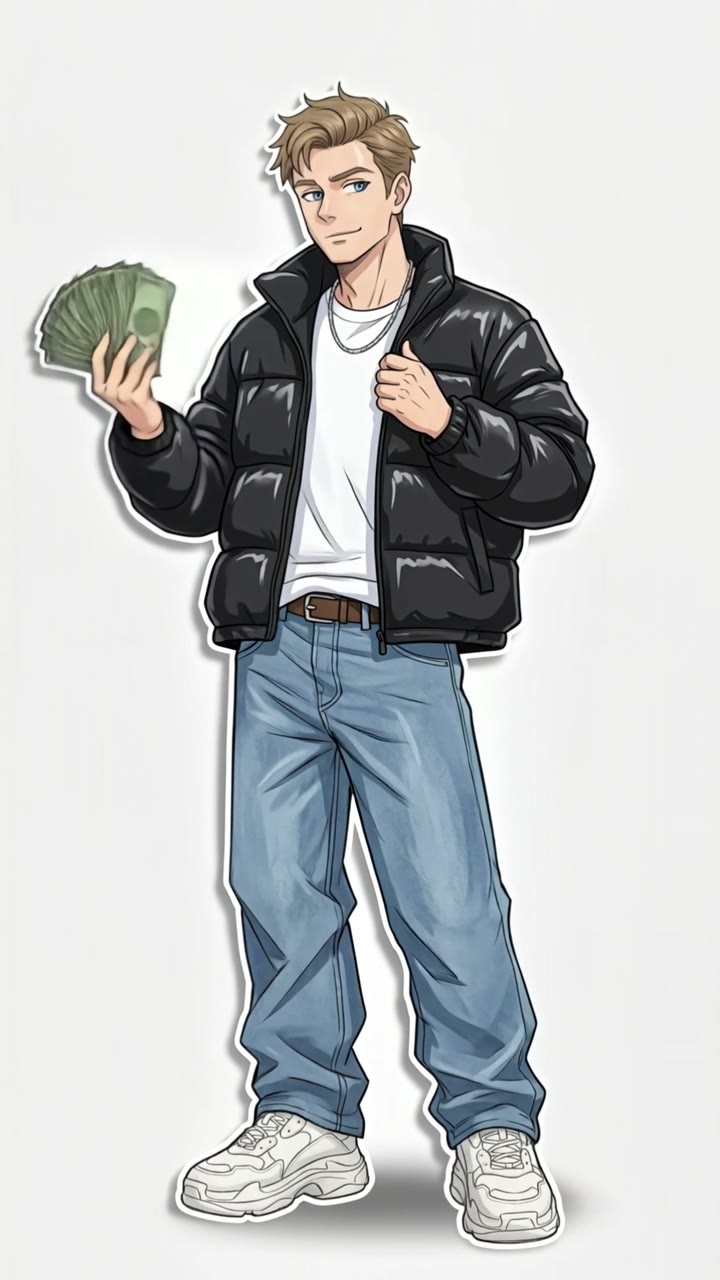
Your photo becomes a full-body anime drawing of you in baggy streetwear, cash in hand, on a clean white background. Then you sway side to side on the beat, just like the viral edits. One photo, 10 seconds.
The wassup in a minute trend is the TikTok edit where hand-drawn anime characters in baggy streetwear sway side to side, one after another, to a jersey club beat with the line "wassup, been a minute". Fans call the look Atlanta Lock. MakeViral draws you as that character from one photo and makes you sway.
Also called Wassup been a minute trend · In a minute wassup · Wasala in a minute · Wassup sway
Example
What the Wassup in a Minute video looks like
Made from the prompts on this page. The people and pets are AI-made, not real persons, and the sound is original. Your result will differ from run to run.
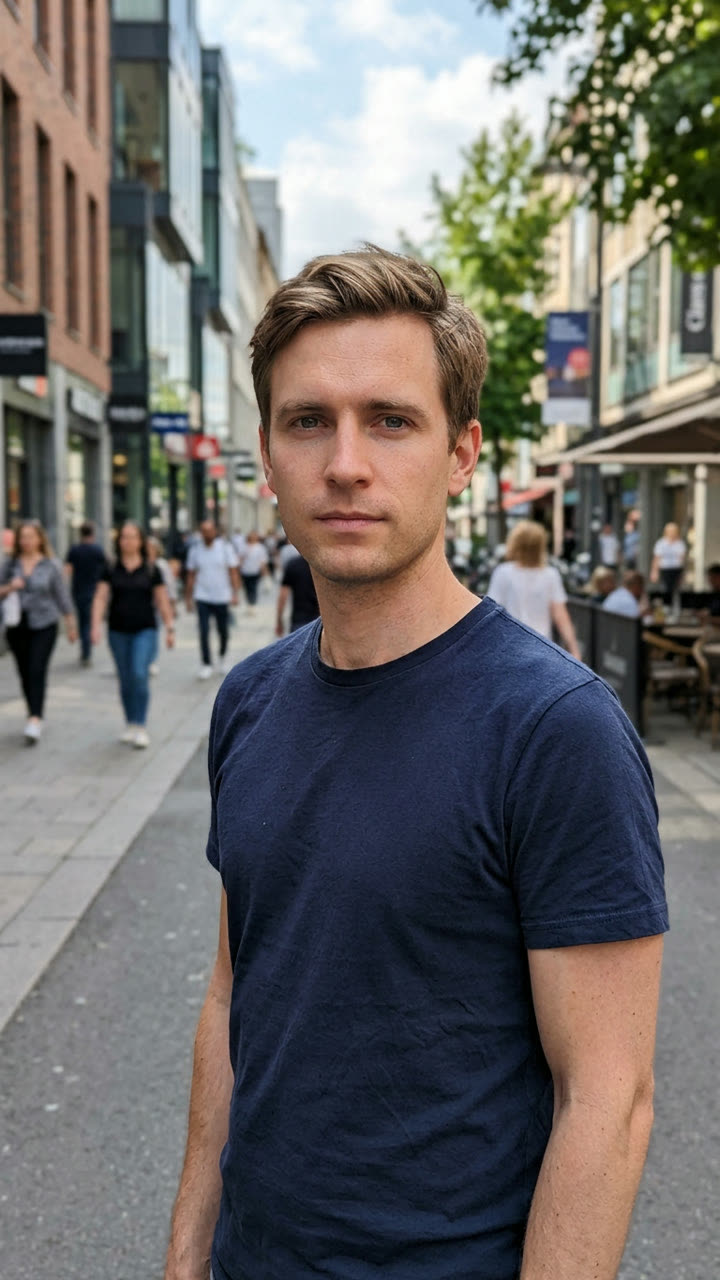
InputResult, 10 s, with sound
Our You version on an AI-made man: a full-body streetwear anime drawing of him, cash in hand, swaying on the beat.
Step by step
How to make the Wassup in a Minute video on MakeViral
Everything runs in the browser. No editing app, no prompt to write, no watermark.
Add your photo
Press "Create your own" and add you (18+), face clear, knees up or full body. Take it with the camera or pick it from your library.
Press Generate
The button shows the price. MakeViral builds the Wassup In A Minute scene with your photos, then Kling 3.0 animates it for 10 seconds with original sound. You write no prompt.
Download or share
The video is ready in a few minutes as a 9:16 MP4. Download it, share it from your phone, or find it later in My videos.
Which photo works best?
Use one clear photo of you, ideally from the knees up or full body, your face toward the camera, in good light.
The drawing keeps your face shape, hair, skin tone, glasses and beard, so pick a photo where your face is sharp and not hidden.
Your clothes do not matter: you get the trend's streetwear, a black puffer jacket, a white tee, a chain, baggy jeans and white sneakers.
A head-and-shoulders selfie works too; the drawing adds the rest of the body.
No hat or hood if you want your hair in the drawing, and no sunglasses.
One adult (18+) per photo, and only photos of you or of someone who said yes.
Where did the Wassup in a Minute trend start?
The sound came first. On 14 January 2026, producer zbee posted a jersey club remix of "From Time", the 2013 Drake song with Jhené Aiko. Its line "wassup, been a minute" is what most people hear as "wassup in a minute", and some hear "wasala in a minute" or "wassup wait a minute".
The look is older. For years, fans of the football anime Blue Lock have drawn its players as Atlanta rappers, in puffer jackets, chains and baggy jeans, holding stacks of cash. They call it Atlanta Lock. On 22 October 2026 the US animator @ristyisvalid made four of those drawings sway on a white background to the remix, one after another: 1.2 million views. The next day's post, captioned "Wassup in a minute", reached about 1.45 million views and gave the trend its name.
Within two days, fans redrew it with characters from other anime. On 24 and 25 October the AI wave followed: tutorials for the "character shake effect" with an AI video app template, an AI image prompt, and "upload one photo" templates that put you in the wassup in a minute anime edit.
Producer zbee posts a jersey club remix of "From Time" on TikTok. Its opening line becomes the trend sound. TikTok
@ristyisvalid (US) posts four hand-drawn streetwear anime characters swaying to the remix: the first post of the trend and the first with over a million views (1.2M). TikTok
The follow-up post, captioned "Wassup in a minute", gets about 1.45 million views and 353,000 likes and names the trend. TikTok
Fans redraw the edit with characters from other anime (one gets 753,000 views), and the first tutorials for the character shake effect appear. TikTok
AI tutorials and "upload one photo" templates flood TikTok, and the #wassupinaminute hashtag starts (153 videos and 254,000 views by the evening). TikTok
Copy and paste
The Wassup in a Minute prompts
You do not need these: the one-tap flow runs them for you. A photo prompt puts your photo into the scene, then a video prompt animates it. Want to change them? Copy them and edit them in AI Photo and AI Video.
1 photo: you (18+), face clear, knees up or full bodyKling 3.010 s · 1080p · 9:1656 credits
Step 1 · Photo prompt
Create a full-body anime character in a polished digital illustration style featuring clean, expressive linework, soft cel shading, subtle gradients, delicate sketch-like textures, realistic anime proportions, natural anatomy, detailed facial features, and carefully rendered clothing folds. Use gentle highlights, smooth skin shading, slightly painterly edges, and refined details for a stylish, semi-realistic anime appearance.
Character: Recreate the person shown in the uploaded image as this anime character: an original drawing of this person, not an existing anime or game character.
Clothing: Accurately reproduce this baggy streetwear outfit, including colors, patterns, accessories, materials, and small details: an oversized glossy black puffer jacket worn open over a plain white T-shirt, a thin silver chain necklace, baggy light-wash jeans with a brown leather belt, and chunky white sneakers. No logos, no brand marks, no sports jersey, no numbers and no letters on any clothing.
Pose: looks a bit to the side while doing money spread: one hand fans out a thick stack of plain green banknotes at chest height, the other hand holds the collar of the open jacket. A calm, cocky half smile with the mouth closed, the face three-quarters to the viewer.
Full Body: Always show the entire character from head to toe. If the uploaded image is cropped or incomplete, intelligently draw all missing body parts, including the torso, arms, hands, legs, and feet, ensuring natural anatomy and consistent proportions.
Background: Completely solid pure white (#FFFFFF), perfectly uniform, with absolutely no gradients, textures, scenery, or objects. Only a soft grey drop shadow falls on the white behind the character and a little to one side, like a cut-out sticker.
Composition: Center the character, keep the entire body visible, and maintain consistent art style and detail throughout. Vertical 9:16: the character fills most of the frame height, with a little white space above the head and below the feet. Exactly one person, an adult. No text, no logos, no watermark, no signature.
The face is always drawn in this anime style, never a photo face: the identity rules below apply to the anime character's face shape, eye color, hair color, hairstyle, bangs, skin tone, glasses, facial hair and gender. The clothes are the streetwear above, not the clothes from the photo.
2379 characters
Step 2 · Video prompt
Animate the drawn character with the bouncy side-to-side sway of a hand-animated sticker edit, on the beat. Keep the exact same pose, composition, and framing. The whole figure rocks from the feet: it leans a little to the left, then a little to the right, about two sways per second, and the head and shoulders bob along just behind the body with small, cocky nods. The feet stay planted on the same spot. The hand with the banknotes keeps fanning them at chest height and gives them a small flick on the beat; the other hand stays on the jacket collar. Add gentle secondary motion to the jacket, the chain and the hair. The character keeps the calm, cocky half smile with the mouth closed, blinks now and then, and raises the eyebrows once near the end. The face stays the same drawn face from the first frame to the last. Keep the exact same drawing style, linework, shading, colors and outfit, and keep the background completely unchanged: plain white, with the soft drop shadow moving with the body. No camera movement, panning, zooming, or perspective changes. Sound: a bouncy, punchy jersey club beat with fast kicks and claps. No voice, no singing, no words. One continuous shot. No text, no subtitles, no logos, no watermark, no extra people, no extra hands, no cuts.
You pay per video in credits, and the create page shows the exact price on the Generate button before you spend anything. The one-tap price covers the scene photo and the video, charged once. One video is 56 credits, so the smallest one-time pack that covers it is $9.99 for 100 credits, with no subscription. The cheaper models are there if you run the prompts by hand in AI Video.
Video model
Settings
Credits
Kling 3.0 (this template)
10 s, 1080p + 1 scene photo, one tap
56
Seedance 2.0 Fast (by hand in AI Video)
10 s, 720p + 1 photo
68
Veo 3.1 Fast (by hand in AI Video)
8 s, 720p + 1 photo
14
One-time packs and plans are on the pricing page. A failed video gives its credits back.
What your wassup in a minute video looks like
It is the same look as the viral edits, with you as the character.
Part
What you get
The drawing
A full-body, semi-realistic anime version of you with clean linework and soft shading, in a black puffer jacket, a white tee, a silver chain, baggy jeans and white sneakers
The pose
You look a little to the side, fan out a stack of cash in one hand and hold your jacket collar with the other, with a cocky half smile
The background
Plain white with a soft drop shadow, like a cut-out sticker
The move
You sway side to side from the feet and nod on the beat, about two sways a second, while the cash flicks
Length and sound
10 seconds, vertical, with a jersey club beat made with the video and no voice
The beat is not the trend's song, so add the wassup in a minute sound when you post. Because the clip has no words, the sound sits on top cleanly.
The wassup in a minute song and the Atlanta Lock look
The song. The wassup in a minute song is a jersey club remix of "From Time" by Drake with Jhené Aiko, made by producer zbee. The line "wassup, been a minute" is why you will see the trend spelled so many ways: wassup in a minute wassup, wassup wait a minute, wasala in a minute, and the wassup been a minute anime trend. The song belongs to its owners, and MakeViral gives you no rights to it; pick the trend sound on TikTok when you post.
The look. Atlanta Lock is a fan nickname for drawings of the Blue Lock football anime cast as Atlanta rappers. The atlanta lock trend uses those drawings, and the atlanta lock edit that went viral is them swaying to this remix. Many people search for a wassup in a minute blue lock version or a blue lock ai filter.
MakeViral never draws a show character. You get an original anime drawing of you, in generic streetwear with no logos, no team jersey and no numbers. That is the part people want to post: themselves in the trend.
How creators make it, and the one-photo shortcut
The wassup in a minute tutorial that most creators follow has two parts. First, an AI image prompt draws a full-body anime character on a green screen. Then they cut it out, put it on white and move the head, body and legs by hand with keyframes, the so-called character shake effect. Others paste the trend clip into an AI video app template. Either way, it takes a while.
This wassup in a minute AI version does both steps for you. It uses the same image prompt a trend tutorial shared on 25 October, with your photo as the character, then top-quality AI video models, including Seedance 2.5, make the sway. You need no wassup in a minute template, no green screen and no keyframes.
Pick Standard for the everyday price or Best for the stronger video model. The price of each shows on the create page before you start. If you only want the picture, the first step is like an anime yourself AI filter: turn yourself into anime AI style, in streetwear.
Tips for posting your wassup in a minute video
Add the trend sound: open any top wassup in a minute post and tap the sound, or search "wassup in a minute" in the sound picker.
Start the clip on the first beat so your sway lands on "wassup".
Make one for each friend and post them back to back, like the original edit's row of characters.
Use #wassupinaminute, #atlantalock and #animation so the right people find it.
Keep the AI label on: it is an AI drawing of you, not a real animation.
FAQ
Wassup in a Minute trend questions
What is the wassup in a minute trend?+
It is a TikTok edit from October 2026: hand-drawn anime characters in baggy streetwear sway side to side on a white background to a jersey club remix with the line "wassup, been a minute". The wassup in a minute trend started with a fan animator's post on 22 October 2026 that passed a million views.
What is the wassup in a minute song?+
It is a jersey club remix of "From Time" by Drake with Jhené Aiko, made by producer zbee and posted on TikTok in January 2026. The words are "wassup, been a minute", which people hear as "wassup in a minute" or "wassup wait a minute".
How do I make the wassup in a minute AI video of myself?+
Upload one photo of you and start. MakeViral draws you as a full-body streetwear anime character on white, then makes you sway on the beat for 10 seconds. It is like a wassup in a minute filter, with a real move, and you can make yourself an anime character without drawing anything.
Is this the Atlanta Lock trend? Can I get a Blue Lock character?+
It is the AI version of the Atlanta Lock trend, but with you as the character. We do not draw characters from Blue Lock or any other show, and we do not use the fan artists' drawings. Your video is an original anime drawing of you in the same streetwear style, which is also what the atlanta lock AI templates do.
Does my video come with the trend sound?+
No. It comes with a jersey club beat made with the video, with no voice. Add the wassup in a minute sound when you post on TikTok, so your video joins the trend.
Can I make it with friends or with my pet?+
Each video has one character, like each drawing in the original edit. Make one for each friend and post them in a row. There is no pet version yet, because the trend posts only show people.
Can I use a photo of a child or a celebrity?+
No. Use a photo of yourself or of an adult (18+) who agreed to it. We do not make this video of children, celebrities or strangers.