Ghost Filter Prank: A Creepy Ghost Rises Behind You

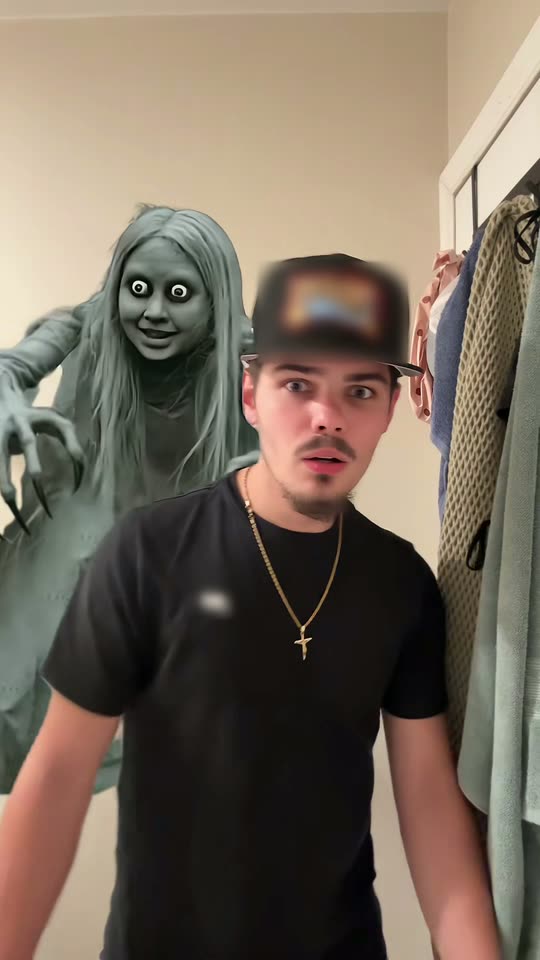
A grey ghost with long grey hair, huge white eyes and a wide grin creeps up behind you while you talk to the camera, and it is gone when you look back. Add one photo. Everything you get is made by AI, so tell people that when you share it.

The original Ghost Filter Prank reel by @maeveplusryanOriginal reel
  • 1 photo you add
  • 12 s clip with sound
  • 9:16 for TikTok, Reels, Shorts
  • No watermark

No prompt to write: Add your photo and tap once

Create your own

Ready in up to several minutes · 183 credits

The ghost filter prank is the TikTok trend where a creepy grey ghost with long grey hair, round white eyes and long claws rises behind someone on the phone screen while they talk, and their reaction is the whole post. Here AI makes that clip from one photo of you, in the viral clip or in your own room.

Example

What the Ghost Filter Prank video looks like

This is the original reel. Your photos replace its characters, so your video follows the same shots with your faces. No two runs come out the same.

Original reel by @maeveplusryan, 12 s

The original reel by @maeveplusryan: she tries the ghost filter on her boyfriend, who is "super scared of ghosts". A grey ghost with long hair and huge white eyes rises behind him while he talks to the camera, and it is gone each time he looks back. Original clip puts your face in his place. The logos on his cap and T-shirt are blurred.

Use this reference
Step by step

How to make the Ghost Filter Prank video on MakeViral

Everything runs in the browser. No editing app, no prompt to write, no watermark.

  1. Add your photo

    Press "Create your own" and add your photo, face clear. Take it with the camera or pick it from your library.

  2. Press Generate

    The button shows the price. Seedance 2.5 puts your photos into the Ghost Filter Prank trend clip and copies it shot by shot for 12 seconds, with the reel's original song. You write no prompt.

  3. Download or share

    The video is ready in up to several minutes as a 9:16 MP4. Download it, share it from your phone, or find it later in your Library.

Which photo works best?

Upload one photo of you; it works for both versions.

  • Face to the camera, sharp and well lit, from the chest up or the waist up. No sunglasses, and no hat or hair over the eyes.
  • Original clip: any background works, because the hallway, the ghost and the camera come from the clip. You get the clothes and the hair from your photo, not the cap from the clip.
  • Your room: take the photo where you want the ghost to show up, with some empty space behind your shoulders, like a hallway, a doorway or a dim bathroom. The prompt asks the AI to use the room in your photo.
  • One person per photo.
  • Use your own photo, or a photo of an adult friend who said yes. Never a child, a celebrity or a stranger.

Where did the Ghost Filter Prank trend start?

Ghost filter pranks are not new. In August 2022 a ghost filter video an influencer made with her four-year-old son passed 23 million views, and in September 2022 a trauma therapist on TikTok warned parents that scaring children this way is not a harmless joke.

In early October 2026 the prank came back with a new ghost: a grey ghost woman with long grey hair, enormous white eyes, a wide grin and long clawed fingers who hovers behind the person on the screen. Tutorials for the CapCut template behind it went up from 6 October. The same week, South African news site Briefly wrote about a grandmother who asked the ghost for blessings, and people tried it on their partners: @maeveplusryan's "Trying the ghost filter on my boyfriend who's super scared of ghosts", posted on 8 October, is the clip on this page.

Most of the viral posts film children, and some of the most liked comments call that cruel. This page is for adults pranking adults who are in on the joke, or for posting your own ghost video, made with AI.

  1. Mothership reports that an influencer's ghost filter video with her four-year-old son has 23 million views, and that viewers accused her of traumatising him. Mothership

  2. A trauma therapist on TikTok warns parents against the ghost filter prank on children; the #ghostprank hashtag has more than 165 million views. YourTango

  3. A ghost filter prank on a grandmother in South Africa, who asks the grey, wide-grinning ghost for blessings, gets 19.4K likes on TikTok; tutorials for the new ghost template start to appear the same day. Briefly News

  4. @maeveplusryan posts "Trying the ghost filter on my boyfriend who's super scared of ghosts"; it has 32.4K views and 2,631 likes on 14 October. TikTok

  5. The #ghostprank hashtag holds 8,822 TikTok videos and 306.5 million views, and #ghostfilter holds 4,527 videos and 89.2 million views. TikTok

Copy and paste

The Ghost Filter Prank prompts

You do not need these: the one-tap flow runs them for you, together with the trend clip. [Image 1] and [Image 2] are your two photos, and [Video 1] is the trend clip the video copies.

Original clip

1 photo: your photo, face clearSeedance 2.512 s · 720p · 9:16183 credits
Video prompt

Recreate the reference video [Video 1] shot for shot: the same narrow cream-colored hallway beside an open white door hung with towels, at night, the same handheld front phone camera, the same framing, timing, head turns, steps and mouth moves, and the same grey ghost behind the person. The ONLY change: the young man in the black T-shirt is now the person in [Image 1]. The person = the person in [Image 1], in EVERY frame: copy the exact face from [Image 1] - face shape, eye color and eye shape, eyebrows, nose, mouth, skin tone, age, hair color, hair length and hairstyle, and any beard, moustache, glasses or freckles exactly as in the photo. The person wears the clothes and the hair from [Image 1]; if [Image 1] shows only the head or the upper body, invent the rest so it matches naturally. The same real person in every frame, from the first second to the last, so their friends instantly recognize them, also when they look back over the shoulder and when they crouch. Never morph, never drift back to the original man's face. NO black cap, NO goatee and NO gold chain unless [Image 1] shows them. If [Image 1] shows an animal, the person is that animal, with its own face, fur and markings and the natural body volume and proportions of that animal: never flattened, squashed, stretched or merged with anything. THE GHOST stays exactly as in [Video 1]: a creepy grey ghost woman with long, straight grey hair, grey skin, oversized round white eyes with tiny dark pupils, a wide eerie grin and long thin grey fingers with dark claws, behind the person's shoulder. It appears and disappears at the same moments as in [Video 1]: when the person looks back over the shoulder it is gone, when they face the camera again it is back. It always stays behind the person and never covers the face. THE PERFORMANCE, beat by beat, exactly as in [Video 1]: 00:00-00:01: turns to face the camera and steps toward it; the ghost rises behind the shoulder on the right of the frame. 00:01-00:01.6: very close to the camera, eyes wide. 00:01.6-00:04.1: stares into the camera, scared, mouth half open, while the ghost peers over the shoulder on the left of the frame with its claws raised. 00:04.1-00:05.3: looks back over the shoulder: the ghost is gone. 00:05.3-00:08.9: faces the camera again, frozen and wide-eyed, talking under the breath; the ghost is back behind the left shoulder, grinning. 00:08.9-00:09.5: glances back over the shoulder again: the ghost is gone. 00:09.5-00:10.3: faces the camera, the ghost back behind the shoulder, then ducks forward. 00:10.3-00:12: crouches down low, only the head and shoulders in frame, while the ghost looms tall behind. FACIAL EXPRESSION: scared, confused and wide-eyed the whole time, never smiling. LIP SYNC: the mouth opens and closes exactly when the original man's mouth does in [Video 1], and is closed when his is. Real live-action phone footage, clear facial features, no distortion. Anatomy rules: one head only, on the person's shoulders. Two arms and two hands, five fingers on each hand. Exactly one real person and one ghost. No text, no captions, no logos, no watermark, no blurred patches on the clothes.

3169 characters
Your room

1 photo: your photo, face clearSeedance 2.510 s · 720p · 9:16126 credits
Video prompt

Make a creepy grey ghost appear behind the person in [Image 1], build suspense with a slow reveal: a spooky ghost filter prank video, filmed like a real front-camera phone video at home, in one continuous shot with no cuts. Photorealistic, fine phone-camera grain. The person is the one in [Image 1], in every frame: copy the exact face from [Image 1] (the face shape, eye color and eye shape, eyebrows, nose, mouth, skin tone, age, hair color, hair length and hairstyle, and any beard, moustache, glasses or freckles) and the clothes from [Image 1]. Keep the person in front recognizable while the spooky reveal builds: the same face from the first frame to the last, so their friends recognize them at once, also in the dim light and when the person turns. Never morph. If [Image 1] shows an animal, the person is that animal, with its own face, fur and markings. The place is the room behind the person in [Image 1], with the same walls, doors, furniture and light; if [Image 1] shows little of the room, a dim home hallway at night with a half-open door behind the person. The person stands close to the camera, framed from the chest up, the face large and sharp, with empty space behind both shoulders. A grey, long-haired ghost slowly rising in the background: a creepy grey ghost woman with long, straight grey hair, grey skin, oversized round white eyes with tiny dark pupils, a wide eerie grin and long thin grey fingers with dark claws, in a long grey dress. 0-3 s: the person talks to the camera with a relaxed smile, unaware; a subtle flickering light. 3-6 s: a slow entrance: the ghost slowly rises behind one shoulder, staring into the camera. 6-8 s: a sudden peek: the ghost leans out right beside the person's head with an eerie grin and lifts its clawed fingers. 8-10 s: the person stops talking, eyes wide, and spins around to look behind: nothing is there. The person turns back to the camera, frozen. A creepy grey ghost with long hair and oversized white eyes emerging slowly behind the person. A stable camera, a consistent face, and a brief suspenseful reveal. Audio: quiet room tone, a low eerie hum that slowly rises, the person's own casual chatter, then a sharp gasp. No music, no lyrics. A static camera, realistic room lighting, a ghost placed clearly behind the subject, and a short gradual reveal. The ghost never overlaps the person and never covers the face. Exactly one real person and one ghost. No blood, no gore, no text, no captions, no logos, no watermark.

2501 characters

How many credits does it cost?

You pay per video in credits, and the create page shows the exact price on the Generate button before you spend anything. The one-tap price covers the video, made in one step from your photos and the trend clip, charged once. One video is 183 credits, so the smallest one-time pack that covers it is $39.99 for 450 credits, with no subscription. The cheaper models are there if you run the prompts by hand in AI Video.

Video modelSettingsCredits
Seedance 2.5 (this template)12 s, 720p, copies the trend clip, one tap183

One-time packs and plans are on the pricing page. A failed video gives its credits back.

What happens in the ghost filter prank video, second by second?

Both versions put your face on the person the ghost sneaks up on. They differ in where it happens and in the sound:

TimeOriginal clip (12 s)Your room (10 s)
StartYou turn to the camera in a narrow hallway; the ghost rises behind your shoulder.You talk to the camera in the room from your photo; the light flickers a little.
MiddleYou stare into the camera, wide-eyed, while the ghost peers over your shoulder with its claws up. You look back: it is gone. You face the camera: it is back.The grey, long-haired ghost slowly rises behind you, then peeks out right next to your head with an eerie grin.
EndYou duck down low while the ghost looms tall behind you.You notice, freeze and spin around: nothing is there.

How it works: Original clip uses Seedance 2.5 to edit the real trend clip itself: your face and your clothes replace the boyfriend's in every frame, and the hallway, the ghost and the camera stay. The clip's own sound goes back on after the run (his voice from the clip); you can turn it off on the result screen. Your room uses Seedance 2.5 to make a new 10-second clip from your photo, with its own spooky sound. Both are vertical 720p. A run takes 5 to 15 minutes, and the exact price shows on the Generate button before you spend anything. Every run is a new take, so results differ.

Original clip or Your room: which one should you make?

  • Original clip looks exactly like the viral prank: real phone footage, the same ghost and the same scared stare, with you in the boyfriend's place. Pick it to post the trend as everyone knows it.
  • Your room puts the ghost in your own place, so it works as a prank: the ghost seems to be in your hallway or your bathroom, not in a stranger's. Pick it when the setting matters.

Caption ideas: "Tried the ghost filter and I'm never turning around again", "Is she still behind me?", "POV: you said ghosts aren't real", or "Made this with AI, don't worry". Hashtags on the trend: #ghostfilter, #ghostprank and #ghostfilterchallenge.

Looking for the sheet-ghost photos with sunglasses instead? That is a different trend: see the AI ghost photoshoot. For the masked killer photos, see the Ghostface AI trend.

How do you do the ghost prank without hurting anyone?

The ghost filter prank went viral on children, and a lot of viewers, and therapists, say that is not funny: a small child cannot tell a filter from a real ghost. Keep it a joke everyone can laugh at:

  • Adults only. Never show the video to a child to scare them, and never make one from a child's photo.
  • Only people who are fine with a scare. Skip anyone with anxiety, a heart condition or a real fear of ghosts.
  • Use their photo only with their yes. Make it with your own face, or with a friend who agreed.
  • Reveal the joke fast. Tell them it is an AI video right after the scare.
  • Say it is AI when you post it. The video is made by AI. Keep the platform's AI label on, so nobody thinks it is a real ghost sighting.

What goes wrong, and how do you fix it?

ProblemFix
You get a black cap, a goatee or a gold chain (Original clip)The man in the clip wears all three. The prompt bans them unless your photo shows them. Use a clear photo of your face and hair, then run it again.
The voice does not fit you (Original clip)The clip's own sound is his voice. Turn the sound off on the result screen and add your own audio.
The ghost covers your faceThe prompts keep the ghost behind you. Run it again; a photo with space behind your shoulders helps.
The room is not your room (Your room)The AI only sees what your photo shows. Take the photo with more of the room in view.
Your face changes in the dark or when you turnUse a sharp, front-facing photo in good light. Every run is a new take.
The model refuses a photoSome photos get refused. The credits come back; try another photo.
FAQ

Ghost Filter Prank trend questions

What is the ghost filter prank?
It is a TikTok prank where a creepy ghost appears behind someone on the phone screen while they talk to the camera. The October 2026 version uses a grey ghost woman with long grey hair, round white eyes, a wide grin and long claws, and the person's reaction is the post.
Where does the ghost filter prank come from?
Ghost filter pranks went viral on TikTok in 2022, mostly on children, and were criticized by therapists. In early October 2026 they came back with the new grey long-haired ghost from a CapCut template, with tutorials from 6 October; people tried it on their children, partners and grandparents.
Can I make the ghost filter prank with AI from a photo?
Yes. Press "Create your own", pick Original clip or Your room and add one clear photo of your face. Press Generate; the button shows the price first. You get a vertical video with sound where the ghost rises behind you. You write no prompt.
Is the ghost real, or is it AI?
The ghost is not real. In the viral clips it comes from a phone template, and on this page the whole video is made by AI from your photo. Say so when you share it, and keep the platform's AI label on.
Is the man from the original clip in my video?
No. In Original clip, your face and your clothes replace him in every frame; only the hallway, the ghost, the camera moves and the clip's sound stay. In Your room, nothing from the clip is used.
Which prompt does this template use?
No creator of the trend shared a prompt: the viral clips use a closed CapCut template. Your room uses the published AI-video prompt for the trend: a creepy grey ghost with long hair and oversized white eyes emerging slowly behind the person, a stable camera, a consistent face and a brief suspenseful reveal, with rules that keep your face from the photo. Original clip copies the trend clip shot by shot.
Can I do the ghost prank on my kids?
We ask you not to. Small children cannot tell an AI ghost from a real one, and child therapists warned about this prank when it first went viral in 2022. Use it with adults who are in on the joke, or post your own ghost video.
How long is the video, and does it have sound?
Original clip is 12 seconds with the original clip's sound put back on after the run; you can turn it off on the result screen. Your room is 10 seconds with its own eerie sound made by the AI. Both are vertical 720p.
How much does an AI ghost filter prank cost?
The create page shows the exact price on the Generate button before you spend anything. Original clip costs more than Your room, because it edits a 12-second clip. If a run fails, the credits come back.
Can I post my ghost video on TikTok or Instagram?
Yes. It is a vertical MP4 with no watermark. Keep the AI label on, use #ghostfilter or #ghostprank, and only post someone else's face if they said yes.

Make your own Ghost Filter Prank video

Add one photo and tap once. No prompt to write. 183 credits.

No watermark. A failed video gives its credits back. Secure checkout by Stripe.