Back

Glove Knock Filter: Cartoon Boxing Gloves Punch You or Your Pet

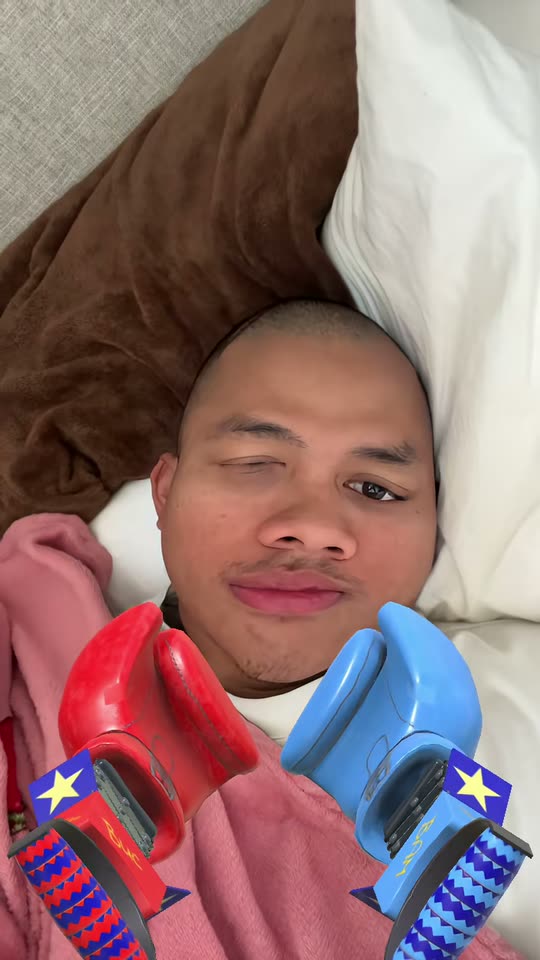
A red and a blue cartoon boxing glove spring up and punch the face until the cheeks puff up pink. Add one photo, and you, a friend who said yes or your pet take the punches, with the trend's own sound.

The original Glove Knock reel by @mangucupppppOriginal reel
  • 1 photo you add
  • 6 s clip with sound
  • 9:16 for TikTok, Reels, Shorts
  • No watermark

No prompt to write: Add your photo and tap once

Create your own

Ready in up to several minutes · 92 credits

The Glove Knock filter is a TikTok camera effect by the effect creator DunPig: a red and a blue cartoon boxing glove spring up and punch your face until your cheeks swell up pink, to the effect's own sound. It started on 18 November 2026. Add one photo, and you or your pet take the punches.

Also called DunPig Glove Knock · Boxing gloves punch filter · Spring boxing gloves effect

Example

What the Glove Knock video looks like

The examples are the trend's own TikTok clips, filmed with the live Glove Knock camera effect, with their sound. Your video copies the clip of the version you pick, with your photo in place of the man or the cat.

Original reel by @mangucuppppp, 6 s

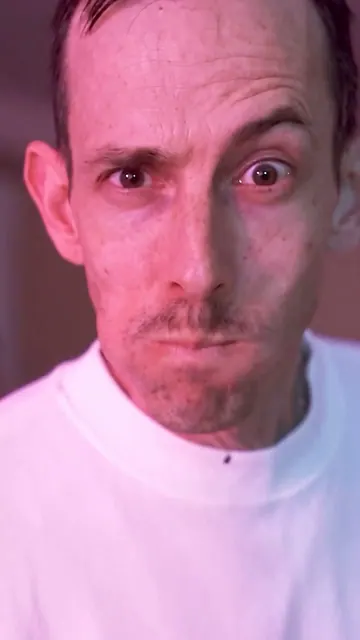
The most viewed Glove Knock clip, by @mangucuppppp (TikTok, 20 November 2026, 28.1 million views): he lies in bed with a straight face while the red and blue gloves punch him and his cheeks puff up pink. Your photo takes his place.

Use this reference
Original reel by @endless_mystery, 6 s

"Poor patches" by @endless_mystery (TikTok, 20 November 2026, 10.3 million views): a calm black cat takes punch after punch and does not care. Your pet takes the cat's place.

Use this reference
Step by step

How to make the Glove Knock video on MakeViral

Everything runs in the browser. No editing app, no prompt to write, no watermark.

  1. Add your photo

    Press "Create your own" and add your photo, face clear. Take it with the camera or pick it from your library.

  2. Press Generate

    The button shows the price. Seedance 2.5 puts your photos into the Glove Knock trend clip and copies it shot by shot for 6 seconds, with the reel's original song. You write no prompt.

  3. Download or share

    The video is ready in up to several minutes as a 9:16 MP4. Download it, share it from your phone, or find it later in My videos.

Which photo works best?

Upload one photo: of yourself (or a friend who said yes) for You, of your pet for Pet.

  • You: a selfie or a portrait from the chest up, face to the camera, sharp and in good light. The video is a close selfie, so the face fills the frame and gets puffy cheeks: a big, clear face works best.
  • No sunglasses, no mask, no hand in front of the face and no beauty filter.
  • Pet: one animal, head and chest in view, eyes open, in daylight. The fur colors, ears and markings come from your photo.
  • Any background works: the bed, the pillows and the camera come from the clip.
  • Only one person or one pet in the photo. Never a celebrity or a stranger.

Where did the Glove Knock trend start?

Glove Knock is a live camera effect, not a song or a film scene. The effect creator DunPig (@dun.pig on TikTok, tag #DunpigEffect) posted the first demo on 18 November 2026 and a second one on 19 November, each with its own sound. By 25 November the two demos had 14.5 million and 22.7 million views.

The rest of TikTok picked it up within a day. On 20 November @mangucuppppp filmed himself in bed taking the punches with a straight face: 28.1 million views, the most watched Glove Knock TikTok post. The same day @endless_mystery pointed it at a black cat called Patches, who does not even blink (10.3 million views). Pets became the second wave: a barking chihuahua from @trashygas got 9.3 million views on 24 November. Most posts come from Southeast Asia (Indonesia, Myanmar, Vietnam, the Philippines), with the US and Europe close behind.

On 23 November CapCut tutorial accounts in Mexico and the US started to teach the "Glove Knock AI trend": the same look made from one photo instead of the live camera. This page does that too.

  1. The effect creator DunPig posts a second Glove Knock demo with a second sound (the first went up on 18 November). It has 22.7 million views by 25 November. TikTok

  2. @mangucuppppp posts a selfie in bed with the effect. With 28.1 million views and 819.9K likes by 25 November, it is the most viewed Glove Knock post. TikTok

  3. @endless_mystery posts "Poor patches": the gloves punch a calm black cat. 10.3 million views and 512.4K likes by 25 November. The #gloveknock hashtag is created the same day. TikTok

  4. CapCut tutorials teach the "Glove Knock AI trend" from one photo: @lorena82453 in Mexico (44K views) and @goldieblake2 in the US (33.1K views). TikTok

  5. @trashygas posts a chihuahua that "wouldn't stop barking" getting the Glove Knock treatment: 9.3 million views in a day. TikTok

  6. The two DunPig sounds hold 31.9K and 15.9K TikTok videos. TikTok

Copy and paste

The Glove Knock prompts

You do not need these: the one-tap flow runs them for you, together with the trend clip. [Image 1] and [Image 2] are your two photos, and [Video 1] is the trend clip the video copies.

You

1 photo: your photo, face clearSeedance 2.56 s · 720p · 9:1692 credits
Video prompt

Recreate the reference video [Video 1] shot for shot: one continuous front-camera phone selfie of someone lying back on a white pillow and a brown pillow, under a pink blanket, with the same framing, the same small camera wobble, the same light and the same timing. The ONLY change: the man lying in bed is now the subject in [Image 1]. The subject = the subject in [Image 1], in EVERY frame. If [Image 1] shows a person: copy the exact face from [Image 1] - face shape, eye color and eye shape, eyebrows, nose, mouth, skin tone, age, hair color, hair length and hairstyle, and any beard, moustache, glasses or freckles exactly as in the photo. NO shaved head unless [Image 1] shows one: keep the hair from [Image 1]. The person wears the top from [Image 1] under the pink blanket. If [Image 1] shows a pet, an animal or anything else: it lies on the pillow in the man's place with its own whole head and body, face, ears, fur or surface, colors and markings exactly as in [Image 1], with the natural body volume and proportions of that subject: never flattened, stretched or merged with anything, and no human body parts or clothes. The same subject in every frame, so their friends instantly recognize them. Never morph, never drift back to the original man's face. Two cartoon boxing gloves sit at the bottom of the frame for the whole clip, exactly as in [Video 1]: a glossy red glove on the left and a glossy blue glove on the right, each on a short striped red, white and blue base with small white stars. When a glove punches, it shoots up on a coiled metal spring in a fraction of a second, hits the face, and snaps straight back down to its base. Keep the gloves, springs and bases exactly as in [Video 1]: the same colors, size, place and flat cartoon sticker look on top of the live footage, and no other gloves. THE PUNCHES, matching [Video 1] second by second: 00:00.6: the blue glove punches the face. 00:01.6: the red glove punches the face. 00:02.6: blue. 00:03.6: red. 00:04.6: blue. 00:05.6: red. Between punches both gloves rest at their bases. THE REACTION, exactly like the man in [Video 1]: on each hit the head jolts a little and the eyes squeeze shut. After every punch the face gets puffier: the cheeks swell more and turn brighter pink-red, so by the end the face is round and swollen with big rosy cheeks and squinting eyes, a funny cartoon look. Between punches the subject lies still and looks into the camera with a straight, deadpan face, never laughing. A pet's face puffs up and its eyes squint the same way. Never blood, bruises, cuts, tears or real injury. Real phone selfie footage under the cartoon gloves. No dialogue throughout the entire video. No background music. Avoid: cuts, text, captions, stickers, logos, watermarks, extra gloves, extra characters, extra limbs, morphing, blood, injury. Anatomy rules: one head only, on the subject's own body. Exactly one subject in the frame. A person's hands stay under the blanket.

2972 characters

Pet

1 photo: your pet, face clearSeedance 2.56 s · 720p · 9:1692 credits
Video prompt

Recreate the reference video [Video 1] shot for shot: one continuous handheld phone shot of an animal lying on a bed with a light patterned blanket, in a room with pale green walls and a bright window with white blinds, with the same framing, the same slow camera tilt, the same light and the same timing. The ONLY change: the cat lying on the bed is now the subject in [Image 1]. The subject = the subject in [Image 1], in EVERY frame. If [Image 1] shows a pet or another animal: the same species and breed, face, eyes, ears, muzzle, fur colors, fur length and markings as in [Image 1], with the natural body volume and proportions of that animal: never flattened, squashed, stretched or merged with anything. It lies on the bed in the cat's place, its head in the same spot. NO black fur and not the coat of the cat in the video unless [Image 1] shows it. If [Image 1] shows a person: the person lies on the bed in the cat's place, chin resting on the blanket, with the exact face from [Image 1] - face shape, eye color and eye shape, eyebrows, nose, mouth, skin tone, age, hair color, hair length and hairstyle, and any beard, moustache, glasses or freckles exactly as in the photo - and the clothes from [Image 1]. If [Image 1] shows anything else, it keeps its own whole look. The same subject in every frame, from the first second to the last, so its owner instantly recognizes it. Never drift back to the cat in the video. Two cartoon boxing gloves sit at the bottom of the frame for the whole clip, exactly as in [Video 1]: a glossy red glove on the left and a glossy blue glove on the right, each on a short striped red, white and blue base with small white stars. When a glove punches, it shoots up on a coiled metal spring in a fraction of a second, hits the face, and snaps straight back down to its base. Keep the gloves, springs and bases exactly as in [Video 1]: the same colors, size, place and flat cartoon sticker look on top of the live footage, and no other gloves. THE PUNCHES, matching [Video 1] second by second: 00:00.8: the blue glove punches the face. 00:02.2: the red glove punches the face. 00:03.6: blue. 00:04.4: red. 00:05.7: blue. Between punches both gloves rest at their bases. THE REACTION, exactly like the cat in [Video 1]: it does not care. On each hit the head nudges a little and the eyes squint, then it goes back to lying calmly with half-closed, unbothered eyes, small ear and head moves only. A person stays just as calm and deadpan. Never blood, bruises, cuts or real injury. Real phone footage under the cartoon gloves. No dialogue throughout the entire video. No background music. Avoid: cuts, text, captions, stickers, logos, watermarks, extra gloves, extra animals, extra characters, extra limbs, morphing, blood, injury. Anatomy rules: one head only, one muzzle, natural animal legs and paws, never human hands on an animal. Exactly one subject on the bed.

2913 characters
How many credits does it cost?

You pay per video in credits, and the create page shows the exact price on the Generate button before you spend anything. The one-tap price covers the video, made in one step from your photos and the trend clip, charged once. One video is 92 credits, so the smallest one-time pack that covers it is $9.99 for 100 credits, with no subscription. The cheaper models are there if you run the prompts by hand in AI Video.

Video modelSettingsCredits
Seedance 2.5 (this template)6 s, 720p, copies the trend clip, one tap92

One-time packs and plans are on the pricing page. A failed video gives its credits back.

What happens in the Glove Knock video, second by second?

Each version copies one real Glove Knock clip, and your photo takes the place of the one who gets punched. The gloves, the timing and the camera come from the clip. Both clips are one continuous phone shot of about 6 seconds:

TimeYou (the selfie in bed)Pet (the cat on the bed)
0 to 1 sYou lie back on the pillow and look into the camera. The blue glove springs up and hits your cheek.Your pet lies on the bed, calm. The blue glove springs up and hits it.
1 to 3 sThe red glove, then the blue one. Your eyes squeeze shut on every hit.The red glove lands. Your pet barely moves.
3 to 5 sRed, then blue again. Your cheeks swell more after each punch and turn pink.Blue, then red. The camera tilts a little.
5 to 6.3 sA last red punch: a round, puffy face with rosy cheeks, still deadpan.A last blue punch, and your pet still does not care.

How it works: the best AI video models available edit the clip itself: they put the person or pet from your photo in place of the man or the cat and keep everything else. You get about 6 seconds, vertical 9:16 at 720p, with the effect's own sound put back after the run. A run takes 5 to 15 minutes, and the exact price shows on the Generate button before you spend anything. Every run is a new take, so results differ.

You or Pet: which one should you make?

  • You copies the most viewed Glove Knock clip: a selfie in bed, the gloves punch one side and then the other, and the face swells up into a round, rosy cartoon look. A straight face makes it funnier. It also takes a pet or any other photo in his place.
  • Pet copies the "Poor patches" cat clip: your dog, cat or other pet lies on a bed and takes the punches without a care. Pets made the boxing filter blow up for the second time, and a calm, serious pet is the funniest.

Caption ideas: "Me after one more meeting", "My cat when the 5 am zoomies stop", "POV: the alarm went off", "He wouldn't stop barking at everyone outside". Or write your own.

More boxing jokes: get knocked out by your own shadow in the knocked out shadow boxing trend, or let your pet throw the punches in the boxing dog AI clip.

What goes wrong, and how do you fix it?

ProblemFix
The face looks less like you after the punchesThe swollen cheeks are the joke, and they change the face shape for a moment. Use a sharp, close photo where the face is big and clear, and run it again for a new take.
You get a shaved head (You)The man in the clip has a shaved head. The prompt keeps your hair from the photo; a photo that shows your hair clearly helps.
Your pet comes out black (Pet)The cat in the clip is black. Use a sharp daylight photo where the fur colors and markings are clear.
A glove looks a bit differentThe gloves come from the clip, and the model redraws them. Run it again for a new take.
The model refuses a photoSome photos get refused. The credits come back; try another photo.

Which sound, caption and hashtags should you post it with?

Your clip comes with the effect's own sound from the clip it copies, so it is ready to post. You can turn it off on the result screen. The sound belongs to its owner, and MakeViral gives you no rights to it. Rules differ from platform to platform, so check them before you use the clip in an ad or a paid post.

Hashtags: #gloveknock (created on 20 November 2026), #boxingfilter (85 TikTok videos and 1.6 million views on 25 November) and #DunpigEffect, the tag of the effect creator. Keep the platform's AI label on.

Keep it a joke. The punches are cartoon gloves with no injury. Make it with your own face, your own pet or a friend who said yes, never with a stranger's photo, and never to mock or threaten someone.

FAQ

Glove Knock trend questions

What is the Glove Knock filter?
Glove Knock is a TikTok camera effect by the effect creator DunPig. A red and a blue cartoon boxing glove on springs pop up from the bottom of the screen and punch the face again and again, and the cheeks puff up and turn pink, so many people just call it the boxing glove filter. It came out on 18 November 2026, and its two sounds hold more than 47,000 videos a week later.
Who made the Glove Knock effect?
The TikTok effect creator DunPig (@dun.pig), whose effects carry the tag #DunpigEffect. The DunPig effect demos for Glove Knock from 18 and 19 November 2026 have 14.5 million and 22.7 million views. The most viewed post with it is @mangucuppppp's selfie in bed (28.1 million views).
Is this the boxing filter TikTok has in its camera?
Not quite. The TikTok boxing filter works live in the TikTok camera. This page makes the same Glove Knock video with AI from one still photo, so it works with an old photo, a photo of a friend who said yes, or a pet that will never sit still in front of the camera.
How do I do the Glove Knock AI trend with my photo?
Press "Create your own", pick You or Pet and add one clear photo. Press Generate; the button shows the price first. You get a Glove Knock AI video of about 6 seconds with the trend's sound, and it waits in My videos when it is ready. You write no prompt. The Glove Knock CapCut tutorials on TikTok show a CapCut template that does the same from a photo.
Can my cat or dog do the Glove Knock trend?
Yes. Pick Pet: it copies the "Poor patches" cat clip, and your pet lies on the bed and takes the punches. Cats and dogs both work, so this is the cat boxing filter and the dog boxing filter in one. Use a sharp photo of one animal with the face in view.
Does it hurt, or is it violent?
No. The gloves are cartoon toys on springs, and the only result is puffy pink cheeks and a squint, like in the original effect. The prompt bans blood, bruises and any real injury.
Is Glove Knock the same as the AI face punch filter?
No. The older face punch filter of AI video apps shows a fist that hits the face in slow motion. The Glove Knock effect has two cartoon boxing gloves, red and blue, that spring up from the bottom of the screen, and a puffy, rosy face as the punchline.
Which prompt does this template use?
Glove Knock is a closed camera effect, so there is no prompt to copy: no creator, tutorial or template site shared one. This template uses our own prompt that copies the real clip shot for shot, with rules that keep the face from your photo, or your pet's fur, ears and markings.
How long is the video and what format is it?
About 6 seconds, like the trend's clips, as a vertical 9:16 MP4 at 720p with the effect's own sound. It plays on TikTok, Reels and Shorts, and there is no watermark.
Does the Glove Knock video cost credits?
Yes. Each video costs credits, and the create page shows the exact price on the Generate button before you spend anything. If a video fails, the credits come back.
Is the video real?
No. The person or pet in your video is put into the clip by AI from one still photo, and nobody filmed it. Keep the AI label on when you post it.
More trends

Other AI video templates

Make your own Glove Knock video

Add one photo and tap once. No prompt to write. 92 credits.

No watermark. A failed video gives its credits back. Secure checkout by Stripe.