Back

AI Mermaid Transformation: Splash Into a Mermaid

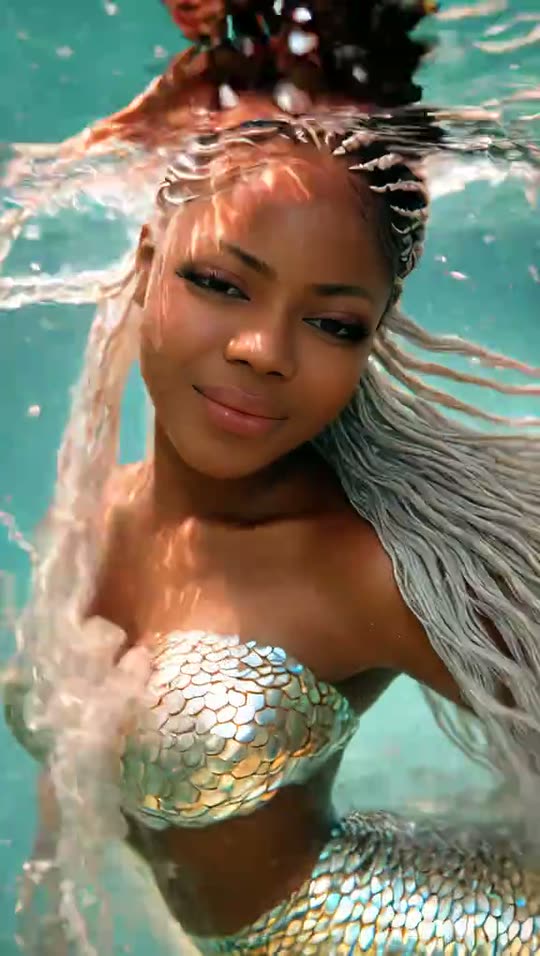
Turquoise water rises over you, a white splash fills the screen, and you come up under water as a mermaid with shimmering scales. Add one photo and get the splash mermaid filter video with the trend's own sound.

The original AI Mermaid reel by @clara2.39Original reel
  • 1 photo you add
  • 5 s clip with sound
  • 9:16 for TikTok, Reels, Shorts
  • No watermark

No prompt to write: Add your photo and tap once

Create your own

Ready in up to several minutes · 76 credits

The AI mermaid transformation is a TikTok photo template: water rises over a person in one photo, a white splash covers the screen, and the person floats under water as a mermaid with shimmering scales, on an original sound from 2021. It spread through CapCut and Hypic tutorials in 2026. Add one photo to make your own mermaid transformation.

Also called AI Mermaid Filter · Mermaid AI trend · AI water effect · Mermaid Glow Effect · AI Ocean Princess transformation

Example

What the AI Mermaid video looks like

The trend clip by @clara2.39, with its own sound. A real person posted it from her own photo; your video copies its water, splash and underwater scene with your face.

Original reel by @clara2.39, 5 s

The mermaid transformation clip by @clara2.39: she rests on a mirror table with a red rose, turquoise water rises over her, a white splash fills the screen, and she floats under water as a mermaid. Your photo takes her place.

Use this reference
Step by step

How to make the AI Mermaid video on MakeViral

Everything runs in the browser. No editing app, no prompt to write, no watermark.

  1. Add your photo

    Press "Create your own" and add you, chest up, face clear. Take it with the camera or pick it from your library.

  2. Press Generate

    The button shows the price. Seedance 2.5 puts your photos into the AI Mermaid Transformation trend clip and copies it shot by shot for 5 seconds, with the reel's original song. You write no prompt.

  3. Download or share

    The video is ready in up to several minutes as a 9:16 MP4. Download it, share it from your phone, or find it later in My videos.

Which photo works best?

Upload one photo of yourself.

  • Chest up, face to the camera, sharp and in good light. The face is big in the first seconds and again under water, so a close, clear face works best.
  • No sunglasses, no hat that hides the face and no beauty filter. Long hair is fine: it floats in the water.
  • Your clothes from the photo show in the opening; under the water you get the mermaid scales.
  • Any background works: the mirror table, the water and the light come from the trend clip.
  • A man becomes a merman with a bare chest and scales. A pet gets a shimmering tail.
  • Use your own photo or a friend who said yes, an adult. Never a child, a celebrity or a stranger.

Where did the AI Mermaid trend start?

Mermaid filters are not new on TikTok. In May 2025 TikTok's own AI Mermaid Filter turned videos of people into underwater mermaid scenes: the first uses date from 21 May 2025, and by 28 May 2025 more than 5.4 million videos had used it, according to Know Your Meme.

The splash version came next, as a photo template in CapCut (Dreamina) and Hypic. You give it one photo; the water rises over you, the screen turns white with the splash, and you float under water with mermaid scales. On 13 May 2026 @clara2.39 posted the clip on this page, and it passed 411,000 plays. A merman version posted two days later passed 546,000 plays.

Then came the tutorials. @baoyibao36 posted a "VIRAL AI Mermaid Glow Effect" tutorial on 17 August 2026 (968,134 plays by 21 November). From 15 to 18 November 2026 @phan.van.khai6 posted four AI mermaid transformation tutorials for the Hypic template, with 290,732, 266,363, 175,250 and 168,385 plays. All of them use the same "original sound" by the TikTok user @_lyss.__, first posted in November 2021.

  1. TikTok's AI Mermaid Filter sees its first uses; by 28 May 2025 more than 5.4 million videos have used it. Know Your Meme

  2. @clara2.39 posts the splash mermaid transformation clip shown on this page. It has 411,482 plays and 14,023 likes by 21 November 2026. TikTok

  3. @baoyibao36 posts a "VIRAL AI Mermaid Glow Effect" tutorial for the CapCut (Dreamina) template. It has 968,134 plays and 66,460 likes by 21 November 2026. TikTok

  4. @phan.van.khai6 posts the first of four Hypic AI mermaid transformation tutorials in four days; the top one has 290,732 plays by 21 November. TikTok

  5. The #mermaidfilter hashtag holds 28,865 TikTok videos and 381.8 million views; #aimermaidfilter holds 19,451 videos and 231.4 million views. TikTok

Copy and paste

The AI Mermaid prompt

You do not need these: the one-tap flow runs them for you, together with the trend clip. [Image 1] and [Image 2] are your two photos, and [Video 1] is the trend clip the video copies.

1 photo: you, chest up, face clearSeedance 2.55 s · 720p · 9:1676 credits
Video prompt

Recreate the reference video [Video 1] shot for shot: the same mirror table and rose, the same rising water, splash and underwater scene, the same camera, timing and moves. The ONLY change: the woman in [Video 1] is now the subject of [Image 1]. The subject = the subject of [Image 1], in EVERY frame, above and under the water. A person: copy the exact face from [Image 1]: face shape, eye color and eye shape, eyebrows, nose, mouth, skin tone, age, hair color, hair length and hairstyle, and any beard, moustache, glasses or freckles exactly as in the photo. The same real person in every frame, also under water with the hair floating. Never drift back to the original woman's face: NO cornrow braids and NO silver-white braids unless [Image 1] shows them; the person keeps the hair color, hair length and hairstyle of [Image 1], wet and floating in the water. Above the water the person wears the clothes from [Image 1]. Under the water a woman wears the shimmering scale top from [Video 1]; a man is a merman: bare-chested, with shimmering scales over the shoulders and the waist, never a woman's top. An animal, a toy, a character or an object: its own whole body and look replace ALL of the woman's body, with its own face, fur or surface and colors, resting on the mirror table in the opening and floating under water with a shimmering mermaid tail in place of its back legs or lower body, with no human face, hair, hands or clothes. One continuous take, no cuts, a close camera at the height of the table: [0-0.8s]: still, like a portrait photo: the subject leans on a glossy mirror table, the chin resting on the folded arms, and smiles softly at the camera; a red rose and red petals lie on the table and reflect in it. [0.8-2.5s]: clear turquoise water rises from the bottom of the frame, over the table, the arms and the rose, up to the chin and then over the face; the subject stays calm and smiles. [2.5-3.3s]: the water covers the camera: a big white splash and white foam fill the whole frame. [3.3-5s]: under water in bright turquoise light: the subject is now a mermaid, floating toward the camera, the hair streaming out in the water with bubbles and sparkling light; shimmering silver and pale gold fish scales cover the chest and run down into a mermaid tail; a soft smile into the lens. No dialogue throughout the entire video. No background music. Real live-action footage, photorealistic water. One head only, on the shoulders; a person has two hands with five fingers each. No extra people. No text, no captions, no logos, no watermark.

2566 characters
How many credits does it cost?

You pay per video in credits, and the create page shows the exact price on the Generate button before you spend anything. The one-tap price covers the video, made in one step from your photos and the trend clip, charged once. One video is 76 credits, so the smallest one-time pack that covers it is $9.99 for 100 credits, with no subscription. The cheaper models are there if you run the prompts by hand in AI Video.

Video modelSettingsCredits
Seedance 2.5 (this template)5 s, 720p, copies the trend clip, one tap76

One-time packs and plans are on the pricing page. A failed video gives its credits back.

What happens in the AI mermaid transformation, second by second?

Your video copies the trend clip shot for shot, in one continuous take, and your photo takes the woman's place:

TimeWhat you see
0 to 0.8 sA calm portrait: you rest your chin on your arms at a glossy mirror table, next to a red rose.
0.8 to 2.5 sClear turquoise water rises from the bottom of the screen, over the table and up over your face.
2.5 to 3.3 sA big white splash covers the camera.
3.3 to 5 sUnder water you float toward the camera as a mermaid: the hair streams out, light sparkles, and shimmering silver and gold scales cover your chest.

How it works: the best AI video models available edit the trend clip itself. They swap the woman for the person in your photo and keep the water, the splash and the camera. You get about 5 seconds, vertical 9:16, at 720p, with the trend's own sound put back after the run. A run takes 5 to 15 minutes, and the exact price shows on the Generate button before you spend anything. Every run is a new take, so results differ.

How is this different from the AI mermaid filter and other mermaid AI apps?

The AI mermaid filter TikTok users tried in 2025 changed a video in place. The 2026 trend is a mermaid transformation video: a splash transition from your photo into an underwater mermaid AI video, the effect people also call the Mermaid Glow Effect or the AI water effect. Most tutorials send you to a mermaid CapCut template or a Hypic mermaid template.

Here you add one photo and get the AI mermaid video with the trend's sound, with no app to install and no template link to find. If you want to turn yourself into a mermaid in a still picture only, an AI mermaid generator for photos does that; this page makes the moving splash version.

More transformations: become a wolf in the AI werewolf transformation, grow wings in I Want Wings, or try the black and white wet look photo.

What goes wrong, and how do you fix it?

ProblemFix
The opening does not look like your photo's placeThat is by design: the opening is the trend's mirror-table pose with your face and clothes. Only the person changes.
You get braids or silver hair you do not haveThe woman in the trend clip has braids that turn silver under water. The prompt bans both unless your photo shows them. Run it again with a sharp, recent photo.
The face looks like someone else under waterUse a close photo with the face big and sharp, then run it again.
A man gets a woman's scale topThe prompt asks for a bare-chested merman. Run it again for a new take.
The face is hidden for a momentThe white splash covers the whole screen for under a second. That is the transition.
The model refuses a photoSome photos get refused. The credits come back; try another photo.

Which sound, caption and hashtags should you post it with?

Your clip comes with the trend's own sound, the same 5 seconds, so it is ready to post. You can turn it off on the result screen. The sound belongs to its owner, and MakeViral gives you no rights to it. Rules differ from platform to platform, so check them before you use the clip in an ad or a paid post.

Hashtags: #mermaidfilter (28,865 TikTok videos and 381.8 million views on 21 November 2026), #aimermaidfilter (19,451 videos and 231.4 million views) and #mermaidtransformation (3,380 videos). Keep the platform's AI label on.

Caption ideas: "Before vs after the water hit", "Real me vs ocean me", "POV: you finally went to the beach". Or write your own.

FAQ

AI Mermaid trend questions

What is the AI mermaid transformation trend?
It is a TikTok photo template: water rises over a person in one photo, a white splash fills the screen, and the person floats under water as a mermaid with shimmering scales, on an original sound from 2021. It spread through CapCut (Dreamina) and Hypic tutorials, with the biggest ones from August to November 2026.
Is this the AI mermaid filter TikTok launched in 2025?
No, but they are related. TikTok's AI Mermaid Filter from May 2025 turned videos into underwater mermaid scenes, and more than 5.4 million videos used it in its first week. The 2026 mermaid transformation is a splash template that starts from one photo. Both go by the name mermaid filter on TikTok, and people search both as mermaid filter AI.
How do I make the AI mermaid transformation with my photo?
Press "Create your own" and add one clear photo, chest up. Press Generate; the button shows the price first. You get about 5 seconds of video with the trend's sound, and it waits in My videos when it is ready. You write no prompt.
Is there an AI mermaid filter app, or a mermaid filter app for the splash effect?
The tutorials use the CapCut and Hypic apps and a template link. MakeViral makes the same kind of mermaid transformation video in the browser from one photo, with no mermaid filter app to install.
Can a man do the mermaid AI trend?
Yes. A man becomes a merman: the prompt gives him a bare chest with shimmering scales, never a woman's top. A merman version of the trend passed 546,000 plays in May 2026. If you looked for merman AI, this is the same page.
Can I turn my dog or cat into a mermaid?
You can try. A pet photo keeps the animal's own body and look, and it gets a shimmering tail under water. The trend clip shows a woman, so a person gives the most reliable result.
Which prompt does this mermaid transformation AI use?
No creator shared a prompt: the CapCut and Hypic templates are closed, and the tutorials and comments show none. This template copies the trend clip second by second, the rising water, the splash and the underwater mermaid, and adds rules that keep the face from your photo.
What does the AI water effect do?
It is the transition in the middle of the video: water rises from the bottom of the screen over the person, then a white splash covers the camera. Under the water the mermaid look appears.
How long is the video and what format is it?
About 5 seconds as an MP4 at 720p, vertical 9:16, with the trend's sound. It plays on TikTok, Reels and Shorts, and there is no watermark.
Does the AI mermaid video cost credits?
Yes. Each video costs credits, and the create page shows the exact price on the Generate button before you spend anything. If a video fails, the credits come back.
Is the video real?
No. You are put into the trend clip by AI from one still photo, and nobody filmed it. Keep the AI label on when you post it.
More trends

Other AI video templates

Make your own AI Mermaid video

Add one photo and tap once. No prompt to write. 76 credits.

No watermark. A failed video gives its credits back. Secure checkout by Stripe.