Back

Christmas in Heaven AI: A Hug From Behind by the Tree

Add a photo of you and one of someone you miss. You sit alone by the Christmas tree, they appear behind you in a soft glow and hold you from behind, in a short video with the trend's own song and its line on screen.

The original Christmas Hug reel by @fabihola_ccOriginal reel
  • 2 photos you add
  • 6 s clip with sound
  • 9:16 for TikTok, Reels, Shorts
  • No watermark

No prompt to write: Add your photos and tap once

Create your own

Ready in up to several minutes · 92 credits

The Christmas hug from heaven is an AI video trend: you sit alone by the Christmas tree, and a loved one who has passed away appears behind you in a soft glow and hugs you from behind. People call it Christmas in heaven or, in Spanish, abrazo por detrás navidad. You need two photos: one of you and one of the person you miss.

Also called Christmas in heaven · Christmas hug from heaven · The only gift I want this Christmas is a hug from you · El único regalo que quiero para esta Navidad es un abrazo tuyo · Abrazo por detrás navidad · Navidad abrazo IA · Abrazo nostálgico navidad · Christmas hug from behind

Example

What the Christmas Hug video looks like

This is the first post of the trend's template, not a MakeViral result. Your video is a new clip made from your two photos in the same Christmas scene, with the same song. No two runs come out the same.

Original reel by @fabihola_cc, 15 s

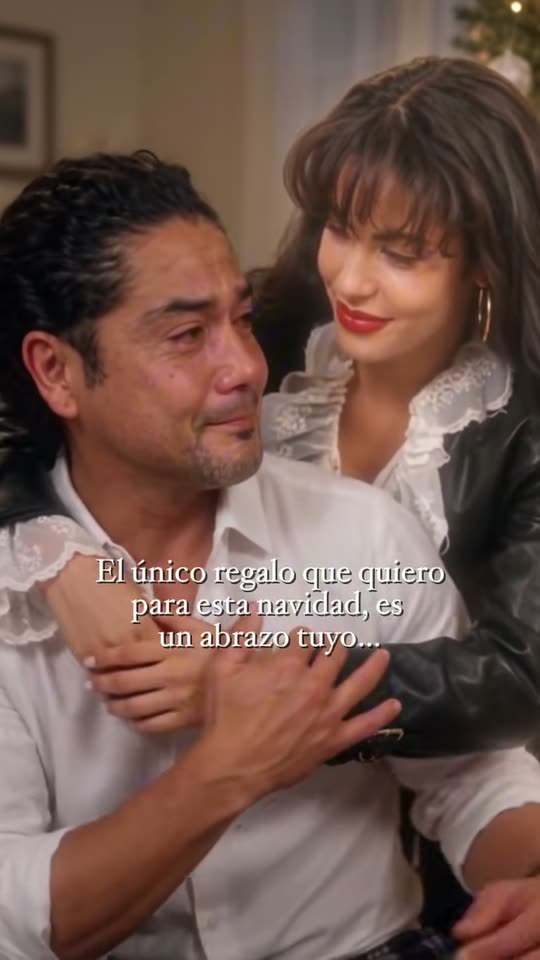
The first post of the template, by its creator @fabihola_cc on 20 November 2026, tagged #selenaquintanilla: a man cries alone by the tree, and an AI likeness of the late singer appears behind him in a soft glow and hugs him. The template's Spanish line stays on screen; only a small AI mark is cropped off.

Step by step

How to make the Christmas Hug video on MakeViral

Everything runs in the browser. No editing app, no prompt to write, no watermark.

  1. Add the two photos

    Press "Create your own" and add you, face clear, then your loved one, face clear. Add them in this order, because the order decides who is who in the scene. Take them with the camera or pick them from your library.

  2. Press Generate

    The button shows the price. Seedance 2.5 puts your photos into the Christmas hug from heaven trend clip and copies it shot by shot for 6 seconds, with the reel's original song. You write no prompt.

  3. Download or share

    The video is ready in up to several minutes as a 9:16 MP4. Download it, share it from your phone, or find it later in My videos.

Which photo works best?

Use two photos: photo 1 is you, the one who sits by the tree. Photo 2 is the person you miss, the one who comes back and hugs you.

  • Clear, sharp faces that look at the camera, in good light. A photo from the waist up works best.
  • Your loved one at the age you want to remember. The video keeps the age in the photo.
  • Old prints are fine. Lay the print flat and photograph it with no glare. A black-and-white photo comes out in natural color.
  • Two people in photo 2, like your grandparents, come back together and hug you both.
  • Only you in photo 1. Crop a group photo first.
  • A pet in photo 2 walks up behind you and leans its head on your shoulder.

Where did the Christmas Hug trend start?

The Christmas hug from heaven is a CapCut AI template that started on TikTok on 20 November 2026: a person cries alone by the Christmas tree, a loved one who is gone appears in a soft glow behind them and hugs them from behind, over the line "El único regalo que quiero para esta Navidad es un abrazo tuyo" ("The only gift I want this Christmas is a hug from you") and the template's own song.

The template's creator, @fabihola_cc, a CapCut template maker, posted it first with an AI scene of the late singer Selena Quintanilla. That post passed 127,000 plays by 22 November, and a Jenni Rivera version followed the same night. On 21 November more than ten US tutorial accounts posted "how to do the hug from behind trend for Christmas" (cómo hacer el trend de abrazo por detrás navidad); the top one had 105,000 plays in one day. The tags #elunicoregaloquenquiero and #abrazonostalgiconavidad started that morning and had more than 100 videos each a day later.

  1. @fabihola_cc posts the first video of the template, an AI hug from behind by the Christmas tree tagged #selenaquintanilla. It has 127,771 plays and 7,516 likes by 22 November. TikTok

  2. The same creator posts a second version of the template tagged #jennirivera. It has 67,927 plays by 22 November. TikTok

  3. US tutorial accounts post the template as "abrazo por detrás navidad". The top tutorial, by @user2312450393252, has 105,583 plays in its first day. TikTok

  4. The English line "The only gift I want this Christmas is a hug from you" spreads with the template, for example in a post by @c0pe6zs0b9 with a couple version (55,190 plays by 22 November). TikTok

  5. The tags #elunicoregaloquenquiero (107 videos) and #abrazonostalgiconavidad (110 videos), both made on the morning of 21 November, pass 360,000 views each. TikTok

Copy and paste

The Christmas Hug prompt

You do not need these: the one-tap flow runs them for you, together with the trend clip. [Image 1] and [Image 2] are your two photos, and [Video 1] is the trend clip the video copies.

2 photos: you, face clear + your loved one, face clearSeedance 2.56 s · 720p · 9:1692 credits
Video prompt

Recreate the reference video [Video 1] shot for shot: the same living room with the lit Christmas tree, the same single take, the same slow push-in, timing and moves. The ONLY change: the woman with glasses who sits alone in front of the tree is now [Image 1], and the older woman who appears behind her and hugs her is now [Image 2]. Both change: no one from the video stays, also in the close-up at the end. The one who sits = the subject of [Image 1], in EVERY frame. A person: copy the exact face from [Image 1]: face shape, eye color and eye shape, eyebrows, nose, mouth, skin tone, age, hair color, hair length and hairstyle, and any beard, moustache, glasses or freckles exactly as in the photo. The same real person in every frame, also while crying. Never drift back to the original woman's face: NO glasses unless [Image 1] shows glasses, NO long dark hair tied back unless [Image 1] shows it; the clothes from [Image 1], never the brown top or the necklace. An animal: that same animal with its own whole body, face, fur and markings sits in her place, never a person, no human hands or clothes. The one who comes back = the subject of [Image 2], in EVERY frame. A person: copy the exact face from [Image 2] with the same face list, at the age shown in [Image 2], healthy and at peace; an old or black-and-white photo comes out in natural full color. Never drift back to the original older woman's face: NO short curly reddish-brown hair unless [Image 2] shows it; the clothes from [Image 2], never the purple shirt or the white vest. If [Image 2] shows two people, both appear and hug from behind together, each with their own face. An animal: that same animal with its own whole body, face, fur and markings walks up behind and leans its head on the shoulder, never a person, no human hands or clothes. Never blend the two faces, never swap their clothes. Shot 1 [0-5.5s], one continuous take, the camera pushes in slowly: 0-1.5 s the one who sits looks up at the tree lights with wet eyes, then looks down, sad; 1.5-2.5 s the one who comes back appears behind them out of a soft warm glow, faint at first, then real; 2.5-3.5 s they bend down and wrap both arms around the one who sits, from behind; 3.5-5.5 s cheek to cheek, the one who sits holds the arms with both hands and cries with a trembling smile. Keep the white caption text exactly as in the video: the same words, place and size. No dialogue throughout the entire video. No background music. Real live-action footage, warm light. One head on each body, five fingers on each hand. Nobody else. No wings, no halos, no angels. No other text, no logos, no watermark.

2645 characters
How many credits does it cost?

You pay per video in credits, and the create page shows the exact price on the Generate button before you spend anything. The one-tap price covers the video, made in one step from your photos and the trend clip, charged once. One video is 92 credits, so the smallest one-time pack that covers it is $9.99 for 100 credits, with no subscription. The cheaper models are there if you run the prompts by hand in AI Video.

Video modelSettingsCredits
Seedance 2.5 (this template)6 s, 720p, copies the trend clip, one tap92

One-time packs and plans are on the pricing page. A failed video gives its credits back.

What happens in the video

The video copies one clip of the template shot for shot: one slow, continuous take of about 6 seconds, in vertical 9:16 at 720p, with the template's Spanish line on screen.

SecondsWhat you see
0 to 1.5You sit alone by a lit Christmas tree, look up at the lights with wet eyes, then look down.
1.5 to 2.5Behind you, your loved one appears out of a soft warm glow.
2.5 to 3.5They bend down and hug you from behind.
3.5 to 6A close-up, cheek to cheek: you hold their arms, with tears and a smile.

The best AI video models available, including Seedance 2.5, put your two photos into the trend's own Christmas in heaven AI video: you take the place of the one by the tree, your loved one the place of the one who comes back. The clip is shorter than the 15-second template posts, because it copies the part of the template that shows the hug. The trend's own song plays on the result, and you can turn it off on the result screen. The exact price shows on the Generate button before you spend anything.

Who people make it for

Most Christmas hugs from heaven are for a parent, a grandparent or a partner: a first Christmas in heaven for mom or dad, or a grandma who always hosted Christmas. Spanish posts write feliz navidad en el cielo, mamá, feliz navidad en el cielo, papá or feliz navidad en el cielo, abuela, and for a recent loss primera navidad en el cielo. In English the lines are "Merry Christmas in heaven" and "Christmas in heaven, mom" or "Christmas in heaven, dad".

Some make it for a pet: a dog that walks up behind you by the tree. Others use the couple form of the trend, with a partner who is far away, the navidad abrazo virtual. The video is an AI creation, not a memory. Make it when it feels right to you, and talk to your family first if the person was theirs too.

How to share it, gently

  • The trend's line: "El único regalo que quiero para esta Navidad es un abrazo tuyo", in English "The only gift I want this Christmas is a hug from you". Many posts shorten it to "el único regalo que quiero".
  • Memorial lines: "Un abrazo hasta el cielo" (a hug all the way to heaven), "Feliz navidad en el cielo", or "Navidad en el cielo" (Christmas in heaven).
  • Hashtags (TikTok, 22 November 2026): #abrazonostalgiconavidad (110 videos) and #elunicoregaloquenquiero (107) for this trend; #christmasinheaven (7,758 videos) and #unabrazohastaelcielo (58,029) are the big memorial tags.
  • Keep the AI label on. The video is an AI creation, not a memory.

Your result keeps the line on screen in Spanish, like the template. Write it in English in your caption if your friends do not read Spanish.

What goes wrong, and how do you fix it?

ProblemFix
A face does not look like the photoUse a sharp photo that looks at the camera, in good light. For an old print, photograph it flat with no glare. Then run it again.
Your loved one looks younger or older than you hopedThe video keeps the age in the photo. Pick a photo from the time you want to remember.
The two faces look alike or mixUse only one person in photo 1, and run it again.
A face from the template clip shows upUse a close, sharp photo of each person, then run it again.
Wings, halos or extra text show upRun it again. The prompt asks for none of them; only the trend's line stays.
The run failsSome photos get refused. The credits come back; try another photo.

Every run is a new take, so results differ.

FAQ

Christmas Hug trend questions

What is the Christmas in heaven AI trend?
It is a TikTok trend from November 2026, also called the Christmas hug from heaven: a person sits alone by the Christmas tree, and a loved one who has passed away appears behind them in a soft glow and hugs them from behind. It comes from a CapCut AI template with the line "The only gift I want this Christmas is a hug from you".
How do I make the Christmas hug from heaven video?
Press "Create your own", add a photo of you as photo 1 and a photo of your loved one as photo 2, and press Generate. The button shows the price first. You get a short vertical Christmas in heaven video in My videos, with the trend's song, and you need no CapCut template.
What does "El único regalo que quiero para esta Navidad es un abrazo tuyo" mean?
It means "The only gift I want this Christmas is a hug from you." It is the line of the template, on screen in every original post, and most people use it as their caption. Short forms are "el único regalo que quiero" and "the only gift I want this Christmas is a hug".
What is abrazo por detrás navidad?
*Abrazo por detrás navidad* means "Christmas hug from behind", the Spanish name the tutorials use for this trend. Others call it *abrazo navideño*, *abrazo nostálgico navidad* or *navidad abrazo IA*, and the CapCut template is the *plantilla abrazo navidad* in CapCut posts.
Is this the same as the heaven hug?
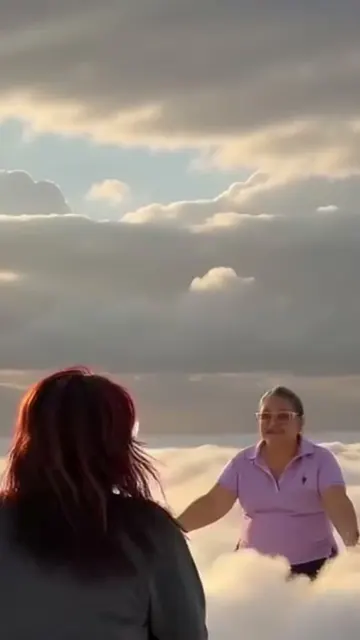
It is the Christmas form of it. In the [heaven hug](/templates/ai-heaven-reunion-hug) you run up a stairway or across the clouds to the person you miss. In the Christmas hug from heaven they come to you: you stay at home by the tree, and they hug you from behind. Both are a hug from heaven made from two photos.
Is this an AI hug from behind video?
Yes. The hug from behind is the whole scene: your loved one comes up behind you, puts their hands on your shoulders and wraps their arms around you. For a hug from behind or a face-to-face hug with someone in your life today, use the [AI hug video](/templates/ai-hug-video).
Can photo 2 show two people or a pet?
Yes. Two people in one photo, like your grandparents, come back together and both hug you from behind. A pet walks up behind you, puts its front paws on your shoulder and leans its head on your cheek.
Can I use an old or black-and-white photo?
Yes. Photograph the print flat, with no glare, so the face is sharp. Your loved one comes out in natural color, at the age they are in the photo.
How do I make an AI video of a deceased loved one for Christmas?
Add a clear photo of your loved one as photo 2 and a photo of you as photo 1, then press Generate. The AI video of a deceased loved one shows them coming back for one Christmas hug by the tree. It is an AI creation, not a memory.
How long is the video, and does it have sound?
It is about 6 seconds, vertical 9:16, at 720p, with the trend's own song from the template, the template's line on screen and no talking. You can turn the song off on the result screen.
Do I need the CapCut template?
No. Many people find that the CapCut template is not available in their country. Here you need no app and no template link: add your two photos in your browser and press Generate.
Is it okay to make a video of someone who has passed away?
It is a personal choice. Talk to your family first, use a photo they are comfortable with, and keep the video private if you are unsure. For a quieter tribute, the [homesick for a person](/templates/homesick-for-a-person-ai-trend) trend turns one photo into a soft black-and-white memory.
Does the Christmas hug video cost credits?
Yes. The create page shows the exact price on the Generate button before you spend anything. If a video fails, the credits come back.
Are my photos private?
Yes. MakeViral does not post your photos or the result anywhere or show them to other users. The video goes to your private My videos page, and you can delete it there at any time.
More trends

Other AI video templates

Make your own Christmas Hug video

Add two photos and tap once. No prompt to write. 92 credits.

No watermark. A failed video gives its credits back. Secure checkout by Stripe.