80s AI Trend: Your 1985 Photo and Home Video

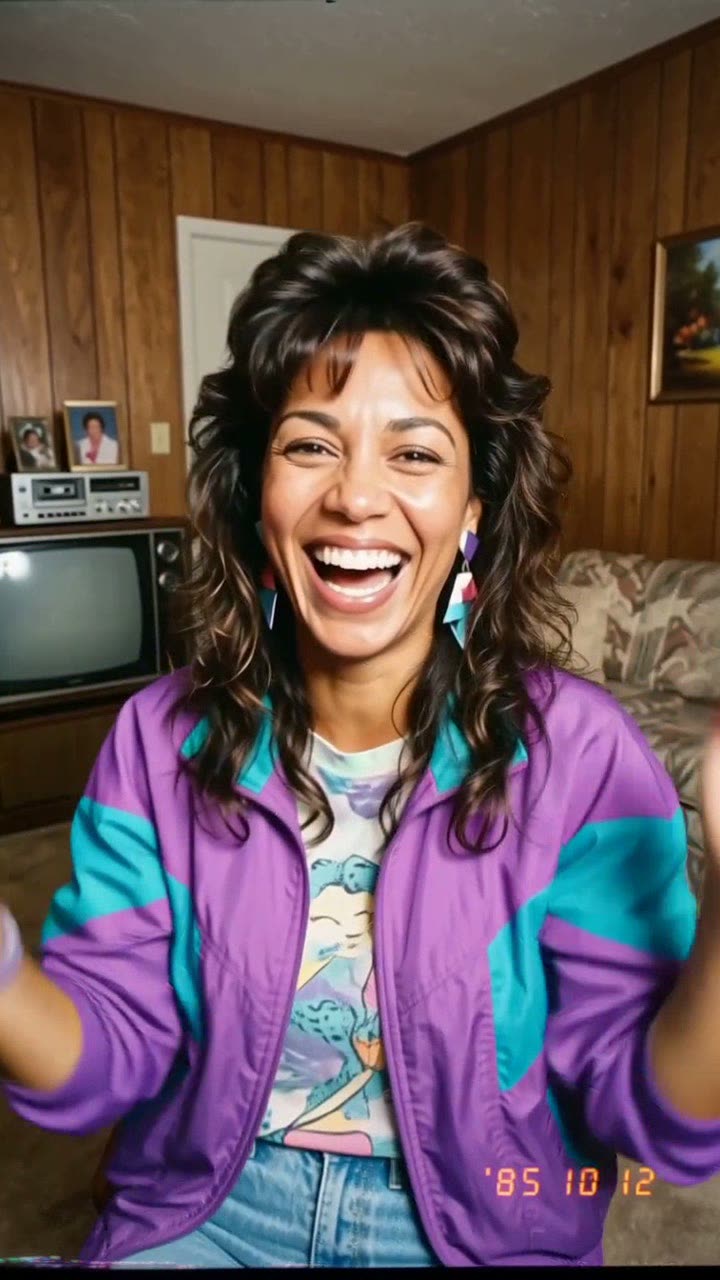
One selfie becomes a faded 1985 snapshot with big hair and a date stamp. Stop there for the photo, or animate it into a 10-second camcorder home video with sound.

80s AI example video, made with AI-made peopleAI-made
  • 1 photo you add
  • 10 s clip with sound
  • 9:16 for TikTok, Reels, Shorts
  • No watermark

No prompt to write: Add your photo and tap once

Create your own

Ready in a few minutes · 128 credits

The 80s AI trend (also called "Back in '85") restyles your selfie as a real-looking 1985 photo: big mid-80s hair, a bright jacket, film grain, direct flash and a red-orange date stamp. A newer version turns that photo into a shaky camcorder home video. You need one clear selfie. Step 1 alone gives you the photo.

Example

What the 80s AI video looks like

Made from the prompts on this page. The people and pets are AI-made, not real persons, and the sound is original. Your result will differ from run to run.

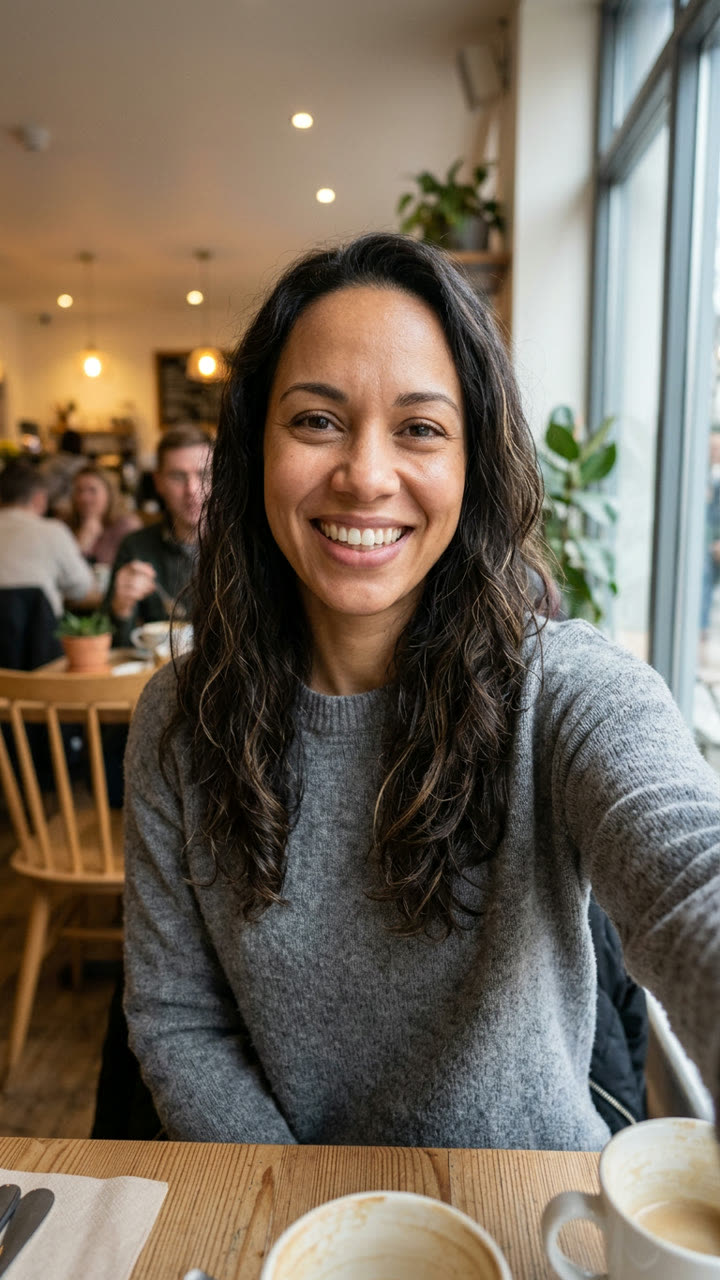
Input photo for 80s AI example (AI-made person)
Input
Result, 10 s, with sound

An AI-made woman as a 1985 camcorder home video: she laughs at the camera, fixes her hair, then rides a bike down the street. Ambient sound only.

Step by step

How to make the 80s AI video on MakeViral

Everything runs in the browser. No editing app, no prompt to write, no watermark.

  1. Add your photo

    Press "Create your own" and add your selfie. Take it with the camera or pick it from your library.

  2. Press Generate

    The button shows the price. MakeViral builds the 80s scene with your photos, then Seedance 2.5 animates it for 10 seconds with original sound. You write no prompt.

  3. Download or share

    The video is ready in a few minutes as a 9:16 MP4. Download it, share it from your phone, or find it later in your Library.

Which photo works best?

Use one clear, front-facing selfie with your whole face in good light. The prompt keeps your face and changes everything else, so the face is the only thing that must be right.

  • Head and shoulders is enough. The model invents the 80s outfit and the room.
  • Take off sunglasses and hats; they hide the features the model needs to keep.
  • Avoid heavy beauty filters. A filtered face comes back as someone slightly different.
  • One person per photo. With two faces, the model has to guess which one to keep.
  • Use a photo of yourself or of an adult who agreed. Never a celebrity or a stranger.

Where did the 80s AI trend start?

The 80s AI trend started as a photo trend on Instagram in the first week of September 2026. People used the Instagram Stories "Add Yours" sticker to share a ChatGPT prompt that asks "show me what I would have looked like around 1985", and challenged their followers to post their own version. BusinessToday covered it on 9 September 2026, and Storyboard18 reported on 10 September that OpenAI had shared the 1980s prompt in its own blog post.

The trend was biggest in India, and it also spread in the UK, the US, the Philippines and the Gulf. On TikTok we counted 95 retro "what would I look like" posts in a 3,815-video sample, the first from 6 September; the top one had 2.4 million views by 29 September. News channels ran privacy warnings about uploading selfies to AI tools.

The video version came later in September, when template apps began to turn the 1985 photo into a short home video, filmed as if by a parent on an old camcorder. That is the clip on this page.

  1. In the first week of September, the 1985 photo prompt spreads on Instagram Stories through the "Add Yours" sticker.

  2. The first retro "what would I look like in the 80s" post appears in our 3,815-video TikTok sample. By 29 September the sample holds 95 of them.

  3. BusinessToday explains the Instagram 80s photo trend and the ChatGPT prompt behind it. BusinessToday

  4. Storyboard18 reports that OpenAI shared the 1980s image prompt in a blog post of its own. Storyboard18

  5. A parody post, "Not 80s AI trend... I'll show you 2040s trend", reaches 8,869 upvotes on r/IndiaTech, and the top TikTok version passes 2.4 million views. Reddit

  6. In US Google Trends data we pulled for the last 30 days, searches for "ai 80s" average about 15 times those for "ai dog dancing".

Copy and paste

The 80s AI prompts

You do not need these: the one-tap flow runs them for you. A photo prompt puts your photo into the scene, then a video prompt animates it. Want to change them? Copy them and edit them in AI Photo and AI Video.

1 photo: your selfieSeedance 2.510 s · 720p · 9:16128 credits
Step 1 · Photo prompt

Use the uploaded image as the base. Keep the subject's face, facial features, skin tone, and expression exactly the same. Transform the photo into a real 1985 snapshot: bold mid-1980s hair, a bright windbreaker or denim jacket, statement accessories, in a wood-panelled suburban living room with a boxy TV and a cassette player. Analog film grain, faded warm colors, direct flash, soft focus. A small red-orange date stamp in the lower right corner. Vertical 9:16. No modern objects, no phones, no logos.

504 characters
Step 2 · Video prompt

A 1985 home video filmed on a consumer camcorder by a parent. Keep the person's face, hair and outfit exactly as in the image. The person notices the camera, laughs, fixes their hair, then walks outside past a station wagon and waves while riding a bike slowly down a sunny suburban street. Soft low-resolution analog video, color bleed, faint tracking lines at the bottom edge, handheld shake, autofocus hunting, a blinking date stamp in the lower right corner. Audio: camcorder mic ambience only, tape hiss, birds, a bike chain, a parent laughing off camera. No music, no modern objects, no logos.

599 characters

How many credits does it cost?

You pay per video in credits, and the create page shows the exact price on the Generate button before you spend anything. The one-tap price covers the scene photo and the video, charged once. One video is 128 credits, so the smallest one-time pack that covers it is $14.99 for 150 credits, with no subscription. The cheaper models are there if you run the prompts by hand in AI Video.

Video modelSettingsCredits
Seedance 2.5 (this template)10 s, 720p + 1 scene photo, one tap128
Seedance 2.0 Fast (by hand in AI Video)10 s, 720p + 1 photo68
Veo 3.1 Fast (by hand in AI Video)8 s, 720p + 1 photo14

One-time packs and plans are on the pricing page. A failed video gives its credits back.

Can you make just the 80s AI photo, without the video?

Yes, and most people only want the photo. The page has two steps, and step 1 alone is the 80s photo trend: upload your selfie to AI Photo with the 1985 photo prompt, and you get a vertical snapshot with the big hair, the faded color, the flash and the date stamp. Download it and stop there. You pay only for the photo.

Step 2 is optional. If you like the still, press the film button on it and AI Video turns it into the newer 80s AI video: a 10-second camcorder clip with tape hiss and a parent laughing off camera. Many creators post both: the photo as a carousel or story, and the video as a Reel or TikTok a day later.

What makes a 1985 photo look real?

The viral versions work because they copy the flaws of cheap 1980s cameras, not just the fashion. Our photo prompt asks for each of these on purpose:

DetailWhy it matters
Direct flashFlat, bright faces and hard shadows behind the subject, like a compact camera from the era.
Faded warm color and grainOld print film shifts toward orange and loses contrast over the years.
Red-orange date stampThe detail most people remember from family albums. It tells the viewer "1985" at a glance.
Wood panels, boxy TV, cassette playerA period room makes the outfit believable.
No modern objectsOne phone or flat screen breaks the effect.

The video prompt does the same for motion: low resolution, color bleed, tracking lines along the bottom edge, handheld shake and autofocus that hunts.

What goes wrong, and how do you fix it?

ProblemFix
The face looks like a different personUse a sharper, front-facing selfie with no filter, then generate the still again.
The photo looks like a modern costume partyGenerate again. The grain, the flash and the date stamp should be strong; if they are weak, the image reads as 2026.
A phone or a modern logo shows upGenerate the still again before you animate it. The video model keeps what is in the first frame.
The date stamp shows the wrong year or random lettersAI text is often wrong. Crop it out, or keep it; viewers rarely read it closely.
The bike or hands warp in the videoCommon in 10-second clips. A second run, or a shorter clip, often fixes it.
The video model refuses the photoSome models refuse some real faces. The credits come back; try Veo 3.1 Fast.

How do you post the 80s AI trend so it gets views?

The trend is a comparison, so show the before. Post your real selfie first and the 1985 version second, or put them side by side. On Instagram, the "Add Yours" sticker is how the trend spread in the first place: add your 80s photo to it so people who follow the sticker can find you.

For the video, the first second should already look like old tape. Keep the ambient sound; the tape hiss and the off-camera laugh are what make it feel like a real home video. If you add a song in the posting app, keep it quiet under the camcorder sound. A caption such as "Mom found the tapes" does more than a hashtag list.

FAQ

80s AI trend questions

What is the 80s AI trend?
It is a September 2026 trend where people use AI to restyle a selfie as a genuine-looking 1985 photo, with mid-80s hair, clothes, film grain, flash and a red-orange date stamp. It started on Instagram with a shared ChatGPT prompt. A newer version animates the photo into a camcorder home video.
What is the 80s AI trend prompt?
The shared prompt asks the AI to show you as you would have looked around 1985, keep your face, and add bold mid-80s styling, analog grain, faded color, direct flash and a date stamp. Our version of it is in the copy box on this page, together with the video prompt for step 2.
What would I look like in the 80s? How do I find out with AI?
Upload one clear selfie to AI Photo with the 1985 photo prompt on this page. Nano Banana 2 keeps your face and rebuilds your hair, outfit and surroundings in mid-80s style. The still is ready in under a minute. Generate it two or three times to see different 80s looks.
Do I have to make the video, or can I just get the 80s photo?
You can stop after step 1. It gives you the 80s photo, which is what most people post, and you pay only for that image. Step 2 turns the photo into a 10-second camcorder video if you want it.
How do I make an 80s AI video from my photo?
Make the 1985 still first, then press the film button on it. AI Video opens with the still as the first frame and the camcorder prompt filled in. It generates a 10-second vertical MP4 with tape hiss and ambient sound, and saves it to your Library with no watermark.
Is the 80s AI trend safe for my privacy?
News outlets warned people to think before uploading selfies to any AI tool. Use a photo you are comfortable sharing, and only of yourself or an adult who agreed. Also check the result: AI can change small details such as jewelry, hands and clothing patterns.
Can I make a 90s or 70s version instead?
Yes. The prompts are plain English, so change "1985" and the style words, for example "1996, a flannel shirt, a disposable camera". Keep the parts about grain, flash and no modern objects; they are what make any decade look real.

Make your own 80s AI video

Add one photo and tap once. No prompt to write. 128 credits.

No watermark. A failed video gives its credits back. Secure checkout by Stripe.