Homesick for a Person I'll Never See Again: AI Memory Video
Add one photo of someone you miss. It becomes an 8-second black-and-white memory: they move a little and smile, with soft motion blur, a faint ghost trail and light leaks, on the trend's own sound.
The homesick for a person I'll never see again trend is a TikTok tribute: people post one photo or clip of a loved one who passed away, turned into a soft black-and-white video with dreamy blur, on the "I'll Be Missing You" sound by @ob_senare. It took off as a CapCut template on 19 November 2026. You need one clear photo.
Also called Homesick for a person I'll never see again in this lifetime · Homesick for a person trend · Homesick for a person CapCut template · Homesick for 2 people I'll never see again · I'll Be Missing You trend
Example
What the Homesick for a Person video looks like
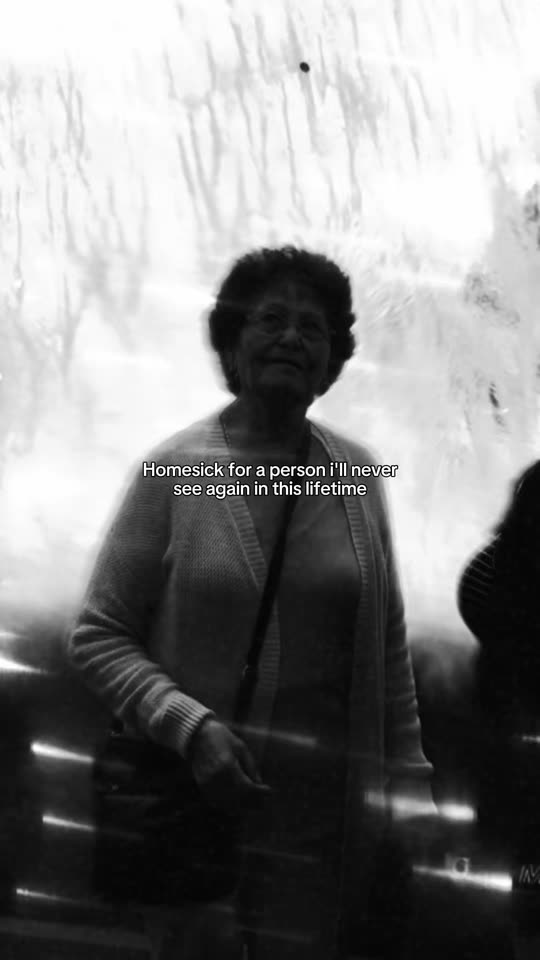
This is the real tribute post that made the template popular, with its own sound. The caption line is part of that post. Your video is a new clip made from your own photo in the same black-and-white look, with no text on it. No two runs come out the same.
Original reel by @marysarenae, 8 s
The post that made the template popular, by @marysarenae on 19 November 2026: the woman who took her in, smiling, in black and white with soft blur and light leaks, under the trend's line "Homesick for a person I'll never see again in this lifetime".
Step by step
How to make the Homesick for a Person video on MakeViral
Everything runs in the browser. No editing app, no prompt to write, no watermark.
Add your photo
Press "Create your own" and add your loved one, face clear. Take it with the camera or pick it from your library.
Press Generate
The button shows the price. MakeViral builds the Homesick for a Person scene with your photos, then Kling 3.0 animates it for 8 seconds, with the trend's original song. You write no prompt.
Download or share
The video is ready in a few minutes as a 9:16 MP4. Download it, share it from your phone, or find it later in My videos.
Which photo works best?
Use one clear photo of the person you miss, the one that looks most like them.
A sharp face in good light, looking at the camera or a little to the side. Your photo, turned black and white, is the first frame of the video, so the face stays theirs.
Chest up or waist up works best. A small face in a big group photo gets lost in the blur: crop to them first.
Old prints are fine. Lay the print flat and photograph it with no glare. Color photos turn black and white; a black-and-white photo stays as it is.
Two people in one photo work too, for the "homesick for 2 people" version of the trend: both move a little and smile.
A pet photo works the same way, for posts like "homesick for a dog".
Photos of adults and pets only.
Where did the Homesick for a Person trend start?
The sound came first. On 11 June 2026 the TikTok account @ob_senare posted a 60-second clip of "I'll Be Missing You" (Puff Daddy and Faith Evans, featuring 112, the 1997 tribute song). Four days later someone made the tag #homesickforapersonillneverseeagaininthislifetime. Through October and early November the sound became a grief sound: people put photo slideshows of a nan, a dad or a friend on it. The biggest, by @xlibby.lavinia.x on 10 November, passed 1.6 million views.
The homesick for a person trend as most people know it now is newer. On 19 November 2026 @marysarenae posted 8 seconds of the woman who took her in, in black and white with a soft blur, light leaks and the line "Homesick for a person I'll never see again in this lifetime". It reached 504,300 views and 109,600 likes in two days. More posts in the same look followed on 20 November, most of them from the US and the UK, and the first tutorial showed it as a homesick for a person CapCut template, with a second line for couples: "Homesick for 2 people I'll never see again". By 21 November the sound held 16,600 videos.
@ob_senare posts the sound, a 60-second clip of "I'll Be Missing You". The tag #homesickforapersonillneverseeagaininthislifetime follows on 15 June. TikTok
A grief photo slideshow on the sound by @xlibby.lavinia.x passes 1.6 million views, the sound's first grief post over a million. TikTok
@marysarenae posts the black-and-white template with the line "Homesick for a person I'll never see again in this lifetime": 504,300 views and 109,600 likes by 21 November. TikTok
More posts in the same look follow, among them a grandmother at the kitchen table by @_spotts0303 (166,700 views). TikTok
The first tutorial shows the CapCut template and the "Homesick for 2 people I'll never see again" line. The sound holds 16,600 videos. TikTok
Copy and paste
The Homesick for a Person prompts
You do not need these: the one-tap flow runs them for you. A photo prompt puts your photo into the scene, then a video prompt animates it. Want to change them? Copy them and edit them in AI Photo and AI Video.
1 photo: your loved one, face clearKling 3.08 s · 1080p · 9:1646 credits
Step 1 · Photo prompt
Turn this exact photo into a black-and-white photo, like a soft old film print. Change nothing else: the same people or animals, the same faces and expressions, the same hair, clothes, glasses and jewelry, the same pose, the same place and the same light, exactly as in the photo. Only the colors go: soft black and white with deep blacks, gentle silver highlights, light film grain and a light vignette. Keep everyone whole and at the same size in the frame. If the vertical frame needs more space than the photo has, extend the background above and below in the same style; never stretch, squash or crop a person or an animal. If the photo is already black and white, keep it as it is. Do not restore, sharpen, beautify, smooth or retouch any face, do not make anyone younger or older, and do not add or remove anyone. No text, no caption, no frame, no border, no watermark, no logo.
885 characters
Step 2 · Video prompt
A black-and-white memory video made from this photo, like a tribute to someone who is missed. Keep everyone in the photo exactly as they are: the same face, face shape, eyes, eyebrows, nose, mouth, skin, age, hair, glasses, beard, clothes and jewelry, the same place, the same pose and the same framing. The whole video stays soft black and white, like old film, from the first frame to the last.
The person moves only a little, like in a real home video: a slow breath, a small turn of the head toward the camera, a blink, and then a warm, gentle smile grows on the face and stays. The hands and the body stay almost still. If the photo shows two people, both move a little and smile, each with their own face, never blended. If the photo shows a pet or another animal, it stays that same animal with its own face, fur and markings, and moves like that animal: a slow blink, a small turn of the head, the ears move a little. Nobody talks, nobody cries.
The camera drifts slowly and sways a little, like a phone in a hand. The look: soft dreamy motion blur on every move, a faint see-through ghost copy of the person that trails a little behind each move and fades, soft white light leaks and lens flares that sweep in from the edges and glow over the frame, bright glowing highlights, gentle film grain and a light vignette. The blur and the ghost pass over the face and leave it sharp and clear again, so the face is easy to recognize in most frames.
Calm, quiet and tender, like a memory. One continuous take. No text, no captions, no letters, no watermark, no logos. No color. No new people, no extra faces, no extra limbs, no fast moves, no wings, no halo, no clouds, no angels.
You pay per video in credits, and the create page shows the exact price on the Generate button before you spend anything. The one-tap price covers the scene photo and the video, charged once. One video is 46 credits, so the smallest one-time pack that covers it is $9.99 for 100 credits, with no subscription. The cheaper models are there if you run the prompts by hand in AI Video.
Video model
Settings
Credits
Kling 3.0 (this template)
8 s, 1080p + 1 scene photo, one tap
46
Seedance 2.0 Fast (by hand in AI Video)
8 s, 720p + 1 photo
55
Veo 3.1 Fast (by hand in AI Video)
8 s, 720p + 1 photo
14
One-time packs and plans are on the pricing page. A failed video gives its credits back.
What happens in the video
Your clip copies the look of the trend's posts. It is made in two steps: first AI turns your photo black and white, with nothing else changed, then the best AI video models available bring it to life, in 8 seconds:
Seconds
What happens
0 to 1
Your photo, now in soft black and white, comes to life.
1 to 5
They breathe, turn their head a little toward the camera and blink, while light leaks sweep across the frame and a faint ghost copy trails behind each move.
5 to 8
A warm smile grows on their face. The blur passes over and leaves the face clear again.
The sound is the trend's own: the "I'll Be Missing You" clip from the posts, as it plays in them. You can turn it off on the result screen. The video has no caption, so you can type the line yourself when you post, word for word or your own.
Standard costs fewer credits. Best uses a stronger video model, with smoother motion and a steadier face. The exact price shows on the Generate button before you spend anything, and the video waits in My videos when it is ready. You write no prompt.
What does "homesick for a person" mean?
Homesick usually means missing a place. The homesick for a person meaning is missing someone so much that they felt like home: a grandmother whose kitchen was where you grew up, a parent, a partner, a friend. The full line, "homesick for a person I'll never see again in this lifetime", is about someone who has died, and "in this lifetime" leaves room for a meeting after it. Many posts say the same thing as "homesick for a person in heaven". A related line, "homesick for a person that no longer exists", is used for someone who is alive but has changed, or for a younger self. People also search it as "homesick for a person will never see again".
On TikTok the line goes with the trend's song, a clip of "I'll Be Missing You", the 1997 tribute song by Puff Daddy and Faith Evans with 112. That is why some people call it the I'll Be Missing You trend.
How to post it, gently
These videos are about love and loss. A few things help:
Talk to your family first if the person was theirs too. Some find the video comforting; others need more time.
Keep the AI label on. The movement is made by AI from your photo. It is not footage of them.
Add the line yourself. Type "Homesick for a person I'll never see again in this lifetime", or "Homesick for 2 people I'll never see again" for a couple, as a TikTok text box.
Tell their story in the caption. The posts that reach people say who the person was and what they did for you.
Hashtags (TikTok, 21 November 2026): #grief (4.1 million videos), #missingyou (2.7 million), #griefjourney (1.7 million), #grieftok, #inlovingmemory and #homesickforaperson.
What goes wrong, and how do you fix it?
Problem
Fix
The face does not look like them
Use a sharper photo where the face is bigger, then run it again or pick Best.
The black-and-white step changed the face a little
Use a sharper photo where the face is bigger, then run it again.
The blur hides the face too long
Run it again: every run is a new take.
The person moves too much or talks
Run it again, or pick Best. The prompt asks for small, calm moves only.
The run fails
Some photos get refused. The credits come back; try another photo.
Every run is a new take, so results differ.
FAQ
Homesick for a Person trend questions
What is the homesick for a person I'll never see again trend?+
It is a TikTok tribute trend from November 2026: a photo or clip of a loved one who passed away, in soft black and white with dreamy blur and light leaks, with the line "Homesick for a person I'll never see again in this lifetime" and a clip of "I'll Be Missing You" as the sound. Most posts are from the US and the UK. To see the homesick trend TikTok posts, search the line itself.
How do I make the homesick for a person AI video?+
Press "Create your own", add one clear photo of the person you miss and press Generate. The button shows the price first. You get an 8-second vertical video in My videos with the trend's sound. You need no CapCut template and write no prompt.
Is there a homesick for a person CapCut template?+
Yes. The trend went viral as a CapCut template, and the posts link it. This page is the homesick for a person AI trend version: it makes the same black-and-white memory video with AI from one photo, so the person moves a little and smiles instead of staying a still picture.
What is the homesick for a person song?+
An "original sound" by the TikTok account @ob_senare, posted on 11 June 2026: a clip of "I'll Be Missing You" by Puff Daddy and Faith Evans, featuring 112. It had 16,600 videos on 21 November 2026. Your video comes with this sound.
Can I make it for two people, like my grandparents?+
Yes. Use one photo that shows both of them, faces clear. Both move a little and smile. Then post it with the line "Homesick for 2 people I'll never see again", like the couple posts of the trend.
Can I make it for a dog or a cat?+
Yes. Some posts say "homesick for a dog" for a pet that died. Add a clear photo of your pet: it stays the same animal, with its own face and fur, and moves a little.
Can I use an old or black-and-white photo?+
Yes. Photograph the print flat with no glare so the face is sharp. Color photos turn black and white first, with nothing else changed; a black-and-white photo stays as it is.
Does the video have the caption on it?+
No. The video has no text, so the face stays clear and you choose the words. Add the line as a text box when you post, the way the trend posts do.
Is this an AI memorial video?+
Yes, a short AI memorial video, or AI tribute video: your photo, turned black and white, is the first frame, and AI adds a small movement, a smile and the black-and-white grief edit look. It is made from your photo, not a real recording of them.
Is it okay to make a video of someone who has passed away?+
It is a personal choice. Talk to your family first, use a photo they are comfortable with, and keep the video private if you are unsure. For a hug with someone you miss, see [Heaven Hug](/templates/ai-heaven-reunion-hug).
How long is the video, and does it have sound?+
It is 8 seconds, vertical 9:16, about as long as the trend's posts. It has the trend's sound, and you can turn the sound off on the result screen.
Does the homesick trend video cost credits?+
Yes. The create page shows the exact price on the Generate button before you spend anything. Standard costs less than Best. If a video fails, the credits come back.
Are my photos private?+
Yes. MakeViral does not post your photo or the result anywhere or show them to other users. The video goes to your private My videos page, and you can delete it there at any time.