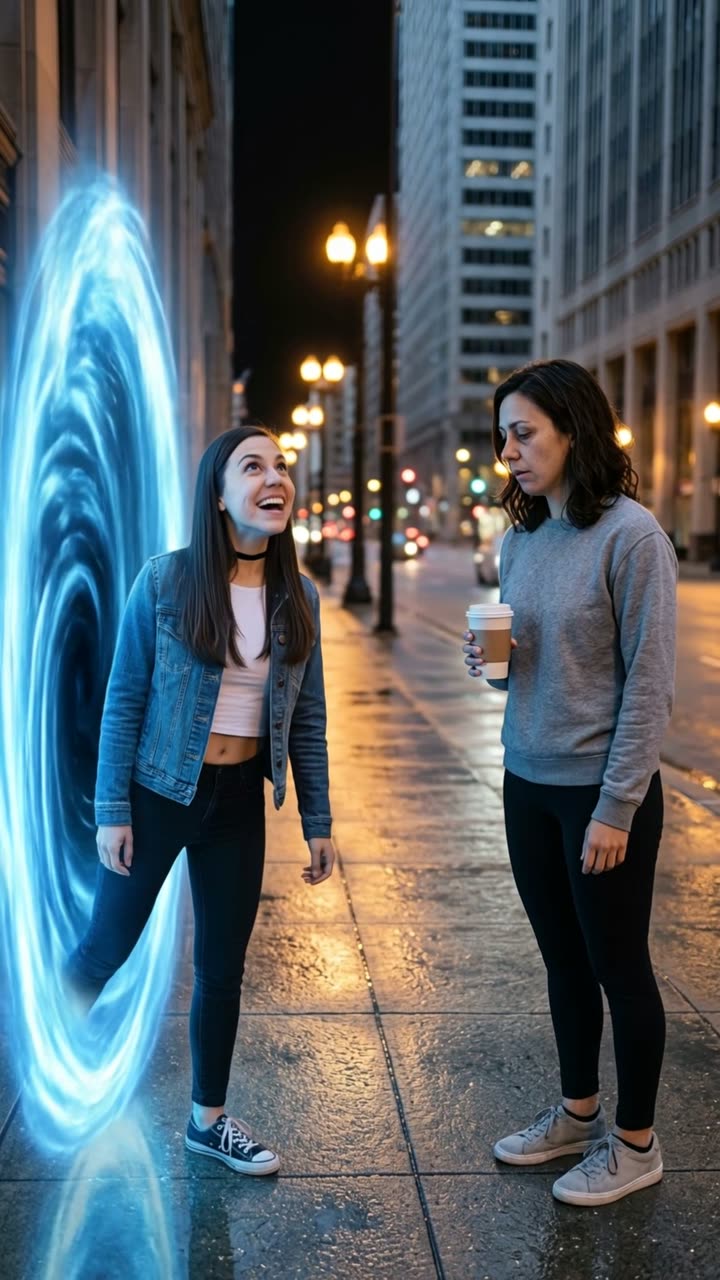
2016 vs 2026: Your 2016 Self Walks In and Meets You

Your 2016 self walks in, looks you up and down and asks why you look so exhausted. Write your own lines, pick the place and the ending. An old photo and a new one in, a 10-second clip with voices out. It works with your pet too.

2016 vs 2026 example video, made with AI-made peopleAI-made
  • 2 photos you add
  • 10 s clip with sound
  • 9:16 for TikTok, Reels, Shorts
  • No watermark

No prompt to write: Add your photos and tap once

Create your own

Ready in a few minutes · 56 credits

The 2016 vs 2026 AI trend puts your past and your present in the same video: your 2016 self arrives in 2026, walks up to you and asks what happened. It grew out of the "2026 is the new 2016" nostalgia wave. You need two photos: an old one and a recent one.

Example

What the 2016 vs 2026 video looks like

Made from the prompts on this page. The people and pets are AI-made, not real persons, and the sound is original. Your result will differ from run to run.

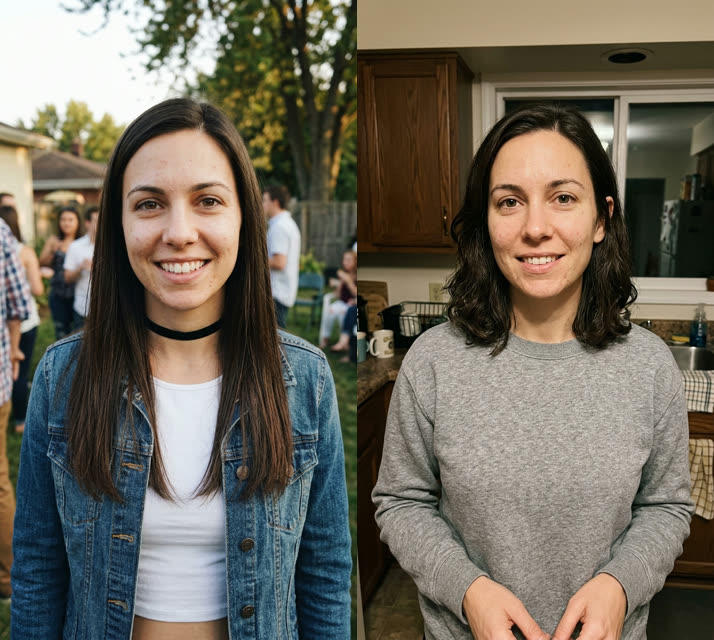
Input photo for 2016 vs 2026 example (AI-made person)
Input
Result, 10 s, with sound

Time portal, two photos: an AI-made woman's 2016 self steps out of a blue portal on a night street and asks "Is this really 2026? Why do you look so exhausted?" Her present self answers "Welcome to 2026."

Input photo for 2016 vs 2026 example (AI-made person)
Input
Result, 10 s, with sound

Make it yours: a coffee shop, two typed lines ("Wait, we still don't own a house in 2026?" and "Rent happened.") and a hug at the end.

Input photo for 2016 vs 2026 example (AI-made person)
Input
Result, 10 s, with sound

The default settings: the 2016 self walks into an ordinary living room, asks the classic question and stares back in shock.

Original reel by @aicontentps, 10 s

The original reel by @aicontentps: a cheerful 2016 character steps out of a time portal and meets the exhausted 2026 version. Two AI-made clay characters; the first 10 seconds, with its own sound.

Step by step

How to make the 2016 vs 2026 video on MakeViral

Everything runs in the browser. No editing app, no prompt to write, no watermark.

  1. Add the two photos

    Press "Create your own" and add you around 2016 (old photo), then you now. Add them in this order, because the order decides who is who in the scene. Take them with the camera or pick them from your library.

  2. Press Generate

    The button shows the price. MakeViral builds the 2016 vs 2026 scene with your photos, then Kling 3.0 animates it for 10 seconds with original sound. You write no prompt.

  3. Download or share

    The video is ready in a few minutes as a 9:16 MP4. Download it, share it from your phone, or find it later in your Library.

Which photo works best?

Use two photos of you, one person in each: an old one from around 2016 (anything from about ten years ago works) and a recent one. The prompt keeps the face, hair and outfit of each photo, so your 2016 clothes come back too.

  • Waist up or knees up works best. A tight face crop leaves the model guessing about your body and clothes.
  • Sharp, front-facing faces in good light. Photograph an old print flat, with no glare.
  • The bigger the change between the two photos (hair, glasses, style), the funnier the meeting.
  • One person per photo. Crop your friends out of the old photo.
  • Use only photos of yourself. Never a celebrity, an ex or a stranger.

For the Pet version, use a puppy or kitten photo of your pet and a photo of it now, each with the whole body in view.

Where did the 2016 vs 2026 trend start?

The nostalgia came first. In late December 2025, "2026 is the new 2016" spread on TikTok: on 31 December, @taybrafang posted a montage of 2016 moments, and in January people brought back 2016 filters, songs and photos. In March 2026, creators posted videos of themselves "talking to my 2016 self", the person they were ten years earlier.

The AI version turns that talk into a meeting. On 13 and 14 September 2026, the TikTok account @aicontentps posted AI clips in which a bright, cheerful 2016 character steps out of a glowing time portal and finds a worn-out 2026 version: "Wait, I jumped 10 years? Is this really 26?" ... "Why do you look so exhausted?" The 14 September clip had 160,900 views by 11 October. On 9 October, an AI clip of a celebrity's 2006 self meeting her 2026 self, made with Seedance, got more than 2,100 upvotes on Reddit's r/aivideo.

By 12 October, #2016vs2026 had 18,241 TikTok videos. On this page your own photos play both parts: you in 2016 and you now.

  1. @taybrafang posts a TikTok montage of 2016 moments, the earliest post Wikipedia names for the "2026 is the new 2016" trend. Wikipedia

  2. "Talking to my 2016 self" videos spread on TikTok: creators speak to the person they were ten years earlier. One posted that day passes 781,000 likes. TikTok

  3. @aicontentps posts "2016usa VS 2026usa", an AI clip in which a cheerful 2016 character steps out of a time portal and meets an exhausted 2026 version. TikTok

  4. The creator's next 2016 vs 2026 clip opens with the same portal meeting. It has 160,900 views and 6,153 likes by 11 October. TikTok

  5. An AI clip of a celebrity's 2006 self meeting her 2026 self, made with Seedance, gets more than 2,100 upvotes and 293 comments on r/aivideo. Reddit

  6. #2016vs2026 counts 18,241 TikTok videos and 106.3 million views; #2026isthenew2016 counts 14,550 videos and 196.1 million views.

Copy and paste

The 2016 vs 2026 prompts

You do not need these: the one-tap flow runs them for you. A photo prompt puts your photo into the scene, then a video prompt animates it. Want to change them? Copy them and edit them in AI Photo and AI Video.

Human

2 photos: you around 2016 (old photo) + you nowKling 3.010 s · 1080p · 9:1656 credits
Step 1 · Photo prompt

Use the two uploaded images as the base. They show the same person about ten years apart. The person in the first image is the younger version, from twenty sixteen: keep that face, facial features, skin tone, hair, age, body and the outfit from the first image exactly. The person in the second image is today's version: keep that face, facial features, skin tone, hair, age, body and the outfit from the second image exactly. Do not blend the two, do not swap their faces and do not make them the same age. An ordinary, unedited smartphone photo, taken by a friend at chest height. The place: "Living room at home", a real, everyday place in natural light, with ordinary details and a little everyday clutter, like a snapshot from someone's camera roll. The younger version is on the left. The younger version has just walked into the scene from the left, as if they simply arrived, with no effects. The younger version looks fresh, curious and full of energy, and looks at today's version. A few steps away on the right, today's version looks tired, with slumped shoulders, holding a plain paper coffee cup and looking back at the younger version. Both from the knees up, both faces clear and sharp, turned three-quarters toward the camera. Photorealistic, natural skin and natural colors: no cinematic lighting, no color grading, no soft dreamy glow, no blurred bokeh background, not CGI, not a cartoon. Vertical 9:16. Exactly two people, nobody else close by. No flags, no signs, no name tags, no text, no logos, no watermarks.

1531 characters
Step 2 · Video prompt

An ordinary, unedited phone video filmed by a friend, in one continuous shot with no cuts, in natural light with a slight handheld shake, like a real clip on social media. Keep both faces, hair, ages and outfits exactly as in the image: the younger one on the left is the version from twenty sixteen, and the older one on the right is today's version of the same person. The younger version walks in from the left side of the frame and stops. The younger version looks around in wonder, walks up to today's version, looks them slowly up and down and says, confused: "Wait... is this really twenty twenty-six? Why do you look so exhausted?" Today's version gives a tired shrug, lifts the coffee cup and says flatly: "Welcome to twenty twenty-six." The younger version stares back in shock. Only the younger version says the first line, and only today's version says the second one, every word clearly and exactly as written. Audio: the natural sound of the scene and the two spoken lines, and nothing else: no music. Exactly two people, no extra limbs, no morphing, no cinematic look, no slow motion, no text, no subtitles, no logos.

1132 characters

Pet

2 photos: your pet when young + your pet nowKling 3.010 s · 1080p · 9:1656 credits
Step 1 · Photo prompt

Use the two uploaded images as the base. They show the same pet years apart. The animal in the first image is the younger version: keep its species, breed, face, eye color, fur color, fur length, markings, young age and small size exactly as in the first image. The animal in the second image is today's version: keep its species, breed, face, eye color, fur color, fur length, markings, age and body size exactly as in the second image. Do not blend the two and do not make them the same age or size. An ordinary, unedited smartphone photo, taken at pet height. The place: "Living room at home", a real, everyday place in natural light, with ordinary details, like a snapshot from someone's camera roll. The younger version is on the left. The younger version has just walked into the scene from the left, as if they simply arrived, with no effects. The younger version is playful, bright-eyed and full of energy, ears up, looking at today's version. A few steps away on the right, today's version sits looking tired and unimpressed, with sleepy, half-closed eyes, looking back at the younger one. Both whole bodies in frame, both faces clear and sharp. Photorealistic, natural fur detail and natural colors: no cinematic lighting, no color grading, no soft dreamy glow, not CGI, not a cartoon. Vertical 9:16. Exactly two animals, no people, no clothes. No flags, no signs, no text, no logos, no watermarks.

1408 characters
Step 2 · Video prompt

An ordinary, unedited phone video filmed at pet height, in one continuous shot with no cuts, in natural light with a slight handheld shake, like a real clip on social media. Keep both animals' faces, fur, markings, ages and sizes exactly as in the image: the young one on the left is the pet in the past, and the older one on the right is the same pet today. The younger version walks in from the left side of the frame and stops. The younger version looks around in wonder, bounces over to today's version, sniffs it from head to tail and tilts its head in confusion. Today's version lets out a long, tired sigh, slowly lies down flat and closes its eyes. The younger version looks from its older self straight into the camera, shocked. Audio: the natural sound of the scene, one small surprised sound from the young pet and a long, tired sigh from the older pet. No music, no human voices, no talking. Exactly two animals, no people, no extra legs, no morphing, no cinematic look, no text, no subtitles, no logos.

1015 characters

How many credits does it cost?

You pay per video in credits, and the create page shows the exact price on the Generate button before you spend anything. The one-tap price covers the scene photo and the video, charged once. One video is 56 credits, so the smallest one-time pack that covers it is $9.99 for 100 credits, with no subscription. The cheaper models are there if you run the prompts by hand in AI Video.

Video modelSettingsCredits
Kling 3.0 (this template)10 s, 1080p + 1 scene photo, one tap56
Seedance 2.0 Fast (by hand in AI Video)10 s, 720p + 1 photo68
Veo 3.1 Fast (by hand in AI Video)8 s, 720p + 1 photo14

One-time packs and plans are on the pricing page. A failed video gives its credits back.

What happens in the 2016 vs 2026 video, second by second?

Your clip is one continuous shot that looks like an ordinary phone video, filmed by a friend. With the default settings:

TimeWhat happens
0-2 sYour 2016 self walks in and stops.
2-5 sYour 2016 self looks around, walks up to you and looks you up and down.
5-8 s"Wait... is this really 2026? Why do you look so exhausted?"
8-10 sYou shrug, lift your coffee and say "Welcome to 2026." Your 2016 self stares back in shock.

Make it yours. On the create page you can change every part: write what your old self says and what you answer (in any language), pick where you meet (your living room, kitchen, office, a coffee shop, a city street at night or any place you type), how your old self arrives (walks in, a glowing blue time portal, out of the mirror or out of an old photo), the ending (a shocked stare, a hug, a high five, a selfie together or both laughing) and the year of your old photo.

The sound is the scene itself: the room or the street and your two lines. There is no music, so you can add the sound you like when you post.

The Pet version plays the same meeting without words: the puppy or kitten walks in, sniffs its grown-up self from head to tail, and the older pet sighs and lies down. You can pick the place and how it arrives.

Why does it work? Everyone has a 2016 photo where they looked more rested. The joke is aimed at yourself, so it is easy to share, and the comments fill with people who feel the same.

How does MakeViral make it, and what does it cost?

The template works in two steps:

  1. The still. Nano Banana 2 takes your two photos and places both versions of you in the place you picked, like a normal phone photo: 2016 you on the left, today's you with a coffee on the right. Each face, hairstyle and outfit stays as in its own photo.
  2. The video. A video model animates the still for 10 seconds: the arrival, the walk, the once-over, your two lines and the ending.
Standard (default)Best
Video modelKling 3.0Seedance 2.5
Length10 s10 s
FrameVertical 9:16, 1080pVertical 9:16, 720p
SoundYour two spoken lines and the sound of the placeThe same
PriceLowerHigher

The exact price shows on the Generate button before you spend anything. You write no prompt.

Is it the trend's own prompt? The creators of the viral clips did not share their prompts. Ours follow the beats of the September clips that started the format: the arrival, the once-over and the "Why do you look so exhausted?" line. Seedance, the model behind the viral celebrity version, is the Best option.

What goes wrong, and how do you fix it?

ProblemFix
Both versions look the same ageUse photos that are further apart, or an old photo where your hair or style was clearly different. Then run it again.
The two faces swap sidesCheck the order: photo 1 is 2016 you, photo 2 is you now. Then run it again.
The wrong one says a line, or both talk at onceTwo people talking is hard for AI. Run it again or pick Best.
The clip cuts to another shotThe prompt asks for one shot. Run it again or pick Best.
Your face looks less like your photoUse a sharper, front-facing photo in good light.
A line you typed comes out wrongKeep each line short and simple, then run it again.
The video model refuses the photoSome photos get refused. The credits come back; try another photo.

Every run is a new take, so the timing and the faces differ from run to run.

Is this the same as "hug my younger self" or "Your next opponent is you"?

No. They are close, but each is its own trend:

  • AI hug: you hug your younger self, often your childhood self. It is warm and emotional, with no words.
  • "Your next opponent is you": a dramatic face-off with your younger self in a dark arena, with a voice that says "your next opponent is... you". Know Your Meme traces it to a TikTok by @shannon__cahill on 12 May 2026.
  • 2016 vs 2026: a joke. Your self from ten years ago arrives in 2026, takes one look at you and wants to know what happened.

Posting tips. Captions that fit: "2016 me would never", "she trusted me with this", or "I'm sorry, 2016 me". Use #2016vs2026 (18,241 TikTok videos on 12 October 2026) and #2026isthenew2016 (14,550). Keep the platform's AI label on. Want more nostalgia? Try the 80s AI trend or the AI school photo.

FAQ

2016 vs 2026 trend questions

What is the 2016 vs 2026 AI trend?
It is an AI video where your 2016 self arrives in 2026, walks up to you, looks you up and down and asks why you look so exhausted. It spread in September and October 2026 as part of the "2026 is the new 2016" nostalgia wave. You need an old photo and a recent one.
What does "2026 is the new 2016" mean?
It is a nostalgia trend that started on TikTok in late December 2025. People brought back the photos, filters, songs and style of 2016, a year many remember as simpler. The 2016 vs 2026 videos are part of it: they put the two years side by side.
How do I make a video of my 2016 self meeting me?
Press "Create your own", add an old photo of you from around 2016 as photo 1 and a recent photo as photo 2, and press Generate. MakeViral makes a photo of both of you in the place you picked, then a 10-second video with the walk, the once-over and the two spoken lines. You write no prompt, but you can write your own lines.
Can I use a photo from 2014 or 2018 instead of 2016?
Yes. Pick the year of your old photo on the create page (2006, 2010, 2013, 2016 or 2019). The prompts keep the age and the look of each photo, so any old photo works, and a gap of about ten years gives the clearest change.
Can I write my own lines?
Yes. On the create page, open Make it yours and type what your old self says and what you answer, in any language, up to 90 characters each. Years like 2026 are read out as words. Leave the fields empty for the classic lines.
Can my pet meet its younger self?
Yes. Pick the Pet version and add a puppy or kitten photo of your pet, then a photo of it now. The young pet walks in and sniffs its older self, and the older pet sighs and lies down. There are no words, only pet sounds and the sound of the place.
Did the creators of the trend share their prompt?
Not as of 12 October 2026. The viral clips came without a prompt, so ours are written to the same beats: the arrival, the once-over and the "Why do you look so exhausted?" line from the September clips by @aicontentps.
How long is the video, and does it have sound?
10 seconds, vertical 9:16, as an MP4 file: 1080p with Standard, 720p with Best. It has its own sound: your two spoken lines and the sound of the place, with no music.
Does the 2016 vs 2026 video cost credits?
Yes. Each video costs credits, and the create page shows the exact price on the Generate button before you spend anything. Standard (Kling 3.0) costs less than Best (Seedance 2.5). If a video fails, the credits come back.
Can I make one with a celebrity's old and new photos?
Do not. A fake video of a real person can break platform rules and that person's rights, and many video models refuse famous faces. Use your own photos: the joke works best when it is about you.
Why do my two versions look the same?
The model sees two photos of the same face and can pull them together. Old and new photos that differ more in hair, glasses or style help, and so does a second run. Check the order too: photo 1 is 2016 you, photo 2 is you now.

Make your own 2016 vs 2026 video

Add two photos and tap once. No prompt to write. 56 credits.

No watermark. A failed video gives its credits back. Secure checkout by Stripe.