Back

I'm a Celebrity Filter: Put Yourself in the Jungle Cast Photo

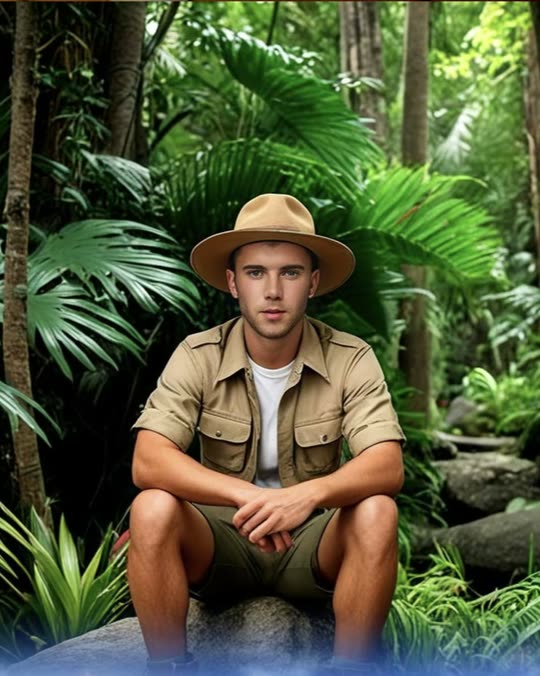
One photo in, one jungle cast portrait out: khaki safari shirt, red gilet, bush hat and a wall of rainforest behind you. Your face stays your own, and it works with a pet too.

The original I'm a Celeb Filter reel by @mikeyconnorOriginal reel
  • 1 photo you add
  • 2K photo you can turn into a video
  • 9:16 for TikTok, Reels, Shorts
  • No watermark

No prompt to write: Add your photo and tap once

Create your own

Ready in a few minutes · Photo · 3 credits

The I'm a Celebrity filter is a CapCut template that turns one selfie into a jungle cast portrait of the UK show I'm a Celebrity... Get Me Out of Here!: a khaki safari shirt, red gilet and bush hat in the rainforest. It started on TikTok in November 2024. Here one photo gives you the portrait.

Also called I'm a Celeb filter · I'm a Celeb AI filter · I'm a Celebrity AI · I'm a Celebrity CapCut template · Jungle cast photo filter · Me if I was in I'm a Celeb

Example

What the I'm a Celeb Filter photo looks like

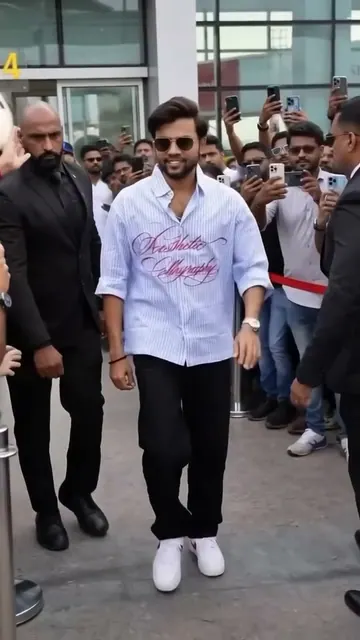
The example is a creator's own post of the CapCut filter from November 2024, with its sound, cropped to the picture so the show title and his caption are cut off. Your result is one new still photo made from your own picture in the same jungle look, with no show title or logo on it. No two runs come out the same.

Original reel by @mikeyconnor, 7 s

One of the first big posts, by @mikeyconnor (21 November 2024, 650,200 views): his own sauna clip wipes into a jungle cast portrait in a khaki safari shirt and a bush hat. Cropped to the picture.

Step by step

How to make the I'm a Celeb Filter photo on MakeViral

Everything runs in the browser. No editing app, no prompt to write, no watermark.

  1. Add your photo

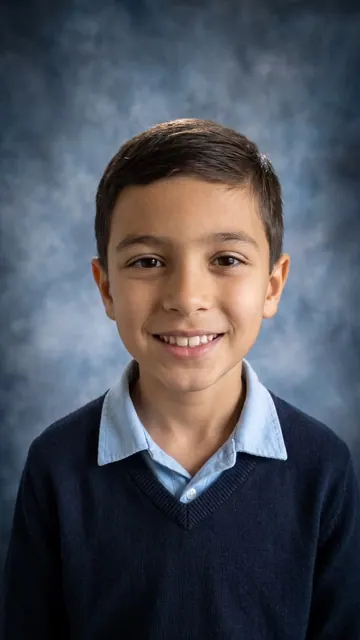
    Press "Create your own" and add you or your pet, face clear. Take it with the camera or pick it from your library.

  2. Press Generate

    The button shows the price. Nano Banana 2.1 puts your photo into the I'm a Celeb filter scene and makes one 2K photo. You write no prompt.

  3. Download or share

    The photo is ready in a few minutes as a 9:16 2K image. Download it, share it from your phone, turn it into a video, or find it later in My videos.

Which photo works best?

You need one photo: you, or your pet.

  • Face clear and toward the camera, sharp and well lit, with nothing over it (no sunglasses, mask or hand). The bush hat goes on top, so the whole face must show.
  • From the chest or the waist up works best. A full-body photo also works, but the face is smaller and keeps less detail.
  • Your clothes do not matter: the template dresses you in the khaki safari shirt and the red gilet. Your face, hair, glasses, beard and expression stay.
  • Smile the way you want to look in the cast photo. The AI keeps the expression from your photo.
  • One person or one pet per photo. For a pet, a photo at its eye level with the whole head in view is best.
  • Use your own photo, or one of a friend who said yes. Never a stranger's photo, and never a child's.

Where did the I'm a Celeb Filter trend start?

The I'm a Celeb filter is a closed CapCut template that TikTok users open with "Try this template". Its sound and the #imacelebfilter tag were both created on 19 November 2024, during the 2024 series, and the first big posts came two days later. On 21 November 2024 @alishajayne04 posted hers ("Signing myself up", 410,700 views), the template account @artemiscc_capcut posted the "Trending Im a celebrity AI Filter Template" (1.1 million views, 41,700 likes) and @mikeyconnor turned a sauna selfie into a campmate photo (650,200 views). The usual caption reads "Me if I was in I'm a celeb".

The filter comes back with every new series. In November 2025 the "I'm a celebrity 2025 ai filter" post by @capcutaesthetic2 reached 544,000 views. The 2026 series started on 16 November 2026 with Wayne Rooney in the line-up, and the same day CapCut template accounts were posting the filter again: @viralfx.ai had 155,500 views by 19 November and @bethoncapcut 114,000. On TikTok the show's own tag, #imaceleb, has more than 71,000 videos and 6.2 billion views.

  1. The template's sound and the #imacelebfilter tag are created on TikTok, during the 2024 series. TikTok

  2. The first big posts: @alishajayne04 (410,700 views), @artemiscc_capcut (1.1 million views) and @mikeyconnor (650,200 views). TikTok

  3. YouCam's blog explains how to get the I'm a Celeb filter look and the safari hat. YouCam

  4. The filter returns with the 2025 series; the "I'm a celebrity 2025 ai filter" post by @capcutaesthetic2 reaches 544,000 views. TikTok

  5. The 2026 series starts on ITV with Wayne Rooney in the line-up, and @viralfx.ai posts the filter the same day (155,500 views by 19 November). Capital FM

  6. @bethoncapcut's version of the filter reaches 114,000 views and 4,100 likes in two days. TikTok

Copy and paste

The I'm a Celeb Filter prompt

You do not need this: the one-tap flow runs it for you. The photo prompt puts your photo into the scene. Want to change it? Copy it and edit it in AI Photo.

1 photo: you or your pet, face clearNano Banana 2.1Photo · 2K · 9:163 credits
Photo prompt

Use the uploaded image as the base. Add a safari hat and turn the uploaded image into the official cast portrait of a jungle survival reality TV show, the glossy promo photo every campmate gets before the series starts. Whoever is in the uploaded image is the one subject of the portrait. If it is a person: keep the same face, expression, skin tone, age, gender, body shape, hair color and hairline, and any beard, moustache, glasses, freckles or tattoos exactly as in the photo. Dress the person in the campmate outfit: a short-sleeved khaki safari shirt with two buttoned chest pockets and shoulder tabs, a bright red sleeveless utility gilet worn open over it, khaki cargo shorts with a brown leather belt, and a tan wide-brimmed bush hat with a dark brown band, set a little back on the head so the whole face shows; long hair falls from under the hat. Never the clothes from the photo. The person stands in a confident, relaxed promo pose, body turned a little, face toward the camera, framed from the knees up with a little space above the hat. If it is an animal or anything else (a pet, a toy, a character): it stays exactly that animal or thing, with its own whole body, face, fur or surface, colors and markings and its natural size and proportions, never flattened or stretched, and it wears a small tan bush hat and a little red gilet made to fit it. No human body, hands or clothes on it. It sits on a mossy boulder, face toward the camera, its whole body in frame. The backdrop: a dense tropical rainforest with tall palm trunks, giant ferns, monstera leaves, hanging vines and mossy rocks, warm sunbeams through the canopy, softly out of focus behind the subject. The look: a high-end TV promo photo, bright soft key light from the front, a gentle rim light on the shoulders, crisp detail, rich greens and natural skin tones, sharp focus on the eyes, 85mm portrait lens look. Photorealistic, a real photo, not CGI, not a cartoon. Vertical 9:16. Exactly one subject. No text, no title, no logo, no badge, no watermark, no frame, no border.

2054 characters
How many credits does it cost?

You pay per photo in credits, and the create page shows the exact price on the Generate button before you spend anything. The one-tap price covers one 2K photo, charged once. One photo is 3 credits, so the smallest one-time pack that covers it is $9.99 for 100 credits, with no subscription. A smaller 1K photo costs less if you run the prompt by hand in AI Photo.

ModelSettingsCredits
Nano Banana 2.1 (this template)2K photo, 9:16, one tap3
Nano Banana 2.1 (by hand in AI Photo)1K photo, 9:16, same prompt2

One-time packs and plans are on the pricing page. A failed photo gives its credits back.

What the I'm a Celeb AI photos look like

Every version of the filter since 2024 gives the same kind of picture, the look of the cast photos the show releases before each series:

PartWhat you get
OutfitA khaki safari shirt with chest pockets, a bright red gilet worn open over it, khaki shorts and a belt
HatThe I'm a Celeb jungle hat: a tan, wide-brimmed bush hat with a dark band, set back so your whole face shows
BackdropDense rainforest: palm trunks, giant ferns, vines and mossy rocks, with warm sunbeams through the canopy
LightBright, glossy TV promo light, sharp on the eyes, rich greens
FramingTall 9:16 portrait from the knees up, made for TikTok, Reels and Stories

The CapCut template prints the show's title over the bottom of the picture. Ours does not: the show's name and logo belong to the broadcaster, so your I'm a Celeb AI images come out clean. Add your own caption in TikTok or CapCut, such as "Me if I was in I'm a Celeb".

How to do the I'm a Celeb filter without CapCut

On TikTok, the I'm a Celeb filter is a CapCut template: you tap "Try this template" under a post, open CapCut, add a photo and export a short clip with the show's title on it. Many people search for the I'm a Celebrity CapCut template and land on dozens of copies by different template accounts, each with a slightly different outfit.

Here it runs in your browser, with no app to install:

  1. Press Create your own and add one photo of you or your pet.
  2. Press Generate. The portrait is ready in under a minute and lands in My videos.
  3. To post it the TikTok way, put your normal selfie first and the jungle photo after it, and add the caption "Me if I was in I'm a Celeb".

Want it to move? Under the finished photo, press Make it a video: it opens AI Video with your portrait as the first frame, for a short clip of you looking around the camp. The video costs its own credits.

Honest limits

  • It is a still photo, not a video, and it has no sound. The trend's clips are a photo with a wipe and a sound; make that edit in TikTok or CapCut, or use "Make it a video".
  • No show title or logo, on purpose. If you want the yellow title, add your own text.
  • Your face can drift a little in some runs, mostly with a small, dark or blurry face in the photo. A sharp photo, face to the camera, fixes most of it. Run it again if it looks off: each run is a little different.
  • The outfit is the campmate look, not your own clothes: your photo's clothes are replaced.
  • For fun only. It is a fan photo, not a real casting, and has nothing to do with the show or the broadcaster.
FAQ

I'm a Celeb Filter trend questions

What is the I'm a Celebrity filter?
It is a CapCut template that puts your selfie into a jungle cast portrait of I'm a Celebrity... Get Me Out of Here!: a khaki safari shirt, a red gilet and a bush hat, in front of the rainforest. It went viral on TikTok on 21 November 2024 and comes back with every new series. People also call it the I'm a Celeb AI filter, the I'm a Celebrity jungle filter or the I'm a Celebrity Get Me Out of Here filter. On this page, one photo gives you the same jungle look.
How do I do the I'm a Celeb AI filter?
Press "Create your own", add one sharp photo of you with your face toward the camera, and press Generate. The I'm a Celeb AI filter keeps your face and expression and puts you in the campmate outfit and the jungle. The photo lands in My videos, ready to post.
Is the I'm a Celeb filter on TikTok or CapCut?
Both, in a way. The I'm a Celeb filter TikTok posts are made with a CapCut template: the "Try this template" link under a post opens it in CapCut. There are many copies, so the I'm a Celeb template you find may look a little different from your friend's. Here you need neither app.
Is there an I'm a Celebrity 2026 filter?
Yes. The same filter came back when the 2026 series started on 16 November 2026, and new template versions were posted that week. The look has not changed since 2024: the safari shirt, the red gilet and the bush hat. This template makes that look from your photo.
Does it put the show's logo on my photo?
No. The CapCut versions print the title "I'm a Celebrity... Get Me Out of Here!" over the bottom of the picture. Ours makes a clean portrait with no text or logo, because the name and logo belong to the broadcaster. You can add your own caption when you post.
What is the I'm a Celebrity outfit?
Campmates on the show wear a khaki safari shirt and shorts, and the viral filter adds a red gilet and a tan bush hat. That is the I'm a Celebrity jungle outfit this template gives you, so you do not need to dress up for the photo. For I'm a Celeb outfit ideas for a party or a campmate costume, the same pieces work: khaki shirt, red gilet, shorts and a jungle hat.
Can I make my dog or cat a campmate?
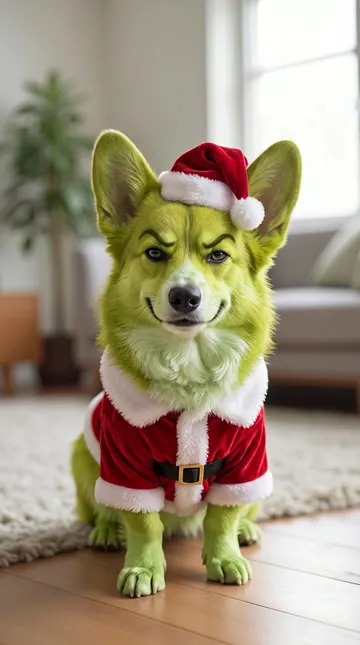
Yes. Add a photo of your pet instead. It stays the same animal, with its own face, fur and markings, and gets a small bush hat and a little red gilet in the jungle. Use a sharp photo with the whole head in view.
Will it look like me?
The prompt keeps your face, skin tone, age, hair, glasses, beard and expression as they are and changes only the clothes, the hat and the backdrop. A sharp, well-lit photo with your face toward the camera gives the best likeness. If a run looks off, run it again.
Is it a photo or a video?
A photo: one tall 9:16 portrait. The TikTok clips show your selfie first, then a wipe to the jungle photo. You can post your selfie and the result one after the other, or press "Make it a video" under the result to animate the portrait.
Can I use a photo of a real campmate?
Use your own photo, or one of a friend who said yes. Fans also ran the CapCut filter on photos of the 2026 campmates, but a picture of someone else made to look real can mislead people, so keep it to yourself and your friends.
How much does the I'm a Celebrity filter cost?
It costs a few credits, far fewer than a video. The create page shows the exact price on the Generate button before you spend anything, and if a run fails, the credits come back.
More trends

Other AI video templates

Make your own I'm a Celeb Filter photo

Add one photo and tap once. No prompt to write. 3 credits.

No watermark. A failed video gives its credits back. Secure checkout by Stripe.