AI Baby Generator: Make a Future Baby Home Video

Two partner photos in, one imagined baby out: a nostalgic camcorder montage of first steps, messy breakfasts and a ride on a parent's shoulders.

Future Baby example video, made with AI-made peopleAI-made
  • 2 photos you add
  • 10 s clip with sound
  • 9:16 for TikTok, Reels, Shorts
  • No watermark

No prompt to write: Add your photos and tap once

Create your own

Ready in a few minutes · 128 credits

An AI baby generator video takes photos of two adults and imagines a baby who mixes their looks, then plays it as a warm early-2000s home video of one day with the family. It is a fun AI guess, not a prediction. To make one you need two clear photos: one of each partner, both adults who agreed.

Example

What the Future Baby video looks like

Made from the prompts on this page. The people and pets are AI-made, not real persons, and the sound is original. Your result will differ from run to run.

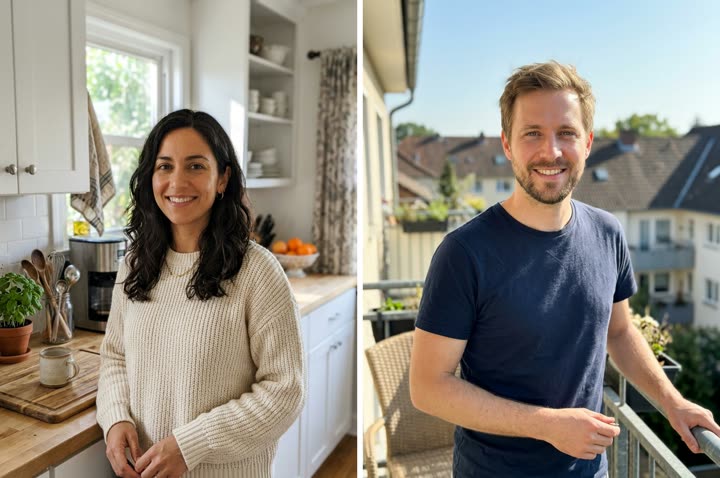
Input photo for Future Baby example (AI-made person)
Input
Result, 10 s, with sound

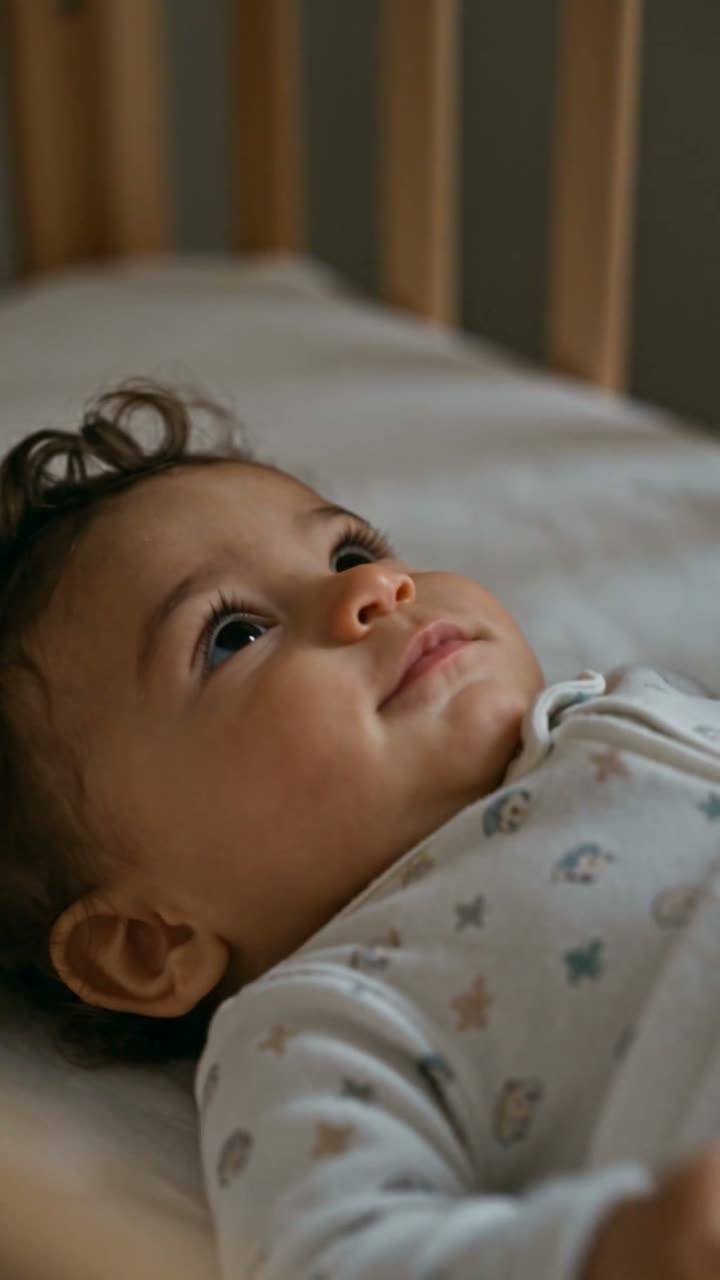
Two AI-made adults and the baby the model mixed from their faces: waking up, a messy high chair, a ride on the shoulders at sunset.

Step by step

How to make the Future Baby video on MakeViral

Everything runs in the browser. No editing app, no prompt to write, no watermark.

  1. Add the two photos

    Press "Create your own" and add first partner, then second partner. Photo 1 goes on the left of the scene, photo 2 on the right. Take them with the camera or pick them from your library.

  2. Press Generate

    The button shows the price. MakeViral builds the Future baby scene with your photos, then Seedance 2.5 animates it for 10 seconds with original sound. You write no prompt.

  3. Download or share

    The video is ready in a few minutes as a 9:16 MP4. Download it, share it from your phone, or find it later in your Library.

Which photo works best?

Upload two photos, one adult per photo, the first partner first. Clear, front-facing faces in daylight give the model the most to mix.

  • Head-and-shoulders photos work best. The model needs the faces, not the outfits.
  • Natural hair color and no heavy filters. A beauty filter changes skin tone and eye shape, and the baby inherits the filter.
  • Similar light in both photos helps. One dark photo and one bright one can make the model favor the brighter face.
  • Both people must be adults who agreed to it. Never use a photo of an ex, a crush, a celebrity or a stranger, and never a photo of a real child.

Where did the Future Baby trend start?

Couples have played "what will our baby look like" with photo apps for years, blending two faces into one still. The video version is newer and rides a much bigger wave of AI baby clips.

AI babies became one of the most watched formats on short video in 2026. In January the AI baby dance spread on TikTok, with clips at 1.5 million and 1.8 million views, per the Daily Dot. Over the summer, AI baby skits went further: in a sample of 3,815 short-form videos we reviewed on 29 September 2026, 51 AI baby videos added up to 42.2 million views, and the top one, posted on 24 August, had 11.5 million.

Most of those are cartoon toddlers and baby skits, not future-baby clips. The future-baby montage is the couples version of the same appeal. By September 2026 some AI video template apps listed a baby template, and one published a future-baby video prompt in July.

  1. The Daily Dot covers the AI baby dance trend on TikTok, with clips at 1.5 million and 1.8 million views. Daily Dot

  2. An AI video template app publishes a future-baby home-video prompt that starts from two partner photos.

  3. An AI baby video on TikTok goes up that later passes 11 million views.

  4. The most viewed AI baby video in our sample is posted; it reaches 11.5 million views.

  5. Our sample of 3,815 short-form videos holds 51 AI baby videos with 42.2 million views combined.

Copy and paste

The Future Baby prompts

You do not need these: the one-tap flow runs them for you. A photo prompt puts your photo into the scene, then a video prompt animates it. Want to change them? Copy them and edit them in AI Photo and AI Video.

2 photos: first partner + second partnerSeedance 2.510 s · 720p · 9:16128 credits
Step 1 · Photo prompt

Use the two uploaded images as the base. Keep both adults' faces, facial features, skin tones and hair exactly the same as in their own photos. Show both adults together on a sofa in a cozy living room, smiling and holding a happy baby about one year old. The baby clearly mixes features from both adults: eye shape, hair color and skin tone. Warm early-2000s home photo look, soft light, gentle grain. Vertical 9:16. No text, no logos.

436 characters
Step 2 · Video prompt

A warm early-2000s home-video montage of one happy day. Keep the two parents and the baby exactly as in the image across every moment. The baby wakes up in the crib and stretches, takes wobbly first steps toward a parent's open arms, laughs in a high chair with food on its face, and rides on a parent's shoulders at sunset. Gentle cuts between moments, handheld camcorder look, faded warm colors. Audio: baby giggles and babble, soft parent voices, quiet room tone. Wholesome and tender. No text, no logos.

507 characters

How many credits does it cost?

You pay per video in credits, and the create page shows the exact price on the Generate button before you spend anything. The one-tap price covers the scene photo and the video, charged once. One video is 128 credits, so the smallest one-time pack that covers it is $14.99 for 150 credits, with no subscription. The cheaper models are there if you run the prompts by hand in AI Video.

Video modelSettingsCredits
Seedance 2.5 (this template)10 s, 720p + 1 scene photo, one tap128
Seedance 2.0 Fast (by hand in AI Video)10 s, 720p + 1 photo68
Veo 3.1 Fast (by hand in AI Video)8 s, 720p + 1 photo14

One-time packs and plans are on the pricing page. A failed video gives its credits back.

Can AI show what your baby will actually look like?

No. The model does not read genes and does not know which traits are dominant. It looks at two faces and draws a baby that borrows visible features from both: eye shape, hair color, skin tone. Run it twice and you get two different babies. Real children often look nothing like either parent at one year old.

Treat it the way people treat a horoscope: a sweet "what if" to share, not an answer. That is how the best posts frame it too, with captions like "the AI says our kid would have my eyebrows" rather than claims about the future.

Why do couples post future baby videos?

It is a shared daydream in ten seconds. The montage borrows the look of a family camcorder tape, with warm faded colors, handheld framing and baby giggles, so it feels like a memory that has not happened yet. That mix of tender and slightly funny gets saved, sent to parents and reposted by both partners.

It also invites replies. Friends comment on whose nose the baby got, and couples often post a second run to compare.

What goes wrong with an AI future baby video, and how do you fix it?

ProblemFix
One parent looks like a strangerUse a sharper photo of that person, and check the still before you animate it.
The baby looks like only one partnerGenerate the still again. Photos with matching light help the model weigh both faces.
The baby looks older or younger than oneKeep "about one year old" in the photo prompt, and pick the still that matches.
The baby's face changes between momentsNormal in a montage with cuts. A second run, or fewer moments in the video prompt, keeps it steadier.
The video model refuses the stillSome models refuse images with children. The credits come back; try Veo 3.1 Fast.

How do you keep a future baby video kind and safe?

Make it only with your partner, both of you adults, and both happy to see it posted. A baby made from someone's face without asking can hurt, even as a joke, so leave exes and crushes out of it.

The baby in the clip is AI-made, not a real child. Do not upload photos of real children to this template, and do not present the result as a real family video or a medical prediction. If a post could be read as real, say it is AI in the caption. Some couples choose not to post at all and keep it as a private keepsake, which is a good choice too.

FAQ

Future Baby trend questions

What is an AI future baby video?
It is a short clip that imagines the baby of two adults. AI takes a photo of each partner, draws a baby that mixes their features, and animates the three of you in a warm home-video montage: waking up, first steps, a messy breakfast, a ride on a parent's shoulders.
How do I use an AI baby generator with our photos?
Press "Make this video" on this page. Upload a photo of the first partner, then the second, to AI Photo. You get one still of you both holding the baby. Press the film button on it: AI Video opens with the montage prompt and animates it for 10 seconds with baby giggles and soft voices.
What will my baby look like? Can AI tell me?
No tool can tell you that. An AI baby generator guesses from how two faces look, not from genes, and it gives a different baby each run. Use it for fun and conversation, not as a prediction. A doctor or genetic counselor is the right place for real questions.
Is there a future baby generator that makes a video, not only a photo?
Yes, this template makes both. The first step makes a still of the two of you with the baby, which you can keep or post on its own. The second step turns that still into a 10-second vertical video with sound, ready for TikTok, Reels or Shorts.
Can I make an AI baby video with one photo?
The template is built for two photos, one per partner. With one photo, the model has only one face to borrow from, so the baby looks like a small copy of that person. That can still be fun for a "me as a parent" post; edit the photo prompt to say one adult instead of two.
Is it safe to upload photos to make an AI baby?
Upload only photos of yourself and a partner who agreed, both adults. Never upload photos of real children. The result is saved as an MP4 in your Library, and the baby in the result is AI-made, not a real person.

Make your own Future Baby video

Add two photos and tap once. No prompt to write. 128 credits.

No watermark. A failed video gives its credits back. Secure checkout by Stripe.